Are Mini LED Monitors Brighter Than OLED
Are Mini LED monitors brighter than OLED? It's one of the most common questions people ask when shopping for a high-end display in 2026, and the answer isn't as straightforward as you'd expect. The truth is that each technology wins in different brightness scenarios, and understanding the difference will save you from spending money on the wrong monitor for your setup.
Manufacturer specifications and independent testing data consistently show that Mini LED panels can hit higher peak brightness numbers on paper, especially in small HDR highlight windows. But perceived brightness in real-world use depends on room lighting, content type, and how each technology handles sustained full-screen output. Let's break it all down so you know exactly what you're getting. If you are exploring similar hardware setups, see our detailed guide on whether mini led monitors lighter than oled.
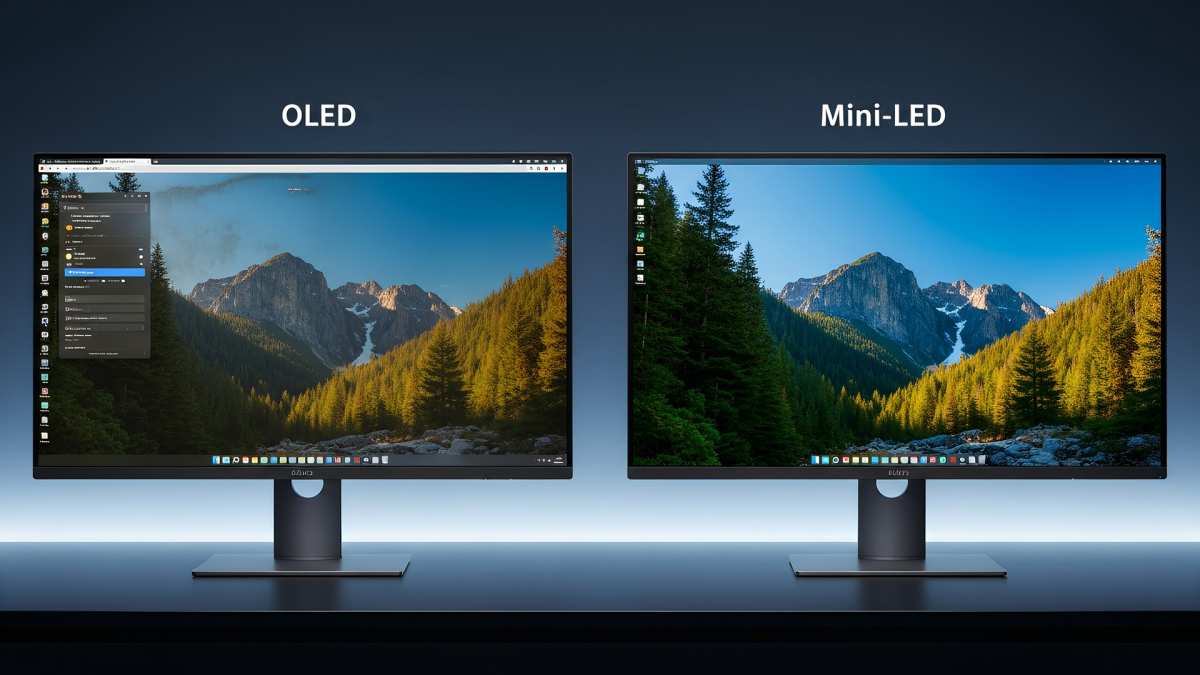
Quick Answer
Mini LED monitors can reach higher peak brightness in small HDR highlights. OLED monitors often look brighter in dark rooms due to perfect blacks. Full-screen sustained brightness favors Mini LED significantly.
Your best choice depends on your room lighting and what you display most.
How Mini LED and OLED Actually Produce Brightness Differently
The brightness gap between these two technologies comes down to fundamentally different ways of creating light. Once you understand the underlying mechanism, the performance differences make complete sense.
Mini LED: Lots of Tiny Backlight Zones Working Together
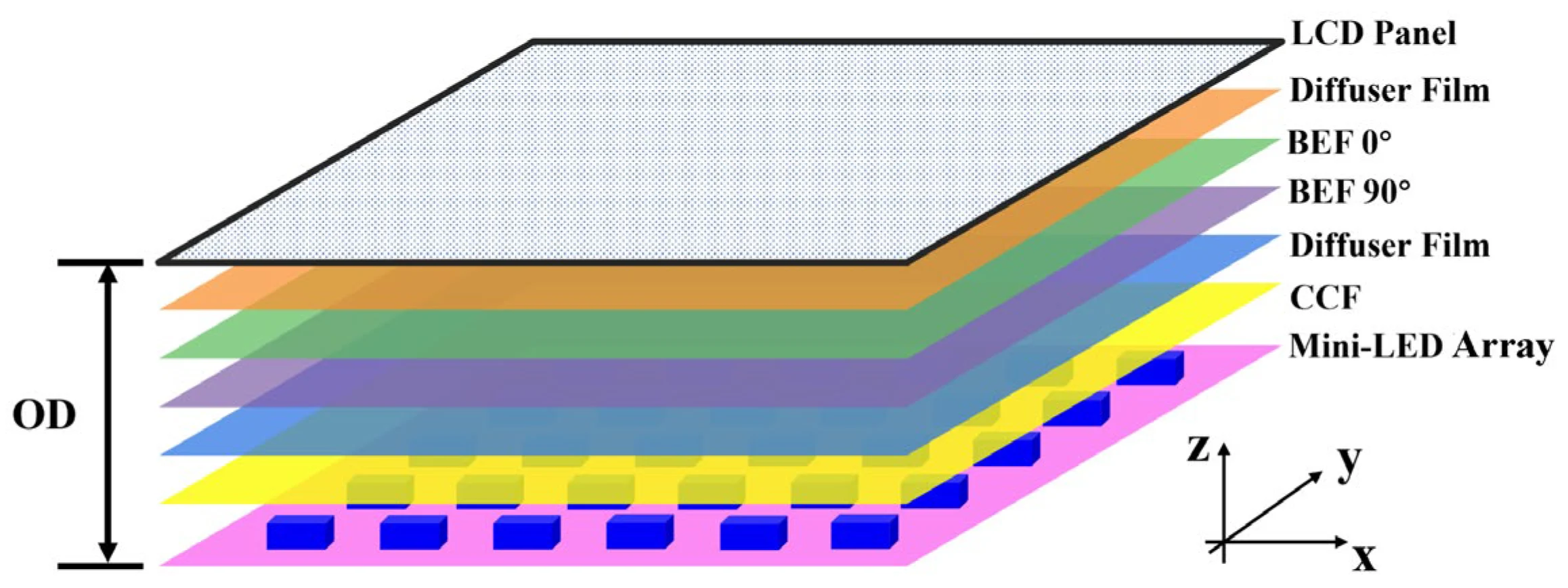
Mini LED monitors use a full-array backlight made up of thousands of small LED zones behind an LCD panel. Each zone can dim or brighten independently, which is why the technology is called full-array local dimming (FALD). A premium Mini LED monitor in 2026 might pack anywhere from 576 to over 2,000 individual dimming zones. Readers evaluating this setup should also consider why are mini led monitors brighter than ips for comparative benchmarks.
The LCD layer itself acts like a shutter, controlling how much of that backlight reaches your eyes. This means the LEDs can blast at extremely high luminance levels, and the LCD filters that light into the image you see. The result is very high peak brightness potential, especially when only a small portion of the screen needs to be bright.
The catch is that the LCD layer isn't a perfect blocker. Some light leaks through around bright objects on dark backgrounds, which creates the blooming effect we'll cover later.
OLED: Every Single Pixel Is Its Own Light Source
OLED (Organic Light-Emitting Diode) technology works completely differently. Each pixel generates its own light and can turn off entirely. There's no backlight unit at all.
When a pixel needs to display black, it simply switches off.
This per-pixel emission is why OLED achieves perfect blacks and effectively infinite contrast. But it also means each individual organic diode has to produce all the brightness for its pixel. There's no separate backlight that can crank up independently.
The pixels themselves are the light source, and they have physical limits on how hard they can be driven before degradation accelerates.
Modern OLED panels using Micro Lens Array (MLA) technology, like LG Display's third-generation WOLED panels, have pushed peak brightness higher than older generations. But the fundamental architecture still limits how bright any single pixel can get compared to a dedicated LED backlight.
Side-by-Side Brightness Comparison
This is where things get interesting. The answer to "which is brighter" changes depending on what kind of brightness you're measuring. Let's look at the three scenarios that actually matter.
Peak HDR Highlight Brightness (Small Windows)
When a monitor displays a small bright object against a dark background, like a starfield or an explosion in a game, the brightness difference is stark.
| Metric | Mini LED (2026 models) | OLED (2026 MLA panels) |
|---|---|---|
| Peak brightness (1% window) | 1,500 to 2,500+ nits | 1,000 to 1,500 nits |
| Peak brightness (5% window) | 1,200 to 2,000 nits | 800 to 1,200 nits |
| Peak brightness (10% window) | 1,000 to 1,600 nits | 600 to 1,000 nits |
Mini LED wins this category convincingly. The dedicated backlight LEDs can be driven at very high current for small highlights without overheating, since only a few zones are active. OLED pixels, by contrast, have to produce all that luminance from the organic material itself, which creates more heat and accelerates wear.
For HDR content with lots of specular highlights, reflections, and bright light sources against dark scenes, Mini LED delivers a more punchy, eye-catching result.
Full-Screen Sustained Brightness (Real-World Desktop Use)
Now flip the scenario. What happens when the entire screen needs to be bright, like when you're working with a white document, browsing a bright website, or viewing a snowy landscape in a game?
| Metric | Mini LED (2026 models) | OLED (2026 MLA panels) |
|---|---|---|
| Full-screen SDR brightness | 350 to 600 nits | 170 to 250 nits |
| Full-screen HDR brightness | 500 to 1,000+ nits | 200 to 400 nits |
| Sustained uniformity | Good to excellent | Good (ABL compression) |
Mini LED dominates here. OLED's Automatic Brightness Limiter (ABL) kicks in aggressively when large portions of the screen are bright. This is a protective mechanism that prevents the organic compounds from degrading too quickly and manages power consumption and heat.
The result is that a full white screen on OLED will look noticeably dimmer than the peak spec sheet number suggests.
If you work in a bright room or use lots of white-background applications, Mini LED will feel significantly brighter in daily use.
Bright Room vs. Dark Room Perceived Brightness
Here's the twist that spec sheets don't tell you. Perceived brightness isn't just about nits. Contrast matters enormously to how bright something appears to your eyes.
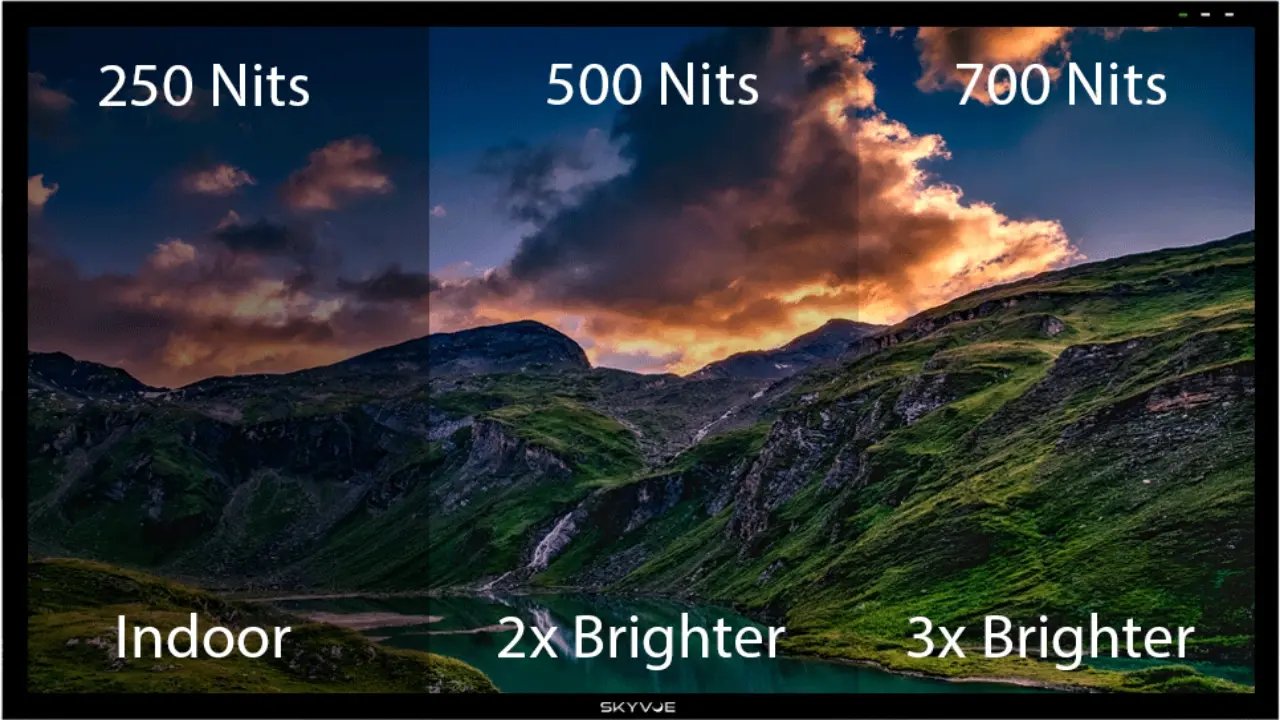
In a dark room, OLED's perfect blacks make bright elements on screen appear subjectively brighter by comparison. Your eyes adjust to the black level, and the bright content pops more dramatically. A 400-nit OLED in a dark room can feel just as impactful as a 1,000-nit Mini LED in the same conditions, because the contrast ratio is so much higher.
In a bright room with ambient light, Mini LED's raw luminance advantage takes over. The higher nit output overcomes ambient reflections and glare, keeping the image visible and punchy. OLED's lower sustained brightness can make it look washed out in very bright environments, even though its contrast advantage still helps.
The ABL Problem: Why OLED Can't Sustain Full-Screen Brightness
Automatic Brightness Limiter is the single biggest factor in OLED's sustained brightness limitation, and it's worth understanding why it exists.
ABL is a firmware-controlled system that monitors the average picture level (APL) across the screen. When a large percentage of pixels are displaying bright content simultaneously, ABL reduces the overall panel brightness to stay within safe thermal and electrical limits. This isn't a defect.
It's a necessary engineering compromise.
The organic compounds in OLED pixels degrade faster when driven at high current for extended periods. Pushing 1,000 nits across the entire screen would dramatically shorten the panel's lifespan and create uneven degradation, leading to visible image retention. ABL prevents this by scaling brightness down as the bright area increases.
Here's roughly how ABL typically affects brightness on a current-generation OLED monitor:
- 1% APL (tiny highlight): Full peak brightness, around 1,000 to 1,500 nits
- 5% APL: Brightness drops to roughly 70 to 80 percent of peak
- 25% APL: Brightness drops to roughly 50 to 60 percent of peak
- 50% APL: Brightness drops to roughly 35 to 45 percent of peak
- 100% APL (full white): Brightness bottoms out at 170 to 250 nits
Mini LED doesn't have this problem in the same way. The backlight LEDs are separate from the image-producing LCD layer, and they're designed to sustain high output across the full array. Thermal management is handled with heat sinks and sometimes small fans in premium models, but there's no equivalent to ABL throttling the entire backlight based on content.
This is why Mini LED is the clear winner for productivity use, bright rooms, and any scenario where large portions of the screen are bright simultaneously.
Blooming: The Mini LED Trade-Off Nobody Talks About Enough
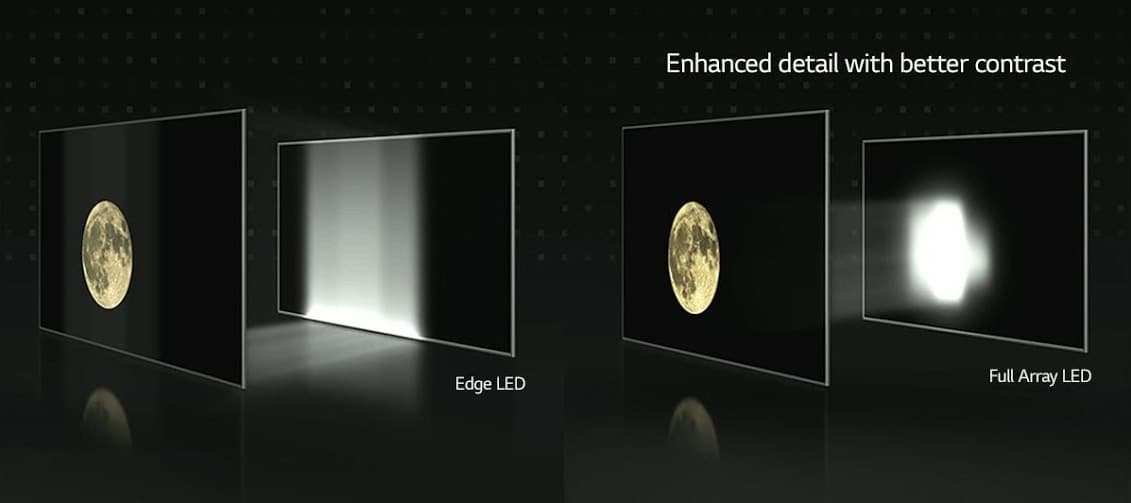
Mini LED's biggest weakness in dark content is blooming, also called the halo effect. This happens when a bright zone in the backlight illuminates pixels that should be dark, creating a visible glow or halo around bright objects on dark backgrounds.
The severity of blooming depends directly on the number of dimming zones and how aggressively the dimming algorithm is tuned. Here's a rough breakdown:
| Zone Count | Blooming Severity | Typical Price Range (2026) |
|---|---|---|
| 112 to 384 zones | Moderate to noticeable | $400 to $700 |
| 576 to 1,152 zones | Mild to moderate | $700 to $1,200 |
| 1,500 to 2,500+ zones | Minimal in most content | $1,200 to $2,500+ |
A monitor with only a few hundred zones will show visible blooming around white text on black backgrounds, cursor movement, and UI elements in dark mode. This is the most common complaint from people who switch to a budget or mid-range Mini LED monitor expecting OLED-like performance.
Higher zone counts reduce blooming significantly, but they don't eliminate it entirely. Only per-pixel dimming, which is what OLED does natively, achieves zero blooming. Some 2026 Mini LED monitors use additional techniques like "micro dimming" that operate within individual zones to further reduce the halo effect, but it's still visible if you look for it in a dark room.
The trade-off is clear. Mini LED gives you higher sustained brightness and no burn-in risk, but you pay for it with blooming in dark scenes. OLED gives you perfect per-pixel control and zero blooming, but you accept lower peak and sustained brightness along with burn-in risk.
Which Technology Is Brighter for How You Actually Use Your Monitor
Brightness isn't just a spec number. It's about how the monitor performs in your specific situation. Here's how the two technologies stack up across common use cases.
Competitive Gaming
For competitive gaming, response time and motion clarity matter more than raw brightness. OLED's near-instantaneous pixel transitions give it a significant advantage here. However, if you play in a bright room or prefer HDR highlights in fast-paced shooters, Mini LED's higher peak brightness can make specular reflections and muzzle flashes more visible.
Winner: OLED for response time, Mini LED for bright-room HDR punch.
Cinematic / Single-Player Gaming
This is where the contrast versus brightness debate gets interesting. In a dark room, OLED's infinite contrast makes HDR highlights pop against true blacks, and the perceived brightness feels more impactful than the nit number suggests. In a bright room, Mini LED's raw luminance advantage keeps HDR content looking vivid.
Winner: OLED for dark rooms, Mini LED for bright rooms.
Photo and Video Editing
Color accuracy and consistent brightness across the screen are critical here. Both technologies can achieve excellent color accuracy, but Mini LED's higher sustained full-screen brightness means you're working closer to standard reference levels (typically 100 nits for SDR, 400+ for HDR mastering). OLED's ABL can cause brightness shifts as you change window layouts, which is frustrating for editing work.
Winner: Mini LED for sustained consistency, though OLED works well in controlled lighting.
Bright Office or Sunlit Room
If your monitor sits near a window or in a brightly lit office, Mini LED's sustained brightness advantage becomes essential. OLED's 170 to 250 nit full-screen ceiling can look dim and washed out in these conditions. Mini LED's 400 to 600 nit sustained output keeps content readable and punchy.
Winner: Mini LED, decisively.
Mixed Productivity and Entertainment
For a do-it-all monitor, you need sustained brightness for desktop work and good HDR performance for entertainment. Mini LED handles both reasonably well, though blooming in dark mode can be annoying. OLED excels at entertainment but struggles with bright desktop content and carries burn-in risk from static UI elements.
Winner: Mini LED for versatility, OLED if you prioritize entertainment quality.
Dark Room Movie Watching
In a dark room, OLED's perfect blacks and zero blooming create a cinematic experience that Mini LED simply cannot match. The perceived contrast makes HDR highlights feel brighter and more dramatic, even though the measured nit output is lower. This is the scenario where OLED's technology shines brightest, pun intended.
Winner: OLED, no contest.
Real-World Specs: What the Numbers Actually Look Like
Let's put concrete numbers on the table so you can compare what you'll actually see. These ranges are drawn from manufacturer specifications and independent measurement databases for 2026 monitor models.
Typical Peak Brightness Ranges
| Brightness Type | Mini LED (2026) | OLED (2026 MLA) |
|---|---|---|
| 1% window HDR | 1,500 to 2,500 nits | 1,000 to 1,500 nits |
| 5% window HDR | 1,200 to 2,000 nits | 800 to 1,200 nits |
| 25% window HDR | 800 to 1,400 nits | 400 to 700 nits |
| 100% SDR | 350 to 600 nits | 170 to 250 nits |
| 100% HDR sustained | 500 to 1,000 nits | 200 to 400 nits |
Full-Screen Brightness Ranges
| Use Case | Mini LED (2026) | OLED (2026 MLA) |
|---|---|---|
| Desktop productivity (SDR) | 400 to 550 nits | 180 to 220 nits |
| Web browsing (mixed content) | 350 to 500 nits | 170 to 230 nits |
| HDR movie (sustained) | 500 to 800 nits | 200 to 350 nits |
| HDR gaming (sustained) | 500 to 900 nits | 200 to 400 nits |
Zone Counts and What They Matter
| Zone Count | Blooming Performance | Example Monitor Tier |
|---|---|---|
| Under 200 | Very noticeable in dark scenes | Budget Mini LED |
| 200 to 576 | Noticeable, acceptable for most | Mid-range Mini LED |
| 576 to 1,152 | Mild, only in demanding dark content | Upper mid-range |
| 1,152 to 2,000 | Minimal for most users | Premium Mini LED |
| 2,000+ | Very difficult to notice | Flagship Mini LED |
| OLED (per-pixel) | Zero blooming | All OLED monitors |
Burn-In, Longevity, and Long-Term Brightness Degradation
Long-term brightness isn't just about day-one performance. How the monitor ages matters just as much, especially if you plan to keep it for several years.
OLED pixels degrade with use. The organic compounds that emit light lose efficiency over time, and they degrade unevenly. Blue sub-pixels typically degrade fastest, followed by green, then red.
This uneven degradation can cause color shifts and gradual brightness reduction over the panel's lifetime. Burn-in, where static elements like taskbars or channel logos leave permanent ghost images, remains a real concern for OLED monitors used with static content.
Most modern OLED monitors include mitigation strategies like pixel shift, logo dimming, and panel refresh cycles. These help significantly, but they don't eliminate the risk entirely. Manufacturer warranties vary on burn-in coverage.
Some brands cover it for a limited period, while others explicitly exclude it.
Mini LED backlights also degrade over time, but much more slowly and uniformly. The LED backlight in a quality Mini LED monitor is typically rated for 30,000 to 50,000 hours before reaching half its original brightness. The LCD layer itself doesn't degrade in any meaningful way.
There's no burn-in risk whatsoever, which makes Mini LED a safer choice for users who display static content for long hours.
For long-term brightness consistency and peace of mind, Mini LED has a meaningful advantage. For users who prioritize image quality and take reasonable precautions, OLED's degradation is manageable within a typical upgrade cycle of three to five years.
Common Mistakes People Make When Comparing Brightness
There are several pitfalls that trip people up when trying to compare these two technologies.
Mistake 1: Trusting peak brightness specs at face value. A monitor advertised at "1,000 nits peak" might only hit that number on a 1 percent window for a few seconds before thermal throttling kicks in. Always look for sustained brightness measurements, not just peak numbers.
Mistake 2: Ignoring room lighting. The brightest monitor on paper might not look brightest in your actual room. Ambient light, wall reflections, and window placement all affect perceived brightness dramatically.
Mistake 3: Comparing blooming on a cheap Mini LED to a premium OLED. A Mini LED monitor with 112 zones will bloom noticeably. A model with 2,000 zones will perform much better. Zone count matters enormously, and comparing a budget Mini LED to a premium OLED gives a misleading impression of the technology.
Mistake 4: Assuming OLED is always better for HDR. HDR is about contrast and dynamic range, not just peak brightness. OLED's perfect blacks give it an advantage in dark rooms, but Mini LED's higher peak highlights can deliver a more dramatic HDR effect in bright rooms.
Mistake 5: Overlooking ABL in real-world use. Many buyers are surprised that their OLED monitor can't sustain its peak brightness during normal desktop use. ABL is always working in the background, and it has a bigger impact on daily use than most people realize.
Mistake 6: Ignoring HDR tone mapping quality. Raw brightness is only part of the equation. How well a monitor maps HDR content to its capabilities matters just as much. A well-tuned OLED at 400 nits can look better than a poorly tuned Mini LED at 1,000 nits.
Frequently Asked Questions
Is Mini LED always brighter than OLED?
No. Mini LED wins on peak HDR highlights and full-screen sustained brightness. OLED can appear subjectively brighter in dark rooms due to its perfect black levels and infinite contrast ratio.
Can OLED monitors get bright enough for daytime use?
Modern OLED monitors with MLA technology can reach 170 to 250 nits sustained full-screen. This is adequate for most indoor environments but can struggle in direct sunlight or very bright rooms where Mini LED's 400+ nit output has a clear advantage.
Does Mini LED brightness vary by zone count?
Yes, significantly. More zones allow finer control over which areas are bright and which are dim. Higher zone counts also allow higher effective peak brightness in small highlights without blooming into adjacent dark areas.
Will OLED burn-in affect brightness over time?
Yes. OLED pixels degrade with use, and blue sub-pixels degrade fastest. This causes gradual brightness reduction and potential color shifts over thousands of hours.
Mini LED backlights degrade much more slowly and uniformly.
Which is better for HDR gaming?
It depends on your room. In a dark room, OLED's contrast advantage makes HDR highlights feel more impactful. In a bright room, Mini LED's higher peak luminance keeps HDR content looking vivid and punchy.
How many Mini LED zones do you need to avoid blooming?
For most users, 576 zones or more keeps blooming mild enough to ignore during normal use. Premium models with 1,500 or more zones reduce blooming to levels that are very difficult to notice in typical content.
Final Verdict: Which Should You Buy?
The brightness question has a nuanced answer, and the right choice depends entirely on your situation.
Choose Mini LED if you:
- Work or game in a bright room with lots of ambient light
- Need high sustained full-screen brightness for productivity
- Display static UI elements for long hours and want zero burn-in risk
- Want the highest peak HDR highlight brightness for specular effects
- Prefer a more versatile all-rounder for mixed use
Choose OLED if you:
- Primarily use your monitor in a dark or dimly lit room
- Prioritize perfect blacks and infinite contrast for cinematic content
- Want the fastest response times for competitive gaming
- Value zero blooming and per-pixel precision
- Are comfortable with burn-in mitigation practices and acceptable long-term degradation
As of 2026, both technologies have matured significantly. MLA OLED panels have pushed brightness higher than ever before, and Mini LED zone counts have climbed into the thousands. The gap is narrower than it used to be, but the fundamental trade-offs remain.
Mini LED wins on raw sustained luminance. OLED wins on contrast and per-pixel control. Your room, your content, and your priorities will determine which one is brighter for you.

Similar Posts





















