Are Mini LED Monitors Worth It for Casual Users
Are mini LED monitors worth it for casual users? For most people who just browse, stream, and handle everyday tasks, the honest answer is probably not, at least not yet at a price that makes sense. Mini LED technology brings real improvements to contrast and HDR, but those benefits are aimed at users who actually need them.
The gap between a decent standard LED monitor and an entry-level mini LED is still $150 to $300 as of 2026. That's real money for someone who just wants a nice screen for work and entertainment. Let's break down what you're actually paying for, what you're actually getting, and where the line sits between smart upgrade and unnecessary splurge. Readers comparing various configurations should also examine why are mini led monitors better than normal led.
Quick Answer
Mini LED monitors offer better contrast and HDR than standard LED displays. The price premium is $150 to $300 over comparable standard LED monitors. For casual users focused on browsing and office work, a good standard LED monitor is the smarter buy.
Mini LED makes sense if you watch a lot of HDR content or want a future-proof display.
What Mini LED Actually Means (And Why the Marketing Can Be Misleading)
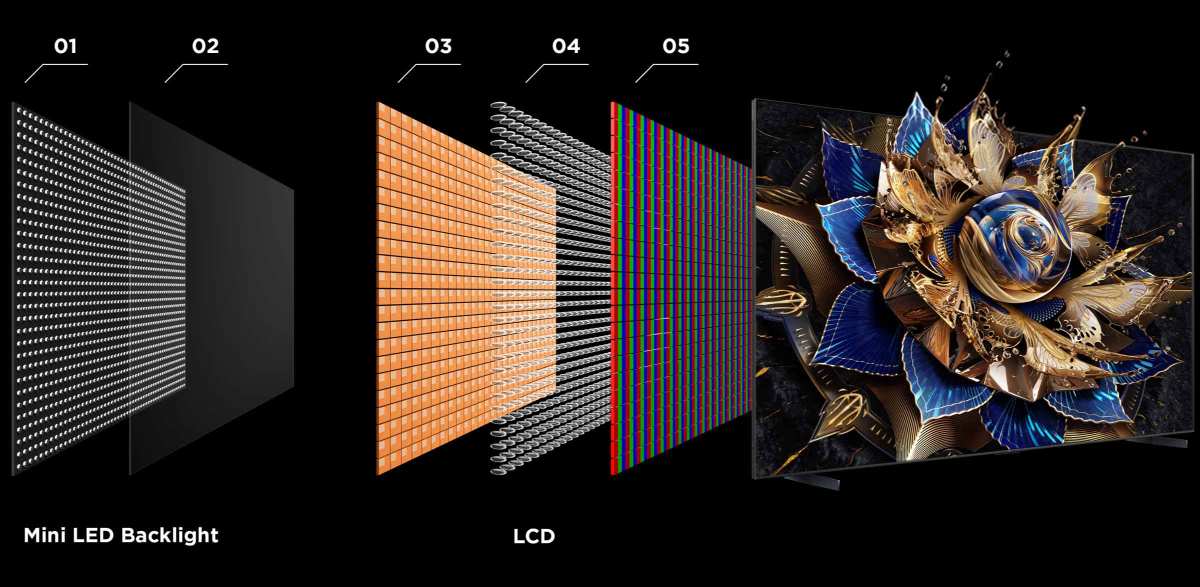
Mini LED is a backlight technology, not a panel technology. Your monitor still uses an LCD panel, usually IPS or VA. The difference is behind the panel where the light comes from. For related troubleshooting and calibration steps, check our walkthrough on how do mini led monitors work.
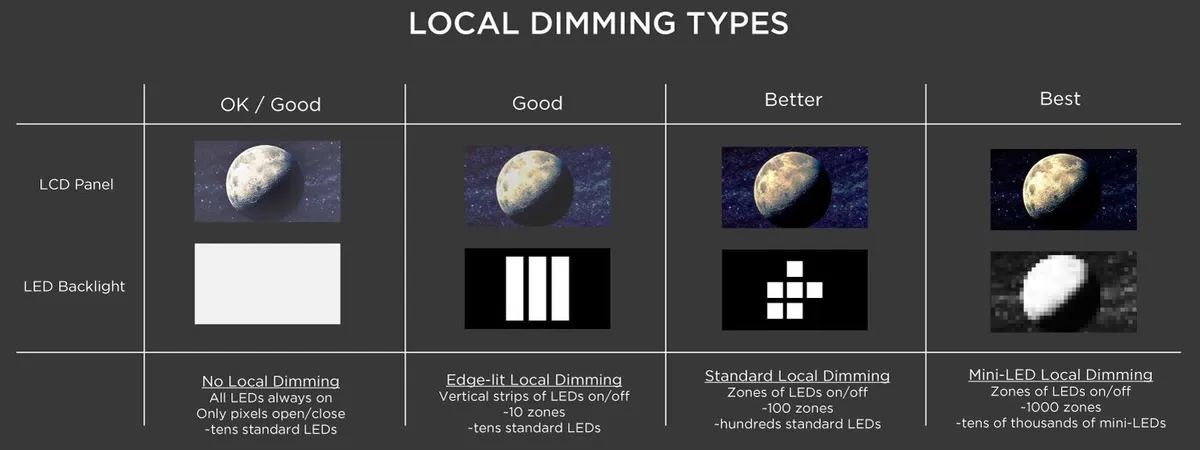
Traditional LED monitors use a few dozen large LED chips along the edges or behind the screen. Mini LED uses thousands of tiny LED chips packed tightly together. Each chip controls a small zone of the display independently.
Manufacturers love to advertise zone counts. You'll see "512 zones" or "1152 zones" splashed across the box. More zones generally means better contrast and less blooming.
But zone count alone doesn't tell the full story.
A 192-zone mini LED with good firmware can outperform a 512-zone model with poor dimming algorithms. The processing behind the dimming matters just as much as the hardware.
Here's what VESA's DisplayHDR certification actually tells you. DisplayHDR 400 is the entry level and honestly not impressive. DisplayHDR 600 is where things start getting interesting.
DisplayHDR 1000 and above is where mini LED really flexes over standard LED.
The marketing trap is simple. A brand slaps "Mini LED" on a DisplayHDR 400 monitor with 96 zones and charges a premium. You're paying for a label, not a meaningful upgrade.
Always check the DisplayHDR tier and zone count together.
Mini LED vs. Standard LED vs. OLED: The Real Differences That Matter
This is the comparison that actually matters when you're spending your money. Each technology has a sweet spot and a weakness. Let's lay them out honestly.
Standard LED monitors are the baseline. They're cheap, reliable, and good enough for most people. The downside is mediocre contrast and basically no real HDR capability.
Blacks look grayish in a dark room. That's the trade-off you make for the lower price.
Mini LED improves contrast dramatically by dimming specific zones. Bright areas stay bright while dark areas go dark. The result is a more punchy, realistic image.
The downside is blooming, where bright objects on dark backgrounds create a visible halo effect.
OLED is the image quality king. Every pixel produces its own light, so you get perfect blacks and zero blooming. The downside is burn-in risk, lower peak brightness on large screens, and a significant price premium.
OLED monitors also tend to be smaller and less common.
Side-by-Side Comparison Table
| Feature | Standard LED | Mini LED | OLED |
|---|---|---|---|
| Price range | $150–$400 | $350–$900 | $700–$2,000+ |
| Contrast ratio | 1,000:1 to 3,000:1 | 10,000:1 to 100,000:1+ | 1,000,000:1+ |
| Black levels | Decent, grayish in dark rooms | Good to very good | Perfect |
| HDR capability | Minimal | Good to excellent | Excellent |
| Blooming | N/A (no local dimming) | Visible in some scenes | None |
| Burn-in risk | None | None | Yes, over time |
| Peak brightness | 250–400 nits | 400–1,400+ nits | 400–1,000 nits |
| Best for | General use, office work | HDR media, gaming, mixed use | Professional color work, home theater |
| Lifespan | Excellent | Excellent | Good (degrades faster) |
The honest takeaway is this. Standard LED wins on value. Mini LED wins on balanced performance.
OLED wins on pure image quality but costs the most and carries real risks.
What You Actually Gain as a Casual User
Let's talk about what changes when you switch to mini LED for everyday use. Some of it is genuinely impressive. Some of it you'll barely notice.
Better HDR for Streaming and Movies
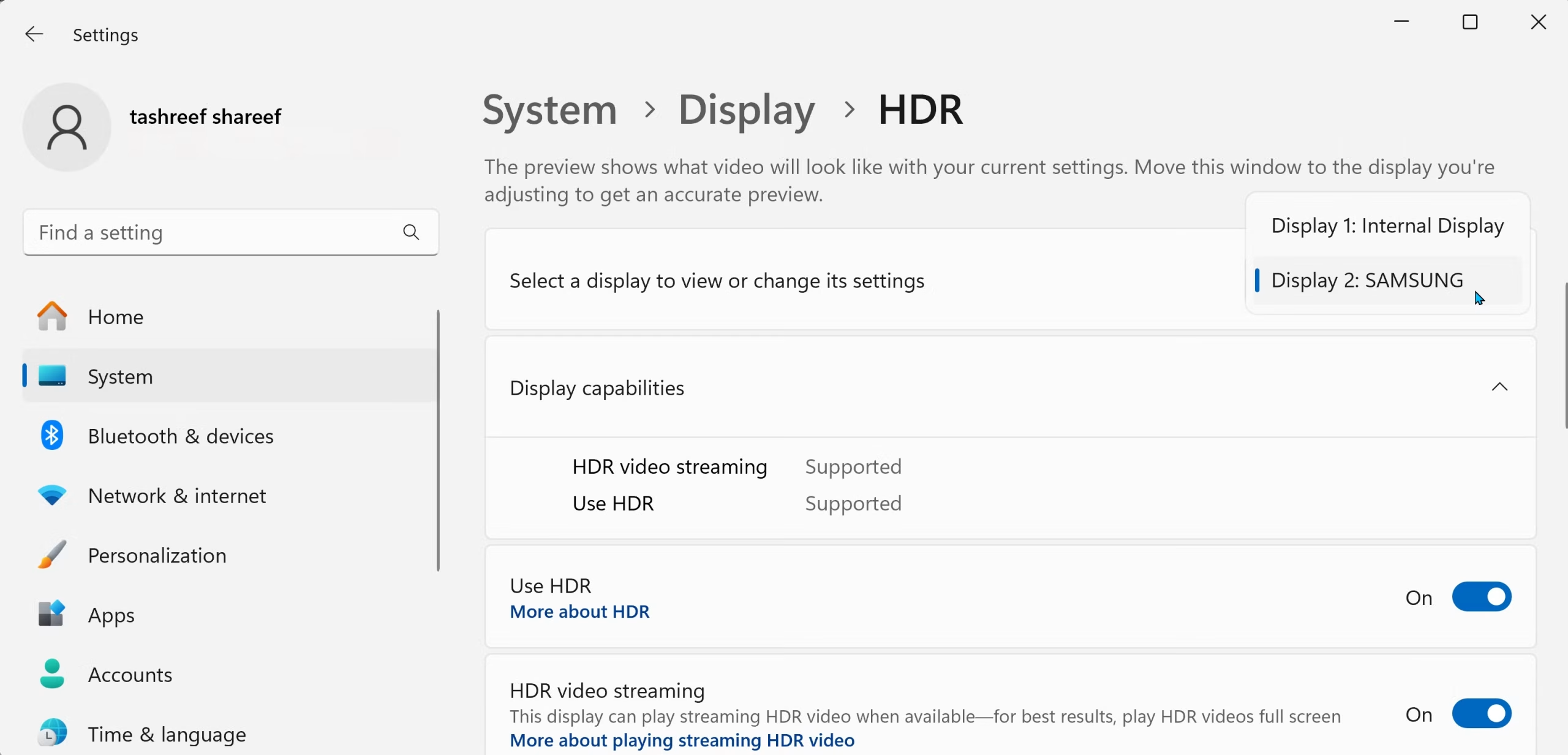
This is the single biggest real-world benefit. If you watch Netflix, Disney+, or YouTube in HDR, a mini LED monitor with DisplayHDR 600 or higher looks noticeably better than a standard LED.
Highlights pop. Dark scenes retain detail. The overall image has more depth and dimension.
It's not a subtle difference. Once you see a good HDR display, going back to a flat SDR image feels dull.
The catch is that not all content is HDR. Most YouTube videos aren't. Many streaming shows default to SDR depending on your settings.
You need to actually have HDR content enabled and playing to see the benefit.
Improved Contrast Over Standard LED
Even with SDR content, mini LED looks better because of the improved contrast. Dark scenes in movies and games look actually dark instead of washed out. Text on dark backgrounds is easier to read.
This is the benefit that applies to everything you do on the monitor. It's not limited to HDR content. The local dimming improves the image across the board, even during basic web browsing with dark mode enabled.
The improvement is most visible in a dimly lit or dark room. In a bright office with sunlight streaming in, the difference is harder to perceive. Your environment matters here.
No Burn-In Risk
This is a practical advantage over OLED that doesn't get enough attention. OLED monitors can develop permanent image retention over time. Static elements like taskbars, channel logos, or game HUDs can burn in.
Mini LED uses an LCD panel with a separate backlight. There's zero burn-in risk. You can leave the same image on screen for hours every day and it won't matter.
For a work monitor that displays the same desktop layout eight hours a day, this is genuinely valuable.
What You Don't Need (And Where You're Overpaying)
Here's where we get honest about the downsides. Mini LED isn't perfect, and some of the marketed benefits don't matter as much as you'd think.
Zone Counts: More Isn't Always Better
A monitor with 2,304 zones sounds amazing on paper. But if you're just browsing the web and watching Netflix, you won't perceive the difference between 512 zones and 2,000+ zones in most content.
The law of diminishing returns hits hard here. Going from 96 zones to 512 zones is a noticeable jump. Going from 512 to 1,152 is subtle.
Going from 1,152 to 2,304 is basically invisible in real use.
Budget mini LED monitors with 96 to 192 zones often show noticeable blooming. White text on a black background will have a visible halo. If you use dark mode frequently, this can be genuinely annoying.
Peak Brightness Beyond What You'll Use
Manufacturers love to tout 1,000+ nits of peak brightness. That spec matters for HDR highlights in movies and games. For general desktop use, you'll run your monitor at 40 to 60 percent brightness.
Running a mini LED at full brightness in a normal room is uncomfortable. You'd never do it. Those impressive brightness numbers only kick in for small HDR highlights, not for your everyday workflow.
The brightness spec is a marketing number that sounds impressive but has limited practical relevance for casual users. Don't let it drive your purchasing decision.
Refresh Rates and Response Times You Won't Notice
Many mini LED monitors advertise 144Hz, 165Hz, or even 240Hz refresh rates. If you're not gaming, these numbers are completely irrelevant. Desktop use and video playback run at 60Hz or lower.
Response time specs follow the same pattern. A 1ms response time matters for competitive gaming. For scrolling through documents and watching videos, the difference between 1ms and 5ms is invisible.
You're often paying a premium for gaming-oriented specs that add zero value to your actual use case. A 60Hz mini LED with good dimming zones is a better casual use monitor than a 240Hz model with poor dimming.
Who Should Actually Buy a Mini LED Monitor
This is where we get specific. Your use case determines whether mini LED is worth your money or just an expensive label.
Best Fit Scenarios
You should seriously consider mini LED if any of these describe you:
- You watch HDR movies and shows regularly on your monitor
- You game casually but want a noticeably better visual experience
- You work in a dimly lit or controllable lighting environment
- You want a single monitor that handles work and entertainment well
- You plan to keep the monitor for five or more years and want future-proofing
- You've tried a good OLED or high-end display and want similar quality without the burn-in risk
The sweet spot user is someone who consumes a lot of HDR media and wants a versatile display that does everything well. If that's you, the premium is justified.
Skip It If You Fit Here
You're better off with a standard LED monitor if any of these apply:
- Your primary use is web browsing, email, documents, and spreadsheets
- You work in a bright office where you can't control the lighting
- You're on a tight budget and every dollar matters
- You don't consume HDR content or don't care about HDR
- You upgrade monitors frequently and don't keep them long-term
- You primarily play competitive games where refresh rate matters more than image quality
A good $250 to $350 IPS monitor will serve you better than a $500 mini LED if your use case falls here. The money you save is real, and you won't miss what you're not using.
The honest truth is that most casual users fall into this second group. Mini LED is a better technology, but better technology doesn't always mean better value for your specific situation.
Price Tiers and What You Get at Each Level
Mini LED monitors span a wide price range. Understanding what each tier actually delivers helps you avoid overpaying for specs you won't use.
Budget Mini LED ($300–$500)
This tier typically offers 96 to 192 dimming zones with DisplayHDR 400 or 600 certification. Peak brightness sits around 400 to 600 nits. You get the mini LED label but with noticeable limitations.
Blooming is more visible in this range. Dark mode users will see halos around bright elements. The dimming algorithm is often less refined, making transitions between zones more obvious.
Models in this range make sense if you want a taste of better HDR without a huge investment. Just know you're getting the entry-level experience, not the full mini LED promise.
Mid-Range Mini LED ($500–$800)
This is where mini LED starts earning its keep. Expect 256 to 512 zones with DisplayHDR 600 or 1000. Peak brightness reaches 600 to 1,000 nits.
Blooming is significantly reduced.
Panel quality tends to be better here too. Higher color accuracy, wider gamut coverage, and better factory calibration are common. This tier offers the best balance of performance and value for most people who want mini LED.
Premium Mini LED ($800+)
Premium models pack 1,000+ zones with DisplayHDR 1000 or 1400. Peak brightness exceeds 1,000 nits consistently. Blooming is minimal in most content.
You're also paying for extras like higher refresh rates, better build quality, and more robust firmware. Professional reviewers note these models compete closely with OLED in HDR performance.
This tier is overkill for most casual users. It's aimed at enthusiasts and professionals who demand the best image quality available.
Common Mistakes People When Buying
The most common mistake is buying based on the mini LED label alone. Not all mini LED monitors are created equal. A DisplayHDR 400 mini LED with 96 zones is a marginal upgrade over good standard LED.
Another mistake is ignoring your environment. If you work in a bright room with windows you can't cover, the contrast improvements of mini LED are harder to see. The technology shines in dimmer spaces.
People also overspend on refresh rates they don't need. A 60Hz mini LED with excellent dimming beats a 165Hz model with poor dimming for anyone who doesn't game competitively.
Finally, many buyers skip checking real-world reviews. Manufacturer specs look impressive. Independent measurements of actual dimming performance and blooming tell a different story.
Real-World Scenarios: What I'd Actually Recommend
Let's walk through specific situations and what makes sense for each one.
Scenario 1: You Browse, Stream, and Do Office Work
Buy a good standard IPS LED monitor in the $200 to $350 range. You'll get solid color accuracy, decent contrast, and reliable performance. The money you save is better spent on other upgrades.
Scenario 2: You Watch a Lot of HDR Movies
A mid-range mini LED with DisplayHDR 1000 and at least 256 zones is worth the investment. The HDR improvement for movie watching is genuinely noticeable and enjoyable.
Scenario 3: You Game Casually but Also Want a Great Movie Display
The mid-range mini LED tier again. You get good HDR for movies and solid gaming performance without paying premium prices for competitive-grade refresh rates.
Scenario 4: You're Upgrading From a 1080p Monitor
If you're moving to 1440p or 4K anyway, a budget or mid-range mini LED makes the upgrade feel more significant. The jump in resolution plus the jump in contrast creates a genuinely new experience.
Frequently Asked Questions
Is mini LED better than IPS?
Mini LED and IPS aren't competing technologies. Mini LED is a backlight system. IPS is a panel type.
Most mini LED monitors use IPS panels. You're comparing apples to oranges with this question.
Does mini LED work well in bright rooms?
The contrast benefits are harder to perceive in bright environments. Mini LED performs best in dimly lit or dark rooms where the dimming zones can make a visible difference.
How long do mini LED monitors last?
Mini LED backlights are rated for 30,000 to 50,000 hours of use. That's roughly 10 to 15 years of typical daily use. The backlight is not the weak point of these displays.
Can I use a mini LED monitor for professional color work?
Many mid-range and premium mini LED monitors offer excellent color accuracy out of the box. Look for models covering 95% or more of DCI-P3 with factory calibration for professional use.
Is mini LED worth it over OLED for office use?
For office use with static elements on screen, yes. Mini LED carries no burn-in risk while OLED can develop image retention over time with static desktop elements.
What's the best mini LED monitor size for casual use?
27-inch and 32-inch models at 1440p or 4K resolution offer the best pixel density and value. Ultrawide mini LED monitors are available but cost significantly more.

Similar Posts





















