Are Mini LED Monitors Good for Netflix
Are mini LED monitors good for Netflix? Yes, they're a solid choice, especially if you watch in a room with some ambient light or you want punchy HDR highlights without worrying about burn-in. They get much brighter than standard LED displays and deliver a more impactful HDR experience than budget options.
But they're not automatically the best pick. Mini LED displays use hundreds or thousands of small dimming zones to improve contrast, and while that's a big step up from edge-lit panels, it still can't match the per-pixel precision of OLED. Per VESA DisplayHDR standards, many mini LED monitors hit 1000 nits or higher peak brightness, which makes HDR pop in a way standard panels simply can't. This directly compares with our findings on why are mini led monitors good for hdr content.
Let's break down exactly where they shine and where they fall short for streaming.
Quick Answer
Mini LED monitors are good for Netflix, particularly in rooms with ambient light. They deliver strong HDR performance with peak brightness often exceeding 1000 nits. Dark scenes can show blooming around bright objects.
For pure dark-room movie watching, OLED still wins.
What Makes Mini LED Different From Regular Monitors
Mini LED is a backlighting technology, not a panel type. The panel itself is usually IPS or VA, same as any standard LED monitor. What changes is what's behind it. You can also reference our testing on whether mini led good for esports monitors when configuring your display.
A traditional LED monitor uses a handful of large light zones, sometimes just one, along the edges or behind the screen. Mini LED swaps that for thousands of tiny LEDs grouped into dimming zones. Each zone can brighten or dim independently based on what's on screen.
Here's why that matters for Netflix. When you're watching a scene with white subtitles over a black background, a standard LED panel has to keep the whole backlight on. The blacks look gray.
A mini LED display with local dimming can darken the zones behind the black areas while keeping the zones behind the text bright.
The zone count varies wildly between models. Budget mini LED monitors might have 192 zones. Higher-end models push 1152 or more.
More zones generally means tighter control over light and less visible blooming.
Manufacturer specs for popular models like the Samsung Odyssey Neo G8 or ASUS ROG Swift PG32UQX show zone counts ranging from 192 to over 2000. The jump from 192 to 576 zones is noticeable. Beyond 1152, the improvements get more subtle.
The Real Winner for Netflix: Mini LED vs OLED
This is the comparison that actually matters for most people choosing a display for streaming. Both technologies aim for deep blacks and bright highlights, but they get there very differently.
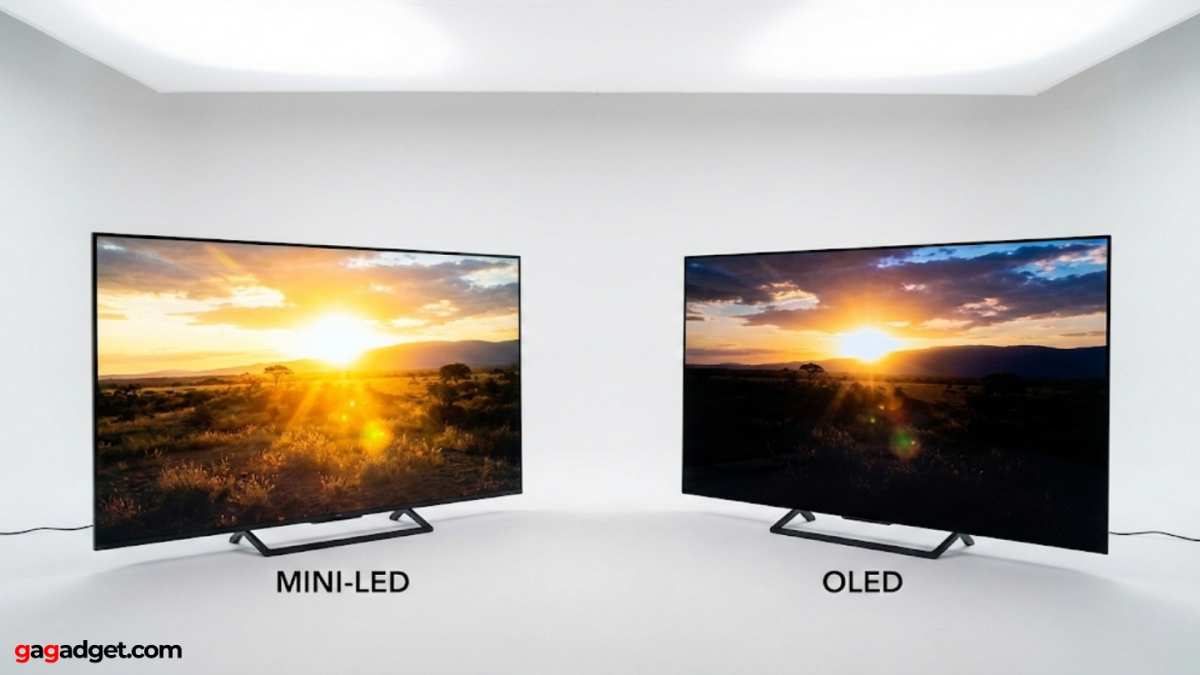
OLED (Organic Light-Emitting Diode) controls light at the pixel level. Each pixel produces its own light and can turn off completely. That means perfect blacks, infinite contrast, and zero blooming.
For dark cinematic content, which Netflix has a lot of, OLED is hard to beat.
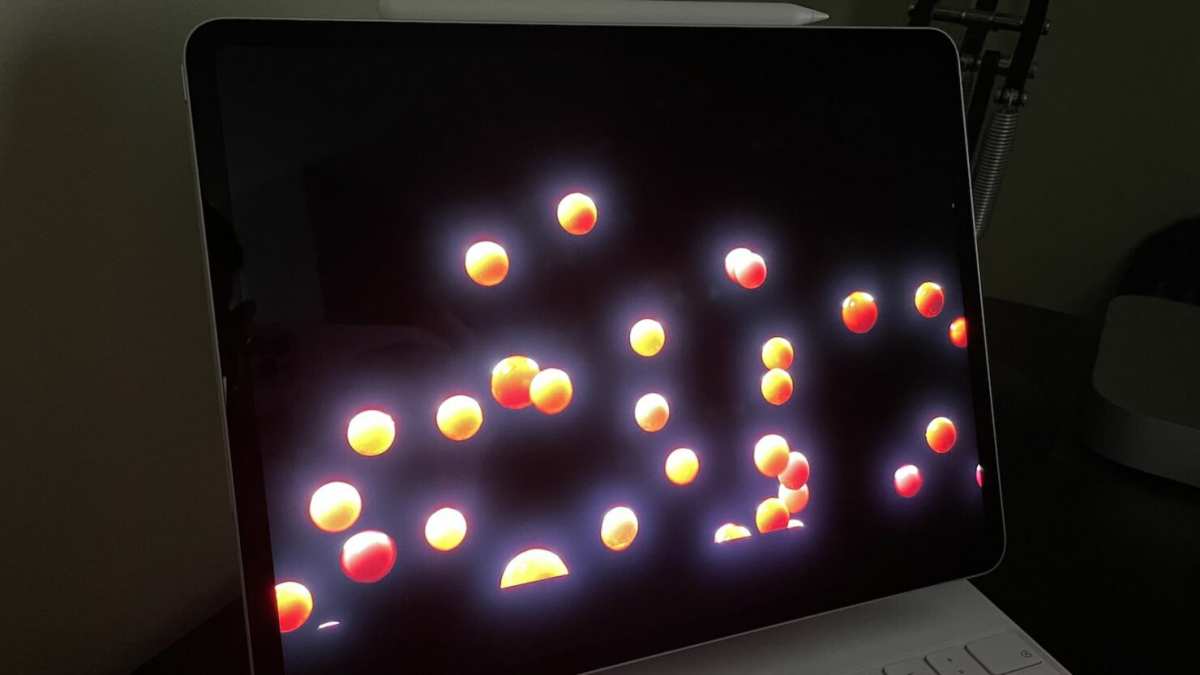
Mini LED can't turn off individual pixels. It relies on zones. When a bright object appears on a dark background, the surrounding zones stay partially lit, creating a halo or "blooming" effect.
You'll notice this most with subtitles, star fields, and letterbox bars.
Where mini LED fights back is brightness. These panels routinely hit 1000 to 2000 nits peak, sometimes more. OLED tops out around 800 to 1000 nits on most consumer monitors.
In a room with windows or overhead lights, that brightness advantage is real.
There's also the burn-in question. OLED panels can develop permanent image retention from static elements like channel logos or game HUDs. Mini LED doesn't have this issue at all.
If you leave Netflix paused on the same screen for hours, you won't damage the display.
For pure dark-room movie watching, OLED wins. For mixed-use setups with ambient light, HDR impact, and zero burn-in worry, mini LED holds its own.
Side-by-Side Comparison: How They Actually Perform for Streaming
Let's get specific about what you'll actually see when you hit play on a show.
HDR and Brightness Impact
Netflix HDR content is mastered with peak brightness targets in mind. When a display can hit 1000 nits or more, specular highlights like sunlight reflecting off metal or explosions look genuinely bright. That's the "pop" HDR is supposed to deliver.
Mini LED monitors excel here. Models certified under VESA DisplayHDR 1000 or 1400 can reproduce those highlights at or near their intended brightness. Standard LED monitors capped at 300 to 400 nits can't come close.
OLED looks stunning in its own way, but the highlights don't hit as hard because the panel can't sustain the same peak brightness. The overall image can feel more balanced, but less explosive.
Dark Scenes and Letterbox Bars
Most Netflix originals are shot with a cinematic look. That means lots of shadows, moody lighting, and black bars on widescreen content.
On a mini LED display, those black bars won't be perfectly black unless the monitor has a very high zone count and aggressive dimming. You'll often see a faint glow or gray tint in the letterbox areas. During dark scenes, bright objects like a phone screen or a face in a dim room can cause visible blooming in the surrounding area.
OLED handles this effortlessly. The bars are truly black. Dark scenes retain detail without any halo effect.
If you watch a lot of horror, thriller, or cinematic content in a dark room, this difference is significant.
Color and Tone Mapping
Both mini LED and OLED monitors typically cover 90% or more of the DCI-P3 color gamut, which is the color space Netflix uses for its HDR content. Color volume, which accounts for brightness levels, tends to favor mini LED because of its higher luminance ceiling.
Tone mapping, the process of fitting HDR content to a display's capabilities, is where things get tricky. A well-tuned mini LED monitor handles this smoothly. A poorly tuned one can crush shadow detail or blow out highlights.
This varies by model and manufacturer, not just by technology.
When Mini LED Is the Better Choice for Netflix
Mini LED makes more sense than OLED in several specific situations.
You watch in a bright or mixed-light room. If your setup is near windows or you like some ambient light while streaming, mini LED's higher brightness keeps the image looking vivid. OLED can look washed out by comparison in those conditions.
You're worried about burn-in. Maybe you pause and leave the screen static for a while, or you use the monitor for other things with static UI elements. Mini LED has zero burn-in risk. You don't have to think about it.
You want HDR that pops. If the "wow factor" of bright highlights matters to you more than perfect blacks, mini LED delivers more dramatic HDR in most viewing conditions.
You're on a moderate budget. As of 2026, quality mini LED monitors start around $400 to $500 for 27-inch models. OLED monitors with comparable specs often start at $800 to $1000 or more.
You use the monitor for more than streaming. If it's also your work display or gaming monitor, the brightness and burn-in advantages of mini LED add up across mixed use.
When You Should Choose Something Else instead
Mini LED isn't the right call for everyone.
You primarily watch in a dark room. If you've got a dedicated viewing space with controlled lighting, OLED will give you a noticeably better experience for cinematic content. The perfect blacks and zero blooming are worth the premium.
Blooming bothers you. Even the best mini LED displays show some blooming. If you're sensitive to it, you'll notice it every time white text appears on a dark background. That's just the nature of zone-based dimming.
You want the absolute best image quality regardless of cost. At the high end, QD-OLED (Quantum Dot OLED) combines OLED's pixel-level control with quantum dot color technology. It's the current gold standard for display quality, though it comes at a higher price and still carries some burn-in risk.
You're on a tight budget under $300. At that price point, you're better with a standard IPS panel that has good color accuracy. A cheap mini LED with low zone count can actually look worse than a good standard LED because of poor dimming implementation.
What Zone Count Actually Means for Your Viewing Experience
Zone count is the spec everyone talks about, but the real-world impact depends on more than just the number.
A monitor with 192 zones will show more visible blooming than one with 1152 zones. That part is straightforward. But the quality of the dimming algorithm matters just as much.
A well-tuned 576-zone display can look better than a poorly tuned 1152-zone one.
Here's a rough guide to what to expect at different zone counts:
| Zone Count | Blooming Visibility | Best For |
|---|---|---|
| 192 to 300 | Noticeable in dark scenes | Bright rooms, mixed use, gaming |
| 576 to 1152 | Moderate, less distracting | General streaming, hybrid use |
| 2000+ | Minimal, hard to spot | Dark room viewing, cinematic content |
The physical size of the display also matters. 192 zones on a 27-inch monitor means larger zones and more visible blooming. The same 192 zones on a 42-inch display spreads the effect differently.
Local dimming behavior varies between models too. Some monitors are aggressive about diming zones, which gives deeper blacks but can cause visible transitions. Others are more conservative, keeping blacks slightly gray but avoiding distracting flickering or pulsing.
If possible, check reviews that specifically test local dimming performance with video content, not just test patterns. Manufacturer specs tell you the zone count. Real-world reviews tell you how it actually looks when you're watching a movie.
Common Mistakes People Make When Buying for Streaming
Ignoring room lighting entirely. People buy based on specs in a vacuum. The best display for a bright living room isn't the same as the best display for a dark basement. Your room matters more than you think.
Assuming all mini LED is equal. A mini LED monitor with 192 zones and a poor dimming algorithm can look worse for Netflix than a good standard IPS panel. The technology name doesn't guarantee quality.
Forgetting about HDR setup. Buying an HDR-capable monitor doesn't mean HDR just works. You need to enable it in your operating system, use the right cable and port, and sometimes configure the monitor's own settings. More on that in the next section.
Overlooking viewing angle. If you're watching with someone else on a couch, viewing angles matter. VA panels common in mini LED monitors have narrower viewing angles than IPS. Colors and contrast shift when you're off-center.
Chasing the highest spec for the price. A 240Hz refresh rate is great for gaming but irrelevant for Netflix content, which is typically 24 or 30 frames per second. Paying for gaming features you won't use for streaming is a common waste.
What You Need on the Software and Settings Side

Getting HDR Netflix content to actually display in HDR requires a few things to line up correctly.
Netflix plan. You need the Premium plan, which as of 2026 costs $22.99 per month. Lower tiers cap out at 1080p SDR. No HDR, no matter what your display can do.
Compatible hardware. Your monitor needs to support HDR10 at minimum. Many mini LED monitors also support Dolby Vision, though Netflix app support for Dolby Vision on PC monitors varies.
The right connection. HDMI 2.0 can handle 4K HDR at 60Hz, which is fine for streaming. HDMI 2.1 or DisplayPort 1.4 with DSC gives you more headroom. Make sure your cable is rated for the bandwidth you need.
Operating system settings. On Windows, you need to enable HDR in Display Settings. On macOS, HDR is supported on newer versions but implementation varies by model. The Netflix app from the Microsoft Store or the Safari browser on Mac typically handles HDR better than Chrome.
Monitor settings. Most mini LED monitors have an HDR mode in the on-screen display menu. You'll need to enable it. Some monitors also have local dimming settings you can adjust between low, medium, and high.
A common frustration is that HDR can make the desktop look washed out. That's normal. Windows desktop rendering in HDR isn't great.
The HDR is really meant for HDR content like Netflix. Some monitors let you toggle HDR on and off easily, which is the practical approach.
Are Mini LED Monitors Good for Netflix? Full Breakdown
Let's pull it all together with a clear picture of where mini LED stands for Netflix streaming.
Strengths for Netflix:
- High peak brightness makes HDR highlights punchy and realistic
- Performs well in rooms with ambient light
- No burn-in risk from static Netflix UI elements
- Wide color gamut coverage matches Netflix's DCI-P3 mastering
- More affordable than OLED at comparable screen sizes
Weaknesses for Netflix:
- Blooming visible in dark scenes and around subtitles
- Letterbox bars may appear gray instead of black
- Dark scene performance inferior to OLED
- Quality varies significantly between models and zone counts
- HDR setup can be fiddly on PC
Who should buy mini LED for Netflix:
- People in bright or mixed-light rooms
- Viewers who prioritize HDR impact over perfect blacks
- Anyone who also games or works on the same display
- People concerned about long-term burn-in
Who should skip it:
- Dedicated dark-room movie watchers
- Anyone highly sensitive to blooming artifacts
- Budget buyers under $300 who'd be better served by a quality IPS panel
The technology has improved significantly since mini LED monitors first hit the market. Zone counts have gone up, dimming algorithms have gotten smarter, and prices have come down. As of 2026, a good mini LED monitor in the $500 to $800 range delivers a Netflix experience that most people will find genuinely impressive.
It's not perfect. The blooming is real, and dark-room purists will still prefer OLED. But for the way most people actually watch Netflix, in rooms with some light, on displays they also use for other things, mini LED is a strong choice.
Frequently Asked Questions
Is mini LED good for watching movies?
Yes, especially in rooms with some ambient light. The high brightness makes HDR content look vibrant. Dark scenes won't be as deep as on OLED, but most viewers find the trade-off acceptable.
Does Netflix support HDR on mini LED monitors?
Yes, if you have the Premium plan and your monitor supports HDR10. You also need the right cable, port, and software settings configured correctly.
How many dimming zones do I need for Netflix?
At least 576 zones for a good experience. Below 300 zones, blooming becomes distracting during dark content. Above 1000 zones, the improvement is there but less dramatic.
Will mini LED burn in from Netflix?
No. Mini LED backlighting doesn't suffer from burn-in. You can leave static images on screen without any risk of permanent damage.
Is OLED or mini LED better for Netflix?
OLED wins for dark-room viewing with perfect blacks and no blooming. Mini LED wins for bright rooms, HDR brightness impact, and burn-in safety. Your room and priorities decide it.
The Bottom Line: Who Should Buy What
If you've made it this far, you probably have a pretty clear sense of which camp you fall into. Let's make it explicit.
Get a mini LED monitor if you watch Netflix in a room that isn't totally dark, you want bright punchy HDR, you plan to use the monitor for gaming or work too, and you don't want to worry about burn-in. It's the practical, versatile choice for most living rooms and shared spaces.
Get an OLED monitor if you have a dedicated dark room, you watch a lot of cinematic content with dark scenes, and perfect blacks matter more to you than raw brightness. It's the specialist choice for people who prioritize image quality above everything else.
Stick with a standard LED if your budget is under $300 or you're mostly watching SDR content. A decent IPS panel with good color accuracy will serve you fine, and you won't notice what you're missing.
The honest answer is that mini LED is a genuinely good technology for Netflix. It's not the absolute best at any one thing, but it does a lot of things well. For most people, in most viewing situations, that's exactly what matters.

Similar Posts





















