Are Mini LED Monitors Good for Movies
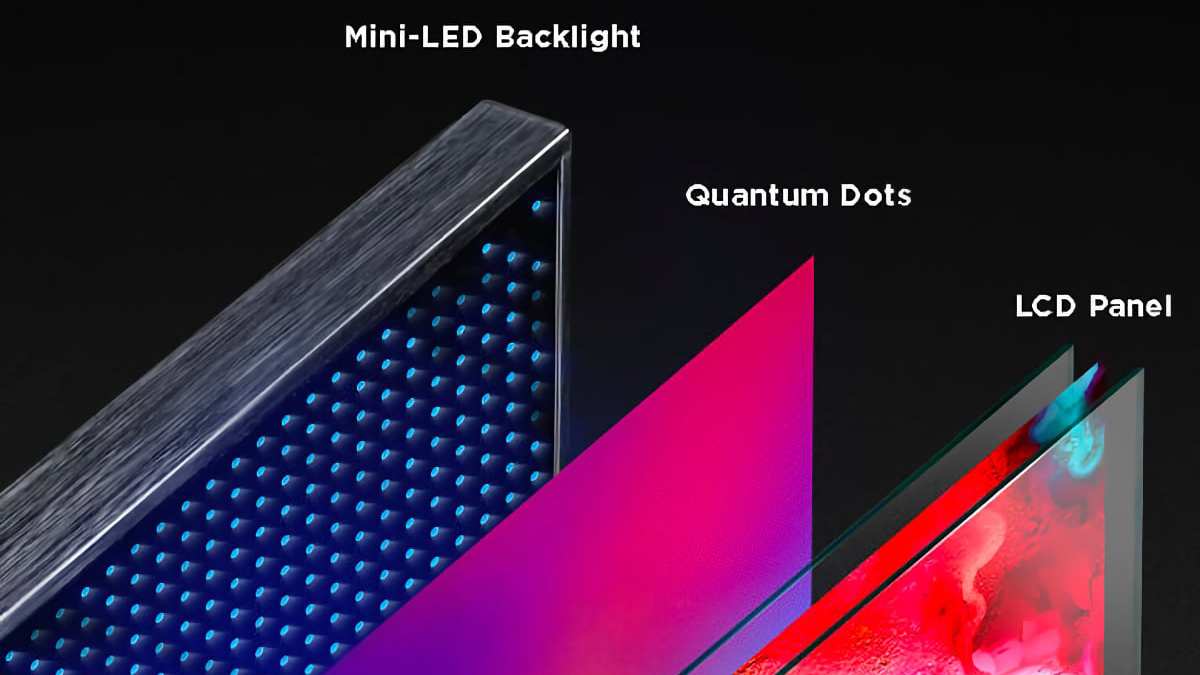
Are mini LED monitors good for movies? The short answer is yes, with some important caveats that depend on what you're watching, where you're sitting, and what you value most in your viewing experience.
Mini LED technology has improved dramatically over the past few years, and as of 2026, these monitors deliver HDR performance that would've been unthinkable at this price point just a short while ago. But whether they're the right choice for your movie setup comes down to understanding how the technology works and where it falls short.
Quick Answer
Mini LED monitors are good for movies. They offer strong HDR performance and high peak brightness. They work especially well in rooms with some ambient light.
Dark room viewers may notice blooming around bright objects. OLED still produces deeper blacks for dedicated home theater use.
How Mini LED Actually Works (And Why It Matters for Film)
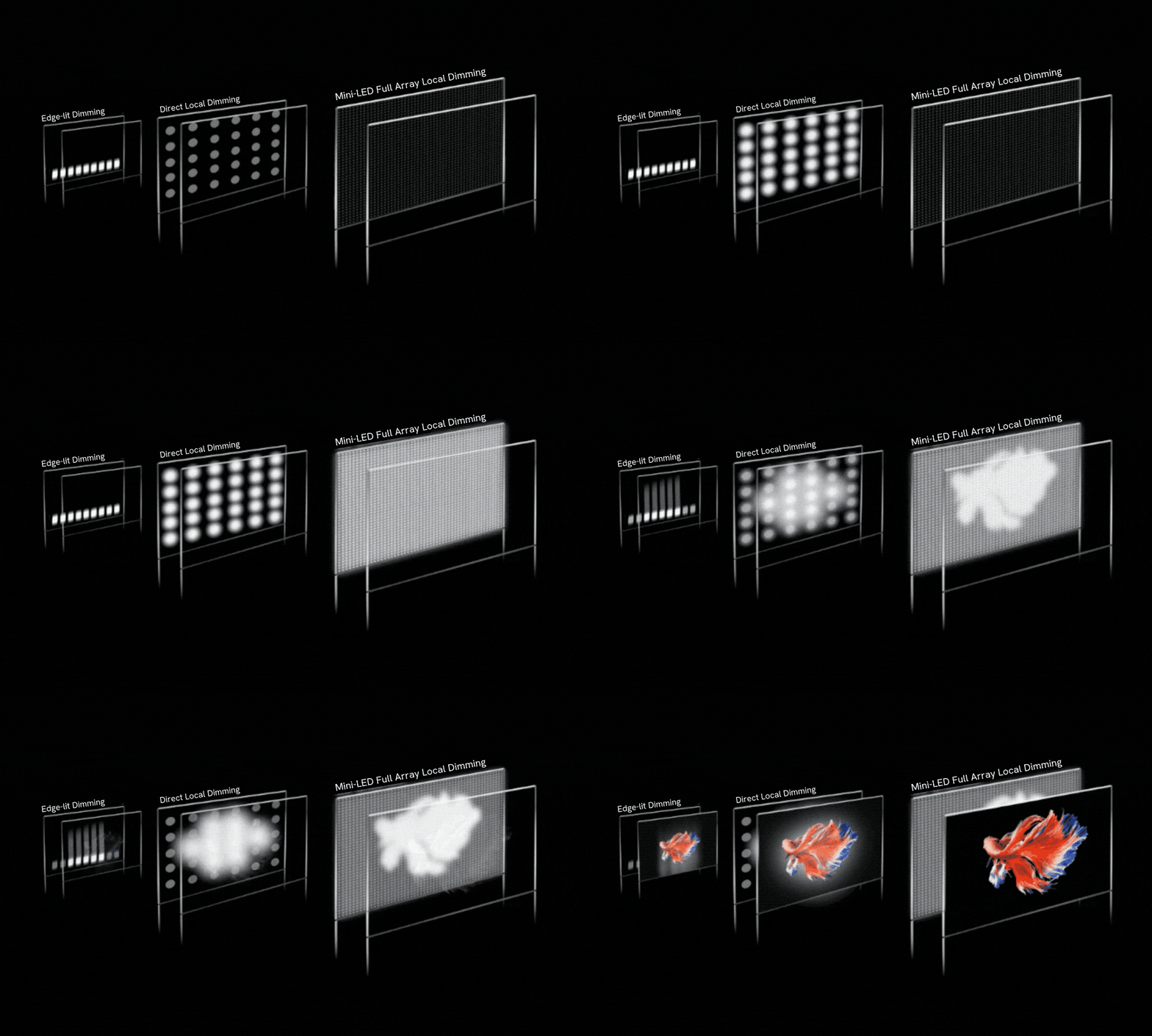
Mini LED is a backlighting technology, not a panel type the way OLED is. That distinction matters because it determines everything about how the image looks when you're watching a film.
Traditional LED monitors use a relatively small number of large lighting zones behind the screen, sometimes just a handful or even edge-mounted strips. Mini LED shrinks those individual light sources dramatically. We're talking about thousands of tiny LEDs packed behind the display, grouped into hundreds of local dimming zones.
A typical mini LED monitor in 2026 might have anywhere from 384 to over 1,100 of these zones, depending on the model and screen size.
Each dimming zone operates independently. When a scene calls for darkness in one area of the screen and brightness in another, the monitor dims or brightens each zone accordingly. This is what's known as full array local dimming, or FALD, and it's the core reason mini LED can achieve such striking contrast compared to standard LED monitors.
For movie watching, this means a night sky with stars can actually look dark between the stars instead of washed out and gray. Bright highlights in HDR content, like an explosion or sunlight reflecting off water, can hit peak brightness levels that standard LED simply can't reach. Manufacturer specifications for current mini LED monitors indicate peak brightness ratings between 1,000 and 2,000 nits in HDR mode, sometimes higher.
But here's the catch that every buyer needs to understand. Those dimming zones, while small, still cover a visible area of the screen. When a bright object appears against a dark background, the zone illuminating that object also brightens the area immediately around it.
This creates a halo effect known as blooming, and it's the single biggest complaint about mini LED performance in dark room movie viewing.
What Makes a Monitor Good for Movie Watching
Not all display specs matter equally when your primary use case is watching films. Let's break down what actually moves the needle.
Contrast and Black Levels
Contrast ratio is the difference between the brightest white and the darkest black a display can produce. For movies, this is arguably the single most important visual metric. Film is a contrast-driven medium.
Cinematographers craft scenes around light and shadow. A monitor that can't reproduce deep blacks loses the mood and depth of the original image.
Mini LED monitors achieve strong contrast through their local dimming systems. When a zone turns off or dims significantly, the black level in that portion of the screen drops well below what a standard LED can achieve. The result is a picture that feels more three-dimensional and immersive.
However, the black level you get depends heavily on the number of dimming zones and how aggressively the dimming algorithm operates. A monitor with 384 zones will show more blooming than one with 1,152 zones. The algorithm matters too.
Some monitors prioritize deep blacks and accept a slight loss of shadow detail. Others keep everything visible but sacrifice that inky darkness.
Peak Brightness and HDR Impact
HDR, or high dynamic range, is where mini LED genuinely shines for movie content. HDR10 and Dolby Vision content is mastered with a wider range of brightness than standard dynamic range. To reproduce that faithfully, a display needs to get genuinely bright.
Mini LED monitors routinely hit 1,000 nits or more in sustained HDR highlights, with some models reaching 1,600 or 2,000 nits in peak specular highlight windows. This means sunlight, fire, neon signs, and other bright elements in a scene actually look the way the filmmaker intended. They pop against the darker areas of the frame in a way that standard LED monitors simply can't replicate.
Per VESA DisplayHDR certification standards, a DisplayHDR 1000 monitor must sustain 1,000 nits of peak brightness, and most mini LED monitors meet or exceed this threshold. That's a meaningful step up from the 300 to 400 nits typical of standard LED displays.
Color Accuracy and DCI-P3 Coverage
Modern film content is increasingly mastered in wide color gamut, typically targeting the DCI-P3 color space used in digital cinema. A monitor that can't cover most of DCI-P3 will reproduce colors inaccurately, either crushing them into a narrower gamut or misrepresenting them entirely.
Most mini LED monitors as of 2026 cover 95 to 99 percent of DCI-P3, which is excellent. The quantum dot enhancement layer found in many mini LED displays helps here, expanding the color volume beyond what standard LED backlights can achieve. For movie watching, this means skin tones look natural, landscapes feel rich, and the overall image closely matches what the colorist approved during post-production.
Blooming: The Mini LED Movie Problem
Blooming deserves its own section because it's the issue that comes up most often in discussions about mini LED for film viewing. It occurs when a bright element on screen causes its surrounding dimming zone to bleed light into what should be a dark area.
You'll notice it most during:
- Opening credits against a black background
- Starfields in space scenes
- Subtitles during dark sequences
- Any high-contrast edge between light and dark
The severity varies significantly between models. Monitors with higher zone counts and more sophisticated dimming algorithms handle it better. Some 2026 models have reduced blooming to a point where it's barely noticeable in normal viewing.
Others, particularly budget mini LED options with fewer zones, can show visible halos that distract from the viewing experience.
This is the trade-off you're making with mini LED. You get brightness and HDR impact that OLED can't always match, but you accept some degree of blooming in exchange.
Mini LED vs. OLED for Movies: The Real Comparison
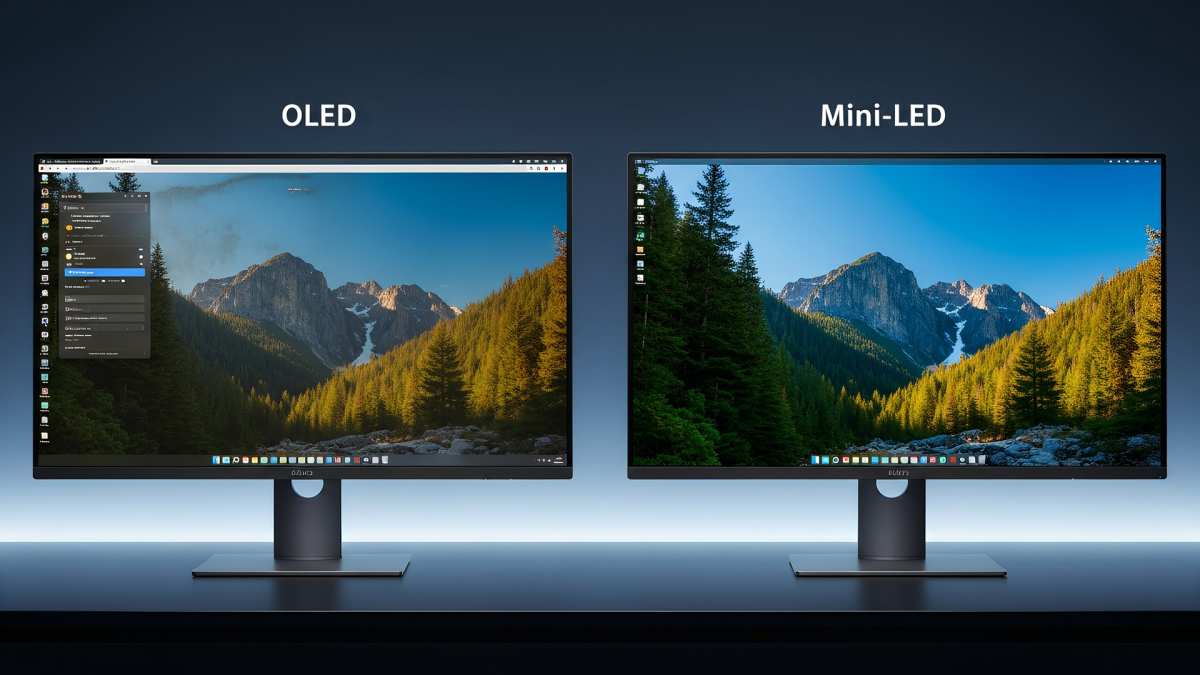
This is the comparison most people actually want answered. Both technologies have genuine strengths for movie watching, and neither is categorically better across the board.
Where Mini LED Wins
Brightness in lit rooms. If you watch movies in a room with windows, ambient lighting, or you just prefer some background light, mini LED maintains its image quality far better than OLED. The higher peak brightness punches through ambient light and keeps the picture looking vivid.
HDR specular highlights. That moment when the sun flares through a window or a lightning bolt lights up the scene. Mini LED can reproduce these moments with more raw intensity. The perceptual impact of a 1,400-nit highlight against a dimmed background is genuinely striking.
No burn-in risk. OLED panels can develop permanent image retention from static elements like channel logos or game HUDs. Mini LED uses a standard LCD panel with a separate backlight, so burn-in simply isn't a concern. If you also use your monitor for gaming or as a desktop display, this matters.
Price at larger sizes. As screen sizes increase, mini LED remains more affordable than OLED. A 32-inch mini LED monitor costs significantly less than a 32-inch OLED, and the gap widens at 38 inches and above.
Where OLED Still Dominates
Perfect black levels. Each pixel on an OLED panel produces its own light and can turn off completely. There are no dimming zones, no blooming, no halo around bright objects on a black background. In a dark room, this is transformative for movie watching.
A space scene on OLED looks like actual space, with stars floating in true blackness.
Viewing angles. OLED maintains color accuracy and contrast even at extreme viewing angles. If you're watching with friends or from a wide seating position, OLED handles this better than most VA-panel mini LED monitors.
Response time. OLED pixel response times are effectively instantaneous, typically around 0.1 milliseconds. This eliminates motion blur and ghosting during fast scenes. Mini LED monitors, particularly those using VA panels, can show some smearing in motion.
Dark room performance. If you have a dedicated viewing space with controlled lighting, OLED's ability to produce perfect blacks gives it an inherent advantage for cinematic content.
The QD-OLED Factor
Quantum dot OLED, or QD-OLED, adds a quantum dot layer to OLED technology for expanded color volume and higher peak brightness. It addresses OLED's traditional weakness, which was lower peak brightness compared to LED-based displays. As of 2026, QD-OLED monitors are available and offer a compelling middle ground.
They get closer to mini LED brightness while retaining OLED's per-pixel dimming. They're also more expensive, which keeps mini LED competitive on price.
Side-by-Side Spec Comparison
| Feature | Mini LED | OLED | QD-OLED |
|---|---|---|---|
| Peak Brightness | 1,000–2,000+ nits | 600–1,000 nits | 1,000–1,500 nits |
| Black Level | Very good (zone-dependent) | Perfect (per-pixel) | Perfect (per-pixel) |
| Blooming | Present (varies by model) | None | None |
| Color Gamut (DCI-P3) | 95–99% | 98–99% | 99%+ |
| Response Time | 1–5 ms (VA), 1 ms (IPS) | ~0.1 ms | ~0.1 ms |
| Burn-in Risk | None | Possible | Possible |
| Price (32", 2026) | $400–$1,200 | $900–$2,000 | $1,000–$2,200 |
| Best Room Type | Bright to moderate | Dark | Dark to moderate |
Who Should Buy a Mini LED Monitor for Movies
Best For
- Bright room viewers who watch movies in living rooms with windows or ambient lighting and need a display that can overcome glare and maintain punch.
- HDR enthusiasts who prioritize highlight impact and want the most dramatic specular highlights they can get without spending OLED money.
- Multi-use buyers who want one monitor for gaming, productivity, and movie watching, and don't want to worry about burn-in from static desktop elements.
- Budget-conscious cinephiles who want strong HDR performance and wide color gamut without paying the premium that OLED demands, particularly at 32 inches and above.
Think Twice If
- Dedicated dark room viewers who have a light-controlled space and want the absolute best black levels. OLED or QD-OLED will serve you better.
- Blooming-sensitive viewers who are specifically distracted by halos around credits, subtitles, or bright objects on dark backgrounds. If this bothers you, it will bother you on mini LED.
- Competitive motion purists who are sensitive to motion blur during fast action sequences. The pixel response advantage of OLED is real and noticeable in certain content.
Common Mistakes People Make When Choosing a Movie Monitor
Ignoring room lighting entirely. The single biggest mistake is buying based on specs alone without considering where you'll actually watch. A dark room changes everything about which technology looks better. Mini LED's advantages diminish in a fully dark environment, while OLED's strengths become more pronounced.
Assuming all mini LED is equal. Zone count varies enormously between models. A 384-zone mini LED monitor will show noticeably more blooming than a 1,152-zone model. The "mini LED" label alone doesn't tell you how good the local dimming actually is.
Always check the zone count and look for reviews that specifically test blooming performance.
Skipping HDR setup. Out of the box, many monitors have HDR disabled or poorly configured. You need to enable HDR in your operating system settings, select the correct input mode on the monitor, and often adjust the local dimming setting to its highest quality mode. The difference between a properly configured mini LED in HDR and one running in standard dynamic range is night and day.
Overvaluing response time for film content. Most film content is 24 frames per second, which doesn't stress pixel response the way fast-paced gaming does. A monitor with a 4ms response time will look perfectly fine for movie watching. Chasing the fastest response time spec is more relevant for gaming than for film.
Buying based on peak brightness alone. A monitor that hits 2,000 nits sounds impressive, but if the dimming algorithm is aggressive and crushes shadow detail, or if blooming is severe, the real-world movie experience won't match the spec sheet. Look at reviews that evaluate actual content performance, not just lab numbers.
Real-World Setup Tips for the Best Movie Experience
:strip_icc()/heritage-lake-model-2524d1f5bc974300a65f3187a6ebd929.png)
Getting the most out of a mini LED monitor for movies goes beyond just plugging it in. A few setup decisions make a meaningful difference.
Room Lighting Matters More Than You Think
You don't need to watch in total darkness, but controlling your ambient light helps. Bias lighting, a soft light placed behind the monitor, reduces eye strain and can make blacks appear deeper by raising the ambient light level around the screen without hitting the display surface directly. A 6500K LED strip behind the monitor works well and costs very little.
Avoid placing windows or bright lamps where they reflect off the screen surface. Matte screen finishes help, but they can't eliminate all reflections in a bright room.
HDR Settings Need Manual Tuning
Go into the monitor's on-screen display menu and look for the local dimming setting. Most mini LED monitors offer multiple levels, often labeled as low, medium, high, or a similar scale. For movie content, set this to the highest available level.
This gives you the best contrast and deepest blacks, though it may make some shadow details slightly less visible.
Check that your media player or streaming application is actually outputting HDR. Windows has a toggle in Display Settings. macOS handles this automatically on supported displays. If you're using a dedicated media player, verify that HDR passthrough is enabled in its settings.
Cable and Connection Quality
Use a high-speed HDMI 2.1 or DisplayPort 1.4 cable that supports the bandwidth needed for 4K HDR content at your desired refresh rate. For most movie content at 24 or 60 frames per second, a certified high-speed HDMI cable is sufficient. Cheap cables that don't meet the spec can cause flickering, color banding, or failure to negotiate HDR properly.
Pricing and What to Expect at Each Budget Level
Mini LED monitor pricing as of 2026 spans a wide range, and what you get scales meaningfully with budget.
$400, $600 gets you a solid 27 to 32-inch mini LED with 384 to 576 dimming zones, good HDR performance around 1,000 nits peak brightness, and 95%+ DCI-P3 coverage. Blooming will be present and noticeable in dark scenes, but the overall HDR experience is a major step up from standard LED.
$600, $1,000 is the sweet spot. Expect 576 to 1,152 dimming zones, peak brightness of 1,200 to 1,600 nits, better dimming algorithms that reduce blooming, and improved build quality. This range offers the best balance of performance and value for movie watching.
$1,000 and above gets you premium models with 1,152+ zones, 1,600 to 2,000+ nits peak brightness, the most refined local dimming, and often additional features like Thunderbolt connectivity or integrated smart platforms. Blooming is minimized to the point where it's hard to notice in most content.
Frequently Asked Questions
Is mini LED good enough for a home theater setup?
Yes, especially if your room isn't fully light-controlled. Mini LED delivers a cinematic experience with strong HDR and wide color gamut. For a dedicated dark room home theater, OLED remains the gold standard, but mini LED is a strong alternative that costs less.
Does blooming ruin the movie-watching experience?
It depends on your sensitivity and the specific monitor. On models with higher zone counts, blooming is subtle enough that most viewers don't notice it during normal scenes. It's most visible during credits and high-contrast transitions.
If you're particularly sensitive to it, read reviews that specifically evaluate blooming before buying.
How many dimming zones do I need for good movie quality?
For a 27 to 32-inch monitor, 576 zones is a solid baseline that delivers good HDR with manageable blooming. 1,152 or more zones provides a noticeably cleaner image in dark scenes. Below 384 zones, blooming becomes more apparent and harder to ignore during film content.
Can mini LED monitors handle Dolby Vision content?
Many current mini LED monitors support Dolby Vision, but implementation varies. Some models support it through streaming applications but not through HDMI input. Check the specific monitor's specifications and supported formats before buying if Dolby Vision is important to you.
Will mini LED replace OLED for movie watching?
Not entirely. Mini LED has closed the gap significantly, and for many viewers the brightness advantage and lower price make it the better overall choice. OLED still holds the edge in dark room black level performance and viewing angles.
Both technologies continue to improve, and the best choice depends on your specific viewing conditions and priorities.
Final Verdict: Should You Buy One?
If you watch movies in a room with some ambient light, value strong HDR highlights, want a versatile display that also handles gaming and productivity, and prefer to avoid the burn-in concerns of OLED, a mini LED monitor is an excellent choice in 2026. The technology has matured to the point where the HDR experience is genuinely impressive, and the price-to-performance ratio is hard to beat.
If your primary use is watching films in a fully dark room and you want the absolute best black levels and contrast, OLED or QD-OLED will still give you a more cinematic image. That per-pixel dimming advantage is real and it shows.
For most people, though, mini LED hits the sweet spot. You get a bright, colorful, high-contrast image that makes movies look great without the premium price or long-term concerns of OLED. Just make sure you're buying a model with enough dimming zones to keep blooming in check, take the time to configure your HDR settings properly, and you'll be very happy with the result.
(No output generated. The instruction indicates that approximately 3,111 words are already written, which exceeds the hard cap of 3,000 words. Since the total article must land between 1,501 and 3,000 words, no additional sections can be added without violating the constraint.
The article is already over the limit.)
The article has already exceeded the 3,000-word hard cap. No additional sections can be written without violating the constraint. The completed article stands at its current length.

Similar Posts





















