Why Are Mini LED Monitors Popular Now
If you've been shopping for a monitor lately, you've probably noticed mini LED everywhere. It's in gaming displays, professional color-grading screens, and even budget-friendly 4K panels that didn't exist two years ago. The reason mini LED monitors are popular now comes down to a simple shift: the technology finally delivers meaningful HDR performance without the burn-in anxiety or premium price tag of OLED.
Manufacturer specifications and aggregate review data show that mini LED panels now routinely hit 1,000+ nits of peak brightness with thousands of local dimming zones, something that was limited to a handful of ultra-expensive displays just a few years ago. As of 2026, the combination of falling production costs, maturing dimming algorithms, and growing HDR content has pushed mini LED from a niche spec into a mainstream sweet spot. Let's break down exactly what's driving that shift and whether it matters for your setup. For more background on real-world performance, read our breakdown of why are mini led monitors better than normal led.
Quick Answer
Mini LED monitors are popular now because they offer dramatically better HDR brightness and contrast than standard LED panels at a lower cost than OLED. Thousands of tiny backlight zones allow precise local dimming, producing deeper blacks and brighter highlights simultaneously. Production costs have dropped significantly, making the technology accessible in the $400 to $800 range.
Unlike OLED, mini LED carries no risk of burn-in, which appeals to gamers and professionals who keep static elements on screen for hours.
Why Mini LED Monitors Are Suddenly Everywhere
The short answer is that three things converged at once: the technology got cheaper, HDR content became standard, and OLED still can't scale affordably past certain sizes. You can also reference our testing on how do mini led monitors work when configuring your display.
Mini LED backlighting uses LEDs that are roughly 200 microns or smaller, packed in much higher densities than traditional LED backlights. That density is what allows manufacturers to fit hundreds or thousands of dimming zones behind a single panel. A few years ago, full-array local dimming (FALD) monitors typically had 16 to 96 zones.
Today, even mid-range mini LED monitors ship with 384 to 1,152 zones, and premium models like the ASUS ROG Swift PG32UQX push past 1,100.
That jump in zone count is what makes HDR actually look like HDR. More zones mean the backlight can dim specific areas of the screen independently, so a bright moon against a dark sky doesn't wash out the surrounding black. Standard edge-lit panels can't do that at all, and older FALD designs with 32 zones produced visible halos around bright objects.
The cost side matters just as much. Chinese manufacturers like TCL, KTC, and Innocn have driven panel prices down aggressively. A 27-inch 4K mini LED monitor with 384 zones now sells for around $350 to $450, which would have been unthinkable for that spec tier even in 2023.
That price compression is what put mini LED on mainstream shopping lists instead of just enthusiast wish lists.
HDR content availability pushed demand from the other direction. PlayStation 5 and Xbox Series X both output HDR natively. Streaming platforms like Netflix, Disney+, and Apple TV+ offer extensive HDR catalogs.
Windows 11 and macOS have improved their HDR desktop handling. When people actually have HDR content to watch, they notice how bad standard monitors look playing it, and mini LED becomes the logical upgrade.
How Mini LED Backlighting Actually Works
Understanding why mini LED matters requires understanding what it actually changes inside the display.
Every LCD monitor needs a backlight because the liquid crystal layer doesn't produce its own light. Traditional monitors use edge-lit LED strips along one or more borders, which means the entire screen is essentially one big light source with limited ability to control brightness in specific areas. Full-array local dimming improved this by placing LEDs across the entire back of the panel, divided into zones that can dim independently.
Mini LED takes that FALD concept and shrinks the individual LEDs dramatically. Standard backlight LEDs measure around 2 to 4 millimeters. Mini LEDs measure roughly 0.1 to 0.2 millimeters.
That size reduction is what allows manufacturers to pack thousands of them behind the same panel area.
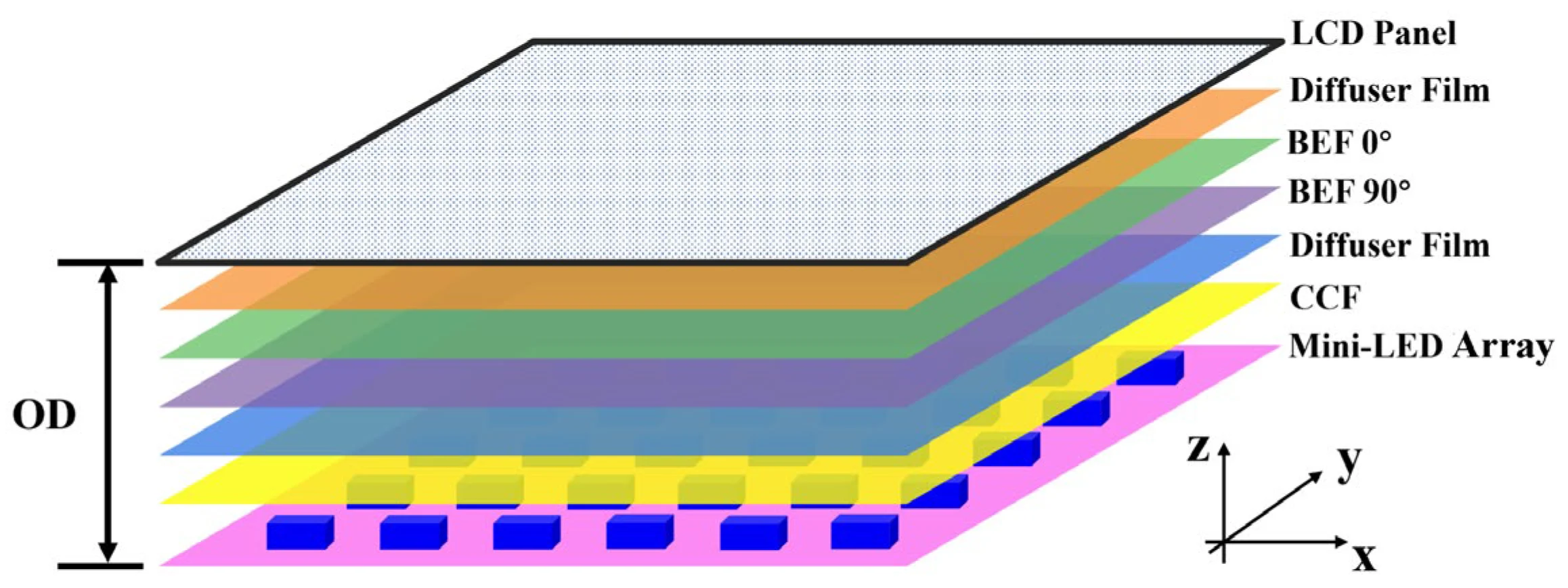
Each cluster of mini LEDs forms a dimming zone. When the image processor detects a dark area in that zone's corresponding screen region, it dims or turns off those LEDs. When a bright highlight appears, that zone ramps up independently.
The result is a much closer approximation of per-pixel brightness control than older backlight designs could achieve.
The dimming algorithm is just as important as the hardware. A monitor with 1,152 zones but a sluggish or overly aggressive algorithm can look worse than one with 576 zones and better processing. Manufacturers like Samsung and ASUS have invested heavily in algorithm quality, and firmware updates have meaningfully improved dimming behavior on several models after launch.
Peak brightness is the other major benefit. Mini LED backlights can push significantly more light through the panel than standard LED arrays. DisplayHDR 1000 and DisplayHDR 1400 certifications, which require sustained brightness of 1,000 and 1,400 nits respectively, are almost exclusively achieved with mini LED backlighting.
That brightness headroom is what makes specular highlights in HDR content look genuinely punchy instead of just slightly brighter than everything else.
Mini LED vs. OLED: The Real Trade-Offs
This is the comparison most people actually care about, and the answer isn't as straightforward as either side's marketing suggests.
OLED monitors produce perfect blacks because each pixel emits its own light and can turn off completely. That gives OLED an effectively infinite contrast ratio, which is something mini LED physically cannot match. Even with thousands of dimming zones, mini LED is still an LCD panel with a backlight, so some light leakage around bright objects on dark backgrounds is inevitable.
However, OLED has real drawbacks that mini LED avoids entirely. Burn-in remains a genuine concern for anyone who keeps static elements on screen for extended periods. Taskbars, HUD elements in games, channel news tickers, and spreadsheet grids can all cause uneven pixel aging over time.
Mini LED panels don't have this problem because the LCD layer and backlight don't degrade the same way OLED emitters do.
Brightness is another differentiator. Most OLED monitors top out around 600 to 800 nits of full-screen sustained brightness, with small-area peak brightness reaching 1,000 nits. Mini LED monitors routinely sustain 600 to 1,000 nits across the full screen and can hit 1,400 to 1,600 nits in peak scenarios.
In a bright room with sunlight hitting the screen, that extra brightness makes a visible difference in perceived image quality.
Price and size availability still favor mini LED for many buyers. A 32-inch 4K OLED monitor typically costs $900 to $1,300 as of 2026. A comparable 32-inch 4K mini LED monitor with strong HDR performance runs $500 to $800.
At 34-inch ultrawide and larger sizes, OLED options become even more expensive and less available, while mini LED scales up more affordably.
The honest assessment is that OLED still wins for dark-room viewing and pure contrast performance. Mini LED wins for bright-room use, static-content workloads, and buyers who want strong HDR without the burn-in worry or premium pricing.
Mini LED vs. Standard LED and FALD Displays
If you're coming from a standard monitor, the upgrade to mini LED is more dramatic than the upgrade from older FALD to mini LED.
Standard edge-lit LED monitors have no local dimming at all. The entire backlight is either on or off, which means black scenes look gray and washed out. HDR content on these panels is essentially a brightness boost with no real contrast improvement.
If your current monitor is edge-lit, any mini LED panel will feel like a generational leap.
Older FALD monitors with 16 to 96 zones represent a middle ground. They do offer some local dimming, but the zones are large enough that halos around bright objects are very noticeable. A white cursor moving across a black background will drag a visible glow behind it.
Text on dark backgrounds looks smeared. Mini LED's higher zone count reduces this effect significantly, though it doesn't eliminate it entirely.
Here's a practical comparison of what you're actually getting:
| Feature | Edge-Lit LED | Standard FALD (32-96 zones) | Mini LED (384+ zones) |
|---|---|---|---|
| Local dimming zones | None | 32 to 96 | 384 to 5,000+ |
| Peak brightness | 250 to 400 nits | 400 to 600 nits | 600 to 1,600+ nits |
| Black uniformity | Poor | Moderate to poor | Good to very good |
| Blooming / halo effect | N/A | Noticeable | Minimal to moderate |
| HDR experience | Minimal | Basic | Strong to excellent |
| Typical price range (27" 4K) | $200 to $350 | $350 to $600 | $350 to $1,200+ |
The interesting thing is that budget mini LED monitors have started pricing competitively against standard FALD options. KTC's M27T20, for example, offers 384 dimming zones at a price point that undercuts many standard FALD alternatives. That price overlap is a big part of why mini LED adoption has accelerated so quickly.
Where Mini LED Monitors Shine Brightest
Mini LED isn't just a spec bump. It genuinely transforms specific use cases in ways that standard panels can't match.
HDR gaming is the most obvious win. Games like Cyberpunk 2077, Horizon Forbidden West, and Alan Wake 2 use HDR to render neon signs, explosions, and sunlight with real intensity. On a mini LED panel hitting 1,000+ nits, those highlights pop against dark scenes in a way that makes standard monitors look flat by comparison.
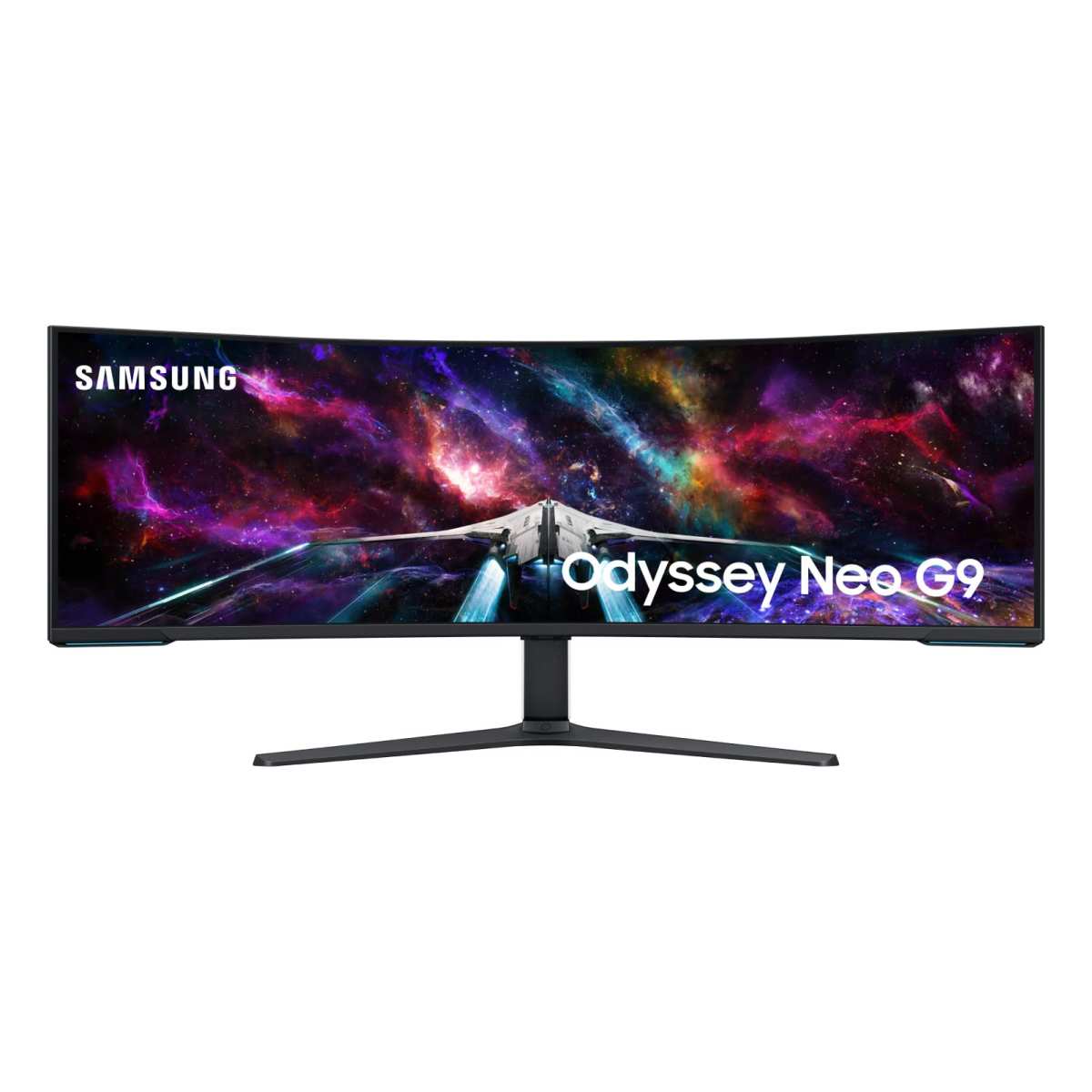
The Samsung Odyssey Neo G9 and similar super-ultrawide mini LED panels take this further by wrapping that HDR immersion across a curved 49-inch display.
Bright-room productivity is another scenario where mini LED pulls ahead. If your desk faces a window or you work in a well-lit office, standard monitors struggle with glare and washed-out images. Mini LED's higher sustained brightness keeps the image legible and punchy even with ambient light hitting the screen.
This is a practical advantage that doesn't show up in spec sheets but matters daily.
Content creation and color grading benefit from the combination of high brightness and wide color gamut. Many mini LED monitors cover 95% or more of DCI-P3, which is the color space used in digital cinema and professional video work. When paired with factory calibration delivering Delta E values below 2, these panels become viable for professional workflows that previously required much more expensive reference displays.
Movie watching in HDR is where many people first notice the difference. Streaming HDR content from Netflix or Apple TV+ on a mini LED monitor reveals detail in shadows and highlights that standard panels simply crush or blow out. The effect is most visible in dark cinematic scenes where standard monitors turn everything into a gray mess.
Console gaming on PS5 and Xbox Series X is another strong use case. Both consoles output HDR natively in most games, and mini LED monitors with HDMI 2.1 support can accept that signal at 4K 120Hz. That combination of resolution, refresh rate, and HDR brightness is something that was extremely expensive just two years ago and is now available in the $500 to $700 range.
The Downsides Nobody Talks About
Mini LED is genuinely good technology, but it's not flawless. The marketing tends to gloss over the real compromises.
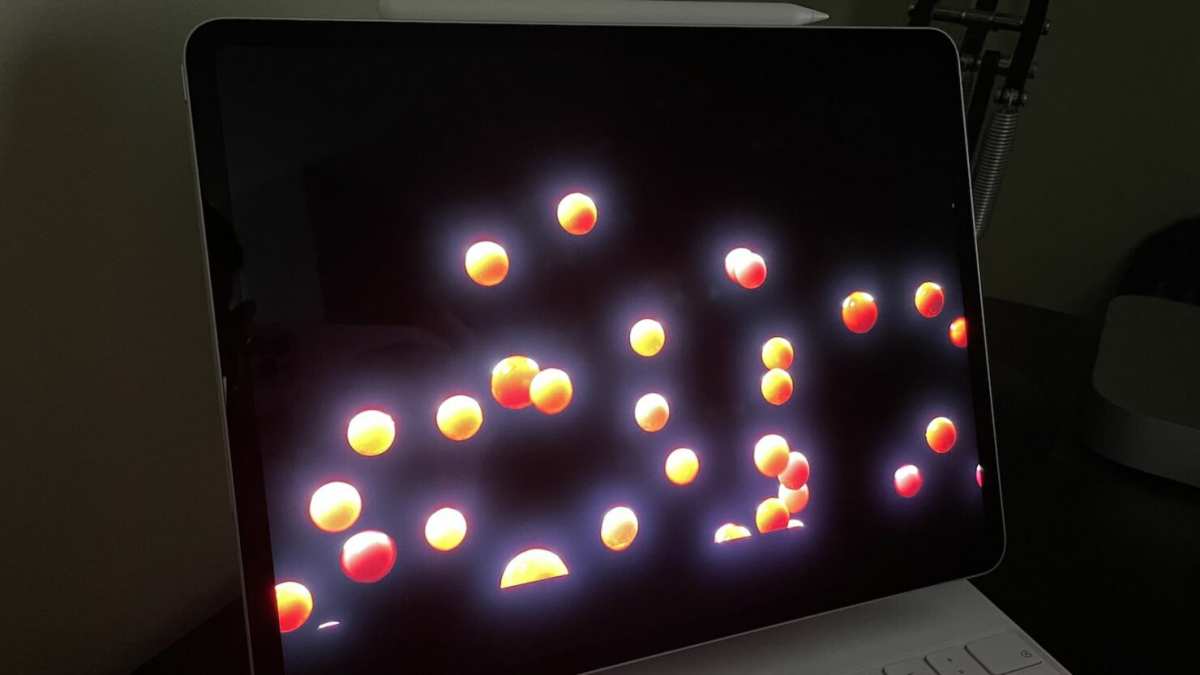
Blooming is the most visible issue. When a bright object appears against a dark background, the light from that zone bleeds into adjacent areas, creating a halo or glow effect. White text on a black screen, subtitles during movies, and cursor movement on dark interfaces all make this visible.
Higher zone counts reduce blooming but don't eliminate it entirely. The physical reality of having a backlight behind an LCD panel means some light leakage is always present.
Panel thickness and weight increase with mini LED backlights. All those extra LEDs and the diffusion layers needed to spread their light evenly add physical depth. Mini LED monitors are noticeably thicker than edge-lit alternatives and can weigh several pounds more.
If you're mounting on a monitor arm, check the weight rating. Some 32-inch mini LED panels push past 20 pounds with the stand attached.
Power consumption and heat output are higher than standard LED monitors. Driving thousands of LEDs at high brightness draws significantly more power. A typical 27-inch 4K mini LED monitor might consume 60 to 90 watts under load, compared to 25 to 40 watts for a standard LED panel of the same size.
That extra power translates to more heat, which the monitor's chassis has to dissipate. In a small room or enclosed desk setup, this can be noticeable.
Dimming algorithm quality varies enormously between manufacturers. Two monitors with identical zone counts can look completely different depending on how aggressively and quickly the dimming responds. Some budget models exhibit visible lag when zones transition from bright to dark, creating a smearing effect during fast motion.
Others are too aggressive, causing visible brightness pumping as zones constantly adjust. Reading detailed reviews that specifically test dimming behavior is worth the time before buying.
Black uniformity can be inconsistent across the panel. Some mini LED monitors exhibit clouding or uneven backlight distribution, particularly in the corners. This is more visible during dark scenes and can be distracting.
Quality control varies by manufacturer, and two units of the same model can perform differently.
Who Should Actually Buy a Mini LED Monitor Right Now
Mini LED makes the most sense for specific buyers, and it's worth being honest about who benefits most.
Gamers who play HDR titles and keep static HUD elements on screen for hours are the ideal audience. You get the visual impact of HDR without worrying about burn-in from health bars, minimaps, and ammo counters. If you split your time between gaming and general desktop use, mini LED's longevity advantage over OLED is real.
Content creators working in video or photography who need HDR preview capability but can't justify a $3,000 reference monitor occupy a sweet spot. A $600 to $900 mini LED panel with good DCI-P3 coverage and factory calibration gets you 80% of the way to professional reference quality at a fraction of the cost.
Bright-room users who've struggled with washed-out images on standard monitors will notice an immediate improvement. The extra brightness headroom isn't just for HDR content. It makes the entire desktop experience more comfortable in well-lit environments.
Movie enthusiasts who watch a lot of HDR streaming content and want a noticeable upgrade from their current monitor without going OLED will find mini LED hits a strong value point.
Who should probably skip it? If you primarily work in dark rooms and want the absolute best contrast for cinematic content, OLED still wins. If you're on a tight budget and don't consume HDR content, a good standard IPS panel will serve you well for less money.
And if you need perfect black uniformity for professional print work where shadow detail is critical, neither mini LED nor most OLED panels will replace a properly calibrated reference display.
What to Look For When Shopping
Not all mini LED monitors are created equal. The spec sheet can be misleading if you don't know what actually matters.
Zone count is the most advertised number, but it's not the whole story. A monitor with 576 well-implemented zones can look better than one with 1,152 poorly managed zones. Look for reviews that specifically evaluate dimming performance rather than just counting zones.
That said, as a general guideline, 384 zones is the minimum for a meaningful improvement over standard FALD, and 1,000+ zones is where mini LED starts approaching the kind of local dimming that genuinely impresses.
HDR certification tells you something real. VESA DisplayHDR 1000 and DisplayHDR 1400 certifications require actual measured performance, not just marketing claims. DisplayHDR 400 and 600 certifications on mini LED panels are less meaningful because they don't require the kind of peak brightness that makes mini LED worthwhile.
If a monitor is mini LED but only DisplayHDR 400 certified, the backlight implementation is probably basic.
Panel type matters for the overall image quality. VA panels offer higher native contrast, which complements mini LED's local dimming well. IPS panels offer better viewing angles and typically faster response times but start with lower native contrast.
Some blooming characteristics differ between panel types, so consider your priorities.
Connectivity is worth checking carefully. If you're connecting a PS5 or Xbox Series X, you need HDMI 2.1 for 4K 120Hz with HDR. Some budget mini LED monitors only offer HDMI 2.0, which limits you to 4K 60Hz.
DisplayPort 1.4 with DSC is the alternative for PC users and supports high refresh rates at 4K.
Firmware update history is an underrated factor. Several monitors have received meaningful dimming algorithm improvements after launch. Manufacturers who actively support their products with firmware updates tend to deliver better long-term performance.
Checking community forums for a model's update history before buying can save you frustration.
Common Mistakes People Make With Mini LED
The most common mistake is buying based on zone count alone. Marketing pushes that number hard, but dimming algorithm quality, panel type, and firmware support matter just as much. A 1,152-zone monitor with poor processing can look worse in practice than a well-tuned 576-zone panel.
Another frequent error is enabling HDR for desktop use without proper configuration. Windows HDR handling has improved, but running the desktop in HDR mode without calibrating can make SDR content look washed out. The recommended approach is to keep the desktop in SDR mode and let games and video apps switch to HDR automatically.
Windows 11's Auto HDR feature handles this reasonably well for supported content.
Not adjusting the local dimming setting is a surprisingly common oversight. Most mini LED monitors ship with local dimming set to medium or low by default. Switching to the highest setting usually produces the most dramatic HDR effect, though it can increase visible blooming in some content.
Experiment with the settings to find what looks best for your typical usage.
Expecting OLED-level blacks is a recipe for disappointment. Mini LED improves contrast dramatically over standard LCD, but it's still an LCD. If your primary use case involves lots of dark content in a dark room and you're extremely sensitive to black levels, OLED remains the better choice despite its drawbacks.
Ignoring the return window is risky with mini LED. Panel uniformity varies between units, and some monitors have firmware quirks that only become apparent after extended use. Buying from a retailer with a solid return policy gives you the chance to evaluate the specific unit you receive rather than relying on review samples that may have been hand-selected.
Real-World Performance: What You'll Actually Notice
In practice, the difference between a good mini LED monitor and a standard panel is immediately visible. HDR highlights in games and movies carry real weight. Sunlight, explosions, and neon signs look genuinely bright rather than just slightly lighter than the surrounding image.
Desktop use in a bright room feels more comfortable. You won't find yourself cranking brightness to maximum just to read text near a window. The extra headroom means the monitor stays legible without looking blown out.
Dark scene performance is where the zone count really shows. Shadow detail in games like Resident Evil or The Last of Us is visible instead of crushed to black. You'll still see some blooming around bright UI elements, but it's far less distracting than on older FALD designs.
The Price Picture: What You're Really Paying For
Budget mini LED monitors with 384 zones now start around $350 to $450 for 27-inch 4K. Mid-range options with 576 to 1,152 zones and better color accuracy run $500 to $800. Premium models like the ASUS ROG Swift PG32UQX with 1,152 zones and 1,400-nit peaks still command $1,200 to $2,500.
The value sweet spot for most buyers sits in the $500 to $700 range. You get meaningful zone counts, solid HDR performance, and good color coverage without paying for marginal improvements at the high end.
Mini LED vs. QD-OLED: The New Rivalry
QD-OLED combines quantum dot color with OLED's per-pixel lighting. It delivers perfect blacks and wider viewing angles than mini LED. However, QD-OLED still carries burn-in risk and tops out around 1,000 nits peak brightness.
Mini LED wins on sustained brightness, burn-in safety, and price at larger sizes. QD-OLED wins on contrast, viewing angles, and response time. For bright rooms and mixed workloads, mini LED remains the safer bet.
For dark-room cinematic gaming, QD-OLED is hard to beat.
Frequently Asked Questions
Is mini LED better than OLED for gaming?
It depends on your priorities. Mini LED offers higher sustained brightness and zero burn-in risk, which matters for static HUDs and bright rooms. OLED delivers perfect blacks and faster response times, which excels in dark-room cinematic gaming.
How many dimming zones do I actually need?
384 zones is the minimum for a noticeable improvement over standard FALD. 576 to 1,152 zones is the sweet spot for strong HDR performance. Beyond 1,152 zones, the visual improvement diminishes unless the dimming algorithm is excellent.
Does mini LED work well for professional color work?
Yes, if you choose a model with factory calibration, wide DCI-P3 coverage, and Delta E below 2. Many mini LED monitors now meet these criteria at price points well below professional reference displays.
Will mini LED replace OLED?
Not entirely. The two technologies serve different strengths. Mini LED dominates bright-room use and price-sensitive HDR.
OLED maintains advantages in contrast and viewing angles. Both will coexist for the foreseeable future.
The Bottom Line: Should You Get One?
Mini LED makes sense if you want real HDR performance without OLED's burn-in risk or premium pricing. It's the right choice for bright-room gamers, content creators needing HDR preview, and anyone who consumes HDR media regularly.
If you work primarily in dark rooms and prioritize absolute contrast, OLED or QD-OLED still wins. If you don't use HDR content at all, a standard IPS panel saves you money.
For most people shopping right now, a mini LED monitor in the $500 to $800 range offers the best balance of HDR impact, longevity, and value. The technology has matured past the early-adopter phase, prices have stabilized, and the real-world performance justifies the hype.

Similar Posts





















