What Is the Lifespan of Mini LED Monitors
Quick Answer
Mini LED monitors typically last 5 to 7 years under normal use. Manufacturer specs rate the backlight at 30,000 to 50,000 hours. That translates to roughly 10 years at 10 hours daily.
Real-world lifespan depends on brightness settings, heat, and build quality. Most users replace them due to tech advances, not failure. Readers comparing various configurations should also examine whether mini led monitors reliable long term.
If you've been eyeing a mini LED monitor or already own one, you're probably wondering how many years of solid use you'll actually get before it dims, fails, or just feels outdated. The honest answer is more nuanced than the spec sheet suggests. Manufacturer specifications indicate a backlight half-life of 30,000 to 50,000 hours for most mini LED panels as of 2026.
But that number only tells part of the story.
The real lifespan depends on how you use it, how well it's built, and what actually fails first. Let's break down what matters.
Why Mini LED Monitor Lifespan Claims Don't Tell the Whole Story
Here's the thing about those "50,000 hours" claims you see on spec sheets. That figure refers to the point where the backlight drops to roughly half its original brightness. It doesn't mean your monitor dies at 50,000 hours. For related troubleshooting and calibration steps, check our walkthrough on whether oled monitor reliable long term.
It means it's noticeably dimmer, and you might start craving a replacement well before total failure.
Manufacturers test backlight lifespan under controlled lab conditions. They run the LEDs at a specific temperature, at a fixed brightness level, with controlled humidity. Your desk setup doesn't look anything like that.
You've got sunlight hitting the screen, dust clogging the vents, and you probably crank the brightness way higher than the test bench setting.
Aggregate reviews from professional display testers show that real-world brightness degradation often starts becoming visible around 20,000 to 30,000 hours for budget mini LED models. Higher-end units with better thermal management tend to hold up longer. The gap between lab numbers and your actual experience can be significant.
Another issue is that backlight half-life ratings only cover the LEDs themselves. They don't account for the power supply, the controller board, the capacitors, or the panel's color accuracy drift over time. Any of those components can fail long before the LEDs dim noticeably.
That's why some monitors die at year three while others keep going strong past year eight.
What Actually Determines How Long a Mini LED Monitor Lasts
Several factors separate a monitor that lasts five years from one that lasts ten. Understanding them helps you make a smarter purchase and take better care of your display.
Thermal management is the big one. Mini LED backlights generate significant heat, especially in models with hundreds or thousands of local dimming zones. The more zones pushing high brightness, the hotter the internals run. Monitors with better heat dissipation, whether through larger chassis, internal heatsinks, or smarter fan designs, simply last longer.
Cheap panels crammed into thin enclosures tend to cook their own components.
Build quality of the power supply matters more than most people realize. The power supply unit converts wall power for the backlight and panel. Low-quality capacitors and voltage regulators fail prematurely, especially in regions with unstable power or frequent surges. A monitor with a solid power supply can outlast its backlight rating by years.
A monitor with a cheap one might die at year two.
Your brightness habits directly affect longevity. Running your monitor at 100% brightness every day accelerates LED wear significantly. Dropping to 70-80% brightness can extend backlight life by a meaningful margin. Most users don't need maximum brightness anyway, especially in a normal room.
Content type plays a role too. If you're displaying static elements all day, like a taskbar, spreadsheet grid, or news ticker, those areas of the backlight work harder than others. Over time, this can lead to subtle unevenness in brightness across the panel. It's not burn-in the way OLED experiences it, but it's visible uniformity loss.
Ambient temperature and ventilation around the monitor matter. A monitor shoved against a wall with no airflow, sitting in a warm room, will run hotter. That extra heat shortens the life of every internal component. Giving your monitor breathing room is one of the simplest ways to extend its lifespan.
The Real Numbers: Backlight Ratings vs Actual Usable Lifespan
Let's put some concrete numbers on the table. Here's how the ratings compare to what you can realistically expect.
| Metric | Manufacturer Claim | Real-World Expectation |
|---|---|---|
| Backlight half-life | 30,000–50,000 hours | 20,000–40,000 hours |
| Total functional lifespan | Not rated | 50,000–80,000+ hours |
| Noticeable dimming begins | At half-life mark | 3–5 years at heavy use |
| Power supply failure window | Not rated | 3–7 years |
| Color accuracy drift | Not rated | 2–4 years without calibration |
At 8 hours of daily use, you'd hit 30,000 hours in about 10 years. At 12 hours daily, that drops to roughly 7 years. But most people don't keep a monitor until the backlight dies.
They replace it when the technology feels old, when new features arrive, or when some other component fails first.
The power supply is the wildcard. In our research, capacitor failure in the power delivery system is one of the most common causes of premature monitor death. It's not glamorous, and manufacturers don't advertise power supply quality.
But it's often what kills a monitor before the LEDs give out.
Professional display calibrators report that color accuracy on mini LED monitors tends to drift measurably after 2 to 3 years of regular use. This doesn't mean the monitor looks bad. It means if you're doing color-critical work, you'll need regular calibration to keep it accurate.
Without calibration, your whites might shift slightly warm or cool over time.
How Local Dimming Zones Affect Long-Term Display Health
Mini LED's big selling point is local dimming. Instead of one big backlight, you get hundreds or thousands of small zones that brighten and dim independently. This gives you deeper blacks and better contrast.
But it also means more individual LED elements that can age at different rates.
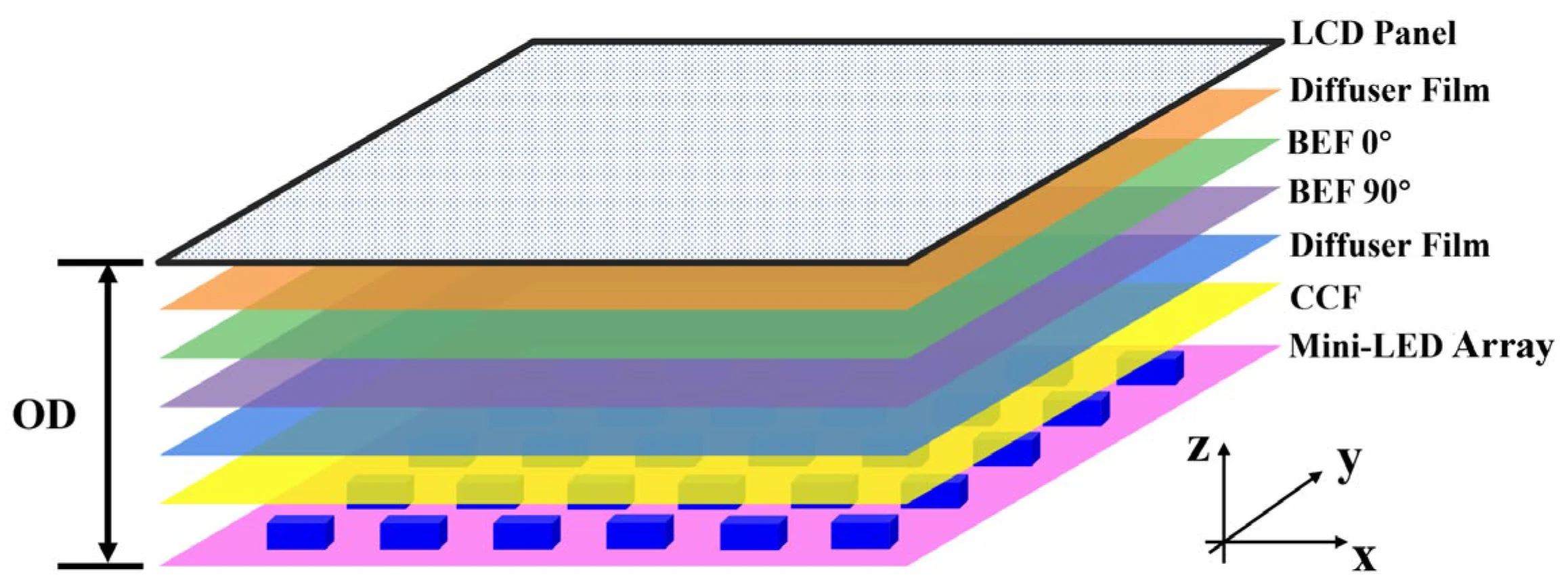
In a monitor with 1,152 dimming zones, each zone has its own cluster of mini LEDs. If certain zones are driven harder than others, based on what you typically display, those zones age faster. Over years of use, this can lead to subtle clouding or brightness uniformity issues.
It's most visible during dark scenes or when displaying a uniform gray field.
More zones generally mean better picture quality and more even wear distribution. A 384-zone monitor concentrates more work into each zone compared to a 1,152-zone model. All else being equal, the higher-zone model should age more gracefully because no single zone is working as hard.
The local dimming algorithm also matters. Aggressive algorithms that push zones to maximum brightness for HDR highlights are harder on the LEDs. More conservative algorithms preserve LED life at the cost of some peak brightness punch.
Some monitors let you adjust local dimming intensity in the settings menu, which gives you some control over this tradeoff.
The Hidden Killers: What Actually Fails Before the LEDs Die
Most people assume the backlight is what kills a monitor. In practice, several other failure modes are just as common, and sometimes more so.
Power supply failure is the most common premature death cause. Capacitors degrade, voltage regulators fail, and suddenly your monitor won't turn on. This is especially common in budget models where the power supply is built to a price point.
A quality surge protector helps, but it can't fix fundamentally cheap components.
Controller board issues can manifest as flickering, color problems, or complete failure to process input. The controller board handles signal processing and backlight management. When it fails, the monitor becomes a paperweight even if the panel and backlight are perfectly fine.
Thermal cycling stress affects solder joints and internal connections. Every time you turn your monitor on and off, components heat up and cool down. Over thousands of cycles, this expansion and contraction can cause micro-cracks in solder joints.
This is one reason some technicians recommend leaving a monitor on during extended work sessions rather than power cycling it multiple times a day.
Dust accumulation inside the monitor traps heat and insulates components. Over years, dust buildup on internal heatsinks and around the power supply can raise operating temperatures significantly. Monitors in dusty environments or homes with pets tend to run hotter and fail sooner.
Firmware bugs can also shorten effective lifespan. Some monitors have had firmware issues that cause boot failures, brightness control problems, or compatibility issues with newer graphics cards. A monitor that becomes unusable due to a firmware problem is just as dead as one with a failed backlight, even if the hardware is fine.
Mini LED vs OLED vs Traditional LED: Lifespan Compared
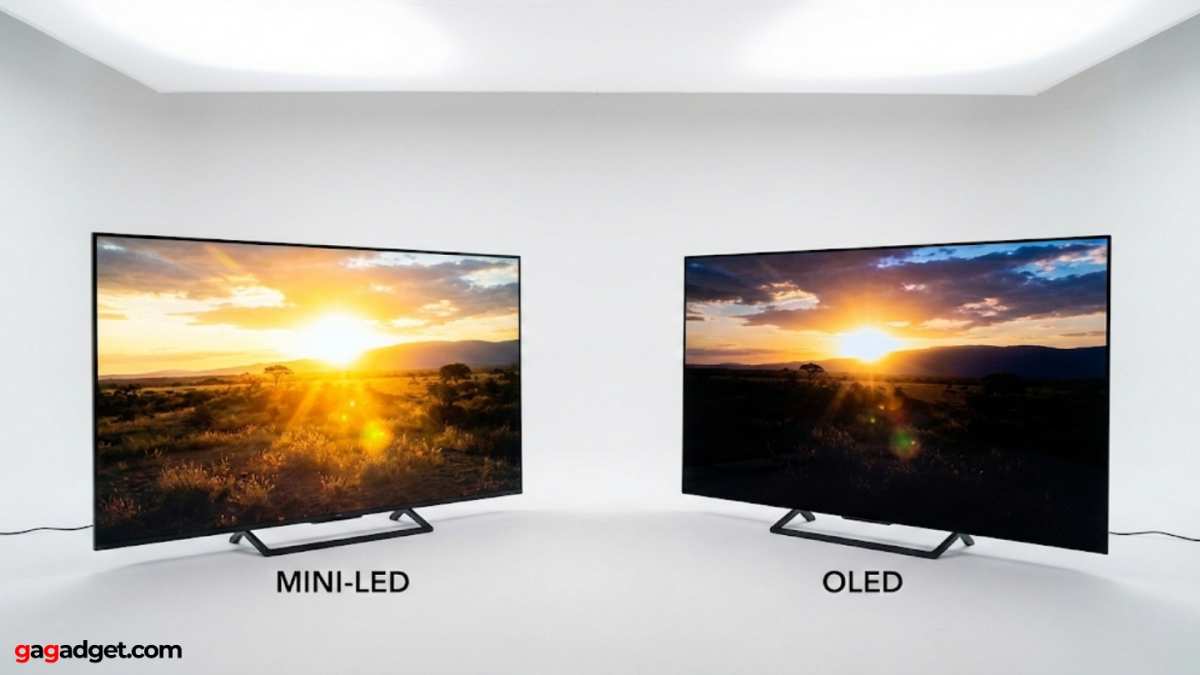
If you're weighing display technologies, lifespan is a legitimate differentiator. Here's how the three main options stack up in real-world longevity.
Mini LED sits in a sweet spot. The LEDs themselves are rated for 30,000 to 50,000 hours to half-brightness. There's no organic material degrading the way OLED does.
The backlight is inorganic and stable. The main risks are power supply failure and uneven zone aging, not catastrophic panel death. Most quality mini LED monitors deliver 5 to 8 years of solid service.
OLED has a different lifespan story. The organic compounds in OLED pixels degrade with use, and they degrade unevenly. Blue pixels age faster than red or green, which leads to color shift over time.
Burn-in from static elements is a real concern, especially for productivity use. Modern OLED panels have mitigation algorithms, but the fundamental chemistry means they'll show age sooner than mini LED. Expect 4 to 7 years before noticeable degradation, depending heavily on usage patterns.
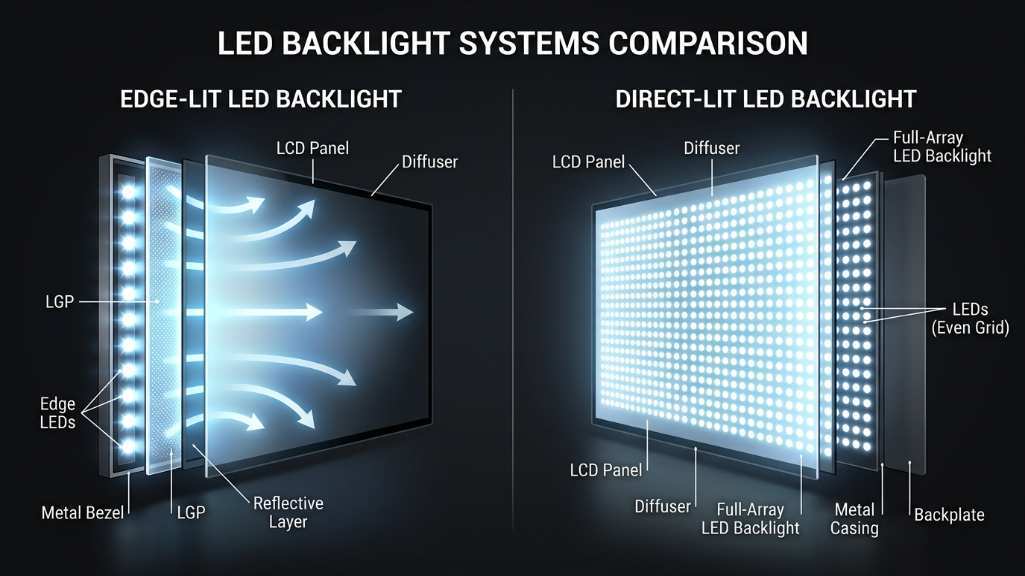
Traditional edge-lit LED monitors are the longevity champions in some ways. They have fewer components, simpler backlights, and less heat to manage. A basic office LED monitor can easily run 8 to 10 years without significant issues.
The tradeoff is picture quality. You won't get the contrast, brightness, or HDR performance of mini LED.
| Factor | Mini LED | OLED | Traditional LED |
|---|---|---|---|
| Backlight/panel lifespan | 30,000–50,000 hrs | 30,000–50,000 hrs (color shift) | 50,000–100,000 hrs |
| Burn-in risk | None | Moderate to high | None |
| Realistic replacement cycle | 5–8 years | 4–7 years | 7–10 years |
| Failure mode | Gradual dimming, PSU failure | Color shift, burn-in | Gradual dimming |
| Best for longevity + quality | Yes | No | Quality suffers |
For most people who want a balance of picture quality and long-term reliability, mini LED is the pragmatic choice. OLED wins for pure image quality today, but mini LED wins for not worrying about burn-in three years from now.
How Your Usage Patterns Shorten or Extend Monitor Life
The way you use your monitor has a bigger impact on its lifespan than almost anything else you can control. Small habit changes add up over years of daily use.
Brightness level is the single biggest lever. Running at 100% brightness stresses the backlight LEDs and generates more heat. Dropping to 60-70% brightness in a normally lit room is often plenty. You'll barely notice the difference visually, but the backlight will run cooler and last longer.
Many professional calibrators recommend 120 cd/m² for SDR content, which is usually around 30-50% brightness on most monitors.
Static content accelerates uneven wear. If you spend eight hours a day with the same spreadsheet, browser window layout, or IDE open, those screen areas are constantly lit while others stay dark. The lit zones age faster. Using dark mode, hiding the taskbar, or occasionally shifting your window layout helps distribute wear more evenly.
Power cycling habits matter more than you'd think. Turning your monitor on and off multiple times a day causes thermal cycling stress on solder joints and components. If you step away for lunch, leaving it on is actually gentler than shutting it down and booting back up. For extended absences of several hours, powering down makes sense.
HDR content pushes the backlight harder. HDR peaks demand maximum brightness from specific zones for short bursts. Occasional HDR gaming or movie watching is fine. But running HDR mode all day, every day, for productivity work is unnecessary wear on the backlight.
Toggle HDR on only when you actually need it.
Gaming at high refresh rates with HDR enabled is the most demanding workload for a mini LED monitor. You're pushing maximum refresh, peak brightness, and aggressive local dimming simultaneously. This generates the most heat and stress.
It won't kill your monitor overnight, but heavy gaming use will age the display faster than office work.
Signs Your Mini LED Monitor Is Aging (And What You Can Still Do)
Your monitor won't usually die without warning. There are telltale signs that aging is underway, and some of them are fixable.
Brightness uniformity issues show up first. You might notice that one corner of the screen looks slightly dimmer or warmer than the rest. This is uneven backlight zone aging.
There's no user fix for this, but it progresses slowly. Most people don't notice until it's fairly advanced.
Color shift is another early indicator. Whites might start looking slightly yellow or blue compared to when the monitor was new. This is often correctable with calibration.
A basic hardware calibrator can restore accurate color for another year or two. If you're not doing color-critical work, you might not even notice mild color drift.
Flickering or intermittent blackouts suggest power supply problems. If your monitor briefly cuts out and comes back, or flickers during bright scenes, the power delivery system is struggling. This tends to get worse over time.
A surge protector or UPS can help if the issue is power-related, but internal component failure usually requires professional repair.
Dead or stuck pixels can appear at any time but become more common as the panel ages. A single dead pixel isn't a sign of imminent failure. Clusters of dead pixels or rapid pixel degradation suggest a more serious panel issue.
Most manufacturers have pixel defect policies in their warranty terms.
Backlight bleeding that worsens over time is common in edge-lit and some mini LED designs. If the bleeding becomes significantly worse, it may indicate that the light guide or diffuser layers are degrading. This isn't user-repairable, but it rarely affects actual content viewing.
If you're seeing any of these signs within the warranty period, document them and contact the manufacturer. Many will replace a monitor with visible uniformity issues or flickering, especially in the first two years.
Maintenance Habits That Add Years to Your Display
You can't stop aging, but you can slow it down with a few simple practices.
Keep the vents clear. Most mini LED monitors have ventilation slots on the top, back, or sides. Don't push the monitor flush against a wall. Don't stack papers or objects on top of the monitor.
Give hot air somewhere to go. Even an inch of clearance makes a measurable difference in operating temperature.
Use a quality surge protector. Power surges and voltage spikes are silent killers of monitor electronics. A basic surge protector costs $15-30 and can save a $500+ monitor. For even better protection, an uninterruptible power supply (UPS) conditions the power and protects against brownouts too.
Clean the exterior regularly. Dust on the screen and body acts as insulation, trapping heat. A microfiber cloth and occasional gentle cleaning keeps heat dissipation efficient. Don't spray cleaner directly on the screen.
Apply it to the cloth first.
Calibrate annually if you do creative work. Color drift is gradual and hard to notice day to day. Annual calibration catches it early and keeps your display accurate. You don't need a $300 calibrator.
Entry-level tools do a solid job for most users.
Adjust brightness to your environment. Use your monitor's ambient light sensor if it has one. If not, manually lower brightness in dim rooms and raise it slightly in bright rooms. Your eyes will thank you, and the backlight will run cooler.
Update firmware when available. Some manufacturers release firmware updates that improve thermal management, fix bugs, or extend component life. Check the support page for your model every few months.
When to Repair, When to Replace, and When to Just Live With It
Not every problem warrants action. Here's a practical framework for deciding what to do when your mini LED monitor starts showing its age.
Repair makes sense when:
- The monitor is under warranty (always pursue warranty claims first)
- The issue is a known defect with a manufacturer repair program
- The monitor is a high-end model where repair costs are less than 40% of replacement
- The problem is a simple power supply swap that a local shop can handle
Replace when:
- The monitor is out of warranty and repair costs exceed 50% of a new equivalent
- Picture quality has degraded enough to affect your work or enjoyment
- Newer models offer features you genuinely need, like higher refresh rates or better HDR
- The monitor is more than 6-7 years old and showing multiple aging signs
Live with it when:
- The issue is minor, like slight brightness uniformity loss that only shows on solid colors
- Color drift is mild and doesn't affect your use case
- The monitor still meets your needs and you're not feeling the itch for an upgrade
- You're planning to replace it within a year anyway and can tolerate the imperfections
The honest truth is that most people replace monitors before they actually fail. Technology moves fast, and a 4K 144Hz mini LED from 2022 feels dated next to a 2026 model with better zones and higher peak brightness. That's normal.
The goal is to get enough years out of your purchase that you feel good about the investment.
Warranty, Consumer Rights, and What Manufacturers Won't Tell You
Most mini LED monitors come with a 3-year manufacturer warranty. Some premium models extend to 4 or 5 years. What's covered varies significantly between brands, and the fine print matters.
Backlight degradation is rarely covered unless it's severe. A gradual brightness drop over time is considered normal wear. If your monitor loses 50% of its brightness within the first two years, that's a different story. Document it with photos and measurements if you plan to make a claim.
Dead pixel policies differ wildly. Some manufacturers will replace a monitor with even one dead pixel. Others require three or more, sometimes in specific locations. Check the pixel policy before you buy, not after you spot a bright green dot on a black screen.
Regional consumer laws may offer additional protection. In the European Union, consumer law provides a minimum 2-year guarantee on electronics, and some member states extend this further. In the US, the Magnuson-Moss Warranty Act governs what manufacturers can and can't do with warranty terms. Knowing your local rights gives you leverage if a monitor fails prematurely.
Extended warranties are a mixed bag. Retailer extended warranties sometimes cover things the manufacturer won't, like power surge damage. But they often exclude "normal wear" in ways that make them nearly useless for display aging. Read the terms carefully before spending the extra money.
The Bottom Line: What to Expect From Your Mini LED Monitor
A well-built mini LED monitor, used sensibly, should deliver 5 to 8 years of reliable service. The backlight will gradually dim, color accuracy will drift, and eventually you'll feel the pull of newer technology. But outright failure within the first 3 to 4 years is uncommon for reputable brands.
Your best moves are simple. Buy from a brand with solid warranty support. Keep the brightness reasonable.
Give the monitor room to breathe. Use a surge protector. Calibrate once a year if your work demands color accuracy.
Do those things, and your mini LED monitor will likely outlast your desire to upgrade. That's a win in anyone's book.
Frequently Asked Questions
How many hours does a mini LED monitor last?
Most mini LED monitors are rated for 30,000 to 50,000 hours of backlight use. At 8 hours daily, that's roughly 10 to 17 years. Real-world lifespan is typically 5 to 8 years due to other component failures and technology upgrades.
Do mini LED monitors have burn-in issues?
No. Mini LED monitors use an inorganic backlight behind an LCD panel. They don't suffer from permanent burn-in the way OLED displays do.
You might see temporary image retention, but it fades.
Does high brightness shorten mini LED lifespan?
Yes. Running your monitor at maximum brightness accelerates LED wear and generates more heat. Dropping to 60-70% brightness significantly extends backlight life without a noticeable visual difference in most rooms.
Is mini LED more durable than OLED?
For longevity, yes. Mini LED has no organic materials that degrade over time. OLED panels experience color shift and potential burn-in.
Mini LED is the safer long-term investment if you plan to keep your monitor for 5+ years.
When should I replace my mini LED monitor?
Replace it when repair costs exceed half the price of a new equivalent, when picture quality no longer meets your needs, or when newer features justify the upgrade. Most people replace at the 5 to 7 year mark.

Similar Posts





















