Is OLED Monitor Reliable Long Term
Is OLED monitor reliable long term depends far more on how you use it than on the panel itself. The underlying technology has matured significantly, and modern monitors ship with genuine protection systems that meaningfully reduce the risk of permanent damage. That said, OLED is not invincible.
It demands a basic understanding of how organic compounds wear unevenly, and what you can do about it.
Manufacturer specifications for current panels, as of 2026, indicate half-brightness lifetimes in the range of 30,000 to 50,000 hours under controlled testing. Real-world aggregate reviews suggest most users can expect several years of reliable service before any visible degradation shows up, assuming reasonable care. Let's walk through exactly what that means for you.
Quick Answer
OLED monitors are reliable long term for most users with normal mixed usage. Modern QD-OLED and WOLED panels include genuine burn-in prevention features. Permanent burn-in risk is low for varied content but real for static heavy workflows.
Warranty coverage for burn-in varies by brand and region. Budget four to seven years of strong performance before noticeable degradation.
The Honest Answer on OLED Monitor Reliability
Here's the bottom line: OLED monitors are genuinely reliable for most everyday users. The technology has moved past the early reputation of fragility. Today's panels from LG Display and Samsung Display are built to sustain years of regular home and office use.
That reliability isn't unconditional. These displays age unevenly because each pixel emits its own light using organic compounds that lose luminosity over time. Red, green, and blue compounds degrade at different rates.
Pixels that display the same bright content more frequently than their neighbors wear out faster.
This leads to two distinct outcomes you should understand clearly.
- Temporary image retention: A faint ghost of a static image that fades after a few minutes of varied content. This is normal and harmless.
- Permanent burn-in: Cumulative uneven wear that leaves a faint but persistent shadow or color shift. This is the real concern.
Most users who complain about burn-in either ran the same static interface for several thousand hours without protection features enabled, with brightness set very high, or were unlucky with a defective unit. For typical mixed use, a modern OLED monitor ages gracefully enough that you'll likely replace it for performance or features before burn-in becomes genuinely bothersome.

What Actually Happens to OLED Panels Over Time
Every pixel in an OLED display is an independent organic light-emitting diode. There is no shared backlight. Each pixel literally produces its own light by passing current through organic compounds.
These compounds don't last forever. Every hour of use causes microscopic wear. The gradual loss of brightness is completely uniform across the panel at first.
This is expected aging, not a defect.
Where things get interesting is when different pixels do different amounts of work. Pixels showing a white taskbar eight hours a day age faster than pixels showing dark video content. Over months, this differential wear becomes faintly visible.
The technical term is luminance degradation. For current consumer OLED panels:
- L50 lifetime (time to half peak brightness for worst-case scenarios) is typically rated at 30,000 to 100,000 hours depending on panel type.
- Blue OLED compounds historically degrade faster than green or red compounds, which is why QD-OLED uses a blue OLED emitter differentially from traditional WOLED designs.
- Peak HDR brightness may drop by roughly 15, 25% over the first several years of regular use.
None of these numbers matter as much as your actual content pattern. A panel showing varied HDR video with screensavers and auto-hide taskbars will age far more uniformly than one showing a static IDE or spreadsheet for ten-hour days.
Burn-In vs. Degradation: Two Different Problems
People use these terms interchangeably. They shouldn't. Understanding the difference determines how seriously you should take the risk.
Degradation is the uniform, expected loss of brightness across the entire panel as organic compounds wear down. It's gradual, even, and won't catch your eye until you compare an aged panel side by side with a brand-new one. Every OLED panel on the planet does this.
It's manageable through reasonable brightness settings.
Burn-in is the specific result of severe differential wear. When certain pixels have been driven harder than their neighbors over a long period, localized differences become visible under specific conditions. You notice it on gray slides, during panning shots in video, or when switching from a bright static scene to a uniform field.
Here's the important part: these are different problems requiring different responses. Degradage is about managing brightness and hours of use. Burn-in is about managing content variety and static element exposure.
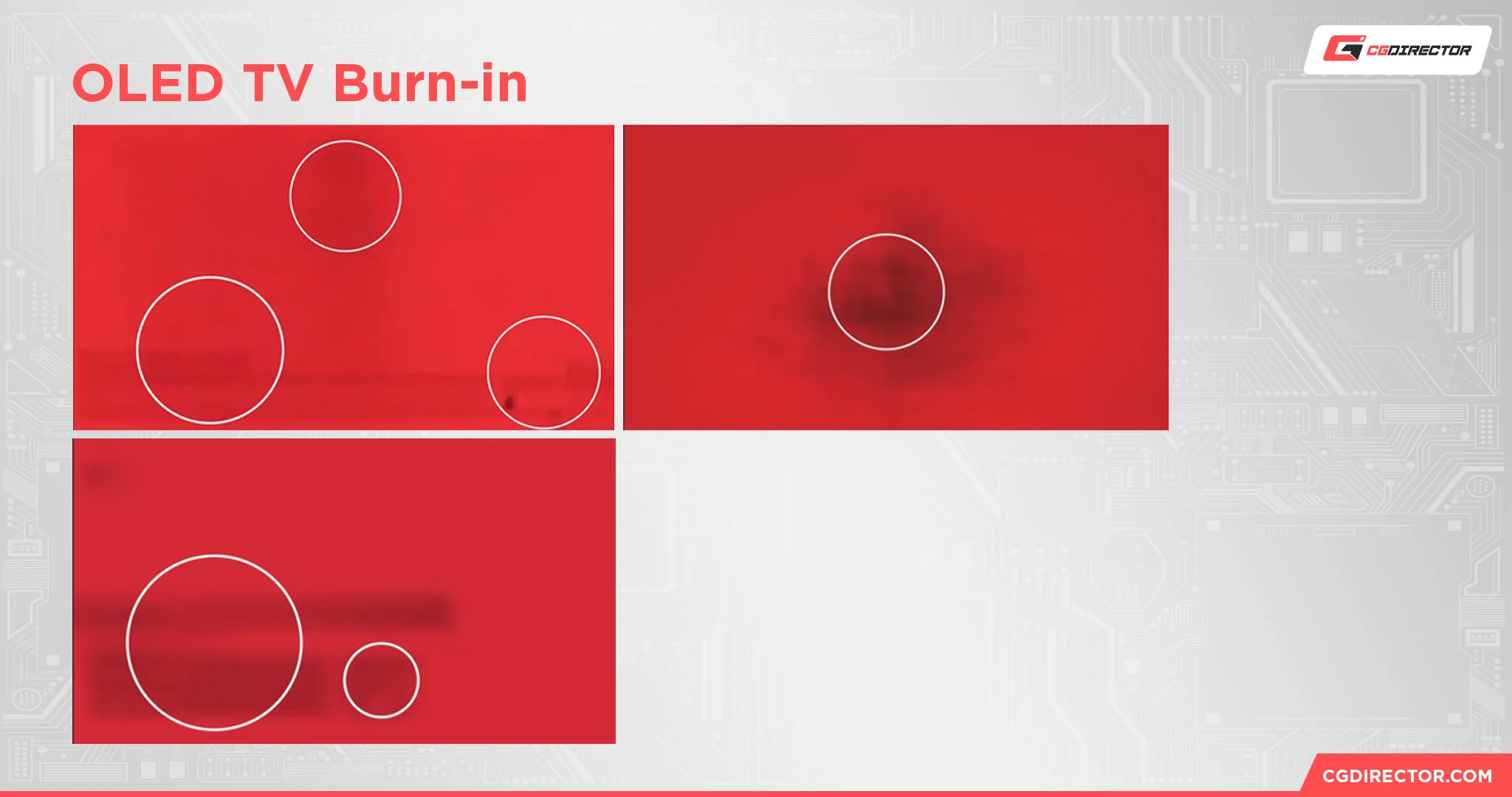
Types of OLED wear you might notice:
| Wear type | What it looks like | Reversibility | Typical cause |
|---|---|---|---|
| Temporary image retention | Faint ghost, fades in minutes | Yes, completely | Displaying static content briefly |
| Uniform brightness reduction | Slower to notice overall | Not reversible | Normal aging across the panel |
| Color shift (warm drift) | Reds fade slightly, blues may shift | Not reversible | Blue emitter degradation pattern |
| Permanent burn-in | Shadow visible on flat backgrounds | Not reversible | Severe cumulative static content |
How QD-OLED and WOLED Differ in Long-Term Wear
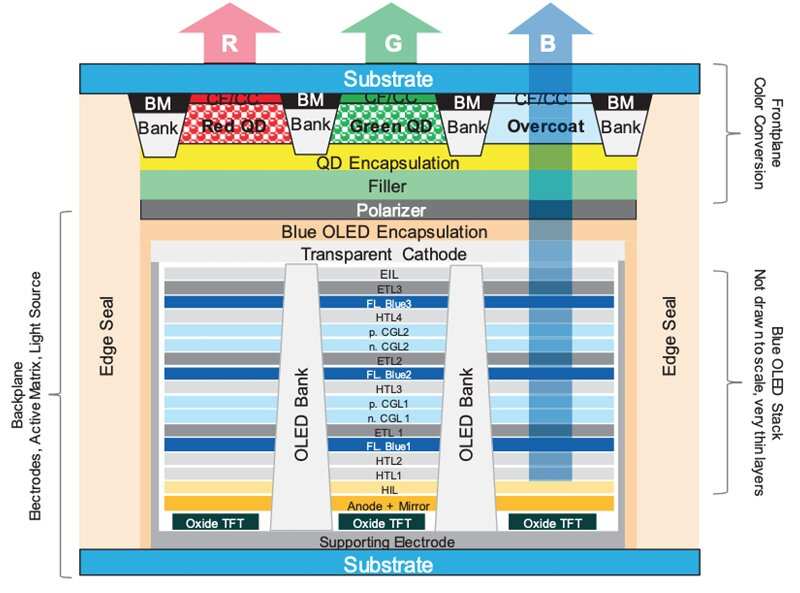
Not all OLED monitors age the same way. The two dominant panel technologies on the market right now have genuinely different degradation characteristics.
WOLED panels use stacked red, green, blue, and white organic emitters with color filters. LG Display pioneered this for televisions and now supplies WOLED panels to several monitor brands including LG's UltraGear line and some Dell Alienware and ASUS models.
QD-OLED panels use blue OLED emitters shining through quantum dot color converters to produce pure red and green. Samsung Display provides these for models like the Alienware AW3225QF, Samsung Odyssey OLED G8, and successors.
The practical difference matters because the blue compounds in QD-OLED panels do a disproportionate share of the work. This creates a different degradation profile than WOLED's distributed emitter approach. In practice, QD-OLED is roughly on par with WOLED for burn-in risk in mixed use.
Users report mixed anecdotal experiences and both panel types age acceptably with normal care.
QD-OLED vs WOLED wear characteristics:
| Characteristic | WOLED | QD-OLED |
|---|---|---|
| Emitter type | RGBW stacked organic layers | Blue OLED + quantum dot converter |
| Dominant aging concern | Red/blue emitter differential | Blue emitter fatigue |
| Color stability over time | Slight warm drift possible | Slight blue shift risk at high static blue |
| Prevention effectiveness | Mature, multi-year track record | Improving rapidly, newer data |
| Best suited for | Heavy text/static UI workflows | Mixed media with gaming/HDR |
Neither panel type is clearly superior for longevity. Both feature robust hardware and firmware countermeasures. Your workflow pattern matters far more than which OLED technology sits behind the glass.
What the Half-Brightness Lifetime Number Really Means
Manufacturers state an OLED panel's rated lifetime in hours to half of original brightness, typically labeled L50. As of 2026, most monitors in this class publish ratings between 30,000 and 50,000 hours.
That sounds straightforward. It isn't.
The rating comes from accelerated lab testing where a panel runs at maximum brightness displaying a specific test pattern, often a pure white field, in controlled temperature and humidity. Your actual use looks nothing like that. Real-world energy consumption depends on average picture level, peak brightness settings, and how frequently the panel runs compensation cycles.
At 50,000 hours of mixed use, here's the realistic picture: two to four hours of varied daily use translates to over fourteen years of service life before hitting L50 conditions. If you push twelve hours daily with heavy static content, those hours accumulate faster and the rate is non-linear.
The number itself matters far less than understanding that brightness settings and content variety drive real-world aging. If you keep OSD brightness in the 30, 40% range for SDR work and let auto-dimming features run, you'll dramatically outlast any rated specification.
Which Users Are Most at Risk of Burn-In
Burn-in risk isn't evenly distributed. Some workflows accelerate differential wear dramatically. Others have almost zero elevated risk.
Where you fall determines how cautiously you should approach OLED.
High risk workloads (prolonged static bright elements are common):
- Software developers with fixed IDE layouts at full opacity for ten-hour days
- Financial analysts with static spreadsheets and always-on ticker bars
- Air traffic and surveillance operators (actually a professional LCD use case)
- Live broadcast monitoring with permanent lower-thirds and logo bugs
Moderate risk workloads:
- Writers and researchers with fixed browser toolbars visible for long sessions
- Competitive gamers with static HUD elements across thousands of hours
- Music producers with fixed timeline and mixer UI configurations
Low risk workloads:
- General productivity with auto-hidden taskbars and dark mode switching between documents
- Movie and video streaming enthusiasts with varied content
- Casual browsing with systems showing mixed pages and ads
- HDR gaming with dynamic content and no persistent overlays
The distinction comes down to one key metric: how many hours per day do the same bright pixels do the same work while their neighbors rest? The more static your display, the more aggressive you need to be with mitigation settings. The more varied, the more a modern OLED monitor performs like a traditional display with no special concerns.
What Burn-In Prevention Features Actually Do
Modern OLED monitors ship with several active and passive countermeasures. Most people never read the manual. Leaving these on makes a genuine difference.
Pixel shift subtly moves the entire displayed image by a few pixels at regular intervals. You won't notice it day-to-day. It spreads wear across neighboring pixel groups so static UI elements don't land on exactly the same emitters forever.
Automatic Brightness Limiter (ABL) monitors average picture level and reduces power when large bright areas stay on screen for extended periods. This trades peak full-screen brightness for reduced aging. When gaming or watching video with lots of dark content, a single bright logo or UI element will trigger subtly different ABL behavior than a full white screen.
Panel compensation cycles run periodic electrical measurements to measure individual pixel wear and adjust drive signals accordingly to correct for uneven aging. These execute after the panel has been powered off or in standby for a fixed number of hours. The process takes several minutes and you might notice the monitor won't turn back on immediately.
Do not unplug the panel during this cycle; interrupting it can harm the correction map.
Static element detection combined with dimming identifies fixed bright regions like on-screen logos, persistent notification icons, and operating system frames then selectively dims those localized areas to keep the image visible while reducing damage rate.
All modern OLED monitors ship with at least two of these active by default. Monitor menus also offer manual compensation cycle triggers if you suspect uneven wear is developing. The general recommendation is to run one of these cycles at most once every few days, only when you feel it's warranted.
Over-running compensation every day can accelerate overall luminosity loss and potentially trigger more error correction noise.
Together, these protect mechanisms have reduced burn-in incidence compared to generation one QD-OLED panels. They aren't magic, but they genuinely work.
How Warranty Policies Affect Your Long-Term Risk
The manufacturer warranty is what determines your actual financial exposure. Panel degradation alone is rarely covered under pixel defect clauses, so what matters most is whether your brand lists visible burn-in explicitly as a covered defect.
Current leading approaches:
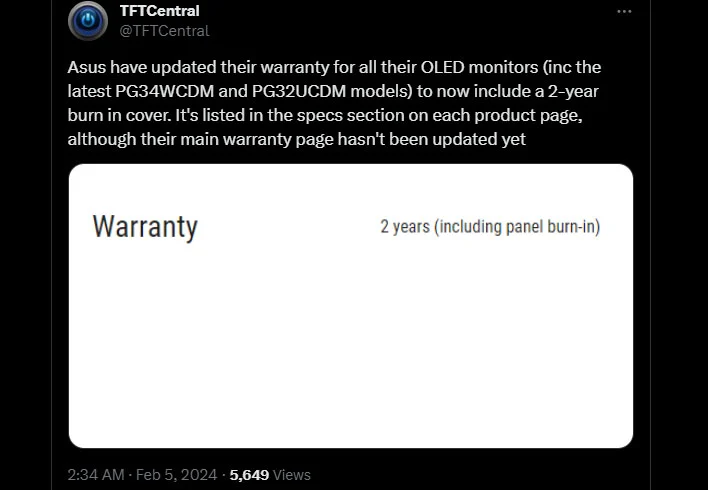
- ASUS was the first major monitor brand to offer explicit burn-in coverage as part of its three-year warranty program for OLED models, widely praised by reviewers as an industry-leading policy.
- LG covers OLED monitors under standard warranty terms, and many regions receive favorable consideration for burn-in claims under consumer law provisions.
- Dell/Alienware generally includes burn-in under the premium panel guarantee on QD-OLED monitors with three-year coverage in supported regions.
- Samsung covers noted screen defects under standard warranty, with regional policy variations offering satisfaction guarantees during the initial return period in some markets.
- MSI and Gigabyte have two to three year burn-in coverage for current OLED monitor lines, improving significantly over earlier policies.
The number that matters most is the warranty duration. Two years offers basic protection but real-world burn-in typically becomes visible in the third year or fourth. Three years becomes the benchmark that takes honest risk off the table.
In the European Union, the two-year legal guarantee provides independent protection that doesn't depend on the manufacturer's specific defect language. Even if a brand technically excludes burn-in, the retailer bears responsibility for delivering a product that remains fit for purpose. Enforcement varies by country, but your position is materially stronger than in the US market, where warranty terms tend to govern more narrowly.
Key warranty features to check before purchase:
- Explicit burn-in or image retention coverage in writing
- Whether coverage lasts two, three, or more years
- Service type: advance replacement, depot repair, or panel swap
- Dead pixel policy (often covers stuck pixels but not always burn-in)
- Regional service clarity, especially if purchasing across borders
Daily Habits That Extend OLED Panel Life
The way you set up your OLED monitor has more impact on longevity than which specific brand you buy. These habits take minutes to configure and genuinely reduce differential wear.
- Enable pixel shift and leave it on. It requires zero sacrifice in image quality.
- Use dark mode for desktop UI elements. White taskbars age far faster than gray or black ones.
- Set your OS to auto-hide the taskbar when not in active use.
- Configure a screen saver or display sleep timeout of five to ten minutes for idle periods.
- Run OLED pixel brightness in SDR content between 30, 50%. Your eye adapts. The unnecessary brightness ages your panel faster.
- Keep operating system and browser tabs in dark themes where available.
- Turn off the monitor at night or let standby mode trigger to allow compensation cycles to execute correctly.
- Avoid static test patterns, solid color full panels, and pause screens left on for extended periods.
- Don't run the manual compensation cycle more often than necessary. Once every couple of months or when you genuinely notice unevenness is sufficient.
- Keep firmware updated. Manufacturers regularly refine ABL behavior and compensation algorithms through firmware.
Setting these up properly adds fifteen minutes of initial effort and then ensures background protections work at their best. You'll spend your time enjoying incredible contrast instead of worrying about panel survival.
Neat habits aside, also be conscious of where brightness actually goes in your workload. A productivity workflow with a massive IDE or Excel sheet is genuinely high risk. For those specific scenarios, consider sitting slightly further back to reduce sudden ABL-triggered luminance changes.
Also avoid testing features like a persistent all-white screen configuration for coding. Dark-themed interfaces have aged far more kindly on OLED than bright backgrounds.
The Verdict: Should You Buy an OLED Monitor for Long-Term Use?
After reviewing the degradation science, the current protection features, and the improved warranty landscape, the verdict is straightforward. For the majority of people asking is OLED monitor reliable long term, the answer is yes.
You should buy an OLED monitor if your priority is elite image quality and you're willing to follow simple preventive practices. You get near-instantaneous response times and per-pixel black levels that no IPS or VA panel has matched. For mixed content workflows including gaming, media, web browsing, and occasional creative work, current panels and protective features deliver reliable service over a realistic replacement window of four to seven years or more.
You should hold off if your workflow is genuinely dominated by a single static bright interface running eight or more hours daily, with no easy option to darken UI elements or auto-hide toolbars. Even with burn-in protection enabled, the accumulated stress on exposed pixel groups will outwear mitigation features sooner than you'd like. In that case, a high-quality IPS panel or a FALD mini-LED display is a perfectly defensible choice.
For most folks, the best strategy is to pick a monitor from the group offering three year burn-in coverage and enjoy the image quality without making OLED anxiety a daily concern. Turn on pixel shift, set SDR brightness below fifty percent, darken your UI where possible, and let the monitor handle the rest. Your panel will age well and your eyes will thank you.
Frequently Asked Questions
How long does an OLED monitor last before burn-in becomes a problem?
With modern default settings and mixed content usage, multiple years of typical home or office use shouldn't produce visibly annoying burn-in. The heavy majority of users report no problems during the first warranty period and continue using the monitor for years after that without permanent burn-in worries. It depends far more on content type than on calendar time.
Is QD-OLED or WOLED more reliable for long-term use?
It has remained difficult to draw a definitive real-world comparison between QD-OLED and WOLED panels. Both panel types feature mature protective countermeasures. Users reporting early issues may not have updated firmware or enabled pixel shift.
For practical majority use, current panel models in either technology are extraordinarily reliable.
Can burn-in be fixed once it appears?
Permanent burn-in from cumulative chemical degradation cannot be reversed. Temporary image retention typically fades after ten to thirty minutes of varied content. Aggressive uniform compensation cycles may slightly improve mild early-stage burn-in unevenness, but shouldn't be expected to eliminate noticeable damage.
Does high brightness cause burn-in?
High sustained brightness accelerates general panel degradation, but burn-in specifically is driven more by uneven wear patterns and extreme static element exposure than overall energy consumption. A dark-themed workload run at eighty percent brightness ages more gently than a white workflow at forty percent because colored pixels and emitter types have different degradation characteristics.
Is OLED reliable enough for professional color work?
Yes. Professional color-grading studios use current OLED reference monitors for these reasons: superior contrast characteristics allow them to achieve deep shadow accuracy, early fears about debilitating burn-in didn't hold up under typical professional workflows with varied content, and built-in compensation and maintenance features have specialized equivalents in high-end professional displays. Panel change costs, which are far lower than reference-grade LCD monitors, provide a controlled maintenance path should it be needed.
What is the realistic replacement window for an OLED monitor?
Most modern OLED monitors offer high-quality performance for at least four to seven years for mixed content users before noticeable degradation prompts replacement. Users running heavy static workloads should keep their warranty status in mind and budget accordingly. A good panel might age gracefully well beyond that span if brightness is managed and default protection settings remain active.
OLED Monitor vs. IPS vs. Mini-LED: Reliability Compared
Finding the right long-term display comes down to understanding how each technology ages. OLED excels at image quality, but two strong alternatives trade that perfect black level for burn-in immunity.
IPS panels use a shared LED backlight with a liquid crystal layer controlling light passage. No organic materials degrade, so burn-in is essentially impossible. The trade-off is weaker contrast, visible IPS glow in dark scenes, and slower response times.
For someone terrified of burn-in who primarily does office work or color-critical tasks, IPS remains the safest bet.
VA panels offer better native contrast than IPS, though still far short of OLED. They carry the same zero burn-in advantage. Motion handling tends to be a weakness, so fast-paced gaming reveals smearing that OLED avoids entirely.
Mini-LED monitors use hundreds or thousands of small LED backlights divided into dimming zones. They burn far less energy at peak brightness than OLED and carry no burn-in risk. HDR total brightness can exceed OLED comfortably.
The downside is blooming around bright objects on dark backgrounds, which OLED doesn't suffer from.
Where OLED wins on reliability despite the burn-in risk:
| Factor | OLED | IPS | Mini-LED |
|---|---|---|---|
| Burn-in risk | Manageable with care | None | None |
| Response time | Near-instant | Slow to moderate | Slow to moderate |
| Contrast | Perfect (infinite) | Low (~1000:1) | Good with limits |
| HDR peak brightness | Lower sustained | Low | Highest |
| Long-term consistency | Gradual uniform dimming | Backlight aging minimal | Backlight aging minimal |
| Best for | Gaming, media mixed use | Pure productivity, fear-averse | Bright rooms, HDR volume |
The honest assessment: pick OLED if image quality drives your enjoyment. Pick IPS or Mini-LED if you want complete peace of mind and don't mind the compromises.
Real-World Longevity: What We Know From Testing and Data
Independent long-term testing has accelerated the available picture of OLED endurance. rtings.com's ongoing longevity test, which runs selected panels displaying varied content continuously, has tracked past models showing only minor ABL-limited brightness loss well into multi-thousand hour territory.
Aggregate owner forum discussions paint a similar picture for most users. The majority of reported burn-in cases come from a specific subset: early QD-OLED buyers who kept OLED pixel brightness nailed to one hundred percent, with no pixel shift enabled, running the same static workstation layout for months on end. Default shipped settings were more conservative, but a segment of enthusiasts chasing maximum spec-sheet brightness inadvertently created the very real edge cases that then made headlines.
Later panel generations, whether in 2024 model year QD-OLED or 2025 monitor updates, have inherited multiple engineering tweaks. ABL behavior has been refined, compensation cycles improved, and manufacturer firmware updates have quietly boosted protection without announcement. Buying a current panel at this point means you benefit from all of that.
Mistakes to Avoid: Common Errors That Shorten OLED Life
Most OLED damage happens through ignorance, not misuse. People make the same handful of mistakes. Avoid these and you are already ahead.
Running SDR brightness at maximum in a dim room is the quickest path to rapid degradation. You don't need it. Your eyes adapt to lower brightness within minutes, and the panel runs cooler and slower.
Leaving static UI elements always visible at full opacity for eight-hour workdays without protection features turned on is asking for trouble. Dark mode, auto-hiding, and pixel shift exist for good reason. Not using them costs you longevity.
Ignoring compensation cycle warnings or unplugging the monitor while one cycles is another surprisingly common error. The panel needs to complete this cycle to correct for wear that has already occurred. Cutting power mid-cycle degrades the compensation map and can make things worse than before.
Buying at MSRP without checking warranty terms is a financial risk people forget. Two year coverage works out fine for a lot of buyers, but if your usage is heavy or you're truly risk-averse, the models with more generous burn-in policies are worth the small premium.
When an OLED Monitor Is the Wrong Choice
There are honest situations where we'd steer someone to IPS or Mini-LED instead. The image quality is outstanding, but it doesn't justify the trade-off in every scenario.
If your primary task is software development with a fixed IDE palette, and you cannot tolerate even faint unevenness on dark code backgrounds five years from now, OLED introduces a variable you don't need. A high-quality IPS is the pragmatic answer.
If you need sustained full-screen brightness for HDR mastering in a bright environment, Mini-LED will outperform OLED without any long-term degradation anxiety. OLED's ABL limitations are a real workflow constraint for that specific professional niche.
If you are extremely cost-sensitive and plan to run the display for eight to ten years without replacing it, the cumulative risk window eventually overtakes the image quality benefit. Budget professional IPS panels easily hit that lifespan with zero burn-in risk.
When an OLED Monitor Is Absolutely Worth It
Conversely, there are scenarios where OLED pulls so far ahead that the cost and minor care requirements are a bargain.
Competitive and immersive gaming is the obvious win. Response times measured in fractions of a millisecond, perfect black levels, and HDR highlight handling combine into something no IPS panel can match in perceived image quality.
Home theater PC setups benefit enormously.letterbox bars are literally invisible against perfect black, and dark scenes in films reveal detail that IPS glow would otherwise mask behind a gray haze.
Mixed productivity plus media consumption is the sweet spot. You get eight hours of productive text work with dark mode enabled, then two hours of stunning movies and gaming in the evening. The variety of content helps the panel age evenly.
And modern burn-in prevention software runs silently in the background.
As of 2026, the combination of refined panel technology, mature protection features, genuinely useful warranty policies from multiple manufacturers, and street prices that have come down meaningfully makes OLED the best visual experience per dollar in any monitor technology.

Similar Posts





















