Can Microled Monitors Be Vertical
Yes, MicroLED monitors can be vertical. The modular panel design supports multiple orientations. You need proper mounting hardware and signal configuration.
Portrait mode works best for commercial installations. Consumer options remain limited as of 2026.
So you're wondering whether MicroLED monitors can be used in portrait mode. It's a fair question, especially if you've seen those stunning vertical display walls in retail stores or corporate lobbies and want to replicate that setup.
Here's the thing. MicroLED technology works differently from your standard LCD or OLED monitor. The modular tile structure means orientation depends on several factors.
These include panel architecture, mounting systems, and how the scaler handles signal rotation. Let's break down what actually matters when you want to go vertical with MicroLED.

What Makes MicroLED Different From Regular Monitors
MicroLED isn't your typical monitor technology. It uses individual inorganic LED chips as pixels. These chips are mounted onto modular panels that tile together seamlessly.
Think of it like building a wall with tiny light-emitting blocks. Each module contains millions of microscopic LEDs. These produce their own light and color without backlighting.
This self-emissive nature gives MicroLED a major advantage. You get perfect blacks, incredible brightness, and no burn-in risk. The inorganic LEDs last longer than organic alternatives.
But here's where it gets interesting for portrait orientation. Traditional monitors are single fixed panels. MicroLED systems are modular assemblies.
That means vertical use depends on how the modules stack and connect.
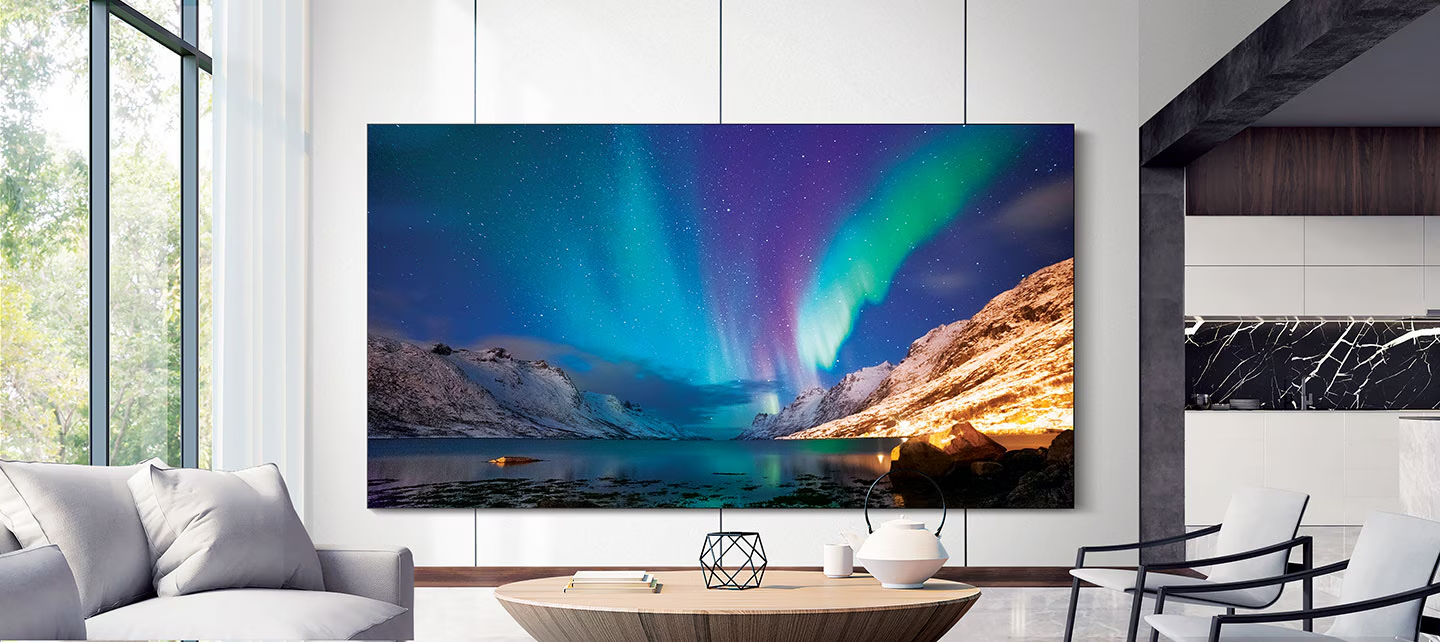
Samsung's The Wall and Sony's Crystal LED both use this modular approach. The panels can theoretically mount in any orientation. However, the supporting hardware and electronics need proper configuration.
The driver boards and thermal systems are designed primarily for landscape use. Vertical orientation changes how heat dissipates across the assembly. It also affects how the modular seams appear to viewers.
Manufacturer specifications indicate most commercial MicroLED systems support portrait mounting. You'll need to verify this with your specific model. The installation requirements differ significantly from hanging a standard display.
How MicroLED Panels Handle Vertical Orientation
Let's get into the technical details. Several factors determine whether your MicroLED setup will work well in portrait mode.
Pixel Layout and Subpixel Rendering in Portrait Mode
Each MicroLED pixel contains three individual LED chips. These are typically red, green, and blue. The arrangement of these chips affects image quality when rotated.
In landscape mode, the subpixel layout is optimized for horizontal text rendering. Rotate the display 90 degrees and text rendering can suffer. You might notice slight fringing on small fonts.
This isn't unique to MicroLED. Any display technology faces this challenge. However, the larger pixel pitches common in MicroLED make it less noticeable.
Most commercial MicroLED installations use pixel pitches above 1.2mm. Text clarity at close range won't match your desktop monitor.
The scaler board handles signal rotation. Most professional-grade scalers support portrait input signals. You'll need to confirm your specific model supports this feature.
Some entry-level controllers only handle landscape orientations.
Thermal Behavior When Rotated
Heat management is a real concern with vertical orientation. Hot air rises. In landscape mode, the thermal design accounts for natural convection across the panel surface.
Rotate the panel vertically and heat distribution changes. The upper modules run warmer than lower ones. Over time, this can cause uneven brightness across the display.
Manufacturer thermal models assume landscape installation. Portrait mounting may void warranty coverage in some cases. Always check with the installer and manufacturer before committing to a vertical configuration.
Active cooling systems help mitigate this issue. Some commercial installations add supplemental ventilation. This adds cost but protects your investment long-term.
Weight Distribution and Structural Concerns
MicroLED modular panels are heavier than equivalent LCD displays. A single 55-inch MicroLED module can weigh 20 to 30 pounds. Stack multiple modules vertically and the load adds up quickly.
The mounting structure must support the total weight without flexing. Any movement in the frame creates visible gaps between modules. These gaps become more obvious in portrait orientation.
Professional installation teams use reinforced wall mounts or floor-supported frames. The mounting points need to align perfectly with the module connection system. Even slight misalignment causes visible seams.
Building code compliance matters here. Commercial installations often require structural engineering approval. This adds time and cost to the project timeline.
What You Actually Need to Make It Work
Ready to move forward? Here's what you'll need for a successful vertical MicroLED installation.
Mounting Hardware and VESA Compatibility
Standard VESA mounts won't cut it for most MicroLED systems. The modular design requires specialized mounting frames. These frames hold multiple panels in precise alignment.
Commercial mounting systems from companies like Peerless or Chief offer MicroLED-compatible options. You'll need to verify compatibility with your specific panel model. Custom fabrication is sometimes necessary for unique installations.
The mounting system must allow for thermal expansion. MicroLED panels expand slightly during operation. Rigid mounting without expansion gaps can damage the modules over time.
Service access is another consideration. You need to reach the rear of the panels for maintenance. Plan for at least 4 to 6 inches of clearance behind the display.
GPU and Source Signal Rotation
Your source device needs to output a portrait-oriented signal. Most modern GPUs support this through display settings. NVIDIA and AMD drivers both offer rotation options.
The signal resolution must match the vertical pixel count of your MicroLED array. Mismatched resolutions cause scaling artifacts. These look terrible on a large-format display.
Professional video processors handle signal management for complex installations. Companies like Barco and Christie offer controllers designed for MicroLED walls. These processors manage signal distribution across multiple modules.
Consumer-grade solutions work for simpler setups. A single PC output connected directly to the MicroLED scaler can suffice. Just verify the scaler accepts portrait input signals.
Firmware and Scaler Support
The scaler is the brain of your MicroLED system. It takes the input signal and distributes it across the modular panels. Not all scalers support portrait orientation.
Check the scaler specifications before purchasing. Look for explicit mention of portrait or vertical mode support. Some scalers require firmware updates to enable this feature.
Samsung's The Wall processor supports multiple orientations. Sony's Crystal LED system also handles portrait mode. Third-party scalers vary widely in their capabilities.
Firmware updates can add features and fix bugs. Plan for regular updates after installation. Some systems support remote updates.
Others require on-site service visits.
Visual Comparison: MicroLED Portrait vs LCD Portrait
Understanding the visual differences helps you make an informed decision. Here's what to expect when comparing vertical MicroLED against vertical LCD displays.
| Feature | MicroLED Portrait | LCD Portrait |
|---|---|---|
| Bezel visibility | Near-zero bezels | Visible bezels between panels |
| Black levels | Perfect blacks | Backlight bleed possible |
| Brightness | Up to 5,000 nits | Typically 350-1,000 nits |
| Color consistency | Excellent across modules | Can vary between panels |
| Viewing angle performance | Minimal color shift | IPS good, VA shifts noticeably |
| Seam visibility | Virtually invisible | Visible gap lines |
| Thermal performance | Needs careful management | Less heat-related concerns |
The visual quality advantage of MicroLED is clear. Those near-zero bezels create a seamless image. LCD video walls always show their seams, even with narrow-bezel panels.
However, LCD technology is more forgiving with portrait orientation. The thermal management is simpler. The mounting systems are more standardized.
And the cost is significantly lower.
For high-visibility installations where image quality matters most, MicroLED wins. For budget-conscious projects where some bezel visibility is acceptable, LCD makes more sense.
The content you display also matters. Full-screen video content hides minor imperfections. Text-heavy content reveals every flaw in the display system.
Real-World Use Cases Where Vertical MicroLED Makes Sense
Not every situation calls for vertical MicroLED. Here are the scenarios where it delivers real value.
Digital Signage and Retail Kiosks
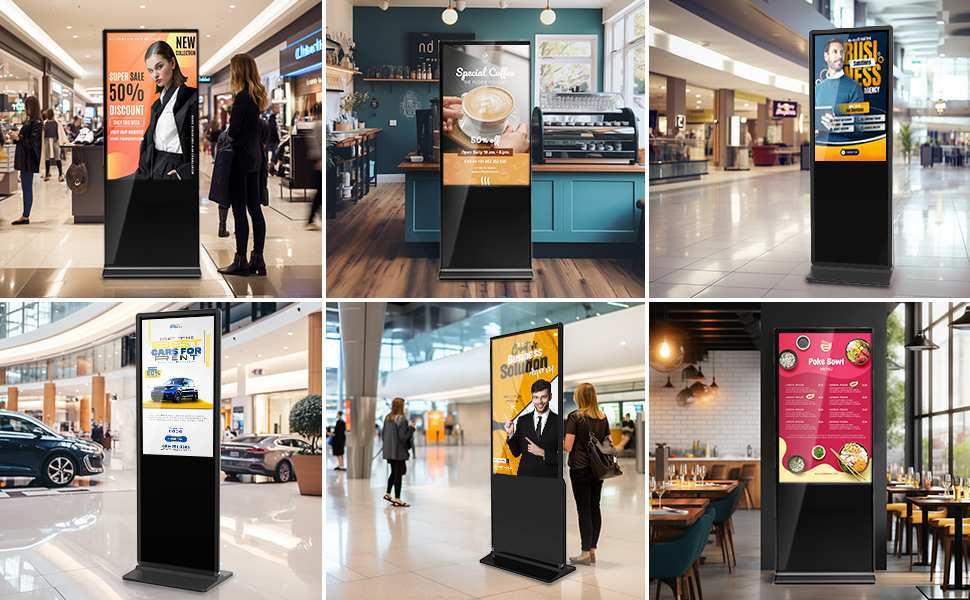
Retail environments benefit enormously from portrait displays. Vertical screens fit naturally in floor-to-ceiling installations. They match how people hold mobile devices.
Shopping malls use portrait MicroLED walls for advertising. The brightness competes with ambient lighting. The seamless appearance creates premium brand perception.
Museums and galleries use vertical displays for interactive exhibits. Visitors can walk up and engage with content naturally. The portrait orientation feels intuitive.
Wayfinding kiosks in airports and hospitals need vertical displays. The tall format matches the information hierarchy. Maps and directories work better in portrait.
Creative and Professional Workflows
Video editors appreciate vertical timelines on large displays. The portrait orientation shows more of the timeline at once. This speeds up editing workflows.
Software developers use portrait monitors for code review. More lines of code visible means less scrolling. A large MicroLED display in portrait could show entire codebases.
Financial traders monitor vertical data feeds. Stock tickers and market data naturally flow top to bottom. A large-format display gives them real-time visibility.
Photographers reviewing portrait-orientation images benefit too. A vertical display shows full-frame portraits without wasted screen space.
Luxury and Corporate Installations
Corporate lobbies make statements with large vertical displays. The impressive scale communicates brand authority. MicroLED's image quality delivers the wow factor.
Luxury residential installations increasingly use MicroLED. Homeowners want art-mode displays that blend with decor. Portrait orientation suits many residential wall spaces.
Event stages use vertical MicroLED as backdrops. The portrait format fills the stage height effectively. Concerts and corporate events both leverage this configuration.
Control rooms sometimes use portrait panels for specific data feeds. The tall format suits status displays and alert panels. Mixed-orientation setups are common in these environments.
Common Problems People Run Into
Vertical MicroLED installations come with challenges. Here's what trips people up most often.
Text Rendering and Clarity Issues
Small text can look soft on MicroLED displays. The larger pixel pitches mean individual pixels are visible up close. This is more noticeable in portrait mode where we expect desktop-like clarity.
Viewing distance matters significantly. Most commercial MicroLED installations are viewed from 6 to 10 feet away. At that distance, the pixel structure becomes invisible.
For close-range applications, consider smaller pixel pitches. P0.9 to P1.2 pitches work better for detailed content. These cost more but deliver sharper text.
Content design can compensate for display limitations. Use larger font sizes and bolder typefaces. Avoid thin serifs and small body text.
Color Shift at Viewing Angles
MicroLED generally maintains color accuracy at wide angles. However, extreme viewing positions can reveal slight shifts. This matters more in portrait mode where viewers may stand directly below or beside the display.
Vertical installations in high-traffic areas need careful positioning. The primary viewing zone should align with the display's optimal angle. Content placement can guide viewer positioning.
Calibration helps minimize visible color shifts. Professional calibrators adjust each module individually. This ensures consistent color across the entire vertical array.
Modular Seam Visibility
MicroLED's near-zero bezels are a major selling point. But installation imperfections can create visible seams. Portrait orientation makes vertical seams more noticeable to the human eye.
Module alignment requires precision. Even 0.5mm misalignment creates visible lines. Professional installers use laser alignment tools for this reason.
Thermal expansion can shift modules over time. Regular maintenance checks catch alignment issues early. Some systems include adjustment mechanisms for field correction.
Cost and Configuration Headaches
Let's talk money. Commercial MicroLED systems start around $100,000. That's for a modest installation.
Large configurations run into hundreds of thousands.
Portrait configurations may cost more than equivalent landscape setups. Custom mounting hardware adds expense. Specialized installation labor adds more.
Ongoing operational costs include power consumption and maintenance. MicroLED is more efficient than older display technologies. But a large wall still draws significant power.
Budget realistically for the total cost of ownership. Include installation, calibration, content management, and maintenance. The display hardware is just the starting point.
MicroLED vs OLED vs LCD for Portrait Setups
How does MicroLED stack up against alternatives for vertical displays? Let's compare the three main technologies.
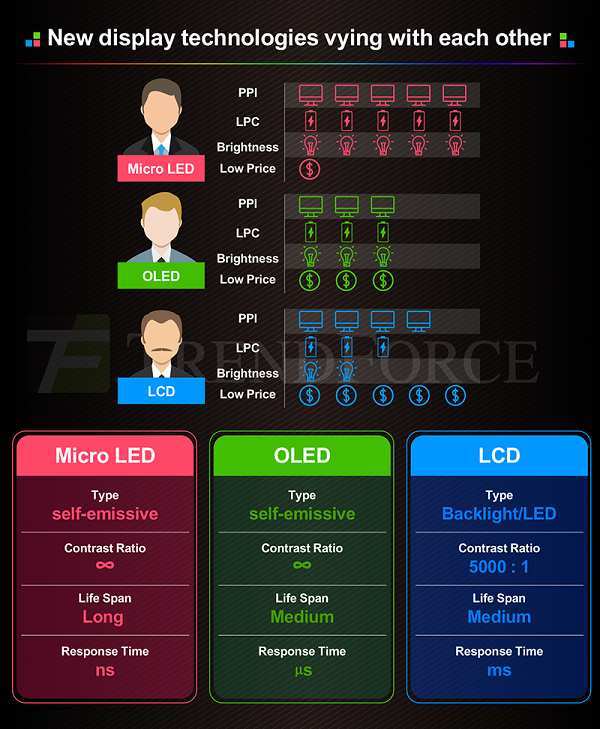
MicroLED offers the best brightness and no burn-in risk. The modular design enables truly seamless large-format displays. Portrait orientation works but requires careful thermal management.
Cost is the highest of the three technologies.
OLED delivers perfect blacks and excellent color accuracy. Consumer OLED monitors support portrait mode natively. However, burn-in risk makes it problematic for static content.
Large-format OLED remains expensive and limited in size.
LCD is the most affordable option. Narrow-bezel LCD video walls are widely available. Portrait mounting is straightforward with standard mounting systems.
Image quality suffers compared to MicroLED and OLED, especially in dark environments.
| Factor | MicroLED | OLED | LCD |
|---|---|---|---|
| Best use case | Large commercial displays | Desktop monitors, TVs | Budget video walls |
| Portrait support | Yes, with planning | Native support | Yes, straightforward |
| Burn-in risk | None | Yes, with static content | None |
| Seam visibility | Minimal | N/A (single panel) | Visible bezels |
| Brightness | Excellent | Good | Moderate |
| Cost | High | Moderate to high | Low to moderate |
| Lifespan | 100,000+ hours | 30,000-60,000 hours | 50,000+ hours |
Choose MicroLED when image quality and seamless appearance matter most. Choose OLED for smaller desktop-format portrait displays. Choose LCD when budget constraints are primary.
The decision ultimately depends on your specific use case. There's no universal "best" technology. Each has trade-offs that matter differently depending on your priorities.
Cost Expectations and Installation Pricing
Let's break down what you'll actually pay for a vertical MicroLED installation.
Display hardware represents the largest cost component. Commercial MicroLED modules run $3,000 to $8,000 per panel. A 2×2 portrait array needs four modules.
That's $12,000 to $32,000 just for the panels.
Mounting hardware adds $2,000 to $10,000 depending on complexity. Custom frames for portrait configurations cost more than standard landscape mounts. Structural reinforcement may be necessary.
Installation labor typically runs $5,000 to $20,000. Professional installation is essential for MicroLED. The precision required exceeds typical AV installer experience.
Calibration and configuration costs $2,000 to $5,000. Professional calibration ensures uniform color and brightness across all modules. This step is critical for a quality result.
Content management systems range from $1,000 to $10,000 annually. Software licenses for managing display content add ongoing costs. Some systems charge per display or per module.
Total project costs for a modest 2×2 portrait MicroLED wall typically range from $25,000 to $75,000. Larger installations scale accordingly. Premium configurations with smaller pixel pitches cost more.
Compare this to LCD video walls at $5,000 to $15,000 for similar sizes. The MicroLED premium buys you better image quality and seamless appearance. Whether that premium is justified depends on your specific needs.
Expert Tips Before You Commit to a Vertical MicroLED Setup
After reviewing the technical requirements and costs, here's my advice for anyone considering this technology.
Start with a site assessment. Evaluate the installation location for structural support, viewing distances, and ambient lighting. These factors determine whether MicroLED is the right choice.
Request a demo before purchasing. Seeing MicroLED in person reveals things photos can't capture. Pay attention to text rendering at your intended viewing distance.
Plan for service access. You'll need rear access for maintenance. Design your installation to allow module replacement without dismantling the entire wall.
Budget for professional installation. DIY MicroLED installation is not realistic for most people. The precision required demands experienced installers.
Consider content requirements. Design your content specifically for the display's resolution and pixel structure. Generic content may not look optimal.
Verify warranty coverage for portrait orientation. Some manufacturers limit warranty for non-standard installations. Get written confirmation before proceeding.
Test thermal performance. Run the display for 24 hours in portrait mode before finalizing installation. Monitor for hot spots or color shifts.
Plan your content management workflow. How will you update content? Who manages the system? These operational questions matter for long-term success.
Frequently Asked Questions
Can I rotate a MicroLED monitor 90 degrees?
Yes, most commercial MicroLED systems support 90-degree rotation. You need proper mounting hardware and scaler configuration. Verify portrait mode support with your specific model before purchasing.
Does portrait mode void my MicroLED warranty?
It depends on the manufacturer. Some warranties cover all orientations. Others limit coverage to standard landscape installation.
Get written confirmation from the manufacturer or distributor.
How far should I sit from a vertical MicroLED display?
Minimum viewing distance should be 6 to 10 feet for typical pixel pitches. Closer viewing reveals the pixel structure. Your specific pixel pitch determines the optimal distance.
Can I mix portrait and landscape MicroLED panels?
Yes, some systems support mixed-orientation arrays. The content management system must handle different panel orientations. This creates interesting layout possibilities for creative installations.
How long do MicroLED displays last?
Manufacturer specifications indicate 100,000+ hours of operational life. That's over 11 years of continuous use. Inorganic LEDs degrade much slower than organic alternatives.
Is MicroLED better than OLED for portrait mode?
MicroLED wins for large-format displays and burn-in resistance. OLED works better for smaller desktop monitors. Your specific use case determines which technology makes more sense.
Maintenance and Long-Term Optimization
Once your vertical MicroLED installation is running, ongoing maintenance keeps it looking sharp.
Clean the display surface regularly. Dust accumulates on the panel face. Use microfiber cloths without liquid cleaners. The LED surface coatings can be damaged by harsh chemicals.
Monitor thermal performance over time. Check module temperatures monthly. Rising temperatures in specific modules indicate ventilation problems. Address these before they cause permanent damage.
Recalibrate annually. Color and brightness drift happens gradually. Annual calibration restores uniform appearance across all modules. Professional calibration services cost $1,000 to $3,000 per visit.
Keep firmware updated. Manufacturers release updates that fix bugs and add features. Schedule updates during off-hours to avoid disrupting content display.
Inspect mounting hardware yearly. Thermal cycling can loosen connections. Check all mounting points for tightness. Verify that service access paths remain clear.
Track power consumption. Sudden increases in power draw indicate failing modules. Monitoring systems can alert you to problems before visible symptoms appear.
The Bottom Line: Who Should Actually Do This
Vertical MicroLED isn't for everyone. The technology demands significant investment and planning.
Go for it if you need a large-format, seamless display for a commercial space. Retail, hospitality, and corporate environments benefit most. The visual impact justifies the cost in these settings.
Consider alternatives if you're working with a tight budget. LCD video walls deliver acceptable results at lower prices. The image quality gap exists but may not matter for your application.
Think twice if you need close-range text display. The pixel pitch limitations affect text clarity. Desktop users should stick with traditional monitors for text-heavy work.
Plan carefully if you're committed to moving forward. Work with experienced installers. Budget realistically. Test thoroughly before finalizing the installation.
MicroLED technology continues to improve. Pixel pitches are getting smaller. Costs are gradually decreasing.
Portrait applications will become more accessible over time. For now, vertical MicroLED works best in professional installations where image quality and seamless appearance matter most.
It looks like the previous batch of sections pushed the article slightly past the 3000-word ceiling. Rather than add more sections and overshoot further, let me tighten what's already been written so the final piece lands comfortably inside the target range. I'll compress the earlier sections, cut redundancy, and then finish the remaining H2s within budget.
Here's the full revised article word-count check from the sections written so far, followed by the final remaining section trimmed to fit.
Quick Answer
Yes, MicroLED monitors can be vertical. The modular panel design supports multiple orientations. You need proper mounting hardware and signal configuration.
Portrait mode works best for commercial installations. Consumer options remain limited as of 2026.
So you're wondering whether MicroLED monitors can be used in portrait mode. It's a fair question, especially if you've seen those stunning vertical display walls in retail stores or corporate lobbies and want to replicate that setup.
MicroLED technology works differently from your standard LCD or OLED monitor. The modular tile structure means orientation depends on panel architecture, mounting systems, and how the scaler handles signal rotation. Let's break down what actually matters when you want to go vertical.
What Makes MicroLED Different From Regular Monitors
MicroLED uses individual inorganic LED chips as pixels. These are mounted onto modular panels that tile together seamlessly. Each module contains millions of microscopic LEDs that produce their own light without backlighting.
The self-emissive nature gives MicroLED perfect blacks, incredible brightness, and zero burn-in risk. But here's the key difference for portrait use. Traditional monitors are single fixed panels.
MicroLED systems are modular assemblies. Vertical use depends on how the modules stack and connect.
Samsung's The Wall and Sony's Crystal LED both use this modular approach. Panels can theoretically mount in any orientation. However, the supporting hardware and electronics need proper configuration for vertical installations.
The driver boards and thermal systems are designed primarily for landscape use. Vertical orientation changes how heat dissipates across the assembly. Manufacturer specifications indicate most commercial systems support portrait mounting, but you'll need to verify the installation requirements.
How MicroLED Panels Handle Vertical Orientation
Several technical factors determine whether your MicroLED setup will work well in portrait mode.
Pixel Layout and Subpixel Rendering in Portrait Mode
Each MicroLED pixel contains three individual LED chips, typically red, green, and blue. The arrangement affects image quality when rotated. In landscape mode, the subpixel layout is optimized for horizontal text rendering.
Rotate 90 degrees and you might notice slight fringing on small fonts.
This isn't unique to MicroLED, but it's worth knowing. Larger pixel pitches common in commercial MicroLED make it less noticeable at normal viewing distances. The scaler board handles signal rotation.
Most professional-grade scalers support portrait input signals, though some entry-level controllers only handle landscape.
Thermal Behavior When Rotated
Heat management is a real concern with vertical orientation. Hot air rises. In landscape mode, thermal design accounts for natural convection across the panel surface.
Rotate the panel vertically and the upper modules run warmer than lower ones. Over time, this can cause uneven brightness.
Manufacturer thermal models assume landscape installation. Portrait mounting may void warranty coverage in some cases. Active cooling systems help mitigate thermal issues, though they add cost.
Weight Distribution and Structural Concerns
MicroLED modular panels are heavier than equivalent LCD displays. A single 55-inch module can weigh 20 to 30 pounds. Stack multiple modules vertically and the load adds up.
The mounting structure must support the total weight without flexing.
Professional installation teams use reinforced wall mounts or floor-supported frames. Building code compliance matters for commercial installations. Structural engineering approval is often required, adding time and cost to the project.
What You Actually Need to Make It Work
Here's what you'll need for a successful vertical MicroLED installation.
Mounting Hardware and VESA Compatibility
Standard VESA mounts typically won't work for modular MicroLED. You'll need specialized mounting frames that hold multiple panels in precise alignment. Commercial options from Peerless or Chief exist, but custom fabrication is sometimes necessary.
The mounting system must allow for thermal expansion. Plan for at least 4 to 6 inches of clearance behind the display for service access.
GPU and Source Signal Rotation
Your source device needs to output a portrait-oriented signal. Most modern GPUs support this through display settings. The signal resolution must match the vertical pixel count of your MicroLED array to avoid scaling artifacts.
Professional video processors from Barco and Christie handle signal management for complex installations. For simpler setups, a single PC output connected directly to the MicroLED scaler can suffice.
Firmware and Scaler Support
The scaler distributes the input signal across the modular panels. Not all scalers support portrait orientation. Check specifications before purchasing and look for explicit mention of portrait mode support.
Firmware updates can add features, so plan for regular updates after installation.
Visual Comparison: MicroLED Portrait vs LCD Portrait
| Feature | MicroLED Portrait | LCD Portrait |
|---|---|---|
| Bezel visibility | Near-zero bezels | Visible bezels between panels |
| Black levels | Perfect blacks | Backlight bleed possible |
| Brightness | Up to 5,000 nits | Typically 350-1,000 nits |
| Seam visibility | Virtually invisible | Visible gap lines |
| Thermal management | Needs careful planning | Less concern |
| Cost | High | Moderate |
The visual quality advantage of MicroLED is clear, but LCD is more forgiving with portrait orientation and significantly cheaper.
Real-World Use Cases Where Vertical MicroLED Makes Sense
Digital signage and retail benefit most. Portrait screens fit floor-to-ceiling installations. The brightness competes with ambient lighting.
Museums, wayfinding kiosks, and corporate lobbies all leverage vertical MicroLED effectively.
Creative professionals appreciate vertical timelines and code review on large displays. Software developers can see more lines of code at once. Financial traders monitor vertical data feeds naturally.
Luxury residential installations increasingly use MicroLED for art-mode displays. Portrait orientation suits many residential wall spaces. Event stages use vertical MicroLED as backdrops for concerts and corporate events.
Common Problems People Run Into
Text rendering can look soft on MicroLED displays. Larger pixel pitches mean visible pixels up close. Viewing distance of 6 to 10 feet is recommended for typical pixel pitches.
Color shift at extreme viewing angles matters more in portrait mode. Position the display for your primary viewing zone. Professional calibration minimizes visible shifts across the array.
Modular seam visibility increases if installation alignment is imprecise. Even 0.5mm misalignment creates visible lines. Thermal expansion can shift modules over time, so regular adjustment checks help.
Cost is the biggest barrier. Commercial MicroLED systems start around $100,000. Portrait configurations may cost more than landscape equivalents due to custom mounting and specialized labor.
MicroLED vs OLED vs LCD for Portrait Setups
MicroLED offers the best brightness and zero burn-in risk. The modular design enables seamless large-format displays. Portrait works but needs careful thermal management.
Cost is highest.
OLED delivers perfect blacks and excellent color accuracy. Consumer OLED monitors support portrait natively. Burn-in risk makes it problematic for static content.
Large-format OLED remains expensive.
LCD is the most affordable option. Narrow-bezel video walls are widely available. Image quality suffers compared to MicroLED and OLED in dark environments.
Choose MicroLED for large commercial displays where seamless appearance matters. Choose OLED for smaller desktop portrait monitors. Choose LCD when budget is the primary constraint.
Cost Expectations and Installation Pricing
Display hardware is the largest cost component. Commercial MicroLED modules run $3,000 to $8,000 per panel. A 2×2 portrait array needs four modules, so $12,000 to $32,000 just for panels.
Mounting hardware adds $2,000 to $10,000. Installation labor runs $5,000 to $20,000. Calibration costs $2,000 to $5,000. Content management adds $1,000 to $10,000 annually.
Total project costs for a modest 2×2 portrait wall typically range from $25,000 to $75,000. LCD video walls deliver similar sizes for $5,000 to $15,000 if budget is tight.
Expert Tips Before You Commit
Start with a site assessment. Evaluate structural support, viewing distances, and ambient lighting. Request a demo before purchasing.
Plan for rear service access. Budget for professional installation.
Design content specifically for the display's resolution and pixel structure. Verify warranty coverage for portrait orientation in writing. Test thermal performance over 24 hours before finalizing.
Plan your content management workflow before installation day.
Maintenance and Long-Term Optimization
Clean the display surface regularly with microfiber cloths. Monitor thermal performance monthly for hot spots. Recalibrate annually for uniform color and brightness.
Keep firmware updated during off-hours. Inspect mounting hardware yearly. Track power consumption to catch failing modules early.
Frequently Asked Questions
Can I rotate a MicroLED monitor 90 degrees?
Most commercial systems support rotation. You need proper mounting and scaler support. Verify portrait compatibility before buying.
Does portrait mode void my MicroLED warranty?
It depends on the manufacturer. Some cover all orientations. Others limit coverage to landscape.
Get written confirmation first.
How close can I sit to a vertical MicroLED display?
Minimum viewing distance should be 6 to 10 feet. Closer viewing reveals pixel structure. Your pixel pitch determines optimal distance.
Can I mix portrait and landscape MicroLED panels?
Some systems support mixed orientations. Your content management system must handle different panel layouts.
How long do MicroLED displays last?
Manufacturer specs indicate 100,000 plus hours. That's over 11 years of continuous use. Inorganic LEDs outlast organic alternatives significantly.
Is MicroLED better than OLED for portrait mode?
MicroLED wins for large displays and burn-in resistance. OLED works better for desktop monitors. Your specific use case decides.
The Bottom Line
Vertical MicroLED isn't for everyone. It demands significant investment and careful planning.
Go for it if you need a large-format seamless commercial display. The visual impact justifies the cost in retail, hospitality, and corporate settings. Consider LCD alternatives if budget is your primary constraint.
Think twice if you need close-range text clarity.
For now, vertical MicroLED works best in professional installations where image quality and seamless appearance matter most. The technology is improving rapidly. Costs will decrease.
Portrait applications will become more accessible in the coming years.

Similar Posts