Is OLED Monitor Good for Watching Movies
If you've ever sat in a dark room watching a movie on a regular monitor and noticed the blacks look more like dark gray, you've already felt the problem OLED solves. So is OLED monitor good for watching movies? The short answer is yes, and for most people who prioritize image quality, it's the single biggest upgrade you can make to a desk-based viewing setup.
OLED technology uses self-emissive pixels, meaning each pixel produces its own light and can turn off completely. That gives you a true infinite contrast ratio, something no backlit LCD panel can match. Per VESA DisplayHDR True Black certification standards, OLED panels deliver per-pixel dimming with zero blooming, which is exactly what makes dark cinematic scenes look the way filmmakers intended.
Let's break down why that matters and where OLED falls short, so you can decide if it's the right call for your setup.

Quick Answer
OLED monitors are excellent for watching movies. They deliver perfect black levels and infinite contrast. HDR content looks stunning on OLED in a dark room.
The main downsides are burn-in risk and lower peak brightness than Mini-LED. If you watch movies in a dark room and want the best image quality, OLED is worth it.
What Makes OLED Different for Movie Playback
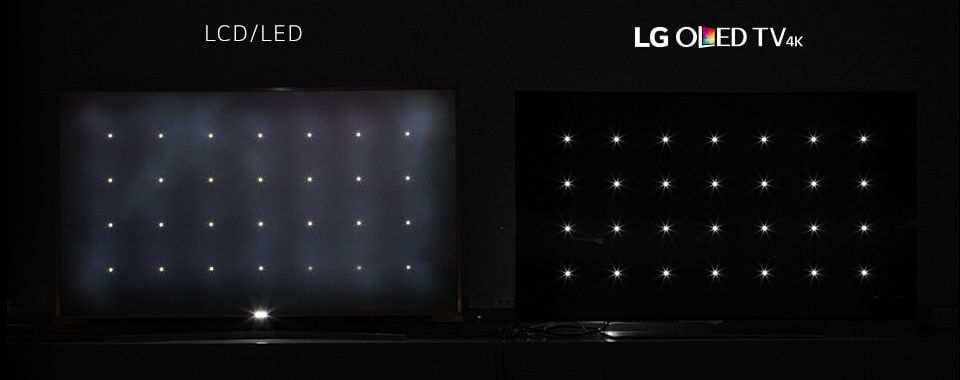
The core difference comes down to how the screen produces light. Every traditional LCD monitor, whether it uses IPS or VA panels, relies on a backlight behind the display. Even with advanced local dimming zones, that backlight bleeds through in dark areas.
OLED skips the backlight entirely.
Each pixel on an OLED panel is its own tiny light source. When a scene calls for black, those pixels switch off. Not dimmed.
Off. That's what creates the "infinite contrast ratio" you see in spec sheets, and it's the reason space scenes, horror films, and any movie with heavy shadow detail look dramatically better on OLED.
Here's what that means in practice:
- No blooming or haloing. Bright objects on dark backgrounds, like subtitles or a streetlight at night, don't create a glow around them.
- Perfect uniformity. The screen looks identical from edge to edge with no clouding or backlight bleed.
- Shadow detail. Dark scenes retain detail that LCD panels often crush into muddy gray.
- Viewing angles. Colors and contrast stay consistent even at extreme angles, which matters if you're not sitting dead center.
Manufacturer specifications from LG Display and Samsung Display confirm that both WOLED and QD-OLED panels achieve per-pixel dimming with response times around 0.03ms. That eliminates the motion smearing you sometimes see on slower LCD panels during fast-paced action sequences.
The Real Benefits of OLED for Films and HDR Content
The advantages go beyond just black levels. When you're watching HDR content, OLED handles the format in a way that feels closer to what a professional reference monitor delivers.
HDR performance. OLED monitors certified under VESA DisplayHDR True Black 400, 500, or 600 standards can display the full range of HDR metadata on a per-pixel basis. That means specular highlights, like a glint off metal or a sunset, pop against truly black surroundings. The effect is more cinematic than what most LCD monitors achieve, even expensive ones.
Color accuracy and gamut. Most OLED monitors cover 98% or more of the DCI-P3 color space, which is the standard used in digital cinema. Colors look rich and accurate out of the box, and many models ship factory-calibrated with Delta E values below 2. That's professional-grade color fidelity.
Motion handling. With response times around 0.03ms, OLED eliminates ghosting and smearing. Fast camera pans and action sequences look clean. This is a genuine advantage over even the fastest IPS panels, which typically sit around 1ms to 5ms.
Form factor. OLED panels are thin and lightweight. A 32-inch OLED monitor can be just a few millimeters thick, which gives you more flexibility in how you set up your viewing space.
No backlight bleed. This sounds minor until you've watched a letterboxed film on an IPS panel with visible glow in the corners. OLED eliminates that entirely.
The Downsides Nobody Talks About
OLED isn't perfect, and some of the drawbacks are significant enough that they should factor into your decision.
Automatic Brightness Limiter (ABL). This is the big one. OLED panels reduce overall brightness when large portions of the screen are bright. A full white screen might only hit 200 to 250 nits, while a small bright element can hit 800 to 1,000 nits.
For movies, this means very bright, sunlit scenes won't hit the same peak brightness you'd get from a Mini-LED display. In practice, this is less noticeable in dark cinematic content, but it's real.
Burn-in risk. Static elements displayed for long periods can cause permanent image retention. Taskbars, channel logos, news tickers, and even the letterbox bars from widescreen films contribute to uneven pixel wear. Manufacturers like LG and Samsung include pixel shift technology and automatic refresh cycles to mitigate this, but the risk doesn't go away entirely.
Warranty coverage for burn-in varies by manufacturer and region.
Lower sustained brightness. Compared to Mini-LED monitors that can sustain 1,000 nits or more across the full screen, OLED falls behind. If you watch movies in a bright room with lots of ambient light, an OLED panel may look dimmer than you'd like.
Price. OLED monitors carry a significant premium. As of 2026, a 32-inch QD-OLED monitor typically runs $900 to $1,300, while a 42-inch or 48-inch OLED panel can exceed $1,200 to $1,800. Comparable IPS or Mini-LED options often cost 30% to 50% less.
Text clarity. WRGB OLED panels, like those used in LG's WOLED displays, use a four-subpixel layout that can cause slight color fringing on text. This matters more for productivity work than movie watching, but if you're using the same monitor for both, it's worth knowing.
OLED vs. Mini-LED vs. IPS for Movie Watching
Here's how the three main technologies stack up for movie-focused use:
| Factor | OLED | Mini-LED | IPS |
|---|---|---|---|
| Black levels | Perfect (pixels off) | Very good (with dimming zones) | Mediocre (backlight glow) |
| Contrast ratio | Infinite | 10,000:1 to 1,000,000:1 | 1,000:1 to 1,500:1 |
| Peak brightness (full screen) | 200 to 250 nits | 600 to 1,200+ nits | 300 to 500 nits |
| Blooming | None | Minimal to moderate | N/A (edge-lit) |
| Burn-in risk | Yes | No | No |
| Price (32-inch, 4K) | $900 to $1,300 | $600 to $1,000 | $300 to $700 |
| Best viewing environment | Dark room | Any room | Bright room |
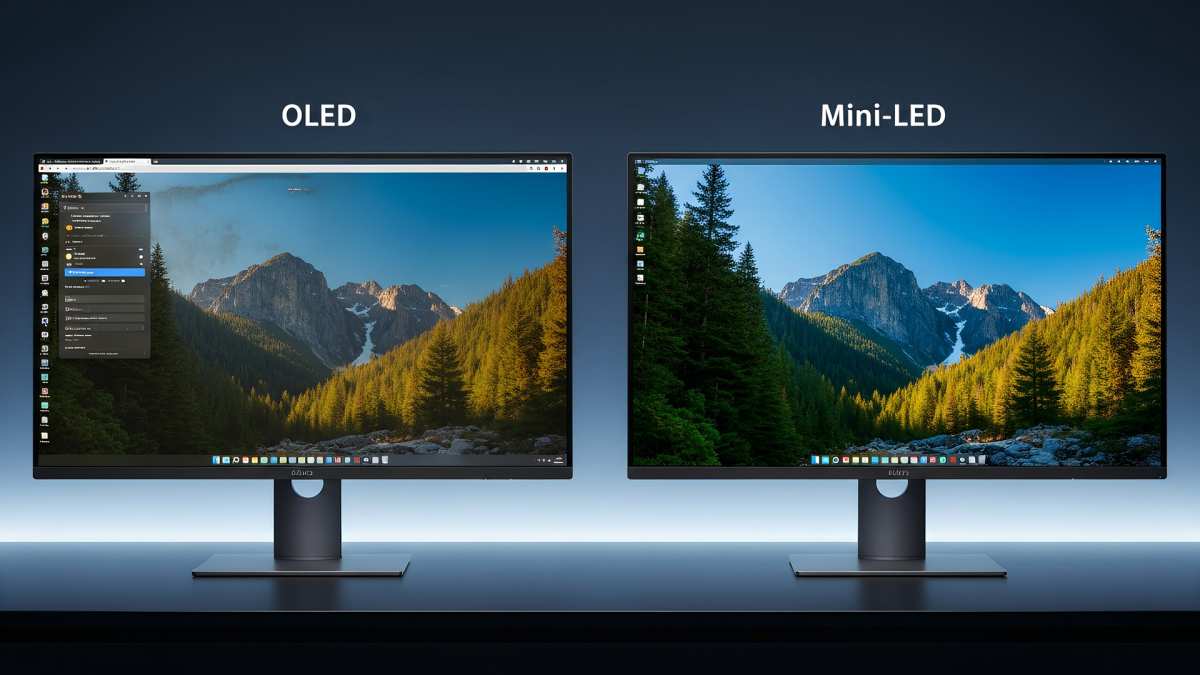
OLED wins when you watch in a dark room and want the most cinematic image quality. The perfect blacks and infinite contrast are unmatched.
Mini-LED wins if you need high brightness for a well-lit room or if burn-in concerns keep you up at night. Modern Mini-LED monitors with 500+ dimming zones get close to OLED's contrast without the longevity concerns.
IPS wins on budget and versatility. A good 4K IPS monitor handles movies fine in a bright room, and you won't worry about burn-in during mixed work-and-play usage.
Who Should Actually Buy an OLED Monitor for Movies
OLED makes the most sense for a specific type of viewer. If this sounds like you, the premium is probably worth it.
Dedicated dark-room viewers. If you watch movies in a bedroom or home theater with controlled lighting, OLED's strengths shine brightest. The perfect blacks and infinite contrast are most visible when there's no ambient light washing out the screen.
Film enthusiasts who care about accuracy. If you want to see movies the way colorists graded them, OLED's DCI-P3 coverage and factory calibration get you closer to a reference display than most consumer LCD options.
People using a monitor as their primary screen. If you don't have space for a separate TV and want one display that handles both work and entertainment, a 32-inch or 42-inch OLED monitor gives you a large enough screen for immersive movie watching without dominating your room.
HDR content consumers. If you stream a lot of 4K HDR content from Netflix, Apple TV+, or Disney+, or if you play back rips from Blu-ray, OLED's per-pixel HDR handling makes a noticeable difference over standard LCD panels.
Who Should Skip It and Go Another Route
OLED isn't for everyone, and in some cases, you'd genuinely be better off with a different technology.
Bright room viewers. If your setup is near a window or you prefer watching with lights on, a Mini-LED monitor will look brighter and more vivid. OLED's lower sustained brightness works against you in well-lit environments.
Heavy mixed-use during the day. If your monitor spends eight hours displaying a spreadsheet with static toolbars and then switches to movies at night, the burn-in risk adds up faster. Mini-LED or IPS handles that workload without the same long-term concerns.
Budget-conscious buyers. If you'd rather spend $500 than $1,200, a good 4K IPS or VA panel delivers a solid movie experience. You'll lose the perfect blacks, but you'll gain peace of mind and extra cash.
People who watch a lot of news or sports with static overlays. Tickers, score bugs, and channel logos are burn-in magnets. If that's a big part of your viewing habit, OLED requires more careful management than most people want to deal with.
How to Set Up an OLED Monitor for the Best Movie Experience
Getting the most out of an OLED monitor for movies involves a few specific settings and habits.
Enable HDR properly. On Windows, go to Settings > Display > HDR and toggle it on. On macOS, HDR is handled automatically on supported displays. Make sure your media player is configured to pass through HDR metadata.
MPV and MPC-HC with madVR are popular choices for PC movie playback.
Calibrate for dark room viewing. Most OLED monitors ship with accurate factory calibration, but you may want to lower the OLED pixel brightness to around 30 to 50 for comfortable dark room viewing. This also reduces wear on the panel over time.
Use a screen saver and auto-hide taskbar. Set your screen saver to activate after a few minutes of inactivity. Hide the Windows taskbar or move it to auto-hide mode. These small steps reduce the time static elements spend on screen.
Run pixel refresh when prompted. Most OLED monitors run an automatic pixel refresh cycle after every four hours of cumulative use. Let it complete. There's also a longer manual refresh you can run monthly or as needed.
Consider bias lighting. A soft LED strip behind the monitor reduces eye strain in dark rooms and can make the image appear more vivid by giving your eyes a reference point for ambient light.
Choose the right media player. For the best quality, use a player that supports HDR tone mapping and proper color space switching. VLC handles basic playback well, but MPV and MPC-HC with madVR offer more control over how HDR content is displayed.
Burn-In, Image Retention, and Long-Term Concerns
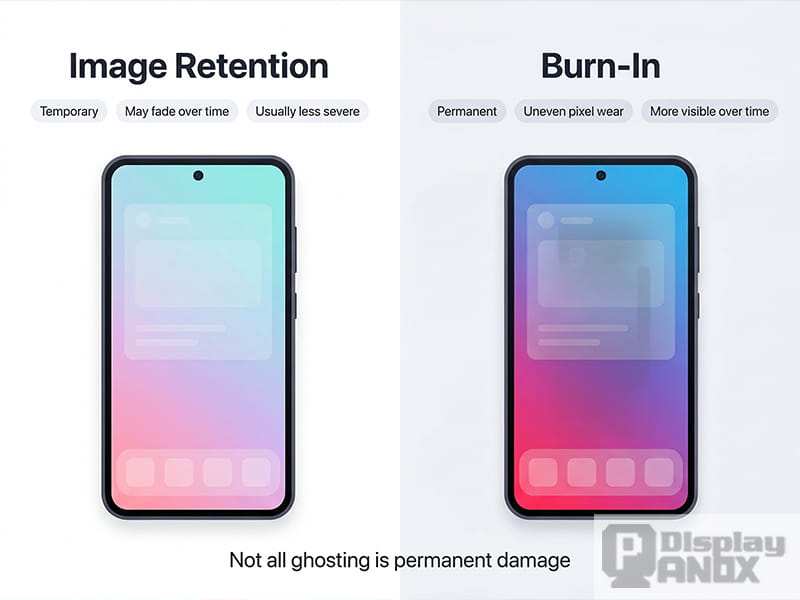
Burn-in is the most common reason people hesitate on OLED, and it's a legitimate concern. Understanding the difference between temporary image retention and permanent burn-in helps you manage the risk.
Image retention is temporary. If you see a faint ghost of a static image after switching content, it usually fades within minutes. Running a pixel refresh cycle clears it up.
Burn-in is permanent. It happens when certain pixels degrade faster than others due to uneven usage. Over time, this creates a visible shadow that doesn't go away.
Manufacturer specifications from LG Display indicate panel lifespans of 30,000 to 100,000 hours to half-brightness under normal use. That's roughly 10 to 30 years at four hours of daily viewing. Burn-in typically occurs well before the panel reaches end of life, but it's not inevitable.
What increases burn-in risk:
- Displaying static elements at maximum brightness for hours
- Leaving the same news channel or taskbar visible daily
- Watching only letterboxed content with the same black bar positions
What reduces it:
- Using pixel shift and screen savers
- Lowering OLED pixel brightness
- Varying your content so no single static element dominates
- Running the built-in refresh cycles
Warranty coverage for burn-in varies. Some manufacturers include it, others treat it as normal wear. Check the specific terms for your model before buying.
Real-World Scenarios: When OLED Shines and When It Doesn't
Let's put this in context with a few common setups.
Scenario 1: Bedroom movie setup, dark room, 32-inch QD-OLED. This is OLED's sweet spot. You're watching films in a controlled environment, the screen is large enough to feel immersive, and the QD-OLED panel delivers vivid colors and perfect blacks. The ABL dimming is rarely noticeable in cinematic content.
This is where OLED justifies its price.
Scenario 2: Living room desk, windows nearby, mixed work and entertainment. Here, OLED struggles more. The ambient light reduces the perceived contrast advantage, and the burn-in risk from a full workday of static UI elements is real. A Mini-LED monitor with 512 or more dimming zones would serve you better.
Scenario 3: Small apartment, 42-inch OLED as both monitor and TV replacement. This is a popular setup as of 2026. A 42-inch LG or Sony OLED panel doubles as a desktop monitor and a couch-viewing screen. The size works for both distances, and the image quality is excellent.
Just be mindful of the burn-in risk if you're switching between spreadsheets and movies on the same display daily.
Scenario 4: Bright home office, IPS monitor, occasional movie watching. If movies are a secondary use and your room is well-lit, a good 4K IPS panel handles the job without the premium or the worry. You'll miss the perfect blacks, but you won't be thinking about burn-in every time you leave a window open on screen.
Current OLED Monitor Options Worth Considering
The OLED monitor market has matured significantly as of 2026. Several strong options exist across different sizes and price points.
27-inch QD-OLED. Models like the Alienware AW2725Q and ASUS ROG Swift PG27UCDM offer 4K resolution at 240Hz on Samsung Display's QD-OLED panels. These are compact enough for a standard desk and deliver excellent HDR for their size. Prices typically range from $800 to $1,100.
32-inch QD-OLED. The Alienware AW3225QF is a popular choice here. It packs 4K at 240Hz with strong HDR performance and a larger screen that feels more cinematic. Expect to pay around $900 to $1,200.
42-inch WOLED. LG's UltraGear GR95QE and similar models use LG Display's WOLED panels. The larger size works well as a dual-purpose monitor and TV replacement. These run around $1,000 to $1,400.
48-inch WOLED. For those who want a true big-screen experience at a desk or wall-mounted setup, 48-inch options exist at a higher price point, typically $1,200 to $1,800.
When choosing between QD-OLED and WOLED, QD-OLED generally offers better color volume and peak brightness on small highlights. WOLED tends to handle full-screen brightness slightly better and avoids the triangular subpixel layout that can cause text fringing on QD-OLED panels.
Frequently Asked Questions
Will watching movies on OLED cause burn-in?
Normal movie watching alone is unlikely to cause burn-in quickly. The risk increases when you mix in static elements like taskbars, news tickers, or desktop icons for long periods. Varying your content and using built-in mitigation features keeps the risk low.
Is OLED better than a TV for watching movies at a desk?
OLED TVs often get brighter and come in larger sizes, but they're designed for longer viewing distances. An OLED monitor sits closer, fills more of your field of view, and doubles as a productivity screen. For desk use, a monitor-sized OLED panel is usually the better fit.
Does OLED look good in a room with some ambient light?
OLED performs best in dark rooms. In a room with moderate ambient light, the image still looks good, but you lose some of the perceived contrast advantage. Mini-LED handles bright rooms better due to higher sustained brightness.
How long do OLED monitors typically last?
Manufacturer specifications indicate 30,000 to 100,000 hours to half-brightness. At four hours of daily use, that's roughly 20 to 68 years. Burn-in is usually the limiting factor, not overall panel death, and it depends heavily on usage patterns.
Can I use an OLED monitor for both work and movies?
Yes, but you'll want to take precautions. Use dark mode, auto-hide the taskbar, enable pixel shift, and run refresh cycles. If your work involves static spreadsheets or code editors for eight hours daily, the burn-in risk is higher than for casual use.
The Bottom Line: Should You Get an OLED Monitor for Movies?
OLED is the best monitor technology available for movie watching in a dark room. The perfect blacks, infinite contrast, and per-pixel HDR handling create a viewing experience that no LCD panel can match. If that's your primary use case and you're willing to manage the burn-in risk, it's a genuine upgrade.
If you watch in a bright room, need a mixed work-and-play display, or want to spend less, a good Mini-LED or IPS monitor handles movies well without the premium or the long-term concerns. The image won't be as cinematic, but it'll be reliable and worry-free.
The decision comes down to your room, your budget, and how much you value that perfect black level. For pure movie enjoyment, OLED earns its reputation.

Similar Posts