Is Mini LED Monitor Necessary for Professionals
Is mini LED monitor necessary for professionals? The honest answer is that it depends entirely on what kind of professional work you actually do. For some workflows, it is an essential tool.
For others, it is an expensive feature you will rarely use.
Mini LED technology has moved from premium TVs into the professional monitor space, and manufacturers are pushing it heavily. But specs on a box do not tell you whether the upgrade matters for your daily work. Let us break down exactly what this technology does, who genuinely benefits, and where your money might be better spent elsewhere. This directly compares with our findings on whether oled monitor necessary for professionals.
A decent professional mini LED monitor starts around $1,000 and climbs past $3,000 for reference-grade models. Meanwhile, excellent standard LED-backlit monitors with professional-grade color accuracy can be found for $500 to $900. That price gap matters, and it means getting the answer right before you buy is worth your time.
So let us walk through this properly.
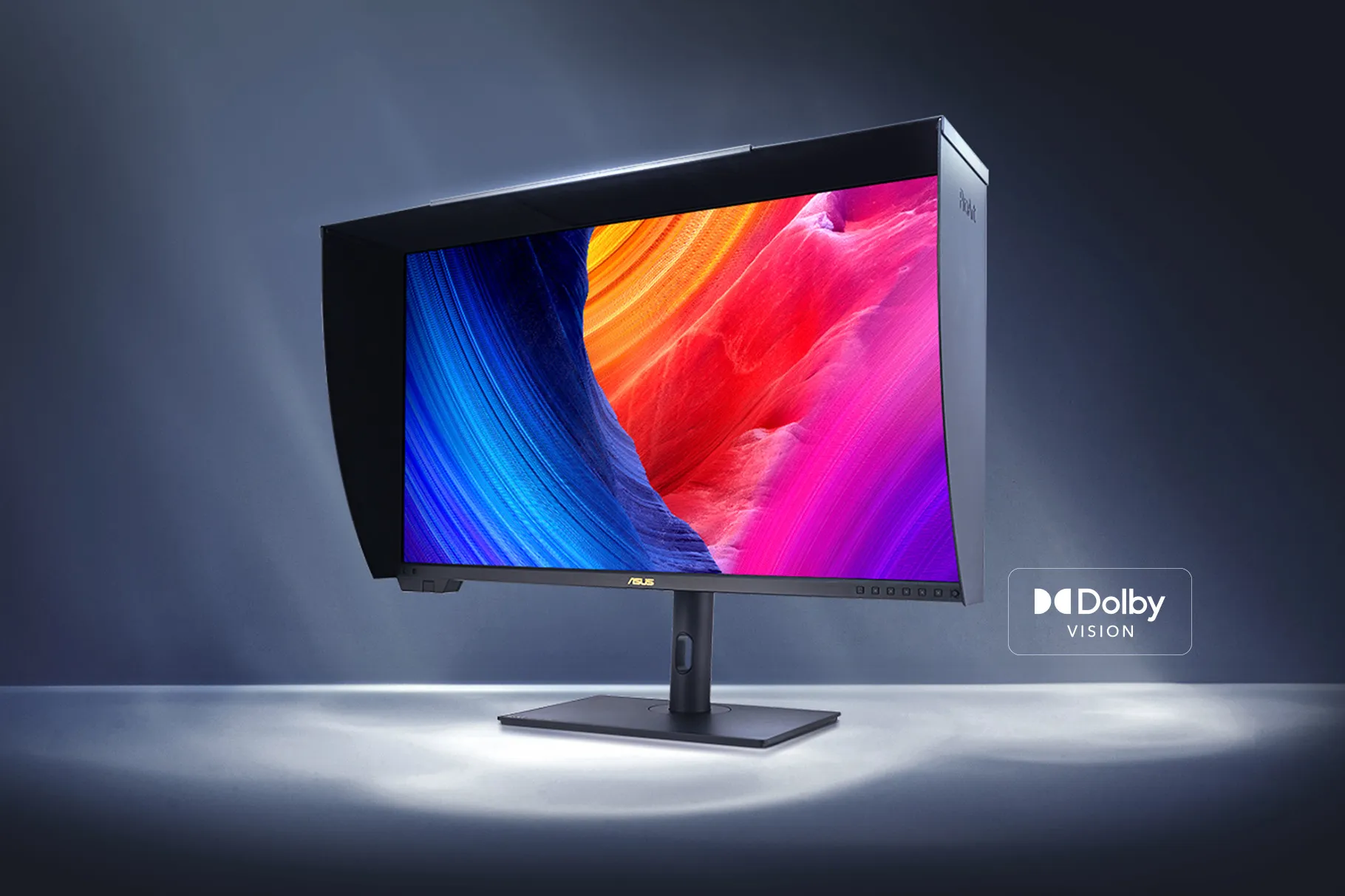
Image source: Bing (Web)
Quick Answer
No, a mini LED monitor is not necessary for every professional. Yes, for HDR colorists and mastering engineers, it is currently the most practical tool. The technology excels at sustained high brightness.
It avoids the burn-in risk of OLED. Most office and creative professionals do not need it. Your workflow type determines whether it is worth the cost. You can also reference our testing on whether mini led monitor good for gaming when configuring your display.
How Mini LED Backlighting Actually Works in Pro Monitors
To understand whether you need a mini LED monitor, you first need to understand what makes it different from a standard display. The core innovation is in the backlight system behind the LCD panel.
A standard LED monitor uses edge lighting or a small number of dimming zones to control brightness across the screen. Mini LED packs thousands of tiny LED beads into the backlight layer, grouped into hundreds or even over a thousand local dimming zones. Each zone can brighten or dim independently based on the content being displayed.
This means dark areas of the image can stay dark while bright areas push high luminance simultaneously.
Here is why that matters in practice. Imagine a scene with white subtitles on a black background. On a standard edge-lit LED monitor, the entire strip near those subtitles lights up, creating a gray haze around the text.
On a mini LED display with good zone control, only the specific zones behind the text brighten. The surrounding area stays genuinely dark.
Manufacturer specifications for professional mini LED monitors typically range from 192 dimming zones on entry-level models to 1,152 zones on premium reference displays. The ASUS ProArt PA32UCG offers 1,152 zones. Zone count directly affects how precisely the display can control contrast.
More zones mean tighter control and fewer visible artifacts.
The underlying LCD panel still determines most of the image quality characteristics. Mini LED enhances the backlight system, but you still need an IPS or VA panel with good color gamut coverage, accurate gamma tracking, and solid viewing angles. A mini LED backlight paired with a mediocre panel is still a mediocre monitor.
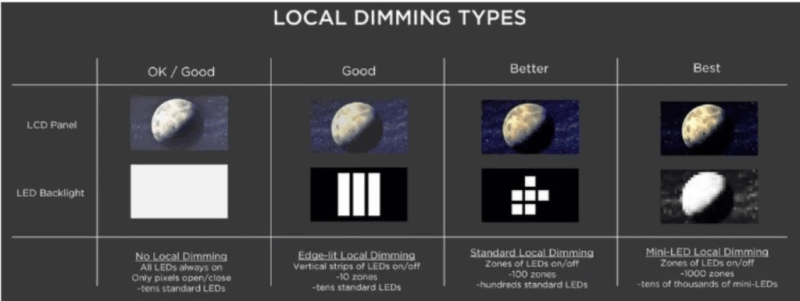
Image source: Bing (Web)
The Real Trade-Offs: Where Mini LED Wins and Where It Falls Short
Mini LED technology delivers genuine advantages, but it also introduces real compromises. Manufacturers tend to highlight the wins and downplay the drawbacks. Let us be honest about both sides.
Where Mini LED Genuinely Excels
Sustained HDR brightness. Mini LED monitors consistently hit sustained brightness levels of 1,000 to 1,600 nits. Premium models push past 2,000 nits in peak HDR. Standard LED monitors typically top out at 350 to 600 nits. If you are doing HDR grading, this brightness headroom is not a luxury. It is a functional requirement.
No burn-in risk. OLED monitors deliver incredible contrast but suffer from burn-in with static elements like timelines, toolbars, and channel logos. Mini LED LCDs do not burn in. For professionals who leave the same interface on screen for hours every day, this matters a lot over a three to five year ownership period.
Color volume. HDR content depends on both color gamut and luminance. Mini LED's high brightness enables wider color volume, which is the actual range of colors a display can produce across luminance levels. This is critical for PQ curve content per SMPTE ST 2084.
Good performance in bright rooms. OLED monitors can struggle in well-lit environments because their peak brightness is limited. Mini LED displays maintain punchy HDR performance even with ambient light in the room, which is common in editing suites and post-production houses.
Where Mini LED Falls Short
Blooming artifacts. This is the biggest complaint. When a bright object sits against a dark background, light from the illuminated zone bleeds into adjacent dark zones. You see a halo or glow effect around the bright area. Subtitles, white cursors, and UI elements on dark scenes reveal this immediately. The severity depends on zone count and the quality of the dimming algorithm.
Black level limitations. Despite hundreds of zones, mini LED cannot match per-pixel black levels. Dark scenes often show elevated black tones compared to OLED, particularly in content with mixed bright and dark areas. Per VESA DisplayHDR testing standards, even a 1,152-zone mini LED monitor cannot achieve the true black performance of an emissive display.
Power consumption and heat. Mini LED backlights with 1,000+ nits of sustained brightness draw significantly more power than standard LED monitors. Professional mini LED displays often consume 90 to 150 watts during normal use. Some models include internal fans for thermal management, which adds noise to your workspace.
Price. Professional mini LED monitors cost roughly two to three times more than equivalent-spec standard LED monitors. A $600 professional IPS monitor becomes a $1,500 to $2,500 proposition once you add the mini LED backlight system.
Zone count inconsistency within price ranges. Zone counts have climbed rapidly in the monitor market, but some manufacturers inflate the headline zone number without a proportional improvement in real-world control.
Blooming on professional mini LED displays remains a persistent challenge, especially with high-contrast UI elements and subtitles.
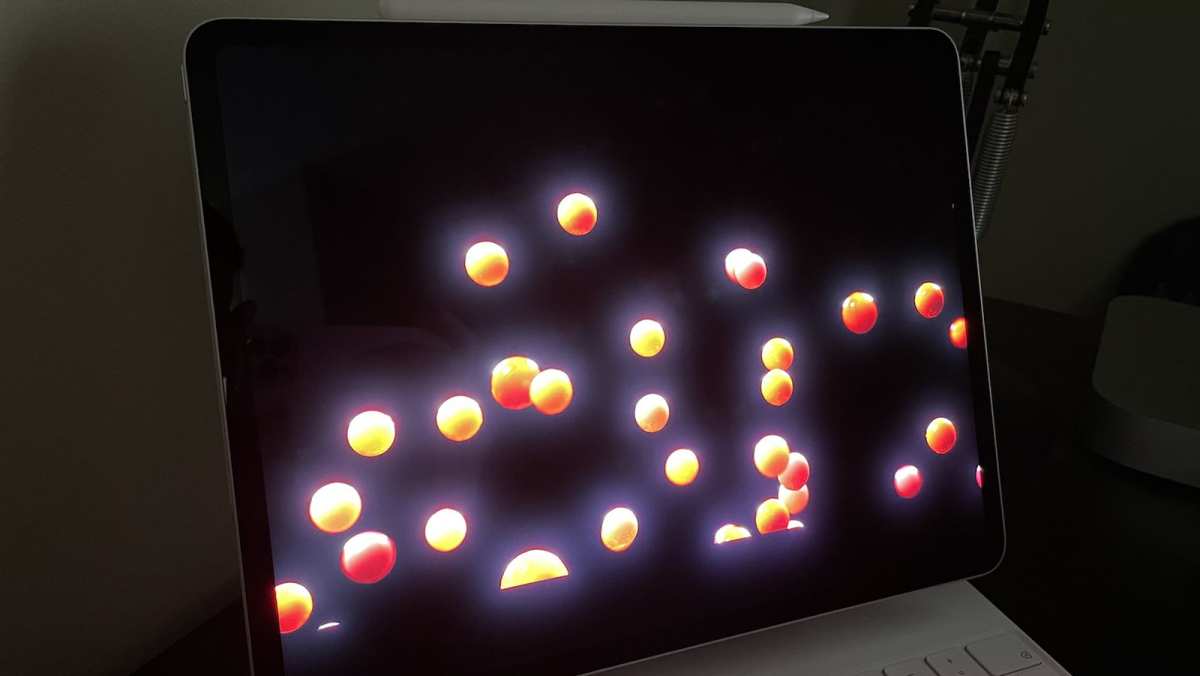
Image source: Bing (Web)
Decision Framework: Do You Actually Need Mini LED?
This is the part that actually helps you decide. The answer hinges on three factors: what content you work with, what deliverables your clients require, and how much you are willing to spend. Let us walk through it.
You Probably Need Mini LED If…
Your work involves creating, grading, or reviewing HDR content as a primary deliverable. Specifically:
HDR colorists and finishing artists working on streaming content for platforms like Netflix, Disney+, or Amazon. These platforms require Dolby Vision or HDR10 masters, and you need a display that can show you what those masters actually look like at 1,000+ nits.
Cinematic DITs and on-set colorists working with RAW camera material that will eventually be graded for HDR release. You need to see highlight detail and shadow behavior in HDR to make informed decisions on set.
Professionals doing their own HDR mastering as a service. If you are delivering HDR content to clients, your monitor needs to match the deliverable spec. A 400-nit SDR display simply cannot show you what a 1,000-nit HDR master looks like.
Medical imaging reviewers where high contrast detail in bright and dark regions simultaneously matters for diagnostic accuracy. Some radiology workstation configurations use mini LED for this reason, though LCD with standard FALD also serves here.
Mini LED Probably Isn't Worth It for You If…
Your daily workflow does not involve HDR deliverables or sustained high-brightness review. Specifically:
Photographers editing stills for print or web. Your output is SDR. A good wide-gamut IPS monitor at 350 to 450 nits covers this perfectly. The DCI-P3 and Adobe RGB coverage on a standard pro IPS monitor is more important than peak HDR brightness here.
Software developers and office professionals. Code editors, spreadsheets, and email clients are SDR content. You gain nothing from 1,000 nits of HDR brightness. You gain a lot from good resolution, comfortable text rendering, and decent color. A standard 4K IPS monitor handles all of that for a fraction of the cost.
Video editors working on SDR broadcast or social media content. If your deliverables are Rec. 709 SDR, a standard 4K professional monitor with good Delta E accuracy serves you better.
3D artists and animators mid-pipeline. Modeling, texturing, and rigging do not benefit from HDR display. The HDR luminance range matters at the final lighting and render review stage, which is often handled on a separate reference display anyway.
The Gray Area: Cases Where It Depends
Some professionals sit in a middle zone where the answer is not obvious.
Freelance video editors who sometimes do HDR work but mostly deliver SDR content. A mini LED monitor makes sense if HDR work represents a meaningful share of your revenue. If it is a rare project, renting a reference display for those sessions is more economical.
Graphic designers whose clients are starting to request HDR assets for digital display advertising. If HDR deliverables are growing in your pipeline, investing in a mini LED monitor now might be forward-thinking. If not, wait.
Photographers expanding into motion and video as a secondary service. If you are shooting hybrid photo and video content and some of that video needs HDR output, a mini LED monitor serves both workflows. If you are strictly stills, spend the money on a better lens instead.
Mini LED vs OLED vs Standard LED: Which Panel Technology Fits Your Workflow?
Understanding how mini LED compares to the other professional display technologies helps put the decision in context. Each technology has a legitimate place. None is universally superior.
| Feature | Mini LED LCD | OLED | Standard LED IPS |
|---|---|---|---|
| Peak HDR brightness | 1,000–2,000+ nits sustained | 500–1,000 nits sustained (varies by model) | 350–600 nits |
| Black level | Good (zone-dependent), elevated in mixed content | Excellent (per-pixel), true zero black | Moderate, IPS glow present |
| Contrast ratio | Very high (dynamic) | Effectively infinite | Moderate |
| Blooming/halo | Present, varies by zone count and algorithm | None | Present as IPS glow, not zone-related |
| Burn-in risk | None | Present with static elements over time | None |
| Color gamut | Excellent (often 99%+ DCI-P3) | Excellent (often 99%+ DCI-P3) | Very good (95–99% DCI-P3 on pro models) |
| Motion response | Good to very good (depends on panel) | Excellent | Good (IPS varies) |
| Power consumption | Higher (90–150W typical) | Moderate (60–100W typical) | Lower (40–70W typical) |
| Fan noise | Some models include fans | None (passive cooling) | None |
| Price range (pro 27–32") | $1,200–$4,000+ | $2,000–$5,000+ | $400–$1,200 |
| Best use case | HDR grading, bright rooms, static UI longevity | Dark-room critical review, cinema grading | SDR creative work, general professional use |
OLED monitors continue to improve in brightness, and 2026 models are closing the gap. But mini LED LCDs still hold a meaningful sustained brightness advantage. That is why most professional HDR mastering suites use mini LED as the primary grading display per current industry practice.
Standard LED IPS monitors remain excellent工具的 for the majority of professional work. They do most things well at a lower price point.
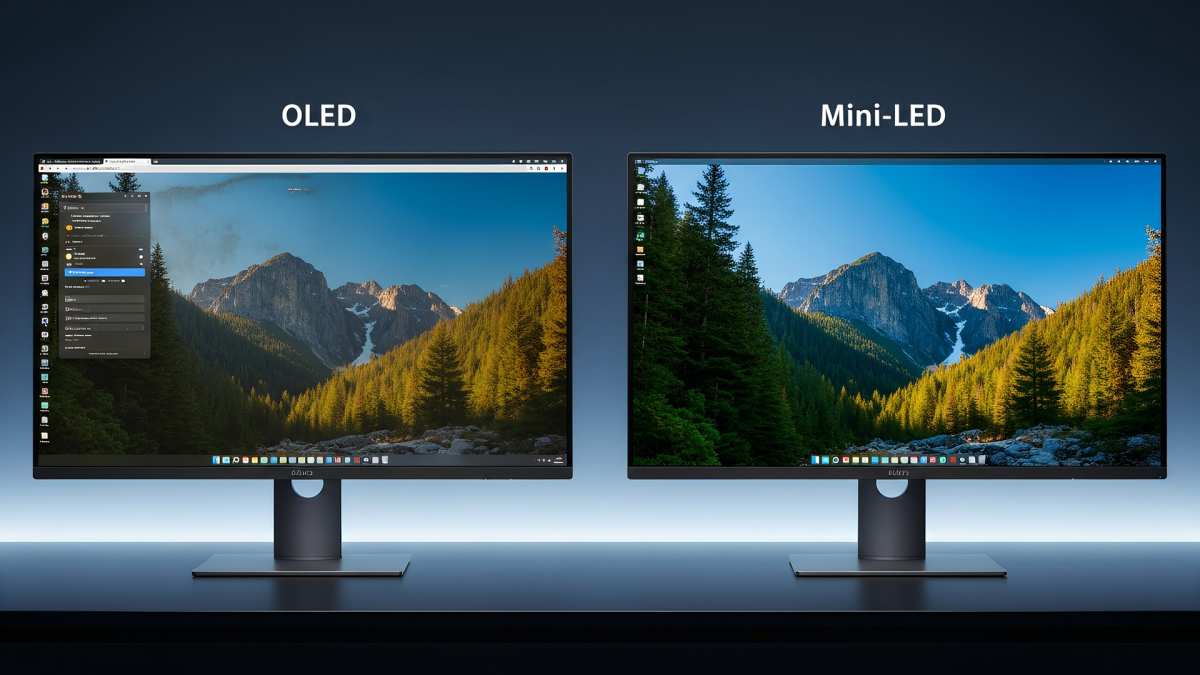
Image source: Bing (Web)
Real Professional Scenarios That Clarify the Decision
Let us put this into concrete situations. These represent common professional workflows where a potential buyer might be wondering about the value of a mini LED monitor.
Scenario 1: Colorist Grading HDR Content for Streaming
A finishing artist needs a display at 1,000 nits sustained, DCI-P3 and BT.2020 coverage, Dolby Vision compatibility, and Delta E under 1.5 in HDR mode. They may need 500+ dimming zones to minimize blooming during mixed-brightness scenes. Mini LED is the right choice.
OLED may also work, but sustained brightness and burn-in risk from grading UIs make mini LED more practical for this intensity of use.
Scenario 2: Photographer Editing Commercial Work for Print
A photographer producing an advertising campaign prints a calibrated proof against FOGRA or GRACoL and needs a display with 99% Adobe RGB coverage, Delta E under 2.0, 10-bit processing, and a hardware-calibrated ICC profile. A standard pro IPS monitor like an EIZO CG2700X perfectly serves this task. Mini LED adds cost and may introduce calibration complexity from backlight fluctuations without matching benefits for SDR print-oriented workflows.
Scenario 3: Software Developer Writing Code 10 Hours a Day
Clean text rendering, resolution for screen real estate, adjustable stands, and low flicker are peak priorities. A 4K or 5K standard IPS display resolves crisp text at PPI-optimized sizes may add fan noise or extra heat for little gain.
Scenario 4: Freelance Video Editor Juggling SDR and HDR Projects
An editor often does SDR work for corporate clients and sometimes HDR projects for documentary or multi-platform distribution. If at least 30% of work is HDR and clients rely on the editor's monitor as a primary reference, a mini LED display pays for itself. Otherwise, a competent SDR monitor paired with rental of a reference display for HDR milestones is more budget-friendly.
What Zone Count Actually Means for Your Work
Manufacturers put zone count front and center on marketing materials. More zones sound better. But the real-world benefit depends on how you use the display.
The Practical Thresholds
192 zones covers basic HDR improvement over standard LED. Blooming will be visible on high-contrast content. For SDR work with occasional HDR review, this tier is adequate.
512 to 576 zones hits a sweet spot for many HDR professionals. Blooming reduces noticeably. High-contrast edges show less halo. Per VESA DisplayHDR 1000 certification, many monitors in this zone range now qualify for the tier.
1,024 to 1,152 zones approaches FALD reference monitor territory. Blooming becomes significantly less prevalent. Zone boundaries remain visible only in very specific test patterns and extreme mixed-brightness scenes.
2,004+ zones is the current high-end tier. At this level, the display response to mixed content approaches the quality needed for client-referenced mastering. Black level control begins to rival dual-layer LCD solutions.
The jumps between tiers are not equally impactful per zone. The biggest perceptible improvement per dollar happens as you move from around 192 to around 576 zones. Above that, each additional zone yields smaller and smaller visible gains.
For many professionals, a 576-zone monitor provides 90% of the visual advantage at perhaps 60% of the cost of a 1,152-zone panel.
Dimming Algorithm Matters as Much as Zone Count
A 512-zone monitor with a well-tuned dimming algorithm often outperforms a 1,024-zone panel with a basic algorithm. How the monitor decides to brighten or dim each zone significantly influences blooming and overall image quality.
Some professional monitors offer adjustable local dimming aggressiveness. This is valuable because different content types benefit from different tuning. Film content with gradual brightness transitions may benefit from less aggressive dimming.
UI-heavy content with sharp bright-on-dark edges may benefit from faster, more responsive zone control.
Pay attention to this when researching specific model reviews. The zone count is listed in the spec sheet and in VESA DisplayHDR certification details. The tuning quality must be evaluated through professional reviews and measurement data.
Common Mistakes People Make When Buying a Mini LED Monitor
People make predictable errors when selecting a monitor for professional mini LED use. Learning from these saves you from an expensive mistake.
Mistake 1: Assuming Mini LED Means Professional Grade
Professional monitors need a suite of features: 10-bit native panel, wide gamut coverage, hardware calibration support, consistent firmware, and a quality power supply. Mini LED is one subsystem. It does not guarantee the rest of the display matches your needs.
Some mini LED gaming monitors sacrifice calibration controls for high refresh rates. Read the full spec sheet before assuming suitability.
Mistake 2: Ignoring Blooming Tests in Reviews
Blooming performance varies enormously between models at similar zone counts. Two monitors with identical zone counts can produce visibly different halo artifacts. Aggregate user reviews and professional measurement analyses are the best sources for this real-world data.
Mistake 3: Underestimating Calibration Complexity
Mini LED backlights add a calibration variable that standard LED displays do not have. The interaction between backlight zones and LCD layer can shift perceived color and gamma in different zones. Some professional monitors include uniformity correction or local dimming calibration compensation, but others may require more frequent verification.
Plan for recalibration in your budget and schedule.
Mistake 4: Choosing Zone Count Over Panel Quality
A mini LED backlight cannot fix a poor IPS layer with low native contrast, slow response times, or limited gamut coverage. A 576-zone mini LED panel with an excellent underlying IPS substrate will outperform an IPS panel with high zone count but low native contrast and thin gamut coverage. Choose the package, not just the headline spec.
Mistake 5: Not Verifying Firmware Updates and Support
Mini LED algorithms improve through firmware updates. Some manufacturers update them. Some do not.
Check whether the manufacturer you are considering historically provides meaningful firmware support for their professional monitors. This is relevant to color accuracy, dimming performance, and new format compatibility over the life of the product.
Price, Specs, and What You're Actually Paying For
A professional mini LED monitor is a major investment. Understanding how pricing maps to capabilities helps you allocate your budget correctly.
What You Get at Different Price Points
Entry-level professional mini LED ($800 to $1,500): Typical specs include 192 to 576 local dimming zones, DisplayHDR 1000 certification, 95%+ DCI-P3 coverage, 32-inch 4K resolution, and Delta E under 2.0 factory calibration. Several models in this range qualify for VESA DisplayHDR 1000 compliance. Suitable for emerging HDR creators and photographers transitioning to video work.
Mid-range professional mini LED ($1,500 to $3,000): Specs commonly include 576 to 1,152 dimming zones, improved native contrast, hardware calibration support with internal LUTs, factory Delta E under 1.0, and more robust build quality with better thermal management. This is the band where most serious HDR professionals should shop.
High-end professional mini LED ($3,000 to $5,000+): Reference-grade specs include 1,024+ zones, per-factory calibration to Delta E under 1.0 in HDR mode, wide gamut coverage including BT.2020 simulation, integrated colorimeter or compatibility with external calibration systems, and connectivity such as 40 Gbps Thunderbolt 4 or DisplayPort 2.1 if available per manufacturer documentation. These displays are suitable for final client approval masters and broadcast deliverables.
The Hidden Costs to Budget For
Calibration hardware and software. Adding a spectrophotometer or advanced colorimeter and calibration software may cost $100 to $800 depending on your measurement needs. Professional calibration services for monitors are available in major post-production locations and may run $150 to $300 per session.
Appropriate ambient lighting. Mini LED advantages are best viewed with appropriate dimmable bias lighting. Purchasing bias light kits may add $20 to $100. Maintaining a consistent ambient light environment is part of achieving accurate HDR evaluation conditions.
Potential replacement sooner than OLED professional monitors. OLED professional monitors may achieve longer display life under controlled brightness use. Factor long-term operating life into your cost calculations per manufacturer specifications.
Final Decision Guide: A Simple Checklist
Use this checklist directly. If you answer Yes to Two or more questions, a mini LED monitor is likely worth the premium for your workflow.
- Is HDR content at least 30% of your paid deliverables?
- Do clients reference your monitor for approval or sign-off?
- Do you work in a bright room where OLED brightness limits your ability to evaluate?
- Do you keep static UI elements on screen for hours daily?
- Does your work require sustained peak brightness above 600 nits?
- Do you have a budget above $1,500 for a monitor plus necessary calibration tools?
If you answer Yes to none or one of these, a standard high-quality professional IPS monitor serves your needs at a lower cost. Answers of Two or three warrant careful consideration of mid-range mini LED. Answers of four or more strongly indicate a professional mini LED monitor is a meaningful investment for your professional work.
Frequently Asked Questions
Does mini LED work well for SDR work?
Yes. Professional mini LED monitors perform excellently in SDR mode. The backlight system functions compatibly with standard gamma curves and color spaces like sRGB and Adobe RGB.
You do not sacrifice SDR performance by choosing a mini LED display.
How many zones do I actually need for HDR video editing?
Most professional reviewers suggest a practical minimum of 384 zones for comfortable HDR evaluation. Zone counts above 768 provide diminishing returns. For serious mastering work, zone counts of 1,000 or higher are preferred to minimize visible artifacts.
Will mini LED monitors drop in price?
Prices have already fallen since the technology entered the professional monitor category. Entry-level 32-inch 4K mini LED models now start near $800. Further price erosion is likely as panel production scales.
However, professional-calibrated models with hardware LUTs will likely retain premium pricing because of the additional component costs and calibration labor involved.
Do I need a special graphics card for mini LED?
No special hardware is required beyond what you already need for 4K professional content. The mini LED backlight is managed by the monitor's internal controller. You simply need a GPU capable of outputting 4K at your desired refresh rate and bit depth over DisplayPort or HDMI.
HDR metadata passthrough may require DisplayPort 1.4 with DSC or HDMI 2.1 to ensure full compatibility with your platform.
Is mini LED better than OLED for professional work?
It depends on your priorities. Mini LED wins on sustained brightness, burn-in safety, and bright-room performance. OLED wins on per-pixel black levels, viewing angles, and motion clarity.
For HDR mastering in a professional environment with varied content, mini LED is often the more practical choice. For dark-room cinema review, OLED may be preferred.
Can I calibrate a mini LED monitor myself?
Yes, with the right tools. Professional calibration works on mini LED monitors using a spectrophotometer or colorimeter and compatible software. The main consideration is that you should verify uniformity across zones after calibration.
Some professional monitors include built-in calibration sensors or support for external sensor integration, which simplifies the process.

Similar Posts





















