Is 144Hz Monitor Better Than 240Hz
If you've been shopping for a gaming monitor, you've probably asked yourself: is 144hz monitor better than 240hz? The honest answer is that it depends entirely on what games you play, what hardware you're running, and how sensitive you are to motion smoothness. For most people, 144Hz hits the sweet spot between performance and value.
But for competitive gamers chasing every possible edge, 240Hz can be worth the premium.
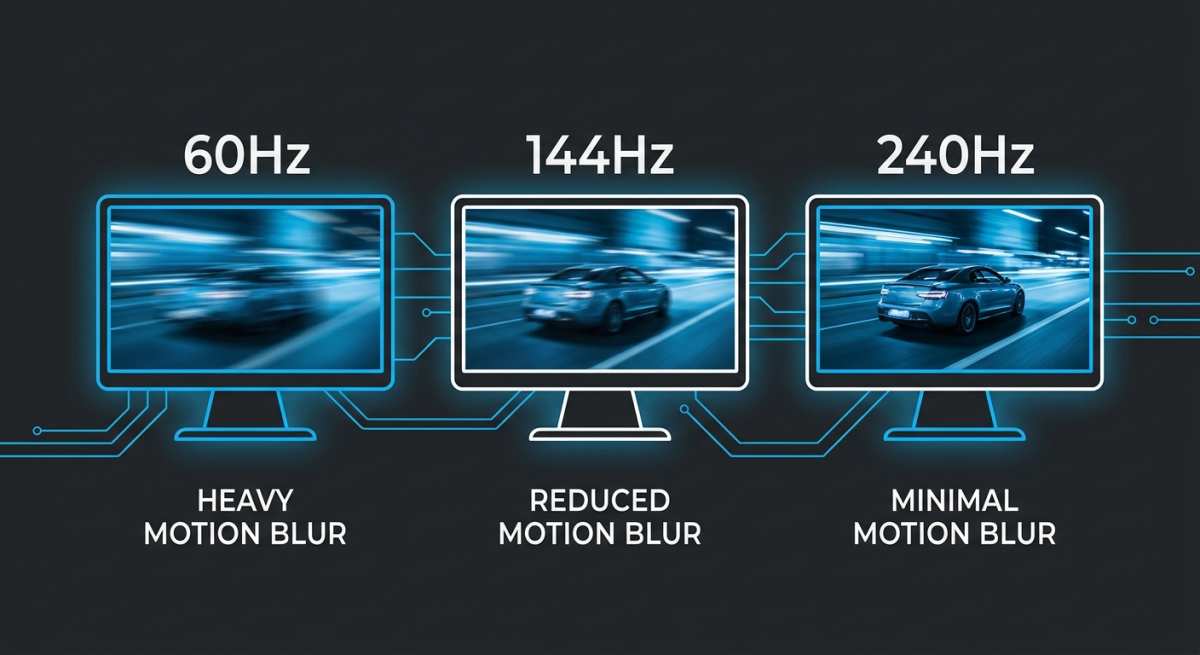
The jump from 60Hz to 144Hz is dramatic. Almost anyone can see and feel that difference immediately. Going from 144Hz to 240Hz, though, is far more subtle.
You're shaving roughly 2.8 milliseconds of frame display time, which matters in theory but is genuinely hard to perceive for the average viewer. Let's break down exactly what you're getting with each option so you can make the right call.
Quick Answer
144Hz is better for most gamers. It delivers excellent smoothness at a lower price. 240Hz offers a small advantage for competitive FPS players. The visible difference between them is subtle.
Your GPU and game choice matter more than the refresh rate number.
Why People Get Stuck on 144Hz vs 240Hz
Monitor marketing loves big numbers. Seeing "240Hz" on a box feels like it has to be noticeably better than 144Hz. But refresh rate perception doesn't scale linearly.
Your eyes and brain don't process the jump from 144 to 240 the same way they process 60 to 144.
Here's where people typically get tripped up.
- They assume 240Hz is automatically the "better" monitor without considering their use case.
- They overlook whether their GPU can actually sustain 240 frames per second in their favorite games.
- They ignore the resolution trade-off. A 1080p 240Hz monitor looks different from a 1440p 144Hz monitor, and the choice isn't just about refresh rate.
- They don't factor in panel type. Some older 240Hz monitors use TN panels with worse color reproduction compared to the IPS panels commonly found at 144Hz.
The real question isn't which number is bigger. It's which monitor fits your actual gaming setup and habits.
How Refresh Rate Actually Affects What You See
Refresh rate, measured in hertz (Hz), tells you how many times per second your monitor draws a new image. A 144Hz monitor refreshes 144 times per second. A 240Hz monitor refreshes 240 times per second.
The higher the number, the more frames you see and the smoother motion appears.
But here's the thing. Your monitor can only display what your GPU sends it. If your graphics card outputs 160 FPS in a game, a 144Hz monitor will show you 144 of those frames, and a 240Hz monitor will show you 160.
The 240Hz panel won't magically create extra frames.
What 144Hz Gets You
At 144Hz, each frame is displayed for about 6.94 milliseconds. That's a massive improvement over 60Hz, where each frame lingers for 16.67 milliseconds. Motion looks significantly smoother.
Camera pans feel fluid. Fast-moving objects are easier to track.
For the vast majority of gaming scenarios, 144Hz is more than enough. It's the refresh rate where most people stop feeling like they need something faster. You get excellent motion clarity without needing top-tier hardware to drive it.
What 240Hz Gets You
At 240Hz, each frame displays for roughly 4.17 milliseconds. That's about 2.77 milliseconds faster than 144Hz. In competitive gaming, where reactions are measured in milliseconds, that small reduction can translate to slightly lower input latency and marginally smoother motion during fast flicks and tracking.
The difference is real. But it's subtle. Most people, even gamers, struggle to reliably distinguish 144Hz from 240Hz in blind tests.
Those who can tend to be experienced competitive players who've spent significant time at high refresh rates.
The Perceptual Diminishing Returns Problem
This is the core concept that monitor marketing won't tell you. The perceptual gain from increasing refresh rate follows a curve of diminishing returns.
| Refresh Rate Jump | Frame Time Change | Perceived Impact |
|---|---|---|
| 60Hz → 144Hz | 16.67ms → 6.94ms | Dramatic, immediately obvious |
| 144Hz → 240Hz | 6.94ms → 4.17ms | Subtle, noticeable mainly to trained eyes |
| 240Hz → 360Hz | 4.17ms → 2.78ms | Very subtle, almost imperceptible |
| 360Hz → 500Hz | 2.78ms → 2.00ms | Marginal, measurable but rarely felt |
The 60 to 144 jump is transformative. The 144 to 240 jump is incremental. That doesn't make 240Hz bad.
It just means you should know what you're paying for.
Input Latency: The Real (But Small) Difference
Where 240Hz genuinely pulls ahead is in input latency. Each new frame represents the latest input state from your mouse or keyboard. At 240Hz, the monitor polls and displays your inputs more frequently.
The math is straightforward. The gap between frames at 144Hz is 6.94ms. At 240Hz, it's 4.17ms.
That's a reduction of about 2.77ms in the display's contribution to total system latency. When you factor in the full input chain (mouse polling, game engine processing, GPU rendering, display output), total system latency at 240Hz can be 2 to 4 milliseconds lower than at 144Hz.
For casual gaming, you won't notice this. For competitive play at the highest levels, every millisecond counts. That's why you'll find 240Hz and even 360Hz monitors on esports tournament stages.
Side-by-Side Comparison: 144Hz vs 240Hz at a Glance
Here's a direct breakdown of how these two refresh rate tiers compare across the factors that actually matter.
| Factor | 144Hz | 240Hz |
|---|---|---|
| Frame display time | 6.94ms | 4.17ms |
| Perceived smoothness vs 60Hz | Dramatic improvement | Dramatic improvement |
| Perceived difference between the two | — | Subtle, mainly in fast motion |
| Input latency advantage | Baseline | ~2–4ms lower |
| Typical price range (2025–2026) | $150–$400 | $250–$600+ |
| GPU requirement for full benefit | 144+ FPS | 240+ FPS |
| Panel quality options | IPS, VA, OLED widely available | IPS improving; OLED emerging |
| Best resolution availability | 1080p, 1440p, 4K | 1080p common; 1440p growing; 4K rare |
| Ideal for | Most gamers, content creators | Competitive FPS players, esports |
| Availability of adaptive sync | Universal | Universal |
| Market maturity | Very mature, excellent options | Good, but fewer high-value picks |
The takeaway from this table is that 144Hz wins on value and versatility. 240Hz wins on raw performance for a specific audience. Neither is objectively "better" across the board.
Who Should Buy a 144Hz Monitor
Not everyone needs 240Hz. In fact, most gamers are better served by a high-quality 144Hz display. Here's who falls into that camp.
Casual and Single-Player Gamers
If you play story-driven games, RPGs, open-world adventures, or anything where visual fidelity matters more than split-second reactions, 144Hz is the sweet spot. Games like Baldur's Gate 3, Elden Ring, or Cyberpunk 2077 benefit far more from higher resolution and better color accuracy than from pushing beyond 144 frames per second.
You'll enjoy buttery smooth gameplay at 144Hz without needing to pair it with a $1,500 GPU. That's a win for your wallet and your experience.
Content Creators Who Also Game
If you edit video, work with color-critical content, or do any kind of creative production, a 144Hz IPS or OLED panel gives you better color accuracy and viewing angles than most 240Hz TN panels from previous generations. Newer 240Hz IPS panels have closed this gap, but you'll often pay more for the same color performance at 240Hz.
A 144Hz 1440p IPS monitor can serve double duty as a gaming and productivity display without compromise.
Console Gamers (PS5, Xbox Series X)
Here's a fact that saves real money. The PlayStation 5 and Xbox Series X are capped at 120Hz output. Buying a 240Hz monitor for a console is spending extra on capability you literally cannot use.
A 144Hz monitor is already beyond what current consoles can output.
Save the premium. Put it toward a better panel or a bigger screen.
Mid-Range PC Builds
If you're running a GPU like an NVIDIA RTX 4060 or AMD RX 7600, hitting 240 FPS consistently at reasonable settings is tough in most modern titles. You'll be much happier with a 144Hz monitor that matches your hardware's actual output. Pairing a mid-range GPU with a 240Hz panel means you'll rarely see the benefit of that higher refresh rate.
Anyone Prioritizing Resolution or Panel Quality
At the same price point, a 144Hz monitor often gives you access to higher resolution (1440p or even 4K) or better panel technology (OLED, high-quality IPS). If you value visual quality alongside smoothness, the 144Hz tier offers more flexibility to get the display characteristics you actually care about.
Who Should Buy a 240Hz Monitor
There's a genuine use case for 240Hz, and it's not just marketing hype. If you fit into one of these categories, the premium can be justified.
Competitive FPS Players at the High Level
If you play titles like Counter-Strike 2, Valorant, Apex Legends, or Overwatch 2 at a competitive rank, the marginal gains from 240Hz matter. We're talking about smoother tracking during sustained aim, slightly clearer motion during fast flicks, and a small but measurable reduction in input latency.
At the highest levels of play, where matches are decided by single-digit health differences, these margins add up. Professional esports players overwhelmingly use 240Hz or higher displays for good reason.
Esports Professionals and Aspiring Pros
If you're competing in organized tournaments or seriously pursuing a path into competitive gaming, 240Hz is the standard. Tournament setups use 240Hz and 360Hz monitors. Training on a 144Hz display and then competing on 240Hz creates an adjustment period that can hurt your performance when it matters most.
Consistency between your practice and competition setup is valuable. If the competitive standard is 240Hz or higher, training at 144Hz puts you at a subtle disadvantage.
High-End PC Builds That Can Sustain 240+ FPS
This is the non-negotiable requirement that gets overlooked. A 240Hz monitor only delivers its full benefit if your system can push 240 or more frames per second in the games you play. That means a high-end GPU, a capable CPU, and often lowered in-game settings for competitive titles.
If you're running an NVIDIA RTX 4080, RTX 4090, or AMD RX 7900 XTX, you have the horsepower to take advantage of 240Hz in many titles. If your hardware can't sustain those frame rates, you're paying for a capability you'll rarely experience.
Players Who Prioritize Motion Clarity Above All Else
Some gamers simply value the smoothest possible motion above everything else. They don't care as much about resolution, color accuracy, or HDR. They want the clearest, most responsive image during fast movement.
For that specific priority, 240Hz delivers a tangible, if incremental, improvement over 144Hz.
If you know this is you, and your hardware supports it, 240Hz is worth the investment. Just go in with realistic expectations about the magnitude of the difference.
The GPU Reality Check: Can Your System Actually Push 240 FPS?
This is where the 144Hz vs 240Hz conversation gets practical. Your monitor's refresh rate is only one part of the equation. The other part is whether your graphics card can produce enough frames to match it.
A 240Hz monitor showing 180 FPS doesn't look any different from a 144Hz monitor showing 180 FPS with adaptive sync. You need to actually hit 240 FPS to see the full benefit. Let's look at what that requires.
What It Takes at 1080p
At 1080p resolution, hitting 240 FPS is achievable in many competitive titles with a modern mid-range to high-end GPU. Games like Valorant, CS2, and Rainbow Six Siege are well-optimized and can reach 240+ FPS on an RTX 4070 or RX 7800 XT with competitive settings.
However, demanding AAA titles at 1080p with high settings will struggle to reach 240 FPS even on top-tier hardware. Cyberpunk 2077 with ray tracing enabled won't hit 240 FPS on any current consumer GPU.
What It Takes at 1440p
1440p is 78% more pixels than 1080p. That's a significant increase in GPU workload. At 1440p, sustaining 240 FPS in competitive titles requires a high-end GPU like the RTX 4080 or RTX 4090.
In AAA games, even those GPUs will typically land well below 240 FPS at high settings.
This is why many competitive players still prefer 1080p 240Hz. It's easier to drive at the frame rates needed to fully utilize the monitor.
What It Takes at 4K
4K 240Hz monitors exist, but they're extremely rare and expensive as of 2026. Driving 240 FPS at 4K is beyond the capability of any single consumer GPU in demanding titles. Even the RTX 4090 averages well below 240 FPS at 4K in most modern games without upscaling.
4K 240Hz is a future-proofing play, not a practical option for most gamers today.
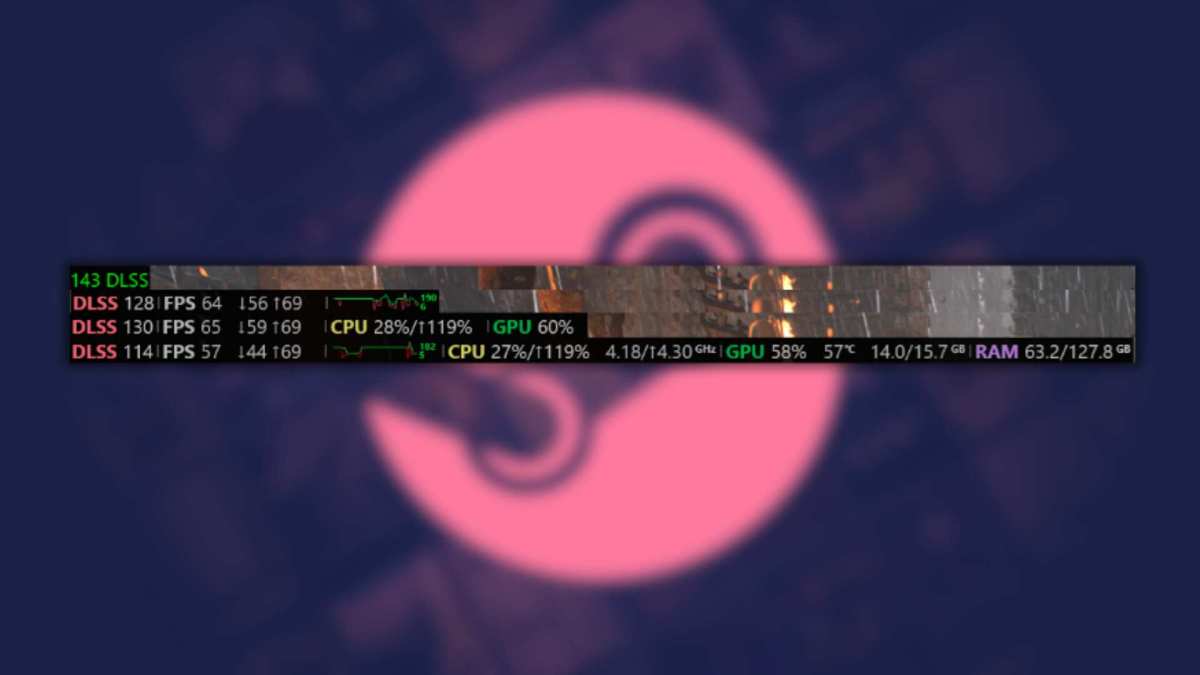
Here's a practical way to think about it. Before buying a 240Hz monitor, run your favorite game with an FPS counter. If you're consistently hitting 240 or above at your preferred resolution and settings, a 240Hz monitor will give you the full benefit.
If you're landing between 144 and 240, a 144Hz monitor with adaptive sync will serve you just as well for most purposes.
The Resolution vs Refresh Rate Trade-Off Nobody Talks About Enough
This is the decision that actually trips people up. You're not just choosing between 144Hz and 240Hz. You're often choosing between a lower-resolution high-refresh monitor and a higher-resolution lower-refresh one.
A 24-inch 1080p 240Hz monitor and a 27-inch 1440p 144Hz monitor often sit in a similar price range. Which one is better?
It depends on what you value.
- 1080p 240Hz gives you maximum frame rate potential and the smoothest possible motion. The pixel density at 24 inches is acceptable but not sharp. Text and fine details won't look as crisp.
- 1440p 144Hz gives you a noticeably sharper, more detailed image. The larger 27-inch screen feels more immersive. The 144Hz refresh rate is still extremely smooth. You just won't hit the highest possible frame rates as easily.
For most people, the 1440p 144Hz option provides a better overall experience. The visual clarity upgrade is immediately noticeable. The drop from 240Hz to 144Hz is subtle by comparison.
Competitive players who prioritize performance above all else will lean toward 1080p 240Hz. Everyone else is probably better served by the resolution bump.
Common Mistakes People Make When Choosing
Even with all the information out there, buyers keep making the same errors when picking between these refresh rate tiers.
- Buying 240Hz without checking GPU capability. If your card can't push 240 FPS, you're wasting money on unused potential. Match your monitor to your hardware, not to a marketing number.
- Ignoring panel type. A 240Hz TN panel with washed-out colors and poor viewing angles is a worse overall experience than a 144Hz IPS panel with rich, accurate colors. Refresh rate isn't the only spec that matters.
- Overlooking resolution. A 1080p 240Hz monitor and a 1440p 144Hz monitor at the same price aren't really competing on refresh rate alone. You're trading sharpness for speed.
- Assuming they'll perceive the difference. Many buyers expect 240Hz to look dramatically smoother than 144Hz. When the difference turns out to be subtle, they feel like they wasted money. Going in with realistic expectations prevents disappointment.
- Forgetting about adaptive sync. G-Sync and FreeSync matter more than raw refresh rate for most gaming scenarios. A 144Hz monitor with good adaptive sync support will feel smoother in variable-FPS situations than a 240Hz monitor without it.
- Neglecting ergonomics and build quality. A monitor with a terrible stand, no height adjustment, and poor connectivity options is frustrating to live with regardless of its refresh rate. Don't fixate on one spec and ignore everything else.
Real-World Scenarios: Which Monitor Wins in Each Situation
Let's put this all together with some specific examples. These reflect common buyer situations as of 2026.
Scenario 1: You play Valorant competitively and your PC has an RTX 4070.
At 1080p with competitive settings, the RTX 4070 can push well above 240 FPS in Valorant. A 1080p 240Hz monitor is the right call here. You'll fully utilize the refresh rate and gain a slight edge in motion clarity and input latency.
Scenario 2: You play a mix of AAA titles and some casual multiplayer games. Your GPU is an RTX 4060.
The RTX 4060 will struggle to hit 240 FPS in most games at high settings. A 1440p 144Hz IPS monitor gives you a sharper, more visually impressive experience. You'll still get smooth gameplay at frame rates your GPU can actually sustain.
Scenario 3: You're a console gamer who also uses the monitor for a PC.
Your console caps at 120Hz. A 144Hz monitor already exceeds that. Spend the money you save on a better panel or a higher resolution. 240Hz is completely wasted on current-generation consoles.
Scenario 4: You're an aspiring CS2 competitor with a high-end build.
You need every advantage you can get. A 240Hz (or even 360Hz) monitor at 1080p with a GPU that can sustain those frame rates is the standard setup. The investment is justified by your specific competitive goals.
Scenario 5: You want one monitor for gaming, work, and content consumption.
A 144Hz 1440p IPS or OLED monitor is the versatile choice. You get smooth gaming, sharp text for productivity, and good color accuracy for media. The 240Hz tier offers you almost nothing extra in this mixed-use scenario.
Pricing and Value: What You're Actually Payed For
Monitor pricing has shifted over the past few years. Here's what you can expect to pay as of 2025, 2026.
| Category | Typical Price Range | What You Get |
|---|---|---|
| 1080p 144Hz IPS | $150–$250 | Excellent value, great for budget builds |
| 1440p 144Hz IPS | $250–$400 | Sweet spot for most gamers |
| 1080p 240Hz IPS | $250–$400 | Competitive-focused, good motion clarity |
| 1440p 240Hz IPS | $400–$650 | Premium tier, best of both worlds |
| 4K 144Hz+ OLED | $800–$1,500+ | Enthusiast tier, visual quality king |
| 1080p 360Hz+ | $400–$600 | Esports specialist, diminishing returns |
The value curve favors 144Hz heavily. You get a mature market with excellent panel options at every price point. The 240Hz tier offers diminishing returns on the experience side, though 1440p 240Hz monitors have become significantly more affordable and represent a compelling middle ground for those who want both high resolution and high refresh.
If your budget is under $300, 144Hz is almost always the better buy. If you have $400 or more and your hardware supports it, 1440p 240Hz is worth considering.
Expert Tips Before You Buy
A few practical pointers to make sure you're making the right decision.
- Check your actual FPS first. Use MSI Afterburner or your game's built-in benchmark. See what frame rates you're getting now. If you're not hitting 240 FPS in your main game, a 240Hz monitor won't change that.
- Prioritize panel quality over refresh rate. A good IPS or OLED panel at 144Hz is a better experience than a mediocre TN panel at 240Hz. Color accuracy, contrast, and viewing angles affect your daily experience more than the difference between 144 and 240Hz.
- Make sure you're using the right cable. DisplayPort 1.4 with DisplayPort Stream Compression is needed for high refresh rates at higher resolutions. HDMI 2.1 works for console and PC setups. Using an older cable can cap your refresh rate without you realizing it.
- Enable the refresh rate in your OS. Windows doesn't always default to a monitor's maximum refresh rate. Check your display settings and your GPU control panel to confirm you're actually running at 144Hz or 240Hz.
- Test your adaptive sync setup. G-Sync and FreeSync need to be enabled in both your monitor's on-screen display and your GPU driver. Misconfiguration here causes tearing or stuttering that people wrongly blame on the monitor.
- Consider your desk setup. A 24-inch 1080p monitor and a 27-inch 1440p monitor feel very different in person. Size and resolution affect immersion and comfort in ways that specs on a page don't fully convey.
Frequently Asked Questions
Can you actually see the difference between 144Hz and 240Hz?
Most people can see it in fast motion, but the difference is subtle. Competitive gamers notice it more than casual players. The jump from 60Hz to 144Hz is far more dramatic than 144Hz to 240Hz.
Is 240Hz worth it for casual gaming?
For most casual gamers, no. The premium you pay for 240Hz is better spent on higher resolution, a better panel type, or a larger screen. 144Hz already provides an excellent experience for non-competitive play.
Do you need 240 FPS to use a 240Hz monitor?
To get the full benefit, yes. The monitor can display up to 240 frames per second. If your GPU outputs fewer frames, you won't see the complete advantage.
The monitor still works fine at lower frame rates, but you're not using it to its potential.
Is 1440p 144Hz better than 1080p 240Hz?
For most people, yes. The resolution upgrade is immediately noticeable in sharpness and detail. The drop from 240Hz to 144Hz is much harder to perceive.
Competitive FPS players are the main exception.
Will a 240Hz monitor make me a better gamer?
It won't directly improve your skills. The marginal reduction in input latency and smoother motion can help at high levels, but practice and game sense matter far more than refresh rate. Don't expect a monitor upgrade to boost your rank.
How long will 144Hz monitors stay relevant?
144Hz isn't going anywhere. It's been the mainstream gaming standard for years and will remain perfectly viable for the foreseeable future. There's no urgency to move to 240Hz unless you have specific competitive needs.
Final Verdict: The Decision Framework
Here's the simplest way to think about it.
Buy 144Hz if you play a variety of games, value visual quality and resolution, use a mid-range GPU, game on console, or want the best value for your money. It's the right choice for the majority of gamers and will serve you well for years.
Buy 240Hz if you primarily play competitive FPS titles, your GPU can sustain 240+ FPS at your preferred resolution, you're at or approaching a high competitive rank, or you're preparing for esports competition where every millisecond matters.
The honest truth is that 144Hz is "better" for most people when you factor in price, versatility, and the diminishing perceptual returns of going higher. 240Hz is better for a specific subset of competitive gamers who can actually perceive and benefit from the difference.
Don't let a bigger number on a box make the decision for you. Match your monitor to your hardware, your games, and your actual needs. That's how you end up with a display you're genuinely happy with.
(No output generated)
Quick Answer
144Hz is better for most gamers. It delivers excellent smoothness at a lower price. 240Hz offers a small advantage for competitive FPS players. The visible difference between them is subtle.
Your GPU and game choice matter more than the refresh rate number.

Similar Posts





















