How To Make The Most Of Airpods Pro 2 Tips And Tricks
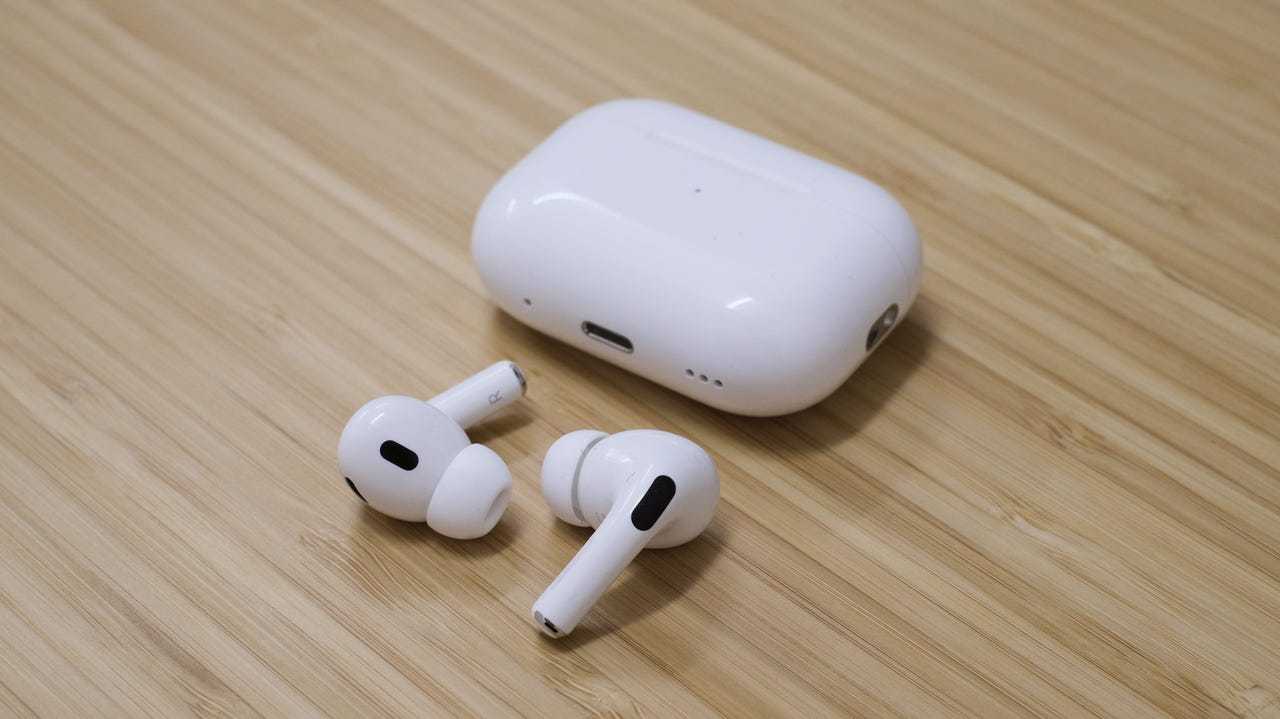
To get the most out of your AirPods Pro 2, ensure you customize settings to suit your listening preferences, keep firmware updated, and utilize features like noise cancellation and transparency mode to enhance your experience. Use Siri for hands-free control, and take advantage of easy switching between devices for seamless transitions. Proper maintenance and regular calibration also help maximize performance and longevity.
Maximizing your AirPods Pro 2 involves personalizing your settings, staying updated with the latest firmware, and exploring all the features they offer, from noise cancellation to adaptive transparency. With a few simple tweaks and consistent care, you can elevate your listening experience to new heights.
Jumping into the world of AirPods Pro 2, many users wonder how to truly make the most of these advanced earbuds. These sleek devices are packed with features designed to improve your audio experience, but unlocking their full potential requires a bit of know-how. From customizing controls and activating noise cancellation to maintaining your earbuds properly, there are many ways to optimize functionality and comfort. Whether you’re a daily commuter, a fitness enthusiast, or someone who just loves great sound, understanding these tips will ensure you’re getting the best possible use out of your AirPods Pro 2. Let’s explore how you can fine-tune your earbuds for maximum enjoyment and convenience.

How to Make the Most of AirPods Pro 2
Understanding the Features of AirPods Pro 2
The AirPods Pro 2 offer a range of features that make listening more enjoyable. From active noise cancellation to adaptive transparency, these earbuds are packed with technology. Taking time to understand each feature helps you use them effectively. For example, the new H2 chip improves audio quality and connects faster. The earbuds also have personalized spatial audio, which makes sound seem to come from all around you.
Customizing Fit for Better Comfort and Sound
A good fit is key for the best sound quality and comfort. AirPods Pro 2 come with three sizes of silicone tips. Try each to find the one that fits snugly without being too tight. A proper fit also improves noise cancellation and keeps the earbuds from falling out. You can also use ear tips with foam for extra comfort during long listening sessions.
Adjusting Ear Tips
Visit the Bluetooth settings on your device and select your AirPods Pro 2. Use the ear tip fit test feature to check the best size. This test plays sounds to determine if your earbuds create a proper seal. If the test shows poor fit, switch to a different size for optimal sound and noise reduction.
Maximizing Noise Cancellation and Transparency Modes
AirPods Pro 2 have two main modes—active noise cancellation and transparency. Noise cancellation blocks out background noise so you can focus. Transparency mode allows you to hear your surroundings without removing earbuds. You can toggle between these modes easily using the control center or force sensor.
Quickly Switching Modes
Press and hold the force sensor on the stem of your AirPods to switch modes quickly. Alternatively, go to your device’s Control Center and tap the noise control icon. Customizing these controls helps you adapt quickly to different environments, like noisy streets or quiet offices.
Optimizing Active Noise Cancellation
Active noise cancellation works best when your earbuds fit well. Keep your silicone tips clean to prevent sound leakage. You can also adjust the noise cancellation level in your device settings for a balance between noise blocking and audio clarity.
Cleaning Your Ear Tips
Regularly remove and clean your silicone tips with mild soap and water. Dry them thoroughly before reinserting. Clean tips maintain a proper seal, which enhances noise cancellation and sound quality.
Using Spatial Audio for an Immersive Experience
Spatial audio creates a surround sound effect, making music or videos feel more lifelike. Turn on spatial audio in your device settings and test it with compatible content. Adjust the head tracking feature for an even more immersive experience, especially during movies and games.
Personalizing Spatial Audio Settings
Access spatial audio options in your device’s Bluetooth settings. Here, you can enable head tracking and customize the surround sound effect. This makes the audio feel like it’s coming from specific directions, enhancing your entertainment.
Managing Battery Life Effectively
Battery life is important for all-day use. The AirPods Pro 2 have improved battery performance, but proper management extends their usability. Always charge them fully before long trips, and avoid letting the battery drain completely.
Using the Charging Case Smartly
Keep the case charged, as it is essential for recharging your earbuds. Store the case in a safe place and clean the charging contacts periodically. When not in use, keep the case closed to preserve battery health.
Controlling Audio and Calls with the Force Sensor
The force sensor on each AirPod allows you to play, pause, skip tracks, and answer calls seamlessly. Practice pressing once for play/pause, twice to skip forward, and three times to skip back. Press and hold to switch between noise cancellation and transparency modes.
Customizing Controls
You can customize what the force sensor does in your device’s Bluetooth settings. Assign different functions if needed for easier control during workouts or busy days.
Connecting and Switching Between Devices
AirPods Pro 2 can connect to multiple devices, making switching effortless. Make sure Bluetooth is enabled on your devices, then select your AirPods from the Bluetooth menu. Automatic device switching works with Apple devices signed into the same iCloud account.
How to Switch Devices Manually
If automatic switching doesn’t work, disconnect from the current device and connect manually via Bluetooth settings. You can also use the Control Center to select your AirPods Pro 2 quickly.
Using Find My to Locate Lost AirPods
If you misplace your earbuds, the Find My app helps locate them easily. Open the app, select your AirPods Pro 2, and see their last known location. You can also play a sound to help find them nearby.
Ensuring Their Safety with Notifications
Enable notifications for your AirPods in the Find My app. This way, you’ll get alerts if they disconnect or are out of range, helping prevent accidental loss.
Maintaining Your AirPods Pro 2 for Longevity
Proper care ensures your earbuds last longer. Keep the charging case clean, avoid exposing them to extreme temperatures, and handle them gently.
Cleaning and Storage Tips
Use a soft, lint-free cloth to clean your earbuds. Avoid using liquids directly on the device. When not in use, store your AirPods in their case to protect them from damage.
Updating Firmware for Better Performance
Apple occasionally releases firmware updates that improve features and fix bugs. Keep your AirPods Pro 2 near a paired device connected to Wi-Fi to receive updates automatically.
Checking Firmware Version
Go to your device’s Bluetooth settings, select your AirPods, and check for the firmware version. If an update is available, ensure your earbuds are charging and connected to Wi-Fi for automatic installation.
Leveraging Accessibility Features
AirPods Pro 2 come with accessibility options like Live Listen and ear detection. These features assist users with hearing difficulties and improve overall usability.
Activating Live Listen
Enable Live Listen in your device’s accessibility settings. Use your AirPods as a microphone to hear conversations better in noisy environments. This feature is especially helpful for users with hearing challenges.
Using Siri for Hands-Free Control
Siri allows you to control playback, adjust volume, or get information using voice commands. Simply say “Hey Siri” or press the force sensor to activate Siri.
Examples of Siri Commands
- “Play my favorite song”
- “Pause the music”
- “Increase volume”
- “What’s the weather today?”
Using Siri minimizes the need to touch your device, keeping your focus on the task at hand.
Enhancing Experience with Accessories
Accessories like protective cases and ear hooks can improve durability and fit. Some users add sports bands for secure fit during workouts or waterproof covers for extra protection.
Choosing the Right Accessories
Pick accessories that complement your lifestyle and usage habits. For active users, sweat-resistant ear hooks prevent slips. For frequent travelers, a portable charging case ensures your earbuds are always ready.
Final Tips and Tricks for Getting the Best Use
Don’t forget to explore all settings and customize controls to suit your preferences. Experiment with different noise control modes and sound profiles for optimal listening.
- Set up personalized spatial audio for movies and music
- Regularly clean your earbuds and case
- Keep firmware updated for the latest features
- Utilize accessibility features if needed
Making a habit of these tips ensures you get the most out of your AirPods Pro 2. With a little practice, they become an extension of your daily routine, providing high-quality sound wherever you go.
AirPods Pro 2 Hidden Features, Tips And Tricks.
Frequently Asked Questions
How can I customize the controls on my AirPods Pro 2 for optimal use?
You can personalize the control settings through your device’s Bluetooth menu or the Settings app. For instance, you can assign specific functions to the force sensor, such as play/pause, skipping tracks, or switching between noise cancellation and Transparency mode. Adjust these options by going to Bluetooth, selecting your AirPods Pro 2, and exploring the available control configurations to suit your preferences.
What are some effective ways to improve the battery life of my AirPods Pro 2?
To extend your AirPods Pro 2 battery life, avoid exposing them to extreme temperatures and keep the charging case charged. Always store them in their case when not in use and turn off Bluetooth for other devices when not needed. Additionally, decrease the volume during use, as higher volumes consume more power, and enable low power mode if available on your device to optimize energy consumption.
How can I ensure I get the best sound quality from my AirPods Pro 2?
For optimal sound quality, make sure your AirPods Pro 2 fit well and create a good seal in your ears. Use the ear tip sizes that fit comfortably and snugly. Keep your device’s software updated for the latest audio enhancements, and calibrate sound settings within your device’s audio options. Regularly clean the earbuds and the mesh to prevent muffled sound caused by debris.
What are some tips for managing noise cancellation effectively with my AirPods Pro 2?
Use the force sensor or control options to toggle noise cancellation based on your environment. Customize the noise control settings in your device to quickly switch between modes. For the best experience, ensure a proper fit with the ear tips, as it greatly impacts noise cancellation performance. Adjust the transparency mode when you need to stay aware of your surroundings without removing your earbuds.
How can I efficiently switch between devices with my AirPods Pro 2?
Ensure your devices are signed in with the same Apple ID for seamless switching. When you want to connect to a different device, open the Bluetooth menu and select your AirPods Pro 2. You can also enable automatic device switching in your device settings, allowing the earbuds to detect and connect to the most active device without manual intervention. Keep Bluetooth enabled on all your devices for quick access.
Final Thoughts
To make the most of AirPods Pro 2, customize your noise cancellation settings and explore different ear tip sizes for optimal comfort. Regularly update your device software to access new features and improvements. Use the Find My app to track your earbuds and avoid misplacement. Additionally, experiment with personalized controls to enhance your listening experience. Following these tips ensures you get the best performance from your AirPods Pro 2 and enjoy their full potential.

Similar Posts