Do You Need HDMI 2.1 for 4K Monitor
Do you need HDMI 2.1 for a 4K monitor? The honest answer is: probably not for basic use, but absolutely yes if you're gaming at high refresh rates or need HDR with full color at 4K. Most people buying a 4K monitor for office work, photo editing, or media consumption can get by just fine with HDMI 2.0.
But if you're connecting a PS5, Xbox Series X, or a gaming PC and you want 4K at 120Hz or higher, HDMI 2.1 becomes essential.
The confusion around this topic is real. Monitor manufacturers love slapping "HDMI 2.1" on spec sheets like it's a must-have badge, and cable makers are happy to sell you expensive "premium" HDMI cables you might not actually need. Let's cut through the noise and figure out what matters for your specific setup.
Quick Answer
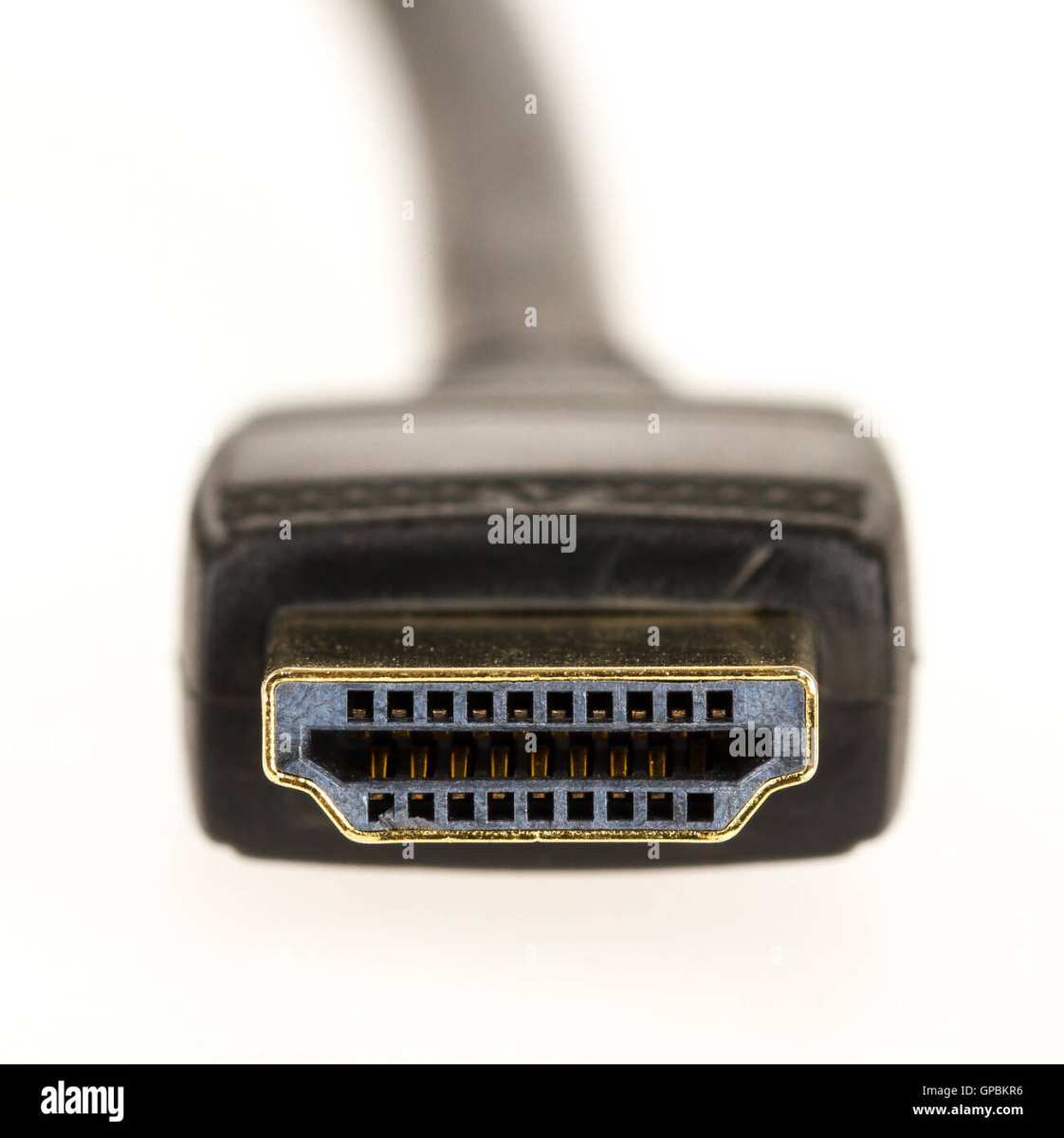
You don't need HDMI 2.1 for 4K at 60Hz. HDMI 2.0 handles that fine. You do need HDMI 2.1 for 4K at 120Hz or higher.
It also enables VRR and full HDR at high refresh rates. Match the cable to your monitor's actual capabilities.
What HDMI 2.1 Actually Does for 4K Monitors
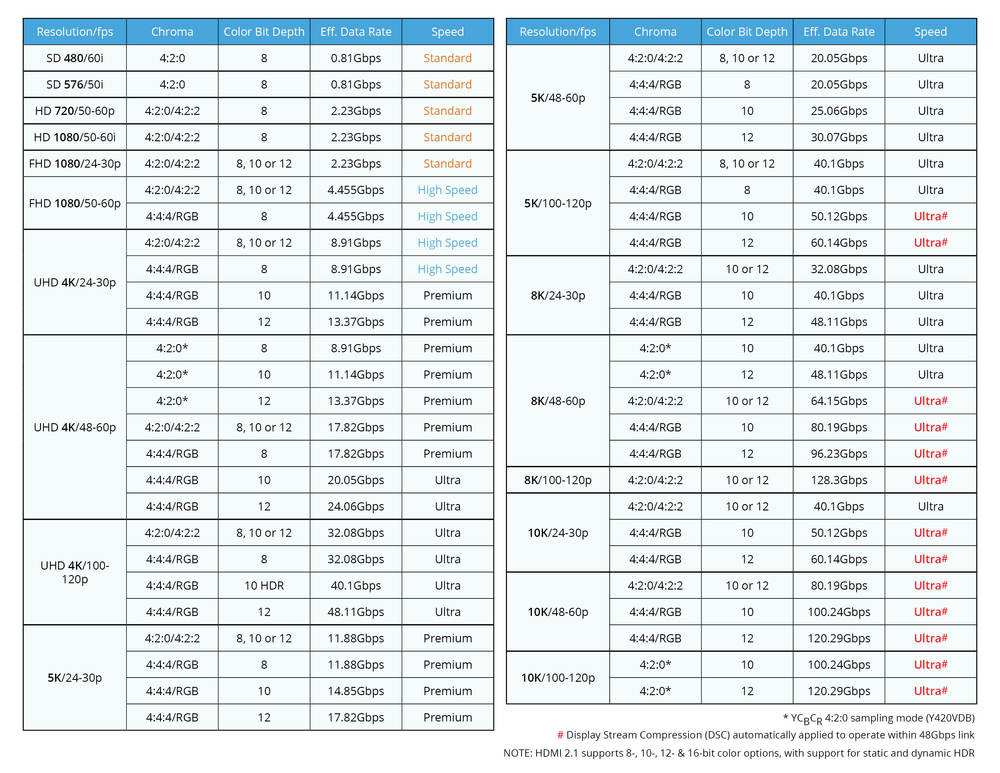
HDMI 2.1 isn't just a minor bump. It's a significant leap in what the connection can handle. The older HDMI 2.0 standard maxes out at 18 Gbps of bandwidth.
HDMI 2.1 pushes that to 48 Gbps using a signaling method called Fixed Rate Link (FRL). That's the core difference everything else builds on.
Think of it like a highway. HDMI 2.0 is a three-lane road that handles regular traffic well. HDMI 2.1 is an eight-lane freeway.
For most daily driving, three lanes are plenty. But when you need to move a lot of data at once, like 4K at 120Hz with full HDR and uncompressed color, you need those extra lanes.
Bandwidth: The Real Bottleneck
Every video signal requires a certain amount of bandwidth based on resolution, refresh rate, color depth, and chroma subsampling. Here's where the math matters. A 4K signal at 60Hz with 8-bit color and full 4:4:4 chroma needs about 12.54 Gbps.
That fits comfortably within HDMI 2.0's 18 Gbps limit.
But bump that to 4K at 120Hz with 10-bit HDR and 4:4:4 chroma, and you're looking at roughly 35.68 Gbps. HDMI 2.0 can't touch that. You need HDMI 2.1's 48 Gbps pipe, or you need to use Display Stream Compression (DSC) to squeeze the signal through.
| Use Case | Bandwidth Required | HDMI 2.0 (18 Gbps) | HDMI 2.1 (48 Gbps) |
|---|---|---|---|
| 4K/60Hz, 8-bit, 4:4:4 | ~12.54 Gbps | Yes | Yes |
| 4K/60Hz, 10-bit HDR, 4:4:4 | ~17.82 Gbps | Yes (tight) | Yes |
| 4K/120Hz, 8-bit, 4:4:4 | ~25.08 Gbps | No | Yes |
| 4K/120Hz, 10-bit HDR, 4:4:4 | ~35.68 Gbps | No | Yes |
| 4K/144Hz, 10-bit HDR, 4:4:4 | ~44.54 Gbps | No | Yes (with DSC) |
| 4K/240Hz, 10-bit HDR | ~59+ Gbps | No | Requires DSC |
What HDMI 2.0 Can Handle at 4K
HDMI 2.0 is far from obsolete. For a huge number of 4K monitor use cases, it's perfectly sufficient. Here's what it handles without any compression or compromise:
- 4K at 60Hz with 8-bit color and 4:4:4 chroma (standard for desktop use)
- 4K at 60Hz with 10-bit color at 4:2:2 chroma (workable for HDR content)
- Full audio passthrough including surround sound formats
- HDR10 metadata at 60Hz
If your workflow is office productivity, web browsing, photo editing at 60Hz, or watching 4K HDR movies, HDMI 2.0 covers you completely. The monitor will look fantastic, and you won't notice any limitation.
What Forces You Into HDMI 2.1 Territory
Certain features simply won't work without HDMI 2.1's extra bandwidth. These are the non-negotiable scenarios:
- 4K at 120Hz or higher: The single biggest reason people need HDMI 2.1. If your monitor is 4K/120Hz, 4K/144Hz, or 4K/240Hz, HDMI 2.0 will cap you at 60Hz. You'd be leaving your monitor's best feature on the table.
- VRR (Variable Refresh Rate): While some HDMI 2.0 implementations support basic FreeSync, full VRR support (HDMI 2.1 VRR, G-Sync over HDMI) requires the 2.1 specification.
- Full HDR at high refresh rates: 4K/120Hz with 10-bit HDR and 4:4:4 chroma needs HDMI 2.1. Drop to 4:2:2 chroma on HDMI 2.0 and you'll see subtle color resolution loss.
- ALLM (Auto Low Latency Mode): Auto-switching to game mode is an HDMI 2.1 feature. Convenient, not essential, but nice to have.
- eARC: If you're routing audio through the monitor to a sound system, eARC (enhanced Audio Return Channel) supports uncompressed formats like Dolby TrueHD and DTS-HD Master Audio.
The Decision Tree: Do You Actually Need HDMI 2.1?
This is where we get practical. Your answer depends entirely on what you're connecting and what you expect to see on screen. Let's walk through it.
You Probably Don't Need HDMI 2.1 If…
- You're using the monitor for office work, coding, or general productivity at 60Hz
- You're a photo editor working with a 4K/60Hz panel
- You watch 4K HDR movies and don't game
- Your monitor is 4K/60Hz or 4K/75Hz (no high refresh rate to unlock)
- You're connecting a laptop for presentations or extended desktop use
- Your source device (laptop, docking station) only has HDMI 2.0 output and your monitor is 60Hz
In all these cases, a High Speed HDMI cable (the older certified standard) will serve you well. Save your money.
You Do Need HDMI 2.1 If…
- Your monitor is 4K/120Hz or higher and you want to actually use that refresh rate
- You're connecting a PS5 or Xbox Series X and want 4K/120Hz output
- You're a PC gamer with a capable GPU and a high-refresh 4K monitor
- You need VRR (G-Sync or FreeSync) over HDMI
- You want 4K/120Hz with full HDR and 4:4:4 chroma simultaneously
- You're using the monitor as a home theater hub with eARC audio passthrough
The Gray Zone: It Depends
Some situations fall in the middle. If your monitor is 4K/120Hz but you only game at 4K/60Hz and don't care about VRR, HDMI 2.0 works fine. You just won't get the high refresh rate.
Whether that matters is up to you.
Another gray zone: Display Stream Compression. If your monitor and GPU both support DSC, you can sometimes push high refresh rates through DisplayPort 1.4 instead of needing HDMI 2.1. That's a workaround worth knowing about, which we'll cover in the DisplayPort section.
Real Scenarios: Who Needs What
Let's put this into concrete situations. These are the setups people actually deal with day to day.
Console Gaming (PS5, Xbox Series X)
Both the PS5 and Xbox Series X output 4K/120Hz and support VRR over HDMI 2.1. If you've bought a 4K/120Hz monitor specifically for console gaming, you need an Ultra High Speed HDMI cable and a monitor with a full-bandwidth HDMI 2.1 port. Without it, you'll be stuck at 4K/60Hz.
Here's the catch. Some budget monitors advertise "HDMI 2.1" but only support 4K/60Hz over that port. The HDMI 2.1 port might exist physically but lack the bandwidth to do anything beyond what HDMI 2.0 offers.
Always check the actual supported refresh rate at 4K resolution, not just the port version number.
PC Gaming
PC gamers usually have more flexibility because most graphics cards have both HDMI 2.1 and DisplayPort 1.4 (or newer). If your GPU has HDMI 2.1 output and your monitor has HDMI 2.1 input, a single Ultra High Speed HDMI cable gets you 4K/120Hz with VRR. It's plug and play.
But if your GPU only has HDMI 2.0 (some older or budget cards), you'll need to use DisplayPort instead to hit high refresh rates at 4K. DisplayPort 1.4 with DSC handles 4K/120Hz just fine. We'll dig into that comparison next.
Creative Work and Productivity
For video editors, photographers, and designers working on 4K monitors, the priority is usually color accuracy and resolution, not refresh rate. A 4K/60Hz monitor with 10-bit color and 4:4:4 chroma works over HDMI 2.0 without issue. The extra bandwidth of HDMI 2.1 doesn't add anything to your workflow unless you're also gaming on the same display.
Media and Home Theater
If you're using a 4K monitor as a display for a home theater PC or media player, HDMI 2.0 handles 4K/60Hz HDR content perfectly. Most film and streaming content is 24fps or 30fps anyway. The only reason to insist on HDMI 2.1 here is if you want eARC for high-quality audio passthrough to an AV receiver.
HDMI 2.1 vs DisplayPort: The Better Question
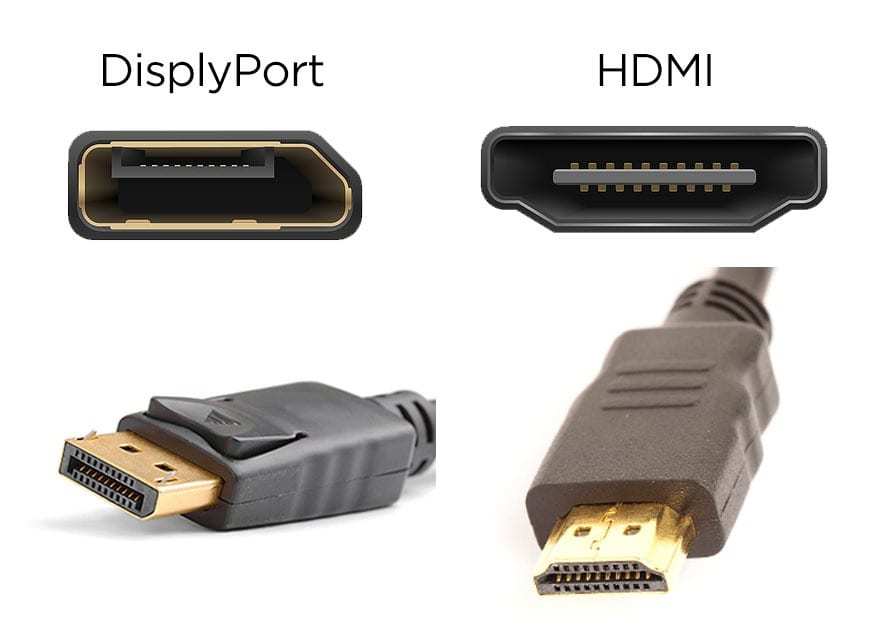
For a lot of people, the real question isn't HDMI 2.1 versus HDMI 2.0. It's HDMI 2.1 versus DisplayPort. And the answer depends on what hardware you're working with.
When DisplayPort Wins
DisplayPort 1.4 offers 32.4 Gbps of bandwidth. That's less than HDMI 2.1's 48 Gbps, but with Display Stream Compression, it handles 4K/120Hz at 10-bit HDR without any visible quality loss. DSC is visually lossless, meaning you genuinely cannot tell the difference in normal use.
DisplayPort is the better choice when:
- Your PC has DisplayPort output and your monitor has DisplayPort input (most do)
- You want 4K/120Hz on a DisplayPort 1.4 setup with DSC
- You're running multi-monitor daisy chaining (DisplayPort supports this, HDMI doesn't)
- You need Adaptive Sync (FreeSync works natively over DisplayPort)
DisplayPort 2.0 and 2.1 push bandwidth up to 80 Gbps, which dwarfs HDMI 2.1. As of 2026, DisplayPort 2.1 is starting to appear on newer GPUs and monitors, but adoption is still early.
When HDMI 2.1 Is Your Only Option
HDMI 2.1 wins by default in situations where DisplayPort isn't available:
- Consoles: PS5 and Xbox Series X only have HDMI outputs. No DisplayPort option exists.
- Laptops: Many laptops only have HDMI for external display output. If you're connecting a laptop to a 4K/120Hz monitor, HDMI 2.1 is your path.
- AV receivers: If you're routing through a home theater receiver, HDMI is the standard. HDMI 2.1 receivers support 4K/120Hz passthrough.
- Older GPUs: Some graphics cards lack DisplayPort outputs or only have older DP versions.
| Feature | HDMI 2.0 | HDMI 2.1 | DisplayPort 1.4 | DisplayPort 2.1 |
|---|---|---|---|---|
| Max Bandwidth | 18 Gbps | 48 Gbps | 32.4 Gbps | 80 Gbps |
| 4K/60Hz HDR | Yes | Yes | Yes | Yes |
| 4K/120Hz HDR | No | Yes | Yes (DSC) | Yes |
| 4K/144Hz HDR | No | Yes (DSC) | Yes (DSC) | Yes |
| VRR Support | Limited | Yes | Yes (native) | Yes |
| Daisy Chaining | No | No | Yes | Yes |
| eARC | No | Yes | No | No |
| Console Support | Yes | Yes | No | No |
The Cable Problem Nobody Talks About
Here's where a lot of people waste money. They see "HDMI 2.1" and assume they need to buy a new cable. Some cables marketed as "HDMI 2.1 compatible" cost three to four times more than a standard High Speed HDMI cable.
Many of them don't actually meet the official specification.
Certified vs. "Compatible"
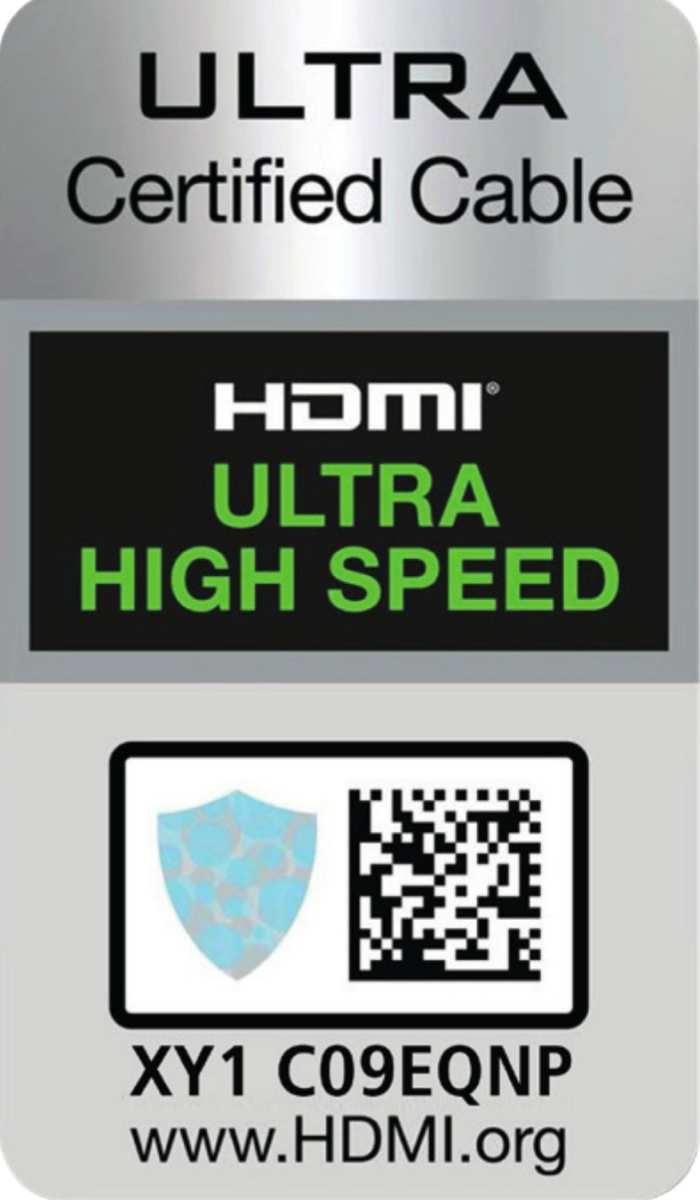
The HDMI Licensing Administrator has an official certification program. Cables that pass testing earn the "Ultra High Speed HDMI" label. These cables are verified to handle the full 48 Gbps bandwidth.
They also have a QR code and holographic label you can scan to verify authenticity.
Plenty of cables on the market say "HDMI 2.1 compatible" or "supports 4K/120Hz" without being certified. Some of these work fine. Others are cheaply made and cause signal dropouts, flickering, or fallback to lower refresh rates.
The problem is you can't tell by looking at the packaging.
Our recommendation: if you genuinely need HDMI 2.1 bandwidth, buy a certified Ultra High Speed HDMI cable. They typically cost $8 to $15 for a 6-foot length. That's reasonable.
If someone is charging $40 or $50 for an "8K certified gaming HDMI cable," you're paying for marketing, not performance.
Cable Length Matters More Than You Think
HDMI 2.1's 48 Gbps signal degrades over distance faster than HDMI 2.0's 18 Gbps signal. At lengths beyond about 10 feet (3 meters), you may experience signal integrity issues with uncertified cables. For runs longer than 10 feet, look for active HDMI cables that include built-in signal amplification, or consider fiber-optic HDMI cables.
For most desk setups where the PC or console sits within 6 feet of the monitor, a passive certified cable works perfectly. Save the active cables for longer runs.
Common Mistakes and Misleading Marketing
The HDMI 2.1 label has become a marketing buzzword. Manufacturers use it to make products look more capable than they are. Here are the most common traps.
The "HDMI 2.1 Ready" Trap
Some monitors advertise HDMI 2.1 support but only include one HDMI 2.1 port alongside one or more HDMI 2.0 ports. Others have HDMI 2.1 ports that support only a subset of the specification, like eARC but not full 48 Gbps bandwidth. Always check the detailed specs, not just the marketing headline.
A monitor with an HDMI 2.1 port that only supports 4K/60Hz over that port is technically "HDMI 2.1" but gives you no practical benefit over HDMI 2.0. The port version number doesn't guarantee the bandwidth.
Assuming Your GPU Has HDMI 2.1
Not all graphics cards have HDMI 2.1 outputs. As of 2026, NVIDIA's RTX 30-series and newer have HDMI 2.1. AMD's RX 6000-series and newer also include it.
But many older and budget GPUs still ship with HDMI 2.0. Check your specific GPU model's output specifications before buying cables or expecting 4K/120Hz over HDMI.
Buying the Wrong Cable
The most common mistake is buying an expensive "8K HDMI cable" when a standard High Speed HDMI cable would work. If your setup only needs 4K/60Hz, you don't need Ultra High Speed HDMI. A High Speed HDMI cable (certified for 18 Gbps) handles that signal with room to spare.
Save the premium cable purchase for when you actually need 48 Gbps.
Quick Reference: Bandwidth Requirements by Use Case
Here's a practical cheat sheet. Match your situation to the cable and port version you actually need.
| Your Situation | Cable You Need | Port Version Required |
|---|---|---|
| Office work, 4K/60Hz | High Speed HDMI | HDMI 2.0 |
| Photo editing, 4K/60Hz HDR | High Speed HDMI | HDMI 2.0 |
| 4K HDR movie watching | High Speed HDMI | HDMI 2.0 |
| Console gaming, 4K/60Hz | High Speed HDMI | HDMI 2.0 |
| Console gaming, 4K/120Hz | Ultra High Speed HDMI | HDMI 2.1 (full bandwidth) |
| PC gaming, 4K/120Hz | Ultra High Speed HDMI | HDMI 2.1 (full bandwidth) |
| PC gaming, 4K/144Hz+ | Ultra High Speed HDMI (or DP 1.4 with DSC) | HDMI 2.1 or DisplayPort 1.4+ |
| VRR gaming over HDMI | Ultra High Speed HDMI | HDMI 2.1 |
| eARC audio passthrough | Ultra High Speed HDMI | HDMI 2.1 |
Final Verdict: A Simple Decision Guide
If you've made it this far, you know the answer isn't a simple yes or no. Here's the bottom line.
For 4K/60Hz use, whether that's office work, media consumption, or casual gaming, HDMI 2.0 is enough. Don't let anyone convince you that you need to upgrade your cables or your monitor just to get a "2.1" label on the spec sheet.
For 4K/120Hz and above, HDMI 2.1 is necessary. There's no way around it without using DisplayPort and DSC. If you're connecting a console or a PC to a high-refresh 4K monitor, budget for a certified Ultra High Speed HDMI cable and make sure both your source and your monitor have full-bandwidth HDMI 2.1 ports.
The smartest move is to check your specific monitor's manual. Look at what resolution and refresh rate each HDMI port actually supports. Then match your cable to that.
That five-minute check saves you from buying the wrong cable or wondering why your 4K/144Hz monitor is stuck at 60Hz.
Frequently Asked Questions
Can I use an HDMI 2.0 cable with a 4K monitor that has HDMI 2.1?
Yes, the cable will work. But you'll be limited to HDMI 2.0 bandwidth. That means 4K/60Hz maximum.
If your monitor supports 4K/120Hz, you won't reach that refresh rate with an HDMI 2.0 cable.
Do all HDMI 2.1 ports support 48 Gbps?
No. The HDMI 2.1 specification includes features that can be implemented independently. Some monitors have HDMI 2.1 ports that support features like eARC or VRR but only offer reduced bandwidth (around 24 to 32 Gbps).
Always check the actual supported refresh rate at your target resolution.
Is DisplayPort better than HDMI 2.1 for 4K gaming?
For PC gaming, DisplayPort 1.4 with DSC is comparable to HDMI 2.1 for 4K/120Hz. DisplayPort 2.1 exceeds HDMI 2.1 in bandwidth. But for console gaming, HDMI 2.1 is your only option since consoles don't have DisplayPort outputs.
How do I know if my HDMI cable is certified?
Look for the "Ultra High Speed HDMI" label on the packaging. Certified cables have a holographic label and a QR code you can scan with the HDMI Licensing Administrator's verification app. If the cable just says "HDMI 2.1 compatible" without the official certification logo, it hasn't been independently tested.
Will HDMI 2.1 become the standard for all 4K monitors?
It's already becoming standard on mid-range and high-end 4K monitors as of 2026. But HDMI 2.0 remains common on budget 4K displays. The transition is happening gradually as 4K/120Hz panels become more affordable and HDMI 2.1 licensing costs decrease.

Similar Posts





















