Do Mini LED Monitors Support HDR10+
Do mini-LED monitors support HDR10+? It's a fair question, and the answer isn't as straightforward as you'd hope. The short version: some do, most don't, and the reason comes down to two completely separate technologies that people constantly confuse.
Mini-LED is a backlighting method. HDR10+ is a content standard. Having one doesn't automatically give you the other, and that distinction trips up a lot of buyers. If you are exploring similar hardware setups, see our detailed guide on whether mini led monitors support daisy chaining.
Let's break down exactly what's going on so you know what to look for before spending your money.
Quick Answer
Some mini-LED monitors support HDR10+. Most do not. Mini-LED is a backlight technology.
HDR10+ is a dynamic metadata format. Samsung's Odyssey Neo series leads the market here. Always verify HDR10+ in the spec sheet before buying. Readers evaluating this setup should also consider what refresh rates do mini led monitors support for comparative benchmarks.
Why This Question Is More Complicated Than It Sounds
Here's where people get tripped up. They see "mini-LED" and assume it's a premium HDR experience across the board. That's not how it works.
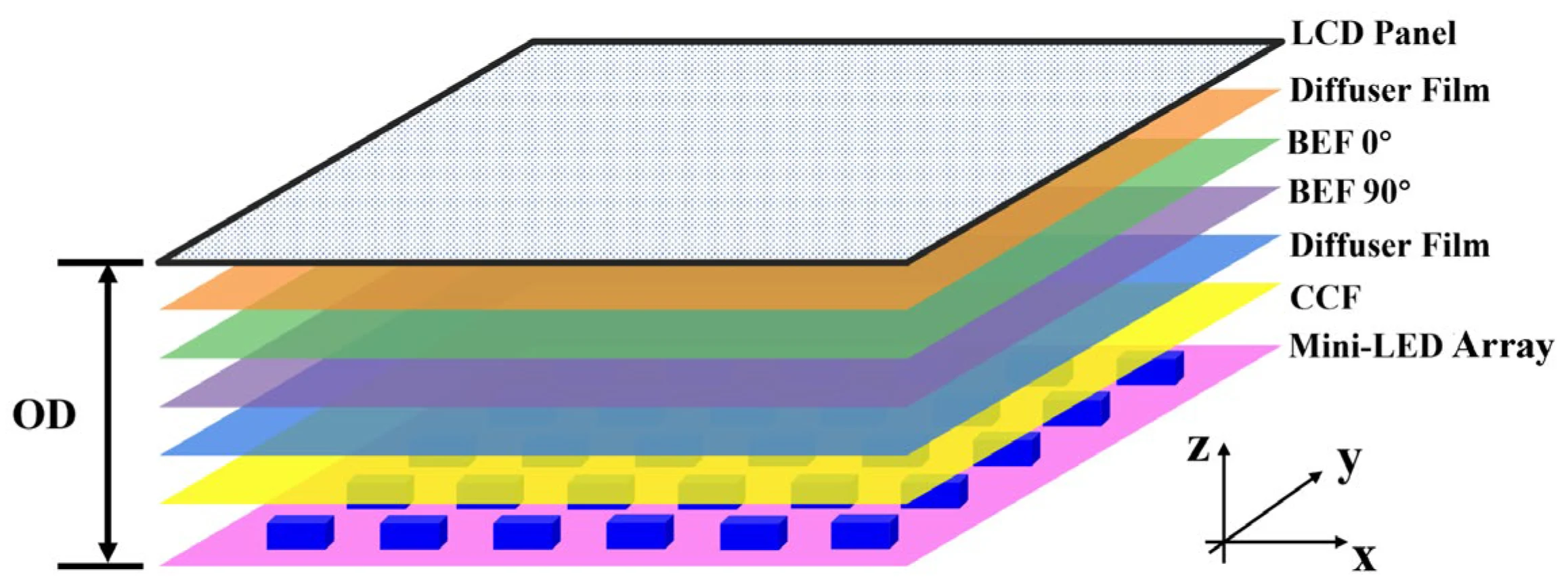
Mini-LED refers to the physical backlighting system behind the LCD panel. It uses thousands of tiny LED zones to control brightness in different areas of the screen simultaneously. That gives you deeper blacks, higher contrast, and better overall picture quality compared to older edge-lit or direct-lit LED monitors.
HDR10+ is something else entirely. It's a dynamic metadata format developed by Samsung that tells the display how to render each individual scene of content. Standard HDR10 uses static metadata, meaning one set of instructions for the entire video.
HDR10+ adjusts frame by frame, giving the display more precise guidance on brightness, contrast, and color.
So when someone asks whether mini-LED monitors support HDR10+, they're really asking whether a specific monitor has both the hardware capability (mini-LED backlighting) and the software/certification (HDR10+ decoding and processing). Those are two independent checkboxes.
As of 2026, the number of mini-LED monitors with HDR10+ certification remains surprisingly small. Samsung dominates this space because they're the primary backer of the HDR10+ standard itself. Other manufacturers tend to favor Dolby Vision or stick with basic HDR10.
How Mini-LED and HDR10+ Actually Work Together
Let's separate these two technologies clearly so you understand exactly what each one does and where they overlap.
What Mini-LED Brings to the Table
Mini-LED is all about the hardware behind your LCD panel. Instead of a few dozen or a few hundred dimming zones, mini-LED packs in hundreds or even thousands of individually controlled LED zones.
Here's what that gives you:
- Higher peak brightness. Many mini-LED monitors hit 1,000 nits or more in sustained highlights.
- Deeper blacks. Zones can turn off completely in dark areas while staying bright elsewhere on screen.
- Better contrast ratios. The difference between the brightest and darkest parts of an image becomes dramatic.
- Reduced blooming. Light from bright objects doesn't bleed as much into surrounding dark areas.
The number of zones matters enormously. A monitor with 576 zones performs noticeably differently from one with 2,048 zones. More zones mean finer control and fewer visible artifacts around high-contrast edges.
But here's the key point. Mini-LED hardware alone doesn't decode HDR10+ signals. It just provides a better canvas for whatever HDR format you throw at it.
The monitor's processor, firmware, and certification determine whether it actually understands HDR10+ content.
What HDR10+ Actually Requires
HDR10+ isn't a hardware specification. It's a content format and processing standard managed by HDR10+ Technologies LLC, a subsidiary of Samsung.
For a monitor to support HDR10+, it needs:
- An HDR10+ certified processor. The monitor's internal scaler chip must be licensed and certified to interpret HDR10+ dynamic metadata.
- Firmware implementation. The manufacturer must actively build HDR10+ support into the monitor's firmware.
- Minimum brightness and color requirements. While HDR10+ doesn't mandate a specific peak brightness, the certification process expects the display to perform well enough that dynamic metadata actually makes a visible difference.
- HDMI or DisplayPort input support. The signal path from your GPU or media player must carry the HDR10+ metadata without stripping it.
This is why a monitor can have spectacular mini-LED hardware with 2,000 zones and 2,000 nits of peak brightness but still lack HDR10+. The manufacturer simply didn't license the standard or didn't prioritize it in firmware.
Why Having One Doesn't Guarantee the Other
Think of it like a high-end sound system. Having premium speakers (mini-LED) doesn't mean your receiver can decode Dolby Atmos (HDR10+). You need both pieces working together.
Manufacturers make deliberate choices about which HDR formats to support based on licensing costs, target market, and ecosystem alignment. Samsung backs HDR10+ because they created it. LG Display pushes Dolby Vision because they have a partnership there.
Other brands pick and choose based on what their target buyers care about.
The result is a fragmented landscape where mini-LED monitors vary wildly in HDR format support. You'll find models with HDR10 and DisplayHDR 1400 certification but no HDR10+. You'll find others with HDR10+ but lower peak brightness.
And you'll find premium models that support everything.
Which Mini-LED Monitors Actually Support HDR10+
Let's get specific about what's actually on the market right now.
Samsung's HDR10+ Monitor Lineup
Samsung is the clear leader here, and it makes sense. They developed HDR10+ and actively push it across their product lines.
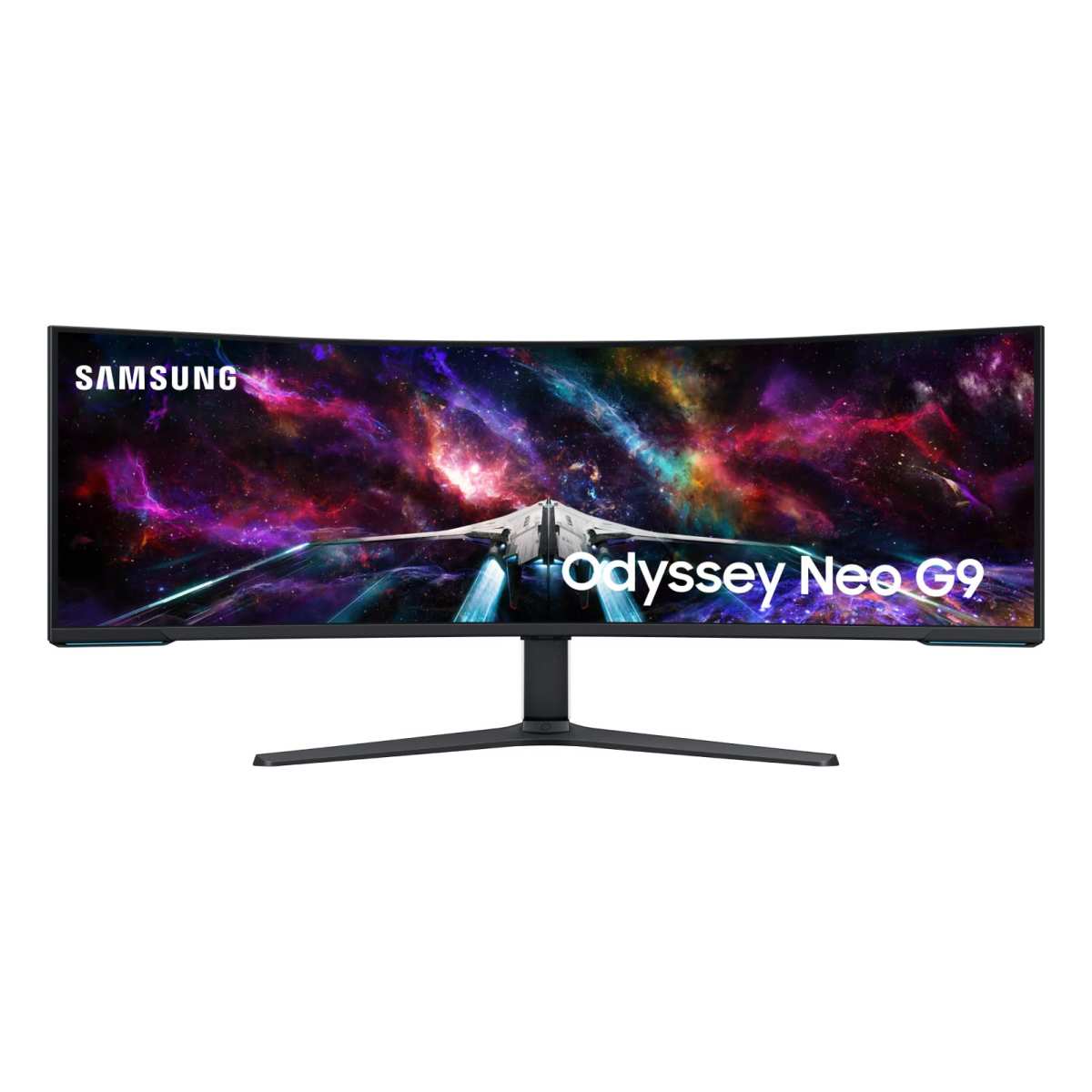
The Samsung Odyssey Neo series is where you'll find HDR10+ support on mini-LED hardware. Models like the Odyssey Neo G9 (both the original 57-inch and the newer iterations) combine Samsung's quantum dot color layer with mini-LED backlighting and full HDR10+ certification.
Key specs on these displays typically include:
- 4,096 or more local dimming zones on the largest models
- 1,000 to 2,000 nits peak brightness
- 10-bit color depth
- 95%+ DCI-P3 coverage
- HDMI 2.1 inputs that pass HDR10+ signals
Samsung's smaller Odyssey Neo models in the 27-inch to 32-inch range also carry HDR10+ support, though with fewer dimming zones than the flagship ultrawide.
The important thing to note is that Samsung doesn't charge a separate licensing fee for HDR10+ since they own the standard. That makes it easier for them to include it across their lineup without inflating the price.
Other Brands: The Reality Check
Outside Samsung, HDR10+ support on mini-LED monitors is rare. Here's what we found across the market:
- ASUS ROG Swift series. Some models support HDR10 and DisplayHDR 1400, but HDR10+ certification is absent from most SKUs.
- Acer Predator line. Similar story. Strong mini-LED hardware, DisplayHDR certification, but no HDR10+ badge.
- Dell Alienware. The AW3423DWF and similar models focus on Dolby Vision or standard HDR10 rather than HDR10+.
- LG. LG's mini-LED monitors almost universally favor Dolby Vision, which makes sense given their display division's relationship with Dolby.
- MSI, Gigabyte, Cooler Master. Budget and mid-range mini-LED options from these brands typically stick with HDR10 and DisplayHDR certification. HDR10+ isn't on their spec sheets.
This doesn't mean those other monitors are bad. Many of them deliver excellent HDR experiences through Dolby Vision or well-tuned HDR10 implementations. But if HDR10+ specifically matters to you, Samsung is essentially the game in town for mini-LED monitors as of 2026.
HDR10+ vs. Dolby Vision vs. Standard HDR10 on Mini-LED
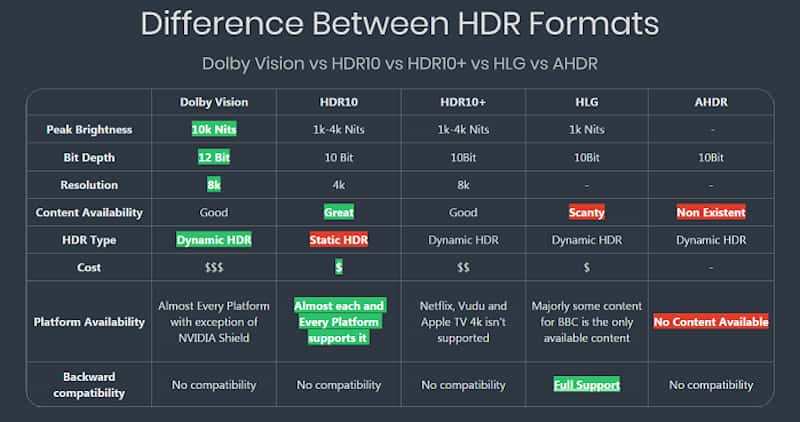
Now let's put the three main HDR formats head to head so you can see where HDR10+ fits in the bigger picture.
Side-by-Side Comparison Table
| Feature | HDR10 | HDR10+ | Dolby Vision |
|---|---|---|---|
| Metadata type | Static (one for entire content) | Dynamic (scene-by-scene) | Dynamic (scene-by-scene) |
| Licensing | Free, open standard | Free, but certification required | Proprietary, licensing fees apply |
| Peak brightness target | Up to 10,000 nits (theoretical) | Up to 10,000 nits (theoretical) | Up to 10,000 nits (theoretical) |
| Bit depth | 10-bit | 10-bit | 12-bit capable |
| Primary backer | UHD Alliance / HDR10+ Technologies | Samsung | Dolby Laboratories |
| Mini-LED monitor availability | Nearly universal | Mostly Samsung models | LG, some others |
| Content availability | Universal (all HDR content) | Amazon Prime Video, some Blu-ray | Netflix, Disney+, Apple TV+, most streaming |
| PC gaming support | Excellent | Limited (growing) | Limited on PC |
When HDR10+ Makes Sense
HDR10+ shines when you're watching content that's specifically mastered in that format. Amazon Prime Video is the biggest supporter, with a growing library of HDR10+ titles. Some 4K Blu-ray discs also carry HDR10+ metadata.
For gaming, the picture is more complicated. Console games that support HDR10+ are rare. PC game support is even rarer.
Most games output standard HDR10, which works fine on any HDR-capable monitor.
If your primary use case is watching HDR10+ streaming content on a mini-LED display, Samsung's Odyssey Neo monitors are your best bet. The combination of high zone counts and proper HDR10+ decoding means you're actually seeing the dynamic metadata do its job.
When Dolby Vision or Standard HDR10 Is Better
Dolby Vision has broader content support across streaming platforms. Netflix, Disney+, Apple TV+, and most major services default to Dolby Vision. If you consume a lot of streaming content across multiple platforms, a Dolby Vision-capable mini-LED monitor might serve you better.
Standard HDR10 is the universal fallback. Every HDR display supports it. Every HDR game outputs it.
It's not as refined as dynamic metadata formats, but it works everywhere without compatibility headaches.
For PC gaming specifically, standard HDR10 is still the practical choice. Very few PC titles implement HDR10+ or Dolby Vision. You'll get a great experience on a mini-LED monitor with strong HDR10 implementation regardless of whether it carries the HDR10+ badge.
What This Means for Gaming
Gaming is where HDR10+ support gets complicated on mini-LED monitors.
Most PC games output standard HDR10. That's been the norm since Windows 10 introduced system-level HDR support. Very few game engines implement HDR10+ or Dolby Vision rendering pipelines.
The list of titles that natively output HDR10+ signals is short and mostly consists of Samsung-partnered releases or specific console ports.
For console gaming, the situation is slightly different. Some Samsung TVs with HDR10+ have received firmware updates enabling HDR10+ gaming mode. On monitors, this feature is less common.
Samsung's Odyssey Neo monitors do support HDR10+ gaming mode in some firmware versions, but the actual game library that triggers it remains limited.
What matters more for gaming on a mini-LED monitor is the raw HDR performance. Peak brightness, local dimming zone count, and input lag in HDR mode affect your experience far more than whether the HDR10+ badge is on the spec sheet. A monitor with 1,000+ zones and 1,400 nits peak brightness running standard HDR10 will look spectacular in most games.
If HDR10+ gaming is a priority, check Samsung's firmware release notes for specific Odyssey Neo models. Some units received HDR10+ gaming support through post-launch updates. Others shipped with it from day one.
What This Means for Content Creation and Media
For professional content creators, HDR10+ support on a mini-LED monitor is a different calculation.
Video editors working with HDR10+ masters need a display that accurately reproduces the dynamic metadata. Samsung's Odyssey Neo monitors handle this well for preview purposes, but they're not reference-grade mastering displays. Dedicated reference monitors from brands like Sony or Flanders Scientific remain the standard for final color approval.
For photographers editing HDR images, the mini-LED backlight advantage is more relevant than HDR10+ specifically. The ability to see deep shadows and bright highlights simultaneously on screen helps with tone mapping decisions. Standard HDR10 support is sufficient for most photo editing workflows since HDR10+ is primarily a video format.
Media consumption is where HDR10+ on a mini-LED monitor genuinely shines. Amazon Prime Video's HDR10+ catalog looks noticeably better on a Samsung Odyssey Neo than on a standard HDR10 display. The per-scene tone mapping makes a visible difference in content that was graded with HDR10+ metadata.
Dark scenes retain shadow detail. Bright scenes don't clip highlights as aggressively.
If your monitor doubles as a media consumption display, HDR10+ support adds real value. Just make sure your streaming device or PC software can actually output HDR10+ signals. Not all media players pass through the metadata correctly.
How to Verify HDR10+ Support Before You Buy
Don't take marketing claims at face value. Here's how to confirm HDR10+ support before you spend money.
Check the Spec Sheet (Here's What to Look For)
Go to the manufacturer's official product page. Look for "HDR10+" specifically listed under the HDR or display specifications section. Don't settle for vague terms like "HDR compatible" or "HDR ready." Those usually mean basic HDR10.
The VESA DisplayHDR certification database is another useful resource. While DisplayHDR certification doesn't directly indicate HDR10+ support, it tells you the monitor's actual brightness and color performance tier. A DisplayHDR 1400 certification suggests the hardware is capable enough that HDR10+ would make a meaningful difference.
Also check whether HDR10+ is listed for the specific input you plan to use. Some monitors only support HDR10+ over HDMI, not DisplayPort. Others support it on both.
The spec sheet should clarify this.
Confirm Your GPU and Cable Setup
Your graphics card needs to output HDR10+ signals. NVIDIA's RTX 20-series and newer GPUs support HDR10+ output through compatible drivers. AMD's RX 5000-series and newer GPUs also support it, though driver implementation has been less consistent in some user reports.
Cable quality matters too. For 4K HDR10+ at 60Hz, you need a certified Ultra High Speed HDMI 2.1 cable. For higher refresh rates at lower resolutions, DisplayPort 1.4 with Display Stream Compression can carry HDR10+ signals.
Cheap cables often fail to maintain the full bandwidth, resulting in dropped metadata or fallback to standard HDR10.
Test HDR10+ Once You've Got It
After setup, verify HDR10+ is actually active. On Windows, the HDR toggle in Display Settings should show HDR10+ as the active format when playing compatible content. Samsung's Odyssey Neo monitors display an HDR10+ indicator in the OSD when the signal is detected.
Amazon Prime Video's HDR10+ titles show a small "HDR10+" badge in the video player when streaming. If you see that badge and your monitor's OSD confirms HDR10+ detection, everything is working correctly.
Common Mistakes People Make With Mini-LED and HDR10+
These are the errors we see most often from buyers who assume mini-LED automatically means full HDR compatibility.
Assuming all mini-LED monitors support HDR10+. They don't. Most don't. Always verify the specific HDR formats listed on the spec sheet before purchasing.
Ignoring the content ecosystem. Buying an HDR10+ monitor is only useful if you have access to HDR10+ content. If your streaming services default to Dolby Vision and your games output standard HDR10, the HDR10+ badge doesn't add much value.
Using the wrong cable. A standard HDMI 2.0 cable cannot carry HDR10+ signals at 4K resolution with high refresh rates. You need HDMI 2.1 or DisplayPort 1.4 with DSC. This catches a lot of people off guard.
Not enabling HDR in Windows. Windows defaults to SDR mode. You need to manually toggle HDR on in Display Settings. Even then, Windows' desktop HDR implementation can look washed out.
HDR is best experienced in full-screen applications and media players.
Expecting HDR10+ to fix poor content. Dynamic metadata improves tone mapping, but it can't salvage badly mastered content. A poorly graded HDR10+ video will still look poor on a high-end mini-LED monitor.
Overlooking local dimming quality. HDR10+ metadata is only as good as the display's ability to execute it. A mini-LED monitor with 100 zones and HDR10+ won't look as good as one with 1,000 zones running standard HDR10. Zone count matters more than the metadata format.
Pricing and What You're Actually Paying For
Mini-LED monitors with HDR10+ certification carry a price premium. Here's what the market looks like as of 2026.
Samsung's Odyssey Neo G9 (57-inch, dual 4K, 240Hz) sits at the top end, typically priced between $1,300 and $1,800 depending on sales and availability. The smaller 32-inch and 49-inch Odyssey Neo models range from $800 to $1,200.
Non-Samsung mini-LED monitors with similar hardware specs but without HDR10+ certification often cost $200 to $400 less. That price difference reflects the licensing, certification, and firmware development costs associated with HDR10+ support.
Is the premium worth it? That depends entirely on your use case. If you watch a lot of HDR10+ content on Amazon Prime Video, yes.
If you primarily game with standard HDR10, you'll get more value from a non-HDR10+ mini-LED monitor with higher zone counts or better input lag specs at a lower price.
The sweet spot for most buyers is a well-reviewed mini-LED monitor with strong local dimming performance and standard HDR10 support. HDR10+ is a nice bonus, not a must-have, unless you have specific content that benefits from it.
Frequently Asked Questions
Do all mini-LED monitors support HDR10+?
No. Most mini-LED monitors support standard HDR10 and DisplayHDR certification. HDR10+ support is primarily found on Samsung's Odyssey Neo series.
Always check the specific HDR format list on the manufacturer's spec sheet before assuming HDR10+ is included.
Is HDR10+ better than Dolby Vision?
Not necessarily. Both are dynamic metadata formats that adjust tone mapping scene by scene. Dolby Vision has broader content support across streaming platforms.
HDR10+ has stronger adoption on Samsung devices and Amazon Prime Video. The better format depends on which content you consume most.
Can I use HDR10+ on PC?
PC support for HDR10+ is limited. Windows supports HDR10 natively, but HDR10+ output requires specific GPU drivers and compatible applications. Most PC games output standard HDR10.
HDR10+ on PC is mainly useful for media playback through compatible players.
Does HDR10+ require a special cable?
HDR10+ at 4K resolution requires an Ultra High Speed HDMI 2.1 cable or DisplayPort 1.4 with Display Stream Compression. Standard HDMI 2.0 cables lack the bandwidth for full HDR10+ signals at high resolutions and refresh rates. Cable quality matters more than most people realize.
Is a mini-LED monitor worth it for HDR gaming?
Yes, but not specifically because of HDR10+. Mini-LED's high zone counts and peak brightness make a visible difference in HDR gaming regardless of the metadata format. Standard HDR10 gaming on a quality mini-LED monitor looks excellent.
The HDR10+ badge is less important for gaming than raw display performance.
How do I know if HDR10+ is active on my monitor?
Samsung's Odyssey Neo monitors display an HDR10+ indicator in the on-screen display when the signal is detected. On Windows, the HDR settings panel should show the active HDR format. Amazon Prime Video also displays an HDR10+ badge in its video player when streaming compatible content.
Final Verdict: Should You Buy a Mini-LED Monitor for HDR10+?
Here's the honest answer. If HDR10+ specifically is your primary goal, Samsung's Odyssey Neo monitors are essentially your only option in the mini-LED monitor space. They deliver strong performance with proper HDR10+ implementation.
But if you're choosing a mini-LED monitor primarily for gaming, standard HDR10 support combined with high zone counts and peak brightness will serve you better than chasing the HDR10+ badge. The content ecosystem for HDR10+ gaming is too limited to make it a deciding factor.
For content creation, look at your actual workflow. If you're editing HDR10+ video for Amazon Prime Video delivery, a Samsung Odyssey Neo makes sense as a preview display. For everything else, prioritize color accuracy and uniform brightness over HDR10+ certification.
The smartest move is to evaluate the monitor's overall HDR performance first. Zone count, peak brightness, color gamut coverage, and input lag matter more in daily use than whether the spec sheet includes HDR10+. Let the badge be a tiebreaker, not the deciding factor.

Similar Posts





















