Are USB C Monitors Eco Friendly
Are USB-C monitors eco-friendly? The honest answer is: it depends on which model you pick and what you're replacing. USB-C monitors offer real environmental advantages through cable consolidation and smarter power delivery, but they're not automatically green just because they have that port.
Per USB-IF standards, USB-C Power Delivery negotiates power based on what the connected device requests. This is genuinely more efficient than pushing fixed voltage through a dumb barrel-jack charger. But the full picture involves repairability, panel lifespan, and whether the manufacturer actually designed for longevity. If you are exploring similar hardware setups, see our detailed guide on whether oled monitors eco friendly.
Let's break it down.
Quick Answer
USB-C monitors can be eco-friendly, but it depends on the specific model. They reduce cable clutter and use smarter power delivery. Energy savings range from modest to meaningful, often 15, 25 watts during normal use.
However, non-repairable models with sealed power supplies create more e-waste. Always check for replaceable cables and power components before assuming green benefits.
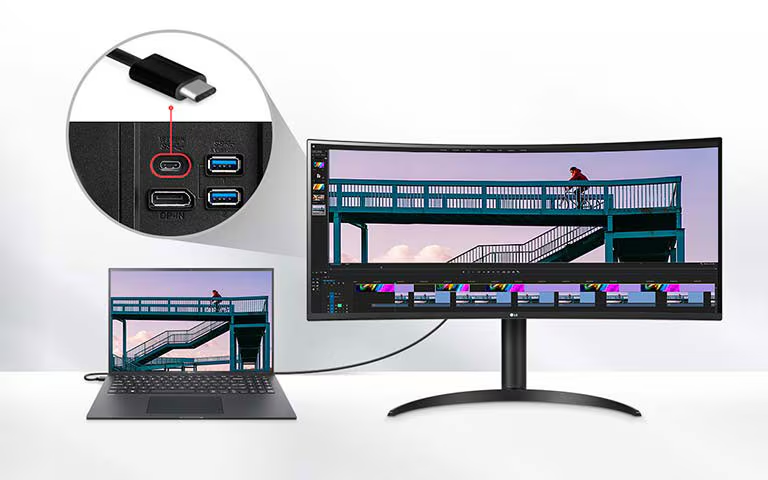
Image source: LG Electronics
What Makes a Monitor "Eco-Friendly" in the First Place?
Before we judge USB-C monitors on their green credentials, we need to agree on what "eco-friendly" actually means for a display. It's not just about energy consumption during use. To see how this holds up against alternate models, explore whether touchscreen monitors eco friendly.
The environmental footprint of a monitor comes from four main areas:
- Energy consumption during its lifetime, This is usually the biggest factor. A monitor running 8 hours a day for 7 years uses a lot of electricity. Even small efficiency gains compound over that span.
- Manufacturing and materials, The panel itself, the aluminum or plastic housing, the circuit boards, and the rare earth elements in the backlight all carry an environmental cost before the monitor ever reaches your desk.
- Product lifespan and repairability, A monitor that lasts 10 years is greener than two monitors that each last 5 years. Full stop. Repairability directly affects this.
- End-of-life disposal, What happens when the monitor dies? Can the power supply be separated for recycling? Are the plastics marked for sorting? Or does the whole unit go into e-waste?
Most people only think about the first factor. But for USB-C monitors specifically, the repairability question (that's point 3) is arguably more important than the energy efficiency gains. Why?
Because the USB-C port adds complexity to the circuit board. Power delivery negotiation, video output switching, and USB hub duties all live on one integrated board in many models. More complexity means more potential failure points.
And if the manufacturer designed it as a sealed unit, one failed component can mean trashing the entire monitor.
The certifications that actually tell you something:
- Energy Star, Meets strict energy efficiency criteria set by the US EPA. For monitors, this typically means meeting specific power consumption limits in on-mode, sleep-mode, and off-mode.
- EPEAT, A broader environmental assessment from the Green Electronics Council. Covers energy use, materials selection, product longevity, and end-of-life management.
- TCO Certified, A sustainability certification from TCO Development specifically for IT products. Includes criteria for ergonomics, energy efficiency, hazardous substances, and circular economy principles.
A monitor carrying all three certifications is a much safer bet for eco-friendliness than one that just has a USB-C port and a green-sounding marketing tagline.
USB-C Monitors: Where They Help the Environment
This is the part of the pitch that's actually legitimate. USB-C monitors deliver real environmental benefits in specific, measurable ways.
Cable and Adapter Reduction
The most obvious win. A traditional monitor setup typically involves:
- One video cable (HDMI, DisplayPort, or VGA)
- One power cable with a wall adapter
- One USB upstream cable if you want the monitor's built-in hub
- A separate laptop charger
A USB-C monitor collapses all of that into a single cable carrying video, data, and power simultaneously. That's three or four cables reduced to one. Fewer cables manufactured means less copper mining, less plastic insulation, less packaging material, and lower shipping weight per unit.
For individual users, the benefit is modest. But for enterprise deployments, it adds up fast. When a company outfits 500 desks with USB-C monitors, that's potentially 1,500 fewer cables in the supply chain.
The logistics savings alone are significant.
Smarter Power Delivery
USB-C Power Delivery (USB-PD) is genuinely more efficient than traditional fixed-voltage charging. Here's why.
A standard barrel-jack charger pushes a fixed voltage regardless of what the device actually needs. Some energy gets wasted as heat during the conversion process inside the laptop. USB-PD negotiates the exact voltage and amperage the device requests.
This means less conversion loss and less wasted heat.
Most USB-C monitors with power delivery offer between 60W and 100W of passthrough charging. That covers the vast majority of ultrabooks and productivity laptops. High-performance laptops and gaming machines still need their dedicated power bricks, but for the typical office or home setup, the monitor can handle it.
Typical power consumption for USB-C monitors:
| Panel Size | Resolution | Typical On-Mode Power | Sleep Mode | Off Mode |
|---|---|---|---|---|
| 24 inches | 1080p | 12–18W | <0.5W | <0.3W |
| 27 inches | 1440p | 18–25W | <0.5W | <0.3W |
| 27 inches | 4K | 22–30W | <0.5W | <0.3W |
| 32 inches | 4K | 25–35W | <0.5W | <0.3W |
| 34 inches | Ultrawide | 25–40W | <0.5W | <0.3W |
These numbers are comparable to non-USB-C monitors of the same size and resolution. The efficiency gain isn't in the panel itself. It's in eliminating the redundant power supplies and adapters.
Reduced Shipping Impact
USB-C monitors tend to ship with less in the box. No separate video cable in many models. No separate power brick.
Smaller packaging. Lighter total weight.
This is a small factor per unit, but it's real. Lighter shipments mean lower freight emissions per monitor. And if you care about packaging waste, the simpler boxes are genuinely less wasteful.
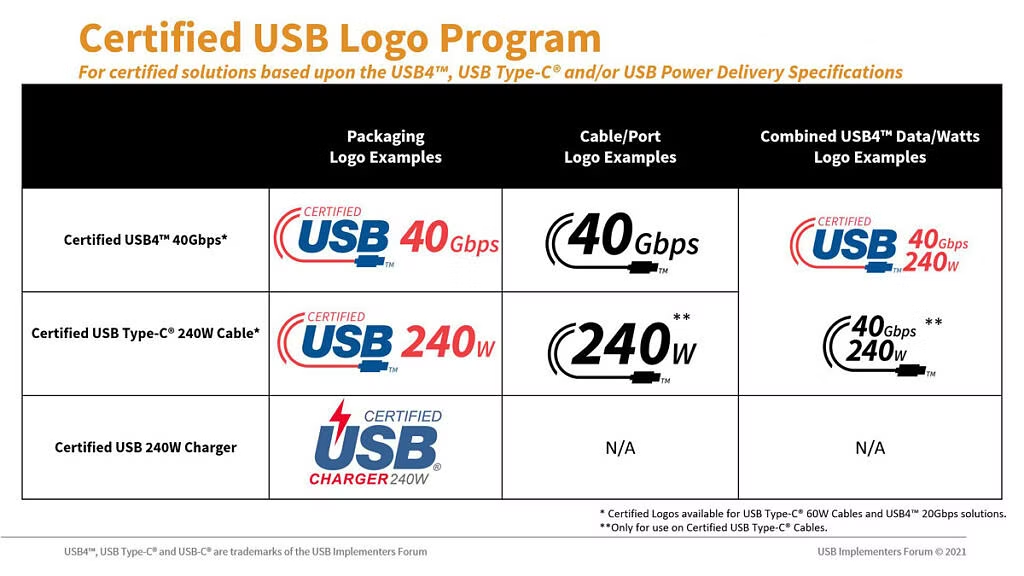
Image source: XDA Developers
USB-C Monitors: Where They Fall Short
Now for the part the marketing materials don't emphasize. USB-C monitors have some genuine environmental downsides that can offset the benefits if you're not careful about which model you choose.
The Repairability Problem
This is the big one. Many USB-C monitors integrate the power supply directly into the monitor body with no option to replace it separately. When that internal PSU dies, the whole monitor often gets tossed.
The USB-C port itself adds complexity. In a traditional monitor, the power supply is a separate, replaceable brick. The video input is a separate board.
The USB hub is a separate controller. In a USB-C monitor, all of these functions often live on a single main board. If any one component fails, you might be looking at replacing the entire unit.
What to check before buying:
- Is the USB-C cable detachable or hardwired? Detachable means you can replace it if it wears out.
- Is the power supply internal or external? External is more replaceable.
- Does the manufacturer sell replacement parts? Power boards, cables, stands.
- Is there a service manual available? If not, the manufacturer probably doesn't want you repairing it.
- What's the warranty length? A 3-year warranty with real service support tells you more about expected lifespan than any spec sheet.
A USB-C monitor with a hardwired cable and a sealed power supply is essentially a disposable product. The environmental cost of manufacturing a new display panel is significant. If you're replacing it every 3, 4 years instead of keeping a repairable monitor for 7, 10 years, the USB-C convenience isn't worth it from an eco standpoint.
Proprietary Implementations
Not all USB-C is created equal. Some monitors use proprietary USB-C implementations that require specific cables or dongles. This defeats the whole purpose of a universal standard.
If a monitor needs a $35 proprietary USB-C cable instead of a standard $8 USB-IF certified cable, that's a problem. Proprietary cables are harder to replace, more expensive, and more likely to end up in a landfill when the monitor gets retired.
E-Waste Reality
The global e-waste problem is massive. The UN's Global E-Waste Monitor report estimated 62 million metric tons of e-waste generated in 2022, with only 22.3% formally collected and recycled. Monitors are a significant contributor.
A USB-C monitor that fails after 4 years and can't be repaired adds to this problem. The panel, the backlight, the circuit board, the plastics, all of it. If the manufacturer doesn't have a take-back or recycling program, that monitor is headed for a landfill or an informal recycling operation where hazardous materials leach into soil and water.

Image source: Wikimedia Commons / Retired electrician
The Decision Framework: Is a USB-C Monitor Right for Your Situation?
This is where we move from general principles to your specific circumstances. The eco-friendliness of a USB-C monitor depends heavily on what you're replacing, how long you keep your gear, and what features matter to you.
Your Current Monitor's Age and Efficiency
If your current monitor is older than 5 years or below 1080p resolution, upgrading to a modern USB-C monitor likely gives a net environmental benefit. Newer LED-backlit panels are significantly more efficient than older CCFL-backlit displays. The efficiency gains from the panel itself can outweigh the added complexity of the USB-C circuitry.
But if you're upgrading from a perfectly functional 27-inch 1440p monitor from 2021 just to get the USB-C port, the math doesn't work in your favor. The embodied energy and e-waste cost of manufacturing a new display panel is substantial. You'd need years of marginal efficiency gains to offset the environmental cost of producing and shipping a new monitor.
Rule of thumb: If your current monitor works fine and meets your needs, the greenest move is keeping it. Add a USB-C hub or adapter if you need the connectivity. You'll get most of the convenience without the environmental cost of a whole new display.
Repairability and Lifespan: The Hidden Eco Factor
This is the factor that separates a genuinely eco-friendly USB-C monitor from a greenwashed one. A monitor that lasts 10 years is greener than one that lasts 4 years, regardless of how many cables it replaces.
Checklist for repairability:
- Standard USB-C cable (not proprietary)
- Detachable cable (not hardwired)
- External power supply or replaceable internal PSU
- Available replacement parts from the manufacturer
- Published service manual or at least exploded diagrams
- Warranty of 3 years or more with real service support
If a monitor checks most of these boxes, it's a safer long-term bet. If it checks none of them, you're buying a disposable product with a USB-C port on it.
What You Actually Need: Matching Use Case to Choice
Different situations call for different answers. Here's how to think about it:
Remote worker with a laptop and a desk setup: USB-C makes sense here. The single-cable docking convenience is genuinely useful, and the efficiency gains are real if you're replacing an older monitor. Just pick a model with a detachable cable and a replaceable power supply.
Hot-desking or hybrid office environment: USB-C is almost a no-brainer for the convenience factor alone. The environmental benefits are a bonus. IT teams can deploy and reconfigure workstations faster, and employees can plug in with one cable.
For enterprise scale, the cable and adapter reduction adds up meaningfully.
Creative professional (design, video, photo): You probably need color accuracy and high resolution more than you need USB-C. Prioritize the panel specs and look for USB-C as a nice-to-have. Many professional-grade monitors now include USB-C, so you don't have to choose between performance and connectivity.
Student in a dorm room: Space is tight and convenience matters. A USB-C monitor that also charges your laptop is a solid pick. Just avoid the cheapest no-name brands.
They're more likely to use proprietary components and have shorter lifespans.
Minimalist desk setup enthusiast: If cable management is your priority, USB-C delivers. The environmental angle is secondary here, but it's still a net positive if you choose a quality model.
USB-C vs. Traditional Monitors: An Honest Comparison
Let's put them side by side. No spin, just the facts.
| Factor | USB-C Monitor | Traditional Monitor (HDMI/DP) |
|---|---|---|
| Cable count | 1 cable for video, data, power | 2–4 cables typically |
| Power delivery | 60–100W passthrough charging | None (separate laptop charger needed) |
| Power supply | Often internal (less replaceable) | Often external brick (more replaceable) |
| Repairability | Varies widely by model | Generally simpler, more modular |
| Panel efficiency | Comparable to same-size traditional | Comparable to same-size USB-C |
| Shipping weight | Slightly lighter (fewer accessories) | Slightly heavier |
| E-waste risk | Higher if sealed/non-repairable | Lower if modular design |
| Compatibility | Requires USB-C DP Alt Mode support | Universal (HDMI/DP works with everything) |
| Price premium | $20–$100 more than equivalent non-USB-C | Baseline pricing |
The honest takeaway: USB-C monitors win on convenience and cable reduction. Traditional monitors often win on repairability and universal compatibility. Neither is automatically greener.
It depends entirely on the specific models you're comparing.
The real question isn't "USB-C or not?" It's "which specific monitor has the best combination of efficiency, repairability, and longevity for my needs?" Sometimes that monitor has USB-C. Sometimes it doesn't.
Common Mistakes People Make When Buying Green
Most people make the same errors when trying to choose an eco-friendly monitor. Here are the ones that actually matter.
Mistake 1: Assuming USB-C automatically means eco-friendly. The port type alone tells you nothing about the monitor's overall environmental impact. A sealed-unit USB-C monitor with a proprietary cable and no repair support is worse for the planet than a modular DisplayPort monitor with a replaceable power brick.
Mistake 2: Ignoring the power supply design. This is the single biggest factor most buyers overlook. An internal, non-replaceable power supply means the entire monitor gets scrapped when that component fails. External power bricks are easier to replace and easier to recycle separately.
Mistake 3: Not checking cable compatibility before buying. Some monitors ship with short USB-C cables that only support USB 2.0 data speeds, not full DisplayPort Alt Mode video. Others require specific cable specifications to achieve full power delivery wattage. Buying the wrong cable means returning it or tossing it, adding to e-waste.
Mistake 4: Upgrading too soon. The greenest monitor is the one you already own. If your current display works fine and meets your needs, adding a USB-C adapter or hub gives you most of the connectivity without the environmental cost of a whole new panel.
Mistake 5: Skipping the warranty and support check. A monitor with a 1-year warranty and no available spare parts is a disposable product. Look for at least 3 years of warranty coverage and confirmed availability of replacement cables, power supplies, and stands.
Certifications and Labels That Actually Matter
Not all eco-labels are created equal. Some represent rigorous third-party testing. Others are basically marketing stickers.
Energy Star is the baseline. It means the monitor meets the US EPA's energy efficiency requirements for on-mode, sleep-mode, and off-mode power consumption. Most modern monitors qualify, so it's a minimum threshold, not a differentiator.
EPEAT goes further. Managed by the Green Electronics Council, EPEAT evaluates the full lifecycle: energy use, materials selection, product longevity, end-of-life management, and corporate social responsibility. A monitor registered at the Gold level has met more stringent optional criteria beyond the baseline Bronze requirements.
TCO Certified is the most comprehensive for IT products. TCO Development updates their criteria every few years. The current generation includes requirements for circular economy practices, hazardous substance restrictions, ergonomic design, and social responsibility in manufacturing.
It's one of the harder certifications to earn.
What to look for on the box or spec sheet:
- Energy Star logo with version number
- EPEAT registration level (Bronze, Silver, or Gold)
- TCO Certified generation number
- RoHS compliance marking
- WEEE disposal symbol (crossed-out wheeled bin)
If a monitor has none of these, the manufacturer's "eco-friendly" claims are just words. If it has all three major certifications plus RoHS and WEEE compliance, you're looking at a product that's been independently verified.
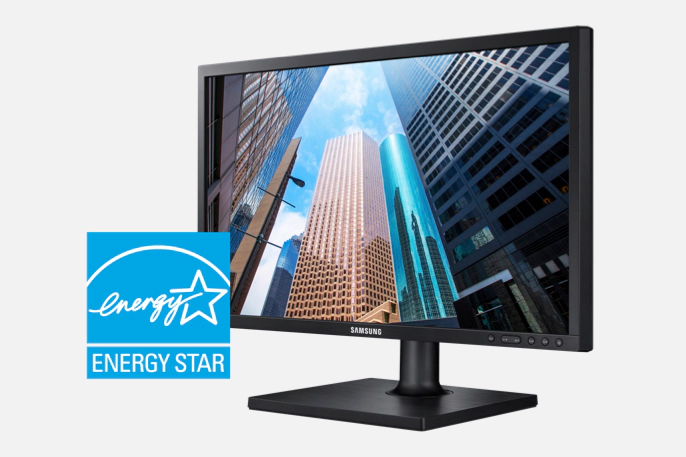
Image source: Samsung Electronics
The Verdict: Making Your Call
Here's the bottom line. USB-C monitors can be a genuinely greener choice, but only when you pick the right model and the right situation.
Go for a USB-C monitor if:
- You're replacing an older, less efficient display (5+ years old or below 1080p)
- You value the single-cable convenience for daily docking
- The model has a detachable USB-C cable and a replaceable power supply
- It carries Energy Star, EPEAT, and ideally TCO Certified labels
- The manufacturer offers a 3+ year warranty with available spare parts
Stick with a traditional monitor or keep your current one if:
- Your existing monitor works well and meets your needs
- The USB-C model you're considering is a sealed, non-repairable unit
- You'd be upgrading from a reasonably modern display just for the port
- The price premium for USB-C doesn't fit your budget
- You can achieve what you need with a USB-C hub or adapter instead
The greenest monitor isn't the one with the most eco-labels or the newest port standard. It's the one that lasts the longest, uses the least energy over its lifetime, and can be repaired instead of replaced when something goes wrong. Sometimes that's a USB-C monitor.
Sometimes it's not. Check the specs, check the repairability, and make the call that fits your actual situation.
Frequently Asked Questions
Do USB-C monitors use less power than HDMI monitors?
Not significantly. The panel itself determines most of the power draw. USB-C monitors eliminate the need for separate adapter bricks, which reduces overall system energy use.
The monitor's own consumption is comparable to same-size HDMI models.
Is the USB-C cable included with monitors usually high enough quality?
It varies. Most reputable brands include a certified USB-C cable that supports full DisplayPort Alt Mode and power delivery. Budget brands sometimes include basic cables that only support USB 2.0 data speeds.
Always verify the included cable specs before assuming it supports video output.
How long should a USB-C monitor last?
A quality monitor should last 7 to 10 years with normal use. If the USB-C port, power supply, or panel fails within 3 to 4 years and can't be repaired, that's a design problem, not normal wear. Look for models with warranties of 3 years or more.
Can I use any USB-C cable with a USB-C monitor?
No. You need a cable that supports DisplayPort Alt Mode for video and USB Power Delivery for charging. USB-C cables that only support charging or USB 2.0 data won't carry a video signal.
Check the cable's specifications for DP Alt Mode and PD wattage ratings.
Are portable USB-C monitors more eco-friendly?
Not necessarily. Portable monitors are often built to tighter cost constraints with less repairable designs. Their smaller size means lower energy consumption per unit, but shorter lifespans can offset that benefit.
Apply the same repairability and durability checks as you would for a full-size monitor.

Similar Posts





















