Are OLED Monitors Eco Friendly
If you've been eyeing an OLED monitor and wondering about the environmental trade-offs, you're not alone. More of us are trying to make smarter choices without sacrificing the stuff we actually care about, like image quality. Are OLED monitors eco-friendly?
That's one of those questions that sounds simple but really isn't.
OLED panels use less power in certain scenarios and contain fewer hazardous materials than older LCD tech. But they also have a shorter lifespan and a manufacturing process that's energy-intensive. Per Energy Star data, modern OLED desktop monitors typically draw 30 to 80 watts during use depending on content brightness.
The honest answer depends on how you define "eco-friendly" and what matters most to you. Let's break it down properly.
Quick Answer
OLED monitors are partially eco-friendly. They excel at energy efficiency during dark-content viewing and eliminate mercury entirely, which older CCFL-backlit LCDs contain. However, their organic materials degrade faster than LED-backlit alternatives, potentially shortening replacement cycles.
As of 2026, no OLED monitor matches the panel longevity of high-end IPS or Mini-LED displays. Your usage pattern determines whether the energy savings offset the shorter lifespan.
Why This Question Doesn't Have a Simple Yes or No
Most eco-questions in tech don't have clean answers, and OLED monitors are a perfect example. The environmental footprint of any display depends on three distinct phases: manufacturing, use, and end-of-life disposal. OLED performs differently across each phase compared to competing technologies.
During manufacturing, OLED panels require more energy and precision to produce. The organic compounds need vacuum deposition processes that are resource-heavy. Yield rates, meaning the percentage of panels that pass quality control, tend to be lower than mature LCD production lines.
More rejected panels means more waste per usable unit.
During the use phase, OLED's power consumption is highly variable. Show a mostly dark interface and sliver of content, and it sips energy. Push a bright white web page across the whole screen, and power draw jumps significantly.
This content-dependent behavior makes blanket efficiency claims misleading.
At end-of-life, OLED panels present recycling challenges. The organic layers and thin-film transistor arrays aren't as straightforward to separate and recover as standard glass-and-metal LCD panels. Most e-waste facilities aren't specifically equipped to handle OLED panel chemistry.
So when someone asks whether OLED monitors are eco-friendly, the real answer is: it depends on which phase you weigh most heavily, how you use the monitor, and what you compare it against.
How OLED Technology Works and Where the Environmental Impact Comes From

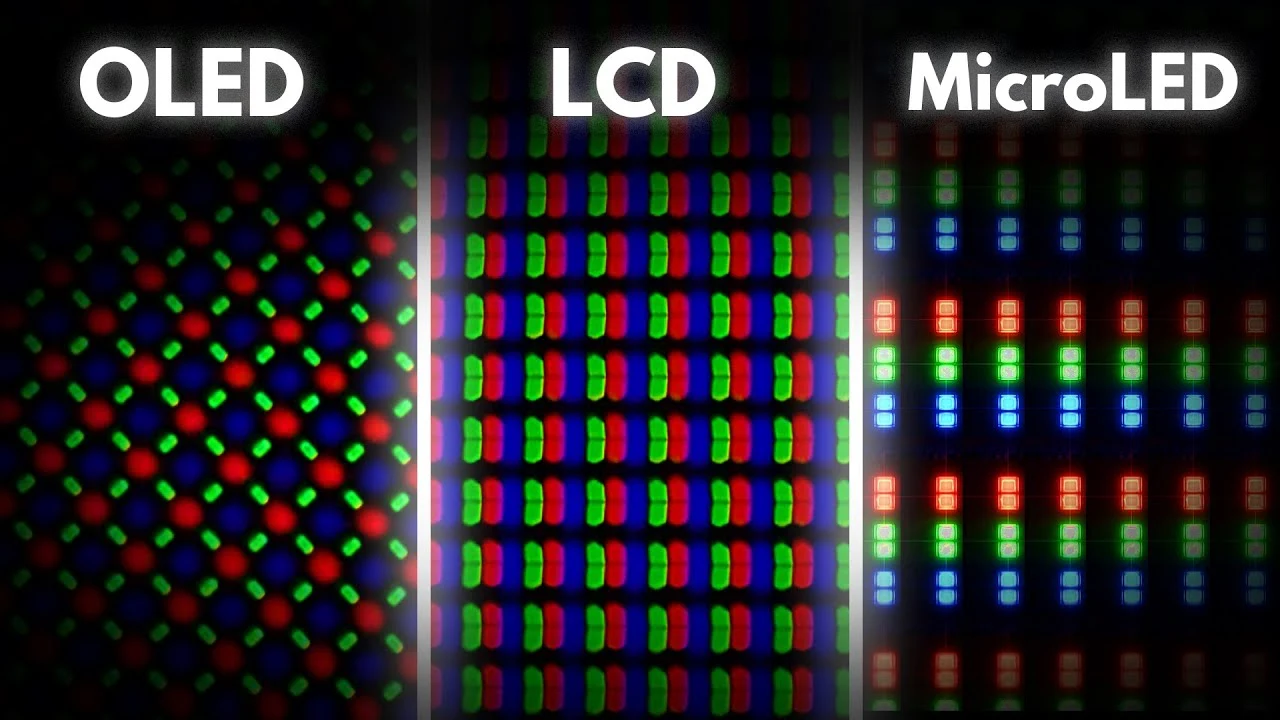
Understanding why OLED has the environmental profile it does starts with how these panels actually work. Unlike LCD monitors that rely on a constant LED backlight shining through liquid crystal shutters, OLED pixels are self-emissive. Each tiny pixel produces its own light using organic carbon-based compounds sandwiched between electrodes.
This self-emissive design is the root cause of both OLED's biggest environmental advantage and its most significant limitation. When a pixel needs to display black, it simply turns off. Zero light, zero energy for that pixel.
LCDs with standard backlighting can't do this. Even Mini-LED panels with hundreds of dimming zones still have some light bleed and constant baseline power draw from the backlight array.
The organic compounds, however, degrade over time. This is the fundamental trade-off baked into the technology. The same materials that enable perfect blacks and pixel-level dimming also lose brightness gradually with use.
Blue sub-pixels tend to degrade fastest, which is why burn-in happens. The panel doesn't die suddenly. It slowly dims and shifts color characteristics over thousands of hours.
From a materials standpoint, OLED avoids mercury entirely. Older CCFL-backlit LCDs relied on mercury-vapor fluorescent tubes, a potent neurotoxin requiring specialized disposal. Modern LED-backlit LCDs also avoid mercury, so this particular advantage of OLED is less differentiating than it was a decade ago.
But it's still worth noting for anyone comparing against older stock or budget panels that might use CCFL backlighting.
The manufacturing process involves depositing those organic layers onto glass or flexible substrates in vacuum chambers. This requires significant energy and precision. LG Display's WOLED approach and Samsung Display's QD-OLED approach both involve complex multi-layer deposition and encapsulation processes.
Any defect in the encapsulation layer means moisture and oxygen can reach the organic materials, causing premature failure. This drives reject rates up and effective yield down compared to LCD manufacturing, which has had decades of process refinement.
Energy Consumption: Where OLED Wins and Where It Doesn't
This is where most eco-conversations about OLED start and unfortunately, where many of them stop. The energy story is genuinely nuanced and depends entirely on what you display on screen.
Where OLED wins on power:
- Dark mode interfaces and content with significant black areas
- HDR content where bright highlights sit against true black backgrounds
- Smaller screen sizes where total pixel count is lower
- Scenes with predominantly dark color palettes (gaming in dim environments, coding with dark themes)
Where OLED loses on power:
- Full-screen bright white content (spreadsheets, documents, web browsing on light backgrounds)
- Sustained high-brightness HDR usage
- Larger screen sizes (42-inch and above) where total pixel count drives up draw
- Bright ambient environments requiring maximum panel brightness
Manufacturer specifications for current OLED monitors like the LG UltraGear 45GX950A-B list typical power consumption around 55 watts with peaks up to 130 watts. Comparable 32-inch IPS monitors typically range from 35 to 75 watts depending on brightness and content. The overlap is significant.
Neither technology is universally more efficient.
Aggregate review data from multiple hardware testing outlets suggests OLED monitors use roughly 20 to 40 percent less power than equivalent IPS panels when displaying typical mixed content with moderate brightness. But that advantage shrinks or reverses with sustained bright content. If you're the type who works with white backgrounds at full brightness eight hours a day, an IPS or Mini-LED panel might actually use less electricity over the same period.
The bigger picture involves your local electricity grid. If you're in a region powered primarily by coal or natural gas, every watt saved during use directly reduces carbon emissions. If your grid is heavily renewable, the manufacturing carbon footprint becomes proportionally more important in the overall equation.
There's no universal answer here. Your location and usage pattern genuinely change the math.
OLED vs. IPS vs. Mini-LED: Environmental Impact Compared
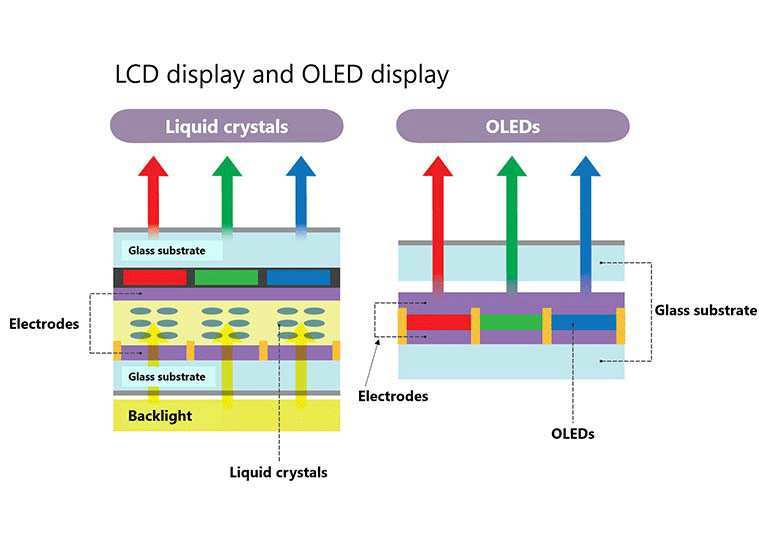
Let's put the three main monitor technologies side by side across the environmental dimensions that actually matter. This comparison covers the factors most relevant to anyone trying to make an informed eco-conscious decision.
| Factor | OLED | IPS LCD (LED-backlit) | Mini-LED / FALD |
|---|---|---|---|
| Power (dark content) | Very low (pixels off) | Moderate (backlight always on) | Low to moderate (zone dimming) |
| Power (bright content) | Moderate to high | Moderate | Moderate |
| Mercury content | None | None (LED-backlit) | None |
| Panel lifespan | 30,000–60,000 hrs | 50,000–100,000+ hrs | 50,000–100,000+ hrs |
| Hazardous materials | Minimal | Minimal | Minimal |
| Recyclability | Challenging (organic layers) | Straightforward (glass, metal, LED) | Moderate (complex backlight arrays) |
| Manufacturing energy | High | Moderate | Moderate to high |
| Material efficiency | Lower yield rates | High yield rates | Moderate yield rates |
| Weight and shipping | Lighter (no backlight) | Slightly heavier | Heavier (backlight hardware) |
| Replacement frequency | Potentially sooner | Longer | Longer |
Best for energy-conscious dark-mode users: OLED. If you use dark themes, watch HDR content, or game in dimly lit scenes, OLED's per-pixel power management gives it a genuine edge.
Best for all-day bright-content office work: IPS or Mini-LED. The consistent backlight power draw is predictable and often lower than OLED pushing maximum brightness across the full panel.
Best for longest lifespan and least waste: IPS. The mature manufacturing process and longer half-life mean fewer replacements over a decade of use.
Best for balanced efficiency with good HDR: Mini-LED with effective local dimming. It splits the difference between OLED's per-pixel control and IPS's consistent efficiency.
The honest takeaway is that no single technology wins across every environmental metric. OLED excels in specific use cases but carries real trade-offs in longevity and manufacturing impact. Your personal usage pattern should drive this decision more than any blanket eco-rating.
What Happens When OLED Monitors Reach End of Life

This is the phase most people never think about, and it's where OLED faces some of its toughest environmental challenges. When any monitor dies or gets replaced, it enters the e-waste stream. How easily its materials can be recovered and reused makes a real difference in its overall footprint.
LCD panels are relatively straightforward to recycle. The main materials are glass, aluminum, copper, and small amounts of silicon. Standard e-waste processing facilities can handle these with established workflows.
LED backlight strips contain small amounts of rare earth elements but nothing that requires exotic recovery processes.
OLED panels are trickier. The organic layers are deposited onto glass or plastic substrates in ultra-thin films bonded with encapsulation materials. Separating these layers for recovery requires specialized processes that most general e-waste facilities don't operate.
The thin-film transistor arrays embedded in the panel use indium and other materials worth recovering, but extracting them from the layered OLED structure is more complex than pulling components from a standard LCD.
The EU WEEE Directive requires manufacturers to fund end-of-life collection and recycling of electronic products sold in European markets. This means brands selling OLED monitors in Europe must participate in take-back programs. In the United States, e-waste regulation varies by state.
California's Electronic Waste Recycling Act covers monitors specifically, but comprehensive federal e-waste legislation doesn't exist as of 2026.
Practically, this means if you're in a region with good e-waste infrastructure, your old OLED monitor will likely be processed. The glass and metal will be recovered. The organic layers will probably be incinerated or landfilled because recovery isn't economically viable at current scale.
If you're in a region without formal e-waste collection, that monitor may end up in general waste, where none of the materials get recovered.
The best thing you can do is use manufacturer take-back programs when available. LG and Samsung both offer recycling programs for their display products in many markets. Check with your local municipality for certified e-waste collection events or permanent drop-off sites.
Don't toss a dead monitor in the trash, regardless of the technology.
Who Should Buy an OLED Monitor (and Who Shouldn't)
Let's get specific about who actually benefits from choosing OLED and for whom it makes less sense from both a practical and environmental standpoint.
OLED makes sense for you if:
- You primarily consume HDR content, game in dark environments, or use dark-mode interfaces
- You value image quality enough to accept a potentially shorter panel lifespan
- You're replacing an older CCFL-backlit LCD, which is a significant environmental upgrade regardless
- You have access to proper e-waste recycling in your area
- You keep monitors for 5+ years and are comfortable with gradual brightness degradation
You should probably skip OLED if:
- You work with bright white backgrounds for 8+ hours daily (spreadsheets, documents, coding with light themes)
- You need a display that must maintain consistent brightness and color for 8 to 10 years
- You're in a region with no e-waste recycling infrastructure
- You replace monitors frequently anyway, making the shorter lifespan compounding waste
- Your primary concern is minimizing total lifecycle carbon rather than per-use energy
The middle ground: If you want OLED's image quality but are concerned about longevity, consider using the monitor with conservative settings. Lower brightness, pixel shift enabled, screen saver activation, and varied content all extend panel life. Some users report getting 8+ years from OLED panels with careful habits, though this varies by individual unit and usage intensity.
Corporate buyers with ESG commitments should look at TCO Certified and EPEAT databases when selecting monitors for office deployment. These certification programs evaluate lifecycle environmental impact including manufacturing, energy use, and end-of-life considerations. As of 2026, the selection of OLED monitors meeting TCO Certified criteria remains limited compared to IPS options.
Common Mistakes People Make When Choosing an Eco-Friendly Monitor
There are several recurring mistakes we see people make when trying to pick a monitor with environmental considerations in mind. Avoiding these will save you money and lead to a genuinely better choice.
Mistake 1: Assuming lower power consumption always means greener. A monitor that uses 10 watts less per hour but needs replacing three years sooner creates more total environmental impact than a slightly less efficient panel that lasts twice as long. Lifespan matters as much as efficiency.
Mistake 2: Ignoring the manufacturing carbon footprint. The energy used during the years you own and use a monitor is only part of the total. Manufacturing a new panel generates significant emissions. Keeping your current monitor longer, even if it's less efficient, often beats buying a new "greener" one.
Mistake 3: Not checking actual recyclability in your area. A monitor being technically recyclable means nothing if there's no facility near you that processes e-waste. Check your local options before assuming end-of-life will be handled responsibly.
Mistake 4: Buying based on spec sheet eco-claims alone. Manufacturers highlight impressive-sounding environmental features while downplaying trade-offs. "Mercury-free" is standard across all modern displays, not an OLED-specific advantage. "Energy efficient" without context about content-dependent power draw is misleading.
Mistake 5: Overlooking brightness settings as an environmental tool. Running any monitor at maximum brightness wastes energy and accelerates panel degradation. Setting brightness to match your ambient lighting conditions can cut power consumption by 30 to 50 percent and extend panel life significantly.
Mistake 6: Choosing size without considering total power draw. A 42-inch OLED monitor has roughly four times the pixels of a 21.5-inch one. More pixels means more total power consumption regardless of the per-pixel efficiency advantage. Bigger isn't always better from an energy standpoint.
Practical Tips to Reduce Your Monitor's Environmental Impact
Regardless of which display technology you choose, there are concrete steps you can take to minimize the environmental footprint of your setup.
Adjust brightness intelligently. Match your monitor brightness to your room lighting. Most people run monitors far brighter than necessary. Reducing brightness from 100 percent to 50 percent can cut power consumption nearly in half on most panels.
Enable aggressive sleep and auto-off timers. A monitor that's on while you're away is wasting energy for no reason. Set your display to sleep after 5 to 10 minutes of inactivity. This is the single easiest energy-saving change you can make.
Use dark mode where possible. If you have an OLED monitor, dark mode isn't just easier on your eyes. It genuinely reduces power consumption because black pixels draw zero power. Even on an LCD, dark mode can slightly reduce backlight power on some implementations.
Keep your current monitor longer. The greenest monitor is the one you already own. Every year you extend your replacement cycle avoids the full manufacturing footprint of a new panel. Resist upgrade pressure unless your current display genuinely doesn't meet your needs.
Research e-waste options before you need them. Find your nearest certified e-waste facility now. Know what your manufacturer's take-back policy covers. When your monitor does eventually die, you'll have a plan ready instead of defaulting to the trash.
Consider refurbished or second-hand monitors. Buying a refurbished unit extends the life of existing hardware without generating new manufacturing demand. This applies across all display technologies and is one of the most impactful eco-choices available.
Enable pixel shift and screen saver features on OLED. These features distribute wear across the panel more evenly, reducing the risk of burn-in and extending usable lifespan. They cost you nothing in daily use.
Certifications and Labels That Actually Matter

Not all eco-labels are created equal. Some represent rigorous independent evaluation. Others are essentially marketing stamps.
Here's what actually helps you identify monitors with verified environmental credentials.
TCO Certified is the gold standard for IT product sustainability. Managed by TCO Development, this certification covers manufacturing conditions, ergonomics, energy efficiency, and end-of-life handling. Products must meet criteria across the full lifecycle, not just energy use during operation.
The criteria are updated every three years, so certification stays current with evolving standards.
EPEAT (Electronic Product Environmental Assessment Tool) is a comprehensive environmental rating system managed by the Green Electronics Council. Products are rated Bronze, Silver, or Gold based on criteria including material selection, supply chain responsibility, and end-of-life management. EPEAT registration is searchable online, making it easy to check specific models.
Energy Star focuses specifically on energy efficiency during use. It's useful but limited. A monitor can earn Energy Star certification while being manufactured in conditions or with materials that don't meet broader sustainability criteria.
Think of Energy Star as a minimum threshold, not a comprehensive endorsement.
RoHS compliance (Restriction of Hazardous Substances) is legally required for electronics sold in the EU and similar regulations exist in other markets. It limits lead, mercury, cadmium, and other hazardous materials. All monitors sold in regulated markets must comply, so it's a baseline requirement, not a differentiator.
When shopping, check TCO Certified and EPEAT databases directly rather than relying on manufacturer claims. A monitor that's TCO Certified and EPEAT Gold has been independently verified across multiple environmental dimensions. That's worth more than any number of green marketing buzzwords on a product page.
Frequently Asked Questions
Are OLED monitors worse for the environment than LCD monitors?
Not universally. OLED monitors use less energy during dark-content viewing and contain fewer hazardous materials. However, their shorter lifespan and more complex manufacturing process can offset those advantages.
The answer depends on your usage pattern and local recycling infrastructure.
How long do OLED monitors typically last?
Manufacturer specifications and aggregate review data suggest OLED panels retain roughly half their original brightness after 30,000 to 60,000 hours of use. For someone using a monitor 8 hours daily, that translates to roughly 10 to 16 years before significant degradation. Actual lifespan varies by usage intensity and panel care habits.
Do OLED monitors use more electricity than IPS monitors?
It depends entirely on content. OLED uses less power displaying dark or mixed content because black pixels draw zero power. IPS often uses less power with full-screen bright white content since OLED must illuminate every pixel at high output.
Neither technology is universally more efficient.
Can OLED monitors be recycled?
Yes, but the process is more complex than LCD recycling. Glass and metal components are recoverable through standard e-waste processing. The organic layers are difficult to separate and typically aren't recovered at current scale.
Use certified e-waste facilities and manufacturer take-back programs when available.
Is it better to keep my old monitor or buy a new energy-efficient one?
In most cases, keeping your current monitor longer is the greener choice. The manufacturing footprint of a new panel is substantial. Unless your current monitor is extremely inefficient or broken, extending its life avoids generating new e-waste and manufacturing emissions.
Do OLED monitors contain mercury?
No. OLED monitors contain zero mercury. This is also true of modern LED-backlit LCD monitors.
Mercury was only present in older CCFL-backlit LCDs, which are increasingly rare in the consumer market as of 2026.
Final Verdict: Should You Buy an OLED Monitor for Environmental Reasons?
Here's the honest bottom line. OLED monitors are neither the eco-hero nor the environmental villain that extreme takes on either side would suggest. They're a solid choice for specific users and a less ideal one for others.
If your usage leans toward dark content, HDR media, or gaming with dark interfaces, and you have access to proper e-waste recycling, an OLED monitor is a reasonable environmental choice. The energy savings during those dark viewing sessions are real and measurable over time.
If you're a bright-background all-day office worker who keeps monitors for a decade, a high-quality IPS or Mini-LED panel likely serves both your needs and the environment better. The longer lifespan alone often outweighs the per-hour energy advantage OLED offers.
The most impactful environmental decision you can make isn't about which technology you pick. It's about keeping whatever you buy for as long as possible, using it efficiently, and disposing of it responsibly when it finally gives out. That beats any spec sheet comparison.
 ✓
✓Chris Nolan
Senior Hardware & Tech Editor · Lead Benchmark SpecialistChris Nolan leads consumer electronics benchmarking and hardware diagnostics at TechBink. With over 15 years of laboratory stress-testing experience across mobile silicon, PC computing architectures, and cutting-edge gadgetry, Chris provides objective, data-backed hardware reviews and teardowns.

Similar Posts