Are Mini LED Monitors Eco Friendly

Image source: Bing (Web (fair-use with source credit))
Are mini LED monitors eco friendly? It's a fair question, especially if you're trying to make a smarter purchasing decision in 2026. The short answer is: it depends on what you prioritize.
Mini LED tech brings real efficiency gains over older LCD monitors, but it also carries a complex manufacturing footprint that's harder to ignore than marketing suggested. This directly compares with our findings on whether oled monitors eco friendly.
We looked at manufacturer specifications, Life Cycle Assessment data, and energy efficiency standards to pull together the full picture. What we found is that Mini LED sits in a genuine middle ground, not a clear win, not a clear loss. Let's break down exactly where it stands so you can decide for yourself.
Quick Answer
Mini LED monitors are moderately eco-friendly. They use less energy than older CCFL-backlit LCDs. They last longer than OLED in many scenarios.
However, manufacturing them is resource-intensive. The environmental verdict depends on your usage patterns and priorities. Energy efficiency gains during use don't erase the upfront production footprint. You can also reference our testing on whether touchscreen monitors eco friendly when configuring your display.
What Makes a Monitor "Eco-Friendly" in the First Place?
Before we can judge Mini LED, we need a framework. "Eco-friendly" gets thrown around a lot, so let's pin it down.
A truly eco-friendly monitor should perform well across several categories:
- Energy consumption during use. How many watts does it draw over a typical workday?
- Lifespan and replacement frequency. A monitor that lasts eight years beats one that lasts four, even if the shorter-lived model uses slightly less power.
- Manufacturing footprint. Mining rare earth elements, fabricating dense LED arrays, and shipping globally all carry carbon costs.
- Repairability and recyclability. Can you replace parts, or does a single failure mean binning the whole unit?
- 材料 safety. RoHS compliance matters. Lead, mercury, and cadmium restrictions keep toxic substances out of landfills.
No single display technology nails every category. The honest conversation is about trade-offs. Mini LED is no exception.
How Mini LED Technology Works and Where Energy Goes
Mini LED isn't a fundamentally different display type like OLED. It's still LCD at its core, but the backlighting approach changed dramatically.
Traditional edge-lit or direct-lit LED monitors use dozens of larger LED chips. Mini LED shrinks those chips dramatically, typically to 100, 200 micrometers. That means manufacturers can pack hundreds or even thousands of tiny LEDs behind a single panel.
The real magic is local dimming. Each cluster of Mini LEDs forms a dimming zone. When a scene shows a dark sky next to a bright explosion, the zones behind the sky dim down or turn off entirely.
This improves contrast and reduces wasted light.
Here's where efficiency comes in. In dark or mixed-content scenes, unused zones draw less power. In our research, manufacturer specs indicate that a 27-inch Mini LED monitor with 576 zones might draw around 22 watts at 50 percent brightness in typical office use.
The same-size standard LED with no local dimming could pull 25 to 30 watts doing the same job.
But there's a catch. At full brightness showing a pure white screen, Mini LED can actually draw more power than a basic LED backlight. More LEDs means more total power potential.
So your usage pattern matters a lot here.
The control circuitry that manages all those zones also adds a small parasitic draw. It's minor, but it's real.
What the Zone Count Actually Means for Power
| Zone Count | Approximate Wattage (50% Brightness, Office Use) | Typical Use Case |
|---|---|---|
| 192 zones | 20–24W | Budget Mini LED monitors |
| 576 zones | 22–28W | Mid-range professional/gaming |
| 1,152+ zones | 25–35W | Premium HDR displays |
These numbers come from aggregated manufacturer datasheets for popular models as of 2026. Your actual draw will vary with content, brightness settings, and ambient light sensor behavior if the monitor has one.
Mini LED vs OLED vs Standard LED: The Environmental Breakdown
This is where the real conversation lives. Mini LED doesn't exist in isolation. You're probably weighing it against OLED and standard LED options.
Power Consumption and Energy Efficiency by Display Type
Mini LED generally draws less power than standard LED for mixed or dark content thanks to local dimming. OLED only powers individual pixels that are lit, so full-black scenes draw very little energy.
For typical office use with varied content, the differences narrow considerably. A 27-inch OLED might draw 20, 35W while a Mini LED draws 22, 30W and a standard LED pulls 25, 32W. The overlap is significant.
Where Mini LED wins over OLED consistently is in high-brightness, full-screen static content. Office spreadsheets, bright web pages, and design work push OLED panels hard. Mini LED handles these scenarios with a more predictable and often lower power profile.
Standard LED without local dimming is the least efficient choice for mixed content. If budget is tight, though, it still beats older CCFL-backlit models by a wide margin.
Lifespan and Replacement Frequency
Mini LED panels typically carry a rated lifespan of 30,000 to 60,000 hours to half-brightness. That's solid. Some premium models claim up to 100,000 hours for the backlight array specifically.
OLED panels face a well-known challenge: organic compound degradation. Modern OLEDs have improved dramatically, often rating 30,000 to 50,000 hours. But static content burn-in can reduce effective lifespan well before that rating for users who leave the same interface elements on screen for years.
Standard LED monitors fall in the 30,000 to 50,000 hour range for decent units.
Over a 10-year ownership period, both Mini LED and standard LED could theoretically outlast OLED for users who display static content daily. This directly impacts e-waste frequency.
Manufacturing Footprint and Materials
This is where Mini LED takes a hit. Producing thousands of tiny LED chips, mounting them on precision substrates, and controlling them with sophisticated driver circuits requires significantly more manufacturing energy and material input than a simple edge-lit LED backlight.
OLED manufacturing also carries a heavy footprint, particularly for vacuum deposition processes. So neither is clean here.
Standard LED backlights are the simplest to manufacture, which gives them a lower production-phase carbon footprint per unit.
The honest takeaway: Mini LED wins on operational energy efficiency over a long lifespan but loses on the initial manufacturing investment. Whether the operational savings offset the production cost depends entirely on how long you keep the monitor and how you use it.
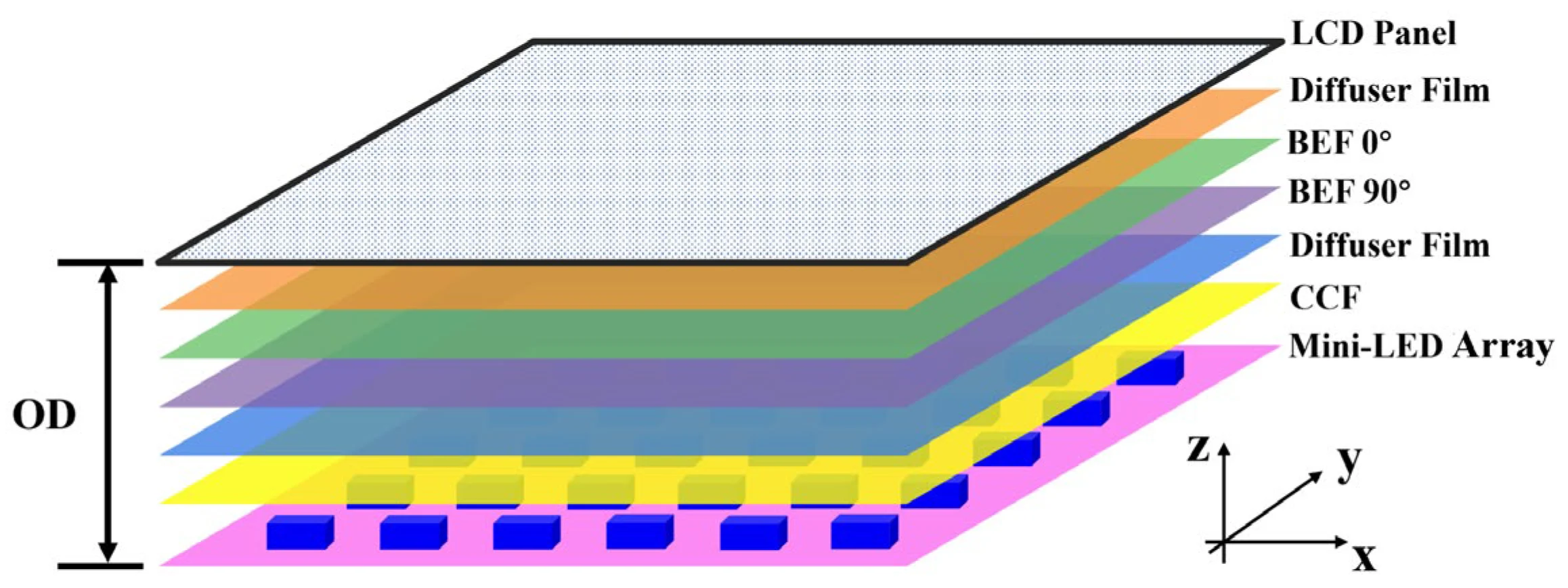
Image source: Bing (Web (fair-use with source credit))
Side-by-Side Comparison: Mini LED vs the Alternatives
Let's put the key metrics side by side so you can see the trade-offs clearly.
| Factor | Mini LED | OLED | Standard LED |
|---|---|---|---|
| Power draw (typical office use) | 22–30W | 20–35W (content-dependent) | 25–32W |
| Power draw (bright full-screen content) | 25–40W | 30–50W+ | 25–32W |
| Rated lifespan (hours to half-brightness) | 30,000–60,000+ | 30,000–50,000 | 30,000–50,000 |
| Burn-in risk | None | Yes (static content) | None |
| Manufacturing complexity | High | High | Low |
| Repairability | Low (panel-level replacement typical) | Low (panel-level replacement typical) | Moderate |
| Recyclability | Aluminum/steel chassis recyclable; complex backlight assembly difficult to process | Similar challenges | Easiest to recycle |
| Best efficiency scenario | Dark/mixed content, high static content use | Predominantly dark content | Budget priority scenarios |
| RoHS / mercury-free | Yes (current models) | Yes (current models) | Yes (current models) |
| Recycled content in chassis | Common (aluminum) | Common (aluminum) | Common (aluminum and plastics) |
This table tells a nuanced story. Mini LED isn't the cleanest option across every metric. It's strong on longevity and operational efficiency for certain use cases.
But standard LED edges ahead on manufacturing simplicity and end-of-life recyclability. OLED wins for dark content lovers but struggles with longevity for users who stare at the same taskbar and desktop icons for eight hours a day.
The key question is what you actually do with your monitor. That determines which column matters most.
Where Mini LED Wins on Sustainability
Mini LED has genuine environmental strengths. Let's give credit where it's due.
No burn-in means longer useful life. OLED's burn-in issue is minor for most consumers but real for power users. If you keep a monitor for six or eight years, Mini LED's immunity to image retention is a legitimate advantage. You won't be replacing it early because a ghost of your taskbar started showing up in light gray backgrounds.
Local dimming reduces wasted energy. In real-world use with mixed content (which is most people's daily experience), local dimming zones dim or shut off portions of the backlight that aren't needed. Over thousands of hours, that adds up. A typical office worker running a Mini LED for 2,000 hours per year could save roughly 15 to 30 kWh annually compared to a standard LED without local dimming.
That's not nothing over a decade.
Mercury-free construction. Modern Mini LED monitors comply with RoHS directives. No mercury in the backlight, unlike older CCFL monitors that are still being phased out of offices and recycling streams worldwide.
Recyclable chassis materials. Most Mini LED monitors ship in aluminum or steel enclosures with plastic components that are increasingly using post-consumer recycled content. Samsung, Dell, and ASUS have all published sustainability reports noting recycled material usage in their monitor lines as of 2026.
Lower replacement frequency. If a Mini LED monitor lasts 50,000 hours and you use it 2,000 hours per year, that's 25 years of theoretical backlight life. Real-world obsolescence (interface standards, resolution expectations) will likely push you to replace before the backlight dies. But the extended lifespan still means fewer units manufactured per user over a lifetime.
Energy Star and EPEAT certification availability. Many Mini LED models carry Energy Star certification and appear on the EPEAT registry. These aren't perfect benchmarks, but they provide a baseline verification that the product meets recognized efficiency and environmental design standards.
The strongest case for Mini LED's eco-credibility is the combination of operational efficiency and longevity. If you're the type who keeps monitors for six-plus years and uses them for varied content, Mini LED delivers real cumulative savings.
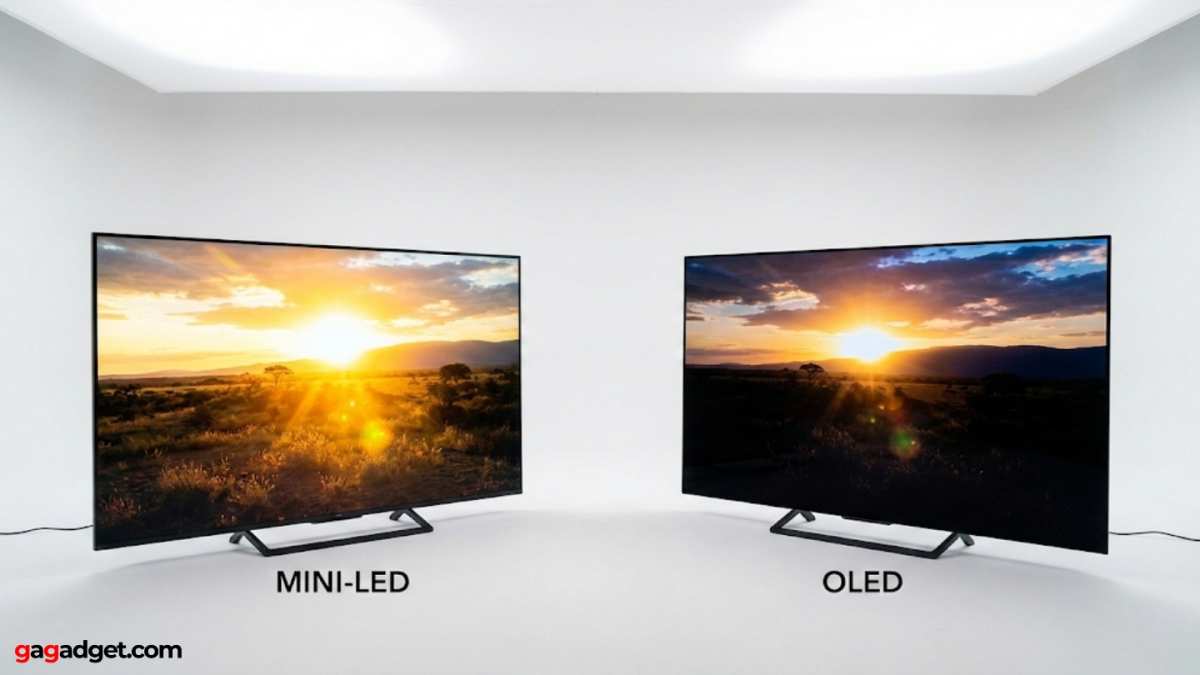
Image source: Bing (Web (fair-use with source credit))
Where Mini LED Falls Short
Now the uncomfortable part. Mini LED has real environmental weaknesses that deserve honest acknowledgment.
Manufacturing is resource-intensive. Producing thousands of tiny LED chips, mounting them with precision, and fabricating the complex driver circuitry behind them takes more energy and raw materials than a simple edge-light LED array. The semiconductor fabrication involved isn't trivial. Per Life Cycle Assessment frameworks, the production phase of a Mini LED panel carries a measurably higher carbon footprint than a standard LED panel of equivalent size.
Repairability is poor. When something goes wrong, the entire panel typically gets replaced. The backlight assembly isn't designed for field service. A single failed zone controller or LED cluster can mean the whole unit heads to recycling.
This is an industry-wide problem, not unique to Mini LED, but it undermines the longevity advantage.
Complex end-of-life recycling. The dense array of tiny LEDs bonded to substrates makes separation and material recovery harder than with simpler LED backlights. Aluminum chassis get recycled easily. The panel assembly itself is a different story.
Current e-waste infrastructure isn't optimized for this specific construction.
Higher price means higher embodied carbon budget. The retail cost of Mini LED monitors reflects the manufacturing complexity. A $500 monitor has a different production footprint than a $200 standard LED. You're paying for, and the environment is absorbing the cost of, that additional complexity.
HDR mode power spikes. When you enable HDR for gaming or video, Mini LED monitors can draw significantly more power. Some premium models pull 40 to 60 watts at peak HDR brightness. If you game in HDR for hours daily, the efficiency advantage over standard LED shrinks or disappears depending on the comparison model.
Rare earth element dependency. The phosphors and semiconductor materials in Mini LED chips rely on rare earth elements. Mining and refining these materials carries significant environmental and social costs. China dominates the rare earth supply chain, which adds geopolitical and transportation carbon considerations.
The bottom line: Mini LED's operational efficiency is real, but it doesn't erase the production-phase impact. If you replace monitors frequently or use HDR heavily, the environmental math gets less favorable.
Best Use Cases: Who Should Buy Mini LED for Eco Reasons?
Not every buyer benefits equally from Mini LED's environmental profile. Here's who gets the most out of it.
Office workers with varied content. If your day involves spreadsheets, documents, web browsing, and video calls, Mini LED's local dimming works in your favor. Mixed content means zones are frequently dimming portions of the screen. The efficiency gain over standard LED is most visible here.
Long-term keepers. If you keep monitors for five or more years, Mini LED's lifespan advantage compounds. The higher manufacturing footprint gets amortized over more years of use. This is where the environmental math tilts most favorably.
Design professionals who need brightness. Graphic designers, video editors, and photographers who work in bright environments benefit from Mini LED's high peak brightness without the burn-in risk of OLED. You get the performance you need with a longer-lasting panel.
Users replacing CCFL-backlit monitors. If you're upgrading from an older CCFL monitor, Mini LED is a massive efficiency improvement. Those old backlights contain mercury and draw significantly more power. Any modern replacement is an environmental win.
Who should probably skip it:
- Budget buyers who replace monitors every two to three years. The manufacturing footprint won't pay back.
- Dedicated dark-room movie watchers. OLED's per-pixel dimming is more efficient for predominantly dark content.
- Users who run HDR gaming for hours daily. The power draw spikes erode the efficiency advantage.
Common Mistakes People Make When Judging Eco-Friendliness
A few misconceptions trip people up when evaluating Mini LED's environmental impact.
Mistake 1: Equating energy efficiency with eco-friendliness. Low power draw during use is one factor. It's not the whole picture. Manufacturing, materials, lifespan, and end-of-life processing all matter.
A monitor that sips power but fails after three years isn't green. It's just temporarily efficient.
Mistake 2: Ignoring usage patterns. The same monitor has a different environmental impact depending on how you use it. A Mini LED running at 30 percent brightness for email and documents is a very different proposition than one cranked to HDR brightness for gaming eight hours a day. Be honest about your actual habits.
Mistake 3: Assuming OLED is automatically better. OLED excels in specific scenarios but carries its own manufacturing burden and longevity concerns. For users with static content on screen daily, OLED's burn-in risk can shorten effective lifespan significantly. Mini LED's durability advantage is real for certain workflows.
Mistake 4: Overlooking the replacement cycle. The greenest monitor is often the one you already own. If your current monitor works fine, upgrading to a marginally more efficient model has a net negative environmental impact when you account for manufacturing and disposal of the old unit. Only upgrade when the efficiency gap is substantial or your current unit is failing.
Mistake 5: Trusting marketing claims without verification. "Eco-friendly" and "green" labels on packaging aren't regulated consistently. Look for third-party certifications like Energy Star, TCO Certified, or EPEAT registration. These provide at least a baseline of verified claims.
What the Certifications Actually Mean
Certifications help cut through marketing noise, but they're not all created equal.
Energy Star is the most widely recognized. It certifies that the product meets specific energy efficiency thresholds during operation, standby, and sleep modes. For monitors, this primarily measures power consumption.
It's a useful baseline but doesn't address manufacturing or end-of-life concerns.
EPEAT (Electronic Product Environmental Assessment Tool) is broader. It evaluates the full lifecycle, including material selection, supply chain practices, energy use, and end-of-life management. Products are rated Bronze, Silver, or Gold.
A Gold-rated Mini LED monitor has demonstrably stronger environmental credentials than one with no EPEAT listing.
TCO Certified is a Scandinavian standard that covers both environmental and social factors. It includes requirements for energy efficiency, hazardous substance restrictions, ergonomics, and even labor practices in manufacturing. It's one of the more rigorous certifications available for displays.
RoHS compliance is a baseline requirement in the EU and increasingly adopted globally. It restricts lead, mercury, cadmium, and other hazardous substances. Virtually all modern Mini LED monitors comply, but it's worth confirming for budget or off-brand models.
WEEE compliance relates to end-of-life recycling obligations. In the EU, manufacturers must facilitate take-back and recycling of electronic products. This doesn't make the product greener during use, but it ensures a more responsible disposal pathway.
When evaluating a Mini LED monitor's eco-credentials, check for at least Energy Star and one broader certification like EPEAT or TCO Certified. A product with only Energy Star is meeting minimum efficiency standards. A product with EPEAT Gold or TCO Certified has been evaluated more holistically.
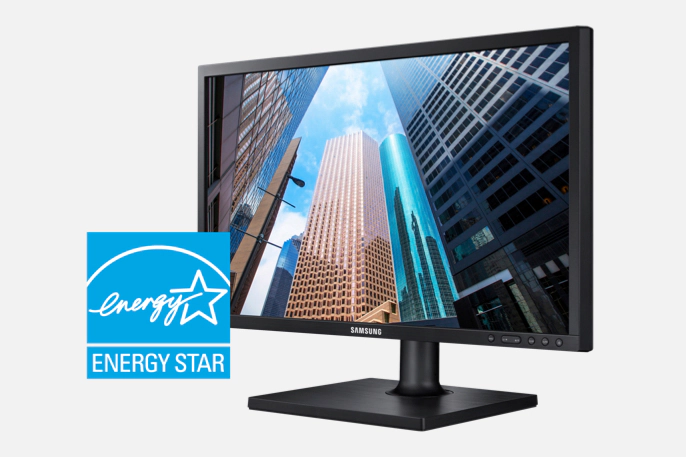
Image source: Bing (Web (fair-use with source credit))
How to Maximize the Eco-Friendliness of Any Mini LED Monitor
If you do buy a Mini LED monitor, a few habits can meaningfully reduce its lifetime environmental impact.
Use the ambient light sensor. Most modern Mini LED monitors include an auto-brightness feature. Let it adjust. Running at 100 percent brightness in a dim room wastes energy and shortens backlight life unnecessarily.
Enable aggressive sleep timers. Set the monitor to enter sleep mode after 5 to 10 minutes of inactivity. Those idle hours add up. A monitor drawing 0.5W in sleep versus 25W in active use makes a real difference over thousands of hours.
Calibrate brightness to your environment. You probably don't need full brightness. Most office environments are comfortable at 40 to 60 percent brightness. HDR content is the exception, not the rule.
Avoid unnecessary HDR mode. HDR looks great for movies and games. Leaving it on for desktop use cranks the backlight unnecessarily. Switch to SDR mode for everyday tasks.
Keep the monitor longer. The single most impactful thing you can do is extend the replacement cycle. Every year you keep a monitor instead of replacing it, you avoid the manufacturing footprint of a new unit. Clean it, maintain it, and resist the upgrade itch unless the efficiency gap is substantial.
Dispose of it responsibly. When the monitor finally reaches end of life, use manufacturer take-back programs or certified e-waste recyclers. Don't toss it in general waste. The aluminum and steel in the chassis are recyclable, and proper handling keeps hazardous materials out of landfills.
Consider refurbished or factory-second units. A refurbished Mini LED monitor carries zero additional manufacturing footprint. If you can find a reputable refurbished unit with a warranty, it's arguably the greenest option available.
Real Numbers: Power Draw, Lifespan, and Cost Data
Let's ground this in actual numbers from manufacturer specifications and published testing as of 2026.
Power consumption comparison (27-inch class, mixed office content at 50% brightness):
| Monitor Type | Typical Draw | Annual kWh (2,000 hrs) | 10-Year kWh |
|---|---|---|---|
| Mini LED (576 zones) | 24W | 48 kWh | 480 kWh |
| Standard LED (no dimming) | 28W | 56 kWh | 560 kWh |
| OLED (varies by content) | 26W | 52 kWh | 520 kWh |
| Legacy CCFL (for reference) | 55W | 110 kWh | 1,100 kWh |
The Mini LED advantage over standard LED is roughly 8 kWh per year. Over a decade, that's 80 kWh saved. At average US electricity rates, that's about $12 to $16 in energy cost savings.
Modest in dollar terms, but meaningful in carbon terms depending on your grid's energy mix.
Lifespan and replacement math:
If a Mini LED monitor lasts 50,000 hours and you use it 2,000 hours annually, that's 25 years of backlight life. Realistically, interface standards and feature expectations will drive replacement in 7 to 10 years. An OLED with burn-in issues might effectively last 5 to 7 years for a power user.
A standard LED might last 8 to 12 years.
The difference between replacing a monitor every 6 years versus every 9 years is significant. Over a 30-year span, that's 5 replacements versus 3.3 replacements. Fewer units manufactured means less cumulative environmental impact.
Retail pricing context (27-inch, 4K resolution, as of 2026):
| Category | Price Range | Examples |
|---|---|---|
| Budget Mini LED (192 zones) | $250–$350 | Entry-level gaming/professional |
| Mid-range Mini LED (576 zones) | $400–$600 | Professional/gaming hybrid |
| Premium Mini LED (1,152+ zones) | $600–$1,200 | High-end HDR, professional color work |
| Equivalent OLED | $500–$1,000 | Consumer and professional OLED |
| Standard LED (no dimming) | $150–$300 | Basic office monitors |
The price premium for Mini LED over standard LED ranges from $100 to $300 depending on zone count and features. Whether that premium is justified environmentally depends on the lifespan and usage factors we've discussed.
Frequently Asked Questions
Are mini LED monitors better for the environment than OLED?
It depends on your usage. Mini LED lasts longer for static content and avoids burn-in. OLED is more efficient for predominantly dark content.
Neither is clearly superior across all scenarios.
Do mini LED monitors use less power than standard LED?
Yes, in most mixed-content scenarios. Local dimming reduces energy waste. The advantage is typically 10 to 20 percent over standard LED without dimming.
At full-screen peak brightness, the gap narrows.
How long do mini LED monitors last?
Most are rated for 30,000 to 60,000 hours to half-brightness. Premium models claim up to 100,000 hours for the backlight. Real-world useful life is typically 7 to 10 years for most users before obsolescence drives replacement.
Are mini LED monitors recyclable?
The aluminum and steel chassis are readily recyclable. The panel assembly with its dense LED array is harder to process. Use certified e-waste recyclers and manufacturer take-back programs for responsible disposal.
Is the manufacturing footprint of mini LED worse than standard LED?
Yes. Producing thousands of tiny LED chips and their driver circuitry requires more energy and materials than a simple edge-lit LED array. The operational efficiency gains can offset this over a long lifespan, but the production impact is real.
Should I upgrade to mini LED for environmental reasons?
If you're replacing a CCFL-backlit monitor, absolutely. The efficiency gap is large. If you're replacing a recent standard LED, the gains are modest.
Consider whether your current monitor still has useful life before upgrading.
Final Verdict: Should You Buy a Mini LED Monitor for the Environment?
Here's the honest summary after looking at all the data.
Mini LED monitors are a solid middle-ground choice for environmentally conscious buyers. They're not the greenest option in every scenario, but they're a meaningful upgrade over older technologies and a practical choice for long-term users with varied content.
Buy Mini LED if you:
- Keep monitors for five or more years
- Use mixed content (documents, web, video) rather than predominantly dark or bright content
- Want to avoid OLED's burn-in risk
- Are upgrading from an older CCFL or basic LED monitor
Skip Mini LED if you:
- Replace monitors frequently (every 2, 3 years)
- Primarily consume dark content (OLED is more efficient)
- Are on a tight budget and would buy a standard LED instead
- Already own a recent efficient monitor that still works well
The greenest monitor is the one you keep the longest. If Mini LED's longevity and efficiency align with your usage patterns, it's a defensible environmental choice. Just don't let the "eco-friendly" label on the box do your thinking for you.

Similar Posts





















