How to Check If Monitor Is Ips
Figuring out how to check if your monitor is an IPS display isn't always as straightforward as you'd hope. Retail packaging rarely spells it out clearly, spec sheets can be vague, and some manufacturers use misleading labels like "IPS-type" on panels that aren't actually IPS at all. IPS (In-Plane Switching) panels are the LCD technology known for wide viewing angles and strong color accuracy, typically rated at 178 degrees horizontal and vertical.
Manufacturer specifications indicate that identifying your panel type reliably comes down to a handful of practical methods: visual testing under the right conditions, looking up the panel's model number, or reading the EDID data your monitor reports to your computer. Let's walk through each one so you can know exactly what you're working with.
Quick Answer
To check if your monitor is IPS, run a viewing angle test by looking at the screen from extreme side angles and below. IPS panels maintain color accuracy and brightness at angles where TN and VA panels show obvious color shift or contrast loss. For certainty, find your monitor's full model number and look up the panel specifications on a database like Panelook or TFTCentral.
Why You Can't Just Read a Spec Sheet and Call It a Day
Here's the frustrating reality: a lot of monitor listings, especially on Amazon and big retail sites, either leave the panel type completely out or use deliberately vague language. You'll see terms like "IPS-level," "wide viewing angle," or "HD IPS" that sound promising but don't guarantee you're getting a true In-Plane Switching panel. Some budget manufacturers slap "IPS" on packaging for panels that are actually VA or TN variants with a wider color filter.
There's another wrinkle. Major brands like Dell, LG, and ASUS sometimes source panels from multiple suppliers for the same monitor model. Your particular unit might have an LG Display IPS panel while someone else's identical model number came with an AUO VA panel.
This is what the monitor community calls "panel lottery." The model number on the box tells you the monitor model, but not necessarily which specific panel ended up inside your unit. That's why hands-on confirmation matters.
The Three Instant Visual Tests Anyone Can Do
You don't need any tools or software to get a strong indication of your panel type. Three quick visual tests will tell you a lot in under five minutes.
The Viewing Angle Tilt Test
This is the single most reliable at-home check. Open a document or any screen with white background and readable text. Sit normally in front of the monitor, then move your head sharply to the left, then the right, then look from below the screen.
Here's what you're watching for:
- IPS: The image stays bright and color-accurate even at extreme off-angles. Text remains readable at 80+ degrees from center.
- TN: Colors invert or shift dramatically at even moderate horizontal angles. Vertical viewing from below washes out heavily.
- VA: Contrast drops noticeably at angles. Colors shift but less severely than TN. Blacks start looking gray when you move off-center.
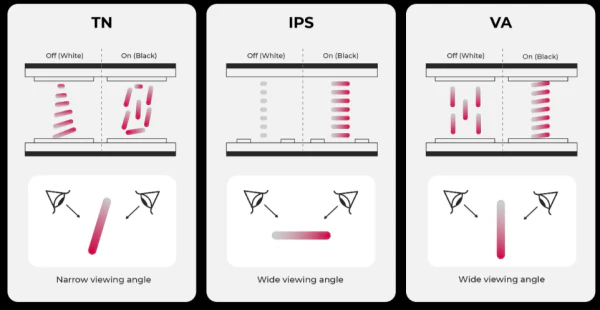
This behavior is rooted in how each technology aligns liquid crystals. IPS crystals rotate in-plane (parallel to the screen surface), which is why the image holds up at angles. TN crystals twist perpendicularly, which is why the image falls apart the moment you move off-axis.
The IPS Glow Test (Dark Room)
This one is specific to IPS and it's a dead giveaway once you know what to look for. Dim the lights in your room as much as possible. Display a full black image on screen (a solid black PNG or a YouTube video of a black screen works fine).
Look at the corners of the display, especially the bottom corners.
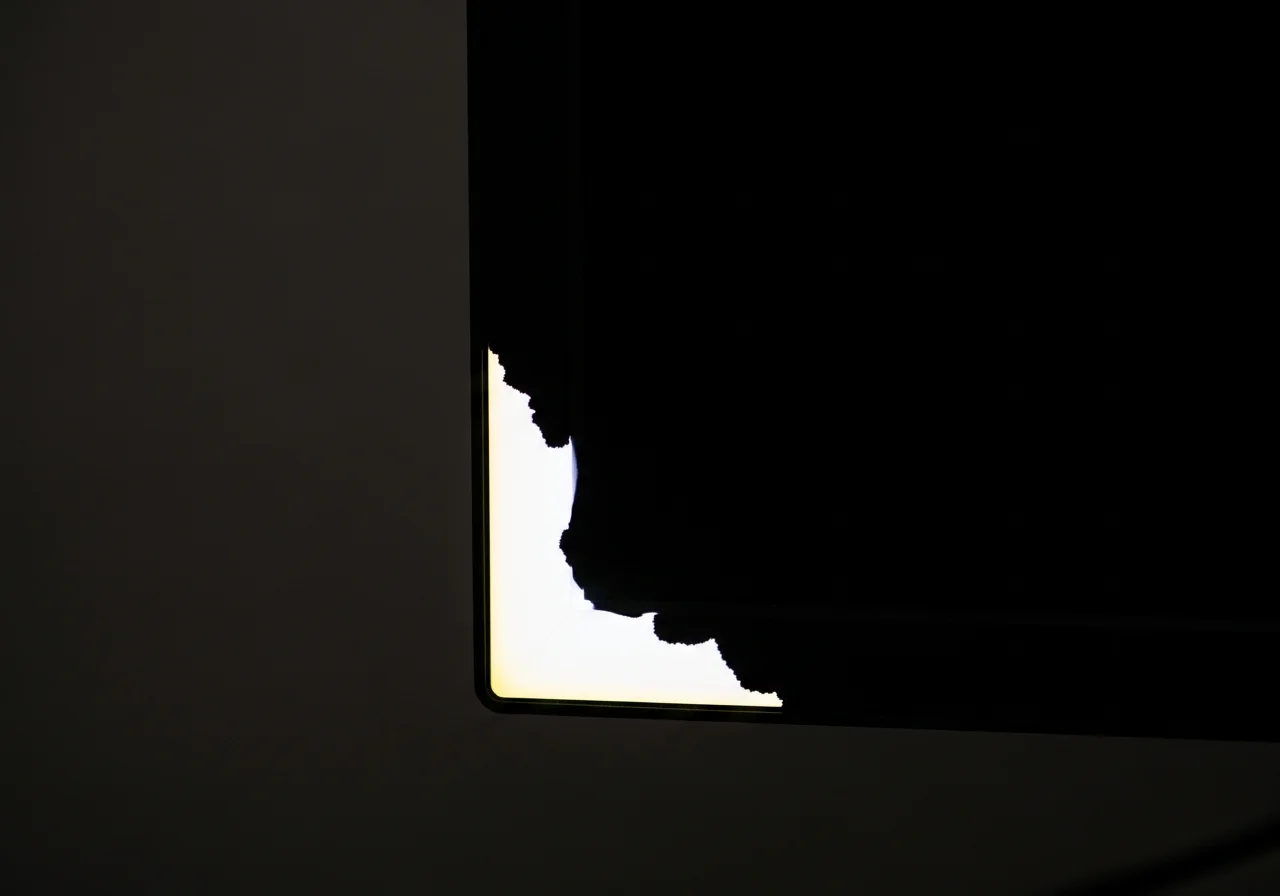
A true IPS panel will show a subtle silvery or white-ish glow in the corners. It looks almost like light is bleeding through from behind the panel in those areas. This is called "IPS glow" and it's a characteristic trade-off of the technology.
It's not a defect. It's inherent to how IPS works.
TN and VA panels don't exhibit this specific corner glow the same way. VA panels may show backlight bleed, but it looks different (more like uneven white patches along edges rather than the concentrated corner shimmer of IPS glow).
The Contrast Shift Check (Side vs. VA)
Display a photo with rich dark and bright areas. Look at it straight on, then tilt your head about 45 degrees to the side. On an IPS panel, the image will look slightly dimmer but the relationship between darks and lights stays consistent.
The blacks stay looking like blacks. On a VA panel, dark areas will start looking noticeably shallower or more washed out at that angle. This contrast shift is VA's telltale sign and it's distinctly different from the brightness-only reduction you see on IPS.
When Visual Tests Are Enough
If you see wide viewing angles with minimal color shift, plus corner IPS glow in a dark room, you're almost certainly looking at an IPS panel. Those two signs together are very hard to fake with other technologies.
What a Real IPS Display Looks Like From Every Angle
Understanding what to look for helps you interpret the tests above correctly. An IPS panel viewed from center shows consistent brightness and color across the full screen. Move 60 degrees to the left and the image dims maybe 15 to 20 percent but skin tones stay skin tones and blues stay blue.
Move 70 or 80 degrees and the image is noticeably dimmer but still usable, still recognizable, still color-accurate.
From below, IPS panels hold up better than TN but do show some brightness reduction. From above, similar story. This symmetry (similar performance both horizontally and vertically) is a key IPS trait.
Other technologies tend to perform better on one axis than the other.
IPS glow typically appears as a triangular or wedge-shaped silvery patch in one or more corners. It's most visible in dark rooms with dark content. In normal room lighting, you probably won't notice it at all.
A small amount of IPS glow is considered normal and most reviewers flag it as acceptable. Excessive glow would be a quality issue with that specific unit rather than a technology issue.
How IPS Glow Is Different From Backlight Bleed (And Why People Mix Them Up)
People constantly confuse IPS glow with backlight bleed, and honestly, it's easy to see why. Both show up as unwanted light in dark images. But they're distinct phenomena and understanding the difference helps you correctly identify your panel.
| IPS Glow | Backlight Bleed | |
|---|---|---|
| Location | Concentrated at corners, wedge-shaped | Usually along edges, especially bottom |
| Appearance | Silvery, shimmering, almost pearl-like | White or yellowish cloud-like patches |
| Changes with angle | Shifts or changes when you move your head | Stays in same physical location regardless of viewing angle |
| Cause | IPS liquid crystal alignment redirecting backlight unevenly at edges | Backlight LED pressure or frame unevenness |
| Panel type | Specific to IPS (defining characteristic) | Can appear on any LCD type |
| Affects | Acceptable in small amounts, unavoidable to some degree | Always considered a defect or quality issue |
The simplest way to tell them apart: move your head left and right while looking at a black screen in a dark room. IPS glow moves with you. Backlight bleed stays put.
If the bright patch shifts or changes shape as you change your viewing angle, that's IPS glow and it strongly suggests an IPS panel.
When Visual Tests Aren't Enough: Checking the Specs Directly
Sometimes you need certainty, not probability. Maybe you're verifying a used purchase, filing a warranty claim, or just don't trust your own eyes. The definitive route is identifying your actual panel through spec sheets and databases.
Find the Full Model Number
Flip your monitor around and look at the sticker on the back. You need the full model number (something like "LG 27GN950-B" or " Dell U2723QE"), not just the series name. Some monitors also list a "panel code" or "screen model" on this sticker, though that's rare with consumer units.
If you see a short alphanumeric code that looks like a panel designation (like "LM270WQ1" for LG panels), you can look that up directly.
Decode the EDID Data
Your monitor tells your computer exactly what it is through EDID (Extended Display Identification Data). Free tools like HWiNFO or ReadEDID can pull this information. The EDID report includes the manufacturer code, product code, and sometimes the detailed panel identification string.
Cross-reference this data on Panelook.com or TFTCentral's database to find the exact panel model in your display.
Manufacturer OSD Clues
Some monitors display panel information in their on-screen display menu. Check under "System," "Information," or "About" in your monitor's OSD. A few models from BenQ and professional-grade displays from EIZO and NEC show the panel type directly here.
It's not common on consumer monitors, but worth a two-second check.
The Same Model Number Can Have Different Panels — Here's Why
This catches people off guard. You buy the same monitor model as someone else and end up with a completely different panel inside. It happens more often than you'd think.
Monitor manufacturers source panels from multiple suppliers to meet production volumes and negotiate pricing. LG might use an LG Display AH-IPS panel in one production batch and switch to an AUO IPS panel in the next. Both meet the published specs, so the product page doesn't change.
But the actual panel characteristics (response time, coating, glow behavior) can differ between the two.
Higher-end and professional monitors tend to have better panel consistency. A Dell UltraSharp or EIZO ColorEdge is far more likely to use a single panel supplier throughout its production run. Budget and mid-range consumer gaming monitors are where panel lottery is most common.
If you want to verify which specific panel is in your unit, the EDID method above is your best bet. Sites like rtings.com occasionally note in their reviews whether a model uses multiple panel types across units, but this isn't always documented.
IPS vs. TN vs. VA: Quick Visual Reference Guide
Here's a practical side-by-side of the three main LCD panel technologies and what each looks like in the same viewing-angle test.
| Trait | IPS | TN | VA |
|---|---|---|---|
| Viewing angles (side) | Excellent, minimal shift | Poor, color inversion at 30-40 degrees | Good initially, contrast drops past 45 degrees |
| Viewing angles (below) | Good, slight brightness loss | Poor, heavy washout | Moderate, some contrast loss |
| Color accuracy out of box | Typically strong, factory calibrated | Often weak, narrow gamut | Decent, better than TN |
| Contrast ratio (center) | ~1000:1 typical | ~800:1 typical | ~3000:1+ typical |
| Black uniformity | Can show IPS glow in corners | Generally even but washed out | Some clouding in backlight |
| Response time (stock) | 4-5ms GtG typical | 1-2ms GtG typical | 4-8ms GtG typical |
| Dark room corner glow | Yes, IPS glow present | No specific corner glow | Backlight bleed possible along edges |
| Best for | Color work, wide viewing | Competitive esports | Movies, HDR, dark scenes |
TN Panels: What You'll See
A TN display viewed from center looks fine. The moment you shift even 30 to 40 degrees sideways, colors start inverting. Skin tones go greenish or purplish.
From below, the image washes out almost completely, sometimes appearing as a negative. If you've ever looked at a cheap laptop screen from an angle and seen the image basically disappear, that was TN.
VA Panels: The Tricky Middle Ground
VA panels can be surprisingly hard to distinguish from IPS at a glance. They have decent center contrast (much deeper blacks than IPS at center) and reasonable viewing angles past 30 degrees. The key difference shows up past 45 degrees off-center: VA blacks turn noticeably gray and the whole image loses depth.
An IPS image dims but keeps its punch. A VA image loses its contrast advantage when you move off-axis.
IPS Panels: The Telltale Signs
Wide stable viewing angles plus corner IPS glow in the dark equals IPS. That's the reliable combination. No other panel type checks both boxes.
VA can have wide-ish angles but lacks the IPS glow signature. TN has neither the viewing angles nor the glow. If both signs are present, you're looking at an IPS panel.
When It Actually Matters Which Panel Type You Have
Not everyone needs to care about panel type. But for certain use cases, the difference between IPS, TN, and VA is genuinely significant.
Color-Critical Creative Work
Photographers, graphic designers, and video editors almost always want IPS. The color accuracy, viewing angle stability, and predictable output make it the standard for creative professions. Factory-calibrated IPS panels with wide gamut coverage (98% DCI-P3 or better) are the baseline for serious color work.
Most professional monitors advertised for creative workflows are IPS or IPS Black variants.
Office and Productivity
For spreadsheets, documents, and web browsing, panel type barely matters. An IPS panel is nice if you share your screen with colleagues and they're viewing from different angles. But a decent VA or even a good TN is perfectly fine for solo desk work.
Don't overthink it if productivity is your only concern.
Gaming
Here it depends on what you play and at what level. Competitive esports players chasing the fastest response time still lean toward high-refresh TN panels (some now hit 1ms GtG). But modern Fast IPS panels have largely closed that gap while offering much better image quality.
As of 2026, the majority of gaming monitors sold in the mid-range and above are IPS or Nano IPS variants. For single-player, cinematic gaming, VA's deeper blacks sometimes win fans despite the slower pixel response.
General Use and Casual Viewing
For watching YouTube, browsing, and everyday computer use, any modern panel type is adequate. IPS holds a slight edge for shared viewing because of its wide angles. But you're not going to have a bad experience with a VA or TN for casual use unless the specific unit has quality issues unrelated to its panel type.
The Specs Behind the Visuals: Key Numbers to Know
The visual differences between panel types are rooted in measurable specifications. Here's what the numbers actually mean:
- Viewing angle rating (178°/178°): This is the VESA-standard threshold where contrast ratio drops to 10:1 or less. IPS panels typically hit or exceed this. TN panels often fall well short in practice despite what spec sheets claim.
- Contrast ratio: IPS sits around 1000:1. VA reaches 3000:1 to 5000:1. TN is usually 700:1 to 1000:1. Deeper blacks = higher number.
- Response time (GtG): Gray-to-gray transitions. TN leads at 1ms on paper. Modern IPS panels achieve 1ms with overdrive (Fast IPS), though without overdrive, typical IPS is 4-5ms. VA is generally the slowest at 4-8ms native.
- Color gamut: IPS panels commonly cover 95-100% sRGB with many hitting 95%+ DCI-P3. High-end Nano IPS can cover 98% DCI-P3. TN panels are often limited to 95% sRGB or less on budget units.
- HDR capability: As of 2026, HDR on IPS is generally limited to DisplayHDR 400-600 due to the ~1000:1 contrast limitation. VA panels achieve DisplayHDR 1000 more readily due to their native contrast advantage.
These spec ranges represent typical values across the category. Individual monitors can exceed or fall short depending on the specific panel and manufacturer tuning.
Common Mistakes People Make When Identifying Panel Type
A few errors come up constantly:
Confusing "wide viewing angle" marketing with IPS: Many monitor listings advertise "178° viewing angles" on VA panels. The rated spec doesn't always reflect real-world performance. VA panels can be rated 178°/178° (VESA's low-contrast-threshold definition) but still show visible color and contrast shift at angles where IPS holds steady.
Using a brightly lit room for the glow test: IPS glow is a subtle effect. If your room has ambient light or a window behind you, you won't see it. The test genuinely requires a dark room and a fully black screen to be reliable.
Judging by response time alone: People assume fast response time equals IPS because modern gaming IPS panels advertise 1ms GtG. But TN panels have been at 1ms for years, and some VA panels also advertise 1ms with aggressive overdrive. Response time alone doesn't identify panel type.
Assuming all IPS panels perform the same: Budget IPS panels and premium IPS panels can differ noticeably in glow severity, response time, and color gamut. The technology family (IPS) tells you about viewing angle behavior, but not about overall quality tier.
Opening the monitor to check the panel sticker: This risks voiding your warranty and potentially damaging the unit. Check external labels and software methods first. Only consider opening the chassis if you're comfortable with the risk and the monitor is out of warranty.
Quick Reference Cheat Sheet
Keep this handy for future reference:
| Method | Difficulty | Reliability | Time Needed |
|---|---|---|---|
| Visual viewing angle test | Easy | High (when combined with glow test) | 2 minutes |
| IPS glow test (dark room) | Easy | Very high (definitive for IPS) | 2 minutes |
| Contrast shift test | Easy | Moderate (VA vs. IPS can be close) | 1 minute |
| Model number + panel database lookup | Easy | Very high | 5 minutes |
| EDID data reading with HWiNFO | Moderate | Very high | 10 minutes |
| Manufacturer OSD check | Easy | Low (not always available) | 30 seconds |
Bottom line: The viewing angle test plus the IPS glow test together give you a confident identification most of the time, with zero tools required.
Frequently Asked Questions
Can I check if my monitor is IPS through Windows settings?
Windows doesn't display panel type directly. However, you can read the EDID data using free tools like HWiNFO or MonitorInfoView, which report the monitor's native panel identification. Cross-reference that information on Panelook.com to confirm whether your panel is IPS.
What does IPS glow look like?
IPS glow appears as a silvery or whitish shimmer concentrated in one or more corners of the screen, visible only on a black image in a dark room. It looks different from edge backlight bleed, which appears as cloudy patches along the screen edges. IPS glow shifts with your viewing angle.
Backlight bleed does not.
Are IPS Black panels still IPS?
Yes. IPS Black is LG's improved IPS variant that raises contrast ratio from the typical 1000:1 to around 2000:1. The viewing angle behavior and IPS glow characteristics remain fundamentally the same.
A dark room test on an IPS Black panel will still show corner glow, though it may be less pronounced due to the improved black performance.
Why do some monitors have different panels with the same model number?
Manufacturers sometimes source IPS panels from multiple suppliers (LG Display, AUO, BOE, Innolux) for the same monitor model across different production batches. Both panels meet the published specifications, so the product listing doesn't change. This is known as "panel lottery" and is common in mid-range consumer monitors.
Is IPS glow a defect that I should return my monitor for?
No. IPS glow is an inherent property of the IPS technology and is considered normal behavior. Small amounts of corner glow in a completely dark room are expected on virtually all IPS panels.
It's only a return-worthy issue if the glow is severe enough to distract you during normal use in your typical lighting conditions.

Similar Posts





















