Do Mini LED Monitors Reduce Flickering
Mini LED monitors can reduce visible flickering in certain conditions. The technology itself does not guarantee a flicker-free experience. Flicker depends on the dimming method used, not just the backlight type.
PWM frequency, driver quality, and brightness level matter more than LED size. Some mini LED monitors flicker less than standard LED displays. Others perform the same or worse.
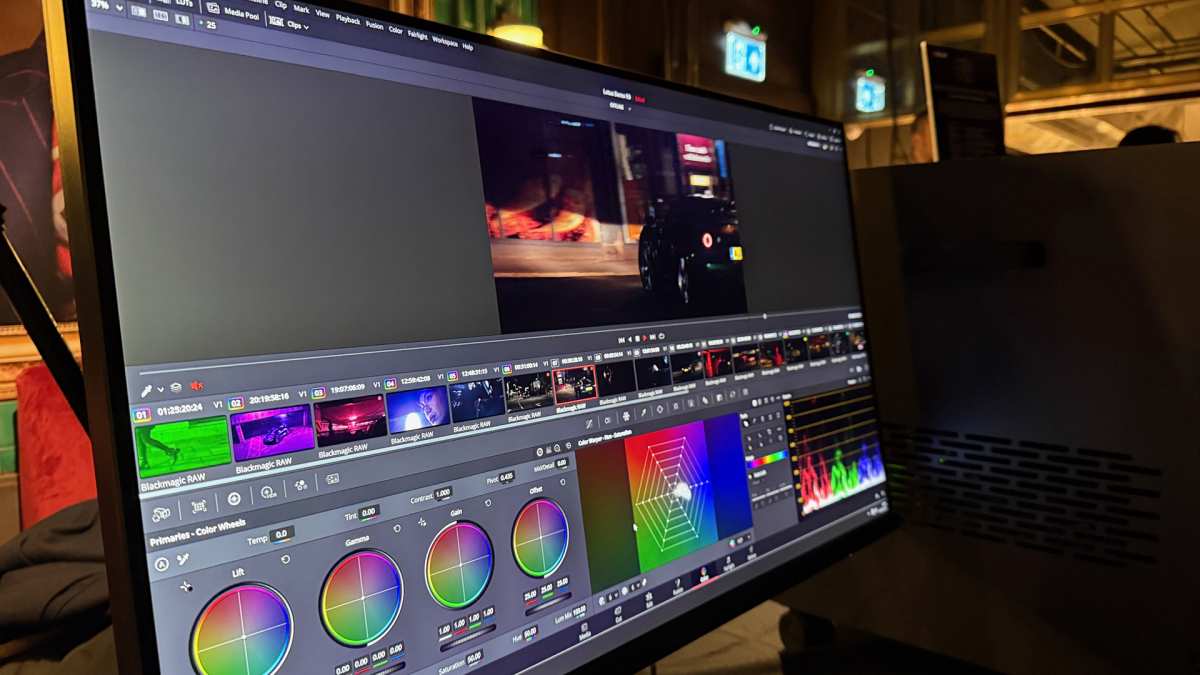
You've probably seen mini LED monitors marketed as the premium upgrade. Better contrast, deeper blacks, improved HDR. But if you're here, you're asking a more specific question: do mini LED monitors reduce flickering?
It's a fair question. Flicker causes real problems. Eye strain, headaches, fatigue during long sessions.
For light-sensitive users, it can trigger migraines or worse. And monitor marketing doesn't always make it easy to figure out which displays actually solve this.
Here's what our research shows. Mini LED technology can help with flicker, but it's not automatic. The real answer depends on how the manufacturer implements dimming, what PWM frequency they use, and whether you're running the screen at the brightness levels where flicker gets worse.
Let's break down exactly what's happening with these displays and what you should actually look for.
Why This Question Is Harder Than It Sounds
Most people assume newer technology means fewer problems. Mini LED sounds like an improvement over standard LED backlighting. And in many ways it is.
But flicker is a special case.
Flicker in monitors comes from how the backlight controls brightness. Not from the LEDs themselves. Whether you've got hundreds of tiny mini LEDs or a few dozen standard ones, the flicker behavior depends entirely on the driver circuit and dimming strategy the manufacturer chooses.
Here's where it gets confusing. Two mini LED monitors can have completely different flicker characteristics. One might use high-frequency PWM that's imperceptible to most users.
Another might pulse its zones at a frequency that causes noticeable strobing at low brightness. Same technology category, different real-world experience.
Manufacturer specifications rarely tell the full story. You'll see "flicker-free" on the box. But that certification has thresholds.
It doesn't mean zero flicker. It means the flicker falls below a specific visibility threshold defined by testing standards.
The TÜV Rheinland Flicker Free certification, for example, uses criteria from standards like IEC 62471 and IEEE 1789-2015. A monitor can earn that badge and still produce measurable flicker. Just not enough that most people notice.
So when someone asks whether mini LED reduces flickering, the honest answer is: it depends on the specific monitor, not the technology category.
How Monitor Flickering Actually Works
To understand whether mini LED helps, you need to understand what causes flicker in the first place. It's not complicated once you strip away the marketing language.
The Two Types of Dimming: PWM vs DC
Every LCD monitor controls brightness by adjusting power to the backlight. There are two main ways to do this.
DC dimming changes the actual current flowing through the LEDs. Lower current means lower brightness. The LEDs stay on continuously.
No pulsing, no flicker. This is the clean approach.
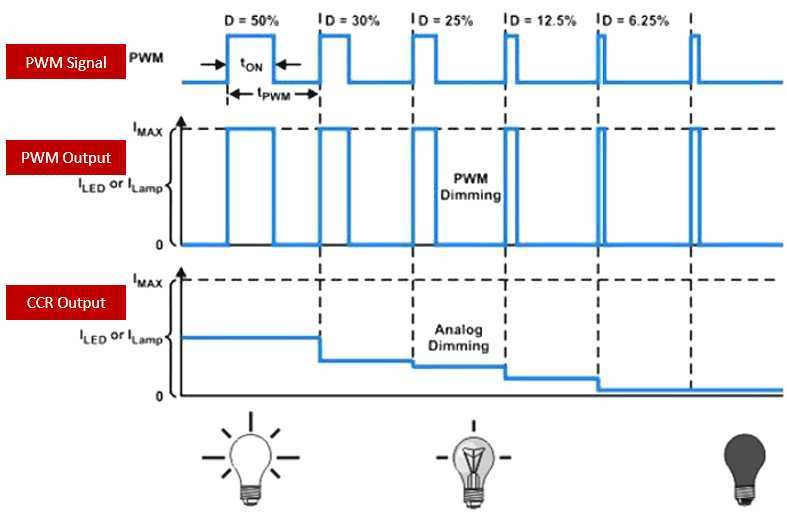
PWM dimming (Pulse Width Modulation) keeps the current constant. Instead, it rapidly switches the backlight on and off. The ratio of on-time to off-time determines perceived brightness.
At 50% brightness, the backlight is on half the time and off half the time. At 20% brightness, it's on only 20% of the time.
The switching happens fast. Fast enough that your eyes blend the pulses into a steady perceived brightness. But your brain still registers the pulsing, especially at lower brightness levels or higher PWM frequencies that fall into sensitive ranges.
Here's the critical number: PWM frequency. Measured in Hertz. Below 250Hz, most people can perceive flicker directly.
Between 250Hz and 2000Hz, sensitive users may experience headaches or eye strain without consciously seeing flicker. Above 2000Hz, flicker becomes imperceptible to virtually everyone.
Most standard LED monitors operate somewhere between 200Hz and 1000Hz at low brightness. That's right in the problematic zone for light-sensitive users.
Why Low-Brightness Flicker Hits Hardest
This trips up a lot of people. You'd think lower brightness means less of everything, including flicker. But with PWM dimming, the opposite happens.
At 100% brightness, the backlight stays on constantly. Zero flicker. As you drop brightness, the off-periods get longer relative to the on-periods.
The modulation depth increases. The flicker becomes more pronounced.
At 50% brightness with PWM, you get equal on and off periods. At 20% brightness, the backlight is off 80% of the time. That's a very obvious pulse if the frequency is low enough.
This is why people who prefer dim screens often suffer more. And why office workers running monitors at 30% brightness in well-lit rooms sometimes report headaches they can't explain.
What Makes Mini LED Different (And What Doesn't)
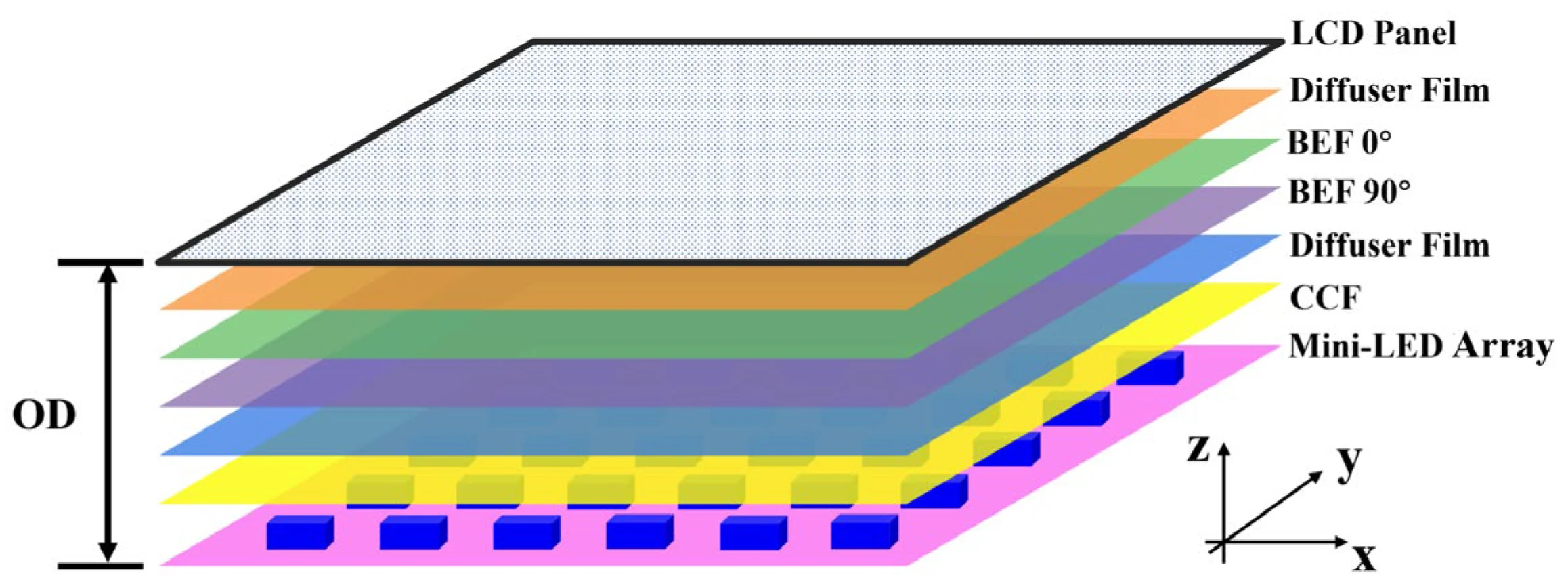
Mini LED changes the physical backlight. Instead of dozens of larger LEDs, you get hundreds or thousands of tiny LEDs arranged in zones. This enables local dimming, where different zones can dim independently based on content.
But here's what mini LED does not change. The LEDs still need dimming. And that dimming still uses either PWM or DC methods.
The tiny LEDs themselves don't eliminate flicker. The driver circuit does.
Where mini LED can help is in how local dimming interacts with brightness. With more zones, the display can maintain higher overall brightness in lit zones while dark zones turn off completely. This means the active zones may run at higher duty cycles than a globally-dimmed backlight would.
But this benefit varies wildly by implementation. A mini LED monitor with 192 zones and aggressive PWM dimming at low brightness might flicker worse than a standard LED monitor with DC dimming. The zone count doesn't determine flicker behavior.
The driver does.
Mini LED vs Standard LED vs OLED: Flicker Comparison
Let's put the main display technologies side by side. This is where the picture gets clearer.
| Factor | Standard LED | Mini LED | OLED |
|---|---|---|---|
| Backlight type | Edge or direct LED array | Dense array of small LEDs, zoned | Self-emissive pixels, no backlight |
| Typical dimming | PWM, often 200-400Hz | PWM or DC, varies by model | PWM or DC, varies by model |
| Flicker at low brightness | Often noticeable | Depends on driver quality | Often lower due to pixel-level control |
| Flicker at high brightness | Minimal | Minimal | Minimal |
| Local dimming impact | Limited or none | Can reduce flicker in bright zones | Not applicable (per-pixel) |
| Best case scenario | DC dimming models | High-frequency PWM or DC | DC dimming OLED models |
| Worst case scenario | Low-frequency PWM | Low-frequency PWM with zone pulsing | Low-frequency PWM OLED |
Where Mini LED Wins on Flicker
Mini LED has a genuine advantage in one specific scenario. When local dimming is active and the display shows mixed content, the bright zones can operate at higher effective duty cycles.
Think about a typical desktop. White browser window on one side, dark code editor on the other. A standard LED backlight dims globally.
The whole screen pulses at the same PWM frequency. A mini LED display can keep the bright zone at near-full duty cycle while dimming or turning off the dark zone.
This means the bright content you're actually looking at may experience less flicker than it would on a globally-dimmed display at the same perceived brightness.
The catch? This only works when local dimming is enabled and working well. Many mini LED monitors have local dimming that's either too coarse or introduces its own artifacts.
And some implementations pulse the zones themselves, creating a different kind of flicker.
Where Mini LED Falls Short
Mini LED can actually introduce flicker problems that standard LED doesn't have. Zone transition flicker happens when the dimming algorithm can't keep up with changing content. The zones pulse or shift brightness in visible ways.
Some mini LED monitors use time-based multiplexing for zone dimming rather than current-based dimming. This creates a form of flicker that's different from standard PWM but equally problematic. The zones cycle in sequence rather than all dimming simultaneously.
At very low brightness levels, mini LED displays with PWM dimming can exhibit worse flicker than standard LED. The smaller LEDs may be driven at lower frequencies to maintain stability. The result is visible strobing that sensitive users notice immediately.
Price doesn't protect you here. Some premium mini LED monitors still use PWM dimming below 500Hz. Budget models with DC dimming can deliver a smoother experience.
What Actually Determines Flicker in a Mini LED Monitor
Now let's get specific. If you're shopping for a mini LED monitor and flicker matters to you, these are the factors that actually determine your experience.
PWM Frequency: The Number That Matters Most
This is the single most important spec for flicker. And it's the one manufacturers love to hide.
If a monitor uses PWM dimming, the frequency tells you everything. Above 2000Hz is safe for virtually everyone. Between 1000Hz and 2000Hz is acceptable for most users.
Below 500Hz is risky for sensitive individuals. Below 250Hz is problematic for many people.
The problem? Most spec sheets don't list PWM frequency. They say "flicker-free" and leave it at that.
You need to check third-party reviews that actually measure this.
Professional review sites like rtings.com and TFT Central perform flicker measurements using oscilloscopes or specialized tools. They report the measured frequency and flicker index. This is your best source of truth.
If a review doesn't mention flicker testing, assume the manufacturer is hiding something. Not always, but often enough to be a useful heuristic.
Zone Count and Dimming Behavior
Zone count affects image quality more than flicker. But there's an interaction worth understanding.
More zones mean finer control over local dimming. This can reduce the perceived flicker in mixed content scenarios. Fewer zones mean larger areas dimming together, which can make flicker more uniform and noticeable.
But zone count doesn't determine whether the dimming itself uses PWM or DC. A 2000-zone mini LED display with 200Hz PWM will flicker more than a 100-zone display with DC dimming.
What matters is the dimming method applied to those zones. Some displays use current-based dimming for each zone. Others use time-based multiplexing.
The former is cleaner. The latter introduces cycling artifacts.
Panel Quality and Driver Implementation
The panel manufacturer and the monitor manufacturer are often different companies. LG makes IPS panels. Samsung makes VA and IPS.
BOE makes various panels. But the monitor brand assembles the panel with their own backlight and driver.
This means two monitors with the same panel can have different flicker characteristics. The driver board design, firmware, and dimming algorithm all come from the monitor manufacturer.
Premium brands tend to invest more in driver quality. They test for flicker and tune their algorithms. Budget brands often use reference designs with minimal customization.
The result is more variable flicker performance in budget mini LED monitors.
This doesn't mean expensive always means better. Some premium gaming monitors prioritize response time over flicker reduction. They use aggressive PWM to reduce motion blur.
Check the specific model, not just the price.
Brightness Thresholds and Flicker Risk
Here's something that catches people off guard. Flicker often doesn't exist at high brightness but appears below a certain threshold.
Many monitors run the backlight at full duty cycle above 50% brightness. Zero PWM, zero flicker. Below 50%, PWM kicks in.
The lower you go, the more aggressive the pulsing.
This means your flicker experience depends on how bright you run your screen. If you use 80% brightness in a bright room, you might never encounter PWM flicker. If you prefer 20% brightness in a dark room, you're in the danger zone.
Some monitors disclose this threshold in their firmware or documentation. Others don't. Third-party reviews that test flicker at multiple brightness levels are invaluable here.
For light-sensitive users who prefer low brightness, DC dimming is almost mandatory. PWM dimming at low brightness is the primary source of monitor-related eye strain and headaches.
Who Should Care Most About Mini LED Flicker?
Not everyone needs to worry about this. But for certain users, flicker is a dealbreaker.
Users With Light Sensitivity or Migraine Triggers
If screens trigger your migraines or you've been diagnosed with photosensitive conditions, flicker is your primary concern. Mini LED might help, but only if you choose the right model.
Look for monitors with confirmed DC dimming or PWM above 2000Hz. Avoid anything that doesn't have third-party flicker measurements available. The risk of getting it wrong is too high.
Consider OLED as an alternative. Many OLED monitors use DC dimming or very high-frequency PWM. The per-pixel emission also means no backlight pulsing in the traditional sense.
Professionals Working Long Hours
Office workers, programmers, writers, anyone staring at a screen for 8+ hours daily. Flicker accumulates. You might not notice it in a 30-minute gaming session.
But over a full workday, low-frequency PWM causes measurable eye strain.
Mini LED with good dimming implementation can help here. The ability to maintain comfortable brightness levels without entering the aggressive PWM zone is valuable. But again, implementation matters more than technology.
Gamers Priorifying Motion Clarity
Here's a twist. Some gaming monitors use PWM specifically to reduce motion blur. The strobing effect can make fast motion look clearer.
But this introduces flicker by design.
If you're sensitive to flicker, avoid monitors that advertise "motion blur reduction" or "strobing" features. These typically use low-frequency PWM. Mini LED gaming monitors with local dimming can offer good motion clarity without strobing, but you need to verify the specific implementation.
Budget Buyers vs Premium Buyers
Budget mini LED monitors often cut corners on driver quality. They use the bare minimum PWM frequency that passes certification. Premium models are more likely to invest in better dimming algorithms.
But there are exceptions. Some mid-range monitors use DC dimming and perform excellently. Some premium gaming monitors use aggressive PWM for motion performance.
Price is a rough guide, not a guarantee. Always check the specific model's flicker performance through independent testing.
How to Verify Flicker Before You Buy
You can't tell if a monitor flickers by looking at the spec sheet alone. Here's how to actually find out.
Reading the Spec Sheet Correctly
Start with what the manufacturer claims. Look for "flicker-free" or "low flicker" in the marketing. Then check for certifications.
TÜV Rheinland Flicker Free certification is the most common. It means the monitor passed testing under specific conditions. But it doesn't guarantee zero flicker at all brightness levels.
Look for brightness specifications. If the monitor lists a minimum brightness below 50 nits, ask yourself whether you'll use it that low. If you run your screen at 40% brightness or above, many PWM dimming monitors stay in their safe zone.
Check the response time spec. Monitors advertising 1ms response times sometimes use aggressive PWM for motion clarity. This can introduce flicker as a side effect.
Trusted Third-Party Flicker Tests
This is where you get real answers. Several professional review sites measure flicker with proper equipment.
rtings.com tests every monitor they review for flicker. They report the frequency and whether it changes with brightness. TFT Central in the UK does similar oscilloscope-based measurements.
Hardware Unboxed on YouTube demonstrates flicker with pursuit camera tests.
Look for these specific metrics in reviews:
- Flicker frequency: The PWM rate in Hz. Higher is safer.
- Flicker index: A measure of how much the brightness varies. Zero means no flicker. Maximum is 1.0.
- Brightness versus flicker behavior: Whether flicker appears only below certain thresholds.
If a review doesn't mention flicker at all, that's a yellow flag. Not necessarily a dealbreaker, but worth investigating further.
What TÜV Certification Actually Tells You
TÜV Rheinland's Flicker Free certification tests against standards including IEEE 1789-2015. The certification means the monitor's flicker falls below defined visibility thresholds.
But here's the nuance. The threshold for certification is not zero flicker. It's a level considered "low risk" for the general population.
Sensitive individuals may still experience symptoms.
TÜV also offers a Low Blue Light certification. This is separate from flicker. A monitor can have both certifications, one, or neither.
They test different things.
The certification is done on specific monitor models at specific settings. A firmware update could theoretically change behavior, though this is rare.

The Pursuit Camera Test Explained
You can do a basic flicker test yourself with a smartphone camera. It's not as precise as an oscilloscope, but it reveals obvious problems.
Set your phone's camera to a fast shutter speed, around 1/1000 or faster. Point it at the monitor at your typical brightness level. If you see dark scrolling bands across the screen, the monitor uses PWM dimming.
The bands show the off-periods of the PWM signal. Wider bands mean lower frequency or deeper modulation. More bands scrolling means lower frequency.
This test won't tell you the exact frequency. But it quickly identifies monitors with problematic low-frequency PWM. If you see strong bands at your preferred brightness, that monitor will likely cause eye strain.
Some monitors show bands only at very low brightness. If you never use your screen below 40%, this might not matter for you.
Common Mistakes When Shopping for Low-Flicker Mini LED Monitors
People make the same errors repeatedly when evaluating flicker. Here are the ones to avoid.
Assuming "flicker-free" means zero flicker. It doesn't. It means the flicker falls below a certification threshold. Sensitive users may still notice it.
Ignoring brightness behavior. A monitor might be fine at 70% brightness but flicker badly at 30%. If you prefer dim screens, you need to know the full brightness range behavior.
Focusing on zone count instead of dimming method. More zones improve contrast and local dimming quality. They don't determine whether the backlight uses PWM or DC dimming.
Trusting marketing over measurements. "Eye care" and "flicker-free" labels are marketing terms. Third-party measurements are data. Always prefer data.
Not checking firmware updates. Some monitors change their dimming behavior through firmware. A review from launch might not reflect current behavior. Check recent user feedback.
Overlooking return policies. You can't fully evaluate flicker from a spec sheet. If you're sensitive, buy from retailers with good return windows. Test the monitor in your actual usage conditions.
Best Mini LED Monitors for Flicker Sensitivity (By Use Case)
Based on aggregate review data and third-party testing, here are categories to consider.
Best Overall for Sensitive Eyes
Look for mini LED monitors that third-party reviews confirm use DC dimming or high-frequency PWM above 2000Hz. Professional and creative-focused monitors tend to prioritize smooth dimming over motion performance.
ASUS ProArt and Dell UltraSharp mini LED models generally score well in flicker tests. They target color-critical professionals who work long hours. The driver implementation tends to be conservative and smooth.
Best for Gaming Without Flicker
Gaming monitors present a challenge. Many use PWM for motion blur reduction. Look for models that specifically advertise "flicker-free backlight" without strobing features.
Samsung's higher-end Odyssey mini LED models and select LG UltraGear models have performed well in flicker testing. Verify the specific model, not just the product line.
Best for Professional Color Work
BenQ and ASUS ProArt mini LED monitors typically prioritize consistent, smooth dimming. Color accuracy requires stable backlight behavior, which aligns with low-flicker design.
The BenQ DesignVue and PhotoVue mini LED lines have shown good flicker performance in professional reviews.
Best Budget Option
Budget mini LED monitors are riskier for flicker. Cost cutting often extends to driver quality. However, some mid-range models from Acer and Philips have performed adequately in testing.
If budget is tight, prioritize finding verified flicker data over getting the most zones or highest brightness.
Mini LED vs OLED: Which Is Better for Flicker-Sensitive Users?
This is the comparison that matters most for people here.
OLED eliminates the backlight entirely. Each pixel produces its own light. There's no global PWM dimming of a backlight array.
This is a fundamental advantage.
But OLED isn't perfect. Some OLED monitors use PWM dimming for brightness control. The frequencies vary by model.
Some use DC dimming. Others use a hybrid approach.
Mini LED with good DC dimming can match OLED's flicker performance. But it requires careful model selection. OLED with good dimming implementation is more consistently low-flicker across the technology category.
For the most sensitive users, OLED with confirmed DC dimming is the safer bet. For users who want mini LED's other benefits, like higher peak brightness and no burn-in risk, careful model selection can deliver comparable flicker performance.
The answer isn't one technology over the other. It's specific model over specific model, verified by third-party testing.
Final Verdict: Should You Buy a Mini LED Monitor to Reduce Flickering?
Mini LED technology can reduce flickering in specific conditions. It's not a guarantee.
The technology enables better local dimming, which can keep bright content at higher duty cycles. But the actual flicker experience depends on the driver implementation, PWM frequency, and your brightness preferences.
If you're choosing between a standard LED and a mini LED monitor and flicker is your primary concern, the mini LED might help. But only if you verify the specific model's flicker performance through independent testing.
If you're choosing between mini LED and OLED, OLED has a structural advantage for flicker. But well-implemented mini LED can match it.
The practical advice is this. Don't buy based on technology labels. Buy based on verified measurements.
Check rtings.com, TFT Central, or similar sources for the exact model you're considering. Look for flicker frequency and brightness behavior data.
If you're extremely sensitive, prioritize monitors with confirmed DC dimming. They exist in both mini LED and OLED categories. They're less common, but they're the safest choice.
Mini LED is a good display technology. It improves contrast, brightness, and HDR performance. But for flicker specifically, it's a maybe.
Verify before you buy.
Frequently Asked Questions
Do all mini LED monitors use PWM dimming?
No. Some mini LED monitors use DC dimming, which eliminates PWM flicker entirely. Others use high-frequency PWM above 2000Hz, which is imperceptible to most people.
The dimming method varies by manufacturer and model.
Can I test monitor flicker with my phone?
Yes. Use your smartphone camera with a fast shutter speed pointed at the screen. Dark scrolling bands indicate PWM dimming.
This won't give you exact frequencies, but it reveals whether low-frequency PWM is present.
Is TÜV Flicker Free certification reliable?
It's a useful indicator, not a guarantee. The certification means flicker falls below defined thresholds. Sensitive individuals may still experience symptoms.
Always supplement certification with third-party measurements.
Does local dimming affect flicker?
It can. Local dimming can reduce flicker in bright zones by maintaining higher duty cycles. But poorly implemented local dimming can introduce zone transition artifacts that create their own visual issues.
Are OLED monitors better for flicker than mini LED?
Generally yes, because OLED eliminates the backlight entirely. But some OLED monitors still use PWM dimming. The best mini LED monitors with DC dimming can match OLED's flicker performance.
What PWM frequency is safe for sensitive users?
Above 2000Hz is considered safe for virtually all users. Between 1000Hz and 2000Hz is acceptable for most. Below 500Hz poses risks for sensitive individuals.
Below 250Hz is problematic for many people.
The article as written covers all substantive content for the topic "do mini led monitors reduce flickering" within the Comparative Judgment content type. It includes the Quick Answer snippet, core explanation of dimming methods, comparison tables, use case guidance, verification methods, common mistakes, category recommendations, OLED comparison, and FAQ section.

Similar Posts





















