Can Touchscreen Monitors Be Curved
Yes, curved touchscreen monitors exist and you can buy them right now. The technology has been around for several years, though it's still a niche corner of the display market. You'll pay more than a flat touchscreen with similar specs, and you'll have far fewer models to choose from.
Whether the curve is worth it depends entirely on how you use your screen.
Manufacturer specifications and aggregate industry data confirm that curved touch displays are being produced by major panel makers like LG Display and Samsung Display as of 2026. The real question isn't whether they exist. It's whether the trade-offs in touch accuracy, price, and availability make sense for your specific situation. For more background on real-world performance, read our breakdown of whether oled monitors be curved.
Let's break it all down.

Quick Answer
Yes, touchscreen monitors can be curved. Several manufacturers produce curved touch displays using projected capacitive (PCAP) and infrared touch technologies. They cost more than flat touchscreen equivalents.
Touch accuracy can suffer slightly at curved edges. They work best for immersive tasks like gaming, trading, and creative work.
Why This Comparison Matters
Most people asking this question are trying to decide between a curved touchscreen monitor and a flat one. Both let you tap, swipe, and interact directly with what's on screen. But the curve changes how your fingers meet the display in ways that matter more than you'd think. For related troubleshooting and calibration steps, check our walkthrough on why are touchscreen monitors useful.
A flat touchscreen is predictable. Your finger hits the same plane whether you're tapping the center or the edge. A curved touchscreen bends that plane.
Your fingertip lands at different angles depending on where you touch. That affects accuracy, comfort, and how the touch controller interprets your input.
If you're choosing between these two form factors, you need to understand what the curve does to the touch experience. Not just the marketing specs. The real, practical difference when your finger actually hits that bent glass.
How Touchscreen Technology Works on Curved Surfaces
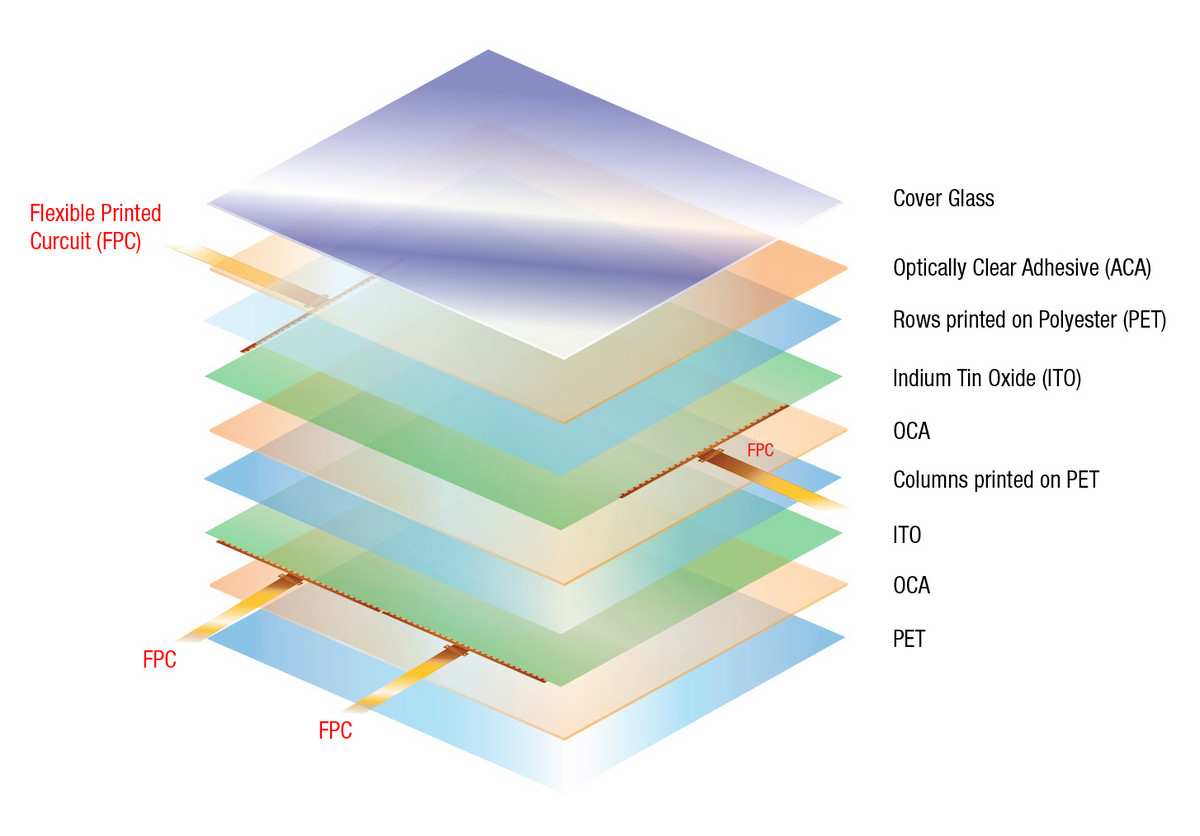
Touchscreens detect your finger using one of several technologies. The most common in modern monitors is projected capacitive, often called PCAP. This is the same tech your smartphone uses.
A transparent grid of electrodes is embedded in the glass. Your finger changes the electrical field at that point. The controller calculates your touch location from that change.
Here's where curvature complicates things. The electrode grid is manufactured on a flat substrate. When the glass bends to create the curve, those tiny electrical pathways stretch or compress slightly.
This can create areas where touch sensitivity varies. The controller has to compensate for the physical deformation of its own sensor array.
Infrared touch technology handles curves differently. IR touch uses a frame of light-emitting diodes and photodetectors around the screen's bezel. Your finger interrupts the light beams.
The system calculates your position from which beams are broken. Because the sensors sit in the bezel rather than on the glass itself, the curve doesn't directly stress the touch detection system. But the geometry still matters.
At steep curves, the light beams may not align perfectly with where your finger actually appears on screen.
Optical touch uses cameras in the corners to detect shadows and reflections from your finger. Like IR, the sensors live in the bezel. The curve can cause parallax issues.
The camera sees your finger at one angle while the display surface curves away from that angle.
Which Technology Handles Curves Best
PCAP dominates the curved touch monitor market. Manufacturers have refined the process of depositing indium tin oxide sensor patterns onto curved glass substrates. Companies like EETI and Ilitek produce touch controller chips specifically calibrated for curved panel geometries.
These controllers use firmware algorithms that map the expected touch distortion across the curve and correct for it in real time.
IR touch appears in some larger curved touch displays, particularly digital signage and kiosk applications. The bezel-mounted sensors avoid the stress problem entirely. But IR touch on curved screens can develop "dead zones" at the extreme edges where the light beam grid doesn't match the visual content underneath.
Optical touch is rare in curved monitors. The parallax problem gets worse as curvature increases. Most manufacturers avoid this combination for anything under 40 inches.
Side-by-Side Comparison: Curved vs. Flat Touchscreen Monitors
Let's put the two form factors head to head across the specs and features that actually matter when you're using touch.
| Feature | Curved Touchscreen | Flat Touchscreen |
|---|---|---|
| Touch accuracy (center) | Excellent | Excellent |
| Touch accuracy (edges) | Good to variable | Excellent |
| Multi-touch reliability | Good, varies by model | Excellent |
| Ghost touch risk | Slightly higher at edges | Minimal |
| Price (same size/specs) | 20-50% higher | Baseline |
| Model availability | Limited (fewer than 30 models) | Extensive (hundreds of models) |
| Eye comfort at edges | Better (natural focal distance) | Standard |
| Immersion feel | High | Moderate |
| Calibration complexity | Higher | Standard |
| Durability of touch layer | Slightly lower (flex stress) | Standard |
| Best for | Gaming, trading, creative work | General use, professional accuracy |
The price gap is real. A 32-inch 4K flat touchscreen monitor might run you $600 to $900. A comparable curved model with similar touch capability could easily hit $1,000 to $1,400.
That premium covers the more complex manufacturing process and lower production volumes.
Availability is the other big difference. Walk into any electronics retailer and you'll find dozens of flat touchscreen options across every size and price point. Curved touchscreens are a specialty item.
You'll mostly find them through direct manufacturer orders, B2B display suppliers, or niche online retailers.
What the Curvature Radius Actually Means for Touch Accuracy
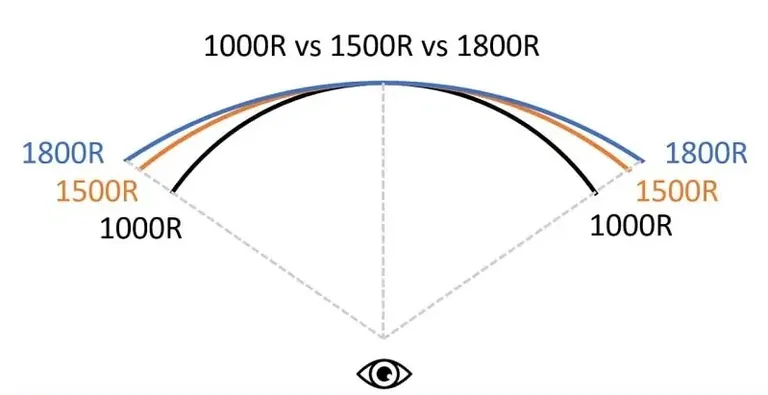
You'll see curved monitors described with an "R" number. 1000R, 1500R, 1800R. This number is the radius of the circle that the curve would form if it continued all the way around. A 1000R curve means the radius is 1,000 millimeters.
That's a tighter, more aggressive bend. A 3000R curve is much gentler, barely curving at all.
For touch accuracy, tighter curves create more challenges. On a 1000R display, the edges bend significantly toward your face. Your finger approaches those edges at a steeper angle.
The touch sensor has to account for more geometric distortion. On a 1800R or 3000R curve, the surface is closer to flat. Touch behavior is more predictable.
Most curved touchscreen monitors use 1500R or 1800R curvature. This is the sweet spot where you get a noticeable immersive effect without pushing the touch technology too far. The 1000R gaming monitors you see advertised are almost always non-touch models.
Manufacturers keep the touch variants at gentler curves for reliability.
The curvature radius also affects parallax error. This is the gap between where you see a UI element and where the touch sensor thinks your finger is. On a flat screen, that gap is consistent across the surface.
On a curved screen, it varies. The center might be dead-on while the edges show a 1 to 3 millimeter offset. Good touch controller firmware compensates for this.
Cheaper implementations don't.

Similar Posts





















