Are Budget Monitors Reliable
Are budget monitors reliable? That's the question that stops most people before they click "add to cart" on that $119 display. And honestly, it's a fair question. When you're spending a fraction of what the flagship models cost, you've got to wonder what corners got cut to hit that price.
The short answer is yes, most budget monitors are reliable enough for everyday use. But the full picture depends on what you need, which brand you pick, and whether you're okay with a bit of a panel lottery. Let's break it down so you can make a smart call. Readers comparing various configurations should also examine whether microled monitors reliable long term.
Quick Answer
Budget monitors are generally reliable for office work, browsing, and casual gaming. Most units from reputable brands last three to five years without issues. Quality control varies more than on premium models.
Your experience depends heavily on brand choice and use case.
Why Budget Monitors Get a Bad Rap (And Where It's Deserved)
Let's be real. Some budget monitors are genuinely terrible. The $79 no-name brand special from an overseas seller with zero warranty support?
That's a coin flip. But the budget tier has matured a lot as of 2025 and 2026. Brands like AOC, ASUS, and Dell have entry-level lines that punch way above their price. To see how this holds up against alternate models, explore whether touchscreen monitors reliable.
The reputation problem comes from a few real issues. Panel lottery is the big one. You and your friend could buy the same model on the same day, and yours might have two dead pixels while theirs is flawless.
That's less common with name-brand units, but it's still a thing.
Then there's the spec sheet gaming. A budget box might scream "1ms response time!" in bold letters. What it doesn't tell you is that's MPRT, not GtG.
The real gray-to-gray response time is probably 5ms to 8ms. That's fine for most people. But if you're coming in expecting true 1ms performance, you'll feel misled.
Build quality is where you'll notice the difference first. Plastic housings, wobbly stands, and barely-adjustable mounts are standard at this price. That doesn't affect reliability directly.
But a monitor that tips over every time you bump your desk isn't doing you any favors.
What Actually Makes a Budget Monitor Reliability
Reliability in a budget monitor comes down to three things. The panel itself, the brand's quality control, and the warranty behind it. Get those three right and you've got a display that'll serve you well for years.
Panel Type Matters More Than Price
The panel technology inside your budget monitor tells you a lot about what you're getting into. There are three main types you'll see at this price point, and each has trade-offs.
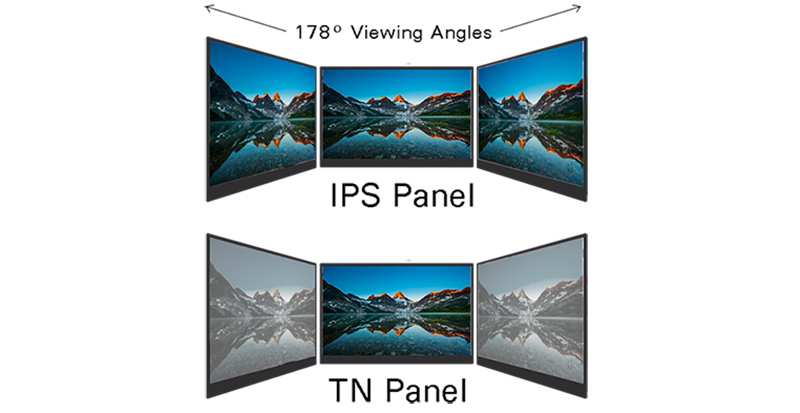
IPS (In-Plane Switching) panels are the sweet spot for most budget buyers. They offer solid color accuracy and wide viewing angles. The downside is IPS glow, that slight brightening in the corners when you're viewing dark content.
It's a characteristic of the tech, not a defect. Budget IPS panels from LG Display or AUO tend to be quite good.
VA (Vertical Alignment) panels give you better contrast ratios. Blacks look deeper, which is great for movies and dark-themed work. The trade-off is color shift when you're viewing from off-angles, and some budget VA panels exhibit ghosting in fast motion.
TN (Twisted Nematic) panels are the cheapest to make. They've got fast response times but terrible viewing angles and washed-out colors. At this point in 2026, there's very little reason to buy a new TN panel unless you're on an extremely tight budget and need high refresh rate for competitive gaming.
| Panel Type | Best For | Main Weakness | Budget Availability |
|---|---|---|---|
| IPS | Office work, general use | IPS glow, moderate contrast | Very common |
| VA | Media consumption, movies | Color shift, ghosting | Common |
| TN | Competitive gaming (high Hz) | Poor color, narrow viewing | Declining |
Build Quality and Stand Durability
Here's where budget monitors show their age fastest. The panel might be fine for five years. But that stand could start feeling loose within six months.
Most budget displays use a simple tilt-only stand with a VESA mount as the saving grace.
If you're buying a budget monitor, seriously consider putting it on a VESA arm. A $25 to $40 monitor arm from Amazon or your local electronics store solves the wobble problem entirely. It also frees up desk space and gives you proper height and angle adjustment that the included stand probably can't offer.
The housing plastic on budget monitors is usually thin but functional. It's not going to crack under normal use. Just don't expect the premium feel of a metal-chassis Dell UltraSharp.
As long as you're not tossing it in a backpack daily, it'll hold up fine.
Port Selection and Future-Proofing
Budget monitors in 2025 and 2026 typically ship with one or two HDMI 1.4 ports and maybe a DisplayPort 1.2. Some newer models include USB-C with power delivery, which is a huge plus if you're connecting a laptop.
The thing to watch for is HDMI version. HDMI 1.4 tops out at 4K at 30Hz or 1080p at 144Hz. If you're buying a 144Hz budget gaming monitor, make sure it has DisplayPort so you can actually hit that refresh rate at 1080p.
Otherwise you're leaving performance on the table.
VGA ports are still floating around on some ultra-budget models. That's a sign the monitor is using an older controller board. It's not a dealbreaker if you're hooking up legacy equipment.
But it's worth noting as a signal of how cutting-edge (or not) the internals are.
Warranty and Brand Support Reality
This is where the reliability question gets answered more than anything else. A good monitor with a bad warranty is a risk. A decent monitor with solid warranty support is a safe bet.
Most reputable budget monitor brands offer a one to three-year warranty. Dell and ASUS tend to be at the three-year end. Off-brand names might offer one year or require you to ship the unit back to China at your own cost, which kind of defeats the purpose.
Dead pixel policies vary. ISO 9241-303 defines pixel fault classes, with Class II allowing a certain number of dead pixels depending on resolution. Most budget monitors ship as Class II, meaning a few dead pixels are considered "within spec." Check the brand's specific dead pixel policy before you buy.
Some will replace a unit with even one bright pixel. Others won't budge until you've got five or more.
The Honest Pros and Cons of Budget Monitors
Let's lay it all out. Budget monitors aren't perfect, but they're not the gamble some people make them out to be. Here's what you're really getting into.
What You're Getting
Solid value for the money. A $130 to $180 budget monitor in 2026 gives you a 24-inch to 27-inch IPS panel with 1080p or 1440p resolution, 75Hz to 144Hz refresh rate, and FreeSync support. Five years ago, that spec sheet would have cost you $300 or more.
Low replacement anxiety. If a $150 monitor dies after three years, you're out $150 and you buy a new one. If a $500 monitor dies, that stings. The lower price point makes it easier to treat these as semi-disposable tech.
Surprisingly good gaming performance. Budget 1080p 144Hz monitors with FreeSync have gotten genuinely good for casual and even semi-competitive gaming. The AOC 24G2 and its successors have been a go-to recommendation for years, and newer models keep improving.
Decent enough color for non-professional work. Most budget IPS panels cover 95% to 99% of sRGB out of the box. That's fine for web browsing, office work, and even light photo editing. You wouldn't color-grade a feature film on one.
But for social media graphics or personal projects, it's more than adequate.
What You're Risking
Panel lottery is real. Even with reputable brands, quality control at the budget tier is looser than on premium models. You might get a flawless unit or you might get one with noticeable backlight bleed. Buying from a retailer with a good return policy is your best insurance here.
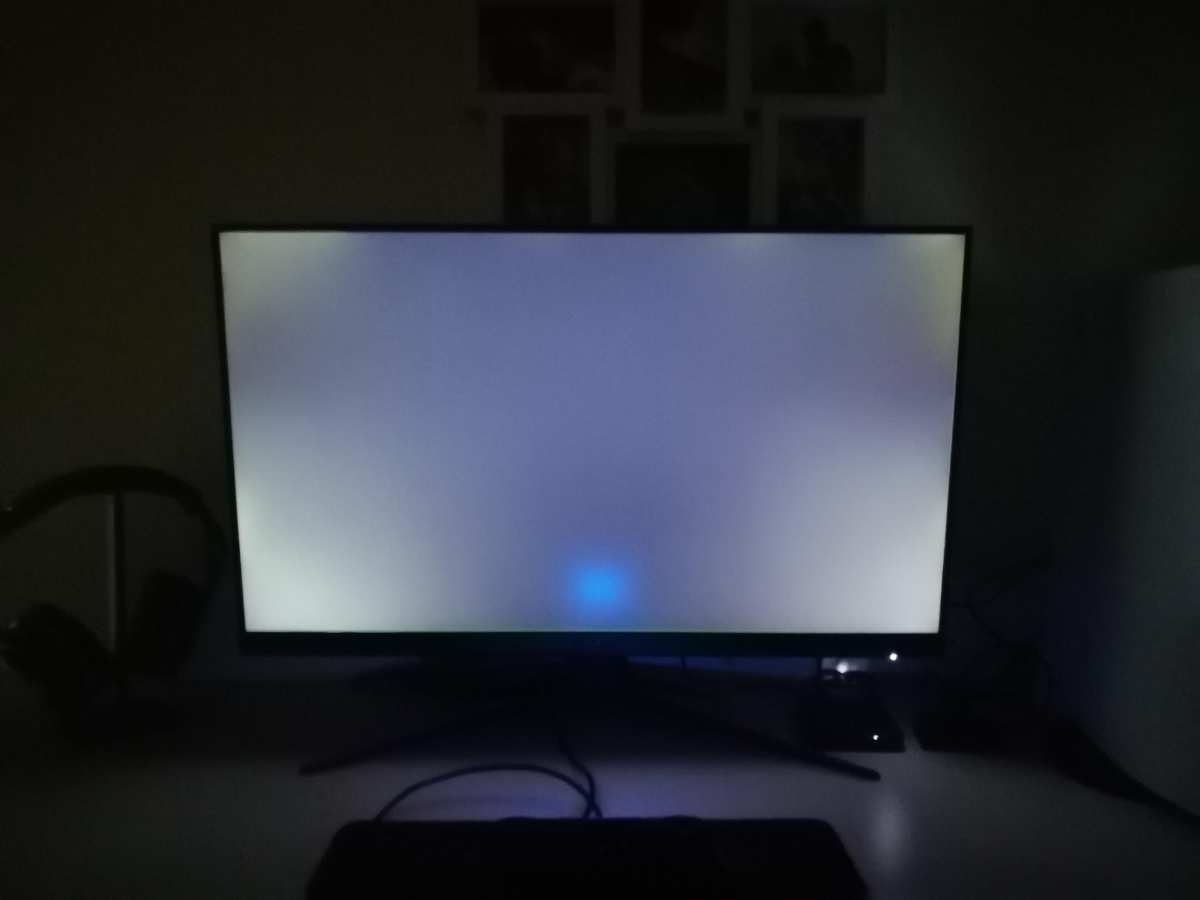
Backlight bleed and IPS glow. This is the most common complaint with budget IPS monitors. In a dark room, you'll likely see light leaking from the edges or corners. It's a characteristic of the panel type, but budget units tend to have less careful sealing and diffuser layers.
Some units are fine. Others look like a flashlight in the corner.
Functional but fake HDR. Many budget monitors now advertise "HDR10 support" or "DisplayHDR 400." In practice, the peak brightness and zone count aren't there to make HDR look meaningful. It'll accept an HDR signal, but SDR often looks better because the monitor handles it more naturally. Don't buy a budget monitor for HDR.
Limited adjustability and ergonomics. Tilt-only stands are the norm. No height adjustment, no swivel, no pivot. If you need proper ergonomic positioning, budget an extra $30 to $50 for a monitor arm.
Your neck and back will thank you.
Shorter useful lifespan on backlights. Budget monitors typically use edge-lit LED backlights that are rated for around 30,000 hours. That's roughly three and a half years of continuous use before brightness drops to half. In practice, most people replace monitors before this becomes an issue.
But it's worth knowing that the backlight is usually the first thing to degrade.
Customer service can be hit or miss. If you buy from a well-known brand with US or UK-based support, you're usually fine. If you go with a lesser-known brand, getting warranty service can be a headache. Check reviews specifically mentioning warranty claims before you commit.
When a Budget Monitor Is the Right Call
Not every situation demands a premium display. Budget monitors shine in specific scenarios where their strengths line up with what you actually need.
Office Work, Browsing, and Productivity
This is the budget monitor's home turf. If you're writing emails, working in spreadsheets, browsing the web, or jumping between documents, a budget IPS monitor is all you need. The color accuracy is good enough, the resolution is sharp enough, and the refresh rate is smooth enough.
A 24-inch 1080p IPS at 75Hz or a 27-inch 1440p IPS at 60Hz or 75Hz will serve you beautifully for office work. You can find solid options from AOC, ASUS VY series, or Dell SE series in the $100 to $160 range. That's a fraction of what you'd pay for a professional-grade display, and you won't notice the difference for this kind of work.
Students and Home Setups
If you're a student or setting up a home workstation on a tight budget, a budget monitor is a no-brainer. You're probably not doing color-critical work, you need something that works reliably day to day, and you'd rather put the savings toward textbooks, rent, or that better chair you've been eyeing.
Look for a 24-inch IPS with an adjustable stand or plan for a VESA mount. The AOC 24G2SAE or similar models give you solid specs without breaking the bank. Pair it with a cheap monitor arm and you've got a setup that feels way more premium than it is.
Secondary or Dual Monitor Duty
Running a dual monitor setup? The secondary display is a perfect spot for a budget monitor. You don't need perfect color accuracy on the screen where you keep Slack, Spotify, or reference documents open.
You just need it to work.
This is where budget monitors really earn their keep. A $119 24-inch display as a secondary screen is one of the best productivity upgrades you can make for the money. You'll wonder how you ever worked with just one screen.
Casual and Entry-Level Gaming
Budget gaming monitors have gotten remarkably good. You can pick up a 24-inch 1080p 144Hz IPS with FreeSync for around $130 to $160. That's enough for smooth gameplay in most titles if your GPU can push the frames.
The key here is managing expectations. You're not getting the fastest response times or the widest color gamut. But for casual gaming, indie titles, or even some competitive shooters at an amateur level, a budget gaming monitor does the job well.
When You Should Spend More
There are situations where a budget monitor will genuinely hold you back. If any of these apply to you, it's worth stretching your budget.
Professional Color-Work (Photo, Video, Design)
If your livelihood depends on accurate color, a budget monitor isn't the right tool. You need factory calibration, wide gamut coverage (Adobe RGB or DCI-P3), and consistent panel quality. Budget monitors typically cover sRGB well but fall short on wider gamuts, and they rarely come with calibration certificates.
A Dell UltraSharp, ASUS ProArt, or BenQ PD series monitor will give you the accuracy and consistency that professional work demands. These monitors cost more, but they're tools that pay for themselves when your print matches your screen or your client approves the first proof.
Competitive Gaming
If you're playing ranked competitive titles and every millisecond counts, a budget monitor's response time and motion clarity limitations will show up. Premium gaming monitors use faster panels with true 1ms GtG response times, better overdrive tuning, and higher refresh rates with less ghosting.
A budget 144Hz monitor is fine for most gamers. But if you're specifically chasing competitive performance, the step up to a premium 240Hz or 360Hz display is noticeable.
Primary Monitor for Mixed Heavy Use
If your single monitor has to do everything (work, gaming, media, creative projects), a budget display will feel limiting faster than you'd like. The compromises that are fine in a specialized role become annoying when everything runs through one screen.
In this case, a mid-range monitor in the $250 to $400 range gives you a better balance of features, build quality, and panel consistency. It's more money, but it's also a display you'll be happy with for longer.
Budget vs. Refurbished Premium: The Real Comparison
Here's a comparison that doesn't get enough attention. Instead of buying a new budget monitor, what about a refurbished professional-grade display from a few years back?
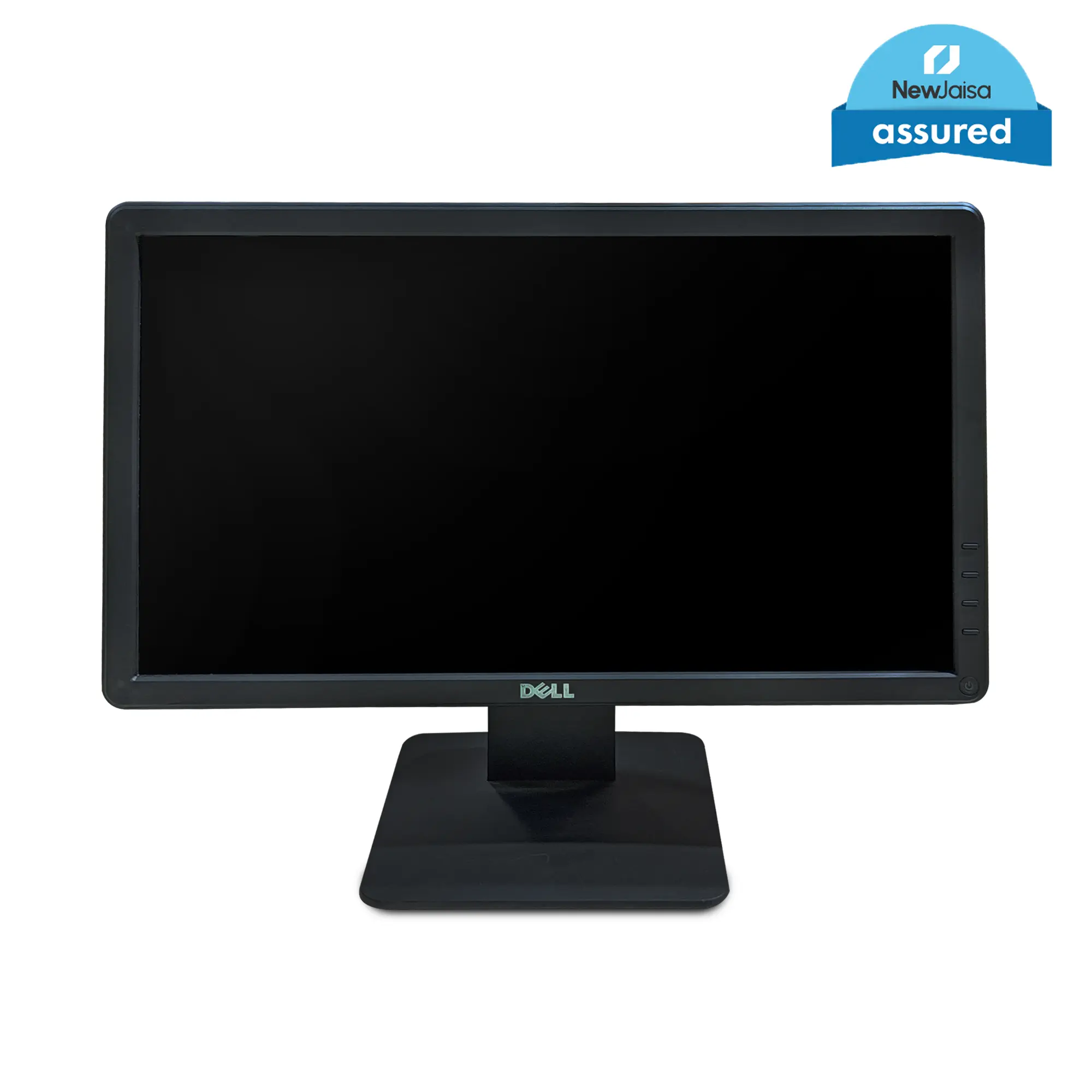
A refurbished Dell UltraSharp or HP Z-series monitor from a reputable refurbisher can be found for $100 to $200. These were $400 to $600 monitors when new. They typically have better build quality, better panels, and better color accuracy than a new budget monitor at the same price.
The trade-off is age. A refurbished monitor might have some cosmetic wear, and its backlight has already seen some hours of use. You're also buying a model that's a generation or two behind on features like USB-C or high refresh rates.
For office work and general use, a refurbished professional monitor is often the smarter buy. For gaming, a new budget monitor with higher refresh rate and adaptive sync is usually the better call.
| Factor | New Budget Monitor | Refurbished Premium Monitor |
|---|---|---|
| Price | $100 to $180 | $100 to $200 |
| Panel Quality | Good (IPS common) | Better (often higher-grade IPS) |
| Build Quality | Basic plastic | Better materials, more adjustment |
| Features | Modern (USB-C, high Hz) | Older (may lack newest ports) |
| Warranty | 1 to 3 years | 90 days to 1 year (refurbisher) |
| Backlight Life | Fresh | Partially used |
| Best For | Gaming, general use | Office, color work, productivity |
How to Stack the Odds in Your Favor
If you're going the budget monitor route, a few smart moves can make the difference between a great experience and a regretful one.
Before You Buy
Stick with known brands. AOC, ASUS, Dell, LG, Samsung, and Acer all have solid budget lines. You're paying a small premium over no-name brands, but you're getting actual warranty support and better quality control.
Check the dead pixel policy. Some brands will replace a unit with even one bright pixel. Others follow ISO Class II and consider a few dead pixels "acceptable." Know what you're getting into before you open the box.
Read recent reviews, not just the listing. Spec sheets don't tell you about firmware bugs, OSD annoyances, or how the monitor handles at low brightness. User reviews on retailer sites and independent review platforms give you the real picture.
Buy from a retailer with a good return policy. Amazon, Best Buy, and similar retailers typically offer 30-day return windows. That's your insurance policy against a bad panel. Register the monitor immediately and test it thoroughly within that window.
When It Arrives
Inspect for dead pixels right away. Use a free online tool like the EIZO Monitor Test or Dead Pixel Buddy. Cycle through solid red, green, blue, white, and black screens. Check every corner.
Test for backlight bleed in a dark room. Display a full black image in a dimly lit or dark room. Some glow in the corners is normal for IPS panels. Excessive bleeding or bright spots along the edges might warrant a return.
Check for fan noise or coil whine. Some budget monitors have a small internal power supply that can produce a faint buzzing or whining sound. This is more common than people think and is usually only noticeable in a quiet room. If it bothers you, exchange it.
Verify all ports work. Plug into every port. Make sure you're getting the advertised resolution and refresh rate on each connection. A faulty port is an immediate return reason.
Setting It Up for Best Results
Set brightness to a comfortable level. Budget monitors are often cranked to 100% brightness out of the box. That's harsh on your eyes and accelerates backlight wear. Drop it to 40% to 60% for typical indoor use.
Turn on FreeSync or Adaptive Sync. If your monitor supports it, enable it in both the monitor's OSD and your GPU's driver settings. This eliminates screen tearing without the input lag penalty of V-Sync.
Use the sRGB mode if available. Many budget monitors have an sRGB emulation mode in the OSD. This clamps the color gamut to sRGB, which gives you more accurate colors for web content and general use.
Consider a monitor arm. A $25 to $40 VESA arm gives you proper height adjustment, frees desk space, and makes the whole setup feel more intentional. It's the single best accessory for a budget monitor.
What the Numbers Actually Say
Let's look at what we know about budget monitor reliability from available data and industry standards.
Most LED backlit monitors are rated for 30,000 to 50,000 hours of backlight life. At eight hours a day, that's roughly 10 to 17 years before the backlight dims to half brightness. The backlight is rarely the first thing to fail in practice.
Controller boards and power supplies tend to go first, and those components are where budget monitors cut the most corners.
Aggregate user reviews on major retailer sites suggest that defect rates for name-brand budget monitors hover around 2% to 5% for out-of-box issues like dead pixels or non-functional ports. Off-brand monitors trend higher, sometimes into the 8% to 12% range based on review analysis.
Warranty claim data is harder to pin down since brands don't publish it publicly. But based on third-party repair forums and community reports, the most common budget monitor failures are backlight inverter issues, capacitor wear on the power board, and occasional panel degradation. These are typically covered under warranty if they occur within the first one to three years.
The ISO 9241-303 standard defines pixel fault classes for displays. Most budget monitors ship as Class II, which allows up to two bright pixels, two dark pixels, and a combination of sub-pixel faults depending on resolution. If you're particular about pixel perfection, look for brands that advertise Class I panels or have a zero-bright-pixel guarantee.
The Budget Monitor Reliability Cheat Sheet
Here's a quick reference to help you decide if a budget monitor is right for your situation.
Buy a budget monitor if you:
- Need a display for office work, browsing, or school
- Want a secondary monitor for a dual setup
- Are a casual or entry-level gamer
- Are on a tight budget and need something that works
- Are okay with using a VESA arm for better ergonomics
Skip the budget monitor if you:
- Do professional photo, video, or design work
- Are a competitive gamer who needs the fastest response times
- Want functional HDR performance
- Need a single do-everything primary monitor
- Are uncomfortable with the possibility of a panel lottery
Best practices for budget monitor shopping:
- Stick with AOC, ASUS, Dell, LG, Samsung, or Acer
- Check the dead pixel and return policy before buying
- Test the unit thoroughly within the return window
- Use a VESA arm for better adjustability
- Enable FreeSync and sRGB mode in the OSD
Frequently Asked Questions
How long do budget monitors typically last?
Most budget monitors last three to five years of regular use without major issues. The backlight is usually rated for 30,000 hours or more. Controller boards and power supplies tend to be the first components to fail, which is why warranty coverage matters.
Is the panel lottery really a thing?
Yes, but it's less dramatic than some forums make it sound. With reputable brands, most units are fine. The variance is real though.
Two identical models can have slightly different backlight bleed or pixel quality. Buying from a retailer with easy returns is your best protection.
Are off-brand monitors like CRUA or KOORUI reliable?
They can be hit or miss. Some users report perfectly fine units with no issues. Others report higher rates of dead pixels and backlight problems.
The bigger concern is warranty support. If something goes wrong, getting a replacement or refund can be difficult with lesser-known brands.
Can a budget monitor work for photo editing?
For casual photo editing and social media graphics, a budget IPS monitor with good sRGB coverage is fine. For professional print work or color-critical projects, you need a factory-calibrated monitor with wider gamut coverage. The budget tier isn't built for that level of accuracy.
Is it worth buying a refurbished monitor instead?
For office work and productivity, a refurbished professional monitor is often a better value than a new budget display. You get better build quality and panel consistency. For gaming, a new budget monitor with high refresh rate and adaptive sync is usually the smarter pick.
What should I check as soon as my budget monitor arrives?
Inspect for dead pixels using a test tool, check for excessive backlight bleed in a dark room, verify all ports work at the correct resolution and refresh rate, and listen for any buzzing or coil whine from the power supply. Do all of this within your return window so you can exchange or return if something's wrong.

Similar Posts





















