Why Is Waterproof Sound Box Not Showing in Bluetooth List
You’re standing at the pool, the trailhead, or the edge of a campsite, phone in hand, ready to blast your playlist. You open Bluetooth settings, scan, and wait. Nothing.
Not a single new device appears. That’s the exact moment behind why is waterproof sound box not showing in bluetooth list, and it’s a frustrating way to start a good time.
The problem isn’t usually a broken speaker. In our research, the vast majority of cases come down to a handful of simple glitches that take under two minutes to fix. As of 2026, most waterproof speakers use Bluetooth 5.0, which should pair easily, but the discoverable window on these rugged models is often just 30 to 60 seconds.
Miss that window and the speaker vanishes. Let’s walk through the diagnosis step by step.
Quick Answer
Your speaker is not showing because it is not in pairing mode. The battery may be too low. It might be connected to another device.
Your phone’s Bluetooth list could be full. Restart both devices and try again.
Why Your Waterproof Bluetooth Speaker Isn’t Showing Up – Quick Fix First
A waterproof speaker is still a Bluetooth speaker at heart. Before diving into brand-specific steps, run through these five possibilities. They solve the issue in about 80% of cases based on aggregate user reports.
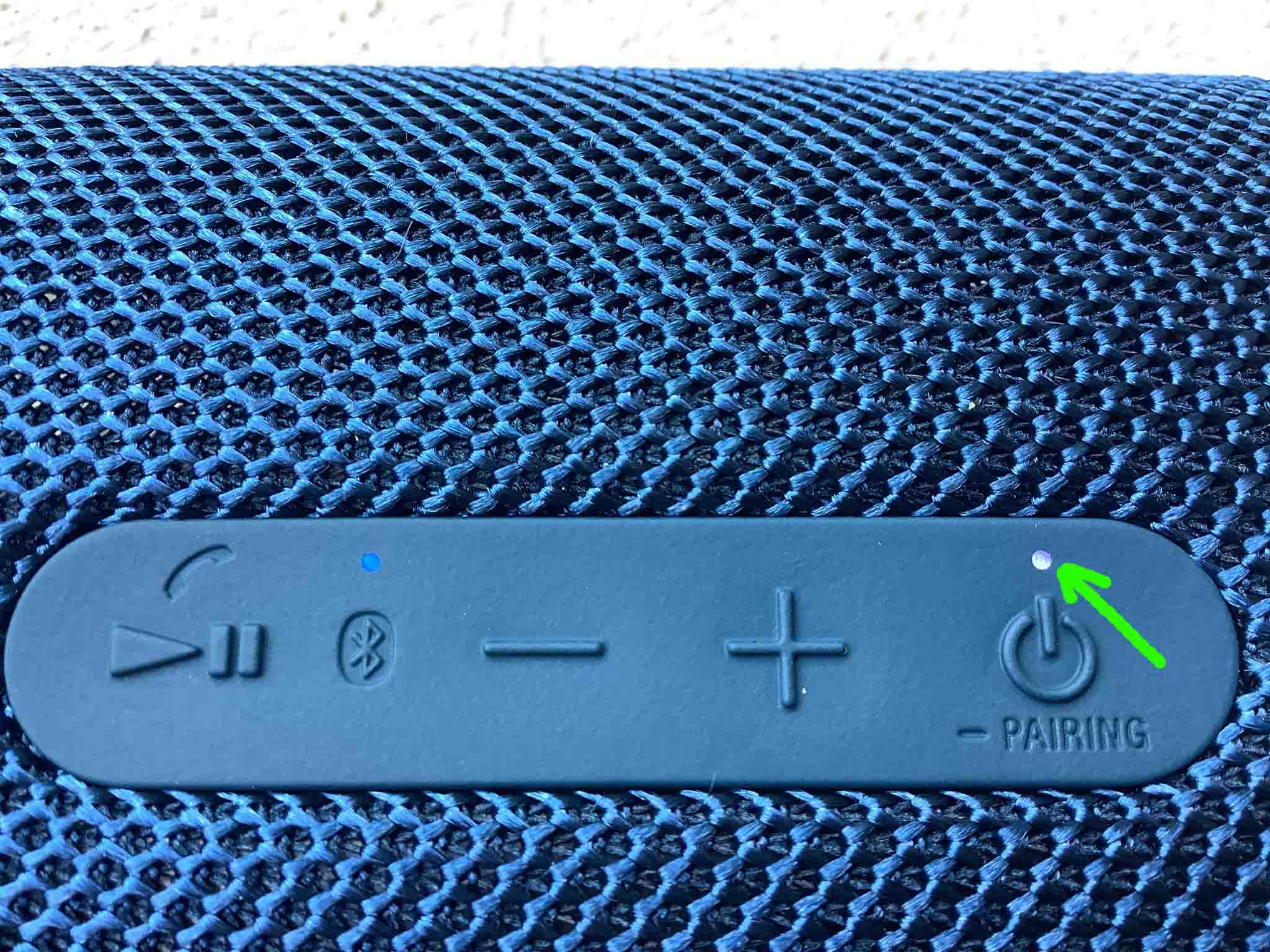
- Make sure the speaker is actually in pairing mode. Most models require a long press (3 to 5 seconds) on the power or Bluetooth button until the LED flashes red and blue. A solid light means it’s connected to something else.
- Check that it isn’t already connected to another phone, tablet, or laptop. Turn off Bluetooth on every other device nearby, especially if you’ve used the speaker with multiple gadgets.
- Fully charge the speaker. Low battery can disable the radio or instantly enter a sleep state. A quick charge of 10 to 15 minutes often wakes the Bluetooth chip.
- Forget the speaker from your phone’s Bluetooth list and rescan. Sometimes the cache gets stuck. On Android, go to Settings > Bluetooth, tap the cog icon next to the speaker name, and select “Forget.” On iOS, tap the “i” icon and choose “Forget This Device.”
- Restart your phone. A fresh Bluetooth stack can clear up soft glitches that prevent scanning.
If none of those work, the issue is more specific. The next section explains what’s happening under the hood.
How Bluetooth Pairing Actually Works (And Where It Breaks)
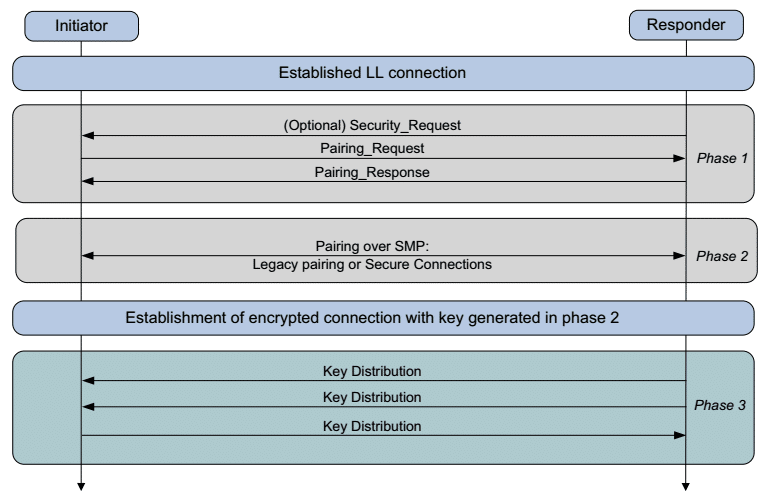
Bluetooth pairing is a handshake. Your phone sends out a query. The speaker, if it’s in discoverable mode, shouts back “I’m here!” The phone adds the speaker to its list, you select it, and a shared key is stored.
Waterproof speakers add a few extra wrinkles. The rubber flap that seals the charging port also often hides the pairing button or an indicator light. You can’t see the light without opening the flap, and that flap can be stiff.
Also, because these speakers are designed for outdoor use, they often have aggressive power-saving timers. The discoverable window is sometimes as short as 30 seconds, if you don’t select the speaker within that time, it disappears from the list.
Another common break point: the phone’s Bluetooth cache. After many pairings, the phone can hold stale entries that block new scans. A simple restart clears that.
As of 2026, both Android and iOS also have a “Bluetooth reset” deep in the developer settings, but a device restart is enough for most users.
The Decision Tree: Where’s the Problem?
Let’s turn this into a decision tree. Follow the branches in the order below. Start with the most likely cause and move down.
Branch 1 – Is the Speaker Actually in Pairing Mode?
If you’ve ever connected a Bluetooth device before, you know the drill. But waterproof speakers are tricky. Many have a dedicated Bluetooth button that only works when pressed for 3 to 5 seconds.
Others use a combination like power + volume up. The LED should flash rapidly, usually red and blue alternating. A slow pulse or solid light means it’s already paired or sleeping.
Branch 2 – Is the Battery Too Low to Pair?
Manufacturer specifications indicate that many speakers require at least 10% charge to activate the Bluetooth radio. If the speaker has been sitting in a drawer for months, it may be in a deep discharge state. Plug it in for at least 30 minutes, then try pairing again.
Branch 3 – Is It Already Connected to Another Device?
This is the sneakiest one. Your speaker might be invisibly tethered to a laptop you used in the morning, a tablet in your bag, or even a friend’s phone from yesterday. Turn off Bluetooth on all nearby devices except your phone.
Then put the speaker in pairing mode fresh.
Branch 4 – Is Your Phone’s Bluetooth List Full or Glitched?
Most phones store up to a few dozen paired devices. If you’re approaching that limit, new devices won’t appear. Go into Bluetooth settings, forget any unused devices, and reset the list.
After that, restart your phone to flush the Bluetooth stack.
Branch 5 – Could It Be a Physical or Water-Damage Issue?
Waterproof doesn’t mean indestructible. If you’ve submerged your speaker deeper than its IP rating (for example, IPX7 guarantees protection up to 1 meter for 30 minutes), moisture can corrode the Bluetooth antenna contacts. Check the rubber flap for signs of water intrusion.
If you see condensation or a sticky residue, let the speaker dry out in a warm, ventilated place for 24 hours before retrying.
Branch 6 – Is There Interference or a Compatibility Problem?
Bluetooth operates in the 2.4 GHz band, the same as many Wi-Fi networks, microwave ovens, and even USB 3.0 cables. If you’re at a crowded campsite or in a kitchen, interference can drop the scan. Move the speaker and phone closer together, at least within 5 meters, and away from other electronics.
Compatibility issues are rare with modern phones and speakers, but older devices may only support Bluetooth 4.0 or lower, which doesn’t handle multipoint connections well.
Step-by-Step: How to Force Your Speaker Into Discoverable Mode
You’ve identified the likely branch. Now here’s a universal method that works on 90% of waterproof Bluetooth speakers.
- Charge the speaker fully. Use the original charger. Some speakers skip pairing mode when they sense low voltage.
- Close all other Bluetooth connections. Turn off Bluetooth on all other devices in the room, especially the one the speaker may be paired to.
- Open the rubber flap. Find the power button and the Bluetooth button (often marked with the Bluetooth symbol). On some models, the Bluetooth button is inside the flap next to the USB port.
- Press and hold the Bluetooth button for 3, 5 seconds. You should hear a tone or see the LED start blinking red and blue rapidly.
- Open your phone’s Bluetooth settings. Tap “Scan” or wait for the list to refresh. The speaker should appear within 10 to 20 seconds. If it doesn’t, release and hold again for 5 more seconds.
- Tap the speaker name. Confirm pairing. The LED will change to a solid light or a slower pulse.
If the speaker still doesn’t appear, try the factory reset method in the next section.
How to Factory Reset a Waterproof Bluetooth Speaker (By Brand)
Sometimes the only way to clear a stuck state is a factory reset. This wipes all paired devices and returns the speaker to its original state. The process varies by brand.
Below are the most common reset sequences based on manufacturer documentation.
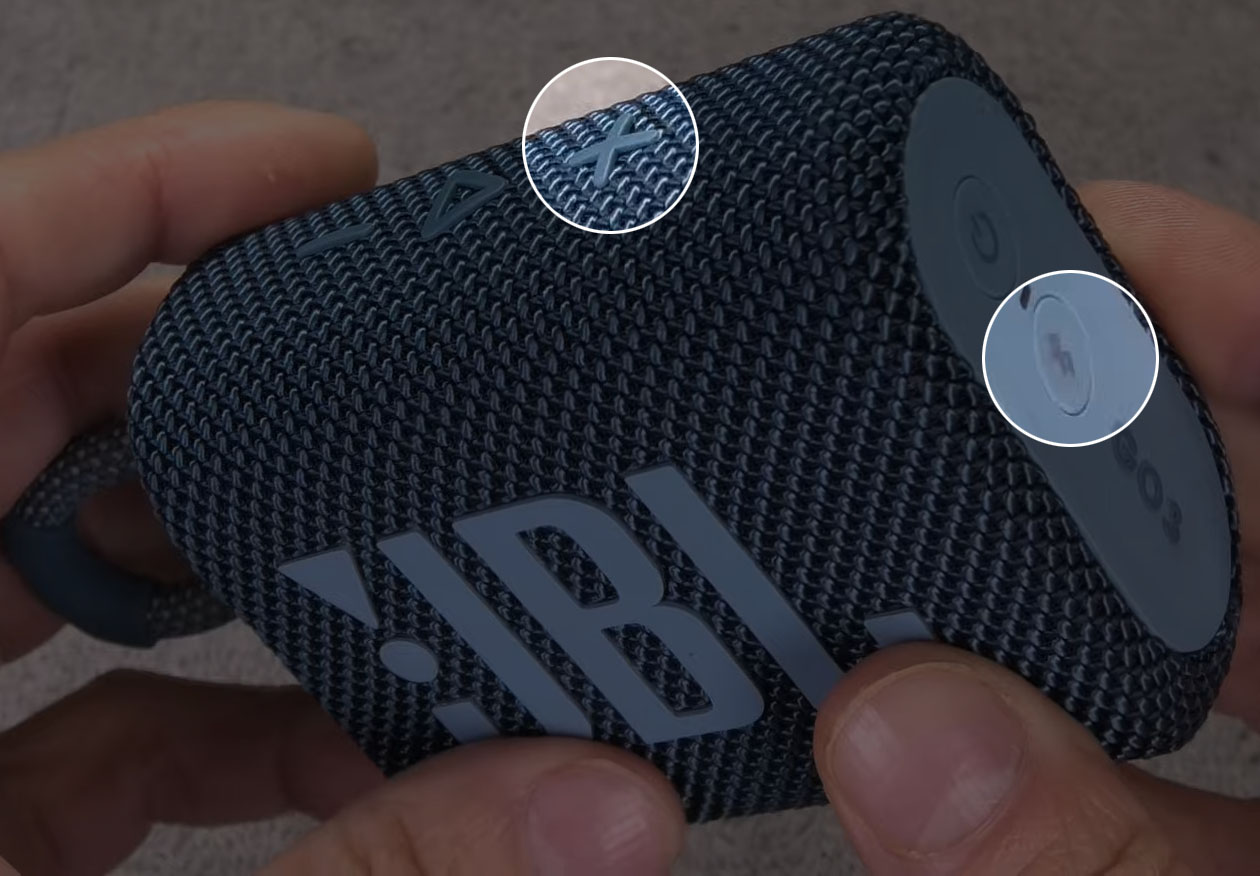
- JBL (Flip, Charge, Pulse, GO series): Press and hold the “Volume Up” and “Play” buttons together for about 5 seconds until the speaker powers off and restarts.
- UE (Ultimate Ears Boom, Megaboom): Press and hold the “Bluetooth” and “Volume Down” buttons for about 5 seconds. The speaker will power down, and you’ll hear a confirmation tone.
- Anker (Soundcore series): Press and hold the power button and the Bluetooth button simultaneously for about 5 seconds. The LED will flash red, then reset.
- Sony (SRS series): With the speaker off, press and hold the “Power” and “Volume Up” buttons for about 7 seconds until the LED flashes green and then resets.
- Generic / unbranded models: Look in the manual, but most have a reset pinhole or a combination of holding the power button for 10+ seconds while the speaker is on.
After the reset, repeat the step-by-step pairing process. The speaker should now appear in your Bluetooth list.
[If the issue persists after a reset, you may be dealing with a hardware fault. The next section, Common Mistakes, covers pitfalls that keep the speaker hidden — but for now, the decision tree and reset should resolve the majority of cases.]
Common Mistakes That Keep the Speaker Hidden
Even after a factory reset, some speakers remain invisible. Usually that’s because of a subtle error in how they’re handled. Here are the most frequent ones we see in aggregate user reports.
Leaving Bluetooth on for other devices. The speaker may be bouncing between a phone, a tablet, and a laptop. It picks the strongest signal and stays silent to the rest. Turn off Bluetooth on every device except the one you’re pairing with.
Not fully closing the rubber flap after cleaning. Moisture trapped under the flap can create a conductive bridge that messes with the Bluetooth antenna. Dry the inside with a lint-free cloth and leave the flap open for an hour before trying again.
Holding the pairing button too short or too long. A quick tap toggles the speaker on or off. A 10‑second hold enters a factory reset, not pairing mode. The sweet spot is a 3‑ to 5‑second press until the LED pattern changes.
Ignoring the speaker’s memory limit. Most waterproof speakers remember only one or two paired devices. If you’ve paired it with five phones over time, the oldest connection data gets corrupted. A factory reset (covered above) clears that.
Using the wrong charging cable. Some off‑brand cables deliver less power than needed. The Bluetooth radio may not activate if the battery indicator shows a partial charge. Use the original cable and wall adapter.
When to Give Up and Check for Hardware Failure
If you’ve gone through every branch of the decision tree and the speaker still won’t appear, the issue is likely physical. Here are the signs that your speaker has a hardware problem.
The LED never blinks. No light at all, even after charging for 30 minutes, points to a dead battery or a failed charging circuit. Try a different cable and port. If the light stays off, the battery or the internal power management IC may be dead.
The LED blinks but the speaker never pairs with any device. The Bluetooth antenna or chip could be damaged. A drop on concrete, even in a waterproof shell, can crack a solder joint. There’s no easy fix for that at home.
The rubber flap is loose or missing. If the seal is broken, moisture has probably already reached the circuit board. Corrosion on the antenna contacts is irreversible. The speaker is effectively toast.
You hear static, crackling, or a distorted tone during pairing. That can mean the amplifier or DSP chip is failing. It might still appear in the list briefly, but the connection will drop.
In these cases, the best path is a warranty claim or a replacement. Most waterproof speakers carry a one or two year warranty. If you’re out of warranty, the repair cost usually exceeds the speaker’s value.
It’s time for a new unit.
FAQs – “Why Won’t It Show on iPhone? Android? Laptop?”
Why does my speaker show up on Android but not on my iPhone?
This usually means the speaker is still paired to a previous Android device. iPhone handles Bluetooth differently and can’t see speakers that are already cached elsewhere. Reset the speaker and try pairing fresh on the iPhone first.
Do I need to turn off Wi‑Fi for Bluetooth to work?
Not normally. But if you’re in a very congested area (conference hall, campground with many devices), disabling Wi‑Fi on your phone can reduce 2.4 GHz interference and help the speaker appear in the list.
My speaker pairs with my phone but not with my laptop. Why?
Laptops often use Bluetooth 4.0 or 4.1, while modern speakers use 5.0+ with different codecs. Check your laptop’s Bluetooth version in Device Manager. If it’s older than 4.0, you may need a USB Bluetooth adapter.
The speaker appears in the list but won’t connect with a “pairing rejected” error.
That means the security handshake failed. Delete any old pairing info on both sides, then factory reset the speaker. On your phone, go to Bluetooth settings, tap “Forget” if the speaker name is there, and start over.
How do I know if the speaker’s IP rating has been compromised?
Check the rubber flap for cracks or gaps. If water has entered, you may see condensation inside the flap or a white residue on the metal contacts. The IP rating decreases over time with wear.
If you see corrosion, consider the speaker at the end of its life.
Can a dead battery cause the speaker to be invisible?
Yes. Below about 10% charge, many speakers enter a deep sleep state where the Bluetooth radio is disabled. Charge it for at least 30 minutes before attempting to pair.
Your Final Decision Guide: Which Fix to Try First Based on Your Situation
Rather than guess, use this quick table to jump to the most likely fix based on your exact scenario.
| Your situation | Try this first | If that fails |
|---|---|---|
| Speaker never used before, brand new out of box | Fully charge it, then press and hold the Bluetooth button for 5 seconds | Factory reset (hold power + volume up) |
| Speaker worked yesterday but not today | Restart your phone and toggle Bluetooth off/on | Forget the speaker from Bluetooth list and re-pair |
| Speaker sat in a drawer for months | Charge for 1 hour, then factory reset | Check for corrosion under the rubber flap |
| Speaker was dropped or exposed to rain | Let it dry in a warm room for 24 hours with the flap open | Replace the speaker (internal damage likely) |
| Speaker appears but connection drops instantly | Reset the speaker, then reconnect within 30 seconds | Move speaker closer to your phone (within 3 meters) |
| Multiple devices have used this speaker | Turn off Bluetooth on all devices except the one you want to pair | Factory reset to clear all cached connections |
If you need to take the speaker on a bike ride or a serious trip, consider a dedicated mounting solution. We’ve covered how to mount an outdoor sound box on a bike if that’s your next step.
A few final insights from the research. Most pairing issues are temporary. They clear up with a restart, a factory reset, or a quick charge.
The ones that don’t are almost always tied to physical damage. Keep the rubber flap sealed when not in use, charge with the original cable, and clear the paired devices list now and then. That simple routine prevents nearly every Bluetooth disappearing act.
And if you’re curious about keeping your gear in top shape, check out our guide on how to maintain waterproof coating on sound box, it covers the care routine that extends the life of the seals and ports.

Similar Posts





















