Why Are OLED Monitors Trending
If you've been shopping for a monitor lately, you've probably noticed that OLED options are popping up everywhere, and you might be wondering why are oled monitors trending so hard right now. The short answer is that panel manufacturing has matured, prices have dropped significantly, and the visual advantages over traditional LCD monitors are impossible to ignore once you see them in person.
OLED monitors use self-emissive pixels that produce their own light with no backlight required, delivering true blacks and an infinite contrast ratio that IPS and VA panels simply cannot match. As of 2026, QD-OLED and WOLED panels are hitting peak brightness levels above 1,000 nits in HDR highlights while maintaining 0.03ms response times, making them the fastest and most visually impressive displays available at mainstream prices. Let's break down what's actually driving this trend and whether it matters for your specific situation. If you are exploring similar hardware setups, see our detailed guide on whether oled monitors good for streaming.
Quick Answer
OLED monitors are trending because panel costs have dropped sharply while performance has improved. QD-OLED and WOLED technologies now offer infinite contrast, near-instant response times, and excellent HDR at accessible prices. Major brands like Dell, ASUS, MSI, and LG have expanded their OLED lineups significantly.
The technology has matured enough that burn-in risk is manageable for most users.
The Real Reason OLED Monitors Are Suddenly Everywhere
The OLED monitor boom comes down to three converging factors that all hit at the same time around 2023 and have accelerated through 2026. Readers evaluating this setup should also consider whether oled monitors future proof for comparative benchmarks.
First, manufacturing capacity scaled up. Samsung Display and LG Display both invested heavily in Gen 8.5 and Gen 8.6 fabrication lines dedicated to larger OLED panels suitable for monitors and laptops. More panels coming off production lines means lower per-unit costs, and those savings have trickled down to consumers.
A 27-inch QD-OLED monitor that would have cost well over $1,200 at launch now sits comfortably in the $600 to $800 range.
Second, the gaming market demanded it. Competitive and immersive gamers had been stuck choosing between fast-but-washed-out TN panels and colorful-but-slow IPS panels. OLED eliminated that compromise entirely.
You get the speed of the fastest TN panels with the color volume of the best IPS panels and contrast that neither technology can touch. When esports professionals and streamers started adopting OLED, the broader gaming audience followed.
Third, the creative professional market started paying attention. Video editors, colorists, and 3D artists need accurate HDR previewing and wide color gamut coverage. OLED's per-pixel emission makes it genuinely useful for evaluating shadows, highlights, and color transitions in ways that even high-end FALD Mini-LED monitors struggle to match.
The DisplayHDR True Black certification gave buyers a clear standard to look for.
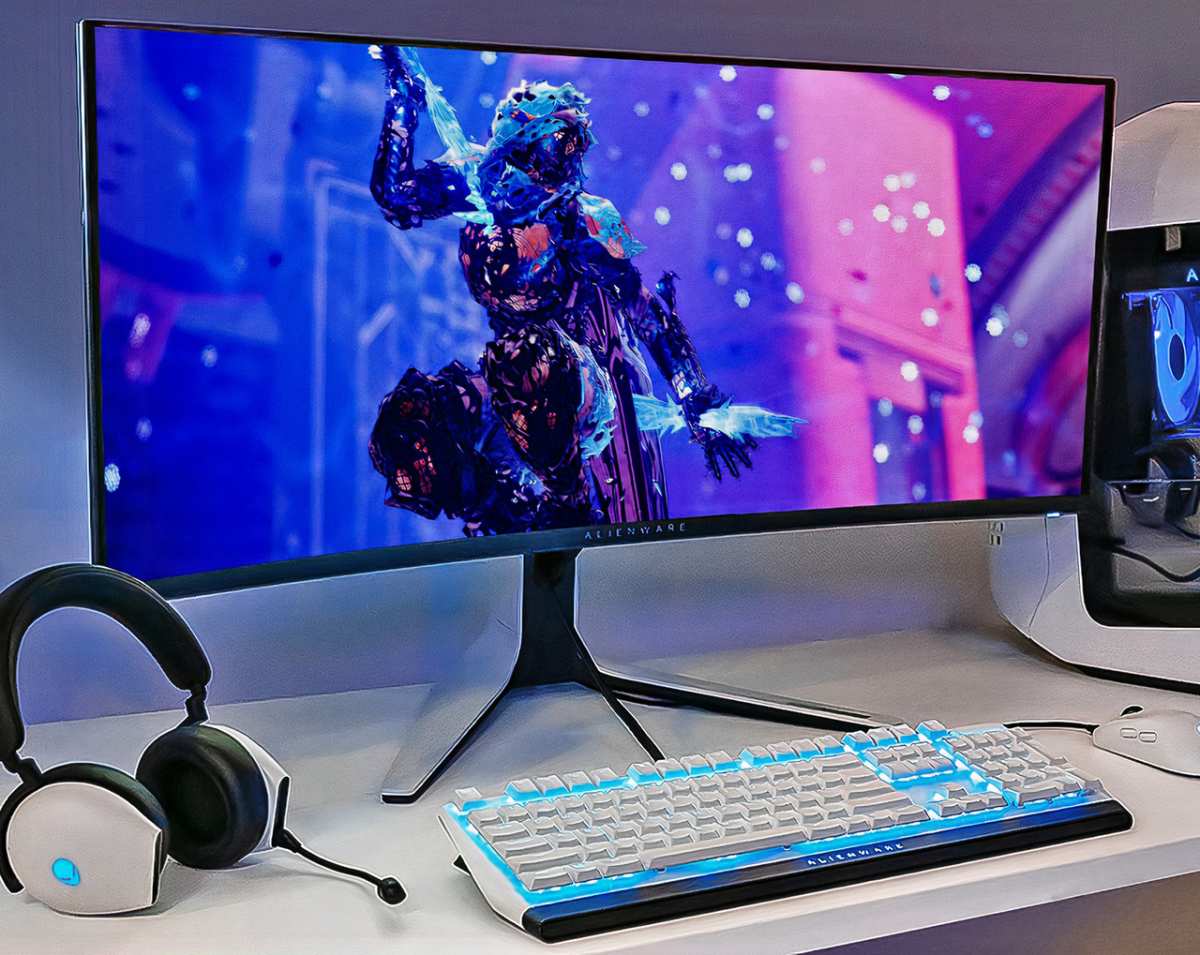
The result is a market that grew roughly 150% year-over-year in shipments between 2023 and 2024, with continued expansion through 2026. Almost every major monitor brand now offers at least one OLED model, and several have committed to OLED as their premium gaming and creative display tier.
OLED vs. IPS vs. Mini-LED: What Actually Matters for Your Use Case
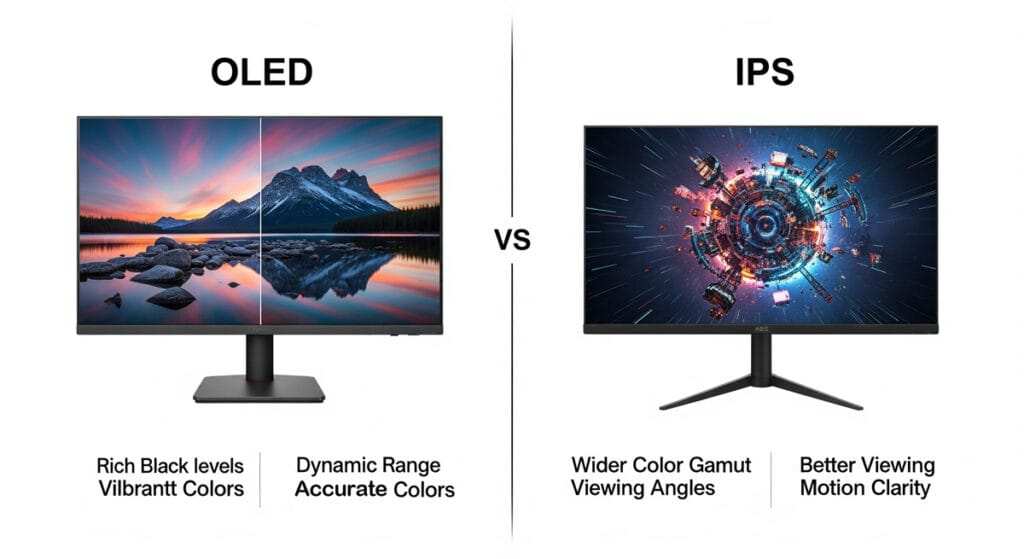
Understanding why OLED is trending means understanding what it does differently than the technologies it's replacing. Each panel type makes different trade-offs, and the right choice depends entirely on what you actually do with your monitor.
OLED (QD-OLED and WOLED)
OLED pixels emit their own light and can turn off completely, producing true black and effectively infinite contrast. Response times sit around 0.03ms GtG, which is roughly 10 to 30 times faster than the best IPS panels. Color gamut coverage typically hits 98 to 99% DCI-Pixel on QD-OLED, with excellent out-of-box accuracy on most models.
The trade-off is peak brightness limited by Automatic Brightness Limiting (ABL) technology. Full-screen white content usually tops out around 250 to 300 nits, though small HDR highlights can push past 1,000 nits. Burn-in risk exists but has been mitigated through pixel-shift algorithms, panel refinements, and improved warranty coverage from most major brands.
IPS (In-Plane Switching)
IPS panels remain the workhorse of the monitor market. They offer solid color accuracy, wide viewing angles, and sustained brightness of 350 to 600 nits without ABL limitations. Modern nano-IPS and Fast IPS panels have improved response times to around 1ms GtG, though real-world performance still lags behind OLED in motion clarity.
The weakness is contrast. Even the best IPS panels deliver around 1,000:1 to 1,300:1, which means blacks look grayish in dark rooms. IPS glow and backlight bleed are common, especially on cheaper models.
For bright office environments and general productivity, IPS still makes a lot of sense.
Mini-LED (FALD Backlight)
Mini-LED uses thousands of small LED zones behind an LCD panel to improve contrast through local dimming. High-end models with 500+ zones can approach OLED-like black levels in many scenes, and sustained brightness often exceeds 600 nits full-screen. This makes Mini-LED strong for HDR content creation in bright rooms.
The problem is blooming. Light from bright objects bleeds into adjacent dark zones, creating visible halos. Response time is still limited by the LCD layer, so motion clarity doesn't match OLED.
Panel cost has also remained stubbornly high at the zone counts needed for truly competitive contrast performance.
Quick Comparison Table
| Feature | OLED | IPS | Mini-LED |
|---|---|---|---|
| Contrast Ratio | ~1,500,000:1 | 1,000:1 to 1,300:1 | 20,000:1 to 100,000:1 |
| Response Time (GtG) | ~0.03ms | 1 to 4ms | 2 to 6ms |
| Full-Screen Brightness | 250 to 300 nits | 350 to 600 nits | 500 to 1,000+ nits |
| HDR Highlight Brightness | 1,000+ nits | 400 to 600 nits | 1,000 to 2,000+ nits |
| Color Gamut (DCI-P3) | 98 to 99% | 95 to 98% | 95 to 99% |
| Burn-In Risk | Low to moderate | None | None |
| Price Range (27") | $600 to $1,000 | $200 to $600 | $500 to $1,200 |
| Best For | Gaming, HDR, creative | Office, general use | Bright-room HDR |
QD-OLED vs WOLED: They're Not the Same Thing
When people talk about OLED monitors, they're actually referring to two distinct panel technologies that behave quite differently in practice. Knowing the difference matters because it directly affects which monitor you should buy.
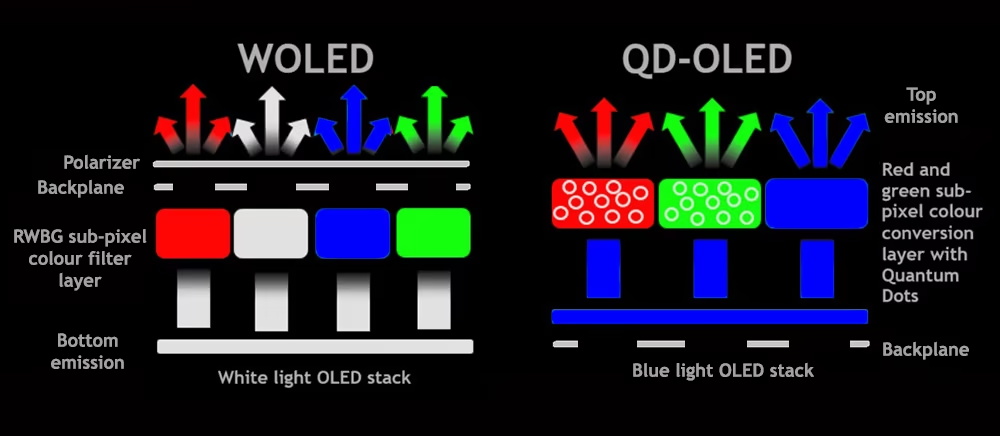
QD-OLED comes from Samsung Display and uses a blue OLED emitter shining through quantum dot color converters to produce red and green. This approach delivers exceptional color volume and saturation, with some models covering over 140% of the sRGB gamut and hitting nearly 100% of the BT.2020 color space. Peak brightness on small highlights tends to be higher than WOLED, and the color performance is genuinely impressive for HDR gaming and creative work.
The downside is text clarity. QD-OLED uses a triangular subpixel layout that doesn't align with how Windows and macOS render text. Most users notice some degree of text fringing, especially at lower PPI or when reading small fonts.
Windows ClearType helps but doesn't fully resolve it. If you spend eight hours a day reading code or editing documents, this can be genuinely annoying.
WOLED comes from LG Display and uses a white OLED emitter with a traditional RGBW subpixel structure. The text rendering is noticeably sharper and more natural because the subpixel layout aligns better with standard font rendering. WOLED panels also tend to handle near-black gradients more cleanly, with less visible chrominance overshoot in dark scenes.
Where WOLED falls behind is color volume. It covers DCI-P3 well but doesn't push into the extended color spaces that QD-OLED achieves. Peak brightness on HDR highlights is also slightly lower.
For pure gaming and media consumption, most people prefer QD-OLED. For mixed use with significant text work, WOLED often wins.
Both technologies have improved rapidly. Second and third-generation QD-OLED panels have addressed some early text clarity concerns through subpixel refinements, and newer WOLED panels have pushed brightness higher. The gap is narrowing, but the fundamental trade-offs remain real as of 2026.
Who Should Actually Buy an OLED Monitor in 2025
Not everyone needs OLED, and honestly, not everyone will benefit enough to justify the premium. Here's a realistic breakdown of who gets the most value.
Competitive and Immersive Gamers
This is the sweet spot. If you play fast-paced shooters, racing games, or anything where motion clarity matters, OLED is a genuine upgrade you'll notice immediately. The combination of near-zero response time and high refresh rates (240Hz and 360Hz OLED panels are available) means moving objects stay sharp with no smearing.
HDR in single-player games looks dramatically better than on any IPS panel.
Color-Critical Creatives (Video, Photo, 3D)
If you edit video for delivery in HDR or work in wide color gamut spaces like DCI-P3 or Adobe RGB, OLED gives you per-pixel accuracy for evaluating shadows and highlights that FALD Mini-LED can't match without blooming. Factory calibration on most OLED monitors hits Delta E below 2, and the true-black reference makes shadow detail evaluation more reliable.
The caveat is sustained brightness. If you work in a bright studio and need to evaluate full-screen white content at high luminance, a Mini-LED with 600+ nits sustained might serve you better.
General Productivity and Office Users
This is where I'd pump the brakes. If your day is mostly spreadsheets, email, web browsing, and documents, an IPS monitor at the same price point will give you better text clarity, higher sustained brightness in lit rooms, and zero burn-in concerns. The visual advantages of OLED are minimal for static desktop use, and the text fringing on QD-OLED can be a real annoyance for heavy reading.
Home Theater and Couch Setups
If you're using a monitor from a couch or bed for gaming and media consumption, OLED is fantastic. The viewing angles are essentially perfect, the contrast looks incredible in dim environments, and the thin panel profile works well in casual setups. A 34-inch or 45-inch curved OLED ultrawide is an excellent living room display.
The Burn-In Question: Is It Still a Real Problem?
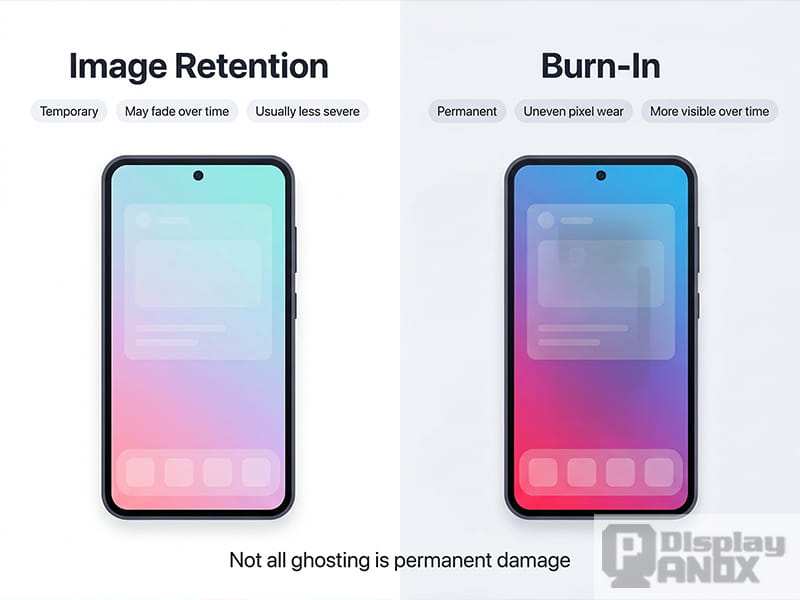
Yes, burn-in remains a real phenomenon, but the actual risk in 2026 is far lower than most people assume. Burn-in happens when organic material in pixels degrades unevenly from displaying static content for extended periods. This creates a ghost image that stays visible even when the content changes.
Modern OLED monitors have multiple layers of protection. Pixel-shift technology constantly moves the image by a few pixels so no single pixel stays static. Automatic Brightness Limiters reduce power to areas displaying static content.
Compensation cycles run automatically every four hours and perform a full panel refresh monthly. These measures have proven effective enough that most users will never encounter burn-in under normal use.
Warranty coverage has also improved significantly. Dell and Alienware cover burn-in on their OLED monitors for three years. ASUS and MSI offer similar coverage on select models.
This is a major shift from earlier years when most warranties explicitly excluded image retention. Panel manufacturers have reported that modern OLED materials last significantly longer than earlier generations, with some estimates exceeding 60,000 hours to noticeable degradation.
The realistic risk profile looks like this. If you use your monitor for normal gaming, browsing, and creative work with varied content, burn-in is unlikely to be a problem within the usable lifespan of the display. If you leave a static taskbar, channel logo, or HUD element on screen 16 hours a day for years, you may eventually see retention.
The threat is real, but manageable with basic habits.
What OLED Monitors Still Can't Do Well
Every display technology has compromises. Here are the practical limitations that matter.
Sustained brightness is limited. ABL kicks in because pushing full-screen white at high brightness would accelerate pixel degradation and exceed thermal limits. Watching bright content in a sunny room can feel underwhelming compared to a 500-nit IPS or Mini-LED. For dark and dim environments, this is irrelevant.
For a desk next to a south-facing window, it matters.
Text clarity varies by panel type. QD-OLED's triangular subpixel layout can produce color fringing on small text, especially in applications without subpixel rendering support. WOLED handles text better but still isn't quite as razor-sharp as a high-PPI IPS for reading dense documents. Most users adapt within a week or two, but it's noticeable initially.
Fill rate limitations mean HDR requires careful implementation. VESA's DisplayHDR True Black certification requires specific luminance and color volume thresholds. Not every OLED monitor meets the highest tiers, and some implementations of local dimming and tone mapping can crush shadow detail or clip highlights. HDR quality is generally excellent, but it's not automatic.
Panel degradation is inherent to organic materials. OLED pixels dim gradually over time. Blue subpixels degrade faster than red or green, which can cause subtle color shifts after years of heavy use. This is factored into the compensation algorithms, but it means your monitor's color accuracy may drift more over five years than an IPS panel would.
Pricing for OLED remains higher than equivalent IPS options. The premium has shrunk, but budget-focused buyers won't find OLED monitors competing at the $200 to $300 price point as of 2026. For buyers who prioritize value per dollar, IPS still wins.
Pricing, Specs, and What You Get at Each Tier
OLED monitor pricing has compressed significantly, but the range is still wide. Here's a practical breakdown of what to expect.
Entry-level QD-OLED (27", 1440p, 144Hz to 175Hz): $550 to $750. These panels deliver the core OLED experience with excellent contrast and response times. Peak brightness is limited to around 250 nits sustained, with HDR highlights near 600 to 800 nits.
Good for gaming and media consumption in controlled lighting. Most models are factory-calibrated with Delta E below 2.
Mid-range QD-OLED (27" to 32", 1440p to 4K, 240Hz): $750 to $1,000. Better HDR performance with peak brightness above 1,000 nits on highlights. Higher refresh rates and improved color volume.
Build quality tends to be better, and burn-in warranties are common. The sweet spot for most enthusiasts.
High-end QD-OLED (32" 4K, 240Hz, or ultrawide): $950 to $1,300. Top-tier performance with the best HDR implementation, highest brightness, and most accurate calibration. Usually incorporates improved cooling and updated panel revisions.
Best choice for professionals who want HDR reference capability.
Large-format OLED (34" to 49" ultrawide, 240Hz): $900 to $1,500+. These models replace dual-monitor setups and deliver immersive gaming and productivity experiences. The 34-inch 3440×1440 options sit at lower price points, while 38-inch and 45-inch 4K panels command premiums.
The curved form factor is standard at these sizes.
Price drops of roughly 30 to 40 percent between early adopter models and the current generation suggest continued affordability improvements through 2026. Competitive pressure from Chinese panel makers like BOE and CSOT is accelerating this trend. Analyst projections indicate OLED could approach IPS pricing parity in the mainstream 27-inch category within another product cycle.
Common Mistakes People Make When Buying an OLED Monitor
Buying an OLED monitor isn't complicated, but several common mistakes waste money or lead to disappointment.
Ignoring room lighting. If your desk sits in direct sunlight or under bright overhead lights, ABL-limited brightness becomes a real frustration. OLED excels in dim or dark environments. Buying one for a brightly lit office without considering this leads to regret.
Assuming all OLED is the same. QD-OLED and WOLED have different text rendering characteristics, color volume, and near-black performance. Choosing without understanding these differences means you might end up with a panel that doesn't suit your primary use case. Research the specific panel type, not just the marketing label.
Not checking burn-in warranty terms. Coverage varies. Some brands cover burn-in for three years, others exclude it entirely. Always verify before purchasing.
A beautiful display with no protection against the technology's main weakness is a risky investment.
Overpaying for specs you won't use. A 360Hz QD-OLED is wasted if you play strategy games at 60fps. A 4K panel adds GPU cost without visible benefit at typical desk viewing distances below 30 inches. Match the resolution and refresh rate to your actual use case and hardware capability.
Using default settings without calibration. Most OLED monitors ship with vivid or preset modes that overspend on saturation. Switching to an sRGB or DCI-P3 clamped mode and running a basic calibration with an affordable colorimeter dramatically improves accuracy.
How to Set Up and Maintain Your OLED Monitor for Longevity
Proper setup and a few habits extend panel life and improve your daily experience.
Enable automatic pixel refresh. This runs every four hours and takes a few minutes. Don't interrupt it. Also run a full manual compensation cycle once a month through the monitor's OSD menu.
This takes about an hour.
Hide your taskbar and use dark mode. Static UI elements are the primary burn-in risk. Auto-hiding the taskbar, using dark mode in applications, and setting your desktop wallpaper to a rotating slideshow eliminates the highest-risk static content.
Set screen timeout to 5 to 10 minutes. Leaving a static image on screen while you step away doesn't help. A short timeout ensures the display sleeps during brief absences.
Keep the room cool. Heat accelerates organic degradation. Ensure the monitor has adequate ventilation, and avoid placing it near heat sources like radiators or direct sunlight on the panel surface.
Use a high-quality cable. HDMI 2.1 or DisplayPort 1.4 with DSC ensures you're getting full bandwidth. Cheap cables can cause handshake issues, color compression, or limited refresh rates, which often get blamed on the panel.
Update firmware periodically. Manufacturers release updates that improve HDR tone mapping, fix ABL behavior, and refine compensation algorithms. Check the support page for your model every few months.
Real Talk: My Honest Recommendation Based on What You Need
After looking at the specs, the trade-offs, and the current market, here's what I'd actually tell someone asking whether to buy one.
If you game regularly and sit in a room with controlled lighting, get an OLED monitor. The visual upgrade over IPS is immediately apparent and genuinely meaningful. A 27-inch QD-OLED at 1440p and 240Hz is the best all-around choice for most people.
If you do color-critical creative work and need HDR reference, get an OLED. Your wallet will feel it, but nothing else matches the per-pixel accuracy for shadow and highlight evaluation.
If you work in a sunny office and do mostly productivity tasks, get a good IPS instead. You'll save money, avoid any burn-in concerns, and get better sustained brightness for your environment.
If you want a massive ultrawide to replace dual monitors, get an OLED ultrawide. The immersion factor is unmatched, and modern panels have largely resolved early text clarity issues for typical productivity workflows.
The technology has crossed the threshold from early adopter gamble to mainstream recommendation for the right users. Monitor-shipment data from industry analysts shows OLED penetration growing rapidly across all price segments, and prices are still falling. If you've been curious but hesitant, the best time to buy is now.
Frequently Asked Questions
Do OLED monitors still get burn-in in 2026?
Burn-in risk exists but modern monitors manage it well through pixel shift, automatic brightness limiting, and compensation cycles. Manufacturers like Dell and ASUS now cover burn-in under standard three-year warranties. Under normal gaming and creative use, most users won't experience it within the display's functional lifespan.
Is QD-OLED better than WOLED for general use?
Not categorically. QD-OLED delivers higher color volume and brighter HDR highlights, making it ideal for gaming and media. WOLED produces sharper text rendering and cleaner near-black gradients, which suits mixed productivity use better.
Your primary workflow should determine which you choose.
How long do OLED monitors typically last?
Modern OLED panels retain usable brightness and color accuracy for 30,000 to 60,000 hours of use. That translates to roughly eight to fifteen years of heavy daily use before noticeable degradation appears. Compensation algorithms help maintain performance over time.
Can I use an OLED monitor in a bright room?
You can, but ABL limits sustained full-screen brightness to around 250 to 300 nits. In direct sunlight or under strong overhead lighting, this can feel insufficient. IPS or Mini-LED monitors perform better in bright environments.
OLED excels in dim or dark rooms.
Are OLED monitors good for text and office work?
They work fine for office tasks but text clarity isn't as sharp as IPS, especially on QD-OLED panels with non-standard subpixel layouts. Users who read small fonts or spend hours in text-heavy applications may notice slight color fringing. Windows ClearType helps but doesn't completely eliminate it.
What's the best size and resolution for an OLED gaming monitor?
27 inches at 1440p hits the sweet spot for pixel density and desk viewing distance. It's sharp enough for text and detailed enough for gaming without requiring a top-tier GPU. 32-inch 4K works if you prefer larger displays but needs a powerful graphics card for high frame rates.

Similar Posts





















