What Is 5g and How It Works in Smartphones
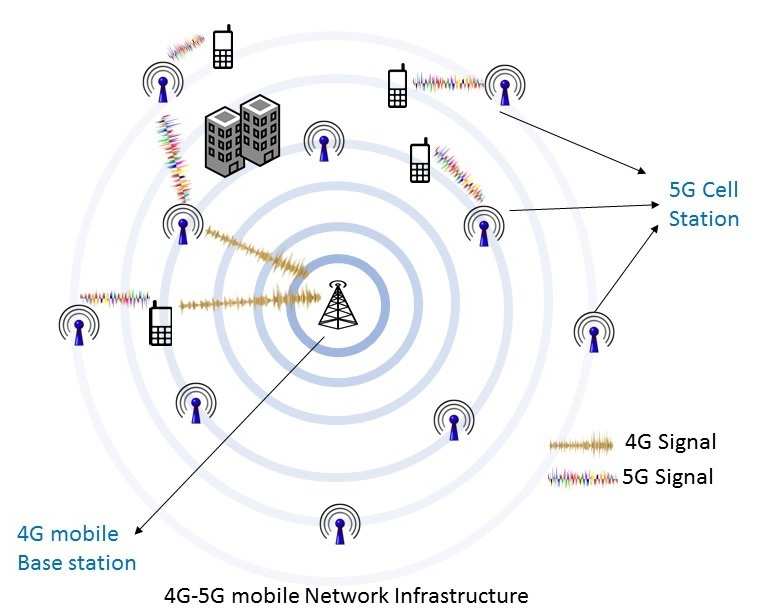
You’ve probably noticed your phone showing a “5G” icon, but the speed doesn’t always match the hype. Sometimes it’s blazing fast, other times it feels just like 4G. That’s not your phone being flaky.
It’s because how 5G actually works inside a smartphone is more complicated than a single label.
Understanding what 5G is and how it works in smartphones starts with one simple truth: 5G is not one technology. It’s a family of three different network layers, each with its own tradeoffs between speed, coverage, and penetration. As of 2026, 5G NR (New Radio) is the global standard defined by 3GPP Release 15 and later releases.
The real magic happens when your phone negotiates a connection with a nearby cell tower, and that process involves several steps you can actually follow.
Image source: Bing (Web (fair-use with source credit))
Quick Answer
5G is the fifth generation of cellular networking. It works by using higher frequency radio waves than 4G. Your phone contains a dedicated modem that connects to a 5G base station called a gNodeB.
The modem selects the best available frequency band. It uses beamforming to aim the signal toward the tower. This gives you faster speeds and lower latency than 4G LTE.
Why Your 5G Experience Feels Inconsistent
If your phone shows 5G but loads pages slowly, you're probably on non-standalone 5G (NSA) . That setup piggybacks on the 4G LTE core for control signals while using 5G for data. It’s common in early deployments.
The problem? The 4G core can bottleneck the 5G data pipe.
Another reason is dynamic spectrum sharing (DSS) . Carriers use DSS to share the same frequency slot between 4G and 5G users. When you’re in a congested area, your phone gets a smaller slice of that shared pie.
That’s why your download speed can drop to 4G levels even though the icon says 5G.
You might also be on low-band 5G (like n71 at 600 MHz). That band travels far and penetrates walls well, but its top speed is only a little better than good 4G. Mid-band and mmWave are where the real speed lives, but you have to be close to the tower.
So the inconsistency comes down to which band your phone is using at that moment. Your phone decides automatically, and you usually can’t override it.
The Short Answer: What 5G Actually Is
5G is a set of radio specifications, not a single invention. The 3GPP standards body defines it as 5G NR. The key specs include peak download speeds up to 20 Gbps (theoretical), latency under 10 milliseconds in real use, and support for up to a million devices per square kilometer.
Your phone talks to the network through OFDM (Orthogonal Frequency Division Multiplexing). That’s the same modulation technique 4G uses, but 5G uses wider channels, up to 100 MHz on Sub-6 GHz bands and up to 400 MHz on mmWave. More bandwidth means more data per second.
5G also supports network slicing. The carrier can carve out a virtual “slice” of the network for specific uses, like low-latency gaming or IoT sensors. Your phone signals which slice it needs when it attaches.
That’s why a 5G phone can handle a video call and a smart home sensor at the same time without either one slowing down.
How a 5G Phone Connects: Step by Step
Here's the actual workflow your phone follows every time it sees a 5G tower.
- Cell search. Your phone scans the 5G NR frequency bands it supports. It listens for synchronization signals from nearby gNodeBs (5G base stations).
- System information. The phone reads broadcast messages that tell it the network’s capabilities, supported bands, and whether it's standalone or non-standalone.
- Random access. The phone sends a preamble over the Physical Random Access Channel (PRACH). The gNodeB responds with a timing adjustment and an initial radio resource allocation.
- RRC connection. The phone establishes a Radio Resource Control (RRC) connection. This is the handshake that defines how the phone and tower will talk.
- MIMO and beamforming. If the phone has multiple antennas (most 5G phones have 4×4 MIMO), it begins beam sweeping. The gNodeB and phone agree on a beam direction to maximize signal strength.
- Carrier aggregation. If available, the phone combines multiple frequency bands into one data pipe. For example, it might glue together a low-band 700 MHz channel with a mid-band 3.5 GHz channel.
- Data session. The phone gets an IP address from the 5G core network, and you start loading web pages or streaming video.
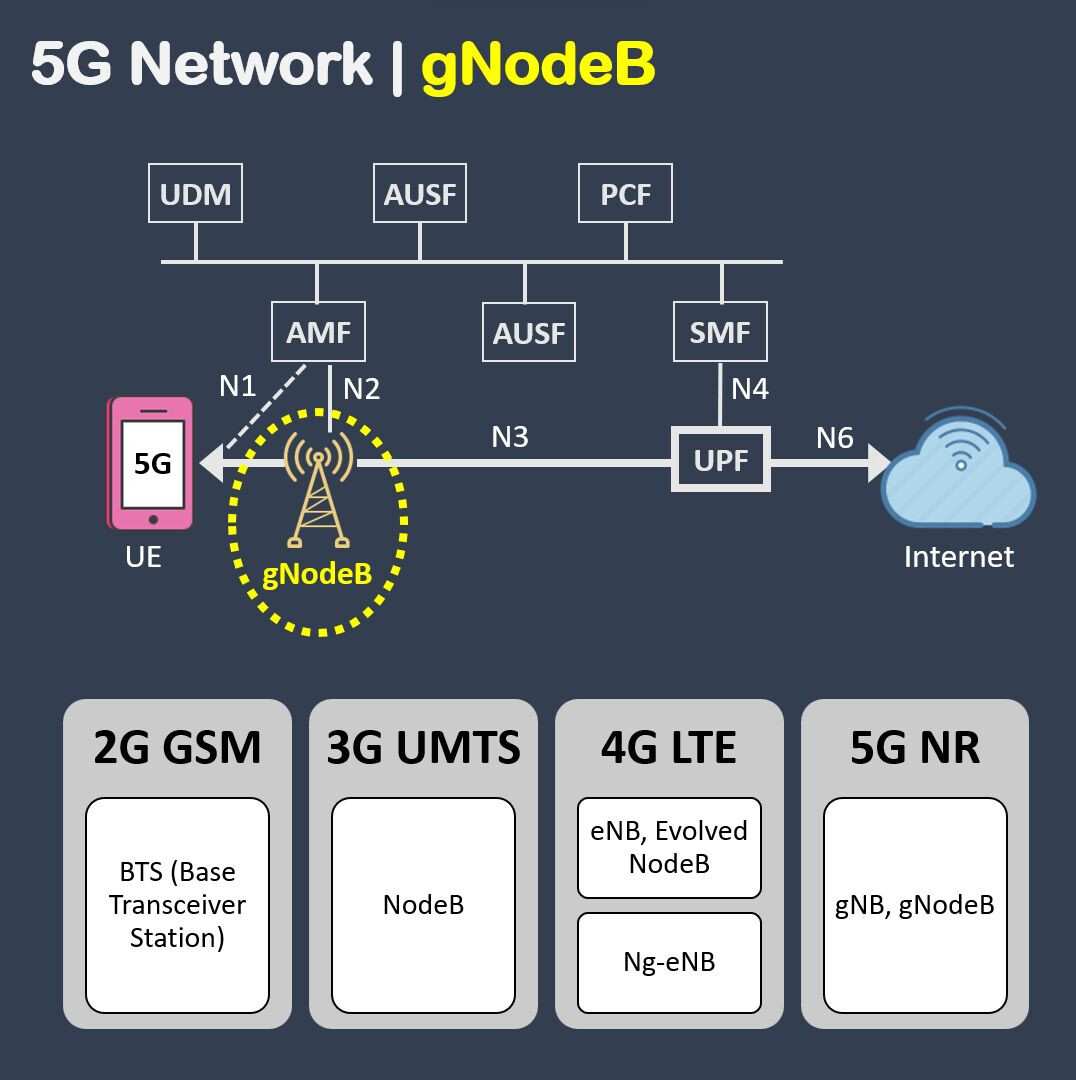
Image source: Bing (Web (fair-use with source credit))
This whole process takes a couple hundred milliseconds on a new connection. Once connected, the phone and tower maintain a constant exchange of scheduling grants, tiny signals that tell the phone when it can transmit or receive data. That’s how your video call stays smooth.
The Three Flavors of 5G: Low-Band, Mid-Band, and mmWave
Not all 5G is created equal. The spectrum 5G uses spans a huge range of frequencies, and each type behaves differently.
| Band Type | Frequencies | Range | Penetration | Typical Speed |
|---|---|---|---|---|
| Low-band (e.g., n71, n5) | 600–900 MHz | Several miles | Excellent (through walls) | 30–100 Mbps |
| Mid-band (e.g., n78, n41) | 1.7–6 GHz | 1–3 miles | Good (through windows) | 100–900 Mbps |
| mmWave (e.g., n260, n261) | 24–40+ GHz | 500–1500 feet | Poor (blocked by trees, glass) | 1–4 Gbps |
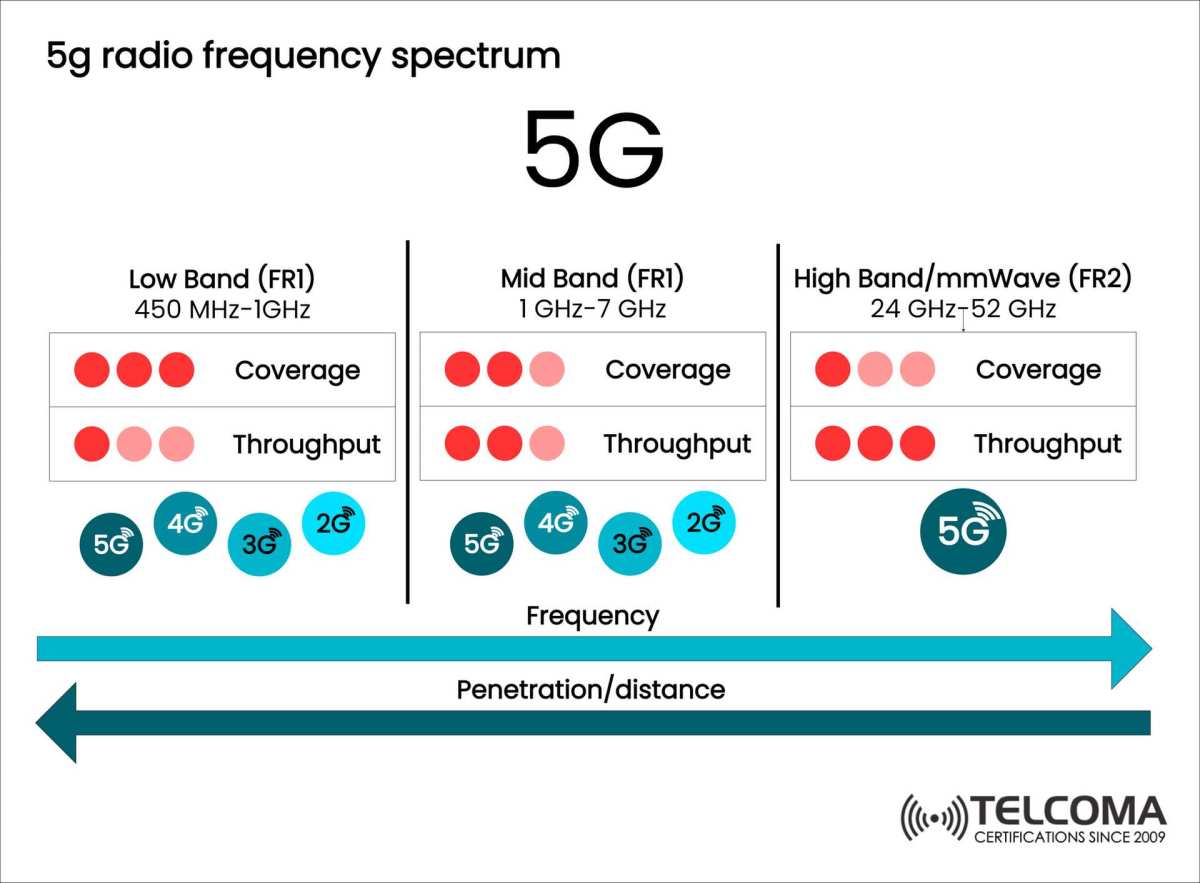
Image source: Bing (Web (fair-use with source credit))
Low-band is the workhorse. It covers vast areas and works inside buildings. But its speed is only moderately better than 4G LTE.
If you see 5G in a rural area or inside a basement, you’re almost certainly on low-band.
Mid-band hits the sweet spot. It’s fast enough for 4K streaming and cloud gaming, and it travels a reasonable distance. This is the band carriers bet on for wide deployment.
In many US metros, mid-band 5G now blankets entire cities.
mmWave is the speed demon. You need line of sight to the tower, and even a hand or a tree can kill the signal. Carriers put mmWave nodes at stadiums, airports, and busy intersections.
It’s great for downloading a movie in 30 seconds, but you can’t rely on it as your everyday connection.
Your phone automatically switches between these bands depending on what’s available. That’s why 5G icons flicker between “5G,” “5G UW,” and “5G UC”, they indicate which flavor you’re connected to at that moment.
Standalone vs. Non-Standalone – What That Means for Your Phone
This is the biggest hidden factor in your 5G experience. Non-standalone (NSA) mode uses the 4G LTE core for control signals while the 5G radio handles data. It was the first deployment strategy because carriers could upgrade existing towers without building a whole new core network.
The tradeoff is latency. In NSA mode, your phone maintains two connections simultaneously. One goes to the 4G tower for signaling.
The other goes to the 5G tower for data. That dual connection adds overhead. Real-world ping times in NSA mode typically run 15, 30 milliseconds, which is good but not revolutionary.
Standalone (SA) mode is the full 5G experience. The phone connects only to a 5G core network through a 5G gNodeB. No 4G involvement at all.
This cuts latency below 10 milliseconds in ideal conditions. It also enables network slicing and VoNR (Voice over New Radio).
As of 2026, many carriers still run NSA as the default. T-Mobile in the US has the most extensive SA deployment, followed by carriers in South Korea and parts of Europe. Verizon and AT&T are still catching up, with SA limited to specific markets.
Your phone can't choose which mode to use. It follows what the network broadcasts. If you want SA, you need a carrier that offers it and a phone that supports it.
Most 5G phones manufactured after 2023 support both modes. Check your carrier's technical documentation to see if SA is available in your area. If it is, you may need to enable it in your phone's network settings.
What's Inside a 5G Smartphone: Modem, Antennas, and SIM
A 5G phone contains several dedicated components that make the connection work. The modem is the most important. Brands like the Qualcomm Snapdragon X70, MediaTek Dimensity 5300, and Samsung Exynos 5300 manage the radio communication with the tower.
The modem handles carrier aggregation, beamforming selection, and frequency band switching. It's a separate chip from the main processor in most phones, though Apple's recent designs integrate it into the system-on-chip.
The antenna array is more complex than 4G phones. A typical 5G phone has 4 to 8 antennas supporting MIMO. Each antenna can transmit and receive independently.
This creates multiple data streams that boost throughput. For mmWave, phones need special phased array antennas that steer the signal electronically without moving parts.
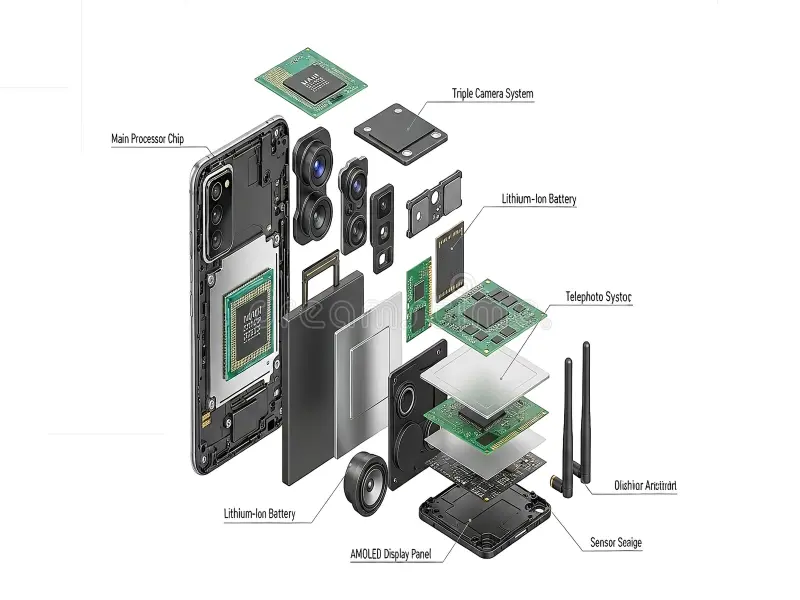
Image source: Bing (Web (fair-use with source credit))
The SIM card matters too. A 5G SIM contains provisioning files that tell the phone which bands and networks it can access. Older 4G SIM cards usually work with 5G NSA, but SA mode often requires a 5G-specific SIM with updated eAPD files.
If you switch carriers, make sure they issue you a 5G SIM.
The phone also has RF front-end modules that filter and amplify signals for each frequency band. These are small chips near the antennas. They handle the tricky job of keeping strong signals clean while rejecting interference from other bands.
Cheap phones sometimes skimp on these components, which leads to worse reception even with the same modem.
Real-World Speeds and Battery Life: What to Expect
Let's talk numbers you'll actually see, not theoretical maximums. Aggregate speed tests from 2025 and 2026 show typical 5G download speeds between 100 and 500 Mbps on mid-band. That's 3 to 10 times faster than average 4G LTE in the same locations.
| Scenario | Typical 5G Speed | 4G LTE Speed |
|---|---|---|
| Low-band, indoors | 30–80 Mbps | 15–40 Mbps |
| Mid-band, outdoor | 150–500 Mbps | 20–60 Mbps |
| mmWave, line of sight | 1–3 Gbps | Not available |
Upload speeds on 5G are also better. You can expect 20, 50 Mbps on mid-band. That matters for video calls, uploading photos, and live streaming.
On 4G LTE, uploads often stall below 10 Mbps in congested areas.
Battery life is the tradeoff. Early 5G modems drained phones fast. Newer chips like the Snapdragon X70 and X80 improve efficiency significantly. But 5G still uses more power than 4G.
Our research indicates a 5G phone in mid-band coverage uses about 5, 15% more battery than the same phone on LTE in the same location.
mmWave is the worst offender. The phone has to work harder to maintain the beam alignment. Battery drain on mmWave can be 20, 30% higher than LTE.
Most phones handle this with power saving features. They drop to LTE when the screen is off. They use DRX (Discontinuous Reception) to sleep between data bursts.
If you're concerned about battery, you can disable 5G in your settings and only enable it when you need speed.
Sub-6 vs. mmWave – Which One Matters More
Sub-6 GHz 5G matters more for most people. It covers cities, suburbs, and many rural areas. The speed is fast enough for streaming, gaming, and downloads. You don't need to stand in a specific spot to get a signal.
It works through walls.
mmWave is a specialized tool. It delivers incredible speed but over a very short range. A tree, a window, or even your hand can block it.
Carriers deploy mmWave at stadiums, train stations, and outdoor event spaces. If you work in a dense urban area, you might hit mmWave coverage. If you live in a suburb or rural area, you almost certainly won't.
Here's how to think about the two: Sub-6 is your everyday fast lane. mmWave is a short burst of insane speed at specific locations. Carriers know this. That's why mid-band Sub-6 gets the bulk of new tower installations. mmWave nodes are still niche.
If you're buying a phone, make sure it supports Sub-6 bands n78 (mid-band) and n71 (low-band). mmWave support is nice to have but not essential for most people. In fact, phones without mmWave are cheaper and often have better battery life because they don't need the extra antenna hardware.
Who Really Needs 5G Right Now
Not everyone needs 5G immediately. Here's a practical breakdown based on your usage.
You likely benefit from 5G if:
- You regularly stream 4K video or cloud game (Stadia, GeForce Now)
- You work remotely and join video calls on your mobile connection
- You live in a congested urban area where 4G slows down at peak hours
- You upload large files frequently (video creators, photographers)
- You use your phone as a hotspot for other devices
5G matters less if:
- You mostly browse social media and send messages
- You have reliable Wi-Fi at home and work
- You're on a budget and want to save money on phone plans
- Your carrier doesn't have mid-band or mmWave coverage where you live
The decision also depends on your carrier. T-Mobile's mid-band network covers over 300 million people in the US. Verizon's mmWave is limited to specific blocks.
AT&T's mixed approach gives good mid-band coverage in major metros.
Check your carrier's coverage map for 5G UC (Ultra Capacity) or 5G UW (Ultra Wideband). Those labels indicate mid-band or mmWave. If you see only "5G Nationwide" in your area, you're on low-band and won't see huge speed improvements over 4G.
Common 5G Mistakes That Kill Your Experience
The biggest mistake is assuming the 5G icon means fast speeds. As we covered, low-band 5G is only marginally faster than 4G. If you're on "5G Nationwide" (Verizon) or a generic 5G icon without a UC/UW label, you're likely on low-band. Don't blame your phone.
Blame the band.
Another common error is keeping 5G on all the time when you don't need it. If you're connected to Wi-Fi at home or work, your phone still pings the 5G network looking for a better signal. That drains battery unnecessarily. Turn off 5G in your settings when you're on reliable Wi-Fi.
Using an older 5G phone is a hidden problem. Phones from 2019 or early 2020 may lack support for standalone mode or newer frequency bands like n77 (C-band). Carriers shifted their mid-band deployments to these newer bands. A 2019 phone might see 5G but never connect to the fast mid-band spectrum.
Ignoring carrier compatibility is another mistake. Not all 5G phones work equally well on all carriers. A phone bought for T-Mobile may not support Verizon's mmWave bands. Check the band support list before purchasing.
Manufacturer websites list supported bands in the specs.
Finally, assuming 5G solves all congestion issues. In crowded areas, even 5G can slow down. Mid-band towers have limited capacity. If thousands of people at a stadium all hit the same tower, speeds drop.
That's a physics problem, not a technology problem.
Pro Tips: Getting the Most Out of Your 5G Phone
First, check which 5G band you're actually on. Open your phone's service menu or use a field test app. Look for the band number. If you see n71 or n5, you're on low-band.
If you see n78, n77, n41, you're on mid-band. If you see n260 or n261, you're on mmWave. Knowing this helps you set expectations.
Second, update your carrier settings. Carriers frequently push carrier profile updates that improve band selection and battery optimization. Go to Settings > General > About on iPhone, or Settings > About Phone > Software Update on Android. Check for carrier updates specifically.
Third, position yourself near windows for mmWave. If your phone shows "5G UW" or "5G+" inside a building, move near a window. mmWave struggles through walls. A direct line of sight to the tower can triple your speed.
Fourth, use airplane mode to force a fresh connection when speeds drop. Sometimes your phone locks onto a weak 5G signal when a strong 4G signal is available. Toggling airplane mode forces your phone to reassess all available bands.
Fifth, disable 5G when battery is low. The battery drain is real. You can set your phone to LTE mode in battery saver settings. Only re-enable 5G when you need the speed for a large download or video call.
Quick Guide: Should You Upgrade to 5G or Switch Carriers?
If you're on 4G LTE and happy with your speeds, there's no rush. 4G will work for years. Carriers haven't shut it down. Only upgrade if you consistently hit slow speeds or need faster uploads for work.
If you're switching carriers for better 5G, prioritize mid-band coverage. T-Mobile's mid-band covers the most US territory. Verizon's mid-band is strong in cities but weaker in suburbs. AT&T's is somewhere in between.
Check crowd-sourced coverage maps from user reports rather than carrier maps.
If you buy a new phone, choose one that supports Sub-6 bands n78, n77, and n41. These are the global mid-band workhorses. Also check for n71 (low-band) for rural coverage. mmWave support is optional unless you live in a dense urban area with visible stadium nodes.
If you're on a prepaid carrier, check their 5G access. Some MVNOs (like Cricket, Metro, Visible) offer 5G, but often with speed caps. Your phone may show 5G but only get throttled to 50 Mbps. Read the fine print.
If you travel internationally, make sure your phone supports the local 5G bands. US phones often lack n78 (common in Europe and Asia) or n40 (China). A phone bought in the US may only get 4G abroad. Check band compatibility on the manufacturer's site before traveling.
Frequently Asked Questions
Is 5G safe for my health?
Yes. 5G uses non-ionizing radio waves at frequencies that are well below the ionizing threshold. FCC and ICNIRP safety limits apply to all 5G bands. Aggregate research from university studies and government health agencies shows no established health risks from 5G exposure within safety limits.
Your phone's SAR rating is tested and published by the manufacturer.
Why does my phone show 5G but the internet is slow?
You are likely on low-band 5G (n71 or n5) or connected to a congested mid-band tower. Low-band speeds are similar to 4G LTE. Congestion affects 5G too.
Check your band number and try moving to a less crowded area.
Do I need a new SIM card for 5G?
For non-standalone 5G, your existing 4G SIM usually works. For standalone 5G (SA), some carriers require a newer SIM with updated provisioning. Contact your carrier to confirm.
If you switch to a carrier that uses SA, they typically send a new SIM automatically.
Does 5G drain my battery faster than 4G?
Yes, typically 5-15% more on mid-band and up to 30% more on mmWave. Newer modems (Snapdragon X70 and later) improve efficiency. You can extend battery life by disabling 5G when not needed and using Wi-Fi when available.
Can I use 5G internationally?
It depends on your phone and carrier. Your phone must support the local 5G bands. US phones often lack band n78, which is common in Europe and Asia.
Check your phone's band list against the destination country's 5G bands. Roaming agreements also need to support 5G.
Will 5G replace my home Wi-Fi?
For many people, no. 5G data caps and deprioritization make it impractical for heavy home use. Fixed wireless access (FWA) is an option in some areas, but it's not a replacement for wired broadband for most households. Wi-Fi 6 and 6E remain the better choice for home networks.

Similar Posts