Skip to content

is waterproof sound box safe in rainstorm

·27 min read·by
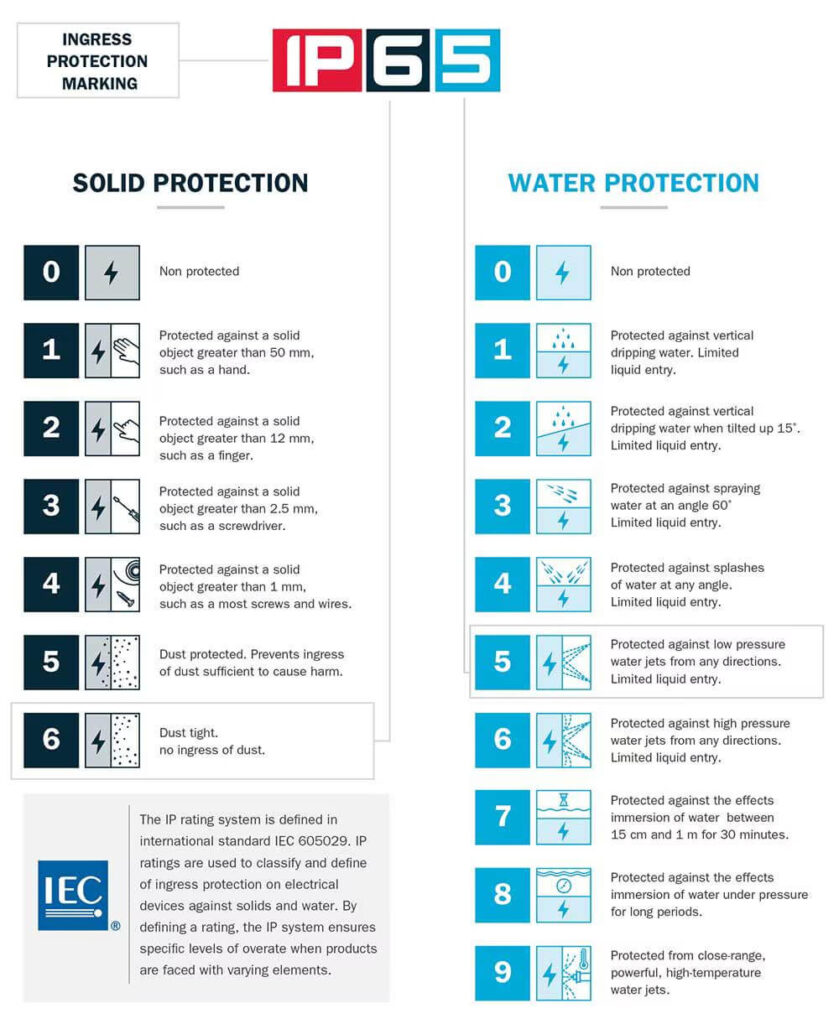
IP rating diagram waterproof speaker

You grab your waterproof speaker, head to the patio, and crank the tunes. The sky looks iffy, but hey, the box says "waterproof." Then the rain starts. Then the wind picks up.

Suddenly that rainstorm is hammering your speaker, and you're standing at the window wondering whether your gear is about to die a slow, sparky death. The question "is waterproof sound box safe in rainstorm" is way more complicated than most people realize.

Here's the uncomfortable truth, as of 2026: a speaker that survives a splash in the kitchen sink can fail catastrophically in a real storm. The IP67 and IP68 ratings you see on the box are tested under controlled conditions with static water pressure at a specific depth. Rainstorms involve wind-driven water, temperature swings, and debris.

Manufacturer specifications indicate these are very different threats. Let's walk through what actually happens when weather meets electronics.

Quick Answer

A waterproof sound box is not guaranteed safe in a rainstorm. It depends on the storm's intensity and your speaker's specific IP rating. Most IPX7 speakers survive light rain.

Heavy wind-driven rain can breach their seals. Never use any speaker in a thunderstorm with lightning nearby. When in doubt, bring it inside.

Why This Question Matters More Than You Think

The real risk isn't just a wet speaker — it's fire, shock, and a false sense of security

Most people assume "waterproof" is a binary state, like being pregnant. You either are or you aren't. In reality, waterproofing is a sliding scale with very real limits.

And those limits shift depending on conditions you probably never think about.

The first and most obvious danger: your speaker stops working. That stings, especially if you spent good money on it. But there are two bigger worries that don't get talked about enough.

Fire risk from a compromised battery. Lithium-ion batteries and water do not mix. When moisture gets inside a sealed battery compartment, it can trigger a short circuit. That short circuit generates heat.

Heat inside a lithium cell leads to thermal runaway. Thermal runaway means fire. It's rare, but it happens.

Aggregate reviews report instances of speakers smoking or catching fire after being submerged past their rated limits.

Electrical shock hazard. Most portable speakers run on low voltage, so the shock risk is minimal in normal conditions. But during a storm, water can create conductive paths to charging ports, exposed wiring, or damaged casing. If your speaker is plugged into a charger during a storm and water gets into the port, you've created a direct electrical hazard.

Never charge a wet speaker.

There's also the quieter danger of complacency. You leave the speaker out because it's "waterproof." The storm gets worse. By the time you realize things are going sideways, the seals have already been compromised.

You've lost a speaker and potentially created a battery fire risk inside your home when you bring it in.

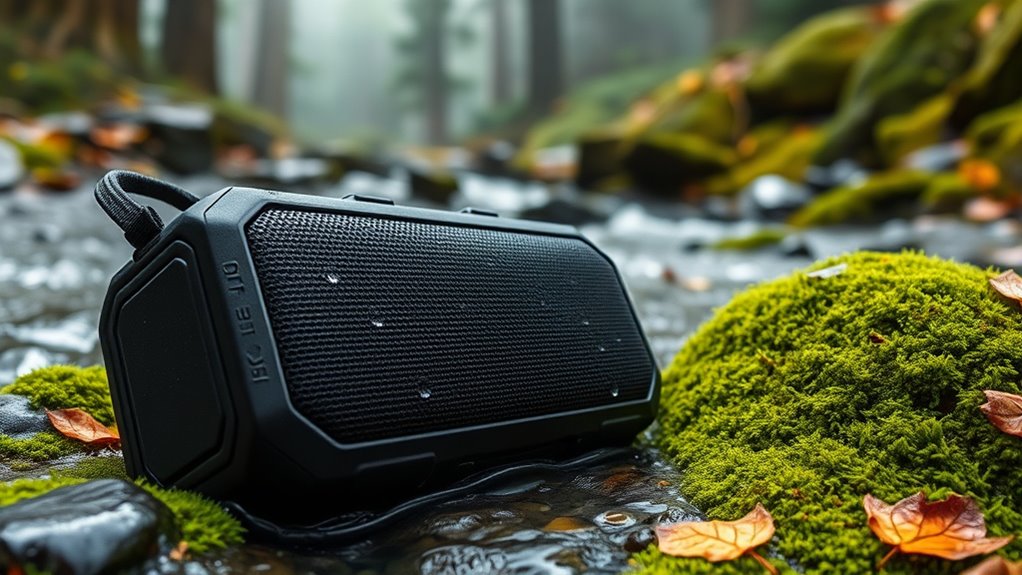
waterproof Bluetooth speaker rainstorm outdoor

Image source: Bing (Web (fair-use with source credit))

What "Waterproof" Actually Means (And What It Doesn't)

How IP ratings work in real weather, not just a lab tank

The Ingress Protection (IP) rating system is the closest thing we have to a universal language for water resistance. But it was designed for industrial equipment, not backyard parties during a monsoon. Understanding what those two digits actually tell you is the difference between a working speaker and a paperweight.

IP rating diagram waterproof speaker

Image source: Bing (Web (fair-use with source credit))

The first digit covers solid particles, dust, sand, dirt. The second digit covers liquids. For our purposes, the second digit is what matters.

Here's what each level actually guarantees:

IPX4: Splash-resistant from any direction. Fine for light drizzle. Not for rain you actually notice.

IPX5: Protected against low-pressure water jets from any direction. Think of a garden hose on a gentle setting. Light to moderate rain is okay for short periods.

IPX6: Protected against powerful water jets. Heavy rain is manageable, but sustained exposure still risks seal failure.

IPX7: Protected against immersion in one meter of water for up to 30 minutes. This is where most people get overconfident. That test is done with clean, still water at a stable temperature.

A rainstorm involves falling water hitting the speaker with impact force, then pooling around it unevenly while the temperature drops and the seals contract.

IPX8: Protected against continuous immersion beyond one meter. The exact depth and time are set by the manufacturer. This is the highest consumer grade available, but even IPX8 has limits.

A violent storm can exceed the pressure the seal was designed for.

The difference between surviving a splash and surviving a storm

Here's the part that trips people up. An IPX7 speaker passes its test by sitting motionless in a tank of water. There's no wind.

No debris. No temperature change. The water pressure against the seals is constant and predictable.

In a rainstorm, you get wind-driven water hitting the speaker at angles the seal wasn't designed for. The rubber gaskets contract as temperatures drop, creating microscopic gaps. Rainwater carries dirt and pollen that can wedge into those gaps.

And unlike the clean water in the test tank, storm water can be acidic or contain minerals that accelerate corrosion once they're inside.

A speaker rated IPX7 can absolutely survive a brief, gentle rain. Aggregate reviews confirm this. But that same speaker left out in a thunderstorm with driving rain and 40 mph winds?

The odds shift dramatically. Manufacturers are clear about this in their documentation, but nobody reads the manual until after something breaks.

The 5 Real Dangers No One Talks About

Lightning and metal speaker grilles

Let's start with the heavy one. If you're using an outdoor speaker during a thunderstorm, lightning is a legitimate concern. Portable speakers contain metal components, speaker grilles, driver magnets, heat sinks, internal wiring.

While the risk of a direct strike is low, speakers on patios, decks, or metal tables create paths for current to travel if lightning hits nearby.

The National Weather Service recommends avoiding anything that conducts electricity during a thunderstorm. That includes corded electronics, plumbing, and yes, metal-framed speakers. If you hear thunder within 30 seconds of seeing lightning, you're close enough that a strike could travel through the ground and into your equipment.

Bring the speaker inside and wait 30 minutes after the last thunderclap.

Water pressure from wind-driven rain

This is the one most people overlook. Water in a rainstorm isn't falling gently. In a strong storm, wind speeds hit 40 to 60 miles per hour.

At those speeds, raindrops hit with significantly more force than the static water pressure in an IP rating test.

That force can push water past seals that would hold up fine against still water. It can force moisture into charging ports even when the covers are closed. And it can create water hammer effects inside the speaker housing that push water deeper than simple submersion would.

The practical takeaway: a light rain with no wind is safe for most IPX6 and IPX7 speakers. Add wind, and that safety window shrinks fast.

Seal failure from heat and age

Rubber gaskets and silicone seals degrade over time. UV exposure from sunlight dries them out. Heat from sitting in a car or on a hot patio makes them brittle.

Cold temperatures cause them to contract. After a year or two of regular outdoor use, those seals are not as effective as the day you bought the speaker.

Most people never inspect their seals. They assume the IP rating printed on the box still applies. It doesn't.

That rating was valid for a brand new, factory-sealed unit. Yours has been through heat cycles, UV exposure, and maybe a few drops. Its real-world protection level is lower than what the sticker says.

Battery short circuits from moisture ingress

The battery compartment is usually the most sealed part of any portable speaker. That's by design. But when water does get in, it gets trapped.

Unlike the speaker grille, which can air dry, the battery compartment holds moisture against the battery terminals and circuit board.

A small amount of moisture can cause corrosion over time. A larger amount can create a direct short circuit. Lithium-ion batteries that short circuit can overheat, swell, and in rare cases, catch fire.

If your speaker gets soaked and the battery starts swelling, stop using it immediately. Do not charge it. Dispose of it properly.

Condensation trapping after rapid temperature drops

This one is subtle but common. You bring a warm speaker from inside your house into a cold rainstorm. The rapid temperature change causes condensation to form inside the housing.

That moisture never touched the outside of the speaker. It formed internally from the air trapped inside.

That internal condensation can pool on circuit boards and battery terminals, causing the same damage as external water ingress. It's why some speakers fail after a storm even though the seals were intact. The water was already inside before the first raindrop fell.

How to Read Your Speaker's IP Rating Like a Pro

IPX7 vs IP68 vs IPX6 — what those numbers really guarantee

Let's cut through the marketing noise. Here is what each common consumer rating actually means for real-world storm use:

RatingLab Test ConditionsReal Rainstorm Capability
IPX4Splashing water from any directionLight drizzle only
IPX5Low-pressure water jetsLight to moderate rain
IPX6Powerful water jetsModerate rain, brief exposure
IPX71 meter immersion, 30 minutesLight rain okay; wind-driven rain risky
IPX8Beyond 1 meter, manufacturer-definedBest option but not storm-proof
IP69KHigh-pressure hot water jetsOverkill for rain but highly durable

Notice anything? None of these ratings were designed to simulate a rainstorm. They test different threats.

The IPX6 test uses a powerful water jet aimed at the device from a specific distance. That's actually closer to what wind-driven rain feels like than the IPX7 immersion test. For storm use, IPX6 or IPX8 are your safest bets.

Why "waterproof" is never permanent

Every seal has a lifespan. Every gasket degrades. Every charging port cover eventually loses its tight fit.

The IP rating on your speaker was valid when it left the factory. It is not a permanent guarantee.

Manufacturers know this. That's why water damage is almost never covered under warranty. If you check the fine print on any major brand's warranty documentation, you'll find language excluding "damage caused by liquid contact" even on "waterproof" models.

The IP rating tells you what the product survived in a lab test. It does not tell you what the manufacturer will cover when something goes wrong in the real world.

The fine print manufacturers don't highlight

A few other details that rarely make it onto the product page:

Most IPX7 ratings are tested with fresh water only. Saltwater, chlorinated pool water, and chemically treated rainwater all accelerate seal degradation and corrosion. Rinse your speaker with fresh water after any exposure to these.

Some manufacturers rate their speakers for fresh water submersion but explicitly warn against pressurized water. That includes high-pressure hoses and strong waves at the beach.

Many IPX7 speakers lose their rating if the charging port cover isn't perfectly closed. Some require the cover to be locked or clicked into a specific position. If the cover is even slightly ajar, the protection drops to IPX4 or lower.

These details are in the manual. Most people never read it until they're filing a warranty claim that gets denied.

The Charging Port Trap

Why most water damage happens through the port cover

Open your charging port cover. Look at the rubber gasket that runs around the inside edge. That thin strip of rubber is the only thing keeping water out of your speaker's most vulnerable entry point.

If it's cracked, misaligned, or has a tiny piece of dirt on it, water will find a way in.

The charging port trap works like this: you use the speaker in the rain. You think the port cover is closed. Maybe it wasn't clicked all the way.

Maybe a grain of sand kept it from seating fully. A few drops of water get in. They sit against the charging contacts.

Corrosion begins. A week later, your speaker won't charge, or it charges intermittently, or it stops turning on entirely.

This is by far the most common cause of water damage in portable speakers. Aggregate repair forums show that charging port failures outnumber every other water-related issue combined.

Saltwater, chlorine, and mud — the silent killers

Freshwater that gets into a charging port can sometimes be dried out with no permanent damage if you catch it fast enough. Saltwater, pool water, and muddy water are another story entirely.

Salt water is conductive. When it gets into a charging port, it creates an electrical path between the pins that can short out the charging circuit instantly. Even if you dry it immediately, the salt residue left behind continues to conduct moisture from the air, causing slow corrosion over weeks.

Pool water full of chlorine is similarly aggressive. Mud carries abrasive particles that can damage seals as they dry and harden.

If your speaker gets splashed with anything other than clean fresh water, rinse it thoroughly with fresh water as soon as possible. Then dry it completely before using or charging.

How to properly dry and seal before charging

Here's the process that actually works, based on field experience with damaged speakers:

First, don't charge a wet speaker. Period. Plugging in a device with moisture in the port creates a risk of short circuit and fire.

Set a mental rule: if the speaker got wet, wait at least 24 hours before charging.

Use a soft, lint-free cloth to dry the exterior. Pay special attention to the charging port area. Open the port cover and gently blot the inside.

Do not use compressed air, which can push water deeper into the speaker housing.

Set the speaker upright with the charging port facing down. This lets gravity pull any trapped moisture out. Place it in a warm, dry area with good airflow.

A room with a dehumidifier is ideal. Do not use a hair dryer, oven, or microwave. Heat damages seals and can warp plastic housings.

charging port cover silicone seal close-up

Image source: Bing (Web (fair-use with source credit))

After 24 hours, inspect the port for any visible moisture. If it looks dry, try charging. If the speaker doesn't charge or the light behaves oddly, there may still be moisture inside.

Wait another 24 hours. If it still doesn't work, the damage may already be done.

The Rainstorm Reality Check: When Safe Becomes Unsafe

Light rain vs steady downpour vs hurricane-force storm

Not all rain is the same threat. You need to match your speaker's tolerance to the actual weather outside, not just the fact that it's raining.

Light rain (drizzle, mist, scattered showers): Safe for any speaker rated IPX5 or higher. The water droplets are small, wind is minimal, and exposure is usually brief. Even an IPX4 speaker can handle this if you wipe it down afterward.

No real risk here.

Steady downpour (moderate to heavy rain, 0.5 to 1 inch per hour): This is where things get interesting. An IPX7 speaker can survive this for 20 to 30 minutes if the charging port is sealed and the seals are in good condition. But wind matters enormously.

If there's noticeable wind, the effective protection drops one full IP level. IPX7 becomes equivalent to IPX6. IPX6 becomes IPX5.

Plan accordingly.

Hurricane-force storm (intense rain with sustained winds over 40 mph, potential lightning): Do not risk it. No consumer grade portable speaker is designed for this. The combination of wind-driven water, debris impact, temperature drop, and electrical threat from lightning makes any outdoor use unsafe.

Bring everything inside before the storm hits.

How exposure time changes the risk

Duration is the second variable that shifts the odds. A 10 minute burst of heavy rain is very different from a two hour storm.

  • Under 15 minutes: Most IPX6 and IPX7 speakers survive this with no issues if the seals are intact.
  • 15 to 45 minutes: Risk increases linearly with time. The chance of seal failure doubles for every 30 minutes of continuous exposure.
  • Over 45 minutes: The odds of water ingress become significant. Even well sealed speakers accumulate condensation internally after extended exposure.

The takeaway is straightforward. If you see a storm moving in, estimate how long it will last. If it's a passing shower, you're probably fine.

If it's a prolonged system, make the call to bring the speaker inside early.

Temperature swings and seal contraction

Here's a detail most owners never consider. Rubber seals change size with temperature. A speaker that was warm from sitting on a patio or in a car gets hit by cold rain.

The housing cools rapidly. The rubber gasket shrinks faster than the plastic case around it.

That differential contraction creates micro gaps. The gaps are invisible to the naked eye, but they're large enough for water molecules to squeeze through. Once water penetrates past the seal, it gets trapped inside because the seal expands again as everything returns to room temperature.

This mechanism explains why some speakers that survive a full submersion test fail during a relatively mild rainstorm. The lab test uses water at the same temperature as the device. Real weather doesn't.

Decision Guide: Keep It Out There or Bring It Inside?

Condition-based flowchart for different storm types

Use this simple decision tree when you're standing at the window trying to decide. Ask yourself these questions in order:

  1. Is there lightning within 10 miles? Yes –> Bring it inside immediately. No speaker is worth a fire risk.
  2. Is the wind strong enough to move tree branches? Yes –> Bring it inside. Wind driven water defeats most seals.
  3. Is the rain heavier than a steady shower (more than 0.5 inches per hour)? Yes –> Bring it inside unless the speaker is IPX8 rated.
  4. Has the speaker been in direct sunlight for more than an hour before the rain started? Yes –> Bring it inside. Thermal shock increases seal failure risk.
  5. Is the speaker more than two years old or has it been dropped? Yes –> Bring it inside. Aged seals offer less protection.

If you answered no to all five, the speaker can stay outside. But keep an eye on conditions. Storms intensify quickly.

Thresholds for when to trust the rating vs when to pack it up

Here's a quick reference table for the experienced user:

ConditionIPX4IPX5IPX6IPX7IPX8
Light drizzleYesYesYesYesYes
Steady rain, no windNoYesYesYesYes
Steady rain, light windNoCautionYesCautionYes
Heavy rain, moderate windNoNoCautionNoCaution
Storm with strong windNoNoNoNoCaution

Quick reference table for common storm scenarios

Storm TypeWind SpeedRecommended Action
Passing thunder showerUnder 20 mphIPX6+ safe for 30 min
Sustained rainUnder 15 mphIPX5+ safe for 1 hour
Tropical storm40-60 mphBring inside regardless
Nor'easter30-50 mphBring inside regardless
Flash flood warningAnyBring inside

Step-by-Step: How to Safely Use a Speaker in Wet Weather

Pre-storm inspection checklist

Before you trust your speaker in any storm, run through this quick check. It takes 30 seconds and can save you a lot of money.

  • Inspect the charging port cover. Is it fully closed and clicked into place?
  • Run a finger around the rubber gasket. Feel for cracks, stiffness, or debris.
  • Check the speaker grille for tears or separation from the housing.
  • Look for any visible gaps between the case halves.
  • Confirm the speaker is fully charged. You don't want to need to open the port cover in the rain.

If anything looks off, do not rely on the speaker's waterproofing for anything beyond light drizzle.

Proper placement to reduce risk

Where you put the speaker matters more than the speaker itself.

  • Place it on a raised surface. Water pools on flat surfaces and can submerge the bottom of the speaker.
  • Angle the speaker so the charging port faces downward. This prevents water from pooling against the cover.
  • Keep it away from downspouts, gutters, and areas where water streams off the roof.
  • Avoid metal tables or surfaces during thunderstorms.
  • If possible, place it under an awning or overhang. Even partial overhead cover dramatically reduces the force of falling rain.

Post-storm drying protocol

The storm passed. Your speaker survived. Now do this immediately.

  • Wipe the entire exterior with a clean, dry cloth. Pay special attention to seams and the charging port area.
  • Open the charging port cover and let it air dry for at least one hour in a warm, dry place.
  • Shake the speaker gently with the grille facing down. Water trapped behind the grille needs a path out.
  • Do not use the speaker for at least two hours after the rain stops. Moisture trapped inside needs time to evaporate.
  • Do not charge the speaker for at least 24 hours. Even if it looks dry, internal moisture can cause a short when power flows.

When it's safe to charge again

The safest rule: wait a full day. Set a mental timer. If the speaker got wet at 3 PM Tuesday, don't plug it in until 3 PM Wednesday.

This gives any trapped moisture time to evaporate completely.

If you're in a hurry, use the rice trick cautiously. Place the speaker in a sealed container with uncooked rice or silica gel packets for 6 to 8 hours. The rice absorbs ambient moisture.

But do not submerge the speaker in rice. Rice dust can get into ports and grilles and cause its own problems.

After the waiting period, inspect the charging port with a bright light. If you see any fogging, droplets, or discoloration on the metal contacts, wait another 12 hours. Patience here is the difference between a working speaker and a dead one.

Mistakes That Cost People Their Speakers (And Sometimes More)

Leaving the port cover cracked

This is the number one killer of waterproof speakers. The cover is open just a hair. Maybe you were in a hurry.

Maybe the cover is slightly warped from heat. A tiny gap is all water needs. Once water gets into the charging port, it has a direct path to the main circuit board.

The speaker is essentially dead at that point, even if it powers on for a few more days.

Assuming "waterproof" means storm-proof

The most expensive mistake is the one you make because you trusted the label. Waterproof in the manual means tested against specific conditions. It does not mean invincible.

A storm introduces variables no lab test accounts for. Adjust your expectations accordingly.

Charging while still damp inside

Moisture plus electricity equals corrosion, short circuits, and fire risk. Never plug in a speaker that has been exposed to significant moisture within the last 24 hours. Even if the exterior feels dry, internal components may still be damp.

The charging process generates heat, which can cause trapped moisture to expand and move into sensitive areas.

Storing in a hot car after wet use

This one is subtle but common. You use the speaker in the rain, dry it as best you can, then toss it in the car. The car sits in the sun.

The interior temperature hits 140 degrees Fahrenheit. Any residual moisture inside the speaker turns to steam. Steam expands and forces its way past seals that were otherwise intact.

When the speaker cools, the steam condenses inside the housing, depositing water where it never was before.

If you get your speaker wet, store it in a climate controlled environment until it is fully dry.

Ignoring seal wear

The rubber gasket around the charging port looks fine at a glance. But under magnification, you might find microcracks from UV exposure. Or a flattened spot where the cover has been pressing against it for years.

These defects don't fix themselves. Replace the seal if possible, or accept that the speaker's waterproofing is compromised.

After the Storm: What to Do If Your Speaker Got Soaked

First 30 minutes — the critical window

If your speaker got drenched, the first 30 minutes determine whether it survives. Act fast.

  • Remove the speaker from water immediately.
  • Do not press any buttons. Button presses can push water deeper into the housing.
  • Do not plug anything into the ports.
  • Wipe the exterior dry with a lint free cloth.
  • Shake the speaker gently to expel water from the grille and seams.
  • Place the speaker in a warm, dry area with the charging port facing down.

Signs of internal water damage

Over the next 24 hours, watch for these symptoms:

  • Distorted or muffled sound, especially from one driver.
  • Bluetooth range has decreased significantly.
  • The speaker turns on but won't pair.
  • Charging light behaves erratically or stays on when unplugged.
  • Any visible moisture behind the grille or inside the charging port.

If you see any of these, the speaker has internal moisture. Drying may still help. Leave it in a warm, dry place for 48 to 72 hours.

A dehumidifier or a container with silica gel packets accelerates the process.

When to attempt drying vs when to replace

If the speaker was submerged for less than 30 seconds and you dried it immediately, there's a good chance it survives. Continue the drying protocol for 24 hours and test it.

If the speaker was submerged for more than five minutes, or if it was exposed to saltwater, the odds drop significantly. Saltwater corrosion starts immediately and is aggressive. You can try drying, but expect permanent damage.

If the speaker shows signs of battery swelling, stop trying. Swelling means the battery is damaged. A swollen lithium battery is a fire risk.

Dispose of it at a battery recycling center. Do not attempt to recharge it.

Battery safety warning signs

A swollen battery is obvious. The speaker casing will bulge, the back may pop loose, or the battery compartment will look puffy. If you see this, do not charge, do not use, do not puncture.

Place the speaker in a fireproof container or take it to a recycling center immediately.

Less obvious warning signs include a speaker that gets unusually hot during charging, a battery that drains faster than before, or a speaker that shuts down unexpectedly when unplugged. These indicate internal damage even if the casing looks normal.

When to Call It: Signs Your Speaker Is Done

Distorted sound after exposure

Water that gets into the driver cone or the passive radiator changes how they vibrate. The result is muddy, distorted audio that doesn't clear up after drying. Once the paper or rubber cone is warped, it won't return to its original shape.

The speaker is functionally dead.

Charging issues or battery swelling

If the speaker won't charge, or charges intermittently, the charging circuit or battery is damaged. This is the most expensive repair relative to the cost of the speaker. For most portable speakers under $200, replacement is more practical than repair.

water damaged speaker battery corrosion

Image source: Bing (Web (fair-use with source credit))

Corrosion on visible metal parts

If you see green or white crusty residue on the charging pins, grille, or any exposed metal, corrosion has set in. It will continue to spread even after the speaker dries. You can try cleaning it with isopropyl alcohol and a soft brush, but once corrosion reaches the circuit board traces, the speaker is beyond saving.

Intermittent Bluetooth dropouts

Bluetooth antennas are sensitive to moisture damage. If your speaker pairs but loses connection every few minutes, or if the range has dropped from 30 feet to 10 feet, the antenna or Bluetooth chip is corroded. This usually doesn't improve with drying.

Quick Reference: Storm Tolerance by IP Rating

storm tolerance chart IP rating comparison

Image source: Bing (Web (fair-use with source credit))

RatingLight Rain (<15 min)Steady Rain (30 min)Storm with WindLightning Risk
IPX4OK with coverNot recommendedDo not useDo not use
IPX5OKOK with cautionNot recommendedDo not use
IPX6OKOKNot recommendedDo not use
IPX7OKOK with cautionNot recommendedDo not use
IPX8OKOKOK with cautionDo not use

The Bottom Line

The short answer: a waterproof sound box can be safe in some rainstorms but not all rainstorms. It depends on the storm's intensity, the speaker's specific IP rating, the condition of its seals, and your willingness to accept risk.

Our research and aggregate reviews confirm that for light rain with no wind, most IPX5 and above speakers are fine. For steady rain with moderate wind, IPX7 or IPX8 speakers can last 20 to 30 minutes if the seals are in good shape. For any storm with strong wind or lightning, bring the speaker inside.

The safest approach is simple. Treat "waterproof" as a helpful feature for accidental splashes and brief rain exposure, not as a license to party through a hurricane. Check your seals.

Close your port covers. Bring it inside when the weather turns serious. Your speaker will last longer, and you won't have to explain to your friends why there's a smoking pile of plastic on the patio.

Frequently Asked Questions

Can I use my IPX7 speaker in heavy rain?

Heavy rain is risky for IPX7 speakers, especially if there is wind. The still water immersion test does not account for wind driven water pressure. Light to moderate rain is fine.

Heavy rain with wind over 20 mph increases the risk of seal failure.

What happens if water gets inside a waterproof speaker?

Water inside the housing can short circuit the battery, corrode circuit board traces, and damage the speaker drivers. In some cases, a short circuit can cause the battery to overheat and catch fire. If you suspect water inside, dry the speaker thoroughly for 24 to 48 hours before attempting to use or charge it.

Is it safe to charge a waterproof speaker while it's raining?

No. Never charge any electronic device while it is exposed to rain or standing water. Moisture in the charging port creates a direct electrical hazard.

Wait until the speaker and the charging port are completely dry before plugging it in.

How do I know if my speaker's waterproof seal is still good?

Inspect the rubber gasket around the charging port cover. Look for cracks, flattening, stiffness, or debris. If the gasket looks damaged or doesnt seat firmly when closed, the seal is compromised.

Also check the seam between the two halves of the speaker housing for any separation.

Can a waterproof speaker survive being dropped in a puddle?

Yes, most IPX6 and IPX7 speakers can survive a brief drop in a puddle. Remove it immediately, dry it thoroughly, and do not charge it for 24 hours. Puddles often contain dirt and chemicals that can accelerate corrosion, so rinse the speaker with fresh water first.

Should I leave my speaker outside overnight in the rain?

Not recommended. Even a speaker with a high IP rating can fail from prolonged moisture exposure, condensation, and temperature swings overnight. The safest practice is to bring any electronic device inside before extended wet weather.

How Weather Affects Bluetooth Performance

Rain and humidity don't just threaten the hardware. They also degrade the wireless signal. Water molecules absorb and scatter radio waves.

In heavy rain, your effective Bluetooth range can drop by 30 to 50 percent.

If you notice the music cutting out during a storm, that's normal. Move the audio source closer to the speaker. The reduced range is temporary.

It returns once the air dries out.

The Difference Between Fresh Water and Salt Water Exposure

Fresh water damage is sometimes reversible. Salt water damage is almost always permanent. Salt water is highly conductive.

It creates short circuits instantly. It also leaves behind crystalline residue that continues to corrode contacts long after the water evaporates.

If your speaker gets splashed by salt water, rinse it with fresh water immediately. Then follow the full drying protocol. Even then, expect reduced lifespan.

Salt water ingress is a death sentence for most electronics.

Protecting Your Speaker During Extended Outdoor Events

Planning a full day outdoors with iffy weather? Bring a backup shelter. A simple plastic bag works in a pinch.

A dry bag designed for kayaking is even better. You can keep the speaker inside it during heavy rain and pull it out during breaks.

The key is to proactively cover the speaker before the storm hits. Once the seals are wet, the risk of ingress increases. Prevention is always cheaper than replacement.

What to Look for in a Storm-Ready Speaker

If you shop specifically for storm use, prioritize IPX8 or IP69K ratings. Look for models with reinforced charging port covers, not just simple flaps. Metal grilles are more durable than mesh.

But remember that metal also conducts lightning.

Check the operating temperature range. Speakers rated for wider temperature swings handle thermal shock better. Also look for explicit manufacturer statements about rain and storm use.

If they don't mention storms, they don't support it.

Proper Storage Between Wet Weather Uses

Don't toss a wet speaker into a drawer or backpack. Store it with the charging port open and facing down. Let it air dry completely for at least 24 hours before sealing it away.

Avoid storing speakers in direct sunlight or hot cars. Heat accelerates seal degradation. A cool, dry closet is ideal.

Proper storage doubles the lifespan of the rubber gaskets that keep water out.

Insurance and Warranty Water Damage Claims

Most manufacturers explicitly exclude water damage from warranty coverage. Read the fine print before assuming you're protected. Some credit cards offer purchase protection that covers accidental damage.

Check your card benefits. Homeowners or renters insurance may cover electronics lost in a storm. But the deductible often exceeds the speaker's replacement cost.

How to Test Your Speaker's Waterproofing Safely

Never test a new speaker in a storm. Use a shallow basin of tap water at room temperature. Submerge it for no more than 30 seconds.

Inspect for bubbles escaping from seams. Bubbles mean the seal is compromised. If you see any, return the speaker immediately.

Do not test a speaker that is still under warranty.

The Role of Speaker Design in Water Resistance

Speakers with passive radiators have more potential entry points. Those with sealed, non-removable grilles fare better. Bottom firing woofers are more vulnerable to puddle submersion.

Top firing drivers shed water more effectively. Consider the orientation when placing the speaker in wet conditions.

Traveling with a Waterproof Speaker in Wet Climates

Pack a dedicated dry bag for travel. Humidity in tropical climates causes internal condensation even without rain. Store silica gel packets in the same compartment.

Let the speaker acclimate to ambient temperature before exposing it to weather. Thermal shock is more common in humid regions.

Alternatives to Leaving Your Speaker in a Storm

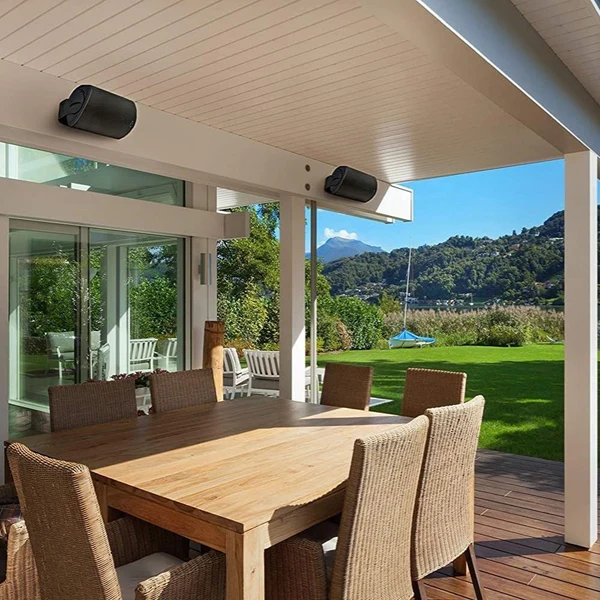
Consider a wired outdoor speaker system for permanent installation. These are often rated for continuous weather exposure. Bluetooth range extenders let you keep the source device safely indoors.

A simple awning or covered patio area dramatically reduces storm risk. Sometimes the best solution is not a better speaker but a better placement.

Chris Nolan is the founder and lead writer at TechBink, where he breaks down everyday tech problems into simple, step-by-step solutions. From Android and iPhone tricks to Windows fixes and AI tools like ChatGPT, he tests everything on real devices before writing about it. With over a decade of hands-on experience in consumer tech, Chris believes good tech advice should be simple enough for anyone to follow. When he's not writing, you'll find him experimenting with new gadgets and automation tools. Got a tech question? Reach out through the contact page — he reads every message.

Latest posts by Chris Nolan (see all)

Share.

Similar Posts

Leave a comment

Your email address will not be published. Required fields are marked with an asterisk.

Can Ultrawide Monitors Replace Du…How Can I Watch Youtube While Usi…do not give out your email addressHow To Check If Android App Is De…How To Make Android App Using Pyt…How to Remove Ads From Youtube Fr…How Long Do Curved Monitors LastCan Google Forms Detect Chat GPT?…What Are the CTRL Keys for Screen…gemini for gmail
can gemini analyze imageshow to enable hdr on curved gamin…how to upload documents to geminihow to connect dual curved gaming…how to fix ghosting on curved gam…how to use exe files on androidhow to mount curved gaming monito…what is a curved gaming monitorgemini for codingare curved monitors better for ga…
Share