Is 4K Curved Monitor Good for Gaming
So you're eyeing a 4K curved monitor for your gaming setup and wondering if it's actually worth the hype. The short answer is yes for most gamers, but the full picture depends on what you play, what's powering your system, and how you use your desk. Let's break it down honestly.
A 4K curved monitor packs 3840 × 2160 pixels into a display that wraps slightly toward your eyes. That combination can look stunning, but it also introduces trade-offs that flat 4K panels don't have. By the end of this guide, you'll know exactly whether this type of monitor fits your gaming style.
Quick Answer
A 4K curved monitor is excellent for immersive single-player gaming. It wraps the image around your peripheral vision naturally. However, it is not ideal for competitive FPS or esports.
Your GPU also needs to be powerful enough to push 4K frames. For most gamers, the experience is a significant upgrade over flat panels.
Why This Comparison Actually Matters for Gamers
Choosing between a curved and flat 4K monitor isn't just about aesthetics. It changes how you experience every game you play. The wrong pick can leave you with eye strain, wasted GPU money, or a display that fights your favorite genre instead of enhancing it.
Here's what's really at stake when you make this call.
The Curved Advantage Is Real but Narrow
Curved monitors work by bending the display panel so that every point on the screen sits at a roughly equal distance from your eyes. On a flat monitor, the edges are physically farther away than the center. Your eyes have to refocus slightly when you glance from the middle to the sides.
A curve eliminates most of that refocusing. The result is a more comfortable viewing session and a stronger sense of depth. For open-world games, RPGs, and cinematic single-player experiences, that immersion boost is noticeable and immediate.
But Flat Still Wins for Precision
Flat monitors keep the entire image on one geometric plane. That matters when you're lining up crosshairs, reading small UI elements, or doing any task where spatial accuracy counts. Competitive FPS players and esports professionals overwhelmingly prefer flat panels for exactly this reason.
The curve introduces a tiny amount of geometric distortion. Your brain corrects for it easily during gameplay, but if you're the type who notices every visual imperfection, it might bug you.
The GPU Question Changes Everything
Here's what most reviews gloss over. A 4K curved monitor is only as good as the frames your system can push. At 3840 × 2160, you're rendering over 8 million pixels per frame.
That's four times the workload of 1080p and twice the pixel count of 1440p.
If your GPU can't hit at least 60 frames per second in the games you play at 4K, you're paying for resolution you can't fully use. We'll cover specific GPU recommendations later, but this is the single biggest factor that determines whether a 4K curved monitor is right for you.
4K Curved vs. 4K Flat: The Real Trade-Offs You Need to Understand
This is the core of the decision. Both options give you the same 3840 × 2160 resolution. The only variable is the physical shape of the panel.
That single difference creates a cascade of practical effects worth understanding.
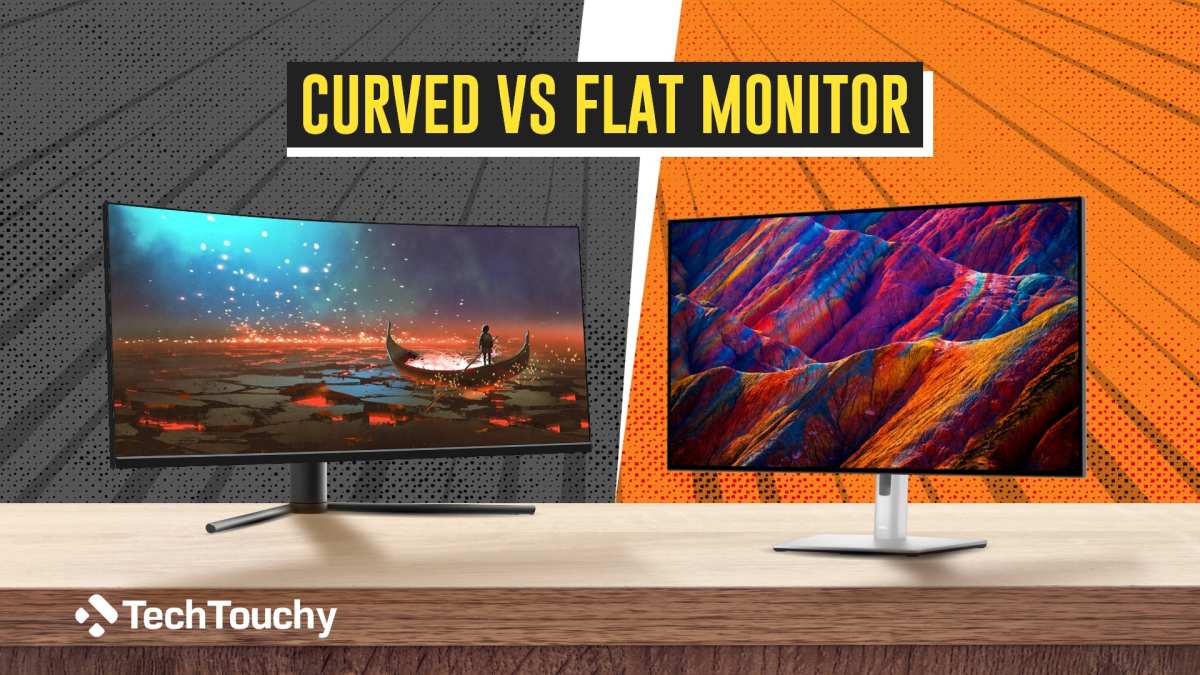
Immersion and Field of View
Curved monitors excel at making you feel inside the game. The wrap effect fills more of your peripheral vision without requiring you to sit uncomfortably close. A 32-inch 4K curved panel at a normal desk distance of 24 to 30 inches creates a noticeably more enveloping image than its flat counterpart.
This is especially true for ultrawide curved monitors in 21:9 or 32:9 aspect ratios. A 34-inch 3440 × 1440 ultrawide curved display already feels cinematic. Scale that concept to a full 4K resolution on a curved panel and the immersion factor jumps significantly.
Flat 4K monitors still look sharp and detailed. They just don't wrap around you. If you value raw clarity over atmosphere, flat wins this round.
Pixel Density and Image Sharpness
At 32 inches, a 4K monitor delivers roughly 163 pixels per inch. That's sharp enough that you won't see individual pixels at normal viewing distances. Text looks crisp, game textures pop, and fine details in UI elements remain readable.
Curved panels don't change pixel density. The pixels are still there in the same count. However, the curve can cause slight color shifts and brightness falloff at the extreme edges, particularly on VA panels.
This is a physical property of how the liquid crystal layer bends. IPS curved panels handle this better but can exhibit IPS glow in the corners.
For most users, these edge effects are minor. But if you do photo editing, design work, or any task where color accuracy across the entire screen matters, a flat IPS panel remains the safer choice.
Response Time and Motion Clarity
This is where panel type intersects with curvature in ways that matter for gaming. Most curved gaming monitors use VA panels because they offer the best contrast ratios and are easier to manufacture in curved form. VA panels typically deliver 3 to 5 millisecond grey-to-grey response times in their best modes.
IPS curved monitors exist but cost more. They generally hit 1 to 4 millisecond response times with better viewing angles. Flat IPS panels at 4K can achieve true 1ms GtG on some models.
For casual and single-player gaming, VA response times are perfectly fine. For competitive shooters where every millisecond of motion clarity counts, a flat IPS panel at 1440p high refresh rate often outperforms a 4K curved VA panel in actual perceived smoothness.
Color Accuracy and Panel Type Differences
VA panels on curved monitors typically cover 90 to 95 percent of the DCI-P3 color gamut with strong contrast ratios around 3000:1. That deep contrast makes dark scenes in horror games and atmospheric titles look fantastic.
IPS curved panels offer wider viewing angles and more accurate out-of-box color, usually hitting 95 to 98 percent DCI-P3. But their contrast ratio sits around 1000:1, which means blacks appear slightly grey compared to VA.
Flat monitors give you the full range of panel types including OLED, which delivers perfect blacks and near-instant response times. If color accuracy is your top priority, a flat OLED or IPS panel gives you more options at 4K.
Side-by-Side: 4K Curved vs. 4K Flat Gaming Monitor Comparison
Here's a direct comparison across the factors that actually matter when you're gaming.
| Factor | 4K Curved | 4K Flat |
|---|---|---|
| Immersion | Excellent, wraps peripheral vision | Good, standard viewing experience |
| Competitive gaming | Acceptable, slight edge distortion | Preferred, no geometric distortion |
| Panel options | Mostly VA, some IPS | VA, IPS, OLED, all types |
| Contrast ratio | Higher on VA curved panels (3000:1+) | Varies by panel type |
| Color accuracy | Good, slight edge shift | Better, uniform across screen |
| Response time | 3-5ms typical (VA curved) | 1-4ms available (IPS/OLED flat) |
| Text clarity at edges | Slight fringing possible | Clean across entire display |
| Desk space needed | Deeper desk recommended | Standard desk depth fine |
| Price range | $400-$1,200 | $300-$1,500+ (OLED premium) |
| Best for | Single-player, RPG, sim gaming | Competitive, productivity, mixed use |
| GPU requirement | Same (3840 × 2160) | Same (3840 × 2160) |
The takeaway is straightforward. If immersion and visual impact are your priorities, curved wins. If versatility and competitive performance matter more, flat is the better all-around choice.
Best 4K Curved Monitors for Specific Gaming Use Cases
Not every gamer needs the same thing. Here's how the 4K curved form factor fits different gaming styles.
Single-Player and Immersive AAA Gaming
This is where a 4K curved monitor absolutely shines. Games like Cyberpunk 2077, Elden Ring, Red Dead Redemption 2, and Baldur's Gate 3 are built for visual spectacle. The combination of high resolution and curved immersion makes these titles feel genuinely cinematic.
A 32-inch 4K curved VA panel with HDR600 or better is the sweet spot here. You get deep contrast, strong color volume, and that wrap-around feeling that flat panels can't match. Refresh rate matters less in these titles since you're often playing at 60 to 100 frames per second.
Samsung's Odyssey Neo G7 and Neo G8 series are strong options in this category. They offer mini-LED backlighting with full-array local dimming, which gives you HDR performance that rivals some TVs.
Competitive FPS and Fast-Paced Gaming
Here's where we have to be honest. A 4K curved monitor is not the best tool for competitive Valorant, Counter-Strike 2, or Apex Legends. The reasons are practical.
First, most competitive players prefer 24 to 27-inch monitors. At 4K resolution, a 32-inch panel means your eyes travel more distance across the screen to track targets. Second, the curve introduces minor geometric distortion that can affect crosshair placement perception at the edges.
If you insist on 4K for competitive play, a flat 27-inch IPS panel with 144Hz or higher refresh rate will serve you better. You can always keep a curved 4K for everything else.
Racing and Flight Simulation
Sim racers and flight sim enthusiasts are arguably the biggest beneficiaries of curved 4K displays. The wrap effect mimics the natural field of view you'd have in a cockpit or driver's seat. Games like iRacing, Assetto Corsa Competizione, Microsoft Flight Simulator, and DCS World feel dramatically more realistic on a curved panel.
A 34-inch or 49-inch ultrawide curved monitor at 4K or near-4K resolution is the ideal setup here. The extra horizontal space combined with the curve creates a genuine sense of sitting inside the vehicle. Pair this with a wheel or HOTAS and the immersion is unmatched.
Console Gaming (PS5 and Xbox Series X)
Both the PlayStation 5 and Xbox Series X support 4K output. A 4K curved monitor works well for console gaming, especially since most console titles are played at 30 to 60 frames per second where the immersion factor outweighs any competitive concerns.
One thing to watch for: make sure the monitor has HDMI 2.1 if you want 4K at 120Hz from these consoles. Some 4K curved monitors only offer HDMI 2.0, which limits you to 4K at 60Hz. The Xbox Series X supports 4K 120Hz output, and you'll want that bandwidth to take advantage of it.
What Your GPU Actually Needs to Handle 4K Gaming
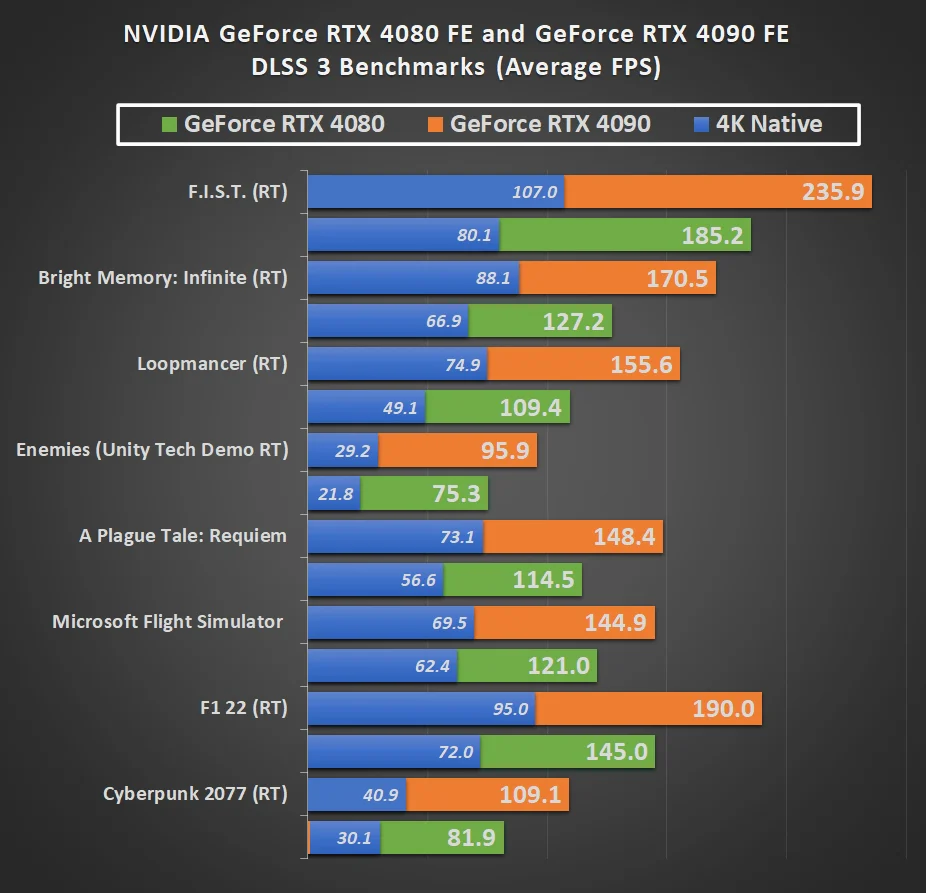
Image source: Bing (Web (fair-use with source credit))
This is the section that saves you from an expensive mistake. Buying a 4K curved monitor without a GPU that can actually drive it is like buying a sports car and putting regular fuel in the tank.
Minimum GPU for 4K Gaming at 60 FPS
If you want a stable 60 frames per second at 4K with high settings in modern AAA titles, you need at least the following.
- NVIDIA GeForce RTX 4070 or RTX 4070 Super
- AMD Radeon RX 7800 XT or RX 7900 GRE
These cards handle 4K at 60fps in most games with settings turned up. You might need to enable DLSS or FSR in the most demanding titles to hold that frame rate steady.
Recommended GPU for 4K Gaming at 100+ FPS
For high-refresh-rate 4K gaming on a 120Hz or 144Hz curved monitor, you need serious horsepower.
- NVIDIA GeForce RTX 4080 Super or RTX 4090
- AMD Radeon RX 7900 XTX
These GPUs push 100-plus frames per second at 4K in most titles with settings maxed. In lighter games like Valorant or Rocket League, you'll hit the monitor's refresh cap easily. In heavy titles like Alan Wake 2 or Starfield, you'll still rely on upscaling technologies.
The Upscaling Reality Check
Let's be real. Native 4K rendering at ultra settings in 2025's most demanding games is brutal even on an RTX 4090. DLSS (NVIDIA) and FSR (AMD) are not optional extras at 4K.
They're essential tools.
DLSS 3 with frame generation on RTX 40-series cards can effectively double your frame rate. FSR 3 offers similar frame generation on both AMD and NVIDIA GPUs. Without these technologies, you'll struggle to hit consistent frame rates in demanding titles regardless of which GPU you own.
This doesn't mean 4K is a bad choice. It means you should plan to use upscaling as part of your regular setup. The image quality from DLSS Quality mode at 4K is excellent and often indistinguishable from native rendering during gameplay.
What Happens If Your GPU Isn't Powerful Enough
If your GPU can't push enough frames at 4K, you'll experience one of two problems. Either your frame rate drops below the monitor's refresh range and you get stuttering, or you're forced to lower resolution or settings to compensate.
A 4K curved monitor running at 30 to 40 frames per second looks worse than a 1440p flat monitor running at 100 frames per second. The resolution advantage disappears if the motion feels choppy. Match your monitor choice to your actual GPU capability.
Common Mistakes People Make When Buying a 4K Curved Monitor
These are the pitfalls we see over and over. Avoid them and you'll be much happier with your purchase.
Ignoring Panel Type and Assuming All Curved Monitors Are the Same
Not all curved panels are created equal. VA panels dominate the curved gaming market and offer excellent contrast, but they have slower pixel response times that can cause smearing in dark scenes. IPS curved panels have better response times and viewing angles but cost more and show more glow in dark content.
Before you buy, identify which panel type the monitor uses. Manufacturers usually list this in the specifications. If a listing doesn't mention panel type, that's a red flag.
Buying a 4K Curved Monitor With the Wrong Ports
This catches people constantly. A 4K monitor at 144Hz requires either DisplayPort 1.4 with Display Stream Compression or HDMI 2.1. If your monitor only has HDMI 2.0, you're locked to 4K at 60Hz.
Check the monitor's port specifications before you buy. If you're gaming on a PS5 or Xbox Series X and want 4K at 120Hz, HDMI 2.1 is mandatory. Not all 4K curved monitors include it.
Sitting Too Close or Too Far From the Curve
Curved monitors have an optimal viewing distance. For a 32-inch 4K curved panel, that sweet spot is roughly 24 to 36 inches from your eyes. Sit too close and the curve feels overwhelming.
Sit too far away and you lose the immersion benefit entirely.
Measure your desk depth before buying. If your monitor sits 40 or more inches from your face, a curved panel won't deliver its intended effect. In that scenario, a flat 4K monitor makes more sense.
Expecting HDR on a Budget
Many 4K curved monitors advertise HDR support but can't actually deliver a meaningful HDR experience. A monitor with 350 nits of peak brightness and no local dimming will look worse with HDR enabled than with it turned off.
For genuine HDR gaming, look for VESA DisplayHDR 600 certification at minimum. DisplayHDR 1000 or higher is ideal. Without that brightness and local dimming, you're better off keeping HDR disabled and enjoying the SDR image.
Forgetting About Desk Space and Mounting
A 32-inch or larger curved monitor with a stand takes up significant desk real estate. The stands on gaming monitors are often deep and wide. If you're working with a shallow desk, you might not have room for the monitor and your keyboard.
Check the monitor's dimensions and stand footprint. Consider a VESA monitor arm if desk space is tight. Just make sure the arm can handle the monitor's weight, since curved panels tend to be heavier than equivalent flat displays.
Curvature Ratings Explained: 1000R vs. 1500R vs. 1800R
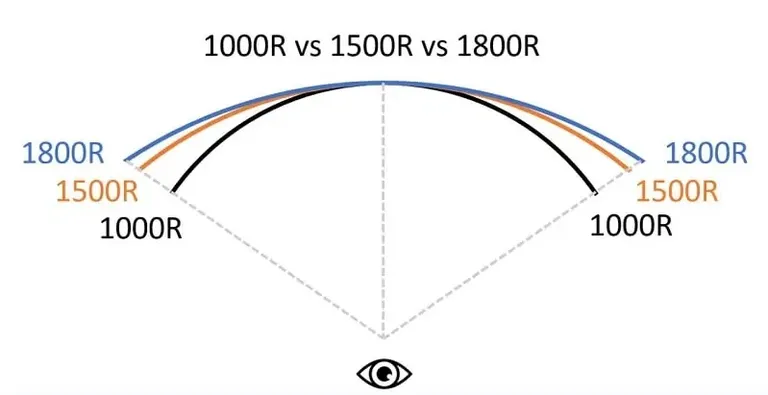
The curvature rating tells you how aggressively the monitor bends. Lower numbers mean a tighter curve. This affects both immersion and practical usability.
What the "R" Stands For
The "R" stands for radius in millimeters. A 1000R curve means the monitor follows the arc of a circle with a 1000mm (1-meter) radius. A 1500R curve follows a gentler arc with a 1500mm radius.
The smaller the number, the more pronounced the curve.
Think of it this way. A 1000R curve hugs you more tightly. A 3800R curve is barely perceptible, almost flat.
1000R: Maximum Immersion, Narrow Sweet Spot
1000R is the tightest curve commonly available in gaming monitors. It closely matches the natural curvature of the human eye. The immersion effect is strongest at this rating.
The downside is that 1000R works best at a specific viewing distance. Move too far back and the curve feels less effective. Move too close and the edges can feel distorted.
For a single user sitting at a normal desk distance, 1000R is excellent. For multiple people watching the same screen, it's not ideal.
1500R: The Balanced Middle Ground
1500R is the most common curvature in curved gaming monitors as of 2025. It offers a noticeable curve without being aggressive. You get most of the immersion benefit of 1000R with a wider sweet spot and less edge distortion.
For most gamers, 1500R is the safest choice. It works well across different desk depths and viewing distances. If you're unsure which curvature to pick, 1500R is the default recommendation.
1800R and 3800R: Subtle Curves for Mixed Use
1800R and 3800R curves are gentle. They provide a slight immersion boost over flat panels without the dramatic wrap of 1000R. These ratings are more common in productivity and professional monitors than in dedicated gaming displays.
If you plan to use your monitor for work, coding, or content creation alongside gaming, a gentler curve might be more practical. The reduced distortion at edges makes text and straight lines look more natural.
Which Curvature Should You Choose
- 1000R: Best for dedicated gaming setups where you sit at a consistent distance
- 1500R: Best all-around choice for gaming and general use
- 1800R/3800R: Best if productivity and gaming share equal priority
Most gaming-focused curved monitors sit at 1000R or 1500R. The trend has been moving toward tighter curves as panel manufacturing has improved. For a pure gaming monitor, don't overthink this.
Either 1000R or 1500R will serve you well.
Who Should Skip a 4K Curved Monitor (and What to Get Instead)
A 4K curved monitor isn't for everyone. Here's who should look elsewhere and what to consider instead.
Competitive Esports Players
If you primarily play ranked Valorant, CS2, League of Legends, or similar titles where reaction time and precision matter, a 27-inch 1440p flat IPS monitor at 240Hz or 360Hz will give you a genuine competitive advantage. The higher refresh rate and lower response time matter more than resolution at this level.
Gamers With Mid-Range GPUs
If you're running an RTX 4060, RX 7600, or anything below the cards we listed earlier, you're not going to have a good time at native 4K. Instead, consider a 1440p curved monitor. You'll get the immersion of the curve with a resolution your GPU can actually handle at high frame rates.
A 27-inch or 32-inch 1440p curved panel at 144Hz or 165Hz is a fantastic pairing for mid-range systems. You'll enjoy smooth gameplay without sacrificing visual quality.
Users Who Need Color-Accurate Work
If your monitor needs to double as a photo editing, video production, or design display, a flat IPS or OLED panel gives you more accurate color reproduction across the entire screen. Curved panels introduce slight color shifts at the edges that can affect color-critical work.
A 4K flat IPS monitor with factory calibration and hardware LUT support is the better choice here. You can always add a secondary curved monitor for gaming.
Budget-Conscious Buyers
4K curved monitors carry a price premium over flat 4K panels. If you're working with a tight budget, a flat 4K monitor at 60Hz or a 1440p high-refresh curved monitor will give you more value per dollar. Don't stretch your budget for a curved panel if it means compromising on panel quality or GPU capability.
Expert Tips for Getting the Most Out of a 4K Curved Gaming Setup
Once you've committed to a 4K curved monitor, these tips will help you get the best possible experience.
Enable Adaptive Sync and Set the Right Refresh Rate
Make sure G-Sync or FreeSync is enabled in both your monitor's on-screen display and your GPU's control panel. This eliminates screen tearing and minimizes stuttering when your frame rate fluctuates.
Also confirm your monitor is actually running at its maximum refresh rate. Windows sometimes defaults to 60Hz even on a 144Hz display. Check your display settings and set it to the highest available refresh rate.
Calibrate Your HDR Settings
If your monitor supports HDR, take ten minutes to calibrate it. Use the Windows HDR calibration tool and adjust the peak brightness and black level settings in the monitor's OSD. Poorly configured HDR looks worse than SDR, so this step matters.
For monitors without true HDR (DisplayHDR 400 or below), leave HDR off. You'll get a better image in SDR mode on these panels.
Adjust In-Game Field of View
Many games default to a field of view setting optimized for flat monitors. On a curved display, you can often increase the FOV by 5 to 15 degrees without the image feeling distorted. This takes advantage of the curve's wider perceived view and improves spatial awareness in first-person games.
Use the Right Cable and Port
This sounds basic but it trips people up. Use the cable that came with the monitor or a certified high-bandwidth cable. For 4K at 144Hz, you need a DisplayPort 1.4 cable with DSC support or an Ultra High Speed HDMI 2.1 cable.
A cheap cable can limit your resolution, refresh rate, or color depth without any obvious error message.
Position the Monitor Correctly
The center of the screen should be at or slightly below your eye level. The top edge should be roughly at eye height. This reduces neck strain during long gaming sessions and ensures you're looking at the optimal part of the curved panel.
Frequently Asked Questions
Is a curved monitor better for gaming than flat?
A curved monitor is better for immersion in single-player and cinematic games. A flat monitor is better for competitive gaming and color-accurate work. Neither is universally better.
It depends on your priorities.
Does a curved monitor affect aim in FPS games?
A curved monitor can slightly affect spatial perception at the edges due to geometric distortion. Most gamers adapt quickly, but competitive players generally prefer flat panels for precision aiming.
What size is best for a 4K curved gaming monitor?
32 inches is the sweet spot for a 4K curved monitor. At this size, you get 163 PPI for sharpness and a large enough display for the curve to feel meaningful. Smaller than 32 inches and the curve is less noticeable.
Can I use a 4K curved monitor for work and productivity?
You can, but text rendering at the edges may show slight fringing on curved VA panels. If you do a lot of text work or spreadsheet tasks, a flat monitor or a gently curved IPS panel is more comfortable for extended use.
Do I need HDMI 2.1 for a 4K curved gaming monitor?
You need HDMI 2.1 if you want 4K at 120Hz from a PS5 or Xbox Series X. For PC gaming, DisplayPort 1.4 with DSC can handle 4K at 144Hz. Without HDMI 2.1 or DP 1.4, you're limited to 4K at 60Hz.
Is 4K curved good for PS5 gaming?
A 4K curved monitor works well for PS5 gaming, especially for single-player titles. Just make sure the monitor has HDMI 2.1 to support 4K at 120Hz in games that offer a performance mode on PS5.
Final Verdict: Should You Buy One?
A 4K curved monitor is an excellent choice for gaming if you prioritize immersion and play a lot of single-player, RPG, racing, or simulation titles. The combination of high resolution and curved display creates an experience that flat panels genuinely can't match.
It's not the right choice if you're a competitive FPS player, running a mid-range GPU, or need color-accurate work from the same display. In those cases, a flat 1440p high-refresh monitor or a flat 4K IPS panel serves you better.
Here's the simplest way to think about it. If your GPU can push 60-plus frames at 4K and you value atmosphere over esports precision, a 4K curved monitor will make your games feel more alive. If you need competitive performance or your hardware can't handle the resolution, save your money and go flat.
Either way, match the monitor to your actual use case, not the marketing. That's the decision that matters.
Best 4K Curved Monitors for Specific Gaming Use Cases
We've already touched on this briefly, but let's get more specific about which types of gamers benefit most from each configuration.
Single-Player and Immersive AAA Gaming
This is the sweet spot for 4K curved displays. Games built around atmosphere, storytelling, and visual spectacle gain the most from the combination of high resolution and wrap-around immersion.
A 32-inch 4K curved VA panel with HDR600 or better is ideal here. You get deep contrast, strong color volume, and that cinematic feel. Samsung's Odyssey Neo G7 (G70NP) and Neo G8 (G80NP) are strong options with mini-LED backlighting that delivers genuine HDR performance.
Competitive FPS and Fast-Paced Gaming
We have to be straightforward. A 4K curved monitor is not the optimal tool for competitive Valorant, CS2, or Apex Legends. The reasons are practical and worth understanding.
Competitive players typically prefer 24 to 27-inch monitors. At 4K, a 32-inch panel means your eyes travel more distance to track targets. The curve also introduces minor geometric distortion at the edges that can affect crosshair placement perception.
If you want 4K for competitive play, a flat 27-inch IPS panel at 144Hz or higher serves you better. You can always keep a curved 4K for everything else.
Racing and Flight Simulation
Sim racers and flight sim enthusiasts are arguably the biggest beneficiaries of curved 4K displays. The wrap effect mimics the natural field of view you'd have in a cockpit or driver's seat.
Games like iRacing, Assetto Corsa Competizione, Microsoft Flight Simulator, and DCS World feel dramatically more realistic on a curved panel. A 34-inch or 49-inch ultrawide curved monitor at 4K or near-4K resolution creates a genuine sense of sitting inside the vehicle.
Pair this with a wheel or HOTAS and the immersion is unmatched by any flat display.
Console Gaming (PS5 and Xbox Series X)
Both the PS5 and Xbox Series X support 4K output. A 4K curved monitor works well for console gaming, especially since most console titles run at 30 to 60 frames per second where immersion matters more than competitive precision.
One critical detail: make sure the monitor has HDMI 2.1 if you want 4K at 120Hz from these consoles. Some 4K curved monitors only include HDMI 2.0, which limits you to 4K at 60Hz. The Xbox Series X supports 4K 120Hz output, and you'll want that bandwidth to take full advantage.
What Your GPU Actually Needs to Handle 4K Gaming
This is the section that saves you from an expensive mistake. Buying a 4K curved monitor without a GPU that can actually drive it is like buying a sports car and putting regular fuel in the tank.
Minimum GPU for 4K Gaming at 60 FPS
If you want a stable 60 frames per second at 4K with high settings in modern AAA titles, you need at least an NVIDIA GeForce RTX 4070 or an AMD Radeon RX 7800 XT. These cards handle 4K at 60fps in most games with settings turned up.
You might need to enable DLSS or FSR in the most demanding titles to hold that frame rate steady. That's normal and expected at this resolution.
Recommended GPU for 4K Gaming at 100+ FPS
For high-refresh-rate 4K gaming on a 120Hz or 144Hz curved monitor, you need serious horsepower. An RTX 4080 Super or RTX 4090 is the recommended starting point. AMD's RX 7900 XTX also fits this tier.
These GPUs push 100-plus frames per second at 4K in most titles with settings maxed. In lighter games like Valorant or Rocket League, you'll hit the monitor's refresh cap easily. In heavy titles like Alan Wake 2 or Starfield, you'll still rely on upscaling technologies.
The Upscaling Reality Check
Let's be honest. Native 4K rendering at ultra settings in 2025's most demanding games is brutal even on an RTX 4090. DLSS and FSR are not optional extras at 4K.
They're essential tools.
DLSS 3 with frame generation on RTX 40-series cards can effectively double your frame rate. FSR 3 offers similar frame generation on both AMD and NVIDIA GPUs. The image quality from DLSS Quality mode at 4K is excellent and often indistinguishable from native rendering during gameplay.
What Happens If Your GPU Isn't Powerful Enough
If your GPU can't push enough frames at 4K, you'll experience stuttering or be forced to lower resolution or settings. A 4K curved monitor running at 30 to 40 frames per second looks worse than a 1440p flat monitor running at 100 frames per second.
Match your monitor choice to your actual GPU capability. Don't buy a display your system can't drive.
Common Mistakes People Make When Buying a 4K Curved Monitor
These are the pitfalls we see repeatedly. Avoid them and you'll be much happier with your purchase.
Ignoring Panel Type and Assuming All Curved Monitors Are the Same
Not all curved panels are created equal. VA panels dominate the curved gaming market and offer excellent contrast, but they have slower pixel response times that can cause smearing in dark scenes. IPS curved panels have better response times and viewing angles but cost more.
Before you buy, identify which panel type the monitor uses. If a listing doesn't mention panel type, that's a red flag.
Buying a 4K Curved Monitor With the Wrong Ports
This catches people constantly. A 4K monitor at 144Hz requires either DisplayPort 1.4 with Display Stream Compression or HDMI 2.1. If your monitor only has HDMI 2.0, you're locked to 4K at 60Hz.
Check the monitor's port specifications before you buy. For PS5 or Xbox Series X at 4K 120Hz, HDMI 2.1 is mandatory.
Sitting Too Close or Too Far From the Curve
Curved monitors have an optimal viewing distance. For a 32-inch 4K curved panel, that sweet spot is roughly 24 to 36 inches from your eyes. Sit too close and the curve feels overwhelming.
Sit too far away and you lose the immersion benefit entirely.
Measure your desk depth before buying. If your monitor sits 40 or more inches from your face, a curved panel won't deliver its intended effect.
Expecting HDR on a Budget
Many 4K curved monitors advertise HDR support but can't actually deliver a meaningful HDR experience. A monitor with 350 nits of peak brightness and no local dimming will look worse with HDR enabled than without it.
For genuine HDR gaming, look for VESA DisplayHDR 600 certification at minimum. Without that brightness and local dimming, keep HDR disabled and enjoy the SDR image.
Forgetting About Desk Space and Mounting
A 32-inch or larger curved monitor with a stand takes up significant desk real estate. The stands on gaming monitors are often deep and wide. If you're working with a shallow desk, you might not have room for the monitor and your keyboard.
Check the monitor's dimensions and stand footprint. Consider a VESA monitor arm if desk space is tight. Just make sure the arm can handle the monitor's weight, since curved panels tend to be heavier than equivalent flat displays.
Curvature Ratings Explained: 1000R vs. 1500R vs. 1800R
The curvature rating tells you how aggressively the monitor bends. Lower numbers mean a tighter curve. This affects both immersion and practical usability.
What the "R" Stands For
The "R" stands for radius in millimeters. A 1000R curve means the monitor follows the arc of a circle with a 1000mm radius. A 1500R curve follows a gentler arc with a 1500mm radius.
The smaller the number, the more pronounced the curve.
Think of it simply. A 1000R curve hugs you more tightly. A 3800R curve is barely perceptible, almost flat.
1000R: Maximum Immersion, Narrow Sweet Spot
1000R is the tightest curve commonly available in gaming monitors. It closely matches the natural curvature of the human eye. The immersion effect is strongest at this rating.
The downside is that 1000R works best at a specific viewing distance. Move too far back and the curve feels less effective. Move too close and the edges can feel distorted.
For a single user sitting at a normal desk distance, 1000R is excellent.
1500R: The Balanced Middle Ground
1500R is the most common curvature in curved gaming monitors as of 2025. It offers a noticeable curve without being aggressive. You get most of the immersion benefit of 1000R with a wider sweet spot and less edge distortion.
For most gamers, 1500R is the safest choice. It works well across different desk depths and viewing distances. If you're unsure which curvature to pick, 1500R is the default recommendation.
1800R and 3800R: Subtle Curves for Mixed Use
1800R and 3800R curves are gentle. They provide a slight immersion boost over flat panels without the dramatic wrap of 1000R. These ratings are more common in productivity and professional monitors than in dedicated gaming displays.
If you plan to use your monitor for work, coding, or content creation alongside gaming, a gentler curve might be more practical. The reduced distortion at edges makes text and straight lines look more natural.
Which Curvature Should You Choose
- 1000R: Best for dedicated gaming setups where you sit at a consistent distance
- 1500R: Best all-around choice for gaming and general use
- 1800R/3800R: Best if productivity and gaming share equal priority
Most gaming-focused curved monitors sit at 1000R or 1500R. For a pure gaming monitor, don't overthink this. Either option will serve you well.
Who Should Skip a 4K Curved Monitor (and What to Get Instead)
A 4K curved monitor isn't for everyone. Here's who should look elsewhere and what to consider instead.
Competitive Esports Players
If you primarily play ranked Valorant, CS2, League of Legends, or similar titles where reaction time and precision matter, a 27-inch 1440p flat IPS monitor at 240Hz or 360Hz will give you a genuine competitive advantage. The higher refresh rate and lower response time matter more than resolution at this level.
Gamers With Mid-Range GPUs
If you're running an RTX 4060, RX 7600, or anything below the cards we listed earlier, you're not going to have a good time at native 4K. Instead, consider a 1440p curved monitor. You'll get the immersion of the curve with a resolution your GPU can actually handle at high frame rates.
A 27-inch or 32-inch 1440p curved panel at 144Hz or 165Hz is a fantastic pairing for mid-range systems. You'll enjoy smooth gameplay without sacrificing visual quality.
Users Who Need Color-Accurate Work
If your monitor needs to double as a photo editing, video production, or design display, a flat IPS or OLED panel gives you more accurate color reproduction across the entire screen. Curved panels introduce slight color shifts at the edges that can affect color-critical work.
A 4K flat IPS monitor with factory calibration is the better choice here. You can always add a secondary curved monitor for gaming.
Budget-Conscious Buyers
4K curved monitors carry a price premium over flat 4K panels. If you're working with a tight budget, a flat 4K monitor at 60Hz or a 1440p high-refresh curved monitor will give you more value per dollar. Don't stretch your budget for a curved panel if it means compromising on panel quality or GPU capability.
Expert Tips for Getting the Most Out of a 4K Curved Gaming Setup
Once you've committed to a 4K curved monitor, these tips will help you get the best possible experience.
Enable Adaptive Sync and Set the Right Refresh Rate
Make sure G-Sync or FreeSync is enabled in both your monitor's on-screen display and your GPU's control panel. This eliminates screen tearing and minimizes stuttering when your frame rate fluctuates.
Also confirm your monitor is actually running at its maximum refresh rate. Windows sometimes defaults to 60Hz even on a 144Hz display. Check your display settings and set it to the highest available refresh rate.
Calibrate Your HDR Settings
If your monitor supports HDR, take ten minutes to calibrate it. Use the Windows HDR calibration tool and adjust the peak brightness and black level settings in the monitor's OSD. Poorly configured HDR looks worse than SDR, so this step matters.
For monitors without true HDR (DisplayHDR 400 or below), leave HDR off. You'll get a better image in SDR mode on these panels.
Adjust In-Game Field of View
Many games default to a field of view setting optimized for flat monitors. On a curved display, you can often increase the FOV by 5 to 15 degrees without the image feeling distorted. This takes advantage of the curve's wider perceived view and improves spatial awareness in first-person games.
Use the Right Cable and Port
This sounds basic but it trips people up. Use the cable that came with the monitor or a certified high-bandwidth cable. For 4K at 144Hz, you need a DisplayPort 1.4 cable with DSC support or an Ultra High Speed HDMI 2.1 cable.
A cheap cable can limit your resolution, refresh rate, or color depth without any obvious error message.
Position the Monitor Correctly
The center of the screen should be at or slightly below your eye level. The top edge should be roughly at eye height. This reduces neck strain during long gaming sessions and ensures you're looking at the optimal part of the curved panel.
Frequently Asked Questions
Is a curved monitor better for gaming than flat?
A curved monitor is better for immersion in single-player and cinematic games. A flat monitor is better for competitive gaming and color-accurate work. Neither is universally better.
It depends on your priorities.
Does a curved monitor affect aim in FPS games?
A curved monitor can slightly affect spatial perception at the edges due to geometric distortion. Most gamers adapt quickly, but competitive players generally prefer flat panels for precision aiming.
What size is best for a 4K curved gaming monitor?
32 inches is the sweet spot for a 4K curved monitor. At this size, you get 163 PPI for sharpness and a large enough display for the curve to feel meaningful. Smaller than 32 inches and the curve is less noticeable.
Can I use a 4K curved monitor for work and productivity?
You can, but text rendering at the edges may show slight fringing on curved VA panels. If you do a lot of text work or spreadsheet tasks, a flat monitor or a gently curved IPS panel is more comfortable for extended use.
Do I need HDMI 2.1 for a 4K curved gaming monitor?
You need HDMI 2.1 if you want 4K at 120Hz from a PS5 or Xbox Series X. For PC gaming, DisplayPort 1.4 with DSC can handle 4K at 144Hz. Without HDMI 2.1 or DP 1.4, you're limited to 4K at 60Hz.
Is 4K curved good for PS5 gaming?
A 4K curved monitor works well for PS5 gaming, especially for single-player titles. Just make sure the monitor has HDMI 2.1 to support 4K at 120Hz in games that offer a performance mode on PS5.
Final Verdict: Should You Buy One?
A 4K curved monitor is an excellent choice for gaming if you prioritize immersion and play a lot of single-player, RPG, racing, or simulation titles. The combination of high resolution and curved display creates an experience that flat panels genuinely can't match.
It's not the right choice if you're a competitive FPS player, running a mid-range GPU, or need color-accurate work from the same display. In those cases, a flat 1440p high-refresh monitor or a flat 4K IPS panel serves you better.
Here's the simplest way to think about it. If your GPU can push 60-plus frames at 4K and you value atmosphere over esports precision, a 4K curved monitor will make your games feel more alive. If you need competitive performance or your hardware can't handle the resolution, save your money and go flat.
Either way, match the monitor to your actual use case, not the marketing. That's the decision that matters.
This is a good question, and it comes up a lot once people start narrowing down their options.
What Makes a 4K Curved Monitor Stand Out
The combination of 3840 × 2160 resolution and a curved panel creates a visual experience that neither feature delivers alone. The high pixel density keeps everything sharp. The curve wraps the image around your field of view.
Together, they make games feel more present and engaging.
Most curved gaming monitors in the 32-inch range use VA panels with strong contrast ratios. This makes dark scenes in games like Alan Wake 2 or Diablo IV look particularly impressive. The blacks feel deeper and the highlights pop more compared to flat IPS panels at the same price point.
Where Flat 4K Monitors Still Win
Flat monitors have a few advantages that matter depending on your use case. They offer more uniform brightness across the entire screen. Text and straight lines look more natural, especially at the edges.
They also give you access to OLED panels, which deliver perfect blacks and near-instantaneous response times that curved VA panels can't match.
If you split your time between gaming and productivity work, a flat 4K IPS monitor is more versatile. You get the same resolution without any edge distortion for spreadsheets, coding, or design work.
The Real Question: What Do You Actually Play
Your game library should drive this decision more than any spec sheet. If you spend most of your time in open-world RPGs, story-driven adventures, or racing sims, the curved 4K experience is noticeably better. If you're grinding ranked matches in competitive shooters, a flat high-refresh monitor will serve you better.
Many gamers end up with both. A 4K curved for immersive single-player sessions and a smaller flat panel for competitive play. That setup covers every scenario without compromise.
Price and Value Considerations
As of 2025, 4K curved gaming monitors typically range from $400 to $1,200 depending on panel type, refresh rate, and HDR capability. Flat 4K monitors start around $300 for basic 60Hz models and go up to $1,500 or more for OLED panels.
The price premium for going curved is roughly $50 to $150 over a comparable flat panel. Whether that's worth it depends entirely on how much you value immersion over versatility. For most gamers who play a mix of single-player and multiplayer titles, the premium is justified by the improved experience in the games they play most.

Similar Posts