Where Can You Find Airpods Serial Number For Easy Tracking

Where Can You Find AirPods Serial Number
Introduction to AirPods Serial Numbers
Your AirPods serial number is a unique code that identifies your specific pair. It is important for warranty claims, repairs, and verifying authenticity. Knowing where to find it makes handling these processes much easier.The Significance of the Serial Number
The serial number helps Apple support identify your AirPods model and production details. It also assists in determining if your device is eligible for warranty or service programs. Having this number handy ensures quick and smooth assistance.Where to Find the Serial Number on the AirPods Case
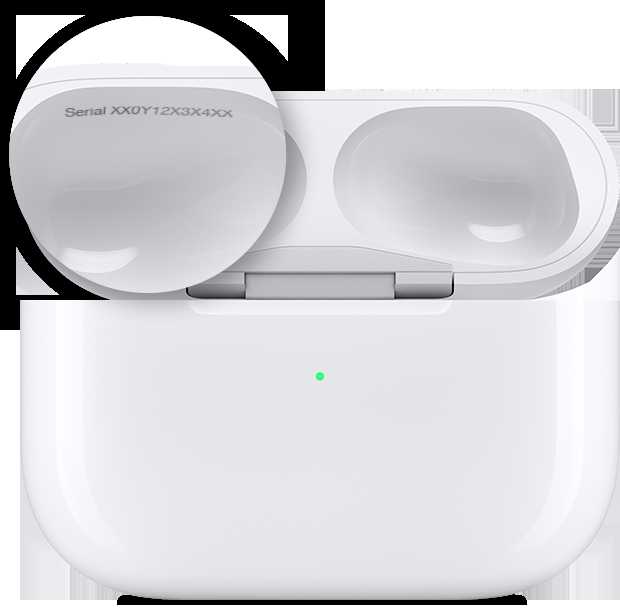
The most common location for the serial number is inside the lid of the charging case. Open your AirPods case and look on the inner side of the lid for a small printed code. This number is typically alphanumeric and is easy to read once the case is open.Steps to Locate the Serial Number:
- Open the AirPods charging case.
- Look on the inside of the lid, where the hinge is attached.
- The serial number is printed in small black text.
Additional Tips:
- The serial number may be faint; use a flashlight for better visibility.
- If your case is damaged or unable to open, proceed with other methods listed below.
Finding the Serial Number on Your iPhone or iPad
If your AirPods are connected to an iPhone or iPad, you can quickly check the serial number through device settings. This method is very convenient if your case isn’t accessible.Steps to Find Serial Number on iPhone or iPad:
- Open the Settings app on your device.
- Tap on your Apple ID at the top of the menu.
- Select ‘Devices’ from the dropdown menu.
- Find your AirPods in the list of connected devices and tap on them.
- The serial number appears on this screen, along with other device details.
Additional Notes:
- This method requires that your AirPods are currently paired or connected to your device.
- Make sure your device is updated to ensure compatibility with the latest iOS features.
Locating the Serial Number on the Original Packaging
Your AirPods’ box often contains important product details, including the serial number. This is a straightforward method if you still have the original packaging.Where to Find the Serial Number on the Box:
- Look on the barcode label, usually on the side or bottom of the box.
- The serial number is printed near the barcode and is often labeled clearly as “Serial Number.”
Important Tips:
- Ensure you check all sides of the box if the serial number isn’t immediately visible.
- This method is best if you need to verify authenticity or for warranty registration.
Using the Apple Support Website
If you have an Apple ID account linked to your AirPods, you can find the serial number by logging into your account on the official Apple website.Steps to Access Serial Number via Apple Support:
- Go to the Apple ID website and log in with your credentials.
- Navigate to the Devices section.
- Select your AirPods from your registered devices list.
- The serial number will be displayed alongside other device details.
Benefits of This Method:
- Provides accurate serial information without needing physical access to your AirPods.
- Useful for remote support or warranty claims.
Additional Methods for Finding the Serial Number
Besides the main options, there are a few other ways to locate your AirPods serial number depending on your situation.Using the Find My App
If you’ve enabled Find My on your device, your AirPods may appear in the app. While it doesn’t directly show the serial number, it helps locate your device and can guide you to the physical location.Contacting Apple Support
If all else fails, reach out to Apple Support with proof of purchase. They can often assist in retrieving your serial number or verifying your device’s authenticity.Summary of Key Locations for the Serial Number
| Location | Description |
|---|---|
| Inside the Charging Case Lid | Small print on the inner side of the case lid. |
| On Original Packaging | Bar code label on the box. |
| On iPhone or iPad Settings | In the Bluetooth device list through Settings. |
| Through Apple Support Website | In your registered devices on your Apple ID account. |
Tips for Maintaining Your Serial Number Information
To keep your AirPods information safe, store the serial number in a secure location. Keep copies of receipts, packaging, or digital records for future reference. Avoid sharing this number publicly to protect your device. Finding your AirPods serial number is simple once you know where to look. You can locate it inside the case, on the packaging, or via your connected devices. Knowing your serial number ensures you can easily get support, verify authenticity, and manage your warranty. Keeping this information handy saves time and provides peace of mind when dealing with repairs or replacements.Frequently Asked Questions
How can I locate the serial number on the physical AirPods case?
To find the serial number on your AirPods case, open the lid and inspect the bottom of the case. The serial number is printed in small text along the hinge or the inner side of the lid. If the markings are not visible, try cleaning the area gently to improve visibility.
Where is the serial number displayed on the device packaging?
Apple typically includes the serial number on the original packaging of your AirPods. Check the barcode label on the box, usually on the side or bottom, where product details and serial number are printed clearly. This helps when you no longer have the device nearby.
Can I find the serial number through the Bluetooth settings?
Yes, you can locate the serial number through your connected device. On your iPhone, go to Settings, then Bluetooth. Find your AirPods in the list of connected devices, tap the info icon (i), and view the device details. The serial number is often listed there for reference.
Is it possible to identify the serial number via the Find My app?
While the Find My app helps track your AirPods, it does not display the serial number directly. However, if you have linked your AirPods to your Apple ID, you can check associated device details in your Apple account settings online for the serial number information.
Where can I find the serial number in the Apple Support app?
If you have added your AirPods to the Apple Support app, navigate to your registered devices within the app. Select your AirPods, and the device details section will include the serial number along with other relevant information. This makes it easy to locate your device ID without physically inspecting the AirPods.
Final Thoughts
You can find the AirPods serial number in several places. Check the original charging case by opening the lid and examining the inside. The serial number is often printed on the underside of the lid or on the back of the case. You can also locate it on your iOS device by navigating to Settings > General > About > AirPods. Additionally, if you have the original packaging, the serial number appears on the box label. where can you find airpods serial number, the most straightforward method is through your device settings or the case itself. Remember to keep this number handy for warranty or support purposes.
Similar Posts































