How Do You Find Your Right Airpod For Better Sound

How Do You Find Your Right AirPod
Understanding the Importance of the Correct AirPod
Finding your right AirPod is key to enjoying clear sound and a comfortable fit. The right AirPod ensures balanced audio and keeps your music, calls, and podcasts flowing smoothly. Without it, you might experience uneven sound or even discomfort during use.Common Reasons for Losing an AirPod
Many users misplace their AirPods because they forget where they last had them. Some might drop them during a walk, while others leave them in a pocket or bag. Recognizing these common reasons helps you stay more aware of where to look.How to Locate Your Right AirPod Using the Find My App
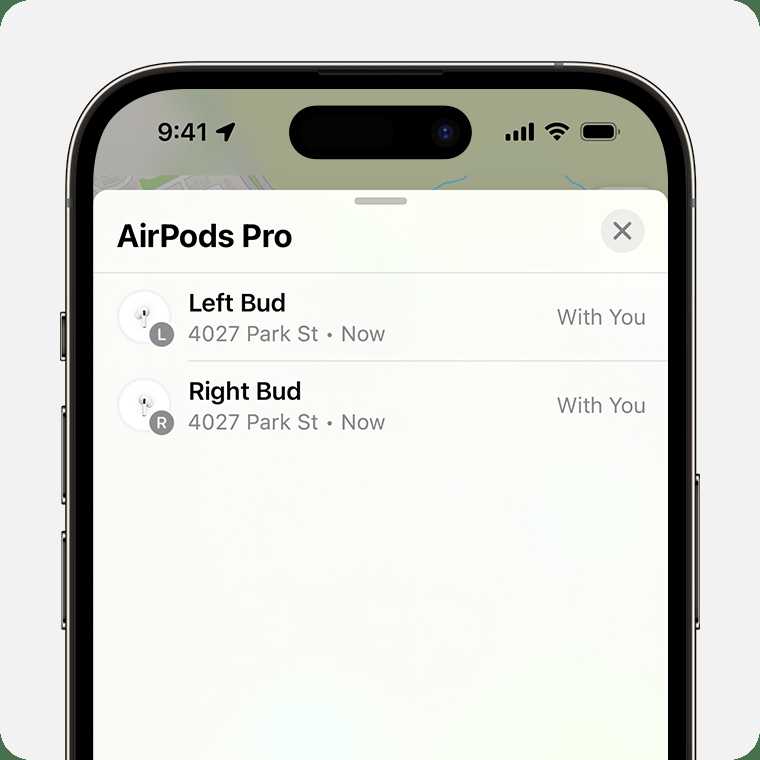
One of the easiest ways to locate your missing AirPod is through the Find My app on your Apple device. Open the app, select your AirPods, and view their last known location on the map. If the AirPod is nearby, you can play a sound to find it quickly.Steps to Use Find My Effectively
- Open the Find My app on your iPhone or iPad.
- Select your AirPods from the list of devices.
- Check the location displayed on the map. If it shows a recent spot, head there.
- Tap Play Sound, and listen for the ringing noise from your AirPod.
Physical Search Tactics for Your Right AirPod
If the Find My app doesn’t locate your AirPod, physical searching becomes necessary. Start by checking common places like pockets, bags, and desks. Remember to look under cushions or inside your car seats where it might have fallen.How to Organize Your Search
- Revisit recent locations where you used your AirPods.
- Look in laundry baskets or near your earbuds case.
- Check the last place you had your phone or device paired with the AirPods.
Using Sound to Locate Your AirPod
Playing a sound through the Find My feature helps spot your right AirPod if it’s nearby. Place your device close to the suspected area and listen carefully. The sound gets louder as you get closer.Limitations of Sound Functions
Note that the sound feature may not work if:- The battery is dead.
- The AirPod is out of Bluetooth range.
- The AirPod is in the charging case.
Prevention Tips to Avoid Losing Your Right AirPod
Prevention is the best way to avoid the hassle of searching for a missing AirPod. Consider these tips to keep track of your right AirPod:- Always place your AirPods in the case when not in use.
- Use a keychain or case holder for added security.
- Develop a habit of checking your belongings after use.
- Label your AirPods with stickers or engravings for easy identification.
Using Accessories to Keep Your Right AirPod Safe
Many accessories help prevent loss and make tracking easier. Some options include:- AirPods straps to secure them around your neck or bag.
- Keychain cases that attach to your keys or backpack.
- Bright-colored covers for visibility.
Battery Life Considerations When Searching
Your AirPod’s battery life affects the ability to locate it. When the battery drains, the Find My app can’t connect or produce sound. Always keep your AirPods charged to increase chances of recovery if lost.Checking Battery Status
Open your case near your iPhone or check the battery widget on your device. If the right AirPod shows low or no charge, it might be harder to find until it is recharged.Replacing or Repairing a Lost Right AirPod
If your AirPod remains missing despite efforts, you may need a replacement. Contact Apple Support or visit an authorized service provider for options. You can purchase a single replacement right AirPod to restore your listening experience.Cost and Process of Replacement
Replacing just one AirPod is usually more affordable than buying a new set. Be prepared with proof of purchase and device details when requesting a replacement.Final Tips for Finding Your Right AirPod
Maintain awareness of where your AirPods are during daily activities. Use technology features like the Find My app and physical accessories for added security. Regularly charging and organizing your AirPods helps prevent future loss.Related Topics to Consider
- How to clean and maintain your AirPods
- Best accessories for AirPod security
- How to extend AirPod battery life
- Troubleshooting common AirPod problems
Frequently Asked Questions
How can I tell if my right AirPod is properly connected to my device?
To confirm your right AirPod is connected, check your device’s Bluetooth settings. If it appears as “Connected,” it means the AirPod is active. You can also play audio and see if sound comes from the right side. Additionally, some devices show battery status of each AirPod, which can help determine if the right one is functioning correctly.
What steps should I take if my right AirPod isn’t producing sound?
First, ensure your AirPods are charged. Place both AirPods back into the charging case and close the lid for a few seconds before taking them out. Check Bluetooth settings to see if they are connected properly. If sound still doesn’t come through, try resetting your AirPods by holding the setup button on the case until the LED flashes amber and white. Reconnect them to your device afterward.
How do I know if my right AirPod has a hardware issue?
If your right AirPod doesn’t respond despite restarting and resetting, it may have a hardware problem. Test it by pairing with another device. If it still doesn’t work or produce sound, consider inspecting it for physical damage or debris. Contact Apple Support or visit an authorized service provider for further diagnosis and repair options.
Can I use my right AirPod separately without the left one?
Yes, you can use your right AirPod independently. Simply connect it to your device, and it will function as a standalone earbud for calls or music. Keep in mind that some features, like automatic ear detection, might be limited when using only one AirPod. Nevertheless, many users find using a single AirPod effective for certain activities.
What should I do if my right AirPod keeps disconnecting from my device?
Ensure your AirPods are within range and charged properly. Turn Bluetooth off and on again on your device to reset the connection. If the problem persists, forget the device in your Bluetooth settings and then pair your AirPods again. Keeping your device’s software updated can also help prevent connectivity issues.
Final Thoughts
Finding your right AirPod begins with ensuring a proper fit. Try different ear tips to see which feels most comfortable and secure. Check that your AirPod is clean and free of debris for optimal sound quality. Adjust the position slightly until you notice a clear, balanced sound. To find your right AirPod efficiently, focus on comfort and fit first. How do you find your right AirPod? Ensure it sits snugly in your ear, and try different tips if needed. Proper fit guarantees better audio and comfort during use.
Similar Posts































