How To Fix Your Own Iphone Screen Safely And Easily

How to Fix Your Own iPhone Screen
Understanding When You Can Fix Your iPhone Screen at Home
Fixing an iPhone screen yourself is possible, but it depends on the damage. Minor cracks or scratches often can be repaired without replacing the entire screen. However, if your screen is shattered or unresponsive, a full replacement might be necessary.Gathering the Right Tools and Supplies
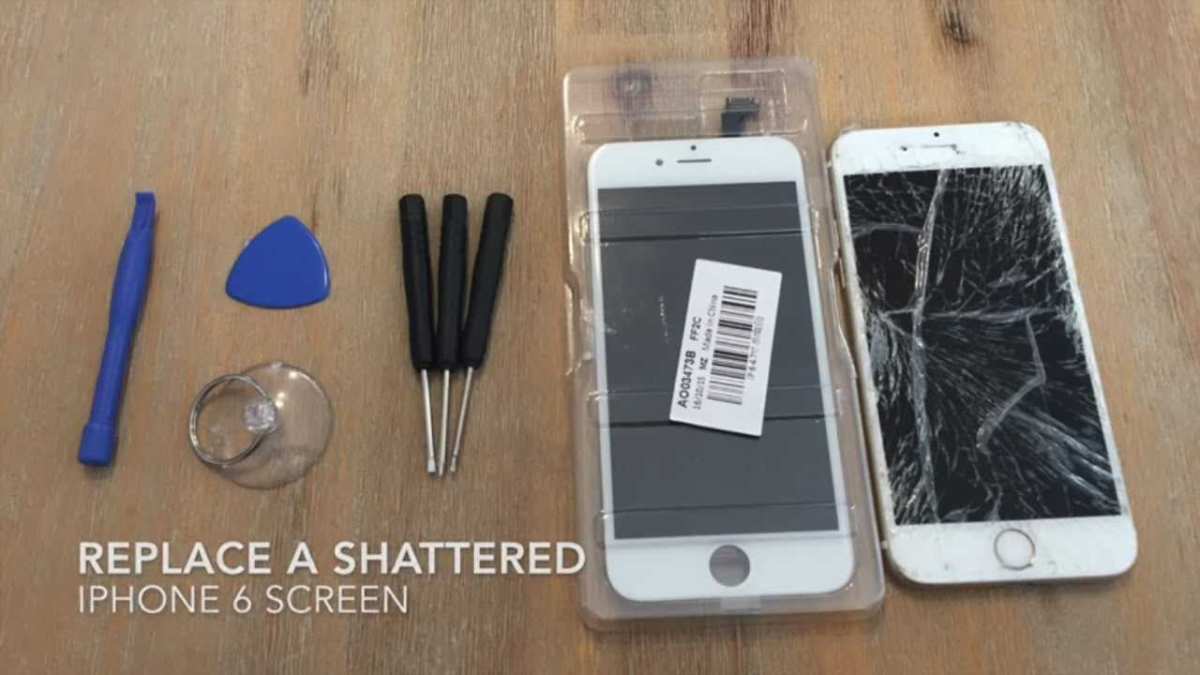
To successfully repair your iPhone screen, you’ll need specific tools. Essential items include a set of precision screwdrivers, a plastic opening tool, tweezers, a screen replacement kit, and adhesive strips. Make sure to buy high-quality parts to ensure durability and fit.Recommended Tools List
- Phillips and Pentalobe screwdrivers
- Spudger or plastic opening tools
- Suction cup
- Tweezers
- Screen replacement kit (includes LCD and digitizer)
- Adhesive strips or glue
- Anti-static wrist strap
Preparing Your Workspace
Choose a clean, well-lit workspace free of static electricity. Use an anti-static mat or wrist strap to protect your iPhone’s internal components. Keep all tools organized and within reach to prevent accidental drops or loss.Powering Down and Removing the SIM Card
Before opening your iPhone, turn it off completely to avoid short circuits. Use a SIM ejector tool or a paperclip to remove the SIM card tray. This step prevents damage and makes disassembly easier.Disassembling Your iPhone
Start by removing the screws on the bottom of your iPhone with the Pentalobe screwdriver. Carefully lift the screen using a suction cup and a plastic tool. Be gentle to avoid damaging delicate connectors.Separating the Screen from the Body
Use the plastic opening tool to gently pry around the edges, disconnecting clips and cables. Carefully lift the display assembly, exposing internal components. Keep track of all screws and connectors for reassembly.Disconnecting the Display Assembly
Locate the display connectors on the logic board and disconnect them using the spudger. Some models have multiple cables, so take your time and note their positions. Handle all parts with care to prevent damage.Removing the Broken Screen
Once disconnected, carefully lift off the broken screen from the housing. If adhesive is stubborn, gently heat around the edges to soften it. Use a plastic card or opening tool to loosen the seal without cracking internal components.Installing the New Screen
Align the new display with the housing, ensuring all connectors are properly positioned. Reconnect the display cables securely. Be cautious not to bend or stress the fragile connectors.Reassembling Your iPhone
After installing the new screen, reattach all connectors and clip the display back into place. Screw in the bottom screws tightly but carefully. Reinsert the SIM card tray and power on your device to test your repair.Testing the New Screen
Power on your iPhone and verify the display functions correctly. Check for touch responsiveness, color accuracy, and brightness. Make sure no dead pixels or display issues are present before completing the reassembly.Troubleshooting Common Problems
If the screen isn’t working properly, double-check all connections. Sometimes, a loose connector causes display issues. If the problem persists, inspect the replacement part for defects or consider seeking professional help.Tips for a Successful DIY Repair
Patience is key when fixing your iPhone screen. Follow each step carefully, and avoid rushing to prevent accidental damage. Watch tutorial videos or read detailed guides for your specific iPhone model.How to Choose Quality Replacement Parts
Select parts from reputable suppliers that guarantee compatibility with your iPhone model. High-quality screens may cost more but often have better display clarity and touch sensitivity. Read reviews and ask for recommendations.Safety Precautions During Repair
Always wear an anti-static wrist strap to prevent static discharge. Keep small parts away from children and pets. If you feel unsure at any point, consider consulting a professional or taking a course on phone repair.Cost Comparison: DIY Repair vs. Professional Service
Fixing your screen at home can save money, with parts costing around $50 to $150 depending on the iPhone model. Professional repairs typically range from $100 to $300 but come with warranties and expertise.When to Seek Professional Help
If you’re uncomfortable with DIY repairs or encounter complex internal damage, it’s best to visit an authorized repair shop. Professionals can ensure your device is fixed safely and correctly.Maintaining Your iPhone After Repair
Once your screen is fixed, use a protective case and a screen protector to prevent future damage. Avoid dropping your phone and keep liquids away from it to prolong its lifespan. Fixing your own iPhone screen is a manageable task with the right tools, patience, and careful steps. While it’s cost-effective and satisfying, always prioritize safety and quality to keep your device working perfectly.Remember, if at any point the repair seems too complicated or you’re worried about damaging your device, seeking professional help is a wise choice. Properly repairing your iPhone screen can save money and give you a sense of accomplishment—just take your time and follow these steps carefully.
iPhone 11 Screen Replacement Tutorial – How to fix your phone screen!
Frequently Asked Questions
What steps should I take before opening my iPhone screen for repair?
Before attempting to fix your iPhone screen, power down your device completely to prevent any electrical damage. Gather all necessary tools such as a pentalobe screwdriver, plastic pry tools, and tweezers. Work in a clean, static-free environment and keep track of all screws and small components. It’s also helpful to watch tutorials specific to your iPhone model to understand the process thoroughly.
How can I safely remove the cracked screen without damaging internal components?
To safely remove the cracked screen, start by heating the edges slightly to soften the adhesive. Use a plastic pry tool to gently lift the screen from the frame, working slowly around the edges to avoid cracking the glass further or damaging internal parts. Be cautious around connectors and cables, disconnect them carefully with appropriate tools. Patience and gentle movements help prevent unintended damage during removal.
Which repair parts should I replace to ensure my iPhone functions properly after fixing the screen?
Replace the cracked glass, the display assembly, and any damaged connectors or flex cables. Inspect the digitizer and LCD for cracks or malfunctions, and swap them if necessary. It’s wise to replace the adhesive and gaskets to guarantee a snug fit and proper sealing. Using high-quality replacement parts helps maintain the original performance and touch responsiveness of your device.
Final Thoughts
To fix your own iPhone screen, gather the necessary tools like a small Phillips screwdriver, opening picks, and a suction cup. Carefully power off your device and remove the pentalobe screws. Use the suction cup to gently lift the screen and disconnect the flex cables. Follow step-by-step tutorials and handle each component with care. Once you replace the broken screen, reassemble your iPhone and test it thoroughly. In conclusion, knowing how to fix your own iPhone screen simplifies repairs and saves money. Proper guidance and patience help you successfully complete the task.
Similar Posts































