How To Fix Iphone With Broken Screen: Easy Repair Tips

How to Fix iPhone with Broken Screen
Identify the Extent of the Damage
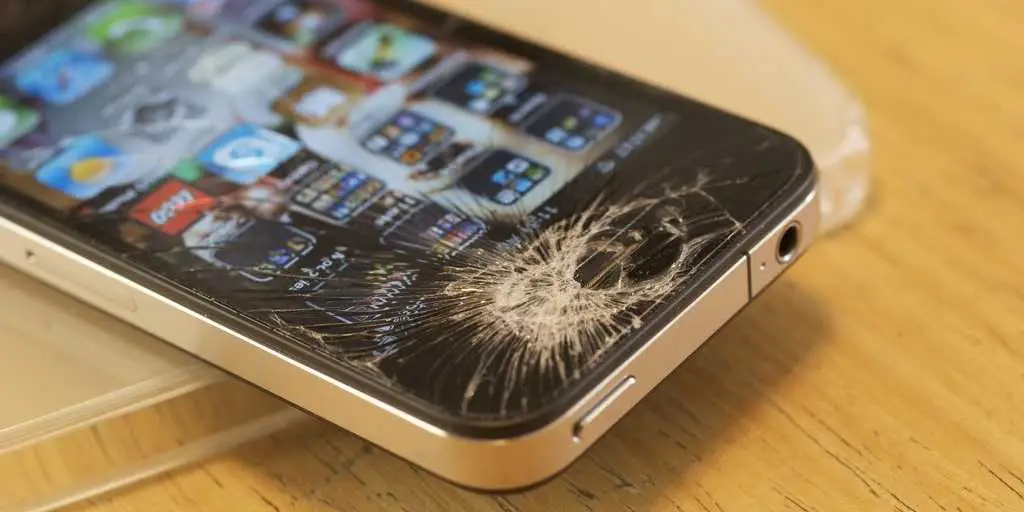
First, examine the damage carefully. Is the screen cracked but still responsive, or is it completely black and unresponsive? Knowing this helps you decide whether to repair it yourself or seek professional help. If your screen has minor cracks but responds normally, a simple repair might suffice. For more serious damage such as shattered glass or unresponsive display, more extensive intervention may be necessary. Always handle a broken screen carefully to avoid injury from broken glass.Determine If You Can Fix the Screen Yourself
Fixing your iPhone screen at home is possible if the damage is minimal. However, it requires patience, the right tools, and some technical skills. Check your warranty or AppleCare+ coverage before proceeding. If the phone is under warranty, professional repair might be the better choice to avoid voiding your warranty. Keep in mind, DIY repairs may void the warranty if not done correctly.Gather Necessary Tools and Supplies
Before starting a repair, collect the tools you’ll need. Typical supplies include:- Precision screwdriver set (P2 pentalobe and Phillips screwdrivers)
- Plastic opening tools
- Suction cup
- Tweezers
- Replacement screen compatible with your iPhone model
- Adhesive strips or glue for reassembly
Follow a Step-by-Step DIY Repair Guide
Many online resources provide detailed guides with images or videos. Here’s a simplified overview:Step 1: Power Off the Device
Turn off your iPhone completely before starting. This step prevents electrical shorts and further damage.Step 2: Remove the Pentalobe Screws
Use the pentalobe screwdriver to remove screws at the bottom of the phone near the charging port.Step 3: Open the Screen Carefully
Attach the suction cup near the edge and gently lift to create a gap. Use plastic opening tools to separate the screen from the body slowly.Step 4: Disconnect Cables
Disconnect the display connectors carefully with tweezers. Avoid pulling on the cables aggressively.Step 5: Remove the Broken Screen
Detach the broken screen completely, and prepare to attach the new one.Step 6: Install the New Screen
Reconnect the display cables, align the new screen, and press gently into place.Step 7: Reassemble the iPhone
Replace the pentalobe screws, ensure all connections are secure, and power on the device to test.Professional Repair Options
If DIY repair seems daunting or the damage is severe, professional repair services are recommended.- Apple Store: Offers official repairs with genuine parts, but can be costly and may require an appointment.
- Authorized Service Providers: Provide reliable repairs with warranty protection.
- Third-Party Repair Shops: Usually cheaper, but quality varies. Make sure they use quality parts and have good reviews.
Utilize Screen Repair Kits
Repair kits include all necessary tools and replacement screens. These kits simplify the process and increase success rates for DIYers. Make sure to select a kit compatible with your specific iPhone model. Read reviews to confirm the quality of the parts included.Safety Tips During Repair
Always power down your iPhone before opening it. Use the right tools and work on a clean, static-free surface. Wear gloves if necessary to avoid cuts and to keep oils away from internal components. Be patient and gentle throughout the process.Tips for Post-Repair Care
After fixing your iPhone, monitor its performance. Test all functions, especially the display, touch responsiveness, and cameras. Avoid dropping your phone again by using a sturdy case and screen protector. Regular maintenance can extend the life of your repair.Cost Considerations for Repair
DIY repairs cost less but involve risks. Professional repairs are more expensive but offer a warranty and less hassle. Typical costs include:| Repair Method | Price Range |
|---|---|
| DIY Screen Replacement | $30 – $80 |
| Official Apple Repair | $129 – $329 (depending on model and warranty) |
| Third-Party Repair Service | $100 – $200 |
Preventing Future Screen Damage
Invest in a good protective case and screen protector. Avoid situations where your phone might fall or be exposed to sharp objects. Keep your phone away from extreme temperatures and moisture. Regularly clean your screen to prevent scratches and other damage.Summary of Important Points
– Assess the damage carefully before proceeding. – Use proper tools and quality replacement parts. – Follow detailed guides or seek professional help if unsure. – Protect your phone from future damage with cases and screen protectors. – Consider costs, warranty, and convenience when choosing repair options. Fixing an iPhone with a broken screen can be straightforward if you understand the process and have the right tools. Whether you choose to repair it yourself or seek professional help, taking prompt action can save your device and money.How to use your phone if the screen is broken 🤯 #lifetips #lifehacks #iphonetips #iphonetricks
Frequently Asked Questions
What are the steps to temporarily repair a cracked iPhone screen at home?
If your iPhone screen is cracked, you can perform a temporary fix by applying a screen protector or clear tape over the damaged area. This helps prevent further cracking and minimizes glass shards from falling out. Clean the screen thoroughly before applying the protector or tape to ensure it stays in place. Keep in mind, this is only a short-term solution, and professional repair is recommended for a permanent fix.
How can I determine if my iPhone needs a screen replacement or just a repair?
Check for signs like persistent display issues, unresponsive touch, or visible cracks that affect visibility. If the screen shows black spots, flickering, or touch sensitivity problems, replacing the entire screen usually provides the best result. Minor cracks that do not interfere with functionality might be temporarily managed, but a full replacement offers a long-lasting solution and restores the device’s original appearance and performance.
Are there any risks involved in attempting a DIY screen repair on my iPhone?
Yes, attempting a DIY repair can result in further damage to internal components if not done carefully. Using improper tools or techniques may cause additional cracks, touch issues, or data loss. Additionally, handling fragile parts like the LCD or biters can pose safety hazards. If you’re not experienced with delicate electronics, seeking professional repair services is the safest option to ensure your device functions correctly afterward.
What should I consider before choosing a professional repair service for my broken iPhone screen?
Look for certified repair providers with good reputation and reviews. Confirm that they use genuine replacement parts compatible with your iPhone model. Ask about warranties or guarantees on their repair work to ensure quality. Comparing prices and turnaround times also helps you make an informed decision. Choosing an authorized service provider typically ensures your device receives proper care and original components.
Final Thoughts
To fix an iPhone with a broken screen, start by turning off your device to prevent further damage. Use a specialized toolkit to carefully remove the screen and disconnect the display connectors. If you’re comfortable, follow detailed guides for replacing the screen yourself or visit a professional repair service. In conclusion, knowing how to fix iPhone with broken screen involves careful handling and selecting the right repair method. Proper repair techniques ensure your device works perfectly again and prolongs its lifespan.
Similar Posts