How Do You Know If Airpods Are Fake
To quickly determine if your AirPods are genuine or fake, check the packaging, build quality, and pairing process closely. Authentic AirPods feel well-crafted, connect seamlessly with Apple devices, and often come with specific serial numbers that can be verified. Counterfeit versions usually have noticeable imperfections, inconsistent sound quality, and may not support all features like automatic ear detection.
If you’re wondering whether your AirPods are real, there are several signs to look for. Fake AirPods often come with subpar packaging, uneven seams, and incorrect logos. They might also face pairing issues, lack certain features, or have a different weight and design compared to authentic models. Making these checks can help you avoid falling for counterfeit products and ensure you’re investing in genuine Apple quality. Whether purchasing online or from a store, a quick inspection can save you from future headaches with faulty or fake AirPods.

How Do You Know If AirPods Are Fake?
Understanding the Importance of Authenticity
Knowing whether your AirPods are real or fake is important because genuine AirPods offer better sound quality and durability. Fake AirPods often have poor audio, cheap materials, or may not work correctly. Identifying authentic AirPods helps you avoid wasting money on low-quality copies.
Examine the Packaging
Start by looking at the box. Real AirPods come in high-quality packaging with clear printing and precise alignment. Fake packaging may have blurry images, misspellings, or uneven fonts. Check for the Apple logo; it should be crisp and correctly placed.
Inspect the Box Details
- Fonts and Text: Authentic boxes use consistent fonts without spelling mistakes.
- Color Quality: The colors should be vibrant and match official product images.
- Barcodes and Serial Numbers: These should be clear and match the serial number on the device.
Check the Serial Number
The serial number on your AirPods can tell you if they are genuine. Visit Apple’s official website and enter your serial number in the “Check Coverage” section. If the website confirms the serial number, your AirPods are authentic.
Serial Number Location
On genuine AirPods, the serial number is printed inside the charging case lid or on the charging case itself. Fake AirPods often lack a serial number or have an incorrect one.
Assess the Design and Build Quality
Authentic AirPods have a sleek design with smooth finishes. Fake models often feel cheaper, with rough edges or uneven parts. The weight of genuine AirPods is balanced; fakes might feel lighter or heavier due to poor materials.
Compare with Official Images
Use Apple’s official website to compare design details like size, shape, and color. Look especially at the stem length, charging interface, and overall fit.
Inspect the Charging Case
The charging case is a major indicator of authenticity. Genuine cases have a high-quality finish, a smooth hinge, and precise button placement.
Key Features to Check
- LED Light: Genuine cases have an LED indicator that shows charging status reliably.
- Charging Port: The port should be a standard lightning port, with tight fitting pins.
- Ease of Opening: The case should open smoothly without resistance.
Test the Connectivity
Authentic AirPods connect seamlessly to Apple devices via Bluetooth. Fake AirPods may have difficulty pairing, disconnect frequently, or not appear in your device’s Bluetooth list at all.
Pairing Process
Place your AirPods close to an Apple device and watch for the pairing pop-up. Genuine AirPods show a clear prompt with the Apple logo, while fakes may not.
Evaluate Sound Quality and Features
Real AirPods deliver crisp, clear audio with effective noise cancellation or transparency modes. Fakes typically sound muffled or distorted.
Using the AirPods
Listen carefully to the audio quality, bass levels, and voice clarity during calls. Genuine AirPods also support features like automatic ear detection and quick switching between devices.
Check the Physical Labels and Markings
Authentic AirPods have precise markings, with the right and left earpieces labeled correctly. The size and font are consistent and clean.
Material and Finish
Look for a smooth, matte finish with no rough edges. Fake AirPods might have visible seams, uneven coloring, or cheap plastic textures.
Compare Price and Seller Reputation
A significantly lower price than retail suggests the product might be fake. Always buy from authorized Apple stores or reputable retailers.
Seller Credentials
Check reviews, ratings, and customer feedback before purchasing. Avoid deals that seem “too good to be true.”
Additional Tips to Confirm Authenticity
- Use the Find My App: Genuine AirPods are detectable in the Find My app if paired with an Apple ID.
- Examine the Firmware: Authentic AirPods update firmware automatically via Apple devices. Fake ones often cannot update.
- Test Battery Life: Fake AirPods often have poor battery performance or do not hold a charge.
Common Signs of Fake AirPods
Some tell-tale signs include odd logos, poor sound quality, faulty charging cases, or mismatched serial numbers. Fake models often lack the smooth, premium feel of genuine AirPods.
Summary Table of Key Differences
| Feature | Authentic AirPods | Fake AirPods |
|---|---|---|
| Packaging Quality | High-resolution images, crisp fonts, correct logos | Blurry images, misspelled words, poor print quality |
| Serial Number | Located inside lid or case, matches Apple records | Missing or incorrect serial number |
| Build Material | Smooth, durable, high-quality plastic | Cheap, rough or uneven plastic |
| Sound Quality | Crisp sound with balanced bass and treble | Distorted or muffled audio |
| Connectivity | Seamless pairing and quick device switching | Difficulty pairing or frequent disconnects |
Being able to distinguish real from fake AirPods saves money and ensures better performance. Carefully examine every detail, from packaging to sound quality, to make sure you have authentic products. Remember, purchasing from trusted sources is the best way to guarantee quality and avoid counterfeit items.
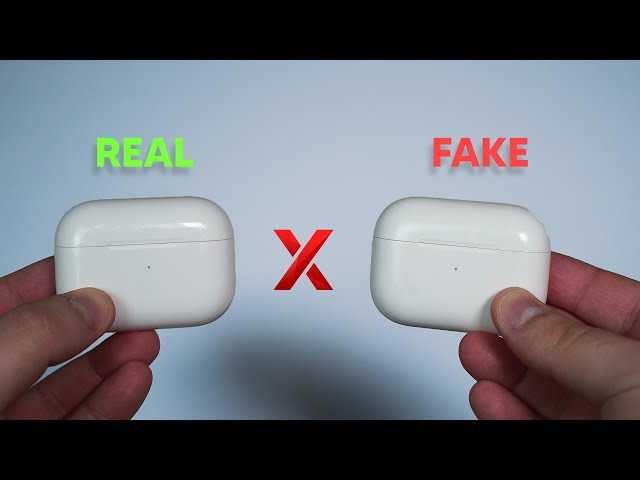
How to DETECT if your AirPods are Fake❌ (2 ways)
Frequently Asked Questions
What physical signs indicate an AirPods might be counterfeit?
Counterfeit AirPods often have noticeable physical defects such as uneven seams, misspelled markings, or incorrect logos. Genuine AirPods typically have a high-quality finish, precise engraving, and properly aligned parts. If the charging case feels bulky, has a cheap feel, or the earbuds look irregular, they could be fake.
How can I verify the serial number on AirPods?
Check the serial number on the AirPods or their case and compare it with the official Apple website. Authentic serial numbers usually turn up specific device details when entered into Apple’s verification tool. If the serial number does not appear or shows inconsistent information, your AirPods may be counterfeit.
What should I listen for to identify fake AirPods?
Genuine AirPods deliver clear, balanced sound with active noise cancellation and seamless audio quality. Fake versions often produce muffled audio, lack bass, or have inconsistent sound quality. Additionally, fake AirPods may have delays in audio sync or produce audio artifacts during playback.
How does the pairing process differ between real and fake AirPods?
Authentic AirPods pair quickly and effortlessly with Apple devices using their proprietary system. Fake AirPods might require multiple attempts to connect, have a longer pairing process, or may not connect at all to Apple devices. Pay attention to the pairing animation and responsiveness during the process.
What features or functions can reveal that AirPods are counterfeit?
Genuine AirPods support features like automatic device switching, battery status display, and seamless integration with iOS. Fake models often lack these features or have limited functionality. If your AirPods do not respond to touch controls or do not show battery levels in your device, they might be fake.
Final Thoughts
Knowing if AirPods are fake can save you money and ensure quality. Check the build quality—genuine AirPods have a smooth finish and precise detailing. Verify the pairing process; authentic ones connect seamlessly to Apple devices. Also, examine the packaging and serial number for authenticity.
In addition, test audio quality and features like the sensors and charging case. Fake AirPods often lack the sharp sound and smooth operation of genuine products. By paying attention to these signs, you can easily spot whether your AirPods are real or fake.
how do you know if airpods are fake? The answer lies in examining build details, pairing, and features closely. Staying alert to these signs guarantees you make well-informed purchasing decisions.

Similar Posts