Best Way To Use Airpods Pro 2 For Optimal Sound Quality

Best Way to Use AirPods Pro 2
Understanding the Features of AirPods Pro 2
AirPods Pro 2 come with advanced features that enhance your listening experience. The adaptive transparency mode allows you to stay aware of your surroundings while blocking out loud noises. Active noise cancellation helps you focus on your music or calls by reducing background sounds. The personalized fit with multiple ear tip sizes ensures comfort and seals out noise effectively. Understanding these features allows you to use your AirPods Pro 2 more efficiently.Maximizing Comfort and Fit
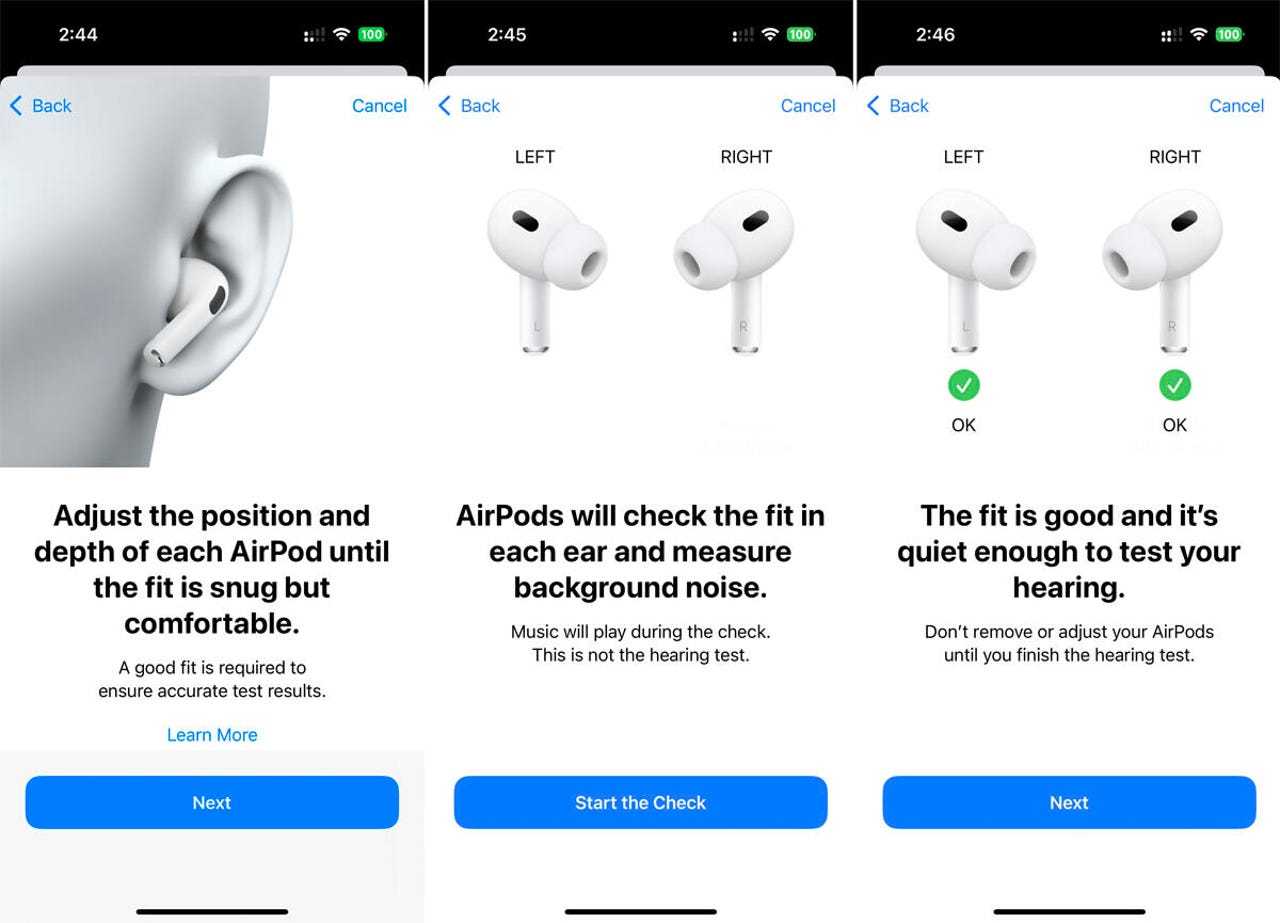
Proper fit is essential for both comfort and sound quality. Try different ear tip sizes to find the best seal for your ears. Use the Ear Tip Fit Test in the Settings app to verify that your AirPods Pro 2 fit correctly. A good fit improves noise cancellation and battery life. Remember, uncomfortable or loose fitting earbuds can cause listening fatigue and reduce sound quality.Tips for Better Fit
- Start with the smallest ear tip and work your way up.
- Insert the AirPods Pro 2 gently and twerk slightly for a snug fit.
- Use the Ear Tip Fit Test to confirm the best seal.
Optimizing Sound Quality
Audio quality depends on proper usage and settings. Make sure your AirPods Pro 2 are clean and free from debris. Adjust the volume to avoid distortion and hearing damage. Enable the Personalised Spatial Audio feature for an immersive listening experience tailored to your head movements. Use the equalizer settings on your device for custom sound preferences.Additional Sound Tips
- Keep your AirPods Pro 2 updated with the latest firmware for improvements.
- Use Active Noise Cancellation in noisy environments for clarity.
- Switch to Transparency Mode outdoors to stay aware of surroundings.
Managing Connectivity and Battery Life
Ensure your AirPods Pro 2 are always connected smoothly by keeping them within Bluetooth range of your device. Use the device’s Bluetooth settings to reconnect or switch devices seamlessly. To extend battery life, turn off Active Noise Cancellation and Transparency Mode when not needed. You can also enable the ‘Optimize Battery Life’ feature in settings.Battery Tips
- Charge your AirPods Pro 2 regularly and avoid letting the battery drain completely.
- Store your AirPods in the charging case when not in use.
- Use the MagSafe or Lightning cable for fast charging.
Controlling Your AirPods Pro 2
Using gestures and controls effectively helps you navigate without reaching for your device. The force sensor on the stem allows you to play, pause, skip tracks, and switch between modes. Customize the Control Center on your device for quick access to frequently used features. Take advantage of Siri integration for hands-free commands.Control Tips
- Press once to play or pause audio.
- Press twice to skip forward.
- Press thrice to skip backward.
- Press and hold to switch between Noise Cancellation and Transparency Mode.
Using AirPods Pro 2 During Calls
The built-in microphones in AirPods Pro 2 provide clear call quality. Use the Ear Tip Fit Test to ensure your microphone picks up your voice accurately. Switch to Voice Mode when making calls for better clarity. Enable Noise Cancellation to minimize background noise during calls.Best Practices for Calls
- Position your head naturally while speaking for better microphone pickup.
- Use Siri to answer or end calls for convenience.
- Adjust the volume during calls to hear clearly without straining.
Leveraging Special Modes for Different Scenarios
The AirPods Pro 2 have modes suited for various activities. Active Noise Cancellation is ideal for commuting or focusing. Transparency Mode helps you stay aware of your environment when walking or cycling. Adaptive Transparency adjusts noise levels based on your surroundings, providing comfort during outdoor activities.Mode Selection Tips
- Switch to Noise Cancellation in noisy places like airplanes or trains.
- Use Transparency Mode when you need to converse or stay alert outdoors.
- Enable Adaptive Transparency for a balanced experience during outdoor activities.
Maintaining and Caring for Your AirPods Pro 2
Regular cleaning keeps your AirPods Pro 2 functioning optimally. Use a soft, dry cloth to wipe the earbuds and charging case. Avoid inserting sharp objects into the mesh to prevent damage.Cleaning Tips
- Remove ear tips and clean with a damp cloth.
- Use a dry brush to clean the speaker grille gently.
- Keep the charging contacts free of dust and debris for reliable charging.
Enhancing Your Experience with Accessories
Consider using accessories like ear tip replacements, cases, or armbands for improved usability. Carrying a dedicated charging case ensures your AirPods Pro 2 are always ready. Use silicone covers to protect against scratches and accidental drops.Accessory Tips
- Select ear tips with better noise isolation.
- Choose a protective case for travel and storage.
- Invest in a portable charger for extended use on the go.
Troubleshooting Common Issues
If you encounter connectivity or sound problems, restart your device and reset your AirPods Pro 2. Ensure your device software is up to date. For sound issues, check for debris or earwax blocking the microphones or speakers.Quick Fixes
- Reset your AirPods Pro 2 by holding the setup button on the case.
- Forget and re-pair them with your device.
- Update your device’s firmware and software regularly.
Frequently Asked Questions
How can I optimize the noise cancellation feature on my AirPods Pro 2?
To get the most out of the noise cancellation feature, ensure that the AirPods Pro 2 fit snugly in your ears. Use the different ear tip sizes provided to find the best seal. You can also toggle the noise controls in the Control Center or Settings to activate or adjust noise cancellation levels based on your environment. Regularly clean your AirPods Pro to prevent any blockage that might reduce effectiveness.
What is the best way to manage battery life on AirPods Pro 2?
Maximize battery life by turning off active noise cancellation and Transparency mode when you don’t need them. Store your AirPods Pro in their charging case when not in use to keep them topped off. Avoid exposing them to extreme temperatures, as this can affect battery performance. Also, periodically check and update the firmware for improved efficiency and performance.
How should I properly clean my AirPods Pro 2 for optimal sound quality?
Use a soft, dry cloth to gently clean the exterior of the AirPods Pro. Remove debris from the ear tips with a mild alcohol wipe or a lint-free cloth. Use a small, dry brush or a soft-bristled brush to clear any wax or dust from the speaker mesh. Avoid using liquids or abrasive materials that could damage the delicate components. Regular cleaning helps maintain sound quality and reduces the risk of ear infections.
What are the best practices for customizing controls on AirPods Pro 2?
Set up the controls through your device’s Bluetooth settings or the device-specific app. You can customize tap and press functions to control playback, switch noise modes, or access Siri. Practice using these controls to become familiar with their operation. Adjusting the controls to suit your preferences enhances your overall experience and makes managing your AirPods Pro more intuitive.
How can I ensure a secure and comfortable fit with my AirPods Pro 2?
Select the ear tips that fit your ears best and try different sizes to find the most secure seal. Insert the AirPods Pro gently, making sure they sit comfortably without causing pressure. If you experience discomfort, adjust the fit or try different ear tips. A proper fit not only improves sound quality but also ensures effective noise cancellation and comfortable wear during extended use.
Final Thoughts
The best way to use AirPods Pro 2 is to personalize the fit for comfort and optimal sound quality. Adjust the ear tips and earbud positioning regularly. Enable noise cancellation during noisy environments for a better experience. Keep your firmware updated to access the latest features and improvements. Use the controls to switch between modes quickly and efficiently. In conclusion, the best way to use AirPods Pro 2 involves customizing fit, maintaining updates, and mastering control features for maximum benefit.
Similar Posts































