How To Put Airpods In The Right Way For Better Sound
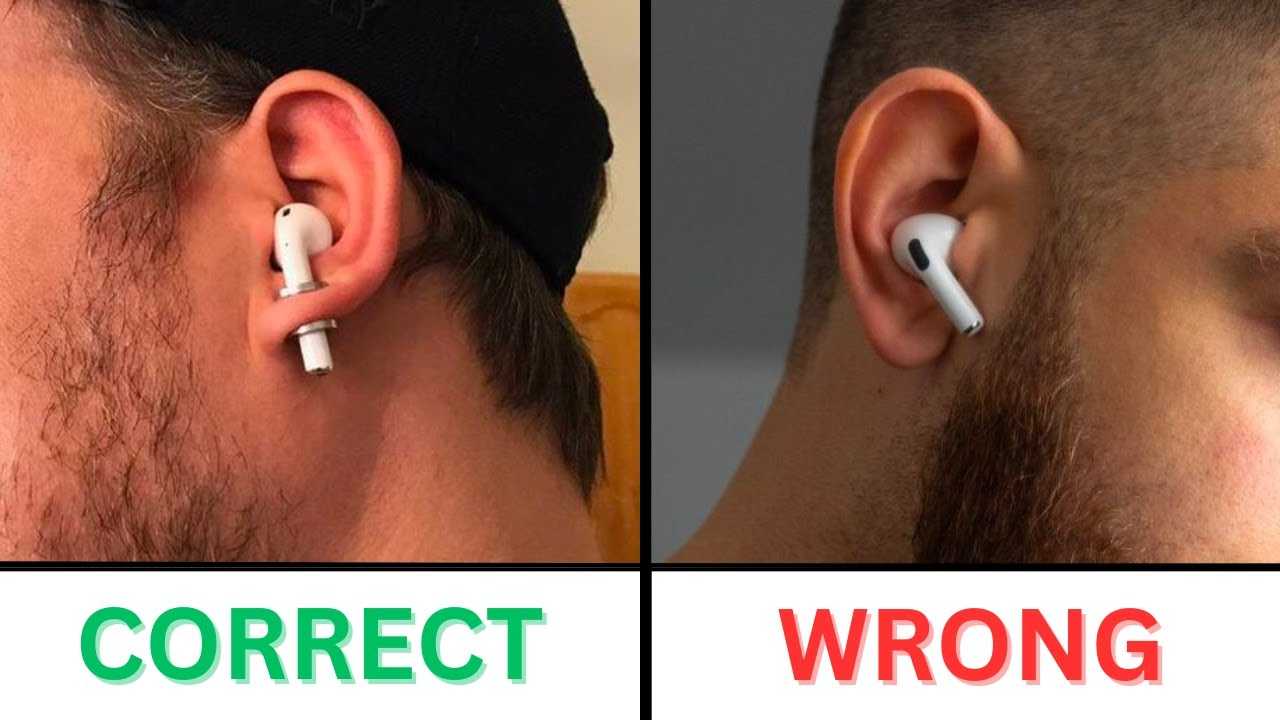
To ensure your AirPods fit perfectly and work seamlessly, insert the right AirPod correctly by aligning it with your ear canal and gently twisting it into place. The key is to hold the AirPod comfortably and find that snug, secure position for optimal sound and comfort.
In short, place the AirPod into your ear with the stem pointing downward, then gently twist or rotate it until it sits comfortably and securely. Make sure it’s properly aligned with your ear canal and not too loose or too tight for the best experience.
Getting your AirPods in the right way can make a huge difference in sound quality and comfort. If you’re new to using them, it’s easy to slip them in incorrectly, which can lead to discomfort or poor sound. Proper placement involves aligning the AirPod with your ear canal and gently twisting it into place so it fits snugly. This not only improves audio clarity but also helps the AirPods stay in place during movement. Whether you’re wearing them during a workout or just listening to music at home, taking a moment to insert them correctly ensures you get the best possible listening experience every time.

How to Put AirPods in the Right Way
Understanding the Basics of AirPods Insertion
Putting your AirPods in correctly is key to enjoying clear sound and comfortable fit. Most users overlook the importance of proper placement, which can lead to poor audio quality or discomfort. Before diving into detailed steps, it’s helpful to know that each AirPod is designed with an ergonomic shape to fit snugly in your ear.
Choosing the Correct Ear Tip (If Using Silicone Tips)
Some AirPods models come with silicone ear tips. Picking the right size is crucial for comfort and sound quality. To find the best fit, try different sizes until the ear tip feels secure and comfortable without causing pain or pressure. A proper seal ensures better sound isolation and bass response.
Identifying the Left and Right AirPods
AirPods are labeled with an “L” for the left ear and an “R” for the right ear. Always check this before inserting them to avoid discomfort and to ensure optimal audio experience. Incorrect insertion can affect microphone quality and noise cancellation.
Preparation Before Insertion
Start with clean hands to prevent dirt or bacteria from transferring to your AirPods. Make sure your ears are clean and dry for a better fit. If you’re using silicone tips, attach the correct one before proceeding.
Step-by-Step Guide to Insert AirPods Correctly
- Hold your AirPod by the stem with your thumb and index finger.
- Gently insert the AirPod into your ear canal, aligning it with the natural shape of your ear.
- Push lightly until you feel a secure fit, but avoid forcing it in.
- Adjust the angle slightly for a better seal and comfort.
- Repeat the process with the other AirPod, ensuring both fit properly.
Proper Positioning for Different Ear Shapes
Everyone’s ears are unique, so you might need to tweak how you insert your AirPods. For ears with a wider opening, a deeper insertion may be necessary. Conversely, if your ears are smaller, a shallower fit is more comfortable and effective. Adjust the angle and depth based on what feels best for stability and sound quality.
Ensuring a Secure Fit
A good fit prevents AirPods from falling out during movement. To achieve this, gently twist or rotate the AirPod after insertion, aiming for a snug but comfortable feel. If they keep slipping out, try a different ear tip size or adjust the angle.
Tips for Long-Term Comfort
Comfort is essential for prolonged use. Take short breaks if you feel any discomfort or pressure. Regularly clean your AirPods to remove earwax and debris, which can impact fit and sound. Replace silicone tips if they become worn out or lose elasticity.
Common Mistakes and How to Avoid Them
Not inserting AirPods far enough into your ears can lead to poor sound quality. Conversely, pushing too hard can cause discomfort or damage. Always aim for a smooth, gentle insertion until they sit comfortably. Avoid holding your AirPods incorrectly — grip the stem rather than the tips to keep them clean.
How to Adjust AirPods for Better Sound and Fit
If your audio sounds muffled or there’s a lot of external noise, check the fit. Gently twist or rotate the AirPod to deepen or loosen the seal. Use the ear tip size that provides the best balance between comfort and sound isolation.
Using Ear Hooks or Accessories for a Better Fit
For active users or those with irregular ear shapes, ear hooks or silicone ear wings can secure AirPods in place. These accessories can be purchased separately and help prevent slipping during workouts or vigorous activities.
Maintaining Proper Hygiene and Care
To keep your AirPods in optimal condition, clean them regularly with a soft cloth. Avoid using harsh chemicals that could damage the material. Proper hygiene also prevents ear infections and ensures the best fit and sound quality.
Troubleshooting Common Fit and Placement Issues
If your AirPods feel loose or uncomfortable, try changing the ear tip size or adjusting the angle. For persistent issues, consider resetting your AirPods or consulting Apple Support. A proper fit enhances both comfort and audio performance.
Related Topics: Enhancing Your AirPods Experience
- How to Clean AirPods Properly
- Best Ear Tips for Different Ear Shapes
- Securing AirPods During Exercise
- Maximizing Noise Cancellation on AirPods
Summary
Getting your AirPods in the right way involves choosing the proper tips, correct insertion angle, and ensuring a snug fit. Adjusting them slightly after placement can significantly improve sound quality and comfort. Regular maintenance and accessories can make your AirPods more secure and longer-lasting.
Proper placement not only improves your listening experience but also prolongs the lifespan of your AirPods. By following these detailed steps and tips, you can enjoy high-quality audio while keeping your ears comfortable.
Keep AirPod Pro 2 from falling out of your ears! – How to wear AirPod pros
Frequently Asked Questions
How should I position my AirPods for a proper fit?
Hold the AirPods with the stem pointing downward and gently insert the silicone tip into your ear canal. Rotate the AirPod slightly to align it comfortably inside your ear, ensuring the speaker faces inward for optimal sound. A proper fit prevents discomfort and helps maintain sound quality.
What is the best way to insert AirPods to avoid them falling out?
Gently push the AirPods into your ears while keeping a slight tilt so the stem rests comfortably outside your ear canal. Twist the AirPods slightly for a snug fit. Make sure the silicone tips sit securely without causing pain, which will keep them stable during movement.
How do I know if I am inserting my AirPods correctly?
Listen for a clear, balanced sound without any distortion or external noise leakage. You should feel a gentle seal around your ear canal without discomfort. If the audio feels muffled or the AirPods feel loose, readjust their placement until they feel secure and comfortable.
Are there any tips for adjusting AirPods once they are inside my ears?
Gently twist or rotate the AirPods to improve their fit and comfort. If you experience discomfort or sound issues, remove them and reposition slightly, ensuring the silicone tips create a seal without applying too much pressure. Regular adjustments can enhance both comfort and sound quality.
Final Thoughts
Putting your AirPods in the right way ensures optimal sound and comfort. First, identify the left and right AirPods, often marked inside the case. Gently insert the earpiece into your ear canal, adjusting slightly for a snug fit.
Remember, how to put AirPods in the right way depends on proper placement to prevent discomfort and improve audio quality. Taking a moment to position them correctly makes a difference. Follow these simple steps for a better experience every time.

Similar Posts