How To Iphone Screen Repair: Step-By-Step Guide
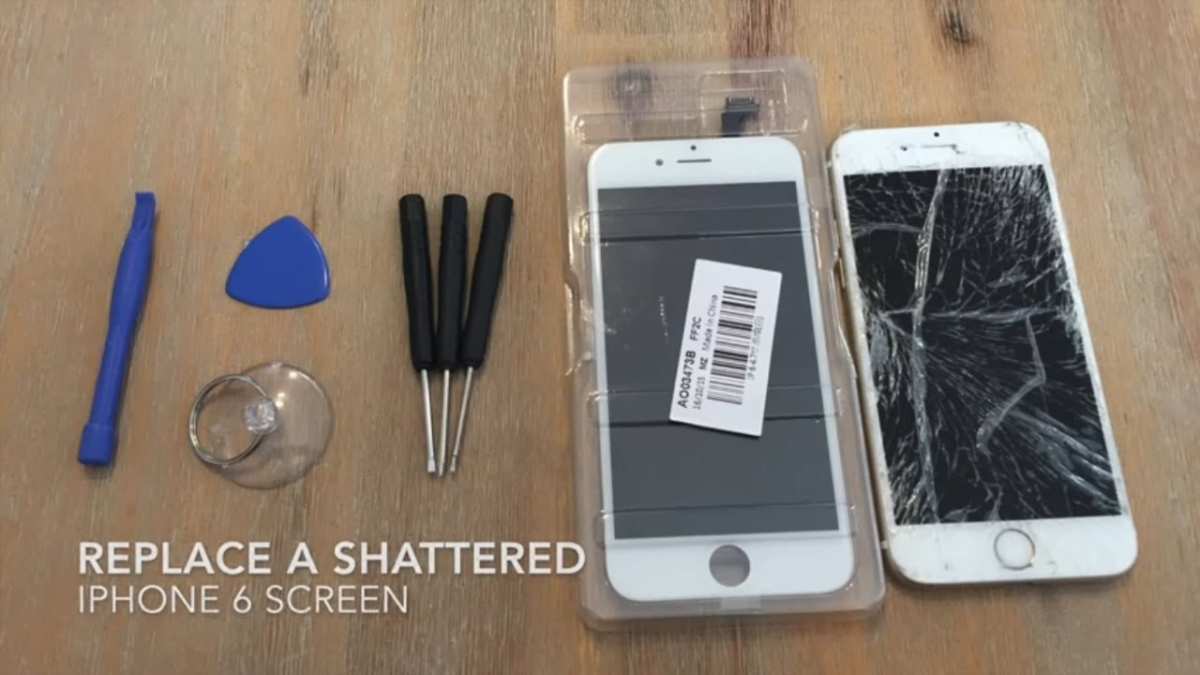
If your iPhone screen is cracked or unresponsive, the best solution is often a quick repair. **Knowing how to iPhone screen repair can save you time and money.** Many choose to visit a professional repair shop, but DIY options exist for those confident enough. Whether you opt for a repair kit or a technician, understanding the process helps ensure your screen gets fixed properly. This guide walks you through simple steps to restore your iPhone’s display effectively.

How to iPhone Screen Repair: Step-by-Step Guide to Fix Your Phone
Repairing your iPhone screen can seem like a daunting task, especially if you’re new to phone repairs. But with the right knowledge and tools, you can save money and fix your device at home or just know what to tell a repair technician. In this guide, we’ll walk you through everything you need to know about how to repair your iPhone screen, from understanding the signs of damage to choosing the best repair options.
Understanding When Your iPhone Screen Needs Repair
Knowing when to repair your iPhone screen is the first step. Not every crack or scratch requires immediate attention, but certain signs indicate urgent repair:
- The screen is cracked or shattered
- Touch responsiveness is inconsistent or entirely non-functional
- You see black spots or lines on the display
- The display is flickering or showing distorted colors
- There’s water damage or the screen is unresponsive after a drop
If any of these signs appear, repairing or replacing your screen becomes a priority to protect the internal components and restore your device’s functionality.
Understanding the Components of an iPhone Screen
Before diving into repair steps, it helps to understand what makes up your iPhone screen. This knowledge makes repairs easier and safer.
Display Assembly
The display assembly includes the LCD or OLED screen, which shows the images and videos. It is delicate and prone to damage when dropped.
Touch Digitizer
This layer registers your finger’s touch and sends signals to the phone’s processor. If it’s broken, the screen might look fine but won’t respond to touch.
Glass Cover
The outermost layer protects the display and digitizer. Cracks or shattering often only affect this layer but can also damage underlying parts.
Supporting Layers and Connectors
Various layers and small connectors hold everything together. During repair, these tiny parts need careful handling to avoid further damage.
Tools Needed for iPhone Screen Repair
Performing a screen repair requires specific tools. Here’s what you should gather before starting:
- Small Phillips and Pentalobe screwdrivers
- Plastic pry tools or opening picks
- Suction cup
- Tweezers with smooth tips
- Adhesive strips or glue for reassembly
- Anti-static wrist strap (optional but recommended)
- Screen replacement kit (includes a new display and necessary tools)
Using the right tools reduces the risk of causing additional damage during repair.
Step-by-Step Process to Repair an iPhone Screen
Now, let’s go through the common steps to replace or fix your iPhone screen. Remember to work patiently and carefully, especially if you’re doing it on your own.
Preparing Your Workspace
Choose a clean, flat surface with good lighting. Keep all tools and parts organized to avoid losing small screws and components. Make sure to power off your iPhone completely before starting.
Removing the Screen
Follow these general steps, but keep in mind that some iPhone models may have different procedures:
- Use the Pentalobe screwdriver to remove screws at the bottom of the device.
- Apply a small amount of heat around the edges to soften the adhesive (be cautious not to overheat).
- Place the suction cup near the edge and gently pull to create a gap.
- Insert the plastic pry tool into the gap and gently slide around the perimeter to release clips.
- Lift the screen carefully, avoiding pulling on the cables attached underneath.
Disconnecting Cables and Removing the Display
Inside, you’ll see several connectors:
- Use the screwdriver to remove the screws securing these connectors.
- Use the tweezers or plastic pry tools to disconnect the cables gently.
- Remove the display assembly entirely from the device.
Replacing the Screen
Once the old screen is off, follow these steps:
- Transfer any necessary components from the old screen to the new one (like the home button or camera modules).
- Reconnect the display cables carefully, ensuring they click into place securely.
- Reassemble the device by reversing the removal steps.
- Screw everything back in place, carefully tightening without overdoing it.
Testing the Repair
Power the device back on before sealing entirely to check the new screen’s responsiveness and display quality. If anything looks off, double-check connections.
Common Challenges During iPhone Screen Repairs and How to Overcome Them
While repairing your iPhone screen is straightforward, you might face some hurdles:
Fragile Components
Small connectors and ribbons are delicate. Use plastic tools and avoid excessive force.
Adhesive Removal
Old adhesive can be stubborn. Carefully heat the edges and use pry tools to lift the screen without cracking it further.
Reassembly Difficulties
Aligning connectors and re-inserting screws can be tricky. Work systematically and double-check each step.
When to Seek Professional Help
Despite the ability to repair your iPhone at home, certain situations call for expert assistance:
- The damage is beyond superficial cracks, affecting internal components
- You lack the necessary tools or experience
- The device isn’t powering on after repair attempts
- You notice distorted visuals or persistent touch issues
Professional repair centers have specialized tools and trained technicians who can handle complex issues safely.
Choosing Between DIY Repair and Professional Service
Deciding whether to repair your iPhone screen yourself or visit a professional depends on:
- The extent of damage
- Your comfort level with small electronics
- Budget constraints
- The warranty status of your device
DIY repairs can save money but carry risks of further damage. Professional services might cost more but usually come with guarantees on the work.
Tips to Ensure a Successful iPhone Screen Repair
To make your repair process smoother, keep these tips in mind:
- Watch detailed repair videos specific to your iPhone model before starting
- Work in a dust-free environment to prevent debris from entering your device
- Be patient and take your time with each step
- Keep extra screws and small parts in labeled containers
- Test your device at various stages to catch issues early
Cost Considerations for iPhone Screen Repair
Repair costs vary depending on your iPhone model and where you get the work done:
| Service Type | Estimated Cost |
|---|---|
| Apple Authorized Service Provider | $129–$329 |
| Third-party Repair Shops | $80–$250 |
| DIY Kit | $30–$70 |
Choosing the right repair option balances cost, quality, and warranty considerations.
Maintaining Your iPhone to Prevent Screen Damage
Prevention is better than repair. Keep these habits in mind:
- Use a protective case and screen protector
- Avoid dropping your device by holding it securely
- Keep your phone away from liquids and extreme temperatures
- Clean your screen regularly with a soft, lint-free cloth
Good maintenance extends the life of your device and minimizes repair needs.
—
Getting your iPhone screen repaired doesn’t have to be complicated if you understand the process and prepare properly. Whether you choose to fix it yourself or consult a professional, having the right knowledge ensures your device stays functional and looks good as new. Remember to handle each step carefully, prioritize safety, and don’t hesitate to seek expert help if you feel unsure. Your phone is an important part of your daily life, and taking good care of it helps you stay connected and productive.
Frequently Asked Questions
What tools and materials are necessary for repairing an iPhone screen at home?
To repair an iPhone screen at home, you’ll need a set of specialized tools including a small Phillips screwdriver, a P2 Pentalobe screwdriver, plastic opening tools, a suction cup, tweezers, and a spudger. Additionally, acquire a quality replacement screen designed for your specific iPhone model, adhesive strips or glue, and a clean, static-free workspace. Using the right tools and materials helps ensure a safe and effective repair process.
How can I safely remove the cracked screen without damaging internal components?
Start by turning off your iPhone and removing the SIM card to prevent any electrical damage. Use a heat gun or a heat pad to soften the adhesive around the original screen. Carefully apply a suction cup near the edge of the screen and gently lift it using plastic opening tools. Work slowly to detach the screen, taking care not to pull on any cables connected to the display. Disconnect the display cables carefully with a spudger to avoid damaging internal parts.
What steps should I follow to properly attach the new screen to my iPhone?
Begin by aligning the new screen properly with the frame of your iPhone. Connect the display cables securely to the motherboard, ensuring they latch properly. Apply fresh adhesive strips or glue around the edges of the new screen for a tight fit. Carefully press the screen into place, ensuring there are no gaps. Once secured, power on the device to check for functionality, and then reassemble any remaining components.
Are there common mistakes to avoid during iPhone screen repair?
Yes, a common mistake is rushing the repair process, which can lead to damaging delicate internal parts or misaligning the screen. Avoid using excessive force when removing or installing components, and always ensure the device is turned off before starting. Using incorrect tools or applying insufficient heat can also cause issues. Following detailed instructions and taking your time helps prevent these problems.
Is it possible to repair an iPhone screen without professional help, or should I seek expert assistance?
You can attempt a screen repair at home if you have the right tools, patience, and some technical know-how. However, if you feel uncertain or lack experience, seeking professional help is advisable. Professionals can guarantee a high-quality repair, minimize the risk of further damage, and often offer warranties on their work. Carefully consider your comfort level before proceeding with a DIY repair.
Final Thoughts
To sum up, knowing how to iPhone screen repair can save time and money. Start by turning off your device and gathering the necessary tools such as a pentalobe screwdriver and a plastic prying tool. Follow step-by-step guides carefully or watch tutorial videos to avoid damaging internal components. With patience and proper technique, you can successfully repair your screen and restore your iPhone’s functionality.

Similar Posts































