How Fast Do Macbooks Charge Best Practices And Tips


How Fast Do MacBooks Charge: A Complete Guide
Many MacBook users wonder about the speed at which their devices charge. The charging speed of a MacBook depends on several factors, including the model, charger wattage, and usage during charging. Understanding these elements helps users optimize their charging routines and ensure their MacBooks are ready when needed.
Factors That Influence MacBook Charging Speed
1. MacBook Model and Battery Capacity
Different MacBook models have varying battery sizes and charging technology. For example, a MacBook Air typically has a smaller battery compared to a MacBook Pro. Larger batteries take longer to charge, but the charging process depends on the device’s maximum input power.
2. Charger Wattage and Power Output
The wattage of the charger significantly impacts how quickly your MacBook charges. MacBooks come with chargers ranging from 29W to 96W. Higher wattage chargers can charge compatible models faster, reducing overall charging time.
3. Charging Cable Quality and Compatibility
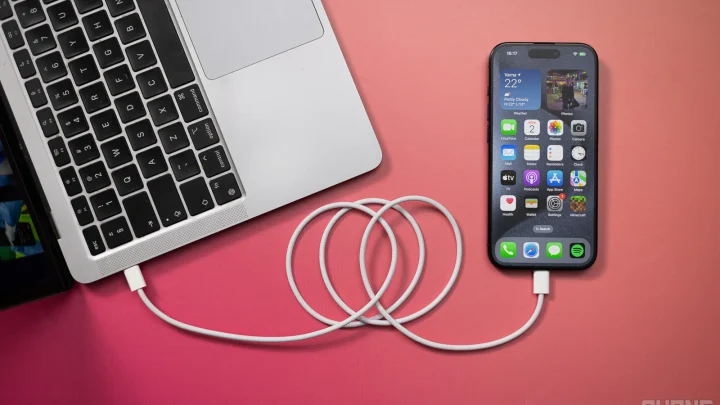
Using the original or certified cables ensures optimal charging speeds. Inferior cables may cause slower charging due to limited power transfer capabilities. Always choose cables that match or exceed your charger’s wattage rating.
4. Usage During Charging
If you use your MacBook heavily while charging, it may take longer to reach a full charge. Heavy tasks like video editing or gaming increase power consumption, slowing down the charging process.
5. Power Source Stability
Charging from a stable power outlet provides consistent power delivery. Fluctuations or interruptions can slow down charging speeds or cause irregularities.
How Long Does It Take for Different MacBook Models to Charge?
1. MacBook Air (M1 and M2)
The MacBook Air with Apple’s M1 or M2 chip typically comes with a 30W or 35W charger. It usually reaches 50% charge in approximately 30 minutes and fully charges in about 2 hours under optimal conditions.
2. MacBook Pro 13-inch and 14-inch
These models often include a 61W or 67W charger. They can charge from 0% to 50% in around 30 minutes. Full charges generally take about 2 to 2.5 hours, depending on usage and battery health.
3. MacBook Pro 16-inch and 15-inch
Equipped with higher-capacity batteries and 87W or 96W chargers, these models can reach 50% in just under 30 minutes. Full charging often takes 2.5 to 3 hours.
Methods to Maximize Charging Efficiency
1. Use the Right Charger
Always use the charger that came with your MacBook or an Apple-certified replacement. Higher wattage chargers can reduce charging time for compatible models.
2. Update macOS Software
Keeping your system updated ensures your MacBook benefits from the latest power management improvements and efficiency features.
3. Minimize Power Usage During Charging
Close unnecessary apps and avoid intensive tasks. Lowering screen brightness and disabling background processes can help your Mac charge faster.
4. Keep MacBook and Charger Clean and in Good Condition
Dirty or damaged ports and cables can hinder charging speeds. Regular cleaning and inspection prevent issues and improve efficiency.
Understanding Fast Charging Technology in MacBooks
1. MagSafe and USB-C Charging
Most recent MacBooks use USB-C PD (Power Delivery), allowing faster charging. MagSafe, reintroduced in some models, also supports fast charging with compatible power adapters.
2. Power Delivery Standards
The PD standard allows high power transfer over USB-C cables, enabling faster charging. MacBooks support up to 100W charging through this protocol, depending on the model.
3. Benefits of Fast Charging
Fast charging reduces downtime and ensures your MacBook is ready quickly. It’s especially useful during busy days when quick power boosts are necessary.
Additional Tips for Optimal Charging
- Charge in a cool, ventilated environment: Heat can slow down charging and impact battery health.
- Don’t let the battery fully deplete regularly: Keeping battery levels between 20% and 80% helps maintain battery performance over time.
- Avoid charging to 100% constantly: Partial charges are better for long-term battery health, though fast charging helps when needed.
Related Topics to Explore
1. Battery Health and Longevity
Learn how charging habits affect your MacBook’s battery life, and tips to extend its lifespan.
2. Troubleshooting Slow Charging
Discover common issues and solutions if your MacBook isn’t charging as fast as expected.
3. Upgrading Chargers and Cables
Find out when it’s advisable to upgrade your charger or cables for better performance.
4. Comparing Charging Speeds Among MacBook Models
A detailed comparison of different models and their charging times helps in choosing the right device based on your needs.
Knowing how fast your MacBook charges helps you plan your day better and ensures your device is always ready. By understanding the influencing factors and using the right accessories, you can optimize your charging experience and keep your MacBook working at its best.
Frequently Asked Questions
What factors influence the charging speed of a MacBook?
The charging speed of a MacBook depends on several factors, including the power adapter’s wattage, the cable used, and the MacBook model. Using a higher-wattage charger, such as the 61W or 96W power adapters, can significantly reduce charging times. Additionally, the MacBook’s current battery level and whether it’s in use while charging can impact how quickly it gains power. Cooler ambient temperatures and avoiding heavy usage during charging help optimize the process as well.
How does the type of charger affect MacBook charging times?
The charger’s wattage directly impacts how fast a MacBook charges. For example, a MacBook with a 61W charger charges faster than one with a 30W charger. Certain models, like the MacBook Pro, are designed to work efficiently with higher-wattage adapters, which can cut down charging time substantially. Using a charger that matches the recommended wattage for your specific MacBook ensures optimal charging speeds without risking damage.
Can charging speed vary between different MacBook models?
Yes, different MacBook models have varying charging capabilities. MacBook Air models typically charge faster due to their lower battery capacities, especially when paired with appropriate chargers. MacBook Pro models, which have larger batteries, may take longer to charge fully. The built-in charging circuitry and battery technology also influence the rate at which each model charges. Upgrading to a compatible higher-wattage charger can improve charging times across models.
Does using the MacBook while charging affect how quickly it charges?
Using your MacBook during charging can slow down the charging process because the power adapter has to supply energy both for usage and battery replenishment. Heavy tasks, like video editing or gaming, further extend the time it takes to reach a full charge. To charge your MacBook more quickly, try to avoid intensive activities while it’s plugged in, especially if you need a rapid boost of battery life.
How long does it typically take for a MacBook to fully charge?
The time it takes to fully charge a MacBook varies depending on the model and the charger used. On average, a MacBook can reach full charge in about 1.5 to 3 hours. MacBook Airs tend to charge faster, often in just around 1.5 hours, while larger MacBook Pro models with bigger batteries may take closer to 3 hours. Using a high-wattage charger and minimizing usage during charging can help speed up this process.
Final Thoughts
The charging speed of MacBooks varies depending on the model and charger used. Generally, newer MacBook models with fast-charging capabilities can reach 50% in about 30 minutes. Using the original or higher-wattage chargers significantly improves charging times. In conclusion, how fast do MacBooks charge depends on the charger and model, but they typically charge quickly when paired with the appropriate power source.
Similar Posts