Best Way To Use Airpods On Plane For Comfortable Listening


Best Way to Use AirPods on Plane
Choosing the Right AirPods Model for Traveling
Using AirPods on a plane starts with selecting the best model for your needs. Apple offers several options, including AirPods, AirPods Pro, and AirPods Max. The AirPods Pro provide active noise cancellation, which significantly reduces engine noise and cabin chatter, making your listening experience more enjoyable. AirPods Max are ideal if you prefer over-ear comfort and premium sound quality, but their size might make them less convenient for travel. When choosing, consider factors like comfort, noise cancellation, battery life, and portability to ensure your AirPods enhance your flight experience.Preparing Your AirPods Before the Flight
Before boarding, it is essential to ensure your AirPods are fully charged. A fully charged case keeps your earbuds powered throughout the flight, preventing interruptions. Connect your AirPods to your device in advance to ensure they pair correctly. Update your device’s software if necessary, as this can improve connection stability and compatibility. Also, download any music or podcasts beforehand, so you are not dependent on in-flight internet, which can be unreliable.How to Connect AirPods to Devices in Flight
Connecting your AirPods to your device is straightforward. Turn on Bluetooth on your device and open the AirPods case near your iPhone or tablet. A prompt will appear to connect; tap on it to pair. Once connected, your AirPods will automatically reconnect each time you open the case close to your device. If you wish to switch between devices, ensure Bluetooth is enabled on each and select your AirPods from the device’s Bluetooth menu.Maximize Noise Cancellation for a Quieter Cabin Experience
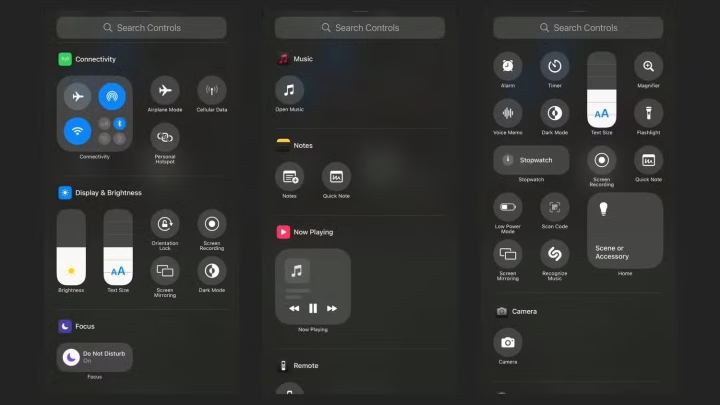
Active noise cancellation (ANC) on AirPods Pro and AirPods Max can block out engine sounds and chatter. To activate ANC, simply press and hold the force sensor or switch the setting in your device’s control center. Using ANC is especially helpful during takeoff, landing, or when the cabin noise becomes loud. Remember that ANC works best with a proper fit; adjust the ear tips of AirPods Pro for a snug seal to enhance noise reduction.Using Transparency Mode for Safety and Awareness
Transparency mode allows you to hear ambient sounds through your AirPods without removing them. This feature is handy when you need to stay aware of announcements or conversations around you. To enable it, press and hold the headphone button or switch it on via your device’s control options. Transparency mode ensures you remain alert while enjoying your favorite music or podcasts, especially during critical moments like boarding or disembarking.Managing Battery Life During the Flight
Long flights can drain your AirPods’ battery, so managing power is vital. Use the charging case to top up your AirPods during boarding or when not in use. Enable automatic ear detection to conserve battery when removed. Turn off features like “Hey Siri” if not needed to save power. If available, consider carrying a portable power bank compatible with Apple devices to charge your case mid-flight.Dealing with Connectivity and Sound Issues
Sometimes, AirPods may disconnect or experience audio glitches during a flight. To fix this, turn Bluetooth off and on again or disconnect and reconnect your AirPods. Resetting your AirPods by holding the setup button on the case can also resolve persistent issues. Keep your device’s software updated to ensure optimal performance and compatibility.Using AirPods in Airplane Mode
Before the flight, set your device to airplane mode to comply with airline regulations. You can then turn on Bluetooth separately to connect your AirPods. This prevents interference with aircraft systems while allowing you to listen to downloaded content offline. Make sure your device is fully charged so that you can enjoy your music or podcasts throughout the flight without needing an internet connection.Additional Tips for Comfortable Listening
Wear your AirPods properly to avoid discomfort during long hours. For AirPods Pro, use the adjustable ear tips for a secure fit. Take breaks to prevent ear fatigue and ensure your ears stay comfortable. Adjust the volume to a safe level to protect your hearing, especially in noisy environments like airplanes.Enhancing Privacy and Security
Ensure that your AirPods are connected only to your device to prevent others from listening in. Turn off “Find My” if you’re concerned about location sharing, or enable it for added security. Be mindful of your surroundings when listening to sensitive information, as Bluetooth signals can sometimes be detected nearby.Related Topics to Improve Your Flight Experience
- Best headphones for airplane travel
- Tips to reduce jet lag and stay comfortable on long flights
- How to stay connected with in-flight entertainment systems
- Using noise-canceling headphones safely during flights
Summary of Key Points
| Tip | Details |
|---|---|
| Choose the right model | AirPods Pro or AirPods Max for noise cancellation |
| Prepare in advance | Charge, update, and download content before flight |
| Connect properly | Pair via Bluetooth, auto-reconnect, switch devices |
| Use noise cancellation and transparency modes | Block noise or stay aware of surroundings |
| Manage battery life | Charge case, turn off unused features, bring portable charger |
| Address issues | Reset or reconnect if problems occur |
| Wear comfortably | Ensure a proper fit, take breaks, adjust volume |
Frequently Asked Questions
How can I minimize noise interference when using AirPods on a plane?
To reduce noise from the aircraft, choose AirPods with active noise cancellation features. Ensure they fit snugly in your ears, and consider using foam or silicone ear tips for a better seal. Adjust the noise cancellation settings to the highest comfortable level to block out engine sounds and chatter, creating a more peaceful listening experience.
What is the best way to manage battery life of AirPods during a long flight?
Charge your AirPods fully before your flight, and carry their charging case to top up the batteries as needed. Turn off active features like noise cancellation when not in use to conserve power. Avoid extremes of temperature, as very cold or hot environments can affect battery performance. If possible, listen with only one AirPod at a time to extend overall usage time.
How can I prevent audio from cutting out or lagging on a plane?
Make sure your AirPods are connected to your device before boarding the plane. Keep your device within range, ideally close to your AirPods, to maintain a strong Bluetooth connection. Avoid using other Bluetooth devices simultaneously, as they can interfere. Restart your device and reconnect your AirPods if you experience persistent lag or interruption issues.
What are some tips to ensure comfort while wearing AirPods on a flight?
Choose the right size of ear tips for your AirPods to ensure a secure fit that feels comfortable over long periods. Take breaks to stretch your ears if you plan to wear them for the entire flight. If discomfort persists, consider switching to over-ear headphones for a more comfortable fit during extended listening sessions.
Should I download movies or music before the flight when using AirPods?
Downloading content ahead of time allows you to listen without relying on in-flight Wi-Fi, which can be unreliable. Save your favorite movies, shows, or playlists locally on your device to avoid interruptions and ensure smooth playback. This way, you can enjoy your entertainment seamlessly using your AirPods throughout your flight.
Final Thoughts
The best way to use airpods on plane is to ensure they are fully charged before the flight. Connect them to your device and enable noise-canceling features for a better experience. Use the airplane mode setting to avoid interference with aircraft systems. Keep your AirPods organized in their case to prevent losing them during travel. Adjust the volume to comfortable levels to protect your hearing and enjoy your media. Following these tips will make your flight more enjoyable and hassle-free.
Similar Posts