Why Do Airpods Connect When In Case Insights

Why Do AirPods Connect When in Case? Exploring the Reasons Behind This Common Behavior
Understanding the Basic Functionality of AirPods
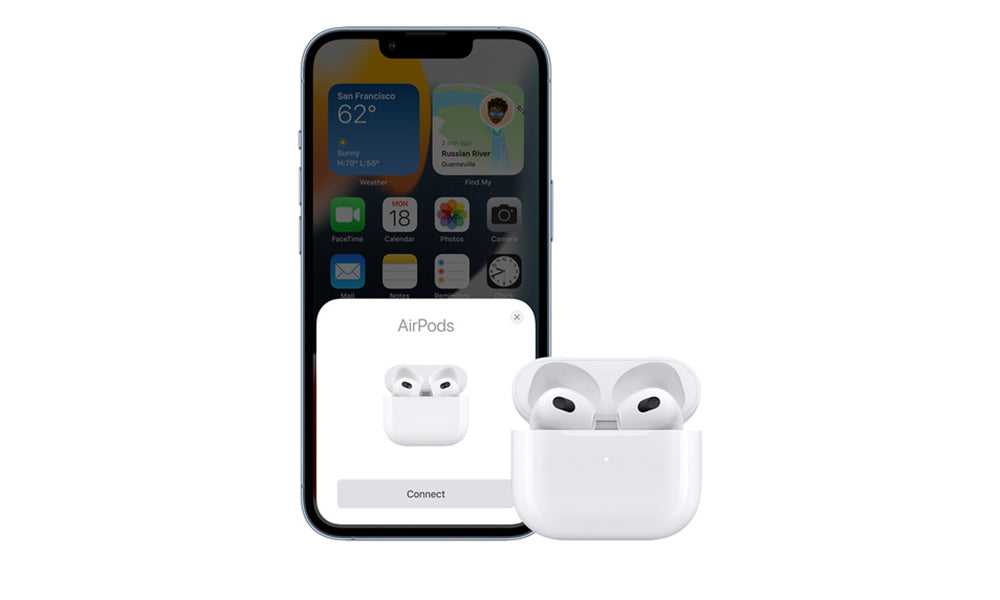
AirPods are designed to connect seamlessly with Apple devices, providing users with quick access to their music, calls, and other audio features. Their primary goal is to make pairing simple and automatic. When you open the case near your device, AirPods usually attempt to connect instantly.The Role of the Bluetooth Connection
Bluetooth technology allows AirPods to communicate wirelessly with your gadget. When the case is open, the AirPods are powered and ready to connect. They constantly look for a nearby device to establish a connection when available.Why Do AirPods Connect When in the Case?
Many users notice that their AirPods connect even when they are sitting inside the case. This behavior can seem confusing at first but makes sense when you understand how AirPods manage power and connectivity.AirPods Are Always in a Low-Power State
AirPods inside their case are kept in a low-power mode. This state allows them to stay ready to connect quickly once taken out. The device’s internal sensors are constantly monitoring for connection requests.The Case Acts as a Charging and Communication Hub
The case doesn’t just charge AirPods. It also facilitates communication with your device. When you open the case, the sensors prompt the AirPods to connect if they aren’t already connected to your device.Proximity and Detection Features
AirPods are equipped with proximity sensors that detect whether they are in your ears or in the case. These sensors help manage when they connect and disconnect.Technical Insights Into AirPods Connectivity
Understanding the technology behind AirPods connection behavior can clarify why they connect when in their case.Automatic Switching and Connection
AirPods are set to automatically connect with paired devices when within Bluetooth range. When the case is open, the connection process is initiated, even if the AirPods are inside it.Memory and Pairing Data Storage
AirPods store pairing information in internal memory. This connection data allows them to recognize your device and connect automatically without requiring manual pairing each time.How the sensors influence connection behavior
The sensors detect whether AirPods are in your ears, in the case, or outside, helping to decide when to connect or disconnect. Inside the case, sensors tell the AirPods they’re not in use, but the Bluetooth connection can still be active if the device requests it.Common Scenarios and Troubleshooting
Knowing why AirPods connect in the case helps when troubleshooting common issues.Unintentional Connections
Sometimes AirPods connect unexpectedly, even when in the case. This can happen when the case is open, or Bluetooth signals are strong. Resetting or updating firmware can often resolve this.How to Prevent Unwanted Connections
You can turn off automatic connection in device settings or disable Bluetooth temporarily. Closing the case fully also helps prevent accidental connection attempts.Battery Drain Concerns
If AirPods keep connecting when in the case, battery life may drain faster. Keep the case closed when not in use to conserve power.Enhancing User Experience and Best Practices
Knowing when and why AirPods connect in their case helps improve how you manage your devices.Proper Handling of AirPods and Case
Always close the case securely to prevent unintended connections and conserve battery life.Updating Firmware for Better Performance
Ensure your AirPods have the latest firmware. Apple releases updates that improve connection stability and fix bugs.Managing Connection Settings
Adjust Bluetooth settings on your device to control automatic connections and prevent interruptions during important tasks.Related Topics to Consider
There are additional factors influencing AirPods connection behavior and user experience.- AirPods Pro vs. Standard AirPods: Differences in connectivity features and sensor technology.
- Battery Maintenance Tips: How to extend the life of your AirPods and case.
- Connection Troubleshooting Guide: Steps to resolve common connectivity issues.
- Compatibility with Non-Apple Devices: How AirPods work with Android or Windows devices.
The Importance of Understanding AirPods Connectivity
Recognizing why AirPods connect when in the case helps users maximize their device’s lifespan and enjoy a smoother experience. Knowing the underlying technology also aids in troubleshooting and optimizing device performance. By managing settings and handling the case properly, users can prevent accidental connections and preserve battery life.Summary of Key Points
- AirPods stay ready to connect even when inside the case due to low-power modes and sensors.
- The case facilitates charging and communicates with the AirPods to manage connection states.
- Proximity sensors detect whether AirPods are in the ears or the case, influencing connection/disconnection.
- Firmware updates and proper handling can improve connection stability and battery life.
- Understanding these factors ensures a better user experience and helps troubleshoot common issues effectively.
Frequently Asked Questions
Why do AirPods sometimes connect even when they are in their case?
AirPods can connect to your device even when in their case if they are not fully sealed or if the case is not closed properly. When the case is slightly open or the AirPods are not securely placed inside, the connection process may initiate because the sensors detect the presence of the earbuds nearby. Additionally, if Bluetooth remains active on your device, it might automatically reconnect once the AirPods are close enough, regardless of their position.
Can a faulty case cause AirPods to connect unexpectedly?
Yes, a malfunctioning or damaged case can cause AirPods to connect unintentionally. If the case’s lid does not close properly or if there is an issue with the internal circuitry, it can send false signals that trigger connection. This may lead to the AirPods attempting to connect even when they are inside or outside the case. Repairing or replacing the case can resolve this problem.
Are there settings that influence how AirPods connect when in their case?
Certain settings on your device, such as automatic device switching or Bluetooth preferences, can impact how AirPods connect in or out of the case. For example, if you enable automatic ear detection, the AirPods might attempt to connect when they detect they are being worn, even if they are in the case. Adjusting these settings can help control when your AirPods establish a connection.
How does the proximity of your device affect AirPods connection in the case?
The Bluetooth connection strength depends heavily on the proximity between your device and the AirPods. If your device remains nearby, the AirPods may attempt to reconnect automatically when they are taken out of the case or if sensors detect they are nearby. Moving the device farther away can prevent unintended connections when the AirPods are stored in the case.
Could software updates impact how AirPods connect in their case?
Software updates on your Apple device or firmware updates for the AirPods can modify their behavior, including connection patterns. Sometimes, updates introduce new features or bug fixes that change how the earbuds interact with your device, potentially leading to more frequent or delayed connections in the case. Keeping your devices updated ensures optimal performance and minimizes unexpected behaviors.
Final Thoughts
why do airpods connect when in case? AirPods connect when in case because they use Bluetooth to maintain a quick link with your device. When placed in the case, they automatically turn off to save battery. Sometimes, they reconnect due to proximity or recent usage, ensuring seamless listening. The case acts as a power source and a reset point, enabling quick reconnections. Understanding this process helps users manage their AirPods better and avoid unintended connections. In conclusion, AirPods connect when in case because of their automatic, power-efficient design. The phrase ‘why do airpods connect when in case’ points to their smart connectivity features. This behavior ensures convenient and fast access without manual setup every time.
Similar Posts































