Is It Safe To Replace Iphone Screen Safe And Expert Tips
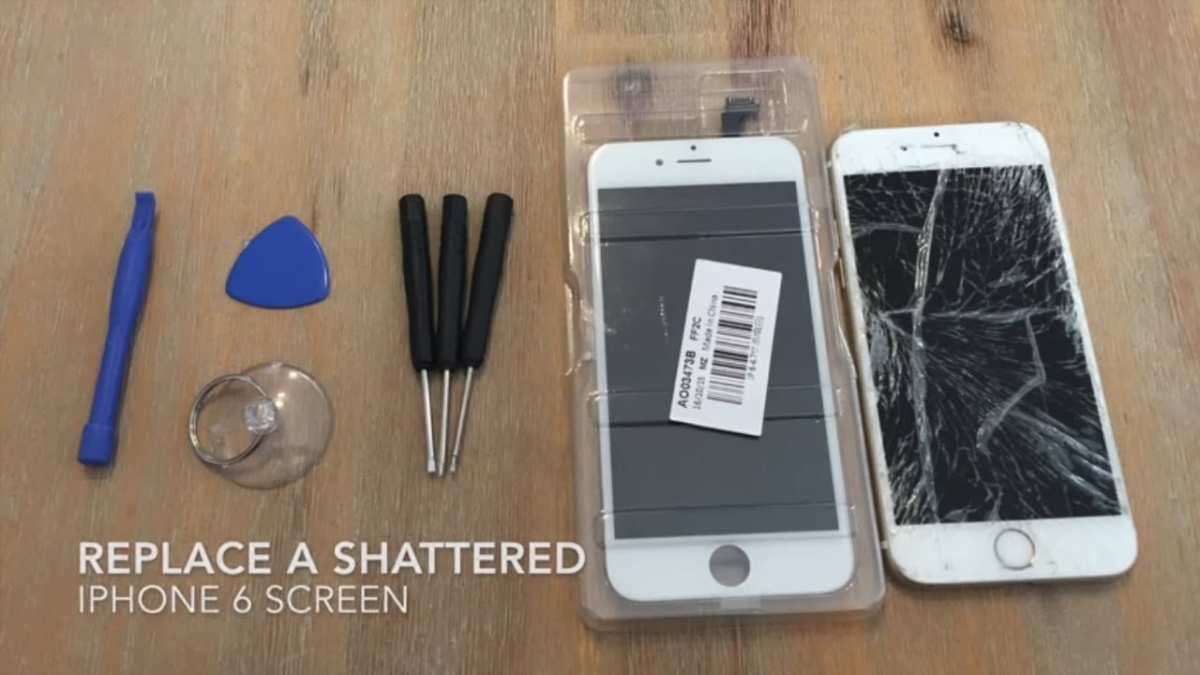

Is It Safe to Replace iPhone Screen?
Replacing an iPhone screen is a common repair that many people consider when their device’s display gets cracked, scratched, or stops working properly. But before you decide to go through with it, you might wonder whether replacing your iPhone screen is safe and what risks are involved. Let’s explore this topic in depth so you can make an informed decision.Understanding Why Screen Replacement Can Be Necessary
Your iPhone screen isn’t just a display; it’s also a touch interface that communicates with your device’s internal hardware. Over time, or after an accidental drop, the screen can crack, pixelate, or become unresponsive. When that happens, replacing the screen often becomes the best option to restore device functionality. Some common reasons for screen replacement include:- Cracked or shattered screen after a fall
- Unresponsive touch zones
- Display discoloration or dead pixels
- Liquid damage affecting the screen’s performance
Are Professional Repairs Safer Than DIY?
One of the main concerns when replacing an iPhone screen is safety in the process. You might be tempted to replace the screen yourself, especially since many online tutorials and DIY kits are available. However, the safety of DIY repairs depends on your experience and the tools you use.- Professional repair services have trained technicians who understand the delicate components inside your iPhone. They know how to remove and replace screens without causing additional damage.
- Certified repair shops use quality tools and original or high-quality replacement parts, reducing the risk of malfunctions or further damage.
- DIY repairs carry risks such as damaging internal components, voiding your warranty, or causing injury if not handled properly.
Potential Risks of Replacing the iPhone Screen
While replacing the screen can bring your device back to life, it is important to acknowledge potential risks involved. These risks can impact the safety and functioning of your iPhone.Damage to Internal Components
The iPhone’s internal components are highly sensitive and tightly packed. During screen replacement, accidental damage can happen if you apply excessive force, mishandle cables, or use the wrong tools. This damage can affect:- Touch responsiveness
- Display quality
- Battery integrity
- Other hardware functions
Water and Dust Resistance Loss
Apple designs its devices to be water and dust resistant, but this feature can be compromised during a screen replacement if the repair isn’t done properly. Without the correct sealing, moisture or dirt can enter, leading to future problems.Electrical Short Circuits and Fire Hazards
Incorrectly installed screens or damaged components can cause short circuits, which may lead to overheating or, in extreme cases, fire hazards. Using incompatible or poor-quality parts can increase this risk.How to Minimize Risks During Screen Replacement
If you choose to replace your iPhone screen, it’s crucial to follow best practices to keep the process safe.- Always use the correct tools, like precision screwdrivers, plastic prying tools, and anti-static mats.
- Work in a clean, dust-free environment to prevent debris from entering your device.
- Use high-quality replacement screens that match the original specifications.
- Follow detailed repair guides or videos from reputable sources to ensure proper procedure.
- If unsure, consult a professional technician who has experience in iPhone repairs.
How to Choose a Safe and Reliable Repair Service
When opting for a professional repair, selecting the right service provider is essential. Here are some tips to help you choose safely:- Look for authorized Apple repair centers or certified technicians with good reviews.
- Ask about the parts they use—preferably original Apple parts or reputable third-party equivalents.
- Check their warranty policy for repairs to ensure coverage in case issues arise later.
- Inquire about their safety protocols, especially in handling internal components and cleanliness standards.
- Compare prices, but avoid services that are significantly cheaper than others—quality matters more than cost.
Benefits of Professional Screen Replacement
Choosing professionals for screen replacement offers various advantages, including:- Ensuring the safety of delicate components during repair
- Getting access to high-quality parts and tools
- Reducing the chance of causing additional damage to the device
- Getting a warranty for the repair, which provides peace of mind
- Fast turnaround times, often same-day repairs
What to Expect After a Screen Replacement
Once your iPhone screen is replaced, there are some important things to keep in mind:- Test all functionalities—touch sensitivity, display clarity, and responsiveness—before leaving the repair shop.
- Check the device’s water resistance status; it might be compromised temporarily after the repair.
- Monitor your device for any signs of malfunction, such as flickering, unresponsive touch, or display issues.
- Keep your device in a safe place and avoid dropping it immediately after repair to prevent re-injury.
Cost Considerations in Screen Replacement
The cost of replacing an iPhone screen can vary based on several factors:- Device model: newer or high-end models like iPhone 13 or iPhone 14 usually cost more for repairs.
- Type of repair service: authorized Apple stores often charge more than third-party repair shops.
- Quality of parts used: original Apple parts may come at a premium but ensure durability and compatibility.
- Additional repairs needed: sometimes, other internal components may require attention, increasing costs.
Summary: Is It Safe to Replace an iPhone Screen?
Replacing an iPhone screen is safe when you follow proper procedures, use high-quality parts, and work with trained professionals. DIY repairs can be risky if you lack experience or use inferior tools and parts. The most secure way to ensure safety is by trusting certified repair centers that adhere to strict standards. Always weigh the risks and benefits, and prioritize safety to keep your device functioning properly. Remember, a well-done repair not only restores your iPhone’s look but also keeps you safe from potential hazards and future problems.Frequently Asked Questions
What are the potential risks associated with replacing an iPhone screen at a repair shop?
Replacing an iPhone screen at a reputable repair shop generally poses minimal risks if performed by trained technicians. However, there is a possibility of damage to internal components if the process isn’t handled carefully. Choosing authorized or experienced repair services reduces the risk of issues like improper reassembly, further screen damage, or voiding your warranty.
Can an unprofessional repair affect my iPhone’s water resistance?
Yes, if the repair doesn’t include proper sealing and reapplication of waterproofing components, your iPhone may lose its ability to resist water and dust. Professional technicians ensure the necessary seals are replaced correctly, maintaining your device’s original resistance features.
Is it safe to use third-party replacement screens on my iPhone?
Using third-party screens can be safe if the components meet quality standards. However, some third-party parts might not align perfectly or could affect display clarity or touch sensitivity. It’s best to choose high-quality replacements from trusted suppliers or opt for genuine Apple parts to ensure safety and performance.
What should I do if I notice issues after replacing my iPhone screen?
If you experience problems such as unresponsive touch, display flickering, or connectivity issues after a screen replacement, contact the repair technician immediately. A reputable repair shop should offer a guarantee or warranty and address any defects or issues free of charge.
How can I ensure my device remains safe after a screen replacement?
Follow post-repair care instructions provided by the technician, avoid exposing your iPhone to extreme temperatures, and use protective cases to prevent future damage. Additionally, regularly update your device’s software to maintain optimal performance and security.
Final Thoughts
Replacing an iPhone screen can be safe if you choose a professional technician or authorized service provider. They use quality parts and follow proper procedures, reducing the risk of damage. Attempting a DIY repair without experience may cause further issues and void your warranty. In conclusion, the answer to ‘is it safe to replace iPhone screen’ depends on your approach. Relying on experts ensures safety and preserves your device’s integrity, making the process less stressful.
Similar Posts