How To Use Chatgpt In The Best Way For Effective Results
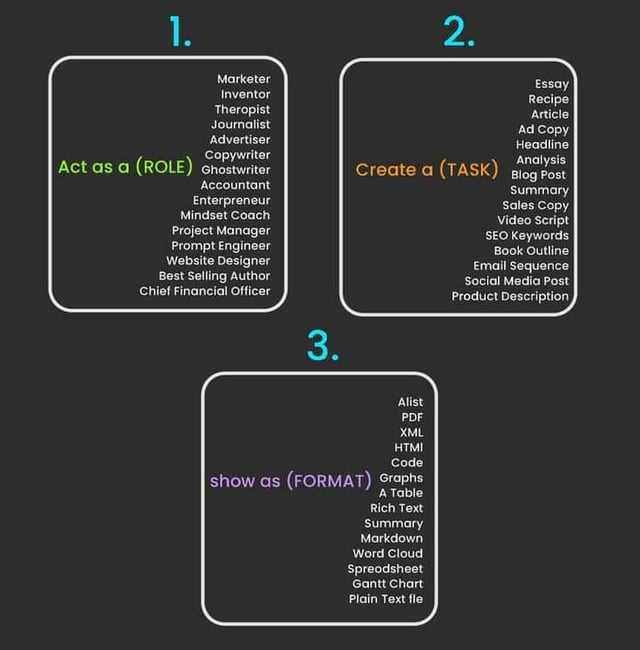

How to Use ChatGPT in the Best Way
ChatGPT is an advanced language model designed to assist with a wide range of tasks. Using it effectively can greatly improve your productivity, creativity, and learning. To get the most out of ChatGPT, you need to understand how to interact with it, provide clear instructions, and make the best use of its capabilities.
Start with Clear and Specific Prompts
The way you phrase your questions or requests directly affects the quality of ChatGPT’s responses. Providing a clear and specific prompt helps the model understand exactly what you need. Instead of vague questions, try to include important details or context.
For example, if you want help with writing an email, specify the purpose, tone, and audience. A prompt like “Write a polite email requesting a meeting with a client” is much better than “Write an email.”
Tips for Crafting Effective Prompts
- Use precise language and avoid ambiguity.
- Include necessary background information.
- Specify the format, style, or tone you want.
- Ask for examples or steps if you need detailed guidance.
Make Use of Follow-Up Questions
ChatGPT allows you to have a back-and-forth conversation, which is useful when you want to dig deeper into a topic or clarify information. Instead of asking for everything in one prompt, break your questions into smaller parts.
This approach helps you get more accurate and relevant answers. You can also refine your queries based on ChatGPT’s previous responses for better precision.
Explore Different Use Cases
ChatGPT can assist in many areas such as content creation, coding, learning new subjects, brainstorming ideas, or even practicing languages. Understanding these use cases helps you apply ChatGPT more effectively in daily tasks.
Writing and Content Creation
ChatGPT can generate articles, stories, essays, and social media posts quickly. You can ask it to help outline ideas, write drafts, or suggest improvements to your writing.
Programming and Technical Help
If you need coding advice, ChatGPT can explain concepts, provide code snippets, or debug simple errors. This can save time and help beginners learn faster.
Learning and Education
The model can answer questions on various subjects, explain difficult topics simply, or help prepare for exams. Use it as a study companion to reinforce your understanding.
Leverage Formatting and Structure in Responses
Asking ChatGPT to structure its answers clearly improves readability and usefulness. You can request information in lists, tables, or step-by-step instructions.
For example, when seeking advice on a process, ask ChatGPT to provide a numbered list of steps. This makes the information easier to follow and apply.
Be Aware of Limitations and Verify Information
Although ChatGPT provides helpful and informative responses, it does not guarantee 100 percent accuracy. The model is trained on data that may be outdated or contain errors. Therefore, it is essential to verify critical information from reliable sources before acting on it.
For sensitive topics, especially in medicine, law, or finance, always consult a qualified professional rather than relying solely on AI advice.
Use ChatGPT for Brainstorming and Idea Generation
When you face writer’s block or need creative input, ChatGPT can suggest fresh ideas, alternative approaches, or new perspectives. By asking open-ended questions, you encourage the model to generate diverse suggestions.
Example Prompts for Idea Generation
- “Suggest five blog topics about healthy eating.”
- “What are some creative marketing ideas for a small business?”
- “Give me different story plot options for a science fiction novel.”
Customize Responses by Adjusting Tone and Style
You can request ChatGPT to reply in different tones such as formal, casual, humorous, or motivational. This helps tailor the output to fit your intended audience or purpose.
Providing examples of the style you want can improve results. For instance, asking for a “friendly and conversational explanation” will differ greatly from requesting a “technical and detailed report.”
Save Time with Templates and Reusable Prompts
To increase efficiency, create templates or reusable prompts for tasks you perform regularly. For example, if you often draft emails, develop a standard prompt format that you can modify slightly each time.
This approach reduces the effort needed to write new prompts and ensures consistent, high-quality output.
Use ChatGPT Responsibly and Ethically
Respect privacy and avoid sharing sensitive personal information in your conversations. Be mindful of the content you request to generate, steering clear of harmful or inappropriate topics.
Remember that ChatGPT reflects the data it was trained on and may produce biased or offensive outputs unintentionally. Review and edit responses carefully before sharing or publishing.
Integrate ChatGPT with Other Tools
To enhance the user experience, consider using ChatGPT alongside other tools such as word processors, spreadsheets, or project management apps. Copy-pasting responses or using APIs can streamline workflows and boost productivity.
For example, after generating ideas or plans with ChatGPT, you can transfer them into a document or spreadsheet for further refinement and tracking.
Keep Updated with New Features and Models
OpenAI frequently updates ChatGPT with improvements and new functionalities. Staying informed about these changes allows you to take advantage of enhanced capabilities like faster responses, better understanding, or additional languages.
Following official channels, blogs, or community forums will help you remain knowledgeable and make the best use of ChatGPT.
Summary Table: Best Practices for Using ChatGPT
| Best Practice | Description |
|---|---|
| Clear Prompts | Provide detailed and specific instructions to get accurate answers. |
| Follow-Up Questions | Ask additional clarifying questions to deepen understanding. |
| Use Cases | Apply ChatGPT in writing, coding, learning, and brainstorming. |
| Request Formatting | Ask for lists, tables, or structured steps to improve clarity. |
| Verify Information | Double-check facts from trusted sources for important topics. |
| Adjust Tone and Style | Customize responses to suit different audiences and purposes. |
| Reuse Prompts | Create templates for common tasks to save time. |
| Ethical Use | Respect privacy and avoid harmful content in conversations. |
| Combine with Tools | Integrate ChatGPT with other software for efficient workflows. |
| Stay Updated | Follow updates to benefit from new features and improvements. |
Using ChatGPT thoughtfully and strategically can greatly improve your productivity and creativity. By crafting precise prompts, engaging in follow-up questions, verifying responses, and tailoring the output, you ensure that the interaction remains useful and relevant. Always keep in mind the ethical considerations and limitations of AI while exploring different applications. Consistent practice will help you discover new ways to benefit from this powerful tool.
Master the Perfect ChatGPT Prompt Formula (in just 8 minutes)!
Frequently Asked Questions
What are effective ways to phrase prompts for better responses?
Use clear and specific language in your prompts to get precise answers. Avoid vague or overly broad questions. Include context or examples when necessary to guide the response. For instance, instead of asking “Tell me about history,” ask “Can you summarize the causes of World War I?” This clarity helps the model understand your intent and provide more relevant information.
How can I make ChatGPT assist with learning new topics?
Break down complex subjects into smaller parts and ask targeted questions about each. Request explanations, examples, or analogies to grasp concepts better. You can also ask for summaries or quizzes to test your understanding. This approach helps you absorb the material more effectively through interactive engagement.
How do I manage the conversation to stay on topic?
Maintain focus by referring back to previous responses and building on them. If the model digresses, gently steer it back by restating your original question or specifying the area you want to explore. Using clear instructions like “Focus on…” or “Explain only…” helps guide the dialogue in your desired direction.
Can ChatGPT help with creative writing or brainstorming ideas?
Yes, you can use ChatGPT to generate story ideas, character descriptions, or plot outlines. Provide a starting point or theme, and ask for suggestions or expansions. The model can also help refine your writing by offering alternative phrasing, tone adjustments, or feedback. Engage in a back-and-forth to shape creative content effectively.
What should I avoid to get the most accurate information from ChatGPT?
Avoid asking questions that require real-time data or very recent events, as the model’s knowledge may be outdated. Also, steer clear of ambiguous or contradictory prompts. Provide clear and concise instructions and verify critical information with reliable sources when needed. This approach ensures you receive accurate and useful answers.
Final Thoughts
Using ChatGPT in the best way involves clear, specific prompts. Providing context helps generate more accurate and relevant responses. Engage with ChatGPT iteratively by refining your questions based on its answers. This approach improves the quality of the interaction over time. Always review and verify the information ChatGPT provides. Combining its assistance with your judgment ensures effective and reliable use of the tool.
Similar Posts



























