How To Make Video Into Live Wallpaper Android

How to Make Video into Live Wallpaper Android
Creating a lively, personalized background on your Android device can be a fun project, especially when you learn how to turn your favorite videos into live wallpapers. With the right tools and steps, you can easily set any video as your home screen background, making your device truly your own. In this comprehensive guide, we’ll walk through the entire process, from choosing the right video to setting it as a live wallpaper, ensuring your Android phone looks vibrant and unique.Understanding Live Wallpapers and Their Benefits
Before diving into the process, it’s helpful to understand what live wallpapers are and why they’re popular among Android users.What Are Live Wallpapers?
Live wallpapers are animated backgrounds that move or change dynamically on your device’s home screen. Unlike static images, they add a visual touch of personality and can include subtle animations, interactive elements, or even videos. They make your device feel more alive and engaging.Advantages of Using Video as Live Wallpaper
- Customization: Use your favorite personal videos or clips from your collection
- Visual Appeal: Enhance your device’s look with dynamic, moving backgrounds
- Fun Factor: Enjoy an interactive experience whenever you unlock your phone
Preparing Your Video for Use as Live Wallpaper
Not every video works perfectly as a live wallpaper. To get the best results, you should prepare your video before making it into a live wallpaper.Choosing the Right Video
Pick videos that are:- Short and looping – avoid long clips that may lag or drain battery
- Horizontal orientation – most phones are landscape, so videos should match that
- High quality – clear visuals look more attractive as a background
Editing Your Video
You might need to trim or resize your video to fit your device’s screen. Use simple video editing apps such as:- InShot
- VideoShow
- CapCut
Converting Video to GIF or Loop Format
Some apps require videos in a specific format like GIFs for smooth looping:- Convert clips using online tools or apps like GIF Maker or VideoToGIF
- Ensure the loop is seamless to avoid a jarring jump between end and start
Choosing the Right App or Tool to Create Live Wallpapers from Videos
Several apps on the Play Store can help turn videos into live wallpapers. Selecting the right one depends on your preferences and device capabilities.Popular Apps for Creating Video Live Wallpapers
| App Name | Key Features | Compatibility |
|---|---|---|
| Video Live Wallpaper | Supports video formats, allows cropping, and offers customization options | Android 5.0 and above |
| Walloop | Simple interface, supports video and GIF files, quick setup | Android 4.4 and above |
| Video Wallpaper | Convert videos to live wallpaper directly, supports looping and effects | Android 5.0 and above |
| KLWP Live Wallpaper Maker | Highly customizable, create complex live wallpapers with videos | Android 4.4 and above |
Factors to Consider When Choosing an App
- Compatibility with your device version
- Ease of use and interface clarity
- Additional features like cropping, filters, and effects
- Support for different video formats
- Ability to preview before setting as wallpaper
Step-by-Step Guide to Make Video into Live Wallpaper on Android
Once you’ve prepared your video and selected your app, you’re ready to start creating your live wallpaper.Installing and Opening the App
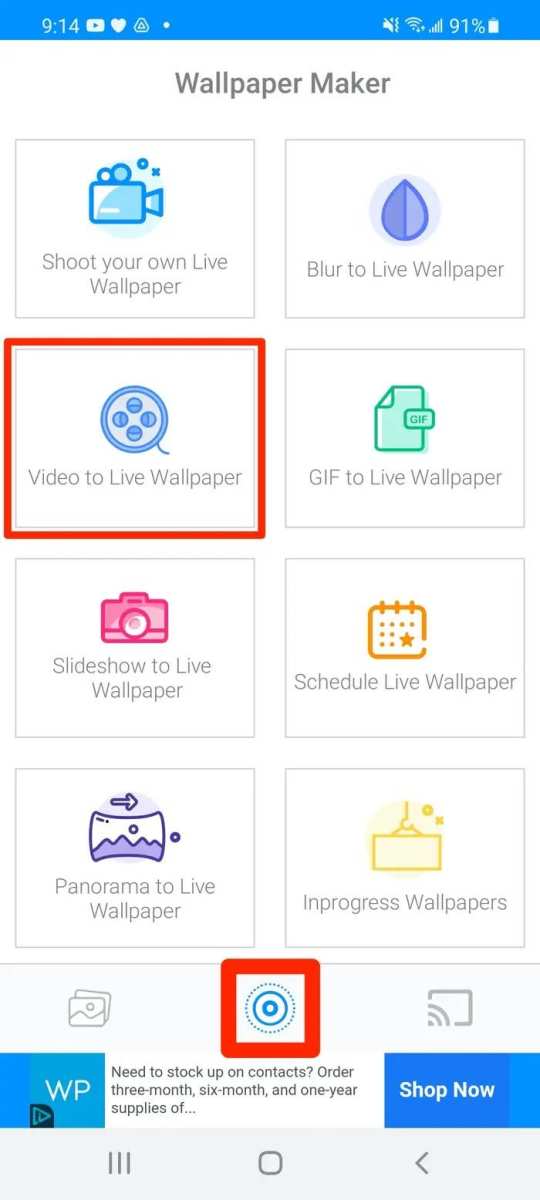
Download your chosen app from the Google Play Store and open it. Many apps are free, but some may offer in-app purchases for advanced features.Importing Your Video
Follow these general steps:- Tap on the ‘Create’ or ‘New Wallpaper’ button
- Select ‘Video’ or ‘From Gallery’ option
- Browse your device’s storage and choose the prepared video file
Adjusting Your Video Settings
Most apps allow you to:- Crop the video to fit your screen
- Set the start and end points for looping
- Add effects or filters if desired
Finalizing and Setting as Wallpaper
Once satisfied:- Tap ‘Set as Wallpaper’ or similar button
- Choose whether to apply it to your home screen, lock screen, or both
- Confirm your choice and enjoy your new animated background
Ensuring Smooth Performance and Battery Efficiency
Using videos as live wallpapers can impact your device’s battery life and performance. Here are tips to optimize your experience:Use Short Looping Videos
Shorter videos, around 10-20 seconds, generally consume less power and run smoothly.Reduce Video Quality
Lower-resolution videos use less processing power, especially on older devices.Enable Battery Saver Mode
This mode restricts background activity, helping your live wallpaper run more efficiently.Limit Live Wallpapers Usage
Avoid setting multiple live wallpapers simultaneously to preserve battery life.Troubleshooting Common Issues
Sometimes, your live wallpaper may not work perfectly. Here are solutions to common problems:Video Not Looping Seamlessly
Ensure your video is properly edited for looping. Use video editing apps to fine-tune start and end points.App Crashing or Not Responding
Update the app, clear cache, or reinstall if necessary.Wallpaper Not Applying Correctly
Check app permissions and ensure your device supports live wallpapers.Battery Draining Quickly
Limit the duration of live wallpapers and avoid high-quality videos that demand more resources.Additional Tips for a Better Live Wallpaper Experience
Enhance your live wallpaper setup with these simple tips:- Use muted or subtle videos to avoid distraction
- Combine your video with matching themes or icons for a cohesive look
- Change your live wallpaper periodically to keep your device fresh
- Use wallpapers that don’t interfere with app icons and widget visibility
Frequently Asked Questions
What tools can I use to convert a video into a live wallpaper on Android?
You can use apps like Video Live Wallpaper, Wallpaper Engine, or Video Wallpaper Maker to convert your videos into live wallpapers. These apps allow you to select a video from your gallery, customize settings such as playback speed and loop options, and set the video as your device’s wallpaper easily.
How do I set a custom video as my live wallpaper on Android?
First, install a compatible live wallpaper app that supports video files. Open the app and choose the video you want to set as your wallpaper. Adjust any settings provided, such as cropping or playback preferences, then tap the option to apply or set as wallpaper. Your video will now appear as your device’s background.
Are there any specific video formats compatible with Android live wallpaper apps?
Most Android live wallpaper apps support popular video formats like MP4, AVI, and MOV. Before importing your video, check the app’s supported formats in its description or settings to ensure compatibility. Converting your video to MP4 usually provides the best results for smooth playback.
Final Thoughts
To make a video into a live wallpaper android, start by choosing a suitable app like Video Live Wallpaper or KLWP. Install the app and open it, then select your desired video file. Customize settings such as playback speed and size to suit your preferences. Once configured, set the video as your wallpaper through the app’s instructions. This process makes your device more personalized and lively. Remember, knowing how to make video into live wallpaper android enhances your user experience effortlessly.
Similar Posts