How To Ask Chat Gpt What Changed In The Latest Ios Update
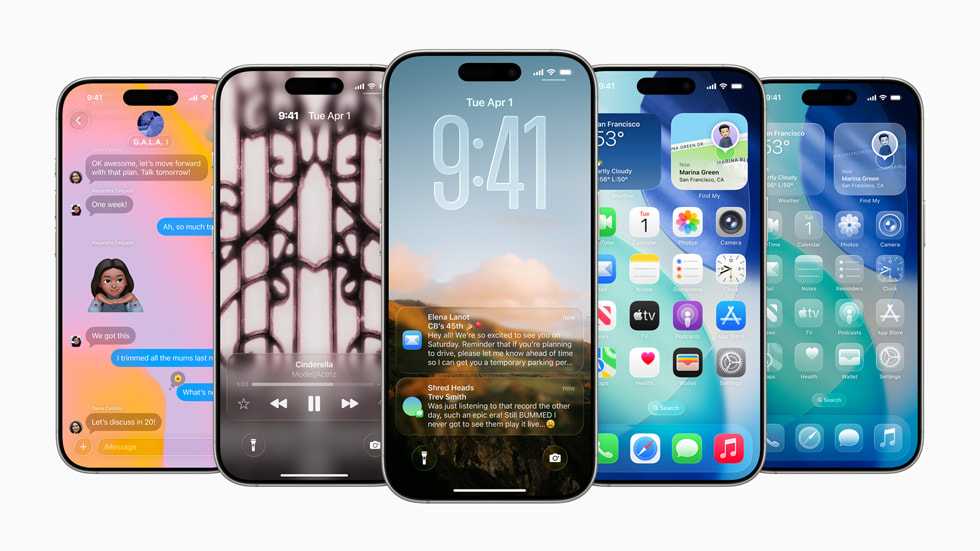

How to Ask Chat GPT What Changed in the Latest iOS Update
Understanding what’s new in the latest iOS update can seem complicated, especially with many changes packed into each version. Using Chat GPT can make this process easier and faster. It’s a simple way to get clear, detailed explanations about the updates.
Why Use Chat GPT to Learn About iOS Updates?
Chat GPT provides quick and accurate summaries of software updates. It analyzes official release notes and user reports to give you a well-rounded view of what’s new. This helps you stay informed without scrolling through lengthy pages.
Additionally, Chat GPT can answer specific questions. If you’re curious about certain features or improvements, just ask directly. It saves time and makes understanding updates more straightforward.
How to Frame Your Questions Effectively
Be Clear and Specific
Ask precise questions like, “What are the main features in the latest iOS update?” or “Has the battery life improved in iOS 17?” This way, Chat GPT can target exactly what you’re interested in.
Use Context When Necessary
If you want details about a particular feature, provide some context. For example, “What’s new in the Messages app in iOS 17?” helps Chat GPT deliver focused information specific to your needs.
Examples of Effective Questions to Ask Chat GPT
- What are the major changes in iOS 17?
- Does iOS 17 improve privacy settings?
- Are there new features for the iPhone camera in the latest update?
- What bug fixes were included in iOS 17?
- How does the new update affect app performance?
Using Official Release Notes with Chat GPT
Start by reviewing the official release notes from Apple. Then, ask Chat GPT questions based on those notes to clarify or expand on the details. This combination gives a comprehensive understanding of the update.
Example Workflow
- Search for Apple’s official iOS update release notes.
- Identify key points you want to know more about.
- Ask Chat GPT, “Can you explain what improvements were made to the lock screen in iOS 17?“
- Read the answer and continue asking questions for areas needing clarification.
How to Verify the Accuracy of Chat GPT’s Answers
While Chat GPT provides helpful summaries, always cross-reference with official sources. Check Apple’s website or trusted tech news outlets for confirmation.
Look for discrepancies or updates that might have been missed. Staying informed from multiple sources ensures your knowledge remains current and accurate.
Tips to Maximize Your Use of Chat GPT for iOS Updates
- Regularly ask about security and privacy updates, as these are crucial for device safety.
- Stay updated on app compatibility, especially if you rely on certain apps daily.
- Inquire about new accessibility features, to understand how they can help you or loved ones.
- Ask for comparison between different iOS versions, to see how the latest update improves upon previous ones.
Related Topics to Explore with Chat GPT
Compatibility and Device Support
Ask about which devices can run the latest iOS update. Chat GPT can also explain earlier versions and their features.
Upgrade Tips and Troubleshooting
Find out how to smoothly update your iPhone or iPad. If you encounter issues, Chat GPT can suggest troubleshooting steps.
Future iOS Features
Get insights or rumors about upcoming features in future iOS versions, helping you stay ahead of the curve.
Using Chat GPT for Learning About iOS Updates from Tech Communities
Combine insights from Chat GPT with community discussions on forums, social media, or tech blogs for the most comprehensive information. Chat GPT can help clarify complex topics or summarize lengthy discussions.
How to Customize Your Questions for Better Results
Formulate questions based on your specific interests, such as “Does iOS 17 enhance battery life for older iPhone models?” or “What new customization options are available in the latest update?” Tailoring your questions yields more relevant information.
Summary
By asking well-phrased, targeted questions, you can maximize Chat GPT’s ability to explain what has changed in the latest iOS update. Remember to seek clarity on features, bug fixes, security updates, and compatibility. Combining official release notes with Chat GPT’s explanations offers a direct, efficient way to stay informed about your device’s software improvements.
Using this approach makes understanding complex update details simple, quick, and accessible. Whether you’re a tech novice or a seasoned user, learning how to ask Chat GPT the right questions helps you get the most out of your iPhone or iPad updates.
7 Mind-Blowing ChatGPT Features You're Not Using (Yet!)
Frequently Asked Questions
What details should I include when asking ChatGPT about recent iOS changes?
When asking ChatGPT about recent iOS updates, specify the particular version you are referring to. Mention specific features or areas you are curious about, such as security improvements, new apps, interface changes, or performance enhancements. Providing context or particular questions helps ChatGPT give precise and relevant information.
How can I phrase my questions to get a clear summary of the latest iOS update?
Frame your questions to request a summary, such as, “What are the main features introduced in the latest iOS update?” or “Can you give an overview of the key changes in the newest iOS version?” These prompts encourage concise and focused answers that highlight the most important updates.
What follow-up questions should I ask if I want more details about specific iOS features?
If you want more information about particular features, ask targeted follow-up questions like, “How does this new feature improve user experience?” or “What are the steps to activate this feature?” Clarifying your interests guides ChatGPT to provide detailed explanations relevant to your needs.
Are there effective ways to check if ChatGPT has the latest information on iOS updates?
Yes, you can ask, “Does your information include the latest iOS update released in October 2023?” or “Are you aware of the newest features in the most recent iOS version?” These questions help determine if ChatGPT’s knowledge is current or if you need to consult official sources for the latest details.
What language should I use when asking about iOS updates to ensure clarity?
Use clear and specific language, mentioning exact versions or features you’re interested in. Avoid vague questions like “What’s new?” Instead, ask precise questions such as, “What changes are included in iOS 17.0?” or “What new privacy features does the latest iOS update introduce?” Clear questions lead to more accurate and informative answers.
Final Thoughts
To ask Chat GPT what changed in the latest iOS update, be specific about the version you want details on. Frame clear questions like, “What are the new features in iOS 17?” for precise answers. Use natural language to make your queries easy for Chat GPT to understand and respond accurately. Remember, concise questions often yield the most useful information. How to ask Chat GPT what changed in the latest iOS update, involves clear, direct communication. This approach helps you quickly get the updates you need without confusion.
Similar Posts































