Disabling Location Services When Not Needed For Better

Disabling Location Services When Not Needed
Many people leave location services on all the time without realizing the potential risks. Turning off these settings can protect your privacy and save your device’s battery life. It also helps prevent apps from collecting unnecessary data about where you go.
Understanding Location Services and How They Work
Location services use GPS, Wi-Fi, and cell towers to determine your position. This data is then shared with apps and services that require your location. Some apps need location access to function properly, like maps or ride-sharing apps.
However, not all apps need constant access. Many only require location when you are actively using them. Knowing how these services work helps you decide when to enable or disable them.
The Importance of Disabling Location Services When Not Needed
Leaving location services enabled constantly can drain your device’s battery quickly. It can also pose privacy risks by allowing third parties to track your movements without your knowledge.
Disabling location when not needed reduces the chances of your data being misused. It also contributes to keeping your personal information safer from hackers or advertisers.
Steps to Turn Off Location Services on Your Smartphone
Turning off location services varies slightly between devices, but the general process is similar.
For iPhones:
- Open Settings and tap on Privacy.
- Select Location Services.
- Toggle the switch to turn off location services completely or choose individual apps to disable.
For Android Devices:
- Open Settings and tap on Location.
- Toggle the main switch to turn off location services.
- Optionally, manage permissions for individual apps to control access more precisely.
Managing App Permissions for Location Access
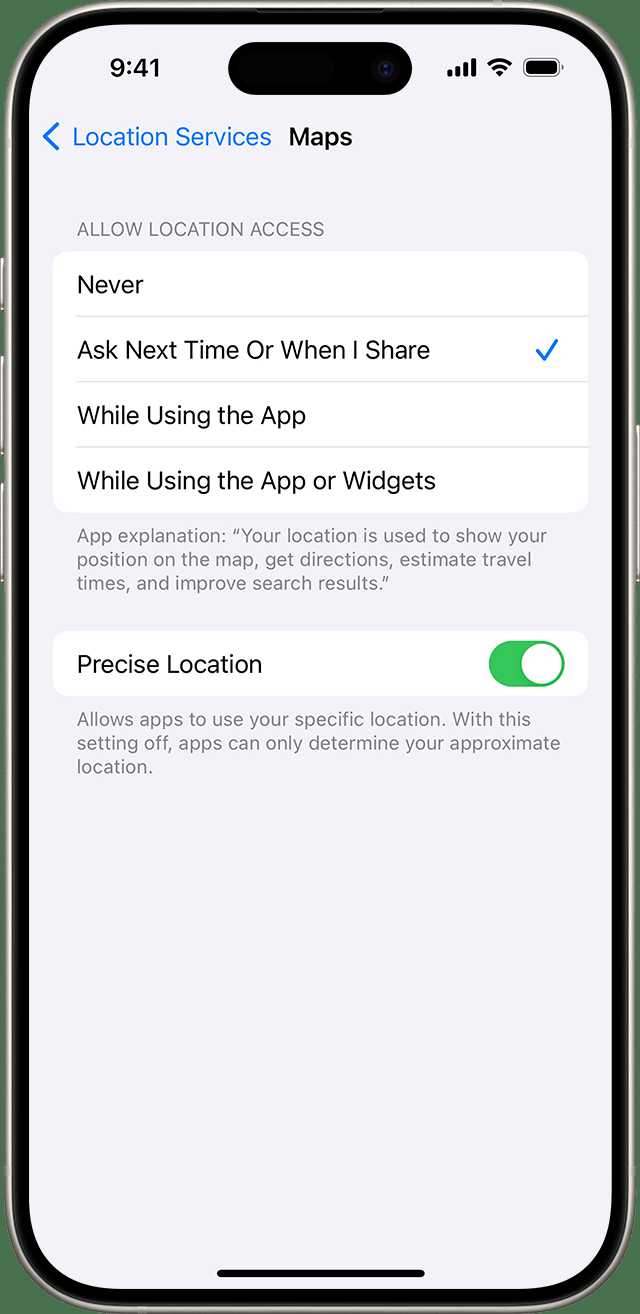
Instead of turning off location globally, you can restrict apps to access your location only while using the app. This approach provides a balance between usability and privacy.
To do this, go into your device’s app settings, find the app in question, and select permission options. You can set permissions to “Allow only while using the app” or “Ask every time.”
The Benefits of Disabling Location Services
The benefits include extended battery life, enhanced privacy, and reduced data sharing. By turning off location when not needed, your device conserves energy and minimizes tracking risks.
This simple practice can also help prevent targeted advertising based on your movements. It makes it harder for third parties to build profiles about your daily routines.
Risks of Keeping Location Services Always On
Constant location tracking can lead to privacy breaches, especially if your data is stored or shared with third parties. Hackers may exploit vulnerabilities to access your location data.
Additionally, apps that run continuously in the background can drain your battery faster. This leads to more frequent charging and potential device performance issues over time.
Related Topics: Enhance Your Device Privacy and Security
- Using VPNs to protect your online activity.
- Understanding app permissions and privacy settings.
- How to clear your location history regularly.
- Tips to secure your device against unauthorized access.
Best Practices for Managing Location Settings
Always review app permissions after installing new apps. Limit location access to only those that truly need it. Remember to disable location services when you’re not actively using apps that require them.
If privacy is a top priority, consider turning off location services in your device’s settings completely. Turn them back on only when necessary for navigation or other location-based features.
The Future of Location Privacy
Technology firms are developing smarter, more privacy-conscious options. Features like “approximate location” or “temporary access” help users control their data better.
Stay informed about updates to your device’s privacy policies and settings. Using the latest software can provide improved tools to manage your location data effectively.
Summary
Disabling location services when not needed is a simple yet effective way to protect your privacy and extend your device’s battery life. Learn to manage settings wisely, restrict app permissions, and stay aware of privacy trends. Making these small adjustments can significantly enhance your overall device security and help you maintain control over your personal information.
Turn Off These iPhone SYSTEM SERVICES Now! [Ultimate Guide]
Frequently Asked Questions
How can turning off location services improve my device’s battery life?
Disabling location services when they’re not needed reduces the amount of power your device uses to continuously track your position. This prevents unnecessary drain on the battery, allowing your device to last longer throughout the day.
What steps should I follow to disable location services on my smartphone?
To turn off location services, access your device’s settings menu, locate the privacy or location section, and toggle off the location services option. You can also manage permissions for individual apps to ensure only necessary applications access your location.
Are there any potential drawbacks to disabling location services?
Turning off location services might limit the functionality of certain apps that rely on your location, such as navigation or ride-sharing apps. However, you can enable location access for specific apps when needed while keeping it off for others to maintain privacy and conserve battery life.
Can I automate the process of disabling location services during certain times?
Yes, many devices offer automation features or built-in settings that allow you to schedule when location services are active. For instance, you can set your device to disable location tracking during nighttime or work hours, helping you save battery and protect your privacy automatically.
Is it advisable to disable location services for all apps to maximize privacy?
While turning off location services for all apps enhances privacy, it may hinder the use of services that depend on your location. For optimal privacy, disable location access for apps that don’t require it and enable it only for trusted applications that benefit from knowing your position.
Final Thoughts
Disabling location services when not needed helps protect your privacy and conserves battery life. It prevents apps from accessing your position unnecessarily, reducing potential security risks. Remember to turn off location services when you’re not actively using them. Staying vigilant about app permissions ensures your data remains private and your device runs efficiently.
Similar Posts































