Disabling Features Like Nfc And Mobile Hotspot When Idle To
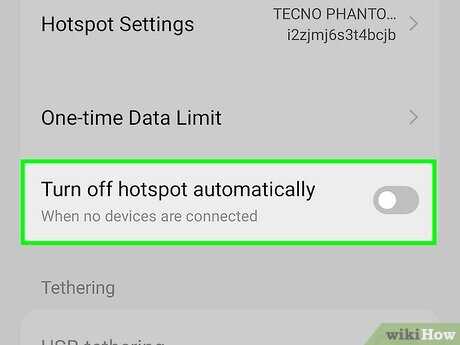
To save battery life and enhance security, it’s smart to turn off features like NFC and mobile hotspot when they’re not in use. Quickly disabling these functionalities when your device is idle can significantly improve performance and protect your data from unauthorized access. The key is to set your phone or tablet to automatically disable these features when they’re not needed, or to do so manually whenever you’re done using them. Disabling features such as NFC and mobile hotspot when not actively using them is an effective way to conserve power and keep your device more secure. You can easily turn these features off through your device’s quick settings or in the settings menu, and some devices even support automation to disable these features automatically after a period of inactivity. This simple step helps extend battery life and minimizes potential security risks. If you want to keep your device running smoothly and securely, turning off NFC and mobile hotspot when not in use is the way to go. Whether manually toggling these features or setting up automatic controls, taking these actions ensures your device uses resources efficiently and stays protected from any potential threats when idle. It’s a quick, easy fix that makes a big difference in your device’s performance and security. 
Disabling Features Like NFC and Mobile Hotspot When Idle
Understanding Why Disabling Features When Idle Matters
Keeping features such as NFC and mobile hotspot enabled when not in use can waste battery life and pose security risks. Many devices automatically keep these features active, leading to unnecessary power drain. Turning them off when not needed helps extend your device’s battery life and reduces the chance of unauthorized access. It is especially important for those who use their phones throughout the day and want better control over their device’s performance.How NFC Affects Battery and Security
Near Field Communication (NFC) is a small radio frequency communication technology that allows devices to exchange data over short distances. While it’s useful for quick payments or sharing files, keeping NFC active when idle can drain battery. More importantly, an active NFC can potentially be an entry point for security breaches if not properly managed.Energy Consumption of NFC
NFC consumes very little power when active but can drain your battery over time if left enabled continuously. Studies show that even when idle, NFC continuously listens for signals, which can gradually use up battery life. Disabling NFC when not in use is a simple way to conserve power.Security Risks of Leaving NFC On
Leaving NFC enabled may expose your device to risks like unauthorised data transfer or malicious attacks. Devices can be tapped remotely if NFC is left active in public areas or unsecured environments. Turning off NFC when not necessary minimizes this security vulnerability.Managing and Disabling NFC on Different Devices
Different smartphones and tablets have various ways to disable NFC, depending on the operating system. Here’s how to turn off NFC on popular platforms:Android Devices
Most Android phones allow you to disable NFC via the settings menu. Navigate to:- Settings
- Connected devices or Connectivity
- NFC or Near Field Communication
iOS Devices
iPhones do not have a dedicated NFC switch. However, NFC is automatically disabled when not actively used, and Apple Pay settings manage NFC security. You can disable Apple Pay if you want to prevent NFC-based transactions.Benefits of Disabling Mobile Hotspot When Idle
Keeping your mobile hotspot active when you’re not using it can quickly deplete your battery and may open up security concerns. Disabling the hotspot when idle conserves power and prevents unauthorized access from nearby devices.How Mobile Hotspot Consumes Power
A mobile hotspot acts as a mini Wi-Fi network, sharing your cellular data with other devices. When active, it consumes a significant amount of battery, especially if multiple devices connect. Disabling it when not needed is a good practice to save power and prolong your device’s usability.Security Implications of Hotspot Activation
A constantly active hotspot can become an entry point for hackers or unauthorized users, especially in crowded or public environments. Disabling the hotspot when idle reduces these security risks.How to Disable Mobile Hotspot on Different Devices
Device manufacturers and OS versions have different methods:Android Devices
- Open Settings
- Go to Network & Internet or Connections
- Select Hotspot & tethering or Mobile Hotspot
- Toggle the hotspot switch off
iOS Devices
- Access Settings
- Tap Personal Hotspot
- Switch the toggle off to disable hotspot
Automating Feature Disabling to Save Power
Many devices offer automation options to turn off NFC and mobile hotspot during periods of inactivity. Using built-in features or third-party apps can help manage these settings effectively.Using Settings and Schedules
Some smartphones allow scheduling or setting rules for feature activation and deactivation. For example, you can set your device to disable NFC overnight or when the screen is off for a certain period.Third-Party Automation Apps
Apps like Tasker (Android) or Shortcuts (iOS) can automate disabling NFC and hotspot based on location, time, or device activity. These tools give you granular control and save power without manual intervention.Additional Tips for Managing Device Features
Besides NFC and hotspot, consider managing other features to optimize power and security:- Bluetooth: turn off when not in use
- Wi-Fi: disable in areas with poor signal or when not needed
- Location services: limit access to only necessary apps
Impact of Disabling Features on Device Performance
Turning off features like NFC and hotspot when idle can lead to noticeable improvements in device performance. Battery life lasts longer, and your device is less susceptible to security threats. This proactive management also ensures your device runs smoothly throughout the day.Related Topics to Explore
To further optimize your device’s security and performance, you might want to explore:Managing Permissions for Apps
Control what data or features each app can access, reducing vulnerability.Enhancing Device Security Settings
Enable two-factor authentication, device encryption, and other security features.Understanding Data Usage and Cost Management
Monitor your mobile data to avoid unexpected charges, especially when using hotspot features.Summary of Key Points
Disabling NFC and mobile hotspot when not in use is a simple yet powerful way to extend battery life and improve security. Adjusting settings varies across devices but generally involves toggling features in the device’s settings menu. Automation tools can further simplify this process, making it easier to maintain optimal device performance and security. Ensuring these features are active only when necessary reduces unnecessary power drain and minimizes potential security threats. Regularly reviewing device settings and managing feature usage helps keep your device secure, fast, and efficient throughout your day.Double Your Android Phone's Battery Life By Changing These Settings
Frequently Asked Questions
Why should I disable NFC and mobile hotspot features when my device is not in use?
Disabling NFC and mobile hotspot when you don’t need them helps conserve battery life and reduces the risk of unauthorized access. These features can consume power even when idle, so turning them off when unnecessary ensures your device runs more efficiently and stays secure.How can I automatically turn off NFC and hotspot features when my device is idle?
Many smartphones include settings or automation apps that allow you to schedule or trigger features like NFC and hotspot to disable after a period of inactivity. Access your device’s settings or use third-party automation tools to set rules that deactivate these features when the device remains unused for a certain duration.What are the security benefits of disabling these features during inactivity?
Turning off NFC and hotspot features when not in use minimizes potential vulnerabilities. Since these features can be exploited by malicious entities to gain access or intercept data, deactivating them when idle adds an extra layer of protection and helps prevent unauthorized connections.Does turning off these features when idle impact their availability when I need them again?
No, disabling NFC and hotspot features when idle does not affect their functionality when you turn them back on. You can easily enable these features manually or through automation whenever you need to use them again, ensuring convenience without compromising security.Are there any specific settings or apps that help manage these features efficiently?
Yes, most smartphones offer built-in options within the quick settings menu or dedicated settings pages to toggle NFC and hotspot features quickly. Additionally, automation apps like Tasker or IFTTT can set up rules to disable these features automatically based on your device’s activity or time schedules, making management more convenient.Final Thoughts
Disabling features like NFC and mobile hotspot when idle helps conserve battery life and improves device security. Turning these features off when not in use prevents unnecessary power drain and reduces potential vulnerabilities. Regularly managing such settings ensures your phone remains efficient and safe. In summary, managing features like NFC and mobile hotspot when idle is a simple yet effective way to optimize your device performance and protect your data.
Similar Posts