Avoiding Overuse Of High Brightness In Outdoor Conditions


Avoiding overuse of high brightness in outdoor conditions
Understanding the Impact of Brightness Levels
Outdoor environments often demand high brightness settings on devices. However, too much brightness can cause discomfort and reduce visibility for users. Excessively bright screens can create glare, making it hard to see content clearly, especially in direct sunlight. Overusing high brightness can also drain device batteries quickly, shortening usage times. Recognizing these effects helps users make smarter choices about screen settings in outdoor settings.Why High Brightness Can Be Problematic
Using brightness levels that are too high in outdoor conditions may seem helpful, but it often backfires. The intense glare from overly bright screens can strain eyes over time. It may also lead to headaches or eye fatigue, especially during prolonged use. Moreover, high brightness can cause reflections and glare that interfere with readability. Balancing brightness is essential to maintain comfortable viewing and conserve battery life.How to Properly Adjust Brightness in Outdoor Settings
Adjusting screen brightness manually is the first step toward avoiding overuse. Most devices include automatic brightness adjustment features that respond to ambient light. Users should enable these features to prevent unnecessary battery drain and eye strain. When manual adjustment is necessary, set the brightness to a level that ensures comfortable viewing without excessive glare. Test different settings in various outdoor lighting conditions for optimal results.Using Ambient Light Sensors Effectively
Many modern devices come equipped with ambient light sensors that detect surrounding light levels. These sensors automatically adjust screen brightness for best visibility. Users should keep these sensors enabled and clean to ensure accurate readings. Regular calibration can improve their performance and allow for seamless transitions between different lighting environments. This prevents the temptation to set uniformly high brightness levels regardless of conditions.Benefits of Adaptive Brightness Settings
Adaptive or auto-brightness features adapt to changing lighting conditions automatically. Using these settings offers several advantages. They help extend battery life by reducing screen power consumption in low-light conditions. They also protect your eyes by ensuring the screen isn’t brighter than necessary. For outdoor use, adaptive brightness adjusts quickly to sunlight, providing clear visuals without overexposure.Comparison Table: Manual vs. Automatic Brightness Adjustment
| Feature | Manual Brightness Control | Automatic Brightness Control |
|---|---|---|
| Ease of Use | Requires frequent manual adjustments | Adjusts automatically based on ambient light |
| Battery Consumption | May drain battery faster if set too high | Optimizes battery use by adjusting brightness as needed |
| Eye Comfort | Depends on user settings | Provides consistent comfort by adjusting to surroundings |
| Best for outdoor use | Requires manual tweaking | Ideal for dynamic outdoor lighting conditions |
Best Practices for Outdoor Screen Usage
To avoid overuse of high brightness, users should follow some simple best practices. First, enable auto-brightness or adaptive brightness features whenever possible. Second, adjust brightness manually only when automatic settings are unavailable or malfunctioning. Third, position screens to reduce glare — for example, tilt devices to minimize reflections. Fourth, take frequent breaks to rest eyes and prevent strain from prolonged screen exposure.Using Protective Accessories to Reduce Glare
Screen protectors and anti-glare filters can significantly reduce reflections and glare in outdoor conditions. These accessories improve visibility without needing to increase brightness levels. For smartphones and tablets, matte screen protectors are especially effective in bright sunlight. For laptops, matte displays diminish glare, making screens easier to read outdoors.Additional Tips for Enhancing Outdoor Readability
– Use shade or cover to shield screens from direct sunlight. – Increase text size and contrast for easier reading. – Adjust the device’s display settings for higher contrast or color profiles suited for outdoor use. – Use external accessories like sun visors or attachments to block sunlight from hitting screens directly.Role of Screen Technology in Brightness Management
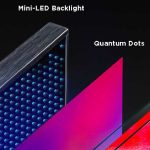
Different display technologies handle brightness differently. OLED screens tend to have higher contrast ratios and better visibility in bright conditions than LCDs. Some devices incorporate transflective displays that reflect ambient light, improving outdoor readability without high brightness. Choosing the right technology can reduce dependence on high brightness settings.Transflective vs. Producing Brightness
| Feature | Transflective Displays | Standard LCD/OLED Screens | |———|————————|—————————| | Visibility in Bright Light | Excellent | Moderate to poor | | Power Consumption | Low | Higher when brightness is increased | | Battery Efficiency | Good | Less efficient at high brightness |Environmental Factors and Their Effect on Brightness Needs
Outdoor lighting varies greatly, affecting how much brightness a device needs. Clear sunny days demand higher brightness for readability, while cloudy or shaded areas require less. The user’s distance from the screen and the presence of reflective surfaces can also influence brightness requirements. Therefore, adaptive brightness settings are critical in adjusting to these changing environments. Balancing the brightness of your device in outdoor conditions prevents eye strain, conserves battery life, and enhances overall visibility. Enabling automatic or adaptive brightness features, minimizing glare through accessories, and understanding the impact of environmental factors keep your outdoor viewing comfortable and efficient. Always consider the specific lighting conditions when adjusting your device, and remember that excessive brightness is rarely necessary for good visibility. By practicing these simple strategies, you can enjoy your outdoor time without risking discomfort or damaging your device’s performance.The Truth About Long-Term Blood Thinner Use: Are You Safe?
Frequently Asked Questions
What are the best practices for adjusting brightness levels in outdoor environments?
To prevent excessive brightness in outdoor settings, regularly evaluate ambient light conditions and adjust your device’s brightness accordingly. Use automated brightness adjustment features when available, and consider manually lowering brightness levels during bright daylight to reduce glare and eye strain. These steps help maintain optimal visibility without overexposing your eyes or draining power unnecessarily.
How can you minimize glare caused by high brightness in outdoor conditions?
Reducing glare involves positioning your device away from direct sunlight and using shading accessories like visors or anti-glare screens. Lowering the device’s brightness and increasing contrast settings also help. Additionally, wearing sunglasses can shield your eyes from excessive reflected light, improving visual comfort and reducing the need for high screen brightness.
What role do environmental factors play in managing screen brightness outdoors?
Environmental factors such as sunlight intensity, angle of illumination, and surrounding reflective surfaces significantly influence the optimal brightness setting. Pay attention to these factors and adjust your device’s brightness to match the conditions. For example, in very bright sunlight, increasing brightness temporarily might be necessary, but always revert to lower levels when possible to protect your eyes and conserve battery life.
Why is it important to avoid constant high brightness in outdoor use?
Constant high brightness can cause eye fatigue, discomfort, and potential long-term damage to your vision. It also consumes more energy, reducing your device’s battery life. By managing brightness levels appropriately, you ensure comfortable viewing, prolong device usability, and promote healthier visual habits during outdoor activities.
Final Thoughts
Avoiding overuse of high brightness in outdoor conditions is essential for preserving your device’s visibility and battery life. Excessive brightness can cause glare, making it difficult to see the screen clearly. Adjust brightness settings based on ambient light to improve readability and comfort. By managing brightness effectively, you ensure a better user experience and protect your device from unnecessary strain.
Similar Posts