Android Battery Saver System Project: Enhance Your Device
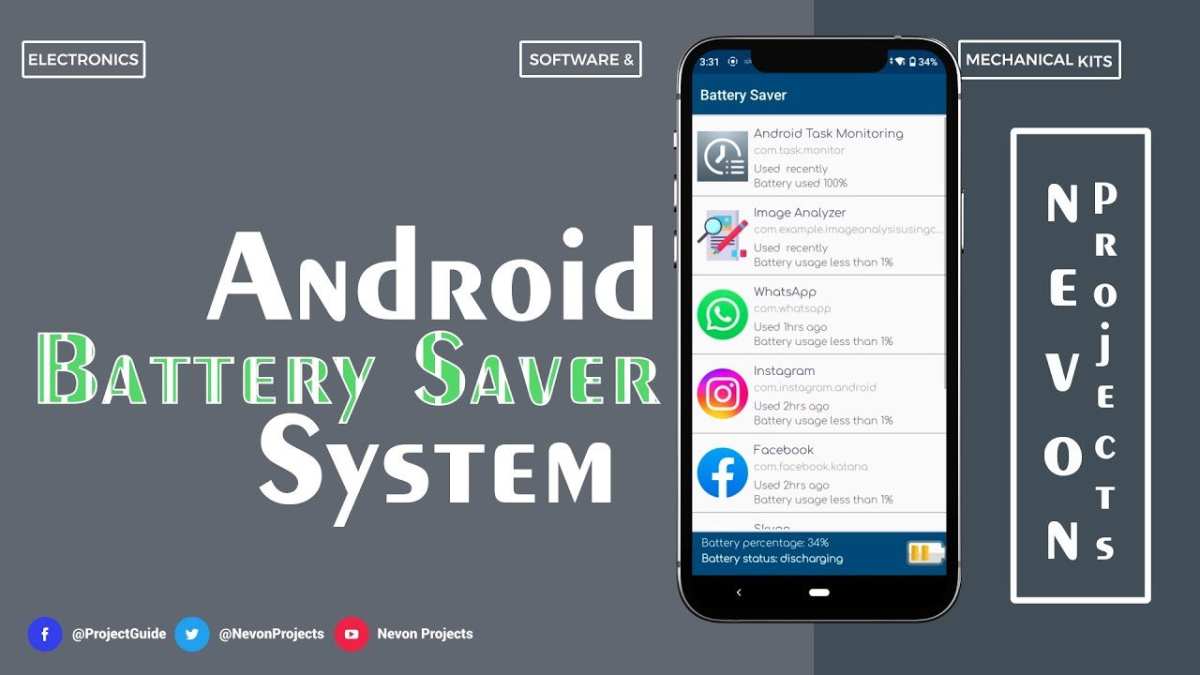
An effective way to extend your Android device’s battery life is by developing a custom battery saver system. **The solution lies in creating an Android battery saver system project that intelligently manages power consumption.** This project involves designing a system that monitors app activity, adjusts screen brightness, and limits background processes.
Building this system enhances device efficiency and user experience. It offers a practical approach for developers and tech enthusiasts to take control of their device’s power management, ensuring longer usage without frequent charging.

Android Battery Saver System Project: An In-Depth Guide
When it comes to using smartphones, battery life often becomes a concern. Imagine you’re out and about, and your phone’s battery is draining faster than expected. That’s where an Android Battery Saver System Project steps in. This project is designed to help conserve battery power, extend your phone’s uptime, and improve overall performance. Let’s explore how this project works, its key features, and how to develop an effective battery saver system for Android devices.
Understanding the Need for an Android Battery Saver System
Mobile devices have become essential tools for communication, entertainment, and work. With so many apps running in the background, screens staying on longer, and constant notifications, batteries tend to drain quickly. Here are some reasons why developing an Android Battery Saver System is vital:
- Prolonged Battery Life: Users want their devices to last through the day without frequent charging.
- Improved Device Performance: Reducing background activities frees up system resources, making the phone faster.
- Enhanced User Experience: An efficient battery saver minimizes inconvenience caused by sudden shutdowns.
- Energy Efficiency: Saving power contributes to environmental protection by reducing energy consumption.
The goal of this project centers around creating a system that intelligently manages power consumption without compromising user experience.
Core Components of an Android Battery Saver System
Building a battery saver system involves integrating various components that work together seamlessly. These include:
Battery Monitoring Module
This module keeps track of battery parameters like current charge level, voltage, temperature, and charging status. Accurate monitoring helps in making informed decisions about when and how to save power.
Power Management Algorithms
Algorithms analyze battery data to identify power-hungry apps or processes. Based on this, they trigger appropriate actions such as reducing screen brightness or closing background applications.
User Interface
The interface allows users to set preferences, activate or deactivate the battery saver mode manually, and view real-time battery status.
System Optimization Techniques
These strategies include managing CPU performance, controlling network usage, and limiting background data to conserve power.
Designing the Battery Saver System: Step-by-Step
Creating an effective system requires careful planning and implementation. Here’s a simplified overview:
- Planning and Requirements Gathering: Decide what features to include, such as auto-mode activation, notification alerts, or customizable settings.
- Setting Up Development Environment: Install Android Studio, SDKs, and necessary libraries for app development.
- Implementing Battery Monitoring: Use Android’s BatteryManager class to collect battery data.
- Designing Power Saving Algorithms: Develop logic to analyze data and execute power reduction actions.
- Creating User Interface: Design simple, user-friendly layouts for settings and battery status display.
- Testing and Optimization: Run tests on different devices, optimize code for performance, and fix bugs.
Throughout the process, ensure your design is flexible enough to allow future upgrades and feature additions.
Key Features to Incorporate in the Android Battery Saver System
To maximize efficiency, consider adding these features:
Auto-Mode Activation
Automatically activates the battery saver when the charge drops below a specified threshold, like 20% or 10%.
App Management
Identify and restrict or close background apps that drain battery unnecessarily.
Screen Brightness Control
Adjust screen brightness based on ambient light or reduce it during battery saver mode to conserve power.
Network Optimization
Disable Wi-Fi, mobile data, or Bluetooth when not in use or during specific times to save energy.
Notifications Management
Limit or schedule notifications to reduce waking the device frequently, which consumes power.
Scheduled Power Saving
Allow users to set specific times during which the battery saver automatically activates, like nighttime hours.
Implementation Challenges and How to Overcome Them
While developing this system, you might face several challenges:
- Battery Monitoring Accuracy: Ensuring the system accurately detects battery levels and usage patterns is crucial. Use Android’s APIs effectively and test on different devices.
- Balancing Power Saving and User Experience: Over-restricting apps or features can frustrate users. Incorporate user preferences and allow manual override options.
- Background Process Management: Some apps are essential and should not be closed. Develop intelligent algorithms that distinguish between critical and non-critical apps.
- Resource Consumption of the System Itself: The battery saver app must be lightweight, consuming minimal power to avoid defeating its purpose.
Proper testing, user feedback, and iterative improvements will help tackle these issues effectively.
Best Practices for Developing an Android Battery Saver System
To ensure your system is effective and user-friendly, follow these best practices:
- Maintain Simple UI: Intuitive settings and clear battery status indicators aid user understanding.
- Use Efficient Code: Optimize algorithms for minimal resource use.
- Offer Customization: Let users choose power-saving levels and set preferences according to their needs.
- Prioritize Background Management: Focus on controlling apps and processes that most impact battery life.
- Regular Updates: Keep the system updated based on new Android versions and user feedback.
Adhering to these practices helps in creating a reliable, effective, and user-loved battery saver system.
Testing and Evaluating the Battery Saver System
Before launching your project, thorough testing is essential. Here’s how to evaluate its performance:
Testing on Multiple Devices
Different Android devices have varying hardware and software configurations. Test on several models to ensure compatibility.
Battery Usage Monitoring
Use Android’s built-in tools like Battery Historian for detailed logs. Compare battery drain rates with and without the system activated.
Performance Metrics
Track CPU usage, app responsiveness, and system stability during testing phases.
User Feedback
Gather insights from test users about usability, effectiveness, and any issues they encounter.
Iterative Improvements
Based on testing results and feedback, refine your algorithms, UI, and features for better performance.
Future Enhancements for the Android Battery Saver System
The technology evolves quickly, so plan for future updates:
- Incorporate AI: Make the system smarter by predicting user behavior and adjusting power-saving strategies accordingly.
- Battery Health Monitoring: Inform users about their battery health and suggest maintenance tips.
- Integration with Other Apps: Collaborate with system apps for more advanced power management.
- Custom Profiles: Let users create profiles for different activities like gaming, reading, or sleeping.
- Real-Time Notifications: Alert users about potential battery issues and suggested actions.
Adding these features will help keep your system relevant and more effective.
—
Creating an effective Android Battery Saver System involves understanding device operations, developing intelligent algorithms, and prioritizing user experience. By paying attention to core components like battery monitoring, power management, and user controls, you can build a system that not only extends battery life but also makes the device smarter and more responsive. Regular testing and updates will ensure your project meets evolving user needs and maintains high performance.
Frequently Asked Questions
What are some common features included in an Android battery saver system?
Android battery saver systems typically include features like limiting background app activity, reducing screen brightness, disabling unnecessary notifications, and turning off data or Wi-Fi when the device is idle. These features work together to conserve power and extend battery life significantly. Some systems also provide customizable options so users can select which features to activate based on their preferences.
How does a battery saver application affect daily device performance?
Battery saver applications reduce power consumption by minimizing background processes and adjusting device settings. While this helps prolong battery life, it may slightly decrease overall device responsiveness, such as slower app updates or delayed notifications. However, these effects are usually minimal and can be adjusted according to user needs, allowing a balance between performance and conservation.
What are the best practices for designing an effective Android battery management system?
To design an effective battery management system, focus on creating intelligent algorithms that identify and limit high-energy-consuming processes. Incorporate user-friendly controls to allow customization, and optimize system settings to reduce unnecessary power drain without impacting critical functions. Regular testing and updates ensure compatibility with various devices and Android versions, helping maintain efficiency over time.
Are there risks associated with using third-party battery saver apps on Android devices?
Yes, some third-party battery saver apps might request excessive permissions, compromise user data security, or consume more resources than they save. It’s essential to choose reputable applications with positive reviews and transparent privacy policies. Proper installation and permissions management can help mitigate these risks and ensure the app effectively supports battery conservation without adverse effects.
How can users manually improve their Android device’s battery life beyond using systems or apps?
Users can improve battery life by adjusting display settings such as reducing screen brightness and shortening screen timeout duration. Turning off Bluetooth, GPS, and Wi-Fi when not in use also helps conserve power. Additionally, closing unused apps, avoiding live wallpapers, and updating the device to the latest software version can contribute to better battery performance over time.
Final Thoughts
The android battery saver system project offers an effective solution to extend device usage by optimizing power consumption. By incorporating intelligent algorithms, it manages background processes and adjusts settings dynamically.
This project provides a practical approach for developers and enthusiasts to enhance user experience and device longevity. Its implementation demonstrates how thoughtful system design can conserve energy efficiently.
In conclusion, the android battery saver system project addresses vital energy-saving needs, making devices more sustainable and user-friendly.

Similar Posts