What Is The Best Android App For Video Editing In 2023

What is the Best Android App for Video Editing?
Choosing the best Android app for video editing can feel overwhelming with so many options available. Each app offers different features, interfaces, and tools suited for various users. To find the perfect fit, it’s important to understand what makes a top video editing app and what features to look for.Key Features of Top Android Video Editing Apps
The most popular apps share several essential features. These include a user-friendly interface, multiple editing tools, and support for high-quality video outputs. Some apps also provide stock music, filters, and transition effects. Ease of Use is critical for beginners who want quick results. An intuitive layout helps users find tools easily. Editing Tools include trimming, cropping, splitting clips, and adding text or overlays. More advanced apps offer multi-track editing and color correction. Support for various video formats such as MP4, AVI, and MOV ensures compatibility. Export options should include different resolutions and aspect ratios for social media.Popular Android Video Editing Apps
Below are some of the standout options with detailed descriptions of their strengths:| App Name | Best For | Price Range | Key Features |
|---|---|---|---|
| KineMaster | Professional-quality editing | Free with in-app purchases | Multi-layer timeline, effects, transitions, chroma key |
| InShot | Social media videos | Free with ads, optional premium | Easy trimming, filters, music, text overlays |
| PowerDirector | Advanced editing | Free with premium options | 4K export, special effects, slow-motion |
| VN Video Editor | Creative videos | Free | Multi-track editing, keyframes, filters |
| FilmoraGo | Quick edits and social sharing | Free with in-app purchases | Music, overlays, themes, speed controls |
Deep Dive into KineMaster
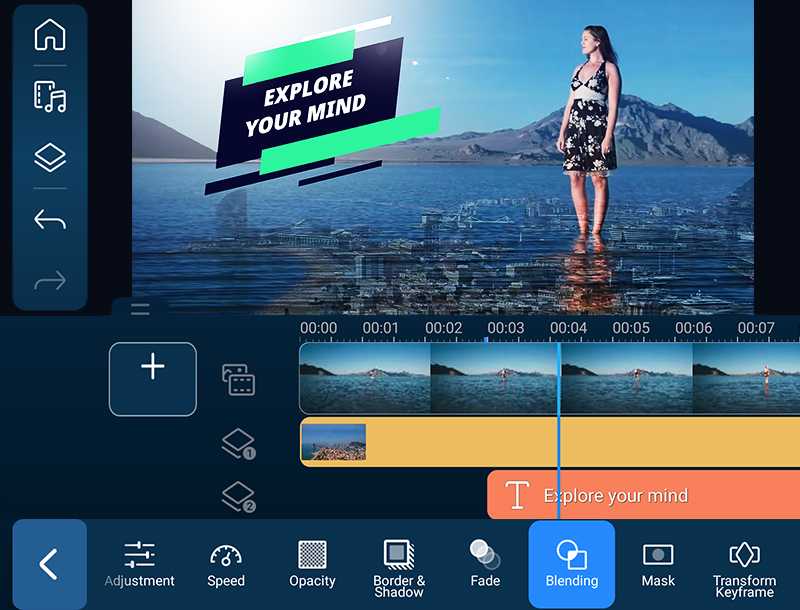
KineMaster garners praise for its professional-grade features on Android devices. It offers multi-layer editing, meaning you can work with several video and audio tracks simultaneously, which is rare in mobile apps. The app supports chroma key, allowing users to create green screen effects easily. Its interface is straightforward, making complex edits accessible even for beginners. KineMaster’s export options include 4K quality, which is ideal for those looking to produce high-resolution videos. The app also provides a vast library of effects, music, and transitions.Advantages of KineMaster
- Professional-level editing tools
- Multiple layers and effects
- Support for 4K export
- Chroma key functionality
Limitations
- Watermark on exported videos unless subscribed
- Some features require a premium plan
InShot: Perfect for Social Media Content
InShot shines when creating content for platforms like Instagram, TikTok, or YouTube. Its interface simplifies editing tasks with large buttons and easy navigation. The app offers basic trimming, merging clips, adding text, emojis, and filters. Music addition is straightforward, with access to free and paid tracks. InShot’s aspect ratios cater specifically to social media square, vertical, and widescreen videos, making it convenient for quick posting.Strengths of InShot
- User-friendly design
- Ideal for quick edits and social media
- Many built-in filters and effects
- Affordable premium options
Possible Downsides
- Limited advanced editing tools
- Watermarks on free version
PowerDirector: For Creative and Professional Projects
PowerDirector offers advanced features that rival desktop software, making it suitable for serious editing on Android. Its 4K support and keyframe controls enable detailed adjustments and animations. The app includes a range of video effects, transitions, and slow-motion options. Users can also apply color correction for cinematic results. Its interface is designed to accommodate detailed editing workflows, making it a powerful choice for creative projects.Highlights of PowerDirector
- 4K video support
- Multiple effects and transitions
- Speed controls including slow-motion and time-lapse
- Chroma key for green screen editing
Limitations
- Some features require a subscription
- Learning curve for beginners
VN Video Editor: For Artistic Editing
VN Video Editor is gaining popularity for its simple yet powerful toolset. It supports multi-track editing, giving room for layered effects and complex projects. The app offers keyframe animation, blending modes, and a variety of filters to enhance creativity. Its timeline allows precise control over video segments and effects. Available for free, VN provides a seamless editing experience without watermarks, making it an attractive choice for hobbyists.Best Features of VN Video Editor
- Multi-track timeline
- Keyframe animation for effects
- Support for 4K videos
- Wide selection of filters and effects
Making the Choice: Features to Consider
When selecting the best app, consider several factors:- User Skill Level: Beginners may prefer simpler apps like InShot, while experienced editors might lean towards KineMaster or PowerDirector.
- Features Needed: Think about whether you require multi-track editing, chroma key, or special effects.
- Output Quality: Look for apps that support high resolutions such as 4K.
- Price and Subscription: Decide if a free app suffices or if premium features are worth the investment.
- Platform Compatibility: Ensure the app works well on your device with adequate hardware support.
Additional Tips for Better Video Editing on Android
– Keep your device updated for optimal performance. – Use footage with good lighting for clearer results. – Explore tutorials for specific apps to maximize their features. – Save backups of your projects regularly. – Experiment with different tools to learn what suits your style best.Related Topics
For those interested in enhancing their video projects further, consider exploring:- Best apps for adding subtitles and captions
- Guide to shooting high-quality videos on Android
- How to incorporate music legally into videos
- Cloud storage options for large video files
3 Best Video Editing Apps For Android in 2025
Frequently Asked Questions
Which Android app offers the most user-friendly interface for video editing?
Adobe Premiere Rush provides an intuitive and straightforward interface that allows users to easily create and edit videos. Its drag-and-drop features and simple design make it suitable for beginners and experienced editors alike, enabling quick edits without a steep learning curve.
What features should I look for in an Android video editing app?
Look for apps that include multiple editing tools such as cutting, trimming, adding transitions, overlaying text, and applying filters. Additionally, features like multi-track editing, support for high-resolution videos, and options for exporting in various formats can significantly enhance your editing experience.
Are there any free Android apps that provide professional-level video editing capabilities?
Yes, apps like KineMaster and InShot offer powerful editing features at no cost. While they provide free versions with essential tools, they also offer premium options for advanced features. These free apps give users the ability to produce polished videos without needing additional software.
Which app is best suited for editing videos on the go with quick results?
PowerDirector is highly efficient for quick edits on mobile devices. Its streamlined workflow, combined with features like instant trimming, effects, and easy exporting, makes it ideal for users who want to produce quality videos rapidly while on the move.
Can I edit 4K videos on Android with the top editing apps?
Yes, many leading Android editing apps such as KineMaster and PowerDirector support 4K video editing. They ensure smooth performance and high-quality output, allowing you to work with high-resolution footage without compromising speed or quality.
Final Thoughts
The best android app for video editing combines user-friendly features with powerful editing tools. Apps like KineMaster and PowerDirector stand out for their versatility and ease of use. They offer a wide range of effects, transitions, and editing options suitable for both beginners and pros. Choosing the right app depends on your editing needs and experience level. For most users, these apps provide everything needed to create professional-quality videos on Android devices. In conclusion, the best android app for video editing is the one that fits your specific requirements and skill level, making the editing process smooth and enjoyable.
Similar Posts































