How Long Do I Have To Upgrade To Windows 11 For Free

How long do I have to upgrade to Windows 11 for free?
Understanding the Free Upgrade Offer
Microsoft announced that eligible Windows 10 devices could upgrade to Windows 11 at no cost. This offer began shortly after Windows 11’s official release in October 2021. The free upgrade is aimed at encouraging users to switch to the latest operating system without extra charges. The free upgrade was initially available for a limited period but has since become somewhat flexible. Microsoft has designed this offer to run for several years, giving users ample time to upgrade without feeling rushed. This approach ensures that most PC users can plan their upgrade comfortably. It’s important to check the specific time window for your device, as Microsoft sometimes adjusts the available upgrade period based on the deployment phase. The key is to stay informed about official Microsoft updates and notices, which often detail the current deadlines for free upgrades.Official Deadlines for Free Upgrade to Windows 11
Microsoft initially set a deadline for most users to upgrade to Windows 11 by October 2022. After this date, the free upgrade for eligible Windows 10 devices was scheduled to end. However, Microsoft has extended support and upgrade windows for certain devices and scenarios. Currently, the general policy is that the free upgrade remains available until October 14, 2025. This date marks the end of the support window, meaning users still have a few years left to upgrade freely if their devices qualify. It’s crucial to confirm your device’s eligibility because not all Windows 10 systems are eligible for the free upgrade. The specific deadline applies to compatible devices that meet the minimum hardware requirements set by Microsoft.How to Check If Your PC Is Eligible for the Free Upgrade
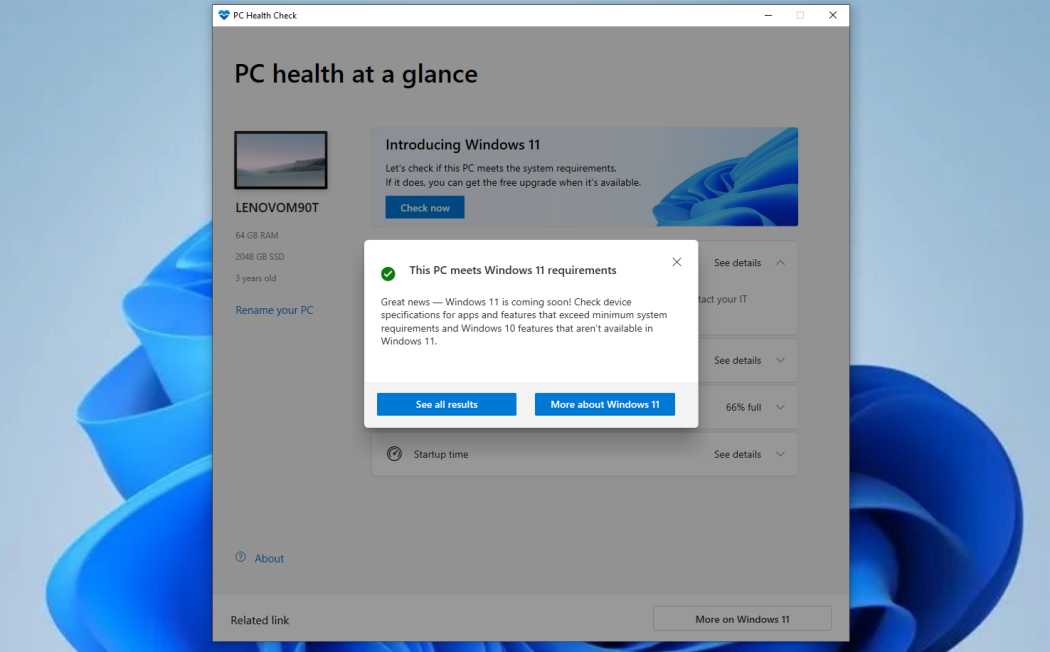
Before planning to upgrade, verify whether your computer qualifies. Microsoft provides a PC Health Check tool that helps determine if your device meets the Windows 11 hardware specifications. To use this tool, download it from the official Microsoft website and run the scan. The tool evaluates processor compatibility, RAM, storage, TPM, and Secure Boot features. If your device passes, you can upgrade for free before the deadline. Additionally, if your PC does not meet the requirements now, you might consider hardware upgrades. For example, enabling TPM in BIOS settings or adding RAM can help your device qualify for the upgrade.What Happens After the Deadline?
Once the free upgrade window closes, users will need to purchase a Windows 11 license if they wish to upgrade later. This means that the upgrade fee will apply, and users won’t be able to get Windows 11 at no cost. If you miss the upgrade deadline, you can still continue using Windows 10 legally and receive security updates until October 14, 2025. However, upgrading to Windows 11 after that date will require purchasing a license or installing a paid version. Microsoft encourages users to upgrade before the deadline to enjoy the latest features, updates, and security improvements. Waiting too long could lead to missing out on new functionalities that are only available on Windows 11.Factors That Might Delay Your Upgrade
Some users may face delays in upgrading, even within the free window. Common reasons include hardware incompatibility, lack of necessary system features, or limited access to upgrade prompts. Certain older devices may never qualify due to hardware limitations. In such cases, users might need to consider purchasing a new PC compatible with Windows 11. Other factors include waiting for the official upgrade notification from Windows Update. Sometimes, the rollout is phased, and your device might not receive the upgrade prompt immediately. Patience is key if your device is eligible.How to Upgrade to Windows 11 Before the Deadline
To ensure you upgrade in time, regularly check your Windows Update settings. If your device is eligible, an upgrade prompt will appear in Windows Update. Alternatively, you can manually download the Windows 11 Installation Assistant from Microsoft’s website. This tool allows you to upgrade immediately, bypassing the waiting period. Backing up your data before upgrading is also important. This step prevents data loss in case of unexpected issues during the installation process.Comparing Free and Paid Upgrade Options
The free upgrade is available only for eligible devices running Windows 10. If your device does not qualify or the upgrade window has closed, you’ll need to purchase a Windows 11 license. Paid options include buying a new device with Windows 11 pre-installed or upgrading an existing device with a retail copy of Windows 11. The cost varies depending on the edition and vendor. Users with unsupported hardware can still install Windows 11 manually, but Microsoft does not provide official support or updates for these installations. This is a risk to consider before proceeding with a manual upgrade.What to Do If Your Device Is Not Eligible
If your PC isn’t eligible for the free upgrade, explore hardware upgrades or consider purchasing a new compatible device. Sometimes, enabling BIOS features like TPM or Secure Boot can make your existing hardware eligible. Alternatively, stick with Windows 10 until the end of support in 2025. This ensures ongoing security updates without extra costs. Keep an eye on new hardware releases and upgrade options from manufacturers. In some cases, you may choose to buy a Windows 11 license and perform a clean installation. Doing so might improve performance or security, especially on older machines.Summary of Key Dates and Recommendations
| Important Date | Description |
|---|---|
| October 14, 2021 | Windows 11 officially launched |
| October 2022 | Initial deadline for free upgrade for most users |
| October 14, 2025 | End of free upgrade support window |
Related Topics to Consider
- Hardware upgrades for Windows 11 compatibility
- Best practices for performing a clean install
- Understanding Windows 11 system requirements
- How to secure your Windows 11 device after upgrade
- Cost comparison: upgrading vs. buying a new PC
How to Upgrade to Windows 11 for FREE
Frequently Asked Questions
Is the free upgrade to Windows 11 available indefinitely?
No, the free upgrade to Windows 11 is available for a limited period. Microsoft initially offered the upgrade to eligible devices following the Windows 11 launch and may set deadlines or phased rollouts. Users should check their eligibility and upgrade options sooner rather than later to avoid missing this opportunity.
Will I still be able to upgrade to Windows 11 after the deadline expires?
If the deadline passes, you’ll need to purchase a new Windows 11 license or upgrade through other paid methods. Microsoft may continue to support existing installations, but free upgrade offers are typically subject to time restrictions, so it’s best to upgrade before the window closes.
How can I confirm my eligibility for the free Windows 11 upgrade?
Check your device compatibility using Microsoft’s PC Health Check tool or similar utilities. Your device must meet specific hardware requirements, and if it qualifies, you can proceed with the free upgrade within the available timeframe. Staying updated on official announcements ensures you don’t miss the upgrade offer.
Final Thoughts
You have until October 2025 to upgrade to Windows 11 for free. Microsoft offers this deadline for users with eligible devices to switch at no cost. After this date, you may need to purchase Windows 11 or continue using your current version. Knowing this timeline helps you plan your upgrade efficiently. Ultimately, how long do I have to upgrade to Windows 11 for free? The window remains open until October 2025, so act before then to ensure a free upgrade.
Similar Posts