Best Android Battery App For Longer Battery Life

The Best Android Battery App to Keep Your Phone Running Longer
Keeping your Android device powered throughout the day can sometimes be challenging, especially when you forget to charge it or if your battery drains quickly. That’s where a good battery app can make a real difference. These apps help you monitor your battery’s health, identify power-hungry apps, and optimize your device to last longer on a single charge. In this section, we’ll explore what makes an Android battery app truly effective and how you can choose the right one for your needs.Why Use a Battery App on Android?
Most Android users want their devices to last as long as possible between charges. Regularly, your phone’s battery life can be affected by many factors, including apps running in the background, screen brightness levels, and network usage. A battery app provides real-time information about these factors, helping you make smarter decisions about your device usage. Some key benefits include:- Monitoring battery health: See how your battery performs over time and detect early signs of aging.
- Identifying power-draining apps: Find out which apps consume the most power and decide whether to close or uninstall them.
- Optimizing settings: Adjust settings such as brightness and background activity to extend battery life.
- Providing usage statistics: Understand your daily usage patterns to make better choices about device management.
What to Look for in a Good Android Battery App
When choosing a battery app, it’s important to focus on features that really make a difference. Here are some qualities to look for:Accurate Battery Monitoring
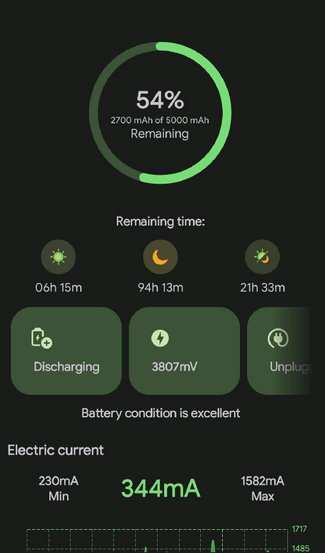
Look for apps that provide precise details about your battery’s current charge, temperature, voltage, and estimated remaining time. Accurate data helps you make informed decisions on how to manage your device.Power Consumption Analysis
A solid app should analyze your device’s activities and pinpoint which apps and processes are using the most power. This insight allows you to close or limit background activity in problematic apps.Ease of Use and Clean Interface
Choose apps that have straightforward designs and easy-to-understand information. Avoid cluttered interfaces or apps with too many unnecessary features that can confuse users.Battery Saving Features
Effective battery apps often include one-touch optimization tools or custom modes that disable unnecessary services, adjust screen brightness, and restrict background apps to save power.Additional Features to Consider
Beyond basic monitoring, some apps offer extra tools such as:- Charging alerts: Notify you when the battery reaches full charge or drops below a certain threshold.
- Historical data: View past usage trends to identify patterns.
- Battery health checks: Detect whether your battery’s capacity is declining significantly.
- Widget support: Provide quick access to battery info from your home screen.
Top Android Battery Apps in the Market
There are many battery apps available in the Google Play Store. Below, we’ll look at some of the top choices based on popularity, features, and user reviews.AccuBattery
AccuBattery is highly regarded for its precise battery health monitoring. It tracks how much energy your apps consume during usage and charging, giving you accurate estimates of remaining battery life. Its main features include:- Battery health analysis
- Charging speed indicator
- Estimates of battery lifespan
- Background activity monitoring
GSam Battery Monitor
GSam Battery Monitor is a robust app that offers detailed insights into your phone’s battery usage. It features:- Detailed app usage statistics
- Historical history of power consumption
- Display of device sensors’ power draw
- Notifications for high power drain
Battery Doctor
Battery Doctor is popular for its user-friendly interface and quick optimization options. Key features include:- One-tap boost to improve battery life
- Customized power-saving modes
- Smart charging reminders
- App management and device cooling tools
Greenify
Although Greenify is primarily an app hibernator, it plays a vital role in conserving battery by putting misbehaving apps into hibernation. Its main features:- Intelligent app hibernation
- Background process management
- Automatic hibernation of unused apps
- Free and premium versions for enhanced features
How to Use a Battery App Effectively
Choosing a good battery app is just the first step. To get the most out of it, follow these practical tips:Regularly Check Battery Usage
Make it a habit to open your battery app daily and review which apps or services are draining the most power. This helps you to take quick action and prevent unnecessary battery consumption.Adjust Settings According to Recommendations
Many apps will suggest ways to save power, such as lowering screen brightness or turning off Wi-Fi when not needed. Follow these tips to maximize your battery’s lifespan.Close Background Apps
When your battery monitoring app shows that certain apps run persistently in the background, consider closing or restricting them to conserve energy.Use Power Saving Modes
Most Android devices offer built-in battery saver modes. Use the settings or your battery app to activate these modes during periods when you need extra battery life.Maintain Proper Charging Habits
Avoid overcharging or letting your battery drain completely. Apps like AccuBattery can inform you about optimal charging times to prolong battery health.Common Mistakes to Avoid with Android Battery Management
Even with a battery app, some habits can hurt your device’s battery life. Here’s what to watch out for:- Ignoring background activity: Many users leave apps running unnecessarily, which consumes power.
- Keeping brightness too high: Bright screens drain batteries quickly, so reduce the brightness or use adaptive brightness.
- Constantly charging to 100%: Frequent full charges can wear out your battery faster.
- Using non-optimized chargers: Always use chargers that meet your device’s specifications for safe charging.
Frequently Asked Questions
Which features should I look for in a reliable Android battery app?
A dependable Android battery app should offer real-time battery usage monitoring, detailed insights into which apps consume the most power, and options to optimize or restrict background activity. It should also provide easy-to-understand suggestions to extend battery life and have a user-friendly interface for quick access to essential information.
How do battery saver apps typically improve my device’s battery life?
Battery saver apps optimize your device by closing unnecessary background processes, reducing screen brightness, and disabling features like Bluetooth or Wi-Fi when not in use. They also identify power-hungry apps and suggest ways to limit their activity, helping you prolong your device’s usage throughout the day.
Are there any safety concerns with using third-party battery management apps?
Some third-party battery apps can pose security or privacy risks if they request excessive permissions or include intrusive advertisements. It is important to choose apps from reputable developers, review permissions carefully, and read user reviews to ensure the app maintains your device’s safety and privacy standards.
Can a battery app help fix issues related to rapid battery drain?
Yes, a well-designed battery app can identify apps or processes that cause abnormal battery consumption. By providing insights and recommendations, it enables you to take targeted actions such as closing problematic applications or adjusting settings, which can significantly reduce rapid battery drain.
Is it necessary to use a battery app if my Android device has built-in power management features?
While most Android devices come with built-in power management tools, third-party battery apps can offer more detailed analysis and customized options. Using an additional app can help you better understand your device’s power usage and fine-tune settings for longer battery life, especially if you want more control over battery optimization.
Final Thoughts
Choosing the best android battery app depends on your specific needs. Some apps focus on real-time monitoring, while others optimize battery usage efficiently. By selecting an app with easy-to-understand features, you ensure longer device life and better performance. The best android battery app offers simple controls and clear insights, making it accessible for all users. In conclusion, the best android battery app provides essential tools to manage your device’s power. It helps you extend battery life and keeps your phone running smoothly without hassle.
Similar Posts































