Best Android Battery Charging App For Longer Battery Life

Understanding the Role of an Android Battery Charging App
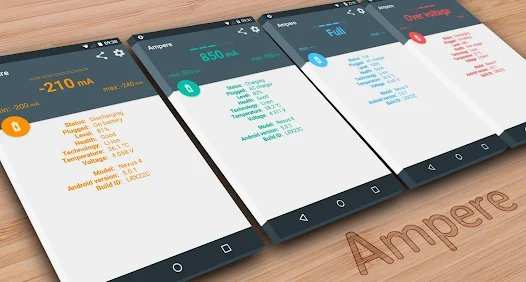
When it comes to keeping your Android device powered up, many users turn to battery charging apps to help manage and improve their phone’s battery life. These apps are designed to optimize charging processes, monitor battery health, and sometimes even extend the overall lifespan of your device’s battery. In this section, we explore what an Android battery charging app does and why it has become a popular tool among smartphone users.What is an Android Battery Charging App?
An Android battery charging app is a software application created specifically to assist users in managing their device’s charging habits. These apps often include features like:- Monitoring the charging status in real-time
- Providing notifications when the battery hits a certain percentage
- Offering tips to improve charging efficiency
- Automatically stopping charging at a set point to prevent overcharging
- Cleaning background processes to conserve battery during charging
Why Do People Use Battery Charging Apps?
Many users look for ways to extend their battery life because they depend on their devices for work, entertainment, and staying connected. Here are some main reasons why battery charging apps have gained popularity:- Prevent overcharging that can shorten battery life
- Maintain battery health over long-term use
- Get notified about optimal charging times
- Reduce unnecessary power drain by managing background apps
- Track battery performance over days and weeks
How Do Android Battery Charging Apps Work?
Understanding how these apps operate will help you choose the right one. Typically, they work through a combination of monitoring, notifications, and automation features. Here’s how they function:Monitoring Battery Levels and Charging Speed
Most apps keep a close eye on your battery percentage and charging speed. They use your device’s sensors and system data to provide real-time updates. This information allows the app to alert you when your battery reaches a specific level, such as 80%, to prevent overcharging.Setting Charging Limits and Alerts
An essential feature for many users involves setting maximum charging thresholds, often around 80 or 90 percent. When you reach that limit, the app can send you a notification or even stop charging automatically if your device supports this function.Optimizing Background Processes
Some apps can close unnecessary background apps and services during charging. This reduces power consumption and helps your device charge faster and more efficiently.Providing Charging Tips and Recommendations
Many apps offer helpful tips, like avoiding charging in extreme temperatures or unplugging once fully charged. These suggestions help users adopt better habits to enhance battery longevity.Popular Features to Look for in a Battery Charging App
Not all apps provide the same tools, so knowing what features are helpful can guide your choice. Here are some common and useful features:- Charge Percentage Notifications: Alerts when your device reaches a certain charge level.
- Automatic Stop Charging: Halts charging once a set percentage is reached, preventing overcharge damage.
- Battery Health Monitoring: Keeps tabs on battery capacity and overall health over time.
- Background App Management: Closes or restricts apps that drain battery during charging periods.
- Charging Schedule Setup: Allows you to program charging times around your daily routine.
- Device Temperature Alerts: Notifies when your device gets too hot during charging, protecting battery health.
Benefits of Using an Android Battery Charging App
Using a dedicated battery charging app offers many advantages. Let’s look at some of the key benefits:Extended Battery Lifespan
By adopting optimal charging habits—such as avoiding overcharging and maintaining proper temperature—the battery stays healthier for longer, delaying the need for battery replacement.Improved Device Performance
A well-maintained battery ensures your device runs smoothly and efficiently. Proper charging prevents sudden shutdowns and performance drops caused by degraded batteries.Greater Control and Convenience
Apps that provide notifications and automation features put you in charge of your device’s charging process. You no longer need to worry about unplugging at the right moment; your app takes care of it.Saving Time and Effort
With features like scheduled charging and background management, these apps streamline the process, making it easier to keep your device charged and ready to go.Potential Drawbacks and Precautions
While many battery charging apps offer useful features, there are some things to keep in mind:- Not all apps are reliable; some may contain ads or unnecessary permissions
- Overreliance on third-party apps might interfere with your device’s native battery management
- Choosing poorly-rated or untrusted apps could pose security risks
- Some features, like automatic stopping, depend on your device’s hardware capabilities
Tips for Maximizing Your Battery Charging Experience
To get the best results from your Android battery charging app, consider combining app features with good charging practices:- Avoid charging your device in very hot or cold environments
- Unplug once the battery reaches around 80% if you’re not using a charging automation feature
- Use original charging cables and chargers to prevent damage
- Keep your device’s software updated for optimal performance
- Regularly check your battery health and replace it if capacity drops significantly
Frequently Asked Questions
How can I optimize my Android phone’s battery life effectively?
To optimize your Android device’s battery life, reduce screen brightness, limit background activity for apps, disable unnecessary features like Bluetooth and Wi-Fi when not in use, and turn off location services for apps that don’t need it. Additionally, keep your apps updated and avoid using heavy apps when your battery is low. Using a battery management app can also help monitor and control power consumption efficiently.
What features should I look for in a good Android charging app?
A reliable Android charging app should include features such as battery health monitoring, charging speed optimization, background app management, and notification control. It should also provide insightful data on battery usage, offer quick access to disable unnecessary services, and include safety features like overcharge protection to extend your battery’s lifespan.
Are there any risks associated with using third-party battery apps on Android?
Yes, some third-party battery apps may pose risks like intrusive ads, unnecessary permissions, or even malware. It’s essential to choose apps from reputable developers and check user reviews before installation. Avoid apps that request excessive permissions or promise unrealistic improvements. Always download updates and scan the app with security software to protect your device.
Can these apps help in speeding up the charging process?
While most apps cannot physically alter the charging speed of your device, some can help reduce power consumption during charging by disabling Wi-Fi, Bluetooth, and background apps. This minimizes the load on the battery, allowing it to reach full charge faster. However, for faster charging, using compatible fast chargers and proper cables remains most effective.
Do battery management apps provide accurate information about battery health?
Many battery management apps offer detailed insights into your battery’s condition, including capacity, temperature, and overall health. However, the accuracy of this information depends on the app’s quality and compatibility with your device. For critical diagnostics, it’s best to use manufacturer-provided tools or consult a professional if you notice significant battery issues.
Final Thoughts
An android battery charging app can significantly improve your device’s performance by managing charging habits effectively. It helps extend battery lifespan and reduces unnecessary power consumption. Users benefit from optimized charging routines that keep their phones running smoothly. In conclusion, choosing the right android battery charging app ensures better battery health and prolonged device usage.
Similar Posts































