Understanding Android Battery Charge Cycles For Better
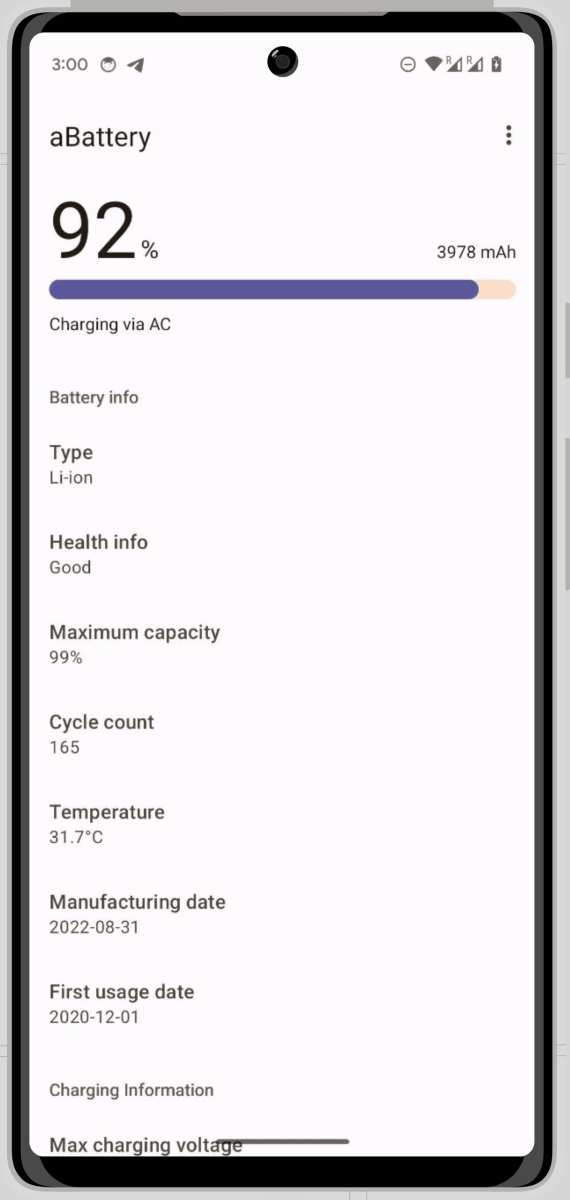
Battery charge cycles on Android devices directly impact battery lifespan. **Limiting these cycles through smart charging habits can significantly extend your battery’s health.** When you charge your device carefully, avoiding over-charging or deep discharges, you reduce the stress on your battery. Understanding android battery charge cycles helps you manage your device better, ensuring it stays reliable longer. Implementing simple strategies keeps your device performing well and prevents unnecessary replacements.

Understanding Android Battery Charge Cycles
Managing your Android phone’s battery life involves more than just charging it regularly. One key factor is understanding what a “battery charge cycle” really means and how it impacts your device over time. This section explores the concept of charge cycles, their significance, and how they relate to your Android battery’s health.
What Is a Battery Charge Cycle?
A battery charge cycle describes the process where your device’s battery goes from a full charge to completely empty and then back to full again. However, it doesn’t necessarily mean doing this in one go. Instead, it considers the sum of multiple partial charges that add up to a full cycle.
For example:
- If you use 50% of your battery in one day and then recharge it back to 100%, that is half a charge cycle.
- If you repeat this process twice, it equals one full charge cycle.
This means that your battery doesn’t have to be drained completely every time before recharging. Using multiple partial charges adds up over time to the same number of charge cycles as full discharges.
Why Are Charge Cycles Important?
Charge cycles affect the overall lifespan of your Android device’s battery. Each cycle gradually reduces the battery’s capacity to hold a full charge, leading to shorter usage times between charges. Understanding this helps you:
- Estimate how much longer your battery will remain healthy.
- Adopt better charging habits to extend the battery’s lifespan.
- Recognize when it might be time to replace or service your battery.
Typically, smartphone batteries are rated for a fixed number of charge cycles—usually between 300 and 500 cycles—before they start losing noticeable capacity.
How Do Charge Cycles Accumulate?
Charge cycles accumulate gradually as you use and recharge your device. The process depends on your usage habits:
- Frequent partial charges, such as topping up the battery during the day, add up over time.
- Allowing the battery to drain completely before recharging may speed up capacity loss, but it’s not necessary.
- Avoiding deep discharges and keeping the battery between 20% and 80% can help maximize the number of cycles your battery endures.
Understanding that partial charges are part of the total cycle count encourages better management of your phone’s power.
Battery Health and Charge Cycles
Over multiple charge cycles, the battery’s ability to hold a full charge diminishes. This is because:
- Electrochemical processes inside the battery change over time.
- Capacity loss is natural and unavoidable to some extent.
- Manufacturers specify a cycle count after which the battery’s capacity will decline significantly, often to 80% of its original capacity.
This capacity reduction leads to:
- Shorter periods between charges.
- More frequent battery replacements or servicing.
By monitoring your charge cycles, you can better anticipate when your device needs attention.
Tracking Charge Cycles on Android Devices
Most Android phones don’t display charge cycle data natively. However, you can monitor your battery health and usage patterns using various tools:
- Built-in Settings: Some phones have battery information within device settings, showing estimated usage and health.
- Third-party Apps: Applications like AccuBattery or BatteryView provide detailed insights, including the number of charge cycles performed.
- Manufacturer Tools: Certain manufacturers include dedicated apps or diagnostics for battery health.
Regularly checking this data helps you understand your charging habits and their impact on battery longevity.
Best Practices to Minimize Battery Wear
Applying smart charging habits can significantly extend your battery’s lifespan:
- Avoid Deep Discharges: Recharging before the battery drops below 20% helps prevent stress on the battery.
- Don’t Always Charge to 100%: Keeping the charge level around 80-90% reduces strain on the battery chemistry.
- Keep Your Phone Cool: Excessive heat during charging accelerates capacity loss. Avoid charging in hot environments.
- Use Quality Chargers: Use certified chargers to prevent voltage fluctuations that could harm the battery.
- Limit Fast Charging: Whenever possible, avoid frequent fast charging, as it generates more heat and stress.
These habits help distribute the stress across multiple cycles, prolonging your battery’s effective life.
Impact of Modern Charging Technologies
Many Android devices now include advanced charging features designed to extend battery life:
- Adaptive Charging: Some phones learn your daily charging routine and slow down charging near full capacity to minimize battery stress.
- Battery Management Software: Tools that prevent overcharging or overheating during the charging process.
- Battery Health Maintenance Modes: Some devices offer modes that limit charging to 80-90% to preserve long-term health.
These technologies aim to reduce the number of full charge cycles needed for daily use, which helps preserve battery capacity over time.
Understanding your Android device’s battery charge cycles is key to maintaining its health. Each charge cycle contributes to capacity loss, but the way you charge your phone influences how quickly this occurs. By adopting good charging habits—like avoiding deep discharges, not always charging to 100%, and keeping your device cool—you can extend the battery’s lifespan. Utilizing available tools and features to monitor and optimize your charging routines also plays a vital role. Ultimately, managing charge cycles effectively leads to better performance and longer-lasting battery life, saving you money and hassle over time.
Frequently Asked Questions
How can I extend the lifespan of my Android device’s battery through charging habits?
To prolong your Android battery’s lifespan, avoid letting it drain completely before recharging. Instead, keep the charge level between 20% and 80% whenever possible. Use original chargers and cables, and avoid exposing your device to extreme temperatures during charging. Regularly updating your software can also optimize battery performance and health over time.
What impact do fast charging methods have on my Android battery cycles?
Fast charging can be convenient, but frequently using it may accelerate battery degradation by generating more heat and stressing the battery cells. To minimize this effect, reserve fast charging for emergencies and use standard charging speeds when possible. Monitoring your device’s temperature during charging also helps maintain the battery’s integrity over multiple cycles.
How do battery cycles affect the overall performance of my Android device?
Each time you charge and discharge your battery, a cycle occurs. Over many cycles, the battery’s capacity diminishes, resulting in shorter usage times. Managing charging habits, such as avoiding full discharges and not overcharging, helps reduce the number of cycles your battery undergoes, thus maintaining better performance over its lifespan.
Are there signs that indicate my Android battery is approaching the end of its cycle life?
Yes, signs include noticeable reductions in battery life, frequent unexpected shutdowns, or sluggish charging times. If your device consistently needs to be recharged before completing a day or shows rapid capacity loss after minimal use, it may indicate the battery has undergone many charge cycles and might need replacement to restore optimal performance.
Final Thoughts
Maintaining your Android device’s battery health depends on understanding battery charge cycles. Proper care can extend your battery’s lifespan, reducing the need for frequent replacements.
Limiting full charges and avoid overcharging helps preserve battery capacity over time.
Tracking your charge cycles allows you to plan for optimal device performance.
In conclusion, being mindful of your Android battery charge cycles ensures better longevity and efficiency for your device.

Similar Posts